Hello,
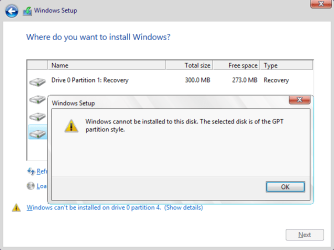
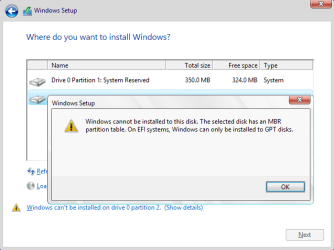
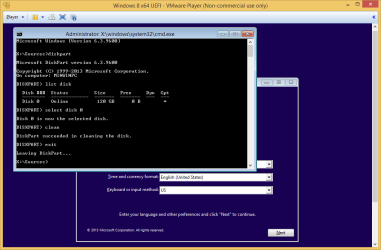
I have a Dell Latitude E6410 that has Windows 7 with a SSD hard drive. I am trying to format the hard drive and reinstall windows 7 home prem. I went into the bios changed boot list option to legacy. The only options I get are Legacy and UEFI. My hard drive is recognized in the bios. I then put my Windows 7 installation disk in and boot to it. When I get to the screen that shows my partitions I select the partition that I want to format and it says
"Windows cannot be installed to this disk.The selected disk has an mbr partition table. On EFI systems, Windows can only be installed to GPT disks.
Windows cannot be installed to this disk. This computer's hardware may not support booting to this disk. Ensure that the disk's controller is enabled in the computer's BIOS menu."
I have a Dell Latitude E6410 that has Windows 7 with a SSD hard drive. I am trying to format the hard drive and reinstall windows 7 home prem. I went into the bios changed boot list option to legacy. The only options I get are Legacy and UEFI. My hard drive is recognized in the bios. I then put my Windows 7 installation disk in and boot to it. When I get to the screen that shows my partitions I select the partition that I want to format and it says
"Windows cannot be installed to this disk.The selected disk has an mbr partition table. On EFI systems, Windows can only be installed to GPT disks.
Windows cannot be installed to this disk. This computer's hardware may not support booting to this disk. Ensure that the disk's controller is enabled in the computer's BIOS menu."
My Computer
At a glance
Windows 7 Home Prem 64 bitIntel i5
- Computer type
- Laptop
- Computer Manufacturer/Model Number
- Dell Latitude E6410
- OS
- Windows 7 Home Prem 64 bit
- CPU
- Intel i5
- Hard Drives
- 128GB SSD