
PC running kinda slow

dndwanted

New member
Local time
1:48 PM
Messages
12
So I have a PC, with Windows 7 Ultimate x64 installed just yesterday. It is running sluggerish if I can say so.
I will try to explain now. When I'm on YouTube, it sometimes freezes to the point that I can see the mouse pointer moving, but I can't click on anything for about 5 seconds. This occurs after I enter and exit fullscreen mode as well. Next thing is that Twitch videos lag. I know for sure that it is not a problem with my ISP.
Sometimes, even when I'm not in browser, it lags. I don't know how to explain, it just feels like it's not fluid. It's like I'm using a pc from 2005.
An Intel i5 4460 with 8GB RAM and R9 280x video card shouldn't have any problem doing this basic things. What I'm trying to ask here is how to fix all those problems and optimize my PC to run at it's potential. I need full details on why it does the things it does and how to fix them, to fully optimize my PC. If you guys need more info, please ask.

Thank you! :)
 

My Computer

Computer type
PC/Desktop
OS
Windows 7 Ultimate x64
CPU
Intel i5 4460
Motherboard
ASROCK B85M-DGS
Memory
8GB
Graphics Card(s)
Radeon R9 280x
Hard Drives
1TB HDD
Antivirus
Avast + Malwarebytes
Browser
Firefox
my guess

As you said you only installed it yesterday, its more than likely that its downloading the 200+ updates, that uses a lot of bandwidth, give it a good day for those and check back in 3/4 if its still a problem.

Roy
 

My Computer

Computer type
PC/Desktop
Computer Manufacturer/Model Number
medionl/Aspire 6930G/acer x55a
OS
W7 home premium 32bit/W7HP 64bit/w10 tp insider ring
CPU
E5300 dual core
Motherboard
medion MS7366
Memory
3gb
Graphics Card(s)
Nvidia Geforce 7100 Nforce 630i
Monitor(s) Displays
avixc
Internet Speed
n (isp resticted to 72)
Antivirus
mse/pands
Browser
palemoon
Other Info
Belkin Fd7050 n USB using Railink RT2870 drivers, more upto date
As you said you only installed it yesterday, its more than likely that its downloading the 200+ updates, that uses a lot of bandwidth, give it a good day for those and check back in 3/4 if its still a problem.

Roy

Well the thing is, I reinstalled windows because I had the same problems before. It's not from the bandwidth.

And I was talking about the PC in general as well. It sometimes lag or not run fluidly even when I browse through folders.
 

My Computer

Computer type
PC/Desktop
OS
Windows 7 Ultimate x64
CPU
Intel i5 4460
Motherboard
ASROCK B85M-DGS
Memory
8GB
Graphics Card(s)
Radeon R9 280x
Hard Drives
1TB HDD
Antivirus
Avast + Malwarebytes
Browser
Firefox
I sure hope you don`t have windows update set to automatic :eek:

How do you know it`s not your service provider ?

Could you run a speedtest and post a snip of the results for us.

Speedtest.net by Ookla - The Global Broadband Speed Test

Where did you get this Ultimate install dvd from ? Is it retail, did you create it ?
 

My Computer

Computer type
PC/Desktop
Computer Manufacturer/Model Number
Skylake Special #666
OS
Windows 10 Pro x64
CPU
Intel Core i7 6700K
Motherboard
Asus Sabertooth Z170 Mark 1
Memory
GSkill TridentZ RGB 16GB 3600 16-16-16-36
Graphics Card(s)
EVGA GTX 980 Ti SC x2
Sound Card
Realtek High Definition
Monitor(s) Displays
AOC G2460PG
Screen Resolution
1920 x 1080 144Hz
Hard Drives
Samsung 860 Pro 256GB, Seagate Barracuda 4TB x2
PSU
EVGA 1000 P2, EVGA White Custom Braided Cables
Case
Corsair Vengeance C70 Gunmetal Black
Cooling
Corsair H100i v2, Corsair ML120 x2, Thermal Grizzly Kryonaut
Keyboard
Logitech G910 Orion Spectrum
Mouse
Logitech G700s
Internet Speed
Verizon Fios Quantum Gateway 75/75
Antivirus
Windows Defender, Malwarebytes Free 3.8.3
Browser
Chrome
Other Info
Corsair SP120 x4, LG Blu-ray Drive, Durabrand HT-395 100 Watt Dolby Digital Amp, Corsair H2100 Wireless 7.1 Headset
I sure hope you don`t have windows update set to automatic :eek:

How do you know it`s not your service provider ?

Could you run a speedtest and post a snip of the results for us.

Speedtest.net by Ookla - The Global Broadband Speed Test

Where did you get this Ultimate install dvd from ? Is it retail, did you create it ?

http://www.speedtest.net/result/4840234624.png

And this is a bad day. :P I have days when down speed is 90+ and up speed 60+

A friend gave me a USB with windows on it. I don't know if it is genuine or not. :/
 
Last edited:

My Computer

Computer type
PC/Desktop
OS
Windows 7 Ultimate x64
CPU
Intel i5 4460
Motherboard
ASROCK B85M-DGS
Memory
8GB
Graphics Card(s)
Radeon R9 280x
Hard Drives
1TB HDD
Antivirus
Avast + Malwarebytes
Browser
Firefox
I would download your own iso file and burn to dvd at no faster then x4 speed or reinstall the iso file on the usb stick again.

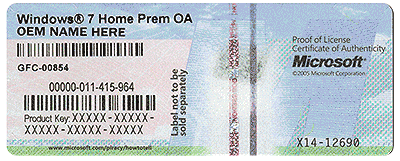
Do you have a genuine windows 7 Ultimate activation key ?

Did you build the PC ?

Or is it store bought, does it have a COA on it ?

The faster you answer the faster I can help you :)
 

Attachments

  • HardwareCOA.gif
    HardwareCOA.gif
    707.8 KB · Views: 13

My Computer

Computer type
PC/Desktop
Computer Manufacturer/Model Number
Skylake Special #666
OS
Windows 10 Pro x64
CPU
Intel Core i7 6700K
Motherboard
Asus Sabertooth Z170 Mark 1
Memory
GSkill TridentZ RGB 16GB 3600 16-16-16-36
Graphics Card(s)
EVGA GTX 980 Ti SC x2
Sound Card
Realtek High Definition
Monitor(s) Displays
AOC G2460PG
Screen Resolution
1920 x 1080 144Hz
Hard Drives
Samsung 860 Pro 256GB, Seagate Barracuda 4TB x2
PSU
EVGA 1000 P2, EVGA White Custom Braided Cables
Case
Corsair Vengeance C70 Gunmetal Black
Cooling
Corsair H100i v2, Corsair ML120 x2, Thermal Grizzly Kryonaut
Keyboard
Logitech G910 Orion Spectrum
Mouse
Logitech G700s
Internet Speed
Verizon Fios Quantum Gateway 75/75
Antivirus
Windows Defender, Malwarebytes Free 3.8.3
Browser
Chrome
Other Info
Corsair SP120 x4, LG Blu-ray Drive, Durabrand HT-395 100 Watt Dolby Digital Amp, Corsair H2100 Wireless 7.1 Headset
I would download your own iso file and burn to dvd at no faster then x4 speed or reinstall the iso file on the usb stick again.

Do you have a genuine windows 7 Ultimate activation key ?

Did you build the PC ?

Or is it store bought, does it have a COA on it ?

It came preactivated. I built my PC.
 

My Computer

Computer type
PC/Desktop
OS
Windows 7 Ultimate x64
CPU
Intel i5 4460
Motherboard
ASROCK B85M-DGS
Memory
8GB
Graphics Card(s)
Radeon R9 280x
Hard Drives
1TB HDD
Antivirus
Avast + Malwarebytes
Browser
Firefox

My Computer

Computer type
PC/Desktop
Computer Manufacturer/Model Number
Skylake Special #666
OS
Windows 10 Pro x64
CPU
Intel Core i7 6700K
Motherboard
Asus Sabertooth Z170 Mark 1
Memory
GSkill TridentZ RGB 16GB 3600 16-16-16-36
Graphics Card(s)
EVGA GTX 980 Ti SC x2
Sound Card
Realtek High Definition
Monitor(s) Displays
AOC G2460PG
Screen Resolution
1920 x 1080 144Hz
Hard Drives
Samsung 860 Pro 256GB, Seagate Barracuda 4TB x2
PSU
EVGA 1000 P2, EVGA White Custom Braided Cables
Case
Corsair Vengeance C70 Gunmetal Black
Cooling
Corsair H100i v2, Corsair ML120 x2, Thermal Grizzly Kryonaut
Keyboard
Logitech G910 Orion Spectrum
Mouse
Logitech G700s
Internet Speed
Verizon Fios Quantum Gateway 75/75
Antivirus
Windows Defender, Malwarebytes Free 3.8.3
Browser
Chrome
Other Info
Corsair SP120 x4, LG Blu-ray Drive, Durabrand HT-395 100 Watt Dolby Digital Amp, Corsair H2100 Wireless 7.1 Headset
There`s no such thing as pre activated, you will need a genuine key, in order for us to help you.

Well I need help to optimize my drivers I guess, and maybe clean my PC from unwanted files that may slow it down. How does having a key help you?
 

My Computer

Computer type
PC/Desktop
OS
Windows 7 Ultimate x64
CPU
Intel i5 4460
Motherboard
ASROCK B85M-DGS
Memory
8GB
Graphics Card(s)
Radeon R9 280x
Hard Drives
1TB HDD
Antivirus
Avast + Malwarebytes
Browser
Firefox
Well, you want to reinstall windows, correct ?

That will clean up your pc and make it lightning fast.

In order to activate that new install you need an activation key.

In order to get help from this forum your windows must be genuine.

We will be glad to help you after that :)

You do not optimize drivers, you just install the latest one.

And even that is not always the best idea, if you don`t have any issues with your hardware, it`s not always wise to upgrade a driver.

If you just installed windows yesterday and it`s slow then I would think your installer is shoddy.

Did you check windows update ?

It should be set to this setting.
 

Attachments

  • WUS.JPG
    WUS.JPG
    13.3 KB · Views: 11

My Computer

Computer type
PC/Desktop
Computer Manufacturer/Model Number
Skylake Special #666
OS
Windows 10 Pro x64
CPU
Intel Core i7 6700K
Motherboard
Asus Sabertooth Z170 Mark 1
Memory
GSkill TridentZ RGB 16GB 3600 16-16-16-36
Graphics Card(s)
EVGA GTX 980 Ti SC x2
Sound Card
Realtek High Definition
Monitor(s) Displays
AOC G2460PG
Screen Resolution
1920 x 1080 144Hz
Hard Drives
Samsung 860 Pro 256GB, Seagate Barracuda 4TB x2
PSU
EVGA 1000 P2, EVGA White Custom Braided Cables
Case
Corsair Vengeance C70 Gunmetal Black
Cooling
Corsair H100i v2, Corsair ML120 x2, Thermal Grizzly Kryonaut
Keyboard
Logitech G910 Orion Spectrum
Mouse
Logitech G700s
Internet Speed
Verizon Fios Quantum Gateway 75/75
Antivirus
Windows Defender, Malwarebytes Free 3.8.3
Browser
Chrome
Other Info
Corsair SP120 x4, LG Blu-ray Drive, Durabrand HT-395 100 Watt Dolby Digital Amp, Corsair H2100 Wireless 7.1 Headset
Well, you want to reinstall windows, correct ?

That will clean up your pc and make it lightning fast.

In order to activate that new install you need an activation key.

You do not optimize drivers, you just install the latest one.

And even that is not always the best idea, if you don`t have any issues with your hardware, it`s not always wise to upgrade a driver.

If you just installed windows yesterday and it`s slow then I would think your installer is shoddy.

Did you check windows update ?

It should be set to this setting.

Well I hope it's not a hardware problem. I think I have the latest driver installed for my GPU.
The thing is, I built my PC in January this year and using the same USB with the same Windows Installer, it worked well, I didn't have any problems with it. I don't really know what causes the slowing.
Why should I have the updates like that?
 

My Computer

Computer type
PC/Desktop
OS
Windows 7 Ultimate x64
CPU
Intel i5 4460
Motherboard
ASROCK B85M-DGS
Memory
8GB
Graphics Card(s)
Radeon R9 280x
Hard Drives
1TB HDD
Antivirus
Avast + Malwarebytes
Browser
Firefox
Because you want to know exactly what each update is for.

You could be installing updates you don`t need.

Microsoft is pushing out Windows 10 updates, and if you don`t want Windows 10 well....... need I say more.

If you just installed windows yesterday, it should not be slow.

Good Luck :)
 

My Computer

Computer type
PC/Desktop
Computer Manufacturer/Model Number
Skylake Special #666
OS
Windows 10 Pro x64
CPU
Intel Core i7 6700K
Motherboard
Asus Sabertooth Z170 Mark 1
Memory
GSkill TridentZ RGB 16GB 3600 16-16-16-36
Graphics Card(s)
EVGA GTX 980 Ti SC x2
Sound Card
Realtek High Definition
Monitor(s) Displays
AOC G2460PG
Screen Resolution
1920 x 1080 144Hz
Hard Drives
Samsung 860 Pro 256GB, Seagate Barracuda 4TB x2
PSU
EVGA 1000 P2, EVGA White Custom Braided Cables
Case
Corsair Vengeance C70 Gunmetal Black
Cooling
Corsair H100i v2, Corsair ML120 x2, Thermal Grizzly Kryonaut
Keyboard
Logitech G910 Orion Spectrum
Mouse
Logitech G700s
Internet Speed
Verizon Fios Quantum Gateway 75/75
Antivirus
Windows Defender, Malwarebytes Free 3.8.3
Browser
Chrome
Other Info
Corsair SP120 x4, LG Blu-ray Drive, Durabrand HT-395 100 Watt Dolby Digital Amp, Corsair H2100 Wireless 7.1 Headset
Because you want to know exactly what each update does.

Microsoft is pushing out Windows 10 updates, and if you don`t want Windows 10 well....... need I say more.

And what does that have to do with Windows 7 running slow?
 

My Computer

Computer type
PC/Desktop
OS
Windows 7 Ultimate x64
CPU
Intel i5 4460
Motherboard
ASROCK B85M-DGS
Memory
8GB
Graphics Card(s)
Radeon R9 280x
Hard Drives
1TB HDD
Antivirus
Avast + Malwarebytes
Browser
Firefox
If you are installing updates windows might run slow :)

I would just reinstall and don`t do any updating or install any drivers, see if it`s fast, then go from there.

Good Luck :)

Until you get genuine windows I can`t help you anymore ;)
 

My Computer

Computer type
PC/Desktop
Computer Manufacturer/Model Number
Skylake Special #666
OS
Windows 10 Pro x64
CPU
Intel Core i7 6700K
Motherboard
Asus Sabertooth Z170 Mark 1
Memory
GSkill TridentZ RGB 16GB 3600 16-16-16-36
Graphics Card(s)
EVGA GTX 980 Ti SC x2
Sound Card
Realtek High Definition
Monitor(s) Displays
AOC G2460PG
Screen Resolution
1920 x 1080 144Hz
Hard Drives
Samsung 860 Pro 256GB, Seagate Barracuda 4TB x2
PSU
EVGA 1000 P2, EVGA White Custom Braided Cables
Case
Corsair Vengeance C70 Gunmetal Black
Cooling
Corsair H100i v2, Corsair ML120 x2, Thermal Grizzly Kryonaut
Keyboard
Logitech G910 Orion Spectrum
Mouse
Logitech G700s
Internet Speed
Verizon Fios Quantum Gateway 75/75
Antivirus
Windows Defender, Malwarebytes Free 3.8.3
Browser
Chrome
Other Info
Corsair SP120 x4, LG Blu-ray Drive, Durabrand HT-395 100 Watt Dolby Digital Amp, Corsair H2100 Wireless 7.1 Headset
Thanks.. I guess.
 

My Computer

Computer type
PC/Desktop
OS
Windows 7 Ultimate x64
CPU
Intel i5 4460
Motherboard
ASROCK B85M-DGS
Memory
8GB
Graphics Card(s)
Radeon R9 280x
Hard Drives
1TB HDD
Antivirus
Avast + Malwarebytes
Browser
Firefox
When it's running slow and lagging ,go to Task manager to check what's using your CPU and memory.
Don't tell me it's svchost.exe.

And to fully optimize your PC you may want to :
Tweak BIOS
Overclock
Keep DPC latency low
Disable unnecessary services
Defrag once in a while
Disable unnecessary startup programs
Set it up the way you like it
 

My Computer

OS
Windows 7 x64 Pro
When it's running slow and lagging ,go to Task manager to check what's using your CPU and memory.
Don't tell me it's svchost.exe.

Mozilla Firefox
 

My Computer

Computer type
PC/Desktop
OS
Windows 7 Ultimate x64
CPU
Intel i5 4460
Motherboard
ASROCK B85M-DGS
Memory
8GB
Graphics Card(s)
Radeon R9 280x
Hard Drives
1TB HDD
Antivirus
Avast + Malwarebytes
Browser
Firefox

My Computer

Computer type
PC/Desktop
OS
Windows 7 Ultimate x64
CPU
Intel i5 4460
Motherboard
ASROCK B85M-DGS
Memory
8GB
Graphics Card(s)
Radeon R9 280x
Hard Drives
1TB HDD
Antivirus
Avast + Malwarebytes
Browser
Firefox

My Computer

OS
Windows 7 x64 Pro
Back
Top