
You are using an out of date browser. It may not display this or other websites correctly.
You should upgrade or use an alternative browser.
You should upgrade or use an alternative browser.
How to remove Windows 10 upgrade updates in Windows 7 and 8
- Thread starter Tookeri
- Start date
- Local time
- 7:18 AM
- Messages
- 8,138
It would recommend using GWX Control Panel. It removed about 3Gb of Windows 10
hidden program files from my PC.
The native Disk Cleanup tool will remove those same files and more. (Run the tool as admin.)

My Computer
At a glance
W7 Pro SP1 64biti78GBIntel HD Graphics
- Computer type
- Laptop
- Computer Manufacturer/Model Number
- Employer provided Dell Latitude
- OS
- W7 Pro SP1 64bit
- CPU
- i7
- Memory
- 8GB
- Graphics Card(s)
- Intel HD Graphics
- Hard Drives
- crappy SSD
- Antivirus
- Employer mandated Symantec Endpoint Protection
- Browser
- Pale Moon 64bit, IE11 64bit & Chrome 64bit
Thanks for that useful tip.
I think GWX Control Panel is good if you are not interested in Windows 10 updates or reserved it and decided not to upgrade and want to remove any hidden files.
I think GWX Control Panel is good if you are not interested in Windows 10 updates or reserved it and decided not to upgrade and want to remove any hidden files.
My Computer
At a glance
Microsoft Windows 7 Home Premium 64-bit
- OS
- Microsoft Windows 7 Home Premium 64-bit

Well, thanks for that info UI, I did that only last week so I won't bother. Anyway, at the moment I don't do anything on this PC without Anak's consent as he is helping me clean my PC. 
My Computer
At a glance
windows 7 professional 64 bitCPU Genuine Intel (R) CPU [email protected]RAM 3 GBToshiba MK2555 GSX ATA
- Computer type
- Laptop
- Computer Manufacturer/Model Number
- HP Presario CQ70
- OS
- windows 7 professional 64 bit
- CPU
- CPU Genuine Intel (R) CPU [email protected]
- Motherboard
- APCI x 64 - based PC
- Memory
- RAM 3 GB
- Graphics Card(s)
- Toshiba MK2555 GSX ATA
- Sound Card
- Conexant High Def Smart Audio 221,
- Monitor(s) Displays
- monitor Generic PnP.
- Screen Resolution
- ?
- Hard Drives
- HDAUDIO Soft Data Fax Modern with smart CP
- PSU
- ?
- Keyboard
- Standard PS/2 keyboard
- Mouse
- PS/2 Compatible mouse
- Antivirus
- Hyjackthis and Superanti spyware, Mamb Ccleaner
- Browser
- Google Chrome
thanks for this new  list Lee,
Will take notes.
Cheers
list Lee,Will take notes.
Cheers
My Computer
At a glance
windows 7 professional 64 bitCPU Genuine Intel (R) CPU [email protected]RAM 3 GBToshiba MK2555 GSX ATA
- Computer type
- Laptop
- Computer Manufacturer/Model Number
- HP Presario CQ70
- OS
- windows 7 professional 64 bit
- CPU
- CPU Genuine Intel (R) CPU [email protected]
- Motherboard
- APCI x 64 - based PC
- Memory
- RAM 3 GB
- Graphics Card(s)
- Toshiba MK2555 GSX ATA
- Sound Card
- Conexant High Def Smart Audio 221,
- Monitor(s) Displays
- monitor Generic PnP.
- Screen Resolution
- ?
- Hard Drives
- HDAUDIO Soft Data Fax Modern with smart CP
- PSU
- ?
- Keyboard
- Standard PS/2 keyboard
- Mouse
- PS/2 Compatible mouse
- Antivirus
- Hyjackthis and Superanti spyware, Mamb Ccleaner
- Browser
- Google Chrome

Thanks Lee, very useful in keeping 7 safe from contamination!
My Computer
At a glance
Windows 7/64 HPremium.AMD FX-6300.Corsair (2x4) GB DDR3 CMXGX3M2A1337CL9.NVidia/Gigabyte GT730 (2GB) GDDR5.
- Computer type
- PC/Desktop
- Computer Manufacturer/Model Number
- bertison
- OS
- Windows 7/64 HPremium.
- CPU
- AMD FX-6300.
- Motherboard
- Asus M5A78L-M LE/USB3.
- Memory
- Corsair (2x4) GB DDR3 CMXGX3M2A1337CL9.
- Graphics Card(s)
- NVidia/Gigabyte GT730 (2GB) GDDR5.
- Sound Card
- Onboard.
- Monitor(s) Displays
- Iiyama PLE2407HDS.
- Screen Resolution
- 1920 x 1280
- Hard Drives
- Desktop: 1TB. WD10EZEX-00BN5A0.
Zyxel nsa310 NAS: 2TB Seagate Barracuda 7200.14.
Cache Drive: Sandisk SDSSDRC032G.
Laptop Lenovo B50/80 128 GB SSD.
- PSU
- Corsair 750M.
- Case
- Coolermaster N300.
- Cooling
- FRONT: (2X) 140mm. TOP: (1x) 120mm. REAR: (1x) 120mm.
- Keyboard
- Logitech K290
- Mouse
- Trust Optical Wired
- Internet Speed
- 15 Mb Down, 0.55 Up.
- Antivirus
- Kaspersky Total Security 2017, Hitman Pro.
- Browser
- Firefox.
- Other Info
- NETWORK:
Sky "Q box" and router.
Desktop & NAS - 30 Metres Cat6 Ethernet wired, via TP-Link 4-port switch.
Lenovo B50/80 Laptop, 2x Wileyfox phones, Lenovo TAB3-8 tablet - all wireless.
Grandchildren, their parents and friends as bandwidth 'parasites' at various times!
- Local time
- 7:18 AM
- Messages
- 8,138
It looks like you suggesting that people should uninstall or avoid installing KB3050265. Do you have evidence that the GPO or registry change quoted above will work without KB3050265 (or newer WUC) installed?~~~
Computers that have this Group Policy object enabled will never detect, download, or install an upgrade to the latest version of Windows.
You can configure this Group Policy object by using Group Policy Editor (gpedit.msc). You can do this by going to Computer Configuration > Administrative Templates > Windows Components > Windows Update, double-clicking "Turn off the upgrade to the latest version of Windows through Windows Update", and then clicking Enabled.
Or to suppress this offer through the registry, set the following registry key:
HKEY_LOCAL_MACHINE\SOFTWARE\Policies\Microsoft\Windows\WindowsUpdate
DWORD: DisableOSUpgrade = 1
My Computer
At a glance
W7 Pro SP1 64biti78GBIntel HD Graphics
- Computer type
- Laptop
- Computer Manufacturer/Model Number
- Employer provided Dell Latitude
- OS
- W7 Pro SP1 64bit
- CPU
- i7
- Memory
- 8GB
- Graphics Card(s)
- Intel HD Graphics
- Hard Drives
- crappy SSD
- Antivirus
- Employer mandated Symantec Endpoint Protection
- Browser
- Pale Moon 64bit, IE11 64bit & Chrome 64bit

All I know is all the systems I have set the Group Policy on have never downloaded any Windows 10 files or offered the upgrade to 10 on any of my systems.
From what I've seen some people have said the registry change sometimes doesn't stick after a new upgrade client install. I have never encountered this with the GP set in place.
I have all the WU client updates installed though.
Not sure what evidence I can provide, I'm just going on my own usage and testing in various different VM's.
If none of those Windows Update Client updates are installed, then the GP object doesn't exist on the system anyway, as it was first introduced with KB3050265. So it can't be set without that update installed.
As for the Registry setting, I don't know as I've always preferred to use the GP workaround.
I just used the wording from the KB article on the MS site.
From what I've seen some people have said the registry change sometimes doesn't stick after a new upgrade client install. I have never encountered this with the GP set in place.
I have all the WU client updates installed though.
Not sure what evidence I can provide, I'm just going on my own usage and testing in various different VM's.
If none of those Windows Update Client updates are installed, then the GP object doesn't exist on the system anyway, as it was first introduced with KB3050265. So it can't be set without that update installed.
As for the Registry setting, I don't know as I've always preferred to use the GP workaround.
I just used the wording from the KB article on the MS site.
Last edited:
My Computer
At a glance
Win 7 Ultimate, Win 8.1 Pro, Linux Mint 19 Ci...Intel i5 4690KCorsair Vengeance LP 32GB DDR3MSI GTX 1060 GAMING X 6GB
- Computer type
- PC/Desktop
- Computer Manufacturer/Model Number
- Custom Build
- OS
- Win 7 Ultimate, Win 8.1 Pro, Linux Mint 19 Cinnamon (All 64-Bit)
- CPU
- Intel i5 4690K
- Motherboard
- Gigabyte Z97X-UD3H
- Memory
- Corsair Vengeance LP 32GB DDR3
- Graphics Card(s)
- MSI GTX 1060 GAMING X 6GB
- Sound Card
- Onboard
- Hard Drives
- Samsung 850 EVO 250GB SSD (x2)
Samsung 860 EVO 1TB SSD (x2)
Crucial MX300 525GB SSD
WD Blue 2TB 5400rpm Intellipark Disabled (x2)
- PSU
- Corsair HX750i
- Case
- Phanteks Enthoo Pro
- Cooling
- CM Hyper 212 EVO on CPU, Noctua Redux NF-P14S 1500rpm (x6)
- Keyboard
- Corsair K70 RGB LUX
- Mouse
- Corsair Sabre RGB
- Antivirus
- Avast Free, MalwareBytes, SAS & CryptoPrevent
- Browser
- Chrome
- Other Info
- StarTech PEXESAT322I 2 Port PCI-E SATA Card
ASUS PCE-AC56 Dual-band AC1300 Wireless Card
Akasa FC.Six Manual Fan Controller
And a Partridge in a Pear Tree!
- Local time
- 7:18 AM
- Messages
- 8,138
Brds7t7,
This thread seems to be for people wishing to avoid:
1) changing the OS to W10
2) telemetry
You provided a list of "Windows 10/telemetry related" updates (presumably for people to avoid or uninstall*). I was hoping that you had computers where you had set the GPO, removed the updates that you listed and had empirical evidence that "Computers that have this Group Policy object enabled will never detect, download, or install an upgrade to the latest version of Windows".
As I understand them, GPO settings are not magic. They require some app to read and obey them. As you noted, the GPO setting in question is not originally a part of Windows 7. It was added by KB3050265. The Windows Update client that came with KB3050265 will read that new GPO setting and act accordingly. However, if you uninstall every Windows Update Client until you are at the version prior to KB3050265, then what app is going to read and act on the GPO setting that you mentioned?
I vaguely recall testing in a VM that only had SP1 installed. I installed KB3050265, set that GPO and then uninstalled KB3050265. I think that the GPO setting remained; but I could not leave that VM in that state to test the statement: "Computers that have this Group Policy object enabled will never detect, download, or install an upgrade to the latest version of Windows".
Since you stated that you have been installing each new Windows Update Client, then you might not be able to test this for those in this thread.
*If your list of updates is for people to uninstall, then you might be doing them a disservice by telling them that "Computers that have this Group Policy object enabled will never detect, download, or install an upgrade to the latest version of Windows" after they uninstall all of the Windows Update Clients on your list.
This thread seems to be for people wishing to avoid:
1) changing the OS to W10
2) telemetry
You provided a list of "Windows 10/telemetry related" updates (presumably for people to avoid or uninstall*). I was hoping that you had computers where you had set the GPO, removed the updates that you listed and had empirical evidence that "Computers that have this Group Policy object enabled will never detect, download, or install an upgrade to the latest version of Windows".
As I understand them, GPO settings are not magic. They require some app to read and obey them. As you noted, the GPO setting in question is not originally a part of Windows 7. It was added by KB3050265. The Windows Update client that came with KB3050265 will read that new GPO setting and act accordingly. However, if you uninstall every Windows Update Client until you are at the version prior to KB3050265, then what app is going to read and act on the GPO setting that you mentioned?
I vaguely recall testing in a VM that only had SP1 installed. I installed KB3050265, set that GPO and then uninstalled KB3050265. I think that the GPO setting remained; but I could not leave that VM in that state to test the statement: "Computers that have this Group Policy object enabled will never detect, download, or install an upgrade to the latest version of Windows".
Since you stated that you have been installing each new Windows Update Client, then you might not be able to test this for those in this thread.
*If your list of updates is for people to uninstall, then you might be doing them a disservice by telling them that "Computers that have this Group Policy object enabled will never detect, download, or install an upgrade to the latest version of Windows" after they uninstall all of the Windows Update Clients on your list.
My Computer
At a glance
W7 Pro SP1 64biti78GBIntel HD Graphics
- Computer type
- Laptop
- Computer Manufacturer/Model Number
- Employer provided Dell Latitude
- OS
- W7 Pro SP1 64bit
- CPU
- i7
- Memory
- 8GB
- Graphics Card(s)
- Intel HD Graphics
- Hard Drives
- crappy SSD
- Antivirus
- Employer mandated Symantec Endpoint Protection
- Browser
- Pale Moon 64bit, IE11 64bit & Chrome 64bit
Problem solved. List removed.
I'll keep them for my own personal use.
I'll keep them for my own personal use.
My Computer
At a glance
Win 7 Ultimate, Win 8.1 Pro, Linux Mint 19 Ci...Intel i5 4690KCorsair Vengeance LP 32GB DDR3MSI GTX 1060 GAMING X 6GB
- Computer type
- PC/Desktop
- Computer Manufacturer/Model Number
- Custom Build
- OS
- Win 7 Ultimate, Win 8.1 Pro, Linux Mint 19 Cinnamon (All 64-Bit)
- CPU
- Intel i5 4690K
- Motherboard
- Gigabyte Z97X-UD3H
- Memory
- Corsair Vengeance LP 32GB DDR3
- Graphics Card(s)
- MSI GTX 1060 GAMING X 6GB
- Sound Card
- Onboard
- Hard Drives
- Samsung 850 EVO 250GB SSD (x2)
Samsung 860 EVO 1TB SSD (x2)
Crucial MX300 525GB SSD
WD Blue 2TB 5400rpm Intellipark Disabled (x2)
- PSU
- Corsair HX750i
- Case
- Phanteks Enthoo Pro
- Cooling
- CM Hyper 212 EVO on CPU, Noctua Redux NF-P14S 1500rpm (x6)
- Keyboard
- Corsair K70 RGB LUX
- Mouse
- Corsair Sabre RGB
- Antivirus
- Avast Free, MalwareBytes, SAS & CryptoPrevent
- Browser
- Chrome
- Other Info
- StarTech PEXESAT322I 2 Port PCI-E SATA Card
ASUS PCE-AC56 Dual-band AC1300 Wireless Card
Akasa FC.Six Manual Fan Controller
And a Partridge in a Pear Tree!
- Local time
- 7:18 AM
- Messages
- 8,138
Brds7t7,
It is fine if you wish to add your list to this thread. I was simply attempting to highlight the potential problem with removing all of those Windows Update Clients AND depending on that GPO setting. As you mentioned, there have been posts where people had various registry settings* and yet they had W10 ready to install. I'm wondering if that was caused by removing the very Windows Update Clients that were designed to read those registry settings.
*that GPO is just another registry setting.
It is fine if you wish to add your list to this thread. I was simply attempting to highlight the potential problem with removing all of those Windows Update Clients AND depending on that GPO setting. As you mentioned, there have been posts where people had various registry settings* and yet they had W10 ready to install. I'm wondering if that was caused by removing the very Windows Update Clients that were designed to read those registry settings.
*that GPO is just another registry setting.
My Computer
At a glance
W7 Pro SP1 64biti78GBIntel HD Graphics
- Computer type
- Laptop
- Computer Manufacturer/Model Number
- Employer provided Dell Latitude
- OS
- W7 Pro SP1 64bit
- CPU
- i7
- Memory
- 8GB
- Graphics Card(s)
- Intel HD Graphics
- Hard Drives
- crappy SSD
- Antivirus
- Employer mandated Symantec Endpoint Protection
- Browser
- Pale Moon 64bit, IE11 64bit & Chrome 64bit
Point taken. People just mentioned they wanted updated lists that's all.
I'm not an I.T tech, so I can't really explain all the workings of group policy objects, etc.
Just wanted to help with an updated list which has worked so far for me and any other friends, relatives systems that I've used the GP workaround on.
I can't say 100% whether it will work in future with the way MS is trying to push 10.
I'm just going by my own list which has worked for me.
I've removed it now anyway, so won't cause anyone any issues.
I'm not an I.T tech, so I can't really explain all the workings of group policy objects, etc.
Just wanted to help with an updated list which has worked so far for me and any other friends, relatives systems that I've used the GP workaround on.
I can't say 100% whether it will work in future with the way MS is trying to push 10.
I'm just going by my own list which has worked for me.
I've removed it now anyway, so won't cause anyone any issues.
My Computer
At a glance
Win 7 Ultimate, Win 8.1 Pro, Linux Mint 19 Ci...Intel i5 4690KCorsair Vengeance LP 32GB DDR3MSI GTX 1060 GAMING X 6GB
- Computer type
- PC/Desktop
- Computer Manufacturer/Model Number
- Custom Build
- OS
- Win 7 Ultimate, Win 8.1 Pro, Linux Mint 19 Cinnamon (All 64-Bit)
- CPU
- Intel i5 4690K
- Motherboard
- Gigabyte Z97X-UD3H
- Memory
- Corsair Vengeance LP 32GB DDR3
- Graphics Card(s)
- MSI GTX 1060 GAMING X 6GB
- Sound Card
- Onboard
- Hard Drives
- Samsung 850 EVO 250GB SSD (x2)
Samsung 860 EVO 1TB SSD (x2)
Crucial MX300 525GB SSD
WD Blue 2TB 5400rpm Intellipark Disabled (x2)
- PSU
- Corsair HX750i
- Case
- Phanteks Enthoo Pro
- Cooling
- CM Hyper 212 EVO on CPU, Noctua Redux NF-P14S 1500rpm (x6)
- Keyboard
- Corsair K70 RGB LUX
- Mouse
- Corsair Sabre RGB
- Antivirus
- Avast Free, MalwareBytes, SAS & CryptoPrevent
- Browser
- Chrome
- Other Info
- StarTech PEXESAT322I 2 Port PCI-E SATA Card
ASUS PCE-AC56 Dual-band AC1300 Wireless Card
Akasa FC.Six Manual Fan Controller
And a Partridge in a Pear Tree!

- Local time
- 6:18 AM
- Messages
- 42
Problem solved. List removed.
I'll keep them for my own personal use.
Personally, I really liked how your list was organized and contained both the function and reference link for the updates. I for one will miss it.
My Computer
At a glance
Win7 Ult x64AMD Phenon II Black 9558 GB DDR3 1600MSI GTX 550-Ti
- Computer type
- PC/Desktop
- OS
- Win7 Ult x64
- CPU
- AMD Phenon II Black 955
- Motherboard
- Asus M5A99X EVO
- Memory
- 8 GB DDR3 1600
- Graphics Card(s)
- MSI GTX 550-Ti
- Hard Drives
- Samsung 850 Pro 512 GB (system)
WD 1 TB Black (data)
- PSU
- Seasonic G-650 Gold
- Cooling
- Cooler Master 212+; positive pressure sys: (3) 200mm fans
- Other Info
- Imaging programs: Image for Windows & Drive Snapshot
- Local time
- 6:18 AM
- Messages
- 42
Brds7t7,
It is fine if you wish to add your list to this thread. I was simply attempting to highlight the potential problem with removing all of those Windows Update Clients AND depending on that GPO setting. As you mentioned, there have been posts where people had various registry settings* and yet they had W10 ready to install. I'm wondering if that was caused by removing the very Windows Update Clients that were designed to read those registry settings.
*that GPO is just another registry setting.
I concur... the "DisableOSUpgrade = 1" registry setting is only functional if the Window Update Client KB3050265 (Aug '15) or newer has been installed. As I understand it, the primary reason for suggesting people setting that registry key is because their editions of W7 (Home eds.) lack the Group Policy Editor.
In my case, that registry setting would do no good at all since I haven't installed any of the recent WUC updates --- starting with KB2990214 (Apr '15). And that means, I don't have the "Turn off the upgrade to the latest version of Windows through Windows Update" showing up in pertinent "Windows Update" section of the GPE on my machine.
The underlying issue with the W10 being "ready to install" is KB3035583 which installs the "Get Windows 10" app. And that's the whole point of suggesting people take a look at GWX Control Panel -- it does address the results of installating of the GWX app and the WUC updates.
And that brings up the central issue upon which Microsoft's aggressive push the W10 upgrade relies: the technical comfort level and expertise of W7/W8 users. Most of them have WU set to "Automatic" with the "Recommended" updates set to installed along with "Important."
That's why I recently alerted all my friends and family to uncheck the box under "Recommended updates" in WU settings. It's the first thing they need to do given MS plans to offer the Install W10 patch in 2016 as a recommended update. Second thing is to make use of GWX Control Panel.
OTOH, there's those who're more tech savy... comfortable with registry settings... and being selective with the updates they install or uninstall. (And some of us really dislike the telemetry updates.)
And I believe that Brds7t7's posts and list were meant for the latter group instead of the former for whose sake you raised your well-considered concerns.
BTW, "DisableOSUpgrade = 1" registry setting (for those who have any of the WUC updates installed) does have the added advantage of restoring the "Windows Update" notifications in the system tray. There's a good thread on this issue and GWX Control Panel in another forum: link
My Computer
At a glance
Win7 Ult x64AMD Phenon II Black 9558 GB DDR3 1600MSI GTX 550-Ti
- Computer type
- PC/Desktop
- OS
- Win7 Ult x64
- CPU
- AMD Phenon II Black 955
- Motherboard
- Asus M5A99X EVO
- Memory
- 8 GB DDR3 1600
- Graphics Card(s)
- MSI GTX 550-Ti
- Hard Drives
- Samsung 850 Pro 512 GB (system)
WD 1 TB Black (data)
- PSU
- Seasonic G-650 Gold
- Cooling
- Cooler Master 212+; positive pressure sys: (3) 200mm fans
- Other Info
- Imaging programs: Image for Windows & Drive Snapshot
Good explication
Jelson thanks for you're thoughts
You are explaining things here in a very simple way that I understand.
If it's true what you state here, then it underlines my idea that all updates, that are offered in a general way to the big public on certain dates, ( usually patch Tuesday), are not the same for each PC, and should therefore always be treated as a personal matter. Install, hide or (delete is not offered).
Now as far as I know, you can really only uninstall one completely from the list if you first would install it and that is wrong and dangerous.
It can simply not be true that we all need the same updates as our interests in things offered are different and what is important or even crucial for one is of no use to the other.
The words force feed, in general, come to my mind.
Does everybody, what works with a Windows 7 program ( no matter what state your PC is in at that moment ) gets the same updates on their plate every Tuesday, I wonder or is it somehow individually monitored?
Perhaps I have it completely wrong, I am only learning at the moment
Jelson thanks for you're thoughts
You are explaining things here in a very simple way that I understand.
If it's true what you state here, then it underlines my idea that all updates, that are offered in a general way to the big public on certain dates, ( usually patch Tuesday), are not the same for each PC, and should therefore always be treated as a personal matter. Install, hide or (delete is not offered).
Now as far as I know, you can really only uninstall one completely from the list if you first would install it and that is wrong and dangerous.
It can simply not be true that we all need the same updates as our interests in things offered are different and what is important or even crucial for one is of no use to the other.
The words force feed, in general, come to my mind.
Does everybody, what works with a Windows 7 program ( no matter what state your PC is in at that moment ) gets the same updates on their plate every Tuesday, I wonder or is it somehow individually monitored?
Perhaps I have it completely wrong, I am only learning at the moment
My Computer
At a glance
windows 7 professional 64 bitCPU Genuine Intel (R) CPU [email protected]RAM 3 GBToshiba MK2555 GSX ATA
- Computer type
- Laptop
- Computer Manufacturer/Model Number
- HP Presario CQ70
- OS
- windows 7 professional 64 bit
- CPU
- CPU Genuine Intel (R) CPU [email protected]
- Motherboard
- APCI x 64 - based PC
- Memory
- RAM 3 GB
- Graphics Card(s)
- Toshiba MK2555 GSX ATA
- Sound Card
- Conexant High Def Smart Audio 221,
- Monitor(s) Displays
- monitor Generic PnP.
- Screen Resolution
- ?
- Hard Drives
- HDAUDIO Soft Data Fax Modern with smart CP
- PSU
- ?
- Keyboard
- Standard PS/2 keyboard
- Mouse
- PS/2 Compatible mouse
- Antivirus
- Hyjackthis and Superanti spyware, Mamb Ccleaner
- Browser
- Google Chrome
Problem solved. List removed.
I'll keep them for my own personal use.
Personally, I really liked how your list was organized and contained both the function and reference link for the updates. I for one will miss it.
Thanks Jelson, appreciated.
 I put a fair amount of time into those lists. Gathering the info, testing wherever I could in VM's. But I'll no longer be posting in any Windows 10 Upgrade related threads.
 They were never intended as a "fix all" for everyone, just a collated reference for anyone wanting an updated list with some extra info/links thrown in. But I can't fix Microsoft's BS, I don't have that expertise.
I'll keep testing and keep my list updated every month for my own personal use. If anybody wants it, they can send me a message. I can't speak of the reliability of the lists for everyone, but they've certainly worked for my own usage so far.
Who knows what MS will do in the future though, they're trying everything they can to get people to install Windows 10. Unfortunately, they can't take "NO" for an answer!

My Computer
At a glance
Win 7 Ultimate, Win 8.1 Pro, Linux Mint 19 Ci...Intel i5 4690KCorsair Vengeance LP 32GB DDR3MSI GTX 1060 GAMING X 6GB
- Computer type
- PC/Desktop
- Computer Manufacturer/Model Number
- Custom Build
- OS
- Win 7 Ultimate, Win 8.1 Pro, Linux Mint 19 Cinnamon (All 64-Bit)
- CPU
- Intel i5 4690K
- Motherboard
- Gigabyte Z97X-UD3H
- Memory
- Corsair Vengeance LP 32GB DDR3
- Graphics Card(s)
- MSI GTX 1060 GAMING X 6GB
- Sound Card
- Onboard
- Hard Drives
- Samsung 850 EVO 250GB SSD (x2)
Samsung 860 EVO 1TB SSD (x2)
Crucial MX300 525GB SSD
WD Blue 2TB 5400rpm Intellipark Disabled (x2)
- PSU
- Corsair HX750i
- Case
- Phanteks Enthoo Pro
- Cooling
- CM Hyper 212 EVO on CPU, Noctua Redux NF-P14S 1500rpm (x6)
- Keyboard
- Corsair K70 RGB LUX
- Mouse
- Corsair Sabre RGB
- Antivirus
- Avast Free, MalwareBytes, SAS & CryptoPrevent
- Browser
- Chrome
- Other Info
- StarTech PEXESAT322I 2 Port PCI-E SATA Card
ASUS PCE-AC56 Dual-band AC1300 Wireless Card
Akasa FC.Six Manual Fan Controller
And a Partridge in a Pear Tree!
IAmNoMan6591
New member
- Local time
- 9:18 AM
- Messages
- 7
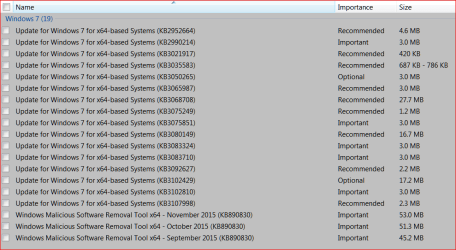
I'll show you mine ...
These are my "Hidden Updates" attached:
Thanks for the link
Yep it's been a fun month or two but a couple of those updates have morphed at least for me Now showing a couple as Important instead of optional as originally did,
A couple even disappeared from the hide list and reappeared as Important is how I spotted them :/
Namely KB2990214 the other morphed to Recommended KB2952664
Originally the only recommended I ever showed was KB3035583 and I suppose ....1917 ?
These are my "Hidden Updates" attached:
Attachments
My Computer
At a glance
Window 7 Professional
- Computer type
- PC/Desktop
- OS
- Window 7 Professional

Thanks for the link
Yep it's been a fun month or two but a couple of those updates have morphed at least for me Now showing a couple as Important instead of optional as originally did,
A couple even disappeared from the hide list and reappeared as Important is how I spotted them :/
Namely KB2990214 the other morphed to Recommended KB2952664
Originally the only recommended I ever showed was KB3035583 and I suppose ....1917 ?
These are my "Hidden Updates" attached:
But wait- 5583 is recommended.
My Computer
At a glance
Windows `10 Professional 64bitIntel i5 [email protected]Corsair Vengeance DDR3 1600 16GNVIDIA GeForce GT520 1GHz
- Computer type
- PC/Desktop
- Computer Manufacturer/Model Number
- Home Built
- OS
- Windows `10 Professional 64bit
- CPU
- Intel i5 [email protected]
- Motherboard
- MSI P67A-GD55 (MS7681)
- Memory
- Corsair Vengeance DDR3 1600 16G
- Graphics Card(s)
- NVIDIA GeForce GT520 1GHz
- Sound Card
- Realtek High Definition Audio
- Monitor(s) Displays
- Haans G 241
- Screen Resolution
- 1600X1024
- Hard Drives
- Crucial MX100 256GB SSD
- PSU
- OCZ ModXStream Modular High Performance 500 Watt
- Case
- Rosewill Challenger-U3
- Cooling
- Just Fans
- Keyboard
- Kensington K64338B
- Mouse
- Microsoft wheel mouse 1.1A
- Internet Speed
- 240.0 Mbps
- Antivirus
- ESET Internet Security
- Browser
- Firefox
- Other Info
- SuperAntiSpyware-Pro
Malwarebytes (Premium)
Kerish Doctor
Here is some of what I have hidden.
KB3087039,KB2952664, KB2999226, KB3013531, KB3021917, KB3035583, KB3068708, KB3075249, KB3080079, KB3080149, KB3102810, KB3107998
I don't know if these are all of them.
You can use windows powershell to see if you have anyone of those updates installed.
If you need to add more just add a coma, space and KB article number. If you want to make sure you are doing it correctly you can add KB article that already been installed on your system.
KB3087039,KB2952664, KB2999226, KB3013531, KB3021917, KB3035583, KB3068708, KB3075249, KB3080079, KB3080149, KB3102810, KB3107998
I don't know if these are all of them.
You can use windows powershell to see if you have anyone of those updates installed.
Code:
Get-HotFix -id KB3087039, KB2952664, KB2999226, KB3013531, KB3021917, KB3035583, KB3068708, KB3075249, KB3080079, KB3080149, KB3102810, KB3107998My Computer
At a glance
W10 32 bit, XUbuntu 18.xx 64 bitIntel(R) Celeron(R) CPU G1620T @ 2.40GHz, 240...4GBIntel HD graphics
- Computer type
- PC/Desktop
- Computer Manufacturer/Model Number
- Dell All in one Inspiron 2020
- OS
- W10 32 bit, XUbuntu 18.xx 64 bit
- CPU
- Intel(R) Celeron(R) CPU G1620T @ 2.40GHz, 2400 Mhz
- Motherboard
- Dell
- Memory
- 4GB
- Graphics Card(s)
- Intel HD graphics
- Sound Card
- High Definition Audio Device
- Monitor(s) Displays
- 20 inch Screen
- Screen Resolution
- W7=1280 x 720 & Linux Mint Xfce=1360 x 768
- Hard Drives
- 500 GB hard drive
- Keyboard
- Usb
- Mouse
- Usb
- Internet Speed
- High-Speed
- Antivirus
- MSE
- Browser
- Main Browser Firefox
- Other Info
- I have done a clean install of Windows 7 using Dell re-installation disk (Dell sent me one). I also use Free Macrium reflect backup and restore.
- Local time
- 6:18 AM
- Messages
- 42
Jelson thanks for you're thoughts
You are explaining things here in a very simple way that I understand.
If it's true what you state here, then it underlines my idea that all updates, that are offered in a general way to the big public on certain dates, ( usually patch Tuesday), are not the same for each PC, and should therefore always be treated as a personal matter. Install, hide or (delete is not offered).
Now as far as I know, you can really only uninstall one completely from the list if you first would install it and that is wrong and dangerous.
It can simply not be true that we all need the same updates as our interests in things offered are different and what is important or even crucial for one is of no use to the other.
The words force feed, in general, come to my mind.
Does everybody, what works with a Windows 7 program ( no matter what state your PC is in at that moment ) gets the same updates on their plate every Tuesday, I wonder or is it somehow individually monitored?
Perhaps I have it completely wrong, I am only learning at the moment
We're all learning... I don't think it ever stops. And you're welcome thelma. Glad I helped.
My understanding is that everyone gets the pertinent updates for their version/edition of Windows and their machine as determined by the Windows Update mechanisms.
For instance, since I've been paying closer and closer attention over the last 6 months and scrutinizing the updates I've being offered... I've found I'm getting the pretty much same updates as everyone else. But at times, I've noticed one or two not showing up. (Some updates have prerequisites.) And of course, I get offered drivers that are specific for my hardware.
Someone else will have to address what the actual processes are and how WU determines which updates to offer.
I don't fully understand why you say uninstalling an update "is wrong and dangerous"... But, I do considering installing them "hazardous" enough to take the precaution of taking a system image before installing MS Updates and then afterwards. (Much easier to restore the system partition than trying to fix things if anything goes wrong.) And I also wait a bit and check to see if any updates are causing people problems beforehand.
My Computer
At a glance
Win7 Ult x64AMD Phenon II Black 9558 GB DDR3 1600MSI GTX 550-Ti
- Computer type
- PC/Desktop
- OS
- Win7 Ult x64
- CPU
- AMD Phenon II Black 955
- Motherboard
- Asus M5A99X EVO
- Memory
- 8 GB DDR3 1600
- Graphics Card(s)
- MSI GTX 550-Ti
- Hard Drives
- Samsung 850 Pro 512 GB (system)
WD 1 TB Black (data)
- PSU
- Seasonic G-650 Gold
- Cooling
- Cooler Master 212+; positive pressure sys: (3) 200mm fans
- Other Info
- Imaging programs: Image for Windows & Drive Snapshot
Similar threads

- Replies
- 8
- Views
- 42K
- Replies
- 11
- Views
- 8K

- Replies
- 42
- Views
- 25K

- Replies
- 71
- Views
- 21K

