
I have some weird add popping on my screen

Dalibor93

New member
Local time
11:27 PM
Messages
6
I recently noticed that some weird add is popping up, here's a screenshot: Untitled1.png
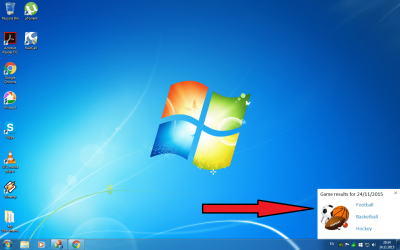
Does anybody know how to remove/disable it?
Thanks for welcoming me guys.
 
Last edited:

My Computer My Computer

At a glance

Windows 7 Ultimate, x64
Computer type
PC/Desktop
OS
Windows 7 Ultimate, x64

My Computer My Computer

At a glance

Windows 10 Pro. 64/ version 1709 Windows 7 Pr...Intel i7-6800K @ 4.3Corsair Platinum 16 gig @2400EVGA GTX 1070 OC
Computer type
PC/Desktop
Computer Manufacturer/Model Number
Home made Desktop
OS
Windows 10 Pro. 64/ version 1709 Windows 7 Pro/64
CPU
Intel i7-6800K @ 4.3
Motherboard
ASUS X-99 Deluxe II
Memory
Corsair Platinum 16 gig @2400
Graphics Card(s)
EVGA GTX 1070 OC
Monitor(s) Displays
Asus 27" LED LCD/VE278Q
Screen Resolution
1920-1080 or 1280-720 HDMI
Hard Drives
INTEL SSD 730-240 Gb Sata 3.0/
PSU
EVGA Platium 1200W
Case
Phanteks Luxe Tempered Glass 8 fans/ one radiator
Cooling
XSPC/ Water Cooled CPU
Keyboard
Das 4 Professional
Mouse
Logitech M705/MX Anywhere 2-S
Internet Speed
100 mbits
Antivirus
Microsoft Security Essentials/ Malwarebytes Premium 3.0/ SAS
Browser
I.E. 11 default/Firefox/ ISP Time Warner Cable/Spectrum
Other Info
LG BluRay Burner/
Sound system-KLipsch-THX/
Icy Dock ssd Hot Swap bays.
Welcome to SevenForums :D

So far, the best way is to do the usual: Scan your whole computer for viruses.

If it has found one, review the results before deleting them, as if it may be your important file of the sort.

Also, when does it appear? If it appears randomly, try disconnecting your network connection for a while.

The most important thing is to find out where it is from. Did it come from a recently installed app? Some application installers do advertisements by recommending users to install other apps (e.g. iLivid, TubeYouDown, CleanerCleaner).

So yeah, the best thing that you can rely on is your Antivirus. Scan, Review, Delete.

Let us know if your problem persists.

Tucker
 

My Computer My Computer

At a glance

w
Computer type
PC/Desktop
OS
w
Well yea, I scanned my PC and nothing, however when I open the file it puts me on Yahoo page with details about in this case sports (basketball if I click on basketball). Also, I was checking my files and I can't find any unknown file that could make this, it appears rarely and it doesn't affect any of my PC functions.
 

My Computer My Computer

At a glance

Windows 7 Ultimate, x64
Computer type
PC/Desktop
OS
Windows 7 Ultimate, x64
Do you have the Yahoo! Toolbar, or any of that type of stuff on there? Check your browser add-ons, too.
 

My Computer My Computer

At a glance

Main - Windows 7 Pro SP1 64-Bit; 2nd - Window...Main - Core i7 2600K; 2nd - Core i7 920Main - 16GB Corsair Vengeance; 2nd - 12GB Cor...Main - XFX Radeon 6870 1GB; 2nd - XFX Radeon ...
Computer Manufacturer/Model Number
Self
OS
Main - Windows 7 Pro SP1 64-Bit; 2nd - Windows Server 2008 R2
CPU
Main - Core i7 2600K; 2nd - Core i7 920
Motherboard
Main - Asus P8Z68-V Pro/Gen3; 2nd - Gigabyte GA-EX58-UDR3
Memory
Main - 16GB Corsair Vengeance; 2nd - 12GB Corsair Vengeance
Graphics Card(s)
Main - XFX Radeon 6870 1GB; 2nd - XFX Radeon 4870 1GB
Sound Card
Both: Onboard Realtek Azalia
Monitor(s) Displays
Main - Hann 25" + I-INC 25" + Acer 23"; 2nd - Upgrading Soon
Screen Resolution
Main - 1920x1080 (All Three Monitors); 2nd - Upgrading Soon
Hard Drives
Main - (1) Crucial M4 128GB (Boot)
Main - (1) Seagate 2TB 64MB Cache (Data)
Main - (1) Seagate 2TB 64MB Cache (Data Backup)
2nd - (1) Intel X25-M SSD 80GB (Boot)
2nd - (3) Seagate 1TB 32MB Cache (Data Backup)
2nd - (1) Seagate 320GB (Because)
PSU
Main - OCZ 600W Modular; 2nd - OCZ 600W
Case
Main - Thermaltake Element G; 2nd - NZXT something or other
Cooling
Main - Corsair H80; 2nd - Prolimatech Megahalems
Keyboard
Main - Razer Reclusa; 2nd - Old MS Keyboard
Mouse
Main - Logitech MX Revolution; 2nd - Old MS Mouse
Internet Speed
20Mbps Time-Warner Cable
No not really, I have only Yahoo ACC.
 

My Computer My Computer

At a glance

Windows 7 Ultimate, x64
Computer type
PC/Desktop
OS
Windows 7 Ultimate, x64
No not really, I have only Yahoo ACC.
I would look closely at the settings in there and see if there is something designed to "help" you which you can turn off.
 

My Computer My Computer

At a glance

Main - Windows 7 Pro SP1 64-Bit; 2nd - Window...Main - Core i7 2600K; 2nd - Core i7 920Main - 16GB Corsair Vengeance; 2nd - 12GB Cor...Main - XFX Radeon 6870 1GB; 2nd - XFX Radeon ...
Computer Manufacturer/Model Number
Self
OS
Main - Windows 7 Pro SP1 64-Bit; 2nd - Windows Server 2008 R2
CPU
Main - Core i7 2600K; 2nd - Core i7 920
Motherboard
Main - Asus P8Z68-V Pro/Gen3; 2nd - Gigabyte GA-EX58-UDR3
Memory
Main - 16GB Corsair Vengeance; 2nd - 12GB Corsair Vengeance
Graphics Card(s)
Main - XFX Radeon 6870 1GB; 2nd - XFX Radeon 4870 1GB
Sound Card
Both: Onboard Realtek Azalia
Monitor(s) Displays
Main - Hann 25" + I-INC 25" + Acer 23"; 2nd - Upgrading Soon
Screen Resolution
Main - 1920x1080 (All Three Monitors); 2nd - Upgrading Soon
Hard Drives
Main - (1) Crucial M4 128GB (Boot)
Main - (1) Seagate 2TB 64MB Cache (Data)
Main - (1) Seagate 2TB 64MB Cache (Data Backup)
2nd - (1) Intel X25-M SSD 80GB (Boot)
2nd - (3) Seagate 1TB 32MB Cache (Data Backup)
2nd - (1) Seagate 320GB (Because)
PSU
Main - OCZ 600W Modular; 2nd - OCZ 600W
Case
Main - Thermaltake Element G; 2nd - NZXT something or other
Cooling
Main - Corsair H80; 2nd - Prolimatech Megahalems
Keyboard
Main - Razer Reclusa; 2nd - Old MS Keyboard
Mouse
Main - Logitech MX Revolution; 2nd - Old MS Mouse
Internet Speed
20Mbps Time-Warner Cable
No not really, I have only Yahoo ACC.
I would look closely at the settings in there and see if there is something designed to "help" you which you can turn off.

I really don't have any adds or anything, I mean I can show you if you don't believe me. I experienced similar ads but on the actual browser and never on desktop like this.
 

My Computer My Computer

At a glance

Windows 7 Ultimate, x64
Computer type
PC/Desktop
OS
Windows 7 Ultimate, x64
Did you just upgrade JAVA, I believe that is the one that wants you to add yahoo settings. Of course you should never just accept defaults on thees guys ad un-select that junk. My 2 cents
 

My Computer My Computer

At a glance

XP Pro SP3
OS
XP Pro SP3

My Computer My Computer

At a glance

Win-7-Pro64bit 7-H-Prem-64biti7-5930K 2nd i9-9940x both water blocked VRM'...Trident-z 3200C14 2nd Trident-z 3600C16EVGA 1080ti ftw3 2nd Titan Xp both water blocked
Computer type
PC/Desktop
Computer Manufacturer/Model Number
Custom assembled by me :}
OS
Win-7-Pro64bit 7-H-Prem-64bit
CPU
i7-5930K 2nd i9-9940x both water blocked VRM's too
Motherboard
ASUS SABERTOOTH X99 2nd ASUS x299 Apex
Memory
Trident-z 3200C14 2nd Trident-z 3600C16
Graphics Card(s)
EVGA 1080ti ftw3 2nd Titan Xp both water blocked
Sound Card
Built-in Realtek
Monitor(s) Displays
1-AOC G2460PG 24"G-Sync 144Hz/ 2nd 1-ASUS VG248QE 24" 144Hz
Screen Resolution
1920 x 1080 144Hz
Hard Drives
2-Samsung M.2 Evo & Evo Plus
2-Samsung 850 EVO 500GB SSD's/ 3-2.5 W.D. Black 1tb-&3-1tb/3-3.5 WD Black 1tb hdd's
PSU
EVGA SuperNOVA 1000-P2 2nd 1200-P2
Case
2-Corsair Obsidian Series 450D Black ATX Mid Tower
Cooling
Custom water loops
Keyboard
Logitech G710+/ 2nd Logitech G910
Mouse
2-RedDragon M901 Perdition 16400 dpi Gaming mouse = wired
Internet Speed
Comcast Ping 19ms 89.31mbps download speed 6.12mbps upload
Antivirus
Malwarebytes Pro/ Superantispyware Pro
Browser
FireFox & Pale moon
Other Info
2nd ASUS X299 Apex/Intel i9-9940x with Custom water loop/7H-Prem-x64/Corsair 450D case/Ram Trident-z 3600C16 4x8gb / Samsung970Evo plus 500gb SSD/Dual ssd EZ swap evo/PSU EVGA SuperNova 1200w-P2 80+Platinum/GPU Titan Xp /8-ML-140 on push-pull on 2-280GTX rads
Process Explorer should be able to show you which process is creating that window.

See this post for more info.

Drag/drop the icon shown below on to the popup window:


Process Explorer should highlight the process responsible for generating the popup window.
 

My Computer My Computer

At a glance

W7 Pro SP1 64biti78GBIntel HD Graphics
Computer type
Laptop
Computer Manufacturer/Model Number
Employer provided Dell Latitude
OS
W7 Pro SP1 64bit
CPU
i7
Memory
8GB
Graphics Card(s)
Intel HD Graphics
Hard Drives
crappy SSD
Antivirus
Employer mandated Symantec Endpoint Protection
Browser
Pale Moon 64bit, IE11 64bit & Chrome 64bit
No not really, I have only Yahoo ACC.
I would look closely at the settings in there and see if there is something designed to "help" you which you can turn off.

I really don't have any adds or anything, I mean I can show you if you don't believe me. I experienced similar ads but on the actual browser and never on desktop like this.
Maybe it was the title of your thread which led me astray... ;)

I have some weird add popping on my screen
 

My Computer My Computer

At a glance

Main - Windows 7 Pro SP1 64-Bit; 2nd - Window...Main - Core i7 2600K; 2nd - Core i7 920Main - 16GB Corsair Vengeance; 2nd - 12GB Cor...Main - XFX Radeon 6870 1GB; 2nd - XFX Radeon ...
Computer Manufacturer/Model Number
Self
OS
Main - Windows 7 Pro SP1 64-Bit; 2nd - Windows Server 2008 R2
CPU
Main - Core i7 2600K; 2nd - Core i7 920
Motherboard
Main - Asus P8Z68-V Pro/Gen3; 2nd - Gigabyte GA-EX58-UDR3
Memory
Main - 16GB Corsair Vengeance; 2nd - 12GB Corsair Vengeance
Graphics Card(s)
Main - XFX Radeon 6870 1GB; 2nd - XFX Radeon 4870 1GB
Sound Card
Both: Onboard Realtek Azalia
Monitor(s) Displays
Main - Hann 25" + I-INC 25" + Acer 23"; 2nd - Upgrading Soon
Screen Resolution
Main - 1920x1080 (All Three Monitors); 2nd - Upgrading Soon
Hard Drives
Main - (1) Crucial M4 128GB (Boot)
Main - (1) Seagate 2TB 64MB Cache (Data)
Main - (1) Seagate 2TB 64MB Cache (Data Backup)
2nd - (1) Intel X25-M SSD 80GB (Boot)
2nd - (3) Seagate 1TB 32MB Cache (Data Backup)
2nd - (1) Seagate 320GB (Because)
PSU
Main - OCZ 600W Modular; 2nd - OCZ 600W
Case
Main - Thermaltake Element G; 2nd - NZXT something or other
Cooling
Main - Corsair H80; 2nd - Prolimatech Megahalems
Keyboard
Main - Razer Reclusa; 2nd - Old MS Keyboard
Mouse
Main - Logitech MX Revolution; 2nd - Old MS Mouse
Internet Speed
20Mbps Time-Warner Cable
Well, that is something else. Might be adware or something.

Try opening Control Panel > Programs and Features > Uninstall or Change a Program thingy, then check out the programs. If you found a program you didn't remember installing it, GET THAT THING AWAY FROM YOUR SYSTEM.

Some programs include suspicious names with weird spaces and numbers and letters, or names such as App Remover, Stackstackstack, Sandwich maker or something.
 

My Computer My Computer

At a glance

w
Computer type
PC/Desktop
OS
w
Just curious, have you run msconfig to see what applications and processes are starting up with your computer? CCleaner's free version also offers a way to check this. The use of both tools is discussed here:
How to Disable Startup Programs in Windows
Good luck!
 

My Computer My Computer

At a glance

Windows 7 Home Premium SP1i36 GBATI Radeon
Computer Manufacturer/Model Number
Dell Inspiron 580s
OS
Windows 7 Home Premium SP1
CPU
i3
Memory
6 GB
Graphics Card(s)
ATI Radeon
I would look closely at the settings in there and see if there is something designed to "help" you which you can turn off.

I really don't have any adds or anything, I mean I can show you if you don't believe me. I experienced similar ads but on the actual browser and never on desktop like this.
Maybe it was the title of your thread which led me astray... ;)

I have some weird add popping on my screen

:D Lol.
 

My Computer My Computer

At a glance

Windows 7 Ultimate, x64
Computer type
PC/Desktop
OS
Windows 7 Ultimate, x64
Process Explorer should be able to show you which process is creating that window.

See this post for more info.

Drag/drop the icon shown below on to the popup window:


Process Explorer should highlight the process responsible for generating the popup window.

Thanks, I'll try this.
 

My Computer My Computer

At a glance

Windows 7 Ultimate, x64
Computer type
PC/Desktop
OS
Windows 7 Ultimate, x64
Back
Top