Last edited:
My Computer
At a glance
Windows 7 Ultimate, x64
- Computer type
- PC/Desktop
- OS
- Windows 7 Ultimate, x64
I would look closely at the settings in there and see if there is something designed to "help" you which you can turn off.No not really, I have only Yahoo ACC.
Maybe it was the title of your thread which led me astray...I would look closely at the settings in there and see if there is something designed to "help" you which you can turn off.No not really, I have only Yahoo ACC.
I really don't have any adds or anything, I mean I can show you if you don't believe me. I experienced similar ads but on the actual browser and never on desktop like this.

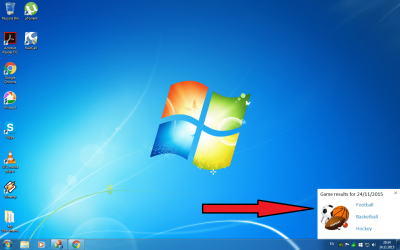
I have some weird add popping on my screen
Maybe it was the title of your thread which led me astray...I would look closely at the settings in there and see if there is something designed to "help" you which you can turn off.
I really don't have any adds or anything, I mean I can show you if you don't believe me. I experienced similar ads but on the actual browser and never on desktop like this.
I have some weird add popping on my screen
Process Explorer should be able to show you which process is creating that window.
See this post for more info.
Drag/drop the icon shown below on to the popup window:
Process Explorer should highlight the process responsible for generating the popup window.