R3B3LCAUSE
New member
- Local time
- 3:08 AM
- Messages
- 17
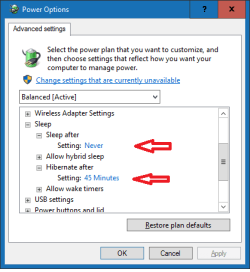
I use Steam Big Picture Mode to control my PC's frequently. It has an option to put the computer to sleep but not to hibernate. I don't ever use regular sleep mode because my computers always end up waking themselves up and it drains my laptops battery. I've heard that it is possible to set a Windows 7 computer to automatically hibernate after being asleep for a certain amount of time, but I can't figure out how to do this. I tried setting "hibernate after" in my advanced power settings, but this just hibernated the computer after x minutes of inactivity instead of x minutes of sleep, which I do not want. Is there a way to get the computer to automatically hibernate after sleeping for a certain amount of time, or even better some way to eliminate sleep mode altogether and just use hibernate instead?
My Computer
- Computer type
- Laptop
- Computer Manufacturer/Model Number
- Lenovo
- OS
- Windows 7 Home Premium x64
- CPU
- i5-3210m
- Memory
- 8GB
- Graphics Card(s)
- Intel HD 4000
- Hard Drives
- 1TB ST1000LM024 HN-M101MBB
- Antivirus
- AVG Antivirus Free
- Browser
- Mozilla Firefox