Solved Setting "Power Plan" to "High Performance" SAFE or NOT ....?

fahadhum

New member
Member
VIP
Local time
1:52 PM
Messages
201
Location
Doha Qatar
Setting "Power Plan" to "High Performance" SAFE or NOT ....?

Something very basic that i overlooked.Which is Setting "Power Plan" to "High Performance".Currently,it is switched to "Balanced" & i am getting great FPS in majority of the games.I am getting like 60 FPS in "Metal Gear Solid : Ground Zeros".Around 40 in "Assassin's Creed : Unity" with MSAA on TXAA.

However,i am not getting very good FPS in some games like , "Call of Duty : Advanced Warfare" (34 & sometimes 38 perhaps) , "Hitman Absolution" (around 40 if EVERYTHING IS SET TO MAX,If i keep MSAA to 2x , i get good FPS , like 45 perhaps)

So,as you can see.I am eager to set the "Power Plan" to "High Performance".But i am concerned as if it will cause any OVERHEATING ISSUES in my Graphics card or cause my fans to work harder.Since everything will be running on max by setting "Power Plan" to "High Performance".

I am using a Desktop.It is an assembled PC , which i have bought for gaming.You can view the specifications under "My System Specs" (In case you are interested)

Also,i have installed a Corsair FAN by replacing the Stock Intel fan in my rig.So i do not have any overheating issues , as if yet.I have placed my RIG in a very spacious position for good ventilation.

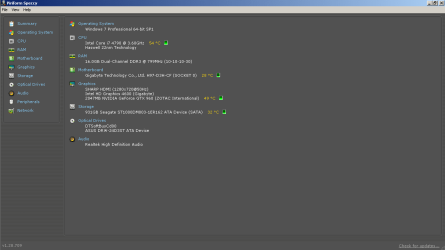
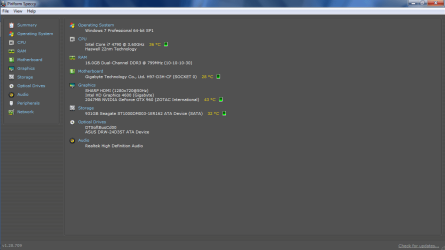
Just to give you a rough idea of my System's Core Temp's WITH & WITHOUT GAMING.I have attached 2 pictures with this post.

I am not that knowledgeable when it comes to monitoring Temperatures & everything though.

I just want to know , if i can get more FPS / Performance Gains by setting "Power Plan" to "High Performance" & won't have to worry about issues such as : OVERHEATING / SYSTEM CRASHING / GETTING BSOD's / Similar .....
 

Attachments
  • My Core Temp's via Speccy.png
    My Core Temp's via Speccy.png
    28.5 KB · Views: 1
  • Core Tem's via Speccy (During Gaming).png
    Core Tem's via Speccy (During Gaming).png
    16.8 KB · Views: 1

My Computer My Computer

Computer type
PC/Desktop
Computer Manufacturer/Model Number
Asus
OS
Windows 7 Home Premium 64 bit
CPU
i7
Motherboard
Gigabyte H97-D3H
Memory
16 GB
Graphics Card(s)
Nvidia GFORCE GTX 960 2 GB
Screen Resolution
1280*720
Cooling
CORSAIR Liquid Fan + One Built in FAN
Antivirus
Avast Free Anti Virus 2015
Browser
Google Chrome
Just check the temperatures while playing games with MSI Afterburner or EVGA Precision. You can definitely get higher frames if you're gonna set the power plan to High Performance mode.
 

My Computer My Computer

Computer type
PC/Desktop
Computer Manufacturer/Model Number
ASUS X550ZE
OS
Windows 7 Home Premium 64-BIT
CPU
AMD A8 7200P
Motherboard
N/A
Memory
8GB 1600mhz
Graphics Card(s)
Radeon R5 (APU) + Radeon R5 M230 2GB Dual Graphics
Sound Card
Realtek ALC269 with SonicMaster
Monitor(s) Displays
Laptop Display
Screen Resolution
1920 x 1080 @60hz
Hard Drives
WDC WD50 00LPVX-80V0TT0 (500GB)
PSU
Laptop Charger
Mouse
ARMAGGEDON TEXTRON SCORPION 7
Internet Speed
100 mbps DOWN / 50 mbps UP
Antivirus
Windows Defender
Browser
Mozzila FireFox, Valve Steam in-game internet browser
I have mine on High Performance as I use it for my recording studio. Has not caused any overheating or any other problem.
 

My Computer My Computer

Computer type
PC/Desktop
Computer Manufacturer/Model Number
My Own Build
OS
Windows 10 64 bit
CPU
Intel i7 6700K
Motherboard
ASUS ROG Maximus VIII Hero
Memory
16GB Corsair Dominator
Graphics Card(s)
Intel CPU Graphics
Sound Card
RealTek
Monitor(s) Displays
27" Dell S2719dgf
Screen Resolution
2560X1440
Hard Drives
1 TB Samsung 850 EVO SSD for Win 10 Pro
500GB Samsung 850 EVO SSD for Win 10 Insider
2 TB drive for backup
PSU
EVGA Supernova 750G2
Case
BeQuiet Silent Base 600
Cooling
Deepcool Captain 120EX
Keyboard
Microsoft Wireless 2000
Mouse
Microsoft wireless
Internet Speed
100 MB/sec (Cable)
Antivirus
Microsoft Defender and Malwarebytes
Browser
Edge/Firefox
Other Info
Cakewalk (Sonar) by BandLab and Studio One 4.1 Pro recording studio software. MOTU 896Mk3 Hybrid recording interface, Frontier Tranzport wireless control unit, Behringer X-Touch Control Surface.
Five USB connected optical drives for CD Audio production using Nero BurningROM
Yeah you can get more fps (but it's not a drastic boost) with High performance plan and it will not cause any additional problems ,but it may rise temps by a few Celsius,nothing drastic.

It's safe!
 

My Computer My Computer

OS
Windows 7 x64 Pro
Huh
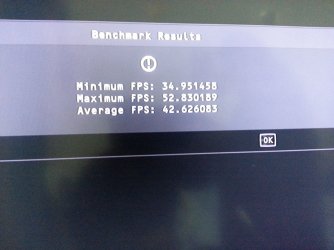
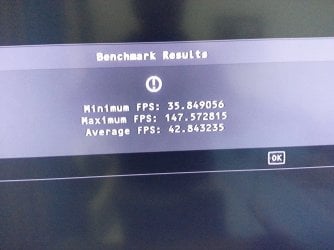
Well i did a small test with Hitman Absolution Bench Mark.
And the results are shocking.
:(
See the 2 attached pictures of , Without & With "Maximum Performance" Benchmark Test for Hitman Absolution. .
 

Attachments

  • 20151213_013937.jpg
    20151213_013937.jpg
    573.4 KB · Views: 1
  • 20151213_013337.jpg
    20151213_013337.jpg
    589 KB · Views: 1

My Computer My Computer

Computer type
PC/Desktop
Computer Manufacturer/Model Number
Asus
OS
Windows 7 Home Premium 64 bit
CPU
i7
Motherboard
Gigabyte H97-D3H
Memory
16 GB
Graphics Card(s)
Nvidia GFORCE GTX 960 2 GB
Screen Resolution
1280*720
Cooling
CORSAIR Liquid Fan + One Built in FAN
Antivirus
Avast Free Anti Virus 2015
Browser
Google Chrome
FPS is going to depend on a lot of other devices rather than just a power plan.

Which your system spec's are pretty limited in what you actually have installed i7/ ........ ?
 

My Computer My Computer

Computer type
PC/Desktop
Computer Manufacturer/Model Number
Custom assembled by me :}
OS
Win-7-Pro64bit 7-H-Prem-64bit
CPU
i7-5930K 2nd i9-9940x both water blocked VRM's too
Motherboard
ASUS SABERTOOTH X99 2nd ASUS x299 Apex
Memory
Trident-z 3200C14 2nd Trident-z 3600C16
Graphics Card(s)
EVGA 1080ti ftw3 2nd Titan Xp both water blocked
Sound Card
Built-in Realtek
Monitor(s) Displays
1-AOC G2460PG 24"G-Sync 144Hz/ 2nd 1-ASUS VG248QE 24" 144Hz
Screen Resolution
1920 x 1080 144Hz
Hard Drives
2-Samsung M.2 Evo & Evo Plus
2-Samsung 850 EVO 500GB SSD's/ 3-2.5 W.D. Black 1tb-&3-1tb/3-3.5 WD Black 1tb hdd's
PSU
EVGA SuperNOVA 1000-P2 2nd 1200-P2
Case
2-Corsair Obsidian Series 450D Black ATX Mid Tower
Cooling
Custom water loops
Keyboard
Logitech G710+/ 2nd Logitech G910
Mouse
2-RedDragon M901 Perdition 16400 dpi Gaming mouse = wired
Internet Speed
Comcast Ping 19ms 89.31mbps download speed 6.12mbps upload
Antivirus
Malwarebytes Pro/ Superantispyware Pro
Browser
FireFox & Pale moon
Other Info
2nd ASUS X299 Apex/Intel i9-9940x with Custom water loop/7H-Prem-x64/Corsair 450D case/Ram Trident-z 3600C16 4x8gb / Samsung970Evo plus 500gb SSD/Dual ssd EZ swap evo/PSU EVGA SuperNova 1200w-P2 80+Platinum/GPU Titan Xp /8-ML-140 on push-pull on 2-280GTX rads
FPS is going to depend on a lot of other devices rather than just a power plan.

Which your system spec's are pretty limited in what you actually have installed i7/ ........ ?

Agreed.I did some testing with different options today.And the weird thing is , somethings work for some games.And somethings won't.

My Specs are :

Computer Manufacturer/Model Number > Asus
OS > Windows 7 Home Premium 64 bit
CPU >i7
Motherboard > Gigabyte H97-D3H
RAM > 16 GB
Graphics Card > Nvidia GFORCE GTX 960 2 GB
Cooling FANS > CORSAIR Liquid Fan + One Built in FAN
Processor > i7 - 4790 CPU @ 3.60GHz 3.60GHz


I tried switching the Power Plan to "High Performance" but saw no major improvement.

Then,i saw a video regarding Adaptive Vsync which i had in my nvidia Control Panel but i had not tried EVER (Since my last Nvidia Graphics Driver Update).Also, i realized i should try selecting the specific game from "Program Settings" and then selecting "Adaptive Sync" from the Vsync section.I did that , and i was getting around 55 or above FPS in Hitman Absolution.

Now,i applied the same technique for an other game that i had , i.e " Metal Gear Solid :Ground Zeros" which was giving 60 fps already.So,just for testing i thought , may be Turning on Adaptive Sync will give more fps then 60.Strange thing happened and when i switched on Vsync from In game options (prior selecting Adaptive Sync for this particular game i.e "Metal Gear Solid : Ground Zeros" , via Nvidia Control Panel) , FPS went from 60 to 45 ...

So,PERHAPS i must do something that is already there in my task-bar i.e Ge-force Game Ready Driver (Version 359.06) ready for Update and Installation , WHICH I AM NOT DOING.Perhaps that will give me the performance BOOST that i want.But ,i am cautious to try ....
 

My Computer My Computer

Computer type
PC/Desktop
Computer Manufacturer/Model Number
Asus
OS
Windows 7 Home Premium 64 bit
CPU
i7
Motherboard
Gigabyte H97-D3H
Memory
16 GB
Graphics Card(s)
Nvidia GFORCE GTX 960 2 GB
Screen Resolution
1280*720
Cooling
CORSAIR Liquid Fan + One Built in FAN
Antivirus
Avast Free Anti Virus 2015
Browser
Google Chrome

My Computer My Computer

Computer type
PC/Desktop
Computer Manufacturer/Model Number
Custom assembled by me :}
OS
Win-7-Pro64bit 7-H-Prem-64bit
CPU
i7-5930K 2nd i9-9940x both water blocked VRM's too
Motherboard
ASUS SABERTOOTH X99 2nd ASUS x299 Apex
Memory
Trident-z 3200C14 2nd Trident-z 3600C16
Graphics Card(s)
EVGA 1080ti ftw3 2nd Titan Xp both water blocked
Sound Card
Built-in Realtek
Monitor(s) Displays
1-AOC G2460PG 24"G-Sync 144Hz/ 2nd 1-ASUS VG248QE 24" 144Hz
Screen Resolution
1920 x 1080 144Hz
Hard Drives
2-Samsung M.2 Evo & Evo Plus
2-Samsung 850 EVO 500GB SSD's/ 3-2.5 W.D. Black 1tb-&3-1tb/3-3.5 WD Black 1tb hdd's
PSU
EVGA SuperNOVA 1000-P2 2nd 1200-P2
Case
2-Corsair Obsidian Series 450D Black ATX Mid Tower
Cooling
Custom water loops
Keyboard
Logitech G710+/ 2nd Logitech G910
Mouse
2-RedDragon M901 Perdition 16400 dpi Gaming mouse = wired
Internet Speed
Comcast Ping 19ms 89.31mbps download speed 6.12mbps upload
Antivirus
Malwarebytes Pro/ Superantispyware Pro
Browser
FireFox & Pale moon
Other Info
2nd ASUS X299 Apex/Intel i9-9940x with Custom water loop/7H-Prem-x64/Corsair 450D case/Ram Trident-z 3600C16 4x8gb / Samsung970Evo plus 500gb SSD/Dual ssd EZ swap evo/PSU EVGA SuperNova 1200w-P2 80+Platinum/GPU Titan Xp /8-ML-140 on push-pull on 2-280GTX rads
For the most part the best improvement would be to get a G-Sync capable monitor.
AOC G2460PG 24" G-SYNC 3D-Ready Ultimate Performance Gaming Monitor 1ms (GTG) 144 Hz DisplayPort Widescreen LED Backlight - Newegg.com
And of course a gtx980 ;)

:shock: I bought this Assembled RIG for 4k , not more then 8 Months or so.So,i may not be buying a new Graphics Card for some years now , PERHAPS :)

Regarding Monitor,i like BIG SCREENS.So,i am using a 32 Inch LCD LED T.V via HDMI with my R.I.G...

By the way,I was wondering just now as to what cause Hitman Absolution's FPS to reach 60 FPS suddenly.I actually De-fragmented all of my drivers yesterday prior to my Game Test...

May be that is what giving this fps boost.It is strange cuz i was not getting 60 FPS with everything on MAX and with 8x MSAA ...
 

My Computer My Computer

Computer type
PC/Desktop
Computer Manufacturer/Model Number
Asus
OS
Windows 7 Home Premium 64 bit
CPU
i7
Motherboard
Gigabyte H97-D3H
Memory
16 GB
Graphics Card(s)
Nvidia GFORCE GTX 960 2 GB
Screen Resolution
1280*720
Cooling
CORSAIR Liquid Fan + One Built in FAN
Antivirus
Avast Free Anti Virus 2015
Browser
Google Chrome
I'm just wondering how can you even play with a 30hz LCD TV properly
 

My Computer My Computer

Computer type
PC/Desktop
Computer Manufacturer/Model Number
ASUS X550ZE
OS
Windows 7 Home Premium 64-BIT
CPU
AMD A8 7200P
Motherboard
N/A
Memory
8GB 1600mhz
Graphics Card(s)
Radeon R5 (APU) + Radeon R5 M230 2GB Dual Graphics
Sound Card
Realtek ALC269 with SonicMaster
Monitor(s) Displays
Laptop Display
Screen Resolution
1920 x 1080 @60hz
Hard Drives
WDC WD50 00LPVX-80V0TT0 (500GB)
PSU
Laptop Charger
Mouse
ARMAGGEDON TEXTRON SCORPION 7
Internet Speed
100 mbps DOWN / 50 mbps UP
Antivirus
Windows Defender
Browser
Mozzila FireFox, Valve Steam in-game internet browser
Not sure how you came up with it being 30Hz
Lowest lcd t.v. I've seen is 60Hz :/
Possibly you got that from the minimum fps reading ?
 

My Computer My Computer

Computer type
PC/Desktop
Computer Manufacturer/Model Number
Custom assembled by me :}
OS
Win-7-Pro64bit 7-H-Prem-64bit
CPU
i7-5930K 2nd i9-9940x both water blocked VRM's too
Motherboard
ASUS SABERTOOTH X99 2nd ASUS x299 Apex
Memory
Trident-z 3200C14 2nd Trident-z 3600C16
Graphics Card(s)
EVGA 1080ti ftw3 2nd Titan Xp both water blocked
Sound Card
Built-in Realtek
Monitor(s) Displays
1-AOC G2460PG 24"G-Sync 144Hz/ 2nd 1-ASUS VG248QE 24" 144Hz
Screen Resolution
1920 x 1080 144Hz
Hard Drives
2-Samsung M.2 Evo & Evo Plus
2-Samsung 850 EVO 500GB SSD's/ 3-2.5 W.D. Black 1tb-&3-1tb/3-3.5 WD Black 1tb hdd's
PSU
EVGA SuperNOVA 1000-P2 2nd 1200-P2
Case
2-Corsair Obsidian Series 450D Black ATX Mid Tower
Cooling
Custom water loops
Keyboard
Logitech G710+/ 2nd Logitech G910
Mouse
2-RedDragon M901 Perdition 16400 dpi Gaming mouse = wired
Internet Speed
Comcast Ping 19ms 89.31mbps download speed 6.12mbps upload
Antivirus
Malwarebytes Pro/ Superantispyware Pro
Browser
FireFox & Pale moon
Other Info
2nd ASUS X299 Apex/Intel i9-9940x with Custom water loop/7H-Prem-x64/Corsair 450D case/Ram Trident-z 3600C16 4x8gb / Samsung970Evo plus 500gb SSD/Dual ssd EZ swap evo/PSU EVGA SuperNova 1200w-P2 80+Platinum/GPU Titan Xp /8-ML-140 on push-pull on 2-280GTX rads
Not sure how you came up with it being 30Hz
Lowest lcd t.v. I've seen is 60Hz :/
Possibly you got that from the minimum fps reading ?

Oh yes.My LED LCD T.V is 60Hz ...
Is that good for gaming or not?
Is that being an obstacle in slight drops of FPS?

REMIND you some games are running at 60fps.Some arn't. ..
 

My Computer My Computer

Computer type
PC/Desktop
Computer Manufacturer/Model Number
Asus
OS
Windows 7 Home Premium 64 bit
CPU
i7
Motherboard
Gigabyte H97-D3H
Memory
16 GB
Graphics Card(s)
Nvidia GFORCE GTX 960 2 GB
Screen Resolution
1280*720
Cooling
CORSAIR Liquid Fan + One Built in FAN
Antivirus
Avast Free Anti Virus 2015
Browser
Google Chrome
Hi,
That is what I figured ;)

Besides the already posted upgrades you just have to adjust your game settings inside the games
The very basic adjustment I use in NVidia control panel is use quality,
Might loose some frame rates but at least everything will look good
You can also check the resolution section and make sure it's set to use 60Hz.
View attachment 377901
 
Last edited:

My Computer My Computer

Computer type
PC/Desktop
Computer Manufacturer/Model Number
Custom assembled by me :}
OS
Win-7-Pro64bit 7-H-Prem-64bit
CPU
i7-5930K 2nd i9-9940x both water blocked VRM's too
Motherboard
ASUS SABERTOOTH X99 2nd ASUS x299 Apex
Memory
Trident-z 3200C14 2nd Trident-z 3600C16
Graphics Card(s)
EVGA 1080ti ftw3 2nd Titan Xp both water blocked
Sound Card
Built-in Realtek
Monitor(s) Displays
1-AOC G2460PG 24"G-Sync 144Hz/ 2nd 1-ASUS VG248QE 24" 144Hz
Screen Resolution
1920 x 1080 144Hz
Hard Drives
2-Samsung M.2 Evo & Evo Plus
2-Samsung 850 EVO 500GB SSD's/ 3-2.5 W.D. Black 1tb-&3-1tb/3-3.5 WD Black 1tb hdd's
PSU
EVGA SuperNOVA 1000-P2 2nd 1200-P2
Case
2-Corsair Obsidian Series 450D Black ATX Mid Tower
Cooling
Custom water loops
Keyboard
Logitech G710+/ 2nd Logitech G910
Mouse
2-RedDragon M901 Perdition 16400 dpi Gaming mouse = wired
Internet Speed
Comcast Ping 19ms 89.31mbps download speed 6.12mbps upload
Antivirus
Malwarebytes Pro/ Superantispyware Pro
Browser
FireFox & Pale moon
Other Info
2nd ASUS X299 Apex/Intel i9-9940x with Custom water loop/7H-Prem-x64/Corsair 450D case/Ram Trident-z 3600C16 4x8gb / Samsung970Evo plus 500gb SSD/Dual ssd EZ swap evo/PSU EVGA SuperNova 1200w-P2 80+Platinum/GPU Titan Xp /8-ML-140 on push-pull on 2-280GTX rads
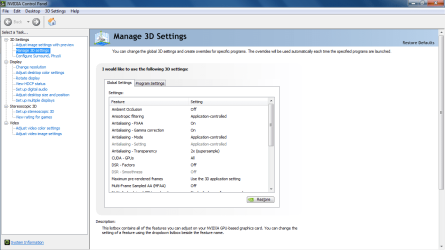
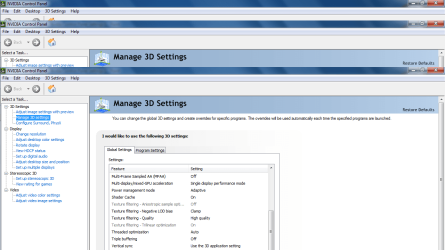
Here are my Nvidia Control Panel Settings & Screen Resolution Settings

Hi,
That is what I figured ;)

Besides the already posted upgrades you just have to adjust your game settings inside the games
The very basic adjustment I use in NVidia control panel is use quality,
Might loose some frame rates but at least everything will look good
You can also check the resolution section and make sure it's set to use 60Hz.
View attachment 377901

Hello :)

Here are my Nvidia Control Panel Settings & Screen Resolution Settings (Kindly , see the attached picture).These settings were suggested by a you-tube up-loader , who said that these are settings for a GTX Nvidia settings for 900 Card Series ...Since my Nvidia graphics card is also a 900 series card (Gtx 960 2 GB),so i am also using these settings.And to be honest , the result is remarkable in some of the games that touch 60fps or 50 fps.

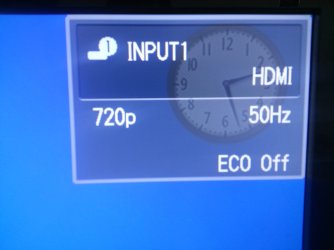
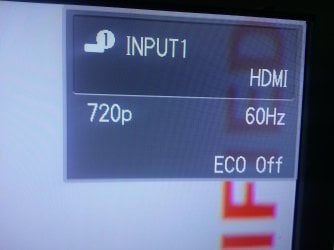
One strange thing to notice is that when i switch on my Sharp LED LCD T.V , it says "720p 50Hz" (Kindly , see the ATTACHED PICTURE)but when i start a Video Game , it says "720p 60Hz" ( Kindly , see the attached picture) .Also the refresh rate inside the game settings is set to 60Hz as default.
 

Attachments

  • My Nvidia Control Panel Settings 1.png
    My Nvidia Control Panel Settings 1.png
    41.2 KB · Views: 1
  • My Nvidia Control Panel Settings 2.png
    My Nvidia Control Panel Settings 2.png
    57.9 KB · Views: 1
  • My T.V Resolution Settings.png
    My T.V Resolution Settings.png
    37.2 KB · Views: 1
  • T.V Refresh Rate Normally.jpg
    T.V Refresh Rate Normally.jpg
    383.1 KB · Views: 1
  • T.V Refresh Rate While Gaming.jpg
    T.V Refresh Rate While Gaming.jpg
    1.1 MB · Views: 1
Last edited:

My Computer My Computer

Computer type
PC/Desktop
Computer Manufacturer/Model Number
Asus
OS
Windows 7 Home Premium 64 bit
CPU
i7
Motherboard
Gigabyte H97-D3H
Memory
16 GB
Graphics Card(s)
Nvidia GFORCE GTX 960 2 GB
Screen Resolution
1280*720
Cooling
CORSAIR Liquid Fan + One Built in FAN
Antivirus
Avast Free Anti Virus 2015
Browser
Google Chrome

My Computer My Computer

Computer type
PC/Desktop
Computer Manufacturer/Model Number
Custom assembled by me :}
OS
Win-7-Pro64bit 7-H-Prem-64bit
CPU
i7-5930K 2nd i9-9940x both water blocked VRM's too
Motherboard
ASUS SABERTOOTH X99 2nd ASUS x299 Apex
Memory
Trident-z 3200C14 2nd Trident-z 3600C16
Graphics Card(s)
EVGA 1080ti ftw3 2nd Titan Xp both water blocked
Sound Card
Built-in Realtek
Monitor(s) Displays
1-AOC G2460PG 24"G-Sync 144Hz/ 2nd 1-ASUS VG248QE 24" 144Hz
Screen Resolution
1920 x 1080 144Hz
Hard Drives
2-Samsung M.2 Evo & Evo Plus
2-Samsung 850 EVO 500GB SSD's/ 3-2.5 W.D. Black 1tb-&3-1tb/3-3.5 WD Black 1tb hdd's
PSU
EVGA SuperNOVA 1000-P2 2nd 1200-P2
Case
2-Corsair Obsidian Series 450D Black ATX Mid Tower
Cooling
Custom water loops
Keyboard
Logitech G710+/ 2nd Logitech G910
Mouse
2-RedDragon M901 Perdition 16400 dpi Gaming mouse = wired
Internet Speed
Comcast Ping 19ms 89.31mbps download speed 6.12mbps upload
Antivirus
Malwarebytes Pro/ Superantispyware Pro
Browser
FireFox & Pale moon
Other Info
2nd ASUS X299 Apex/Intel i9-9940x with Custom water loop/7H-Prem-x64/Corsair 450D case/Ram Trident-z 3600C16 4x8gb / Samsung970Evo plus 500gb SSD/Dual ssd EZ swap evo/PSU EVGA SuperNova 1200w-P2 80+Platinum/GPU Titan Xp /8-ML-140 on push-pull on 2-280GTX rads
Hi,
Could be a hdmi cable issue are you using a gold tipped high speed cable and how long ?
I prefer monster hdmi cables if I use one which I don't
Amazon.com: Monster Cable Ultimate High Speed HDMI THX 1000 Cable, 4 feet - (Non-Retail Packaging): Electronics

Soooooo , buying an EXPENSIVE HDMI cable increases GAMING PERFORMANCE ?

I am not using any GOLD TIPPED HIGH SPEED cable.It is silver TIPPED (i think) & i got this for free from the Shop guy who assembled my PC.He gave this cable to me for free when i purchased my system from him ....
And it has been 10 Months or so , since i have been using this HDMI Cable ....
 

My Computer My Computer

Computer type
PC/Desktop
Computer Manufacturer/Model Number
Asus
OS
Windows 7 Home Premium 64 bit
CPU
i7
Motherboard
Gigabyte H97-D3H
Memory
16 GB
Graphics Card(s)
Nvidia GFORCE GTX 960 2 GB
Screen Resolution
1280*720
Cooling
CORSAIR Liquid Fan + One Built in FAN
Antivirus
Avast Free Anti Virus 2015
Browser
Google Chrome
Hi,
A high speed cable will transfer signal faster which will give you a better picture which for gaming will give the best performance yes.
 

My Computer My Computer

Computer type
PC/Desktop
Computer Manufacturer/Model Number
Custom assembled by me :}
OS
Win-7-Pro64bit 7-H-Prem-64bit
CPU
i7-5930K 2nd i9-9940x both water blocked VRM's too
Motherboard
ASUS SABERTOOTH X99 2nd ASUS x299 Apex
Memory
Trident-z 3200C14 2nd Trident-z 3600C16
Graphics Card(s)
EVGA 1080ti ftw3 2nd Titan Xp both water blocked
Sound Card
Built-in Realtek
Monitor(s) Displays
1-AOC G2460PG 24"G-Sync 144Hz/ 2nd 1-ASUS VG248QE 24" 144Hz
Screen Resolution
1920 x 1080 144Hz
Hard Drives
2-Samsung M.2 Evo & Evo Plus
2-Samsung 850 EVO 500GB SSD's/ 3-2.5 W.D. Black 1tb-&3-1tb/3-3.5 WD Black 1tb hdd's
PSU
EVGA SuperNOVA 1000-P2 2nd 1200-P2
Case
2-Corsair Obsidian Series 450D Black ATX Mid Tower
Cooling
Custom water loops
Keyboard
Logitech G710+/ 2nd Logitech G910
Mouse
2-RedDragon M901 Perdition 16400 dpi Gaming mouse = wired
Internet Speed
Comcast Ping 19ms 89.31mbps download speed 6.12mbps upload
Antivirus
Malwarebytes Pro/ Superantispyware Pro
Browser
FireFox & Pale moon
Other Info
2nd ASUS X299 Apex/Intel i9-9940x with Custom water loop/7H-Prem-x64/Corsair 450D case/Ram Trident-z 3600C16 4x8gb / Samsung970Evo plus 500gb SSD/Dual ssd EZ swap evo/PSU EVGA SuperNova 1200w-P2 80+Platinum/GPU Titan Xp /8-ML-140 on push-pull on 2-280GTX rads
Back
Top