Windows 7 Professional Install - no device drivers were found

Madnesslink5

New member
Local time
7:48 PM
Messages
19
So I have an old laptop running Win7 professional x64 SP1. I downloaded X17-59186.iso and made sure the MD5 and SHA-1 checksums matched which they do.

Properly formatted my USB drive etc. When I boot from USB and choose `install now` however I get the load driver window error:
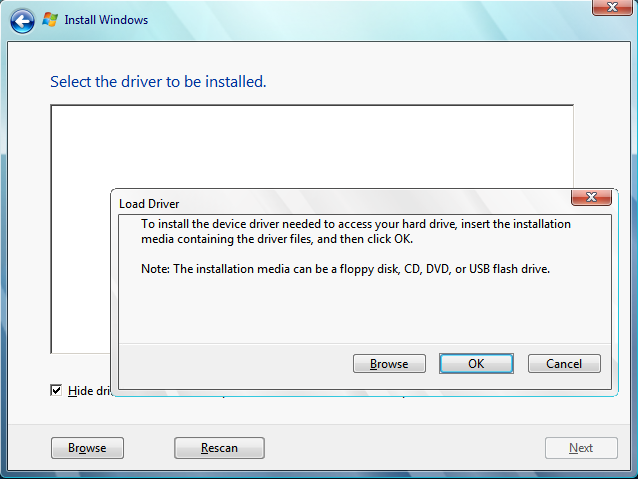
8sHou.png


Also if I try and choose "repair your computer" (at the previous step, rather than trying to install windows) I get an error message saying "This version of system recovery options is not compatible with the version of windows you are trying to repair. Try using a recovery disc that is compatible with this version of windows."

This makes it sound like I have the wrong ISO even though in system information it is definitely running win7 Pro x64.

What is most confusing is that if I use this same bootable USB on my other laptop (running win7 home x64) it works fine, neither of these errors occur.

Also I read something about trying USB2.0/3.0 ports, neither will work.

Any help is very much appreciated, thanks!
 

My Computer My Computer

At a glance

Windows 7 Home Premium 64bit.
Computer type
Laptop
Computer Manufacturer/Model Number
Dell
OS
Windows 7 Home Premium 64bit.
What is the make and model of the laptop ?

You might need drivers, ( though that message often indicates setup.exe can't find install.wim )
 

My Computers My Computers

  • At a glance

    7 X64i5 84002x8gb 3200mhz
    Computer type
    PC/Desktop
    OS
    7 X64
    CPU
    i5 8400
    Motherboard
    gigabyte b365m ds3h
    Memory
    2x8gb 3200mhz
    Hard Drives
    various
    PSU
    pure power 11 400w cm
    Case
    Coolermaster
    Cooling
    cryorig m9i
  • At a glance

    7x64g54008gb ddr4 2400
    Computer type
    PC/Desktop
    OS
    7x64
    CPU
    g5400
    Motherboard
    ga b365m ds3h
    Memory
    8gb ddr4 2400
    PSU
    xfx pro 450w
What is the make and model of the laptop ?

You might need drivers, ( though that message often indicates setup.exe can't find install.wim )

It is a HP 250. When that error occurs there is the option for me to browse for drivers in (C:\) or Boot/(X:\) though I have no clue what I would be looking for.
 

My Computer My Computer

At a glance

Windows 7 Home Premium 64bit.
Computer type
Laptop
Computer Manufacturer/Model Number
Dell
OS
Windows 7 Home Premium 64bit.
If you upload winre.wim from your hard drive, I will probably be able to extract the drivers for you.

extract this and run as admin on the cmd file to get winre.wim on your desktop.
 
Last edited:

My Computers My Computers

  • At a glance

    7 X64i5 84002x8gb 3200mhz
    Computer type
    PC/Desktop
    OS
    7 X64
    CPU
    i5 8400
    Motherboard
    gigabyte b365m ds3h
    Memory
    2x8gb 3200mhz
    Hard Drives
    various
    PSU
    pure power 11 400w cm
    Case
    Coolermaster
    Cooling
    cryorig m9i
  • At a glance

    7x64g54008gb ddr4 2400
    Computer type
    PC/Desktop
    OS
    7x64
    CPU
    g5400
    Motherboard
    ga b365m ds3h
    Memory
    8gb ddr4 2400
    PSU
    xfx pro 450w
Damn took me like 30 minutes to grab that file due to the laptop being so ridiculously slow (hence the attempted re-install...). Anyway hope this can help.

Edit: It's 160Mb, should it be that large? Uploading it to megafile right now.
 

My Computer My Computer

At a glance

Windows 7 Home Premium 64bit.
Computer type
Laptop
Computer Manufacturer/Model Number
Dell
OS
Windows 7 Home Premium 64bit.
Yes, that is about the right size.
 

My Computers My Computers

  • At a glance

    7 X64i5 84002x8gb 3200mhz
    Computer type
    PC/Desktop
    OS
    7 X64
    CPU
    i5 8400
    Motherboard
    gigabyte b365m ds3h
    Memory
    2x8gb 3200mhz
    Hard Drives
    various
    PSU
    pure power 11 400w cm
    Case
    Coolermaster
    Cooling
    cryorig m9i
  • At a glance

    7x64g54008gb ddr4 2400
    Computer type
    PC/Desktop
    OS
    7x64
    CPU
    g5400
    Motherboard
    ga b365m ds3h
    Memory
    8gb ddr4 2400
    PSU
    xfx pro 450w
40kb/s upload speed... Expect a reply sometime around an hours time lol. Thanks for this help though.
 

My Computer My Computer

At a glance

Windows 7 Home Premium 64bit.
Computer type
Laptop
Computer Manufacturer/Model Number
Dell
OS
Windows 7 Home Premium 64bit.
Here is the download link.. thanks again.

WinRE File
 

My Computer My Computer

At a glance

Windows 7 Home Premium 64bit.
Computer type
Laptop
Computer Manufacturer/Model Number
Dell
OS
Windows 7 Home Premium 64bit.
No third party drivers in your winre.wim.

On your usb stick , there is a folder called sources. Inside that is boot.wim and a much larger install.wim.

Setup.exe doesn't seem able to find sources\install.wim. Or perhaps install.wim isn't being recognised.

I will upload a special boot.wim which you can d/l and copy into the sources folder of your usb stick, overwriting the standard boot.wim.

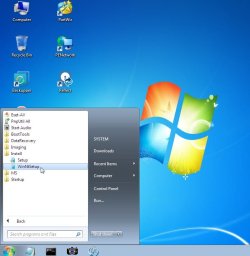
When you boot from the usb stick, a desktop will appear after a minute or so.

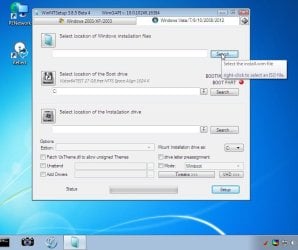
Use winntsetup to browse for sources\install.wim and install the correct edition ( professional).

2015-12-15_014258.jpg

2015-12-15_014423.jpg
 

My Computers My Computers

  • At a glance

    7 X64i5 84002x8gb 3200mhz
    Computer type
    PC/Desktop
    OS
    7 X64
    CPU
    i5 8400
    Motherboard
    gigabyte b365m ds3h
    Memory
    2x8gb 3200mhz
    Hard Drives
    various
    PSU
    pure power 11 400w cm
    Case
    Coolermaster
    Cooling
    cryorig m9i
  • At a glance

    7x64g54008gb ddr4 2400
    Computer type
    PC/Desktop
    OS
    7x64
    CPU
    g5400
    Motherboard
    ga b365m ds3h
    Memory
    8gb ddr4 2400
    PSU
    xfx pro 450w
When I go to browse for the install.wim I cannot see the USB drive anywhere in Computer.

I have Local Disk ( C: ), Boot ( X: ), Local Disk ( Z: ) - and only CD Drive ( D: ) in removable storage devices.

Edit: I checked in Boot(X: )\sources but there was no install.wim to be found there. Though sources\install.wim definitely exists on the USB.
 

My Computer My Computer

At a glance

Windows 7 Home Premium 64bit.
Computer type
Laptop
Computer Manufacturer/Model Number
Dell
OS
Windows 7 Home Premium 64bit.
In that case, copy install.wim onto your hard drive, e.g. so you have C:\Install.wim

Then boot the usb and use winntsetup to browse to install.wim on your hard drive.
 

My Computers My Computers

  • At a glance

    7 X64i5 84002x8gb 3200mhz
    Computer type
    PC/Desktop
    OS
    7 X64
    CPU
    i5 8400
    Motherboard
    gigabyte b365m ds3h
    Memory
    2x8gb 3200mhz
    Hard Drives
    various
    PSU
    pure power 11 400w cm
    Case
    Coolermaster
    Cooling
    cryorig m9i
  • At a glance

    7x64g54008gb ddr4 2400
    Computer type
    PC/Desktop
    OS
    7x64
    CPU
    g5400
    Motherboard
    ga b365m ds3h
    Memory
    8gb ddr4 2400
    PSU
    xfx pro 450w
Okay will do when I'm home, I guess I need to specify the other options such as the installation drive location and edition?
 

My Computer My Computer

At a glance

Windows 7 Home Premium 64bit.
Computer type
Laptop
Computer Manufacturer/Model Number
Dell
OS
Windows 7 Home Premium 64bit.
Yes, just select edition in the drop down and browse to the drive you want to install to.Then click SETUP.

If you want to format the drive for a clean install, you obviously need to copy install.wim to a different partition than the one you want to format.


Alternatively, you could try booting the usb, then running PNP install drivers, see if that does it. Or just type in the run box:

pecmd SHOW -1:-1

Then press enter.
 

My Computers My Computers

  • At a glance

    7 X64i5 84002x8gb 3200mhz
    Computer type
    PC/Desktop
    OS
    7 X64
    CPU
    i5 8400
    Motherboard
    gigabyte b365m ds3h
    Memory
    2x8gb 3200mhz
    Hard Drives
    various
    PSU
    pure power 11 400w cm
    Case
    Coolermaster
    Cooling
    cryorig m9i
  • At a glance

    7x64g54008gb ddr4 2400
    Computer type
    PC/Desktop
    OS
    7x64
    CPU
    g5400
    Motherboard
    ga b365m ds3h
    Memory
    8gb ddr4 2400
    PSU
    xfx pro 450w
Yes, just select edition in the drop down and browse to the drive you want to install to.Then click SETUP.

Will this format the chosen drive as well? Because I really need a clean install to hopefully fix the dreadful speed it currently runs at.
 

My Computer My Computer

At a glance

Windows 7 Home Premium 64bit.
Computer type
Laptop
Computer Manufacturer/Model Number
Dell
OS
Windows 7 Home Premium 64bit.
So I have some problems - I wanted to partition the disk so I could store the install.wim file separately and then format the other part of the disk before installing windows onto it.

Apparently you can't change the partitions from safe mode boot with command line. And now when I start up the laptop normally various system drivers seem to be missing, can't even run cmd.exe or the desktop.

Any ideas?

Edit: Don't know what's going on, now it's booted up okay (still really slow). Definitely need to get this clean install done because I'm pretty sure there is a persistent virus or something messing with the OS + kernel. I'll update if I can get the install done or not.
 

My Computer My Computer

At a glance

Windows 7 Home Premium 64bit.
Computer type
Laptop
Computer Manufacturer/Model Number
Dell
OS
Windows 7 Home Premium 64bit.
Alright so I managed to partition the disk and get the install.wim on a separate partition (E: ). Then I used WinNtSetup (browsed for the install.wim file, chose installation disc location (C: ), chose correct windows version) to do the install. After applying the disc image it restarted, and then on the black screen with "Setup is starting services" I get an error message:

Windows could not finish configuring the system. To attempt to resume configuration, restart the computer.

Jeeez this is a nuisance, thanks for the help so far though.
 

My Computer My Computer

At a glance

Windows 7 Home Premium 64bit.
Computer type
Laptop
Computer Manufacturer/Model Number
Dell
OS
Windows 7 Home Premium 64bit.
I noticed when comparing the boot drive/sources folder to what is on the actual USB stick there are many files missing including install.wim (as discussed), but also install_Windows 7 Professional.clg (as well as the other kinds of windows) would this be why it couldn't configure?

Also pecmd SHOW -1:-1 doesn't seem to do anything.

Edit: I tried completely re-formatting the hard drive, but now I have no way to get the install.wim file onto the hard drive (in the boot.wim you gave me no external usbs appear - I tried using Hiren's boot CD because apparently that will detect the usbs but unfortunately it won't seem to run with my hardware). I have the separate partitions (one to hold install.wim and any other necessary files, the other to install OS onto) but just no way of getting the files onto them.
 
Last edited:

My Computer My Computer

At a glance

Windows 7 Home Premium 64bit.
Computer type
Laptop
Computer Manufacturer/Model Number
Dell
OS
Windows 7 Home Premium 64bit.
Back
Top