Solved Anyway to install a Printer Without a Printer Cable

boweasel

New member
Power User
Local time
3:06 AM
Messages
678
We were originally using this printer (an HP 4500 G510a-f) with a wired connection to a Windows 7 Home Premium 64 bit desktop and it worked perfectly. After we upgraded to Windows 10 we eventually noticed that the scanner was not working as well as before - there was no longer an icon on the desktop that would easily let us scan. The scanner problem was the final straw that made us go back to Windows 7. Unfortunately, we'd lingered past the 30 day mark so we had to reinstall Windows 7 Home Premium. Whether this matters or not, we had only a 32 bit Windows 7 HomeP disk, but the install and the product code validation went fine.

Now we want to reinstall the printer software. For some inane reason, our printer doesn't display the full model name anywhere that I can see, but we used HP's detector and were informed that it's an HP 4500 G510a-f. I didn't see any specific designation on the software page for 32 bit vs 64 bit Home Premium, so we downloaded the full install package and began the install.

It stops me every time on the page where it wants me to connect the printer cable to the PC. I've now used 4 different printer cables and tried each of them with different USB ports, but not a single one EVER lights up the word 'Next'. I've tried skipping that step and then troubleshooting the 'installed' printer (it has a yellow triangle on it). Troubleshooting tells me that the problem is a lack of a driver, and then it prompts me to 'Apply this fix'. It never finds a driver.

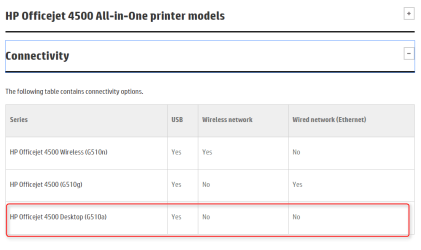
Is there any other method to connect this printer to the computer? We do have a router if that means anything - I'd seen other places where it is mentioned that I can connect a printer via ethernet cable.
 

My Computer

Computer type
Laptop
OS
Windows 7 home premium 64 bit
CPU
AMD K10
Motherboard
Hewlett-Packard 1444 (Socket S1G4)
Memory
3.00GB Dual-Channel DDR3 @ 532MHz
Graphics Card(s)
ATI AMD M880G with ATI Mobility Radeon HD 4250 (HP)
Sound Card
Realtek
Screen Resolution
1366 x 768
Hard Drives
465GB Western Digital
Antivirus
MSE
Hello mate I can find this for the driver HP Software and Driver Downloads for HP Printers, Laptops, Desktops and More | HP® Customer Support and I am wondering if the printer is wifi capable??

Now having said that there have been so many people who have gone to 10 come back and ended up with all sorts of issues. Personally I think it is because one clean installs 7 over the upgrade or whatever it is expected to go no problems and I am of the opinion that 10 leaves remnants behind that cause issues.
Both times I have tried 10 I have wiped the drive before doing a clean install and in my mind the only way to rid the drive of 10, and I have no such problems at all.

I stand to be corrected on the 10 remnants statement of course and probably will be.
 

My Computer

Computer type
PC/Desktop
Computer Manufacturer/Model Number
Own build (new) Desk1 / Asus ROG Win 7 / Desk2 1st build
OS
Desk1 7 Home Prem / Desk2 10 Pro / Main lap Asus ROG 10 Pro 2 laptop Toshiba 7 Pro Asus P2520 7 & 10
CPU
Desk1 i5 3750K / Laptop i7 GTX 860M / Desk2 i5 2500
Motherboard
Desk1 Asus P877-V / Desk2 Gigabyte H67 UD3H / Laptop ?
Memory
Desk1 8GB (1866) / Desk2 16GB (1333) / Laptop 8Gb DDR3
Graphics Card(s)
Desk 1& 2NVidia GTX 650 & Laptops on board Intel
Sound Card
Desk 1 & 2 -XONAR DG Realtek High Def audio Laptop
Monitor(s) Displays
Desk 1 Benq HD 2450 / Desk2 Philips 24" / Laptop 17.5"
Screen Resolution
1920x1080 D1 & D2 & Laptop 1
Hard Drives
Desk1 Samsung 120GB 830 SSD
Asus ROG 256GB 850 Pro SSD
Desk2 Samsung 840 256 SSD
Toshiba 120GB EVO
PSU
Desk 1 Corsair HX 1050/ Laptop ? / Desk 2 Corsair HX 650
Case
Desk 1 Cooler HAF XM ? Toshiba laptop / Desk2 Coolermaster
Cooling
Fans on all Desk1 -2 Desk2 - all Coolermasters 5 Laptop ?
Keyboard
Desk 1 MS Sidewinder X6 Desk 2 MS Sidewinder X 4
Mouse
Desk 1&2 - Gigabyte MS 900 gamer - laptop - Logitec wireless
Internet Speed
ADSL2+
Other Info
One other Desktop (tester) and spare Toshba laptop both with SSD's
Running Kaspersky 2016 ISS on all machines config'd identically
Logitec audio stereo systems on each machine (x3)
Canon MG5250MFC
Router/modem TP-Link running WPA2SK
We were originally using this printer (an HP 4500 G510a-f) with a wired connection to a Windows 7 Home Premium 64 bit desktop and it worked perfectly. After we upgraded to Windows 10 we eventually noticed that the scanner was not working as well as before - there was no longer an icon on the desktop that would easily let us scan. The scanner problem was the final straw that made us go back to Windows 7. Unfortunately, we'd lingered past the 30 day mark so we had to reinstall Windows 7 Home Premium. Whether this matters or not, we had only a 32 bit Windows 7 HomeP disk, but the install and the product code validation went fine.

Now we want to reinstall the printer software. For some inane reason, our printer doesn't display the full model name anywhere that I can see, but we used HP's detector and were informed that it's an HP 4500 G510a-f. I didn't see any specific designation on the software page for 32 bit vs 64 bit Home Premium, so we downloaded the full install package and began the install.

It stops me every time on the page where it wants me to connect the printer cable to the PC. I've now used 4 different printer cables and tried each of them with different USB ports, but not a single one EVER lights up the word 'Next'. I've tried skipping that step and then troubleshooting the 'installed' printer (it has a yellow triangle on it). Troubleshooting tells me that the problem is a lack of a driver, and then it prompts me to 'Apply this fix'. It never finds a driver.

Is there any other method to connect this printer to the computer? We do have a router if that means anything - I'd seen other places where it is mentioned that I can connect a printer via ethernet cable.

Try turning the printer on and off again whilst it's plugged in, during the installation, might be enough to light up the "next" button.
 

My Computer

Computer type
Laptop
Computer Manufacturer/Model Number
Medion
OS
Windows 10 x64
CPU
Intel i5 4210M
Motherboard
N/A
Memory
6GB DDRIII
Graphics Card(s)
Intel HD4600/Nvidia GeForce 825M
Monitor(s) Displays
15.6"
Screen Resolution
1366x768
Hard Drives
Samsung EVO 850 500GB
PSU
N/A
Case
N/A
Cooling
N/A
Keyboard
N/A
Mouse
N/A
Internet Speed
13Mbps (actual)
Antivirus
N/A
Browser
Firefox ;)
Then again, there might not be any Windows 10 drivers/software for your scanner, let us know how it goes.
 

My Computer

Computer type
PC/Desktop
Computer Manufacturer/Model Number
Skylake Special #666
OS
Windows 10 Pro x64
CPU
Intel Core i7 6700K
Motherboard
Asus Sabertooth Z170 Mark 1
Memory
GSkill TridentZ RGB 16GB 3600 16-16-16-36
Graphics Card(s)
EVGA GTX 980 Ti SC x2
Sound Card
Realtek High Definition
Monitor(s) Displays
AOC G2460PG
Screen Resolution
1920 x 1080 144Hz
Hard Drives
Samsung 860 Pro 256GB, Seagate Barracuda 4TB x2
PSU
EVGA 1000 P2, EVGA White Custom Braided Cables
Case
Corsair Vengeance C70 Gunmetal Black
Cooling
Corsair H100i v2, Corsair ML120 x2, Thermal Grizzly Kryonaut
Keyboard
Logitech G910 Orion Spectrum
Mouse
Logitech G700s
Internet Speed
Verizon Fios Quantum Gateway 75/75
Antivirus
Windows Defender, Malwarebytes Free 3.8.3
Browser
Chrome
Other Info
Corsair SP120 x4, LG Blu-ray Drive, Durabrand HT-395 100 Watt Dolby Digital Amp, Corsair H2100 Wireless 7.1 Headset
Then again, there might not be any Windows 10 drivers/software for your scanner
Good point did occur to me but unless I got it wrong it worked in 10 yet not when the OP came back to 7 where it had been working before. Now that smacks of 10 "interference":huh:
 

My Computer

Computer type
PC/Desktop
Computer Manufacturer/Model Number
Own build (new) Desk1 / Asus ROG Win 7 / Desk2 1st build
OS
Desk1 7 Home Prem / Desk2 10 Pro / Main lap Asus ROG 10 Pro 2 laptop Toshiba 7 Pro Asus P2520 7 & 10
CPU
Desk1 i5 3750K / Laptop i7 GTX 860M / Desk2 i5 2500
Motherboard
Desk1 Asus P877-V / Desk2 Gigabyte H67 UD3H / Laptop ?
Memory
Desk1 8GB (1866) / Desk2 16GB (1333) / Laptop 8Gb DDR3
Graphics Card(s)
Desk 1& 2NVidia GTX 650 & Laptops on board Intel
Sound Card
Desk 1 & 2 -XONAR DG Realtek High Def audio Laptop
Monitor(s) Displays
Desk 1 Benq HD 2450 / Desk2 Philips 24" / Laptop 17.5"
Screen Resolution
1920x1080 D1 & D2 & Laptop 1
Hard Drives
Desk1 Samsung 120GB 830 SSD
Asus ROG 256GB 850 Pro SSD
Desk2 Samsung 840 256 SSD
Toshiba 120GB EVO
PSU
Desk 1 Corsair HX 1050/ Laptop ? / Desk 2 Corsair HX 650
Case
Desk 1 Cooler HAF XM ? Toshiba laptop / Desk2 Coolermaster
Cooling
Fans on all Desk1 -2 Desk2 - all Coolermasters 5 Laptop ?
Keyboard
Desk 1 MS Sidewinder X6 Desk 2 MS Sidewinder X 4
Mouse
Desk 1&2 - Gigabyte MS 900 gamer - laptop - Logitec wireless
Internet Speed
ADSL2+
Other Info
One other Desktop (tester) and spare Toshba laptop both with SSD's
Running Kaspersky 2016 ISS on all machines config'd identically
Logitec audio stereo systems on each machine (x3)
Canon MG5250MFC
Router/modem TP-Link running WPA2SK
I just gotta ask, Why did you update, ( I`m not gonna say upgrade ) it to 10 ???
 

My Computer

Computer type
PC/Desktop
Computer Manufacturer/Model Number
Skylake Special #666
OS
Windows 10 Pro x64
CPU
Intel Core i7 6700K
Motherboard
Asus Sabertooth Z170 Mark 1
Memory
GSkill TridentZ RGB 16GB 3600 16-16-16-36
Graphics Card(s)
EVGA GTX 980 Ti SC x2
Sound Card
Realtek High Definition
Monitor(s) Displays
AOC G2460PG
Screen Resolution
1920 x 1080 144Hz
Hard Drives
Samsung 860 Pro 256GB, Seagate Barracuda 4TB x2
PSU
EVGA 1000 P2, EVGA White Custom Braided Cables
Case
Corsair Vengeance C70 Gunmetal Black
Cooling
Corsair H100i v2, Corsair ML120 x2, Thermal Grizzly Kryonaut
Keyboard
Logitech G910 Orion Spectrum
Mouse
Logitech G700s
Internet Speed
Verizon Fios Quantum Gateway 75/75
Antivirus
Windows Defender, Malwarebytes Free 3.8.3
Browser
Chrome
Other Info
Corsair SP120 x4, LG Blu-ray Drive, Durabrand HT-395 100 Watt Dolby Digital Amp, Corsair H2100 Wireless 7.1 Headset
I'm answering these in the order in which they were posted...
If you are able to take your computer through RD. Then Download the software from hp.com in to your office computer and save it on the desktop. Then tried to insall the software and u will get the connecting option then where u can select install the software without connecting the printer and let me know if u have any problem.
  • I don't know what RD is
  • As I said in my post I did download the full installation software from HP. That is what I am running when I get the screen that wants me to connect the printer to the computer. Once I connect it, nothing happens. A button on that page is supposed to go from 'grayed-out' to clickable when the printer is connected, but it never happens, despite using 4 different printer cables.
 

My Computer

Computer type
Laptop
OS
Windows 7 home premium 64 bit
CPU
AMD K10
Motherboard
Hewlett-Packard 1444 (Socket S1G4)
Memory
3.00GB Dual-Channel DDR3 @ 532MHz
Graphics Card(s)
ATI AMD M880G with ATI Mobility Radeon HD 4250 (HP)
Sound Card
Realtek
Screen Resolution
1366 x 768
Hard Drives
465GB Western Digital
Antivirus
MSE
Hello mate I can find this for the driver HP Software and Driver Downloads for HP Printers, Laptops, Desktops and More | HP® Customer Support and I am wondering if the printer is wifi capable??
The printer has wireless capability, however it is not being used - the Lenovo tower that is now running Windows 7 Home Premium 32 bit does not have a built-in wireless adapter so the printer has always been used with a printer cable USB connection. However we do have a Windows 7 laptop and, ideally we'd like to have that laptop use the printer wirelessly.

The link you provided is the same webpage that I went to download the software - I chose the HP Officejet Full Feature Software and Driver. That's the software I was running when I get the fateful message to connect the cable.
Now having said that there have been so many people who have gone to 10 come back and ended up with all sorts of issues. Personally I think it is because one clean installs 7 over the upgrade or whatever it is expected to go no problems and I am of the opinion that 10 leaves remnants behind that cause issues.
Both times I have tried 10 I have wiped the drive before doing a clean install and in my mind the only way to rid the drive of 10, and I have no such problems at all.

I stand to be corrected on the 10 remnants statement of course and probably will be.
Well, I didn't wipe the drive completely, but I did delete the partition where Windows 10 was stored, then format that partition before installing W7. And I actually did that twice because the first time I used a 64 bit Windows 7 Professional CD. The product key was rejected so I had to re-delete and re-reformat before using the Windows Home Premium 32 bit disk.
 

My Computer

Computer type
Laptop
OS
Windows 7 home premium 64 bit
CPU
AMD K10
Motherboard
Hewlett-Packard 1444 (Socket S1G4)
Memory
3.00GB Dual-Channel DDR3 @ 532MHz
Graphics Card(s)
ATI AMD M880G with ATI Mobility Radeon HD 4250 (HP)
Sound Card
Realtek
Screen Resolution
1366 x 768
Hard Drives
465GB Western Digital
Antivirus
MSE
When doing major upgrades, or minor ones for that fact, it is major to do a full system image backup
first. I tried W10 3 times but kept going back to restore W7 image and had no problems at all.
In all my years I still can not seem to emphasize enough the importance of a full clone or image
backup prior doing anything or at least weekly just in case. :cool:
 

My Computer

Computer type
Laptop
OS
Windows 7
Try turning the printer on and off again whilst it's plugged in, during the installation, might be enough to light up the "next" button.
I'd left the printer/PC alone and connected overnight, and when I checked it today there was a diagnostic message from HP that took me through the automated step of uninstalling the printer, followed by running Windows Updates. Yesterday there was only one optional update available but today there's 22 important ones. Go figure! Anyway it's now downloading and (hopefully) installing those updates. We'll see where we go from there....
 

My Computer

Computer type
Laptop
OS
Windows 7 home premium 64 bit
CPU
AMD K10
Motherboard
Hewlett-Packard 1444 (Socket S1G4)
Memory
3.00GB Dual-Channel DDR3 @ 532MHz
Graphics Card(s)
ATI AMD M880G with ATI Mobility Radeon HD 4250 (HP)
Sound Card
Realtek
Screen Resolution
1366 x 768
Hard Drives
465GB Western Digital
Antivirus
MSE
Then again, there might not be any Windows 10 drivers/software for your scanner, let us know how it goes.
Well, that's what I was thinking as well, and is one of the things that prompted the return to W7
 

My Computer

Computer type
Laptop
OS
Windows 7 home premium 64 bit
CPU
AMD K10
Motherboard
Hewlett-Packard 1444 (Socket S1G4)
Memory
3.00GB Dual-Channel DDR3 @ 532MHz
Graphics Card(s)
ATI AMD M880G with ATI Mobility Radeon HD 4250 (HP)
Sound Card
Realtek
Screen Resolution
1366 x 768
Hard Drives
465GB Western Digital
Antivirus
MSE
Then again, there might not be any Windows 10 drivers/software for your scanner
Good point did occur to me but unless I got it wrong it worked in 10 yet not when the OP came back to 7 where it had been working before. Now that smacks of 10 "interference":huh:
Maybe I explained it badly...
  • When running Windows 7 64 bit Home Premium the printer and scanner worked flawlessly using an USB cable
  • After we upgraded to Windows 10, the printer itself still worked fine, but the scanner did not, a condition we did not notice until the time for rollback had come and gone
  • Now, after an install of Windows 7 32 bit Home Premium, the printer seems to not recognize it when, as part of the install, we connect the USB cable to the computer


My Computer

Computer type
Laptop
OS
Windows 7 home premium 64 bit
CPU
AMD K10
Motherboard
Hewlett-Packard 1444 (Socket S1G4)
Memory
3.00GB Dual-Channel DDR3 @ 532MHz
Graphics Card(s)
ATI AMD M880G with ATI Mobility Radeon HD 4250 (HP)
Sound Card
Realtek
Screen Resolution
1366 x 768
Hard Drives
465GB Western Digital
Antivirus
MSE
I just gotta ask, Why did you update, ( I`m not gonna say upgrade ) it to 10 ???
I'm blameless on this one. My wife, knowing that the quote upgrade unquote was free, and getting tired of the incessant Microsoft nags updated on her own. Which, of course leaves me (and this forum) to deal with the fallout. I've already marked threads about this issue as 'solved' on the Windows 10 forum, and on the Installation & Setup subforum here. Hopefully, those threads do not need to be reopened since I have managed to get Windows 7 successfully installed.
 

My Computer

Computer type
Laptop
OS
Windows 7 home premium 64 bit
CPU
AMD K10
Motherboard
Hewlett-Packard 1444 (Socket S1G4)
Memory
3.00GB Dual-Channel DDR3 @ 532MHz
Graphics Card(s)
ATI AMD M880G with ATI Mobility Radeon HD 4250 (HP)
Sound Card
Realtek
Screen Resolution
1366 x 768
Hard Drives
465GB Western Digital
Antivirus
MSE
When doing major upgrades, or minor ones for that fact, it is major to do a full system image backup
first. I tried W10 3 times but kept going back to restore W7 image and had no problems at all.
In all my years I still can not seem to emphasize enough the importance of a full clone or image
backup prior doing anything or at least weekly just in case. :cool:
That, of course is only helpful going forward. My wife upgraded on her own without consulting me, and initially seemed quite proud that she'd managed to do it on her own. She and I have already had the conversation about what a mistake it was.
 

My Computer

Computer type
Laptop
OS
Windows 7 home premium 64 bit
CPU
AMD K10
Motherboard
Hewlett-Packard 1444 (Socket S1G4)
Memory
3.00GB Dual-Channel DDR3 @ 532MHz
Graphics Card(s)
ATI AMD M880G with ATI Mobility Radeon HD 4250 (HP)
Sound Card
Realtek
Screen Resolution
1366 x 768
Hard Drives
465GB Western Digital
Antivirus
MSE
I still think you need to wipe that drive - sorry but in my mind it is the only way to make sure you have cleared the drive completely and securely.

I agree with Baddog that one should always back up before doing such moves and I personally clone a drive then use that clone to upgrade to whatever if things go pear shaped or I just don't like it the original drive is swapped back in.

The nags boweasel mate could have been hidden and if they come back as they surely will unless you are very vigilant with the wretched updates you need to go to the 10 forum and get hold of the tutorials that list such things, As a matter of fact I automatically set updates to let me choose and also install the disable upgarde batch file to all of my machines - Upgrade to Windows 10 Update - Enable or Disable in Windows 7 or 8.1 - Windows 10 Forums

But this isn't solving the problem with the printer eh? Is there any chance of getting a wifi adaptor and trying that because that link I sent re the driver for the printer should have fixed it good and proper.
 

My Computer

Computer type
PC/Desktop
Computer Manufacturer/Model Number
Own build (new) Desk1 / Asus ROG Win 7 / Desk2 1st build
OS
Desk1 7 Home Prem / Desk2 10 Pro / Main lap Asus ROG 10 Pro 2 laptop Toshiba 7 Pro Asus P2520 7 & 10
CPU
Desk1 i5 3750K / Laptop i7 GTX 860M / Desk2 i5 2500
Motherboard
Desk1 Asus P877-V / Desk2 Gigabyte H67 UD3H / Laptop ?
Memory
Desk1 8GB (1866) / Desk2 16GB (1333) / Laptop 8Gb DDR3
Graphics Card(s)
Desk 1& 2NVidia GTX 650 & Laptops on board Intel
Sound Card
Desk 1 & 2 -XONAR DG Realtek High Def audio Laptop
Monitor(s) Displays
Desk 1 Benq HD 2450 / Desk2 Philips 24" / Laptop 17.5"
Screen Resolution
1920x1080 D1 & D2 & Laptop 1
Hard Drives
Desk1 Samsung 120GB 830 SSD
Asus ROG 256GB 850 Pro SSD
Desk2 Samsung 840 256 SSD
Toshiba 120GB EVO
PSU
Desk 1 Corsair HX 1050/ Laptop ? / Desk 2 Corsair HX 650
Case
Desk 1 Cooler HAF XM ? Toshiba laptop / Desk2 Coolermaster
Cooling
Fans on all Desk1 -2 Desk2 - all Coolermasters 5 Laptop ?
Keyboard
Desk 1 MS Sidewinder X6 Desk 2 MS Sidewinder X 4
Mouse
Desk 1&2 - Gigabyte MS 900 gamer - laptop - Logitec wireless
Internet Speed
ADSL2+
Other Info
One other Desktop (tester) and spare Toshba laptop both with SSD's
Running Kaspersky 2016 ISS on all machines config'd identically
Logitec audio stereo systems on each machine (x3)
Canon MG5250MFC
Router/modem TP-Link running WPA2SK
I still think you need to wipe that drive - sorry but in my mind it is the only way to make sure you have cleared the drive completely and securely.
As horrible as the thought is, you might be right. Or not. I refuse to believe that the printer cable port on the back of the HP 4500 decided to malfunction at exactly the same time that I reinstalled Windows 7. I'm not a big believer in coincidence. So I'm left with the thought that Windows 10 did something to the printer, or to the computer. Since I reformatted the HDD, my belief is that 10 screwed up the printer somehow that left the printer cable port dysfunctional. But I allow that my failure to do a total wipe of the drive may have compromised something on the reinstall of 7. I dunno. The prospect of reinstalling all those drivers and updates is daunting. But the prospect of buying another printer and finding out that I have the same connection problem is equally scary.
Is there any chance of getting a wifi adaptor and trying that because that link I sent re the driver for the printer should have fixed it good and proper.
Unless I'm mistaken, even installing a wireless printer requires at least some initial wired connection. I'm assuming that it's necessary for the driver, otherwise why would the troubleshooting diagnostics tell me that I'm missing the printer driver? That issue wouldn't go away simply by purchasing a wireless adapter. If it would, then I could simply install the printer wirelessly to our laptop, then set it up as a network printer, making it accessible to both computers.,
 

My Computer

Computer type
Laptop
OS
Windows 7 home premium 64 bit
CPU
AMD K10
Motherboard
Hewlett-Packard 1444 (Socket S1G4)
Memory
3.00GB Dual-Channel DDR3 @ 532MHz
Graphics Card(s)
ATI AMD M880G with ATI Mobility Radeon HD 4250 (HP)
Sound Card
Realtek
Screen Resolution
1366 x 768
Hard Drives
465GB Western Digital
Antivirus
MSE
even installing a wireless printer requires at least some initial wired connection

Well have set up a few now and just recently too and never needed the cable for that - all you need are the drivers for the printer - and the wifi card if you purchase one. It could be different in your case but I am thinking that would be most unusual.
The driver for the printer has to be installed of course and it would include any software for a wifi connection and the printers I installed with wifi were HP's.

In the manual http://h10032.www1.hp.com/ctg/Manual/c02051571 around page 115 to 125 there are solutions for any firewall and network issues - anyway the wifi is just an option.
 

My Computer

Computer type
PC/Desktop
Computer Manufacturer/Model Number
Own build (new) Desk1 / Asus ROG Win 7 / Desk2 1st build
OS
Desk1 7 Home Prem / Desk2 10 Pro / Main lap Asus ROG 10 Pro 2 laptop Toshiba 7 Pro Asus P2520 7 & 10
CPU
Desk1 i5 3750K / Laptop i7 GTX 860M / Desk2 i5 2500
Motherboard
Desk1 Asus P877-V / Desk2 Gigabyte H67 UD3H / Laptop ?
Memory
Desk1 8GB (1866) / Desk2 16GB (1333) / Laptop 8Gb DDR3
Graphics Card(s)
Desk 1& 2NVidia GTX 650 & Laptops on board Intel
Sound Card
Desk 1 & 2 -XONAR DG Realtek High Def audio Laptop
Monitor(s) Displays
Desk 1 Benq HD 2450 / Desk2 Philips 24" / Laptop 17.5"
Screen Resolution
1920x1080 D1 & D2 & Laptop 1
Hard Drives
Desk1 Samsung 120GB 830 SSD
Asus ROG 256GB 850 Pro SSD
Desk2 Samsung 840 256 SSD
Toshiba 120GB EVO
PSU
Desk 1 Corsair HX 1050/ Laptop ? / Desk 2 Corsair HX 650
Case
Desk 1 Cooler HAF XM ? Toshiba laptop / Desk2 Coolermaster
Cooling
Fans on all Desk1 -2 Desk2 - all Coolermasters 5 Laptop ?
Keyboard
Desk 1 MS Sidewinder X6 Desk 2 MS Sidewinder X 4
Mouse
Desk 1&2 - Gigabyte MS 900 gamer - laptop - Logitec wireless
Internet Speed
ADSL2+
Other Info
One other Desktop (tester) and spare Toshba laptop both with SSD's
Running Kaspersky 2016 ISS on all machines config'd identically
Logitec audio stereo systems on each machine (x3)
Canon MG5250MFC
Router/modem TP-Link running WPA2SK
even installing a wireless printer requires at least some initial wired connection

Well have set up a few now and just recently too and never needed the cable for that - all you need are the drivers for the printer - and the wifi card if you purchase one. It could be different in your case but I am thinking that would be most unusual.
The driver for the printer has to be installed of course and it would include any software for a wifi connection and the printers I installed with wifi were HP's.
Apparently with HP printers you need the USB cable to get the driver. I downloaded the basic software (meaning driver only) for the HP 4500 to the laptop I'm using now and started the install. I was never prompted to choose whether it would be a wired or wireless setup - it just told me at some point to plug in the USB cable. After I did, just like with the Lenovo tower, nothing happened. The install did not continue. The word 'Next' never became un-grayed. When I checked the box to skip that step, the printer was installed on the laptop, but it was non-functional, because it had no driver.
 

My Computer

Computer type
Laptop
OS
Windows 7 home premium 64 bit
CPU
AMD K10
Motherboard
Hewlett-Packard 1444 (Socket S1G4)
Memory
3.00GB Dual-Channel DDR3 @ 532MHz
Graphics Card(s)
ATI AMD M880G with ATI Mobility Radeon HD 4250 (HP)
Sound Card
Realtek
Screen Resolution
1366 x 768
Hard Drives
465GB Western Digital
Antivirus
MSE
Apparently with HP printers you need the USB cable to get the driver

Well I don't know about other places but I set up both my partners and my laptops without having to use a cable - maybe it is different out here. The drivers I just downloaded from HP on the net after initially using the DVD that came with the printer - we are using a HP 6700 Officejet Pro all in one and so far it has worked flawlessly. The software disk was well out of date of course which is why I went to the net.
 

My Computer

Computer type
PC/Desktop
Computer Manufacturer/Model Number
Own build (new) Desk1 / Asus ROG Win 7 / Desk2 1st build
OS
Desk1 7 Home Prem / Desk2 10 Pro / Main lap Asus ROG 10 Pro 2 laptop Toshiba 7 Pro Asus P2520 7 & 10
CPU
Desk1 i5 3750K / Laptop i7 GTX 860M / Desk2 i5 2500
Motherboard
Desk1 Asus P877-V / Desk2 Gigabyte H67 UD3H / Laptop ?
Memory
Desk1 8GB (1866) / Desk2 16GB (1333) / Laptop 8Gb DDR3
Graphics Card(s)
Desk 1& 2NVidia GTX 650 & Laptops on board Intel
Sound Card
Desk 1 & 2 -XONAR DG Realtek High Def audio Laptop
Monitor(s) Displays
Desk 1 Benq HD 2450 / Desk2 Philips 24" / Laptop 17.5"
Screen Resolution
1920x1080 D1 & D2 & Laptop 1
Hard Drives
Desk1 Samsung 120GB 830 SSD
Asus ROG 256GB 850 Pro SSD
Desk2 Samsung 840 256 SSD
Toshiba 120GB EVO
PSU
Desk 1 Corsair HX 1050/ Laptop ? / Desk 2 Corsair HX 650
Case
Desk 1 Cooler HAF XM ? Toshiba laptop / Desk2 Coolermaster
Cooling
Fans on all Desk1 -2 Desk2 - all Coolermasters 5 Laptop ?
Keyboard
Desk 1 MS Sidewinder X6 Desk 2 MS Sidewinder X 4
Mouse
Desk 1&2 - Gigabyte MS 900 gamer - laptop - Logitec wireless
Internet Speed
ADSL2+
Other Info
One other Desktop (tester) and spare Toshba laptop both with SSD's
Running Kaspersky 2016 ISS on all machines config'd identically
Logitec audio stereo systems on each machine (x3)
Canon MG5250MFC
Router/modem TP-Link running WPA2SK

My Computer

Computer type
PC/Desktop
Computer Manufacturer/Model Number
Self Built
OS
Win 10 Pro x64
CPU
Intel I5-2500K @3.3GHz
Motherboard
Asrock P67 Extreme4
Memory
16GB G.Skill Ripjaws X (4x4GB)
Graphics Card(s)
EVGA GeForce 750 Ti SC 2GB
Sound Card
ASUS Xonar DG 5.1 Channels 24-bit 96KHz PCI Interface Sound
Monitor(s) Displays
auria eq2367
Screen Resolution
1920 x 1080
Hard Drives
250GB Samsung 850 EVO SSD
1TB WD Blue
1TB Hitachi
PSU
SeaSonic X 650W 80 Plus Gold
Case
Corsair Obsidian 750D
Cooling
Corsair H60, Three 140mm case fans
Keyboard
Logitech Wireless Keyboard K520
Mouse
Logitech Wireless Mouse M310
Internet Speed
Wave Broadband ~ 100 dn 5 up
Antivirus
Windows Defender, Malwarebytes Premium
Browser
Edge, IE11, Chrome
Other Info
Laptop specs: HP g7-1365dx /
CPU: AMD A6-3420M APU with Radeon(tm) HD Graphics /
RAM: Crucial 8Gb (2x4Gb) /
SSD: Crucial M4-CT128M4SSD2 ATA Device/ FW 000F /
GFX: AMD Radeon HD 6520G /
OS: Windows 10 Pro x64
Back
Top