Last round of updates stuff up again

mjf

New member
Guru
Gold Member
VIP
Local time
5:12 PM
Messages
5,968
Location
Australia
I've just installed the latest (security) important updates. SFC fails unable to correct corrupt files. SFC before updates and was fine. This has happened before and it was a MS KB stuff up. This is why I always make a system image before installing updates!!


Update:
Restored system image made the day before I installed the updates which all installed with "no problems". No system file corruption reported by sfc /scannow.
 
Last edited:

My Computer My Computer

At a glance

Windows 7x64 Home Premium SP1Intel i7 2600kG.Skill Ripjaws (DDR3-1600) 2x4GBNvidia GeForce GTS 450; Intel HD Graphics 300...
Computer type
PC/Desktop
Computer Manufacturer/Model Number
Own build
OS
Windows 7x64 Home Premium SP1
CPU
Intel i7 2600k
Motherboard
ASUS P8Z68 Deluxe
Memory
G.Skill Ripjaws (DDR3-1600) 2x4GB
Graphics Card(s)
Nvidia GeForce GTS 450; Intel HD Graphics 3000(GT2+)
Monitor(s) Displays
Dell Ultrasharp IPS panel U2311H, Samsung SyncMaster P2350
Screen Resolution
1920x1080
Hard Drives
Samsung 850 Pro SSD 256GB, Samsung SSD 840 120GB, Seagates 1TB Barracuda ST31000528AS x2
PSU
Seasonic M12II 520W
Case
Lian Li Lancool PC-K60
Cooling
Case: 1x120mm, 3x140mm CPU: Hyper 212+
Keyboard
Logitech MK520 (wireless)
Mouse
Logitech MK520
Internet Speed
6-7 Mbps
Antivirus
Norton Security Premium, Malwarebytes on 2 (MSE on 3rd PC)
Browser
FireFox
Other Info
Audio: Logitech Z523 2.1
Did you figure out which KB caused the problem?
 

My Computer My Computer

At a glance

Windows 10 Pro. 64/ version 1709 Windows 7 Pr...Intel i7-6800K @ 4.3Corsair Platinum 16 gig @2400EVGA GTX 1070 OC
Computer type
PC/Desktop
Computer Manufacturer/Model Number
Home made Desktop
OS
Windows 10 Pro. 64/ version 1709 Windows 7 Pro/64
CPU
Intel i7-6800K @ 4.3
Motherboard
ASUS X-99 Deluxe II
Memory
Corsair Platinum 16 gig @2400
Graphics Card(s)
EVGA GTX 1070 OC
Monitor(s) Displays
Asus 27" LED LCD/VE278Q
Screen Resolution
1920-1080 or 1280-720 HDMI
Hard Drives
INTEL SSD 730-240 Gb Sata 3.0/
PSU
EVGA Platium 1200W
Case
Phanteks Luxe Tempered Glass 8 fans/ one radiator
Cooling
XSPC/ Water Cooled CPU
Keyboard
Das 4 Professional
Mouse
Logitech M705/MX Anywhere 2-S
Internet Speed
100 mbits
Antivirus
Microsoft Security Essentials/ Malwarebytes Premium 3.0/ SAS
Browser
I.E. 11 default/Firefox/ ISP Time Warner Cable/Spectrum
Other Info
LG BluRay Burner/
Sound system-KLipsch-THX/
Icy Dock ssd Hot Swap bays.
Did you figure out which KB caused the problem?
No. Last time it took me a long time with trial and error plus multiple image restores to identify the one problem KB. I'm not going to do this but there may be a more efficient approach and the rogue KB will be identified.

Those who have installed the latest important security updates may like to do an sfc /scannow. From memory the last time the problem affected many but not all people.

This could be a buggy update or cynics could suspect that this is a mechanism to move users to Windows 10. There appears to be a lot of pressure to move Windows 7 (and 8.1) users to Windows 10. Well there is an EULA MS expect users to adhere to and users should expect the same commitment by MS to the EULA.
 

My Computer My Computer

At a glance

Windows 7x64 Home Premium SP1Intel i7 2600kG.Skill Ripjaws (DDR3-1600) 2x4GBNvidia GeForce GTS 450; Intel HD Graphics 300...
Computer type
PC/Desktop
Computer Manufacturer/Model Number
Own build
OS
Windows 7x64 Home Premium SP1
CPU
Intel i7 2600k
Motherboard
ASUS P8Z68 Deluxe
Memory
G.Skill Ripjaws (DDR3-1600) 2x4GB
Graphics Card(s)
Nvidia GeForce GTS 450; Intel HD Graphics 3000(GT2+)
Monitor(s) Displays
Dell Ultrasharp IPS panel U2311H, Samsung SyncMaster P2350
Screen Resolution
1920x1080
Hard Drives
Samsung 850 Pro SSD 256GB, Samsung SSD 840 120GB, Seagates 1TB Barracuda ST31000528AS x2
PSU
Seasonic M12II 520W
Case
Lian Li Lancool PC-K60
Cooling
Case: 1x120mm, 3x140mm CPU: Hyper 212+
Keyboard
Logitech MK520 (wireless)
Mouse
Logitech MK520
Internet Speed
6-7 Mbps
Antivirus
Norton Security Premium, Malwarebytes on 2 (MSE on 3rd PC)
Browser
FireFox
Other Info
Audio: Logitech Z523 2.1
I installed all the Important Updates on two computers and as always did a sfc /scannow.
No problems were found on either computer.
One Home Premium and one Professional.

I see you use Norton and MSE. Did you have problems on the Norton and MSE computers?
 

My Computer My Computer

At a glance

Windows 10 Pro. 64/ version 1709 Windows 7 Pr...Intel i7-6800K @ 4.3Corsair Platinum 16 gig @2400EVGA GTX 1070 OC
Computer type
PC/Desktop
Computer Manufacturer/Model Number
Home made Desktop
OS
Windows 10 Pro. 64/ version 1709 Windows 7 Pro/64
CPU
Intel i7-6800K @ 4.3
Motherboard
ASUS X-99 Deluxe II
Memory
Corsair Platinum 16 gig @2400
Graphics Card(s)
EVGA GTX 1070 OC
Monitor(s) Displays
Asus 27" LED LCD/VE278Q
Screen Resolution
1920-1080 or 1280-720 HDMI
Hard Drives
INTEL SSD 730-240 Gb Sata 3.0/
PSU
EVGA Platium 1200W
Case
Phanteks Luxe Tempered Glass 8 fans/ one radiator
Cooling
XSPC/ Water Cooled CPU
Keyboard
Das 4 Professional
Mouse
Logitech M705/MX Anywhere 2-S
Internet Speed
100 mbits
Antivirus
Microsoft Security Essentials/ Malwarebytes Premium 3.0/ SAS
Browser
I.E. 11 default/Firefox/ ISP Time Warner Cable/Spectrum
Other Info
LG BluRay Burner/
Sound system-KLipsch-THX/
Icy Dock ssd Hot Swap bays.
The MSE is on a PC which is very seldomly connected to the internet. I have 2 PCs that are very much internet connected and they use Norton and MBAM (free version).

The last time I had this problem I was also using Norton and the KB problem eventually noted by many.
I suppose it could be an incompatibility issue between MS update and Norton. Like Norton or not a large number of people use it.
 

My Computer My Computer

At a glance

Windows 7x64 Home Premium SP1Intel i7 2600kG.Skill Ripjaws (DDR3-1600) 2x4GBNvidia GeForce GTS 450; Intel HD Graphics 300...
Computer type
PC/Desktop
Computer Manufacturer/Model Number
Own build
OS
Windows 7x64 Home Premium SP1
CPU
Intel i7 2600k
Motherboard
ASUS P8Z68 Deluxe
Memory
G.Skill Ripjaws (DDR3-1600) 2x4GB
Graphics Card(s)
Nvidia GeForce GTS 450; Intel HD Graphics 3000(GT2+)
Monitor(s) Displays
Dell Ultrasharp IPS panel U2311H, Samsung SyncMaster P2350
Screen Resolution
1920x1080
Hard Drives
Samsung 850 Pro SSD 256GB, Samsung SSD 840 120GB, Seagates 1TB Barracuda ST31000528AS x2
PSU
Seasonic M12II 520W
Case
Lian Li Lancool PC-K60
Cooling
Case: 1x120mm, 3x140mm CPU: Hyper 212+
Keyboard
Logitech MK520 (wireless)
Mouse
Logitech MK520
Internet Speed
6-7 Mbps
Antivirus
Norton Security Premium, Malwarebytes on 2 (MSE on 3rd PC)
Browser
FireFox
Other Info
Audio: Logitech Z523 2.1
I'm looking at the list of updates now.

The bugged one may be KB3108664 since it was released before and it was a Windows 10 update, and various people are having issues with it today.
 

My Computer My Computer

At a glance

Windows 7 64bitI5 2300 Sandy Bridge 2.80ghz4gb DDR3 PatriotNvidia GTS 450
Computer type
PC/Desktop
Computer Manufacturer/Model Number
Custom Build
OS
Windows 7 64bit
CPU
I5 2300 Sandy Bridge 2.80ghz
Motherboard
Asus P8P67 LE
Memory
4gb DDR3 Patriot
Graphics Card(s)
Nvidia GTS 450
Sound Card
Realtek Integrated Audio
Screen Resolution
1920x1080
Hard Drives
C: Seagate 500GB (Primary
D: Western Digital Black (Secondary)
Case
Antec Two Hundred
Cooling
1 120MM rear case fan, 1 140mm top of the case fan
Antivirus
Eset 5
Browser
Chrome
I'm looking at the list of updates now.

The bugged one may be KB3108664 since it was released before and it was a Windows 10 update, and various people are having issues with it today.
Not the problem for me at least.
 

My Computer My Computer

At a glance

Windows 7x64 Home Premium SP1Intel i7 2600kG.Skill Ripjaws (DDR3-1600) 2x4GBNvidia GeForce GTS 450; Intel HD Graphics 300...
Computer type
PC/Desktop
Computer Manufacturer/Model Number
Own build
OS
Windows 7x64 Home Premium SP1
CPU
Intel i7 2600k
Motherboard
ASUS P8Z68 Deluxe
Memory
G.Skill Ripjaws (DDR3-1600) 2x4GB
Graphics Card(s)
Nvidia GeForce GTS 450; Intel HD Graphics 3000(GT2+)
Monitor(s) Displays
Dell Ultrasharp IPS panel U2311H, Samsung SyncMaster P2350
Screen Resolution
1920x1080
Hard Drives
Samsung 850 Pro SSD 256GB, Samsung SSD 840 120GB, Seagates 1TB Barracuda ST31000528AS x2
PSU
Seasonic M12II 520W
Case
Lian Li Lancool PC-K60
Cooling
Case: 1x120mm, 3x140mm CPU: Hyper 212+
Keyboard
Logitech MK520 (wireless)
Mouse
Logitech MK520
Internet Speed
6-7 Mbps
Antivirus
Norton Security Premium, Malwarebytes on 2 (MSE on 3rd PC)
Browser
FireFox
Other Info
Audio: Logitech Z523 2.1
I'm looking at the list of updates now.

The bugged one may be KB3108664 since it was released before and it was a Windows 10 update, and various people are having issues with it today.
Not the problem for me at least.

That's because I was wrong, one of the other updates borked SFC scan and I just don't have the patience to test them one by one, so I removed them all and I'm running SFC scan right now to see what happens.

For the record, I do not use Norton for my AV, I use Eset.
 
Last edited:

My Computer My Computer

At a glance

Windows 7 64bitI5 2300 Sandy Bridge 2.80ghz4gb DDR3 PatriotNvidia GTS 450
Computer type
PC/Desktop
Computer Manufacturer/Model Number
Custom Build
OS
Windows 7 64bit
CPU
I5 2300 Sandy Bridge 2.80ghz
Motherboard
Asus P8P67 LE
Memory
4gb DDR3 Patriot
Graphics Card(s)
Nvidia GTS 450
Sound Card
Realtek Integrated Audio
Screen Resolution
1920x1080
Hard Drives
C: Seagate 500GB (Primary
D: Western Digital Black (Secondary)
Case
Antec Two Hundred
Cooling
1 120MM rear case fan, 1 140mm top of the case fan
Antivirus
Eset 5
Browser
Chrome
A likely culprit is KB3121212 (Kernel Update)... it borked Windows Update & SFC in much the same manner, had to do a repair install see my post here.
 

My Computer My Computer

At a glance

Win 10 Pro x64, Win 7 Pro x64Intel Core i7-6700HQ Skylake16gb Crucial DDR4NVIDIA GeForce GTX 960M 2 GB
Computer type
Laptop
Computer Manufacturer/Model Number
MSI PE60 6QE
OS
Win 10 Pro x64, Win 7 Pro x64
CPU
Intel Core i7-6700HQ Skylake
Motherboard
MSI MS-16J5
Memory
16gb Crucial DDR4
Graphics Card(s)
NVIDIA GeForce GTX 960M 2 GB
Screen Resolution
1920 x 1080
Hard Drives
Samsung 850 EVO 250 GB M.2 SSD (MZ-N5E250BW)
HGST 1TB @7200 RPM HTS721010A9E630
Case
Plastic
Keyboard
Got one...
Mouse
Yep, one of those too.
Internet Speed
FIOS 75/75
Antivirus
Defender
Browser
Chrome/FFox/Ex-PLODE-r/(L)Edge
Other Info
Defender, Custom Hosts, uBlock, regular backups w/ Macrium (Free)
A likely culprit is KB3121212 (Kernel Update)... it borked Windows Update & SFC in much the same manner, had to do a repair install see my post here.

I removed all the updates from this weeks batch, rebooted, ran SFC scan and it found errors but fixed all of them, then I rebooted again, ran CCleaner, and then re-installed the IE 11 update and ran SFC again and came up clean, I then rebooted once more and ran SFC twice, and both times it came up clean. And I think the likely culprit is KB3121212 but for the moment, I'm going to avoid all of them except for the IE 11 one which is already installed.

I have no idea what SFC scan fixed the first time, it was probably something KB3121212 corrupted.
 

My Computer My Computer

At a glance

Windows 7 64bitI5 2300 Sandy Bridge 2.80ghz4gb DDR3 PatriotNvidia GTS 450
Computer type
PC/Desktop
Computer Manufacturer/Model Number
Custom Build
OS
Windows 7 64bit
CPU
I5 2300 Sandy Bridge 2.80ghz
Motherboard
Asus P8P67 LE
Memory
4gb DDR3 Patriot
Graphics Card(s)
Nvidia GTS 450
Sound Card
Realtek Integrated Audio
Screen Resolution
1920x1080
Hard Drives
C: Seagate 500GB (Primary
D: Western Digital Black (Secondary)
Case
Antec Two Hundred
Cooling
1 120MM rear case fan, 1 140mm top of the case fan
Antivirus
Eset 5
Browser
Chrome
A likely culprit is KB3121212 (Kernel Update)... it borked Windows Update & SFC in much the same manner, had to do a repair install see my post here.
This isn't the update causing my problem.

The problem for many people is when Windows reports that the updates have been installed correctly they may not be aware that they have system file errors. Eventually when problems occur they will have difficulty knowing what the cause was.
 
Last edited:

My Computer My Computer

At a glance

Windows 7x64 Home Premium SP1Intel i7 2600kG.Skill Ripjaws (DDR3-1600) 2x4GBNvidia GeForce GTS 450; Intel HD Graphics 300...
Computer type
PC/Desktop
Computer Manufacturer/Model Number
Own build
OS
Windows 7x64 Home Premium SP1
CPU
Intel i7 2600k
Motherboard
ASUS P8Z68 Deluxe
Memory
G.Skill Ripjaws (DDR3-1600) 2x4GB
Graphics Card(s)
Nvidia GeForce GTS 450; Intel HD Graphics 3000(GT2+)
Monitor(s) Displays
Dell Ultrasharp IPS panel U2311H, Samsung SyncMaster P2350
Screen Resolution
1920x1080
Hard Drives
Samsung 850 Pro SSD 256GB, Samsung SSD 840 120GB, Seagates 1TB Barracuda ST31000528AS x2
PSU
Seasonic M12II 520W
Case
Lian Li Lancool PC-K60
Cooling
Case: 1x120mm, 3x140mm CPU: Hyper 212+
Keyboard
Logitech MK520 (wireless)
Mouse
Logitech MK520
Internet Speed
6-7 Mbps
Antivirus
Norton Security Premium, Malwarebytes on 2 (MSE on 3rd PC)
Browser
FireFox
Other Info
Audio: Logitech Z523 2.1
update

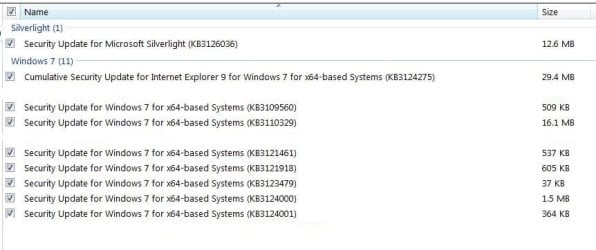
I had a bunch of Office 2007 security updates that produced no problems so the issue is with at least one of these:
Capture.JPG
 
Last edited:

My Computer My Computer

At a glance

Windows 7x64 Home Premium SP1Intel i7 2600kG.Skill Ripjaws (DDR3-1600) 2x4GBNvidia GeForce GTS 450; Intel HD Graphics 300...
Computer type
PC/Desktop
Computer Manufacturer/Model Number
Own build
OS
Windows 7x64 Home Premium SP1
CPU
Intel i7 2600k
Motherboard
ASUS P8Z68 Deluxe
Memory
G.Skill Ripjaws (DDR3-1600) 2x4GB
Graphics Card(s)
Nvidia GeForce GTS 450; Intel HD Graphics 3000(GT2+)
Monitor(s) Displays
Dell Ultrasharp IPS panel U2311H, Samsung SyncMaster P2350
Screen Resolution
1920x1080
Hard Drives
Samsung 850 Pro SSD 256GB, Samsung SSD 840 120GB, Seagates 1TB Barracuda ST31000528AS x2
PSU
Seasonic M12II 520W
Case
Lian Li Lancool PC-K60
Cooling
Case: 1x120mm, 3x140mm CPU: Hyper 212+
Keyboard
Logitech MK520 (wireless)
Mouse
Logitech MK520
Internet Speed
6-7 Mbps
Antivirus
Norton Security Premium, Malwarebytes on 2 (MSE on 3rd PC)
Browser
FireFox
Other Info
Audio: Logitech Z523 2.1
I had a bunch of Office 2007 security updates that produced no problems so the issue is with at least one of these:

SFC Scan is working fine after installing the Malicious Software removal tool update, and while I didn't get the IE 9 update since I use IE 11, I got a very similar update for IE 11 and SFC scan is working after I installed that update as well.

As for the other security updates, installing them one by one and running SFC after each one is installed, I just can't get myself to do it because it doesn't seem to be worth the effort. If it was something big like a new service pack or something it would be worth it, but its just a bunch of vulnerability fixes for windows services I disabled eons ago.
 

My Computer My Computer

At a glance

Windows 7 64bitI5 2300 Sandy Bridge 2.80ghz4gb DDR3 PatriotNvidia GTS 450
Computer type
PC/Desktop
Computer Manufacturer/Model Number
Custom Build
OS
Windows 7 64bit
CPU
I5 2300 Sandy Bridge 2.80ghz
Motherboard
Asus P8P67 LE
Memory
4gb DDR3 Patriot
Graphics Card(s)
Nvidia GTS 450
Sound Card
Realtek Integrated Audio
Screen Resolution
1920x1080
Hard Drives
C: Seagate 500GB (Primary
D: Western Digital Black (Secondary)
Case
Antec Two Hundred
Cooling
1 120MM rear case fan, 1 140mm top of the case fan
Antivirus
Eset 5
Browser
Chrome
FWIW I installed all 10 of this week's WUs (security only, not the W10 one), which included the MSRT scan, plus one for Silverlight and one for IE11 (twelve total) and my SFC is not happy. It LOOKED to be happy but then a third scan said "corrupt" again:

Microsoft Windows [Version 6.1.7601]
Copyright (c) 2009 Microsoft Corporation. All rights reserved.

C:\Users\Max>sfc /scannow

Beginning system scan. This process will take some time.

Beginning verification phase of system scan.
Verification 100% complete.
Windows Resource Protection found corrupt files but was unable to fix some of them.
Details are included in the CBS.Log windir\Logs\CBS\CBS.log. For example
C:\Windows\Logs\CBS\CBS.log

C:\Users\Max>sfc /scannow

Beginning system scan. This process will take some time.

Beginning verification phase of system scan.
Verification 100% complete.

Windows Resource Protection found corrupt files and successfully repaired
them. Details are included in the CBS.Log windir\Logs\CBS\CBS.log. For
example C:\Windows\Logs\CBS\CBS.log

C:\Users\Max>sfc /scannow

Beginning system scan. This process will take some time.

Beginning verification phase of system scan.
Verification 100% complete.
Windows Resource Protection found corrupt files but was unable to fix some of them.
Details are included in the CBS.Log windir\Logs\CBS\CBS.log. For example
C:\Windows\Logs\CBS\CBS.log
I suppose I should look at the logs and/or keep running sfc /scannow ad nauseum but given all the trouble we've had using sfc this year I'm not sure it's worth the effort.

EDIT: I checked these updates w/another PC, doing a sfc before and then after, and no problems were found so the above is an issue with this particular PC and not with the updates--SORRY! The command BTW to check the log is:

findstr /c:"[SR]" %windir%\Logs\CBS\CBS.log >"%userprofile%\Desktop\sfcdetails.txt"
 
Last edited:

My Computer My Computer

At a glance

Windows 7 Professional 64bitIntel Core i7 4600M @ 2.90GHz16.0GB Dual-Channel DDR3 @ 797MHz (11-11-11-28)Intel HD Graphics 4600 (Dell) 2048MB ATI AMD ...
Computer type
Laptop
Computer Manufacturer/Model Number
Dell Latitude E6540 Laptop
OS
Windows 7 Professional 64bit
CPU
Intel Core i7 4600M @ 2.90GHz
Motherboard
Dell Inc. 0CYT5F (SOCKET 0)
Memory
16.0GB Dual-Channel DDR3 @ 797MHz (11-11-11-28)
Graphics Card(s)
Intel HD Graphics 4600 (Dell) 2048MB ATI AMD Radeon HD 8790M
Sound Card
Realtek High Definition Audio
Monitor(s) Displays
HP ZR30w (2560x1600@60Hz)
Hard Drives
256GB LITEONIT LMT-256M6M-41 mm SATA (SSD)
1TB Samsung SSD 860 EVO mSATA SATA (SSD)
2TB USB 3.0 USB Device
115GB SanDisk Ultra Fit USB
Other Info
Multiple Dell E-Port Plus II Port Replicator/Docking Stations 0Y72NH USB 3.0 + 130W AC Adapters
I suppose I should look at the logs and/or keep running sfc /scannow ad nauseum but given all the trouble we've had using sfc this year I'm not sure it's worth the effort.
If SFC is buggy then throw your hands up! If not then I'm not happy accepting corrupt system files. Generally I have no problems with security updates but now and again I do when I run sfc.
This forum has technically aware users but many people wouldn't know what a system file scan was and why should they need to know.
 

My Computer My Computer

At a glance

Windows 7x64 Home Premium SP1Intel i7 2600kG.Skill Ripjaws (DDR3-1600) 2x4GBNvidia GeForce GTS 450; Intel HD Graphics 300...
Computer type
PC/Desktop
Computer Manufacturer/Model Number
Own build
OS
Windows 7x64 Home Premium SP1
CPU
Intel i7 2600k
Motherboard
ASUS P8Z68 Deluxe
Memory
G.Skill Ripjaws (DDR3-1600) 2x4GB
Graphics Card(s)
Nvidia GeForce GTS 450; Intel HD Graphics 3000(GT2+)
Monitor(s) Displays
Dell Ultrasharp IPS panel U2311H, Samsung SyncMaster P2350
Screen Resolution
1920x1080
Hard Drives
Samsung 850 Pro SSD 256GB, Samsung SSD 840 120GB, Seagates 1TB Barracuda ST31000528AS x2
PSU
Seasonic M12II 520W
Case
Lian Li Lancool PC-K60
Cooling
Case: 1x120mm, 3x140mm CPU: Hyper 212+
Keyboard
Logitech MK520 (wireless)
Mouse
Logitech MK520
Internet Speed
6-7 Mbps
Antivirus
Norton Security Premium, Malwarebytes on 2 (MSE on 3rd PC)
Browser
FireFox
Other Info
Audio: Logitech Z523 2.1
fyi on "important updates" always read the caveats. Some have the "unable to uninstall", those you wait on and then you usually avoid crashing your build...
 

My Computer My Computer

At a glance

Win 7
Computer type
PC/Desktop
OS
Win 7
fyi on "important updates" always read the caveats. Some have the "unable to uninstall", those you wait on and then you usually avoid crashing your build...
The best uninstall is a system image restore. My system installed everything "fine" and operation appeared normal. A system file check stated file corruption that couldn't be repaired.
 

My Computer My Computer

At a glance

Windows 7x64 Home Premium SP1Intel i7 2600kG.Skill Ripjaws (DDR3-1600) 2x4GBNvidia GeForce GTS 450; Intel HD Graphics 300...
Computer type
PC/Desktop
Computer Manufacturer/Model Number
Own build
OS
Windows 7x64 Home Premium SP1
CPU
Intel i7 2600k
Motherboard
ASUS P8Z68 Deluxe
Memory
G.Skill Ripjaws (DDR3-1600) 2x4GB
Graphics Card(s)
Nvidia GeForce GTS 450; Intel HD Graphics 3000(GT2+)
Monitor(s) Displays
Dell Ultrasharp IPS panel U2311H, Samsung SyncMaster P2350
Screen Resolution
1920x1080
Hard Drives
Samsung 850 Pro SSD 256GB, Samsung SSD 840 120GB, Seagates 1TB Barracuda ST31000528AS x2
PSU
Seasonic M12II 520W
Case
Lian Li Lancool PC-K60
Cooling
Case: 1x120mm, 3x140mm CPU: Hyper 212+
Keyboard
Logitech MK520 (wireless)
Mouse
Logitech MK520
Internet Speed
6-7 Mbps
Antivirus
Norton Security Premium, Malwarebytes on 2 (MSE on 3rd PC)
Browser
FireFox
Other Info
Audio: Logitech Z523 2.1
This forum has technically aware users but many people wouldn't know what a system file scan was and why should they need to know.

Hell, I was a computer tech for over a decade and I don't think any of my co-workers were even aware it existed, and if a bunch of techs weren't familiar with it, I imagine a lot of mainstream PC owners aren't aware of it. In short, Microsoft can pretty much get away with breaking it since chances are when they do, they're not going to be lynched by the majority.

Now if they released an update that made it impossible to update Twitter or Facebook, they'd have people with pitchforks and guns outside of whatever offices they still have in the US.

Or most people would be like "eh." and just hop on their phone. I heard smartphone sales have put a huge dent in PC sales.. and that most use their smartphones to access social media sites and not pc's.

Kind of sad...
 

My Computer My Computer

At a glance

Windows 7 64bitI5 2300 Sandy Bridge 2.80ghz4gb DDR3 PatriotNvidia GTS 450
Computer type
PC/Desktop
Computer Manufacturer/Model Number
Custom Build
OS
Windows 7 64bit
CPU
I5 2300 Sandy Bridge 2.80ghz
Motherboard
Asus P8P67 LE
Memory
4gb DDR3 Patriot
Graphics Card(s)
Nvidia GTS 450
Sound Card
Realtek Integrated Audio
Screen Resolution
1920x1080
Hard Drives
C: Seagate 500GB (Primary
D: Western Digital Black (Secondary)
Case
Antec Two Hundred
Cooling
1 120MM rear case fan, 1 140mm top of the case fan
Antivirus
Eset 5
Browser
Chrome
Well I just updated another W7HP x64 computer with the 12 most recent and I did not get the sfc /scannow errors as I reported a few posts ago. I checked the PC both before the updates, and then again after, no problems.

So I apologize for the misdirection. BTW anyone having the problem of "integrity violations" can find the source of them by using this command, which parses the CBS.log for you:

findstr /c:"[SR]" %windir%\Logs\CBS\CBS.log >"%userprofile%\Desktop\sfcdetails.txt"
 

My Computer My Computer

At a glance

Windows 7 Professional 64bitIntel Core i7 4600M @ 2.90GHz16.0GB Dual-Channel DDR3 @ 797MHz (11-11-11-28)Intel HD Graphics 4600 (Dell) 2048MB ATI AMD ...
Computer type
Laptop
Computer Manufacturer/Model Number
Dell Latitude E6540 Laptop
OS
Windows 7 Professional 64bit
CPU
Intel Core i7 4600M @ 2.90GHz
Motherboard
Dell Inc. 0CYT5F (SOCKET 0)
Memory
16.0GB Dual-Channel DDR3 @ 797MHz (11-11-11-28)
Graphics Card(s)
Intel HD Graphics 4600 (Dell) 2048MB ATI AMD Radeon HD 8790M
Sound Card
Realtek High Definition Audio
Monitor(s) Displays
HP ZR30w (2560x1600@60Hz)
Hard Drives
256GB LITEONIT LMT-256M6M-41 mm SATA (SSD)
1TB Samsung SSD 860 EVO mSATA SATA (SSD)
2TB USB 3.0 USB Device
115GB SanDisk Ultra Fit USB
Other Info
Multiple Dell E-Port Plus II Port Replicator/Docking Stations 0Y72NH USB 3.0 + 130W AC Adapters
Well I just updated another W7HP x64 computer with the 12 most recent and I did not get the sfc /scannow errors as I reported a few posts ago. I checked the PC both before the updates, and then again after, no problems.

So I apologize for the misdirection. BTW anyone having the problem of "integrity violations" can find the source of them by using this command, which parses the CBS.log for you:

findstr /c:"[SR]" %windir%\Logs\CBS\CBS.log >"%userprofile%\Desktop\sfcdetails.txt"

You didn't misdirect anyone since I re-installed the updates again and SFC got bored again.

It seems to be this file.. but the thing is, even though SFC says it couldn't fix it, SFCdetails says it did..

aeinv.mof

It repairs it a total of 5 times during one SFC scan, so maybe that's why the scan says it couldn't fix some files since after repairing it 5 times, its still broken. I searched around to find out what aeinv.mof was and this is what I found..

What is Aeinv.mof and How to Fix It? Virus or Safe?

Its a Windows 10 file.. big surprise.
 

My Computer My Computer

At a glance

Windows 7 64bitI5 2300 Sandy Bridge 2.80ghz4gb DDR3 PatriotNvidia GTS 450
Computer type
PC/Desktop
Computer Manufacturer/Model Number
Custom Build
OS
Windows 7 64bit
CPU
I5 2300 Sandy Bridge 2.80ghz
Motherboard
Asus P8P67 LE
Memory
4gb DDR3 Patriot
Graphics Card(s)
Nvidia GTS 450
Sound Card
Realtek Integrated Audio
Screen Resolution
1920x1080
Hard Drives
C: Seagate 500GB (Primary
D: Western Digital Black (Secondary)
Case
Antec Two Hundred
Cooling
1 120MM rear case fan, 1 140mm top of the case fan
Antivirus
Eset 5
Browser
Chrome
Back
Top