Scores of updates FAILED updating after fresh install of W7 Pro 32 bit

klxdrt

New member
Member
VIP
Local time
4:07 PM
Messages
188
Re: Scores of updates FAILED updating after fresh install of W7 Pro 32 bit??

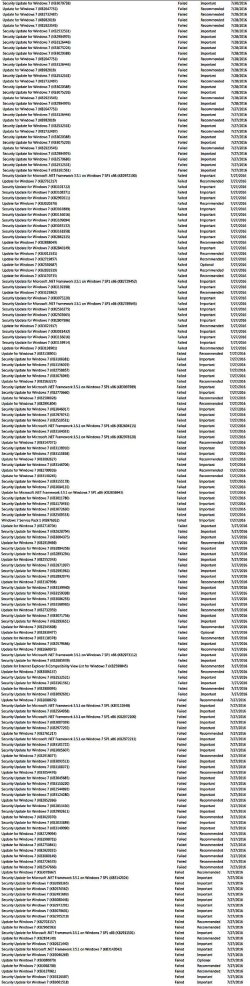
I just had a local PC guy, who built, installed, several W7 Pro PC's, over the years with very few problems. Early Aug, he installed a 500 MB SSD in my desktop, did a fresh install from one of my 2 legit copies of W7 32 Pro bit. He installed most updates, and later in the month, a bunch of new updates popped up & I installed them. Some installed, some failed. This morn, got Win pop-up suggesting I chk some things on my PC; that's when I saw all the updates that failed installation. Don't know whether they were the orig updates or the updates that landed when I just got the PC back?

My question: Is there anyway I can get those failed updates downloaded so I can try installing them again as many were important? See long image (double click) of failed updates list below. I could not locate an action that would let me download failed updates in a number sequenced txt file. Not good information management. Shame on you MS.
 

Attachments
  • updates failed.jpg
    updates failed.jpg
    410.6 KB · Views: 2
  • cheers klx chainwheel.png
    cheers klx chainwheel.png
    4.7 KB · Views: 18

My Computer My Computer

At a glance

w7 pro 32 bit w/XP virt enabled.AMD A6-36504 GB DDR3 RAMNVIDIA GeForce 210
Computer type
PC/Desktop
Computer Manufacturer/Model Number
locally made
OS
w7 pro 32 bit w/XP virt enabled.
CPU
AMD A6-3650
Motherboard
ASUS F1A55-M CSM
Memory
4 GB DDR3 RAM
Graphics Card(s)
NVIDIA GeForce 210
Sound Card
NVIDIA High Definition Audio
Monitor(s) Displays
28" HD monitor
Screen Resolution
1680 x 1050 x 32 bits (4294967296 colors) @ 59 Hz
Hard Drives
2 x 500 GB Western Digital Blue Hard Drive
PSU
?
Case
?
Cooling
3-4 fans
Keyboard
big yellow keys
Mouse
logitec
Internet Speed
60 mb
Antivirus
panda
Browser
ff
Other Info
scanner, webcam, bw printer, fax modem, cd/dvd burner, PC usb ports: 2 usb3, 6 usb2 plus 7 port usb hub, 2 tb usb3, 1 Tb usb3, 500Mb usb2, 120Mb USB2 portable drives, asst of flash drives 250 Mb to 32 Gb. backup PC, office
Hi,
Personally I'd start over,
There are essentially 3 updates needed for a clean install of windows that will get you updated through April of 2016

KB3020369 & KB3172605 & KB3125574 all can be downloaded from the M$ catalog using internet explorer
Microsoft Update Catalog

https://blogs.technet.microsoft.com...17/simplifying-updates-for-windows-7-and-8-1/

To manually install them you will need to ensure the built in windows update service is stopped and disabled first.

If you don't want to start over just make sure KB3020369 & KB3172605 are installed and reset the update system
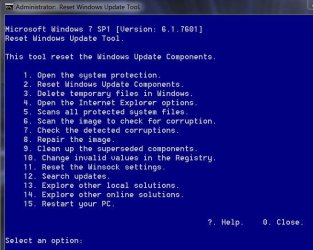
Use Option 2 on the list after right clicking it and select run as administrator
https://gallery.technet.microsoft.com/scriptcenter/Reset-Windows-Update-Agent-d824badc

Download it to your downloads folder
Right click it and select Extract all to the downloads folder.
Then right click ResetWUEng and select run as administrator
Follow the rest of the prompts
Press any key to continue
Type 2 for that Option on the list and the Enter key to reset update services..
Press y for Yes and then the Enter key I believe twice
After it has completed
Type 15 for that option and the Enter key to restart the machine.
Should say will restart in 60 seconds save your work.... press any key to continue.
After restart go to windows updates and manually check for updates shouldn't take a few minutes.

Reset win updates eng.JPG
 

My Computer My Computer

At a glance

Win-7-Pro64bit 7-H-Prem-64biti7-5930K 2nd i9-9940x both water blocked VRM'...Trident-z 3200C14 2nd Trident-z 3600C16EVGA 1080ti ftw3 2nd Titan Xp both water blocked
Computer type
PC/Desktop
Computer Manufacturer/Model Number
Custom assembled by me :}
OS
Win-7-Pro64bit 7-H-Prem-64bit
CPU
i7-5930K 2nd i9-9940x both water blocked VRM's too
Motherboard
ASUS SABERTOOTH X99 2nd ASUS x299 Apex
Memory
Trident-z 3200C14 2nd Trident-z 3600C16
Graphics Card(s)
EVGA 1080ti ftw3 2nd Titan Xp both water blocked
Sound Card
Built-in Realtek
Monitor(s) Displays
1-AOC G2460PG 24"G-Sync 144Hz/ 2nd 1-ASUS VG248QE 24" 144Hz
Screen Resolution
1920 x 1080 144Hz
Hard Drives
2-Samsung M.2 Evo & Evo Plus
2-Samsung 850 EVO 500GB SSD's/ 3-2.5 W.D. Black 1tb-&3-1tb/3-3.5 WD Black 1tb hdd's
PSU
EVGA SuperNOVA 1000-P2 2nd 1200-P2
Case
2-Corsair Obsidian Series 450D Black ATX Mid Tower
Cooling
Custom water loops
Keyboard
Logitech G710+/ 2nd Logitech G910
Mouse
2-RedDragon M901 Perdition 16400 dpi Gaming mouse = wired
Internet Speed
Comcast Ping 19ms 89.31mbps download speed 6.12mbps upload
Antivirus
Malwarebytes Pro/ Superantispyware Pro
Browser
FireFox & Pale moon
Other Info
2nd ASUS X299 Apex/Intel i9-9940x with Custom water loop/7H-Prem-x64/Corsair 450D case/Ram Trident-z 3600C16 4x8gb / Samsung970Evo plus 500gb SSD/Dual ssd EZ swap evo/PSU EVGA SuperNova 1200w-P2 80+Platinum/GPU Titan Xp /8-ML-140 on push-pull on 2-280GTX rads
Thrashzone,

Thanks for your thorough & quick response. I'm not a techie and now I'm up to my eyeballs with a long distance move, real estate agents, closings, lawyers, inspections, packing, repairing etc & in need of a hip replacement. I'll contact the guy who installed W7 and explain what you suggested. I'm sure he will have a solution & fix it. If not I'll try the 3 updates you suggested:
KB3020369 & KB3172605 & KB3125574.

If I go this way, I'll be contacting you/form for additional assistance if I need it.
 

Attachments

  • post-it blu.png
    post-it blu.png
    6.8 KB · Views: 13
  • chain whl klx.png
    chain whl klx.png
    4.3 KB · Views: 12

My Computer My Computer

At a glance

w7 pro 32 bit w/XP virt enabled.AMD A6-36504 GB DDR3 RAMNVIDIA GeForce 210
Computer type
PC/Desktop
Computer Manufacturer/Model Number
locally made
OS
w7 pro 32 bit w/XP virt enabled.
CPU
AMD A6-3650
Motherboard
ASUS F1A55-M CSM
Memory
4 GB DDR3 RAM
Graphics Card(s)
NVIDIA GeForce 210
Sound Card
NVIDIA High Definition Audio
Monitor(s) Displays
28" HD monitor
Screen Resolution
1680 x 1050 x 32 bits (4294967296 colors) @ 59 Hz
Hard Drives
2 x 500 GB Western Digital Blue Hard Drive
PSU
?
Case
?
Cooling
3-4 fans
Keyboard
big yellow keys
Mouse
logitec
Internet Speed
60 mb
Antivirus
panda
Browser
ff
Other Info
scanner, webcam, bw printer, fax modem, cd/dvd burner, PC usb ports: 2 usb3, 6 usb2 plus 7 port usb hub, 2 tb usb3, 1 Tb usb3, 500Mb usb2, 120Mb USB2 portable drives, asst of flash drives 250 Mb to 32 Gb. backup PC, office
I've noticed that there could be problems when installing a few hundred updates at once. Personally I break them up.
 

My Computers My Computers

  • At a glance

    Windows 7 pro/Windows 10 ProIntel i7 860 Quad core 2.8 ghz8 gbATI Radeon HD 5770 1 gb ram
    Computer type
    PC/Desktop
    Computer Manufacturer/Model Number
    HP Pavillion Elite HPE-250f
    OS
    Windows 7 pro/Windows 10 Pro
    CPU
    Intel i7 860 Quad core 2.8 ghz
    Memory
    8 gb
    Graphics Card(s)
    ATI Radeon HD 5770 1 gb ram
    Monitor(s) Displays
    Alienware 25 AW2521HF & Viewsonic
    Screen Resolution
    1920 x1080 & 1680x1050
    Hard Drives
    WD blue 1 tb & 500 gb.
    Browser
    FF of course.
    Other Info
    https://www.bestbuy.com/site/hp-pavilion-elite-desktop-intel-core-i7-processor-8gb-memory-1tb-hard-drive/9921493.p?skuId=9921493
  • At a glance

    Windows 2012 R2 Data center/Linux Minti3 9100 3.6GHz, 8M cache, 4C/4T8GB 2666MT/s DDR4 ECC UDIMM
    Computer type
    PC/Desktop
    System Manufacturer/Model Number
    Dell Poweredge T140
    OS
    Windows 2012 R2 Data center/Linux Mint
    CPU
    i3 9100 3.6GHz, 8M cache, 4C/4T
    Memory
    8GB 2666MT/s DDR4 ECC UDIMM
    Monitor(s) Displays
    Viewsonic
    Screen Resolution
    1680x1050
    Hard Drives
    1 TB & 750 GB
    Other Info
    https://www.dell.com/en-us/work/shop/productdetailstxn/poweredge-t140?~ck=bt
Hi,
No problem we are easy to find for more help if you need it = no charge either :)
 

My Computer My Computer

At a glance

Win-7-Pro64bit 7-H-Prem-64biti7-5930K 2nd i9-9940x both water blocked VRM'...Trident-z 3200C14 2nd Trident-z 3600C16EVGA 1080ti ftw3 2nd Titan Xp both water blocked
Computer type
PC/Desktop
Computer Manufacturer/Model Number
Custom assembled by me :}
OS
Win-7-Pro64bit 7-H-Prem-64bit
CPU
i7-5930K 2nd i9-9940x both water blocked VRM's too
Motherboard
ASUS SABERTOOTH X99 2nd ASUS x299 Apex
Memory
Trident-z 3200C14 2nd Trident-z 3600C16
Graphics Card(s)
EVGA 1080ti ftw3 2nd Titan Xp both water blocked
Sound Card
Built-in Realtek
Monitor(s) Displays
1-AOC G2460PG 24"G-Sync 144Hz/ 2nd 1-ASUS VG248QE 24" 144Hz
Screen Resolution
1920 x 1080 144Hz
Hard Drives
2-Samsung M.2 Evo & Evo Plus
2-Samsung 850 EVO 500GB SSD's/ 3-2.5 W.D. Black 1tb-&3-1tb/3-3.5 WD Black 1tb hdd's
PSU
EVGA SuperNOVA 1000-P2 2nd 1200-P2
Case
2-Corsair Obsidian Series 450D Black ATX Mid Tower
Cooling
Custom water loops
Keyboard
Logitech G710+/ 2nd Logitech G910
Mouse
2-RedDragon M901 Perdition 16400 dpi Gaming mouse = wired
Internet Speed
Comcast Ping 19ms 89.31mbps download speed 6.12mbps upload
Antivirus
Malwarebytes Pro/ Superantispyware Pro
Browser
FireFox & Pale moon
Other Info
2nd ASUS X299 Apex/Intel i9-9940x with Custom water loop/7H-Prem-x64/Corsair 450D case/Ram Trident-z 3600C16 4x8gb / Samsung970Evo plus 500gb SSD/Dual ssd EZ swap evo/PSU EVGA SuperNova 1200w-P2 80+Platinum/GPU Titan Xp /8-ML-140 on push-pull on 2-280GTX rads
Thrashzone,

Thanks for your nice reply, don't get many these days. Altho, I've been using & troubleshooting PC's since the Commodore Vic 20 and all of the Win syst since DOS 3.2 to currently W7. Most of my troubleshooting has been from an experienced business usr not as a techie. You guys on the forum have been very helpful to me in keeping my much needed/used PC's humming.


Attachments

  • chain whl klx.png
    chain whl klx.png
    4.3 KB · Views: 9

My Computer My Computer

At a glance

w7 pro 32 bit w/XP virt enabled.AMD A6-36504 GB DDR3 RAMNVIDIA GeForce 210
Computer type
PC/Desktop
Computer Manufacturer/Model Number
locally made
OS
w7 pro 32 bit w/XP virt enabled.
CPU
AMD A6-3650
Motherboard
ASUS F1A55-M CSM
Memory
4 GB DDR3 RAM
Graphics Card(s)
NVIDIA GeForce 210
Sound Card
NVIDIA High Definition Audio
Monitor(s) Displays
28" HD monitor
Screen Resolution
1680 x 1050 x 32 bits (4294967296 colors) @ 59 Hz
Hard Drives
2 x 500 GB Western Digital Blue Hard Drive
PSU
?
Case
?
Cooling
3-4 fans
Keyboard
big yellow keys
Mouse
logitec
Internet Speed
60 mb
Antivirus
panda
Browser
ff
Other Info
scanner, webcam, bw printer, fax modem, cd/dvd burner, PC usb ports: 2 usb3, 6 usb2 plus 7 port usb hub, 2 tb usb3, 1 Tb usb3, 500Mb usb2, 120Mb USB2 portable drives, asst of flash drives 250 Mb to 32 Gb. backup PC, office

Hi,
if you don't want to deal with the clean install bit,
Just make sure these updates are installed here are the download links if you need either one
Make sure KB3020369 is installed if not manually install it this is the main article page with all versions,
https://support.microsoft.com/en-us/kb/3020369
These other links do prompt you to download as soon as you click on them just to give you a heads up :)

Win-7 32 bit
https://download.microsoft.com/down...B0A-35769CBBE6B0/Windows6.1-KB3020369-x86.msu
Win-7 64 bit
https://download.microsoft.com/down...020-EC41D56B074F/Windows6.1-KB3020369-x64.msu

Then manually install KB3172605 main article page with all versions,
https://support.microsoft.com/en-us/kb/3172605
KB3172605
Win-7 32 bit
https://download.microsoft.com/down...A9C-6B30C3E1735A/Windows6.1-KB3172605-x86.msu

Win-7 64 bit
https://download.microsoft.com/down...67F-C713F7821374/Windows6.1-KB3172605-x64.msu

After switch your windows update settings back to what you had prior and manually check for updates and the rest should show up shortly.
 

My Computer My Computer

At a glance

Win-7-Pro64bit 7-H-Prem-64biti7-5930K 2nd i9-9940x both water blocked VRM'...Trident-z 3200C14 2nd Trident-z 3600C16EVGA 1080ti ftw3 2nd Titan Xp both water blocked
Computer type
PC/Desktop
Computer Manufacturer/Model Number
Custom assembled by me :}
OS
Win-7-Pro64bit 7-H-Prem-64bit
CPU
i7-5930K 2nd i9-9940x both water blocked VRM's too
Motherboard
ASUS SABERTOOTH X99 2nd ASUS x299 Apex
Memory
Trident-z 3200C14 2nd Trident-z 3600C16
Graphics Card(s)
EVGA 1080ti ftw3 2nd Titan Xp both water blocked
Sound Card
Built-in Realtek
Monitor(s) Displays
1-AOC G2460PG 24"G-Sync 144Hz/ 2nd 1-ASUS VG248QE 24" 144Hz
Screen Resolution
1920 x 1080 144Hz
Hard Drives
2-Samsung M.2 Evo & Evo Plus
2-Samsung 850 EVO 500GB SSD's/ 3-2.5 W.D. Black 1tb-&3-1tb/3-3.5 WD Black 1tb hdd's
PSU
EVGA SuperNOVA 1000-P2 2nd 1200-P2
Case
2-Corsair Obsidian Series 450D Black ATX Mid Tower
Cooling
Custom water loops
Keyboard
Logitech G710+/ 2nd Logitech G910
Mouse
2-RedDragon M901 Perdition 16400 dpi Gaming mouse = wired
Internet Speed
Comcast Ping 19ms 89.31mbps download speed 6.12mbps upload
Antivirus
Malwarebytes Pro/ Superantispyware Pro
Browser
FireFox & Pale moon
Other Info
2nd ASUS X299 Apex/Intel i9-9940x with Custom water loop/7H-Prem-x64/Corsair 450D case/Ram Trident-z 3600C16 4x8gb / Samsung970Evo plus 500gb SSD/Dual ssd EZ swap evo/PSU EVGA SuperNova 1200w-P2 80+Platinum/GPU Titan Xp /8-ML-140 on push-pull on 2-280GTX rads
Back
Top