
Windows 7, and system restore not working, for some reason.

acillatem

New member
Member
Local time
4:11 PM
Messages
85
Helping my with with a freezing, occasional BSOD issue
http://www.sevenforums.com/general-...after-having-been-asleep-occasional-bsod.html

and for the heck of it, tried system restore, and got the message you see attached, and it's the same with any restore point I try. It will let me undo any attempt, after giving me that message, for whatever it's worth. It would be nice if it worked properly, so any suggestions?
 

Attachments

  • 2016-01-17_125848.png
    2016-01-17_125848.png
    20.3 KB · Views: 48

My Computer My Computer

Computer type
Laptop
Computer Manufacturer/Model Number
ASUS
OS
Microsoft Windows 7 Home Premium 64-bit 7601 Multiprocessor Free Service Pack 1
CPU
Intel(R) Core(TM) i7-2670QM CPU @ 2.20GHz
Motherboard
ASUSTeK Computer Inc. N53SV
Memory
6.00 GB
Graphics Card(s)
(1) Intel(R) HD Graphics 3000 (2) NVIDIA GeForce GT 540M
Sound Card
(1) Bluetooth Audio Device (2) Realtek High Definition Aud
Screen Resolution
0 x 0 x 0 bits (0 colors) @ 0 Hz
Hard Drives
(1) ST9500423AS (2) HP Photosmart 8100 USB Device
What Anti Virus are you using? I've had the issue and it was caused by my AV's self protection.
 

My Computer My Computer

Computer type
PC/Desktop
Computer Manufacturer/Model Number
1. HP p6733w Desktop 2. HP Envy 700-515xt Desktop
OS
1. Windows 7 Home Premium sp1 - 64bit 2. Windows 7 Pro sp1 - 64bit
CPU
1. AMD Phenom II x2 511 3.4GHz 2. Intel i7-4790 Quad 4.0GHz
Motherboard
1. N-Alvorix-RS880-uATX 2. Kaili2
Memory
1. 5 GB - DDR3 2. 8GB DDR3-1600MHz
Graphics Card(s)
Integrated 1. ATI Radeon 4200 2. Intel HD Graphics 4600
Sound Card
1. Realtek High Definition Audio 2. Realtek (Neutered Beats)
Monitor(s) Displays
1. Acer V193L 2. HP 2311 Series Wide LCD
Screen Resolution
1. 1280 x 1024 2. 1920 x 1080
Hard Drives
1. 750 GB - 7200 RPM SATA 2. 1TB 7200 RPM SATA
PSU
1. 250w 2. 300w
Cooling
Stock
Keyboard
Logitech USB keyboard
Mouse
Logitech USB optical mouse
Internet Speed
1.0 - 2.0 mbps
Antivirus
Eset Smart Security v9.0.349.0
Browser
Pale Moon
What Anti Virus are you using? I've had the issue and it was caused by my AV's self protection.
NOD32. I was wondering about that, especially after a google search, I didn't find this exact issue, but quite a bit about AV programs causing problems with system restore.

Would disabling it and trying work, or would I have to uninstall it to try?
 

My Computer My Computer

Computer type
Laptop
Computer Manufacturer/Model Number
ASUS
OS
Microsoft Windows 7 Home Premium 64-bit 7601 Multiprocessor Free Service Pack 1
CPU
Intel(R) Core(TM) i7-2670QM CPU @ 2.20GHz
Motherboard
ASUSTeK Computer Inc. N53SV
Memory
6.00 GB
Graphics Card(s)
(1) Intel(R) HD Graphics 3000 (2) NVIDIA GeForce GT 540M
Sound Card
(1) Bluetooth Audio Device (2) Realtek High Definition Aud
Screen Resolution
0 x 0 x 0 bits (0 colors) @ 0 Hz
Hard Drives
(1) ST9500423AS (2) HP Photosmart 8100 USB Device
I just tried system restore on my computer, exact same AV program, and no problems. I have Windows 7 Ultimate, and she has Windows 7 Home Premium, but I doubt that would make much difference, especially in this case.
 

My Computer My Computer

Computer type
Laptop
Computer Manufacturer/Model Number
ASUS
OS
Microsoft Windows 7 Home Premium 64-bit 7601 Multiprocessor Free Service Pack 1
CPU
Intel(R) Core(TM) i7-2670QM CPU @ 2.20GHz
Motherboard
ASUSTeK Computer Inc. N53SV
Memory
6.00 GB
Graphics Card(s)
(1) Intel(R) HD Graphics 3000 (2) NVIDIA GeForce GT 540M
Sound Card
(1) Bluetooth Audio Device (2) Realtek High Definition Aud
Screen Resolution
0 x 0 x 0 bits (0 colors) @ 0 Hz
Hard Drives
(1) ST9500423AS (2) HP Photosmart 8100 USB Device
What Anti Virus are you using? I've had the issue and it was caused by my AV's self protection.
NOD32. I was wondering about that, especially after a google search, I didn't find this exact issue, but quite a bit about AV programs causing problems with system restore.

Would disabling it and trying work, or would I have to uninstall it to try?

You may be able to disable it and try. I just go in to Safe Mode and do the restore. The issue here is that you can not undo a restore when made in safe mode as far as I know.

Are you using just the Eset AV or Eset Smart Security? What version are you using?
 

My Computer My Computer

Computer type
PC/Desktop
Computer Manufacturer/Model Number
1. HP p6733w Desktop 2. HP Envy 700-515xt Desktop
OS
1. Windows 7 Home Premium sp1 - 64bit 2. Windows 7 Pro sp1 - 64bit
CPU
1. AMD Phenom II x2 511 3.4GHz 2. Intel i7-4790 Quad 4.0GHz
Motherboard
1. N-Alvorix-RS880-uATX 2. Kaili2
Memory
1. 5 GB - DDR3 2. 8GB DDR3-1600MHz
Graphics Card(s)
Integrated 1. ATI Radeon 4200 2. Intel HD Graphics 4600
Sound Card
1. Realtek High Definition Audio 2. Realtek (Neutered Beats)
Monitor(s) Displays
1. Acer V193L 2. HP 2311 Series Wide LCD
Screen Resolution
1. 1280 x 1024 2. 1920 x 1080
Hard Drives
1. 750 GB - 7200 RPM SATA 2. 1TB 7200 RPM SATA
PSU
1. 250w 2. 300w
Cooling
Stock
Keyboard
Logitech USB keyboard
Mouse
Logitech USB optical mouse
Internet Speed
1.0 - 2.0 mbps
Antivirus
Eset Smart Security v9.0.349.0
Browser
Pale Moon
What Anti Virus are you using? I've had the issue and it was caused by my AV's self protection.
NOD32. I was wondering about that, especially after a google search, I didn't find this exact issue, but quite a bit about AV programs causing problems with system restore.

Would disabling it and trying work, or would I have to uninstall it to try?

You may be able to disable it and try. I just go in to Safe Mode and do the restore. The issue here is that you can not undo a restore when made in safe mode as far as I know.

Are you using just the Eset AV or Eset Smart Security? What version are you using?
Just the AV, and it's version 8.0.319.0

I shouldn't have to go into safe mode to do a restore, but I have to actually see if the AV is the problem.

Like I said, I don't have a problem with my computer. Strange.
 

My Computer My Computer

Computer type
Laptop
Computer Manufacturer/Model Number
ASUS
OS
Microsoft Windows 7 Home Premium 64-bit 7601 Multiprocessor Free Service Pack 1
CPU
Intel(R) Core(TM) i7-2670QM CPU @ 2.20GHz
Motherboard
ASUSTeK Computer Inc. N53SV
Memory
6.00 GB
Graphics Card(s)
(1) Intel(R) HD Graphics 3000 (2) NVIDIA GeForce GT 540M
Sound Card
(1) Bluetooth Audio Device (2) Realtek High Definition Aud
Screen Resolution
0 x 0 x 0 bits (0 colors) @ 0 Hz
Hard Drives
(1) ST9500423AS (2) HP Photosmart 8100 USB Device
I am using Eset Smart Security and I understand that you can disable HIPS protection and it will complete the restore. I haven't used NOD32 AV for a number of years and really can't speak of it specifically.

While I still do restore points from time to time but now I rely more on Drive Images. It takes about 10 minutes to create and about that to restore.

You could post a question over at the Eset Forums: https://forum.eset.com/forum/24-eset-nod32-antivirus/
 

My Computer My Computer

Computer type
PC/Desktop
Computer Manufacturer/Model Number
1. HP p6733w Desktop 2. HP Envy 700-515xt Desktop
OS
1. Windows 7 Home Premium sp1 - 64bit 2. Windows 7 Pro sp1 - 64bit
CPU
1. AMD Phenom II x2 511 3.4GHz 2. Intel i7-4790 Quad 4.0GHz
Motherboard
1. N-Alvorix-RS880-uATX 2. Kaili2
Memory
1. 5 GB - DDR3 2. 8GB DDR3-1600MHz
Graphics Card(s)
Integrated 1. ATI Radeon 4200 2. Intel HD Graphics 4600
Sound Card
1. Realtek High Definition Audio 2. Realtek (Neutered Beats)
Monitor(s) Displays
1. Acer V193L 2. HP 2311 Series Wide LCD
Screen Resolution
1. 1280 x 1024 2. 1920 x 1080
Hard Drives
1. 750 GB - 7200 RPM SATA 2. 1TB 7200 RPM SATA
PSU
1. 250w 2. 300w
Cooling
Stock
Keyboard
Logitech USB keyboard
Mouse
Logitech USB optical mouse
Internet Speed
1.0 - 2.0 mbps
Antivirus
Eset Smart Security v9.0.349.0
Browser
Pale Moon
I am using Eset Smart Security and I understand that you can disable HIPS protection and it will complete the restore. I haven't used NOD32 AV for a number of years and really can't speak of it specifically.

While I still do restore points from time to time but now I rely more on Drive Images. It takes about 10 minutes to create and about that to restore.

You could post a question over at the Eset Forums: https://forum.eset.com/forum/24-eset-nod32-antivirus/
But, I have the same exact program, HIPS enabled, and always have, and I never have a problem with system restore.
 

My Computer My Computer

Computer type
Laptop
Computer Manufacturer/Model Number
ASUS
OS
Microsoft Windows 7 Home Premium 64-bit 7601 Multiprocessor Free Service Pack 1
CPU
Intel(R) Core(TM) i7-2670QM CPU @ 2.20GHz
Motherboard
ASUSTeK Computer Inc. N53SV
Memory
6.00 GB
Graphics Card(s)
(1) Intel(R) HD Graphics 3000 (2) NVIDIA GeForce GT 540M
Sound Card
(1) Bluetooth Audio Device (2) Realtek High Definition Aud
Screen Resolution
0 x 0 x 0 bits (0 colors) @ 0 Hz
Hard Drives
(1) ST9500423AS (2) HP Photosmart 8100 USB Device
Why are you relying on system restore, you should be making disk images.
 

My Computer My Computer

Computer type
PC/Desktop
Computer Manufacturer/Model Number
Skylake Special #666
OS
Windows 10 Pro x64
CPU
Intel Core i7 6700K
Motherboard
Asus Sabertooth Z170 Mark 1
Memory
GSkill TridentZ RGB 16GB 3600 16-16-16-36
Graphics Card(s)
EVGA GTX 980 Ti SC x2
Sound Card
Realtek High Definition
Monitor(s) Displays
AOC G2460PG
Screen Resolution
1920 x 1080 144Hz
Hard Drives
Samsung 860 Pro 256GB, Seagate Barracuda 4TB x2
PSU
EVGA 1000 P2, EVGA White Custom Braided Cables
Case
Corsair Vengeance C70 Gunmetal Black
Cooling
Corsair H100i v2, Corsair ML120 x2, Thermal Grizzly Kryonaut
Keyboard
Logitech G910 Orion Spectrum
Mouse
Logitech G700s
Internet Speed
Verizon Fios Quantum Gateway 75/75
Antivirus
Windows Defender, Malwarebytes Free 3.8.3
Browser
Chrome
Other Info
Corsair SP120 x4, LG Blu-ray Drive, Durabrand HT-395 100 Watt Dolby Digital Amp, Corsair H2100 Wireless 7.1 Headset
Why are you relying on system restore, you should be making disk images.
Because that's what I've always done, and it's worked fine. The fact of the matter is, something IS wrong with the system restore, and I'm trying to figure out to resolve it. It's my wife's laptop, and she's not going to make disk images. She's just not.

That said, what is involved in doing that? I know what the concept is, but is there a simple procedure? I'm all ears. :)

But I'd still like to figure out why the restore is acting the way it is, for her sake. It's just easier.
 

My Computer My Computer

Computer type
Laptop
Computer Manufacturer/Model Number
ASUS
OS
Microsoft Windows 7 Home Premium 64-bit 7601 Multiprocessor Free Service Pack 1
CPU
Intel(R) Core(TM) i7-2670QM CPU @ 2.20GHz
Motherboard
ASUSTeK Computer Inc. N53SV
Memory
6.00 GB
Graphics Card(s)
(1) Intel(R) HD Graphics 3000 (2) NVIDIA GeForce GT 540M
Sound Card
(1) Bluetooth Audio Device (2) Realtek High Definition Aud
Screen Resolution
0 x 0 x 0 bits (0 colors) @ 0 Hz
Hard Drives
(1) ST9500423AS (2) HP Photosmart 8100 USB Device
Why are you relying on system restore, you should be making disk images.
Because that's what I've always done, and it's worked fine. The fact of the matter is, something IS wrong with the system restore, and I'm trying to figure out to resolve it. It's my wife's laptop, and she's not going to make disk images. She's just not.

That said, what is involved in doing that? I know what the concept is, but is there a simple procedure? I'm all ears. :)

But I'd still like to figure out why the restore is acting the way it is, for her sake. It's just easier.
Are you currently backing up your systems?

I truly believe that Disk Imaging is far superior to MS Restore Points. Give this a read:
http://www.sevenforums.com/backup-restore/43219-image-your-system-free-macrium.html
 

My Computer My Computer

Computer type
PC/Desktop
Computer Manufacturer/Model Number
1. HP p6733w Desktop 2. HP Envy 700-515xt Desktop
OS
1. Windows 7 Home Premium sp1 - 64bit 2. Windows 7 Pro sp1 - 64bit
CPU
1. AMD Phenom II x2 511 3.4GHz 2. Intel i7-4790 Quad 4.0GHz
Motherboard
1. N-Alvorix-RS880-uATX 2. Kaili2
Memory
1. 5 GB - DDR3 2. 8GB DDR3-1600MHz
Graphics Card(s)
Integrated 1. ATI Radeon 4200 2. Intel HD Graphics 4600
Sound Card
1. Realtek High Definition Audio 2. Realtek (Neutered Beats)
Monitor(s) Displays
1. Acer V193L 2. HP 2311 Series Wide LCD
Screen Resolution
1. 1280 x 1024 2. 1920 x 1080
Hard Drives
1. 750 GB - 7200 RPM SATA 2. 1TB 7200 RPM SATA
PSU
1. 250w 2. 300w
Cooling
Stock
Keyboard
Logitech USB keyboard
Mouse
Logitech USB optical mouse
Internet Speed
1.0 - 2.0 mbps
Antivirus
Eset Smart Security v9.0.349.0
Browser
Pale Moon
acillatem are your (My System Specs) from the troubled computer?

I use System Restore Points and Macrium. One does not replace the other.
I find both can be useful when needed.


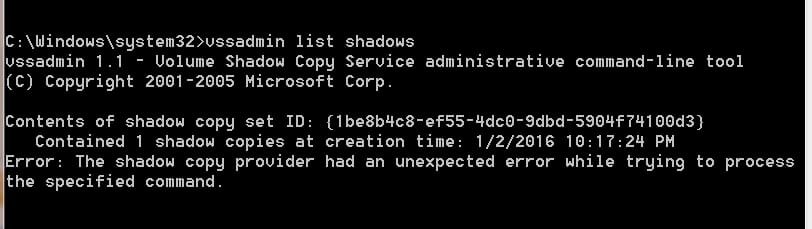
Open the cmd prompt as admin and type this.
vssadmin list shadows and hit (enter) or you can copy and past the one I just typed above and high lighted.

How many restore points do you see?

Lets try to keep the little lady happy and figure out this problem with Restore Points.
 

My Computer My Computer

Computer type
PC/Desktop
Computer Manufacturer/Model Number
Home made Desktop
OS
Windows 10 Pro. 64/ version 1709 Windows 7 Pro/64
CPU
Intel i7-6800K @ 4.3
Motherboard
ASUS X-99 Deluxe II
Memory
Corsair Platinum 16 gig @2400
Graphics Card(s)
EVGA GTX 1070 OC
Monitor(s) Displays
Asus 27" LED LCD/VE278Q
Screen Resolution
1920-1080 or 1280-720 HDMI
Hard Drives
INTEL SSD 730-240 Gb Sata 3.0/
PSU
EVGA Platium 1200W
Case
Phanteks Luxe Tempered Glass 8 fans/ one radiator
Cooling
XSPC/ Water Cooled CPU
Keyboard
Das 4 Professional
Mouse
Logitech M705/MX Anywhere 2-S
Internet Speed
100 mbits
Antivirus
Microsoft Security Essentials/ Malwarebytes Premium 3.0/ SAS
Browser
I.E. 11 default/Firefox/ ISP Time Warner Cable/Spectrum
Other Info
LG BluRay Burner/
Sound system-KLipsch-THX/
Icy Dock ssd Hot Swap bays.
Why are you relying on system restore, you should be making disk images.
Because that's what I've always done, and it's worked fine. The fact of the matter is, something IS wrong with the system restore, and I'm trying to figure out to resolve it. It's my wife's laptop, and she's not going to make disk images. She's just not.

That said, what is involved in doing that? I know what the concept is, but is there a simple procedure? I'm all ears. :)

But I'd still like to figure out why the restore is acting the way it is, for her sake. It's just easier.
Are you currently backing up your systems?

I truly believe that Disk Imaging is far superior to MS Restore Points. Give this a read:
http://www.sevenforums.com/backup-restore/43219-image-your-system-free-macrium.html
I'm not currently backing up my systems, and I know that's not good. Just something I've never done. I keep stuff I don't want to lose on flash drives and whatnot, but that's about. I know....not a good habit, but I'd like to try and break that habit. I'll check out that link.
 

My Computer My Computer

Computer type
Laptop
Computer Manufacturer/Model Number
ASUS
OS
Microsoft Windows 7 Home Premium 64-bit 7601 Multiprocessor Free Service Pack 1
CPU
Intel(R) Core(TM) i7-2670QM CPU @ 2.20GHz
Motherboard
ASUSTeK Computer Inc. N53SV
Memory
6.00 GB
Graphics Card(s)
(1) Intel(R) HD Graphics 3000 (2) NVIDIA GeForce GT 540M
Sound Card
(1) Bluetooth Audio Device (2) Realtek High Definition Aud
Screen Resolution
0 x 0 x 0 bits (0 colors) @ 0 Hz
Hard Drives
(1) ST9500423AS (2) HP Photosmart 8100 USB Device
acillatem are your (My System Specs) from the troubled computer?

I use System Restore Points and Macrium. One does not replace the other.
I find both can be useful when needed.


Open the cmd prompt as admin and type this.
vssadmin list shadows and hit (enter) or you can copy and past the one I just typed above and high lighted.

How many restore points do you see?

Lets try to keep the little lady happy and figure out this problem with Restore Points.
Thanks. And yes, the specs are from her computer.

I will run that command in a bit, and thank you.
 

My Computer My Computer

Computer type
Laptop
Computer Manufacturer/Model Number
ASUS
OS
Microsoft Windows 7 Home Premium 64-bit 7601 Multiprocessor Free Service Pack 1
CPU
Intel(R) Core(TM) i7-2670QM CPU @ 2.20GHz
Motherboard
ASUSTeK Computer Inc. N53SV
Memory
6.00 GB
Graphics Card(s)
(1) Intel(R) HD Graphics 3000 (2) NVIDIA GeForce GT 540M
Sound Card
(1) Bluetooth Audio Device (2) Realtek High Definition Aud
Screen Resolution
0 x 0 x 0 bits (0 colors) @ 0 Hz
Hard Drives
(1) ST9500423AS (2) HP Photosmart 8100 USB Device
acillatem are your (My System Specs) from the troubled computer?

I use System Restore Points and Macrium. One does not replace the other.
I find both can be useful when needed.


Open the cmd prompt as admin and type this.
vssadmin list shadows and hit (enter) or you can copy and past the one I just typed above and high lighted.

How many restore points do you see?

Lets try to keep the little lady happy and figure out this problem with Restore Points.

Here's what I got when I ran that command.
 

Attachments

  • command.jpg
    command.jpg
    26 KB · Views: 0
Last edited:

My Computer My Computer

Computer type
Laptop
Computer Manufacturer/Model Number
ASUS
OS
Microsoft Windows 7 Home Premium 64-bit 7601 Multiprocessor Free Service Pack 1
CPU
Intel(R) Core(TM) i7-2670QM CPU @ 2.20GHz
Motherboard
ASUSTeK Computer Inc. N53SV
Memory
6.00 GB
Graphics Card(s)
(1) Intel(R) HD Graphics 3000 (2) NVIDIA GeForce GT 540M
Sound Card
(1) Bluetooth Audio Device (2) Realtek High Definition Aud
Screen Resolution
0 x 0 x 0 bits (0 colors) @ 0 Hz
Hard Drives
(1) ST9500423AS (2) HP Photosmart 8100 USB Device
What you could try is make another Restore Point manually and see if Window 7 likes that one.
If a Restore Point is corrupted many times it will not work.

Before you do that complete the tutorial to see if Windows 7 System Files are as they should be.

By Brink:
http://www.sevenforums.com/tutorials/1538-sfc-scannow-command-system-file-checker.html


This tutorial by Brink should help with Restore Points.

http://www.sevenforums.com/tutorials/697-system-restore-point-create.html

**Please list all security program used on the computer. Could you also list all the TuneUp, CleanUp, type programs that are used.
 

My Computer My Computer

Computer type
PC/Desktop
Computer Manufacturer/Model Number
Home made Desktop
OS
Windows 10 Pro. 64/ version 1709 Windows 7 Pro/64
CPU
Intel i7-6800K @ 4.3
Motherboard
ASUS X-99 Deluxe II
Memory
Corsair Platinum 16 gig @2400
Graphics Card(s)
EVGA GTX 1070 OC
Monitor(s) Displays
Asus 27" LED LCD/VE278Q
Screen Resolution
1920-1080 or 1280-720 HDMI
Hard Drives
INTEL SSD 730-240 Gb Sata 3.0/
PSU
EVGA Platium 1200W
Case
Phanteks Luxe Tempered Glass 8 fans/ one radiator
Cooling
XSPC/ Water Cooled CPU
Keyboard
Das 4 Professional
Mouse
Logitech M705/MX Anywhere 2-S
Internet Speed
100 mbits
Antivirus
Microsoft Security Essentials/ Malwarebytes Premium 3.0/ SAS
Browser
I.E. 11 default/Firefox/ ISP Time Warner Cable/Spectrum
Other Info
LG BluRay Burner/
Sound system-KLipsch-THX/
Icy Dock ssd Hot Swap bays.
What you could try is make another Restore Point manually and see if Window 7 likes that one.
If a Restore Point is corrupted many times it will not work.

Before you do that complete the tutorial to see if Windows 7 System Files are as they should be.

By Brink:
http://www.sevenforums.com/tutorials/1538-sfc-scannow-command-system-file-checker.html


This tutorial by Brink should help with Restore Points.

http://www.sevenforums.com/tutorials/697-system-restore-point-create.html

**Please list all security program used on the computer. Could you also list all the TuneUp, CleanUp, type programs that are used.
We just posted SFC results the other day, in this thread
http://www.sevenforums.com/general-...after-having-been-asleep-occasional-bsod.html
which is how I found out system restore wasn't working. I don't think the two issues are related, just coincidental, in my opinion. Anyway, I've attached those results here too. :)

Oh....and other than any of the Windows disk cleanup and whatnot, that laptop only has NOD32 AV.
 

Attachments

My Computer My Computer

Computer type
Laptop
Computer Manufacturer/Model Number
ASUS
OS
Microsoft Windows 7 Home Premium 64-bit 7601 Multiprocessor Free Service Pack 1
CPU
Intel(R) Core(TM) i7-2670QM CPU @ 2.20GHz
Motherboard
ASUSTeK Computer Inc. N53SV
Memory
6.00 GB
Graphics Card(s)
(1) Intel(R) HD Graphics 3000 (2) NVIDIA GeForce GT 540M
Sound Card
(1) Bluetooth Audio Device (2) Realtek High Definition Aud
Screen Resolution
0 x 0 x 0 bits (0 colors) @ 0 Hz
Hard Drives
(1) ST9500423AS (2) HP Photosmart 8100 USB Device
All I need to see is one of these from your system.
From my system is below.

Microsoft Windows [Version 6.1.7601]
Copyright (c) 2009 Microsoft Corporation. All rights reserved.

C:\Windows\System32>sfc /scannow

Beginning system scan. This process will take some time.

Beginning verification phase of system scan.
Verification 100% complete.

Windows Resource Protection did not find any integrity violations.

C:\Windows\System32>
 

My Computer My Computer

Computer type
PC/Desktop
Computer Manufacturer/Model Number
Home made Desktop
OS
Windows 10 Pro. 64/ version 1709 Windows 7 Pro/64
CPU
Intel i7-6800K @ 4.3
Motherboard
ASUS X-99 Deluxe II
Memory
Corsair Platinum 16 gig @2400
Graphics Card(s)
EVGA GTX 1070 OC
Monitor(s) Displays
Asus 27" LED LCD/VE278Q
Screen Resolution
1920-1080 or 1280-720 HDMI
Hard Drives
INTEL SSD 730-240 Gb Sata 3.0/
PSU
EVGA Platium 1200W
Case
Phanteks Luxe Tempered Glass 8 fans/ one radiator
Cooling
XSPC/ Water Cooled CPU
Keyboard
Das 4 Professional
Mouse
Logitech M705/MX Anywhere 2-S
Internet Speed
100 mbits
Antivirus
Microsoft Security Essentials/ Malwarebytes Premium 3.0/ SAS
Browser
I.E. 11 default/Firefox/ ISP Time Warner Cable/Spectrum
Other Info
LG BluRay Burner/
Sound system-KLipsch-THX/
Icy Dock ssd Hot Swap bays.
All I need to see is one of these from your system.
From my system is below.

Microsoft Windows [Version 6.1.7601]
Copyright (c) 2009 Microsoft Corporation. All rights reserved.

C:\Windows\System32>sfc /scannow

Beginning system scan. This process will take some time.

Beginning verification phase of system scan.
Verification 100% complete.

Windows Resource Protection did not find any integrity violations.

C:\Windows\System32>
Oh I see what you're saying. When I did the other day, for the other issue, it said it found some corrupt files it couldn't fix. I didn't copy and paste that, I got that report you see in the previous post. Does that not tell you anything?

Now her laptop is freezing when it's not asleep, so we have another issue we didn't have before, so we're not sure what the hell is wrong with it.
 

My Computer My Computer

Computer type
Laptop
Computer Manufacturer/Model Number
ASUS
OS
Microsoft Windows 7 Home Premium 64-bit 7601 Multiprocessor Free Service Pack 1
CPU
Intel(R) Core(TM) i7-2670QM CPU @ 2.20GHz
Motherboard
ASUSTeK Computer Inc. N53SV
Memory
6.00 GB
Graphics Card(s)
(1) Intel(R) HD Graphics 3000 (2) NVIDIA GeForce GT 540M
Sound Card
(1) Bluetooth Audio Device (2) Realtek High Definition Aud
Screen Resolution
0 x 0 x 0 bits (0 colors) @ 0 Hz
Hard Drives
(1) ST9500423AS (2) HP Photosmart 8100 USB Device

My Computer My Computer

Computer type
PC/Desktop
Computer Manufacturer/Model Number
Home made Desktop
OS
Windows 10 Pro. 64/ version 1709 Windows 7 Pro/64
CPU
Intel i7-6800K @ 4.3
Motherboard
ASUS X-99 Deluxe II
Memory
Corsair Platinum 16 gig @2400
Graphics Card(s)
EVGA GTX 1070 OC
Monitor(s) Displays
Asus 27" LED LCD/VE278Q
Screen Resolution
1920-1080 or 1280-720 HDMI
Hard Drives
INTEL SSD 730-240 Gb Sata 3.0/
PSU
EVGA Platium 1200W
Case
Phanteks Luxe Tempered Glass 8 fans/ one radiator
Cooling
XSPC/ Water Cooled CPU
Keyboard
Das 4 Professional
Mouse
Logitech M705/MX Anywhere 2-S
Internet Speed
100 mbits
Antivirus
Microsoft Security Essentials/ Malwarebytes Premium 3.0/ SAS
Browser
I.E. 11 default/Firefox/ ISP Time Warner Cable/Spectrum
Other Info
LG BluRay Burner/
Sound system-KLipsch-THX/
Icy Dock ssd Hot Swap bays.
Back
Top