Solved Two OEM Files When Viewing Setup Disc on PC. What Should I Do?

SickOfTheBSOD

New member
Local time
5:07 PM
Messages
67
I'll try to clarify:

I had a BSOD-related problem but, thanks to a few on this forum, it's been fixed. Before this, however, I took the PC to a retail store and asked for a "clean installation". The result, I find out later, is I now have two OEM "files" (?) under the setup options when I view my PC from the "setup.exe" disc.

What I'd like help with:

1) Understanding what OEM stuff is about?
2) What should I do about this? Should I leave both of them or delete one? (I plan on doing another clean installation sometime soon)
3) What is the purpose of these OEM "files" and why do I need them on my PC? (It's a pre-built model from Alienware)

Any help would be greatly appreciated. I'm not sure what I should do about this and I don't want to cause further problems with my PC.
 

My Computer My Computer

At a glance

Windows 7 Home Premium x64Intel i7 4770 3.40Ghz16 GB DDR3Nvidia GeForce GTA 760 Ti OEM
Computer type
PC/Desktop
Computer Manufacturer/Model Number
Dell, Alienware
OS
Windows 7 Home Premium x64
CPU
Intel i7 4770 3.40Ghz
Motherboard
Micro ATX
Memory
16 GB DDR3
Graphics Card(s)
Nvidia GeForce GTA 760 Ti OEM
Monitor(s) Displays
1
Screen Resolution
1920 x 1080
Antivirus
Microsoft Security Essentials
Browser
Google Chrome, Internet Explorer 11
Other Info
OS was recently reinstalled.
Hi,
I can't say I understand the issue ?
Can you post a picture of what you're referring to ?

Also have you asked the place where you took it for an explanation ?

If you did 1 clean install why would you want to do another ?

Using system images takes a lot less time to undo mistakes :)
http://www.sevenforums.com/tutorials/73828-imaging-free-macrium.html
 

My Computer My Computer

At a glance

Win-7-Pro64bit 7-H-Prem-64biti7-5930K 2nd i9-9940x both water blocked VRM'...Trident-z 3200C14 2nd Trident-z 3600C16EVGA 1080ti ftw3 2nd Titan Xp both water blocked
Computer type
PC/Desktop
Computer Manufacturer/Model Number
Custom assembled by me :}
OS
Win-7-Pro64bit 7-H-Prem-64bit
CPU
i7-5930K 2nd i9-9940x both water blocked VRM's too
Motherboard
ASUS SABERTOOTH X99 2nd ASUS x299 Apex
Memory
Trident-z 3200C14 2nd Trident-z 3600C16
Graphics Card(s)
EVGA 1080ti ftw3 2nd Titan Xp both water blocked
Sound Card
Built-in Realtek
Monitor(s) Displays
1-AOC G2460PG 24"G-Sync 144Hz/ 2nd 1-ASUS VG248QE 24" 144Hz
Screen Resolution
1920 x 1080 144Hz
Hard Drives
2-Samsung M.2 Evo & Evo Plus
2-Samsung 850 EVO 500GB SSD's/ 3-2.5 W.D. Black 1tb-&3-1tb/3-3.5 WD Black 1tb hdd's
PSU
EVGA SuperNOVA 1000-P2 2nd 1200-P2
Case
2-Corsair Obsidian Series 450D Black ATX Mid Tower
Cooling
Custom water loops
Keyboard
Logitech G710+/ 2nd Logitech G910
Mouse
2-RedDragon M901 Perdition 16400 dpi Gaming mouse = wired
Internet Speed
Comcast Ping 19ms 89.31mbps download speed 6.12mbps upload
Antivirus
Malwarebytes Pro/ Superantispyware Pro
Browser
FireFox & Pale moon
Other Info
2nd ASUS X299 Apex/Intel i9-9940x with Custom water loop/7H-Prem-x64/Corsair 450D case/Ram Trident-z 3600C16 4x8gb / Samsung970Evo plus 500gb SSD/Dual ssd EZ swap evo/PSU EVGA SuperNova 1200w-P2 80+Platinum/GPU Titan Xp /8-ML-140 on push-pull on 2-280GTX rads
I can't make any sense out of it either? Need more specific info to sort this out.
 

My Computer My Computer

At a glance

Windows 10 Education 64 bitAMD Phenom II X4 980 Black Edition Deneb 3.7GHz8GB 4GBx2 Kingston PC10600 DDR3 1333 MemoryZotac NVIDIA Geforce GT640 2 Gig DDR3 PCIe
Computer type
PC/Desktop
Computer Manufacturer/Model Number
Home Built
OS
Windows 10 Education 64 bit
CPU
AMD Phenom II X4 980 Black Edition Deneb 3.7GHz
Motherboard
Asus M4N68T-M V2 µATX Motherboard
Memory
8GB 4GBx2 Kingston PC10600 DDR3 1333 Memory
Graphics Card(s)
Zotac NVIDIA Geforce GT640 2 Gig DDR3 PCIe
Sound Card
VIA VT1708s High Definition Audio 8-channel Onboard
Monitor(s) Displays
22" LG E2242 1080p and 2 19" I-INC AG191D
Screen Resolution
1280x1024 - 1920x1080 - 1280x1024
Hard Drives
Crucial M100 256 GB SSD and 500 GB WD Blue SATA
PSU
Thermaltake TR 620
Case
Power Up Black ATX Mid-Tower Case
Cooling
Stock heatsink and fan
Keyboard
Logitech Wireless K350 Wave
Mouse
Logitech Wireless M570 Trackman Wheel
Internet Speed
80 Mbps Down 30 Mbps Up
Antivirus
Windows Defender
Browser
Internet Explorer 11
Other Info
HP DVD1040e Lightscribe - External USB2
Hi,
I can't say I understand the issue ?
Can you post a picture of what you're referring to ?

Also have you asked the place where you took it for an explanation ?

If you did 1 clean install why would you want to do another ?

Using system images takes a lot less time to undo mistakes :)
http://www.sevenforums.com/tutorials/73828-imaging-free-macrium.html

I'll try to post a picture.

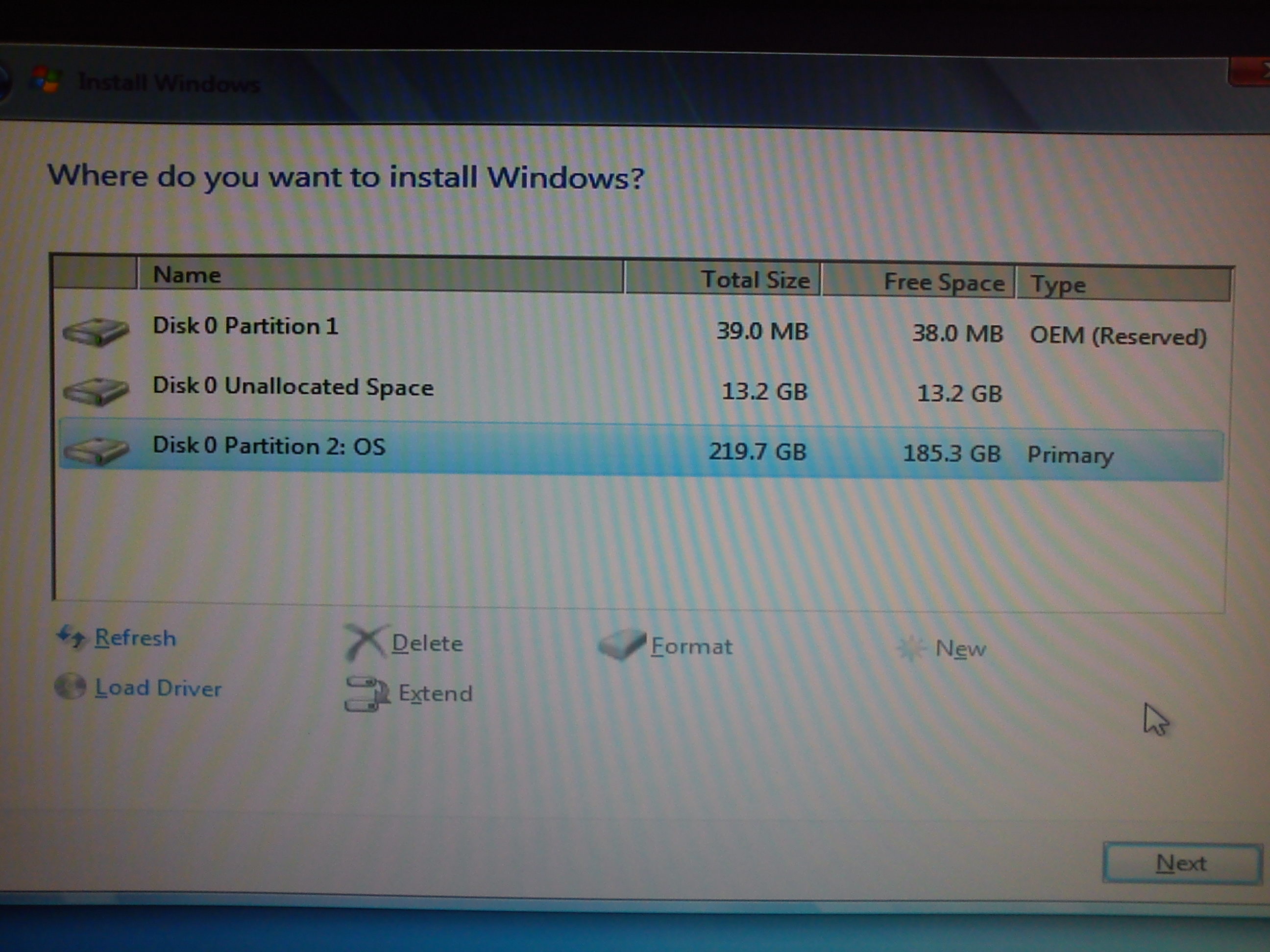
When I put in the "setup.exe" discthat came with my PC, I have two images that look like discs. They say "OEM" somethign next to them and they take up memory. Looking on my laptop (not the gaming desktop), I only have one, so I'm wondering why there is a second one? Is it because of the clean install?

I didn't ask the retail store, no. I'm pretty positive it is a result of the clean install.

I'd want to do another clean install because the post-BSOD problem might have messed up some of the program on the PC, but they are important to the system and I don't want to mess with them by uninstalling/reinstalling.

I can't make any sense out of it either? Need more specific info to sort this out.

I'll try to find or make a picture but I tried explaining it more.

ikDIv.jpg


It says (OEM Reserved). Maybe it's not shaped like a disc but I have two of these when I view the PC using "setup.exe". What should I do? Should I delete one or leave it be?

I'll try to find a better way to represent this.
 

My Computer My Computer

At a glance

Windows 7 Home Premium x64Intel i7 4770 3.40Ghz16 GB DDR3Nvidia GeForce GTA 760 Ti OEM
Computer type
PC/Desktop
Computer Manufacturer/Model Number
Dell, Alienware
OS
Windows 7 Home Premium x64
CPU
Intel i7 4770 3.40Ghz
Motherboard
Micro ATX
Memory
16 GB DDR3
Graphics Card(s)
Nvidia GeForce GTA 760 Ti OEM
Monitor(s) Displays
1
Screen Resolution
1920 x 1080
Antivirus
Microsoft Security Essentials
Browser
Google Chrome, Internet Explorer 11
Other Info
OS was recently reinstalled.
Hi,
Well as far as I can tell the first oem reserved is the factory restore partition
It reset your computer to fresh out of the box when you opened it,

The second largest partition is the current install.

Why again do you want to reinstall ?

If so I would use the factory restore partition it's what it's there for
Although on this machine I don't know how to get the machine to restore the machine using it
Might be the F10 key at startup ?
You'd have to refer to Alienware for that info.
 

My Computer My Computer

At a glance

Win-7-Pro64bit 7-H-Prem-64biti7-5930K 2nd i9-9940x both water blocked VRM'...Trident-z 3200C14 2nd Trident-z 3600C16EVGA 1080ti ftw3 2nd Titan Xp both water blocked
Computer type
PC/Desktop
Computer Manufacturer/Model Number
Custom assembled by me :}
OS
Win-7-Pro64bit 7-H-Prem-64bit
CPU
i7-5930K 2nd i9-9940x both water blocked VRM's too
Motherboard
ASUS SABERTOOTH X99 2nd ASUS x299 Apex
Memory
Trident-z 3200C14 2nd Trident-z 3600C16
Graphics Card(s)
EVGA 1080ti ftw3 2nd Titan Xp both water blocked
Sound Card
Built-in Realtek
Monitor(s) Displays
1-AOC G2460PG 24"G-Sync 144Hz/ 2nd 1-ASUS VG248QE 24" 144Hz
Screen Resolution
1920 x 1080 144Hz
Hard Drives
2-Samsung M.2 Evo & Evo Plus
2-Samsung 850 EVO 500GB SSD's/ 3-2.5 W.D. Black 1tb-&3-1tb/3-3.5 WD Black 1tb hdd's
PSU
EVGA SuperNOVA 1000-P2 2nd 1200-P2
Case
2-Corsair Obsidian Series 450D Black ATX Mid Tower
Cooling
Custom water loops
Keyboard
Logitech G710+/ 2nd Logitech G910
Mouse
2-RedDragon M901 Perdition 16400 dpi Gaming mouse = wired
Internet Speed
Comcast Ping 19ms 89.31mbps download speed 6.12mbps upload
Antivirus
Malwarebytes Pro/ Superantispyware Pro
Browser
FireFox & Pale moon
Other Info
2nd ASUS X299 Apex/Intel i9-9940x with Custom water loop/7H-Prem-x64/Corsair 450D case/Ram Trident-z 3600C16 4x8gb / Samsung970Evo plus 500gb SSD/Dual ssd EZ swap evo/PSU EVGA SuperNova 1200w-P2 80+Platinum/GPU Titan Xp /8-ML-140 on push-pull on 2-280GTX rads
It`s just a shot of your hard drive showing 2 partitions and some unallocated space, what`s the problem ?
 

My Computer My Computer

At a glance

Windows 10 Pro x64Intel Core i7 6700KGSkill TridentZ RGB 16GB 3600 16-16-16-36EVGA GTX 980 Ti SC x2
Computer type
PC/Desktop
Computer Manufacturer/Model Number
Skylake Special #666
OS
Windows 10 Pro x64
CPU
Intel Core i7 6700K
Motherboard
Asus Sabertooth Z170 Mark 1
Memory
GSkill TridentZ RGB 16GB 3600 16-16-16-36
Graphics Card(s)
EVGA GTX 980 Ti SC x2
Sound Card
Realtek High Definition
Monitor(s) Displays
AOC G2460PG
Screen Resolution
1920 x 1080 144Hz
Hard Drives
Samsung 860 Pro 256GB, Seagate Barracuda 4TB x2
PSU
EVGA 1000 P2, EVGA White Custom Braided Cables
Case
Corsair Vengeance C70 Gunmetal Black
Cooling
Corsair H100i v2, Corsair ML120 x2, Thermal Grizzly Kryonaut
Keyboard
Logitech G910 Orion Spectrum
Mouse
Logitech G700s
Internet Speed
Verizon Fios Quantum Gateway 75/75
Antivirus
Windows Defender, Malwarebytes Free 3.8.3
Browser
Chrome
Other Info
Corsair SP120 x4, LG Blu-ray Drive, Durabrand HT-395 100 Watt Dolby Digital Amp, Corsair H2100 Wireless 7.1 Headset
And please stop using the term setup.exe disc.

It is called a Windows 7 install Disc.

Until you learn how to do a clean install on a single hard drive, leave your PC alone.
 

My Computer My Computer

At a glance

Windows 10 Pro x64Intel Core i7 6700KGSkill TridentZ RGB 16GB 3600 16-16-16-36EVGA GTX 980 Ti SC x2
Computer type
PC/Desktop
Computer Manufacturer/Model Number
Skylake Special #666
OS
Windows 10 Pro x64
CPU
Intel Core i7 6700K
Motherboard
Asus Sabertooth Z170 Mark 1
Memory
GSkill TridentZ RGB 16GB 3600 16-16-16-36
Graphics Card(s)
EVGA GTX 980 Ti SC x2
Sound Card
Realtek High Definition
Monitor(s) Displays
AOC G2460PG
Screen Resolution
1920 x 1080 144Hz
Hard Drives
Samsung 860 Pro 256GB, Seagate Barracuda 4TB x2
PSU
EVGA 1000 P2, EVGA White Custom Braided Cables
Case
Corsair Vengeance C70 Gunmetal Black
Cooling
Corsair H100i v2, Corsair ML120 x2, Thermal Grizzly Kryonaut
Keyboard
Logitech G910 Orion Spectrum
Mouse
Logitech G700s
Internet Speed
Verizon Fios Quantum Gateway 75/75
Antivirus
Windows Defender, Malwarebytes Free 3.8.3
Browser
Chrome
Other Info
Corsair SP120 x4, LG Blu-ray Drive, Durabrand HT-395 100 Watt Dolby Digital Amp, Corsair H2100 Wireless 7.1 Headset
Hi,
Well as far as I can tell the first oem reserved is the factory restore partition
It reset your computer to fresh out of the box when you opened it,

The second largest partition is the current install.

Why again do you want to reinstall ?

If so I would use the factory restore partition it's what it's there for
Although on this machine I don't know how to get the machine to restore the machine using it
Might be the F10 key at startup ?
You'd have to refer to Alienware for that info.

I want to reinstall because I believe the BSOD problem I had before may have messed up the internal memory or some junk in the PC. For instance, I made another post about a program that I had on my PC that now mysertiously wants to ask permission before running. It never did that before but now it asks me every time for Administrator permission. Here it is for reference:

http://www.sevenforums.com/software...center-keeps-setting-off-uac-windows-7-a.html

It`s just a shot of your hard drive showing 2 partitions and some unallocated space, what`s the problem ?

This is not an actual image of my gaming desktop's HDD. This is just a screenshot I was able to pull off the Internet so you could understand better what I was talking about.

And please stop using the term setup.exe disc.

It is called a Windows 7 install Disc.

Until you learn how to do a clean install on a single hard drive, leave your PC alone.

Alright, alright. It was the best way ATM that I could explain my predicament.


I'm looking for the following:
1) Since I have two of these factory restore partitions, should I delete one?
2) Is a factory partition the same as a Disc Image?
3) If I'm to use this factory restore partition, what will happen?
4) I deleted McAfee from my PC as a result of the BSOD problem. If I use the factory restore partition, will McAfee come back on to the PC?

I apologize for my ignorance. I'm only two years into PC gaming and using a gaming desktop.
 

My Computer My Computer

At a glance

Windows 7 Home Premium x64Intel i7 4770 3.40Ghz16 GB DDR3Nvidia GeForce GTA 760 Ti OEM
Computer type
PC/Desktop
Computer Manufacturer/Model Number
Dell, Alienware
OS
Windows 7 Home Premium x64
CPU
Intel i7 4770 3.40Ghz
Motherboard
Micro ATX
Memory
16 GB DDR3
Graphics Card(s)
Nvidia GeForce GTA 760 Ti OEM
Monitor(s) Displays
1
Screen Resolution
1920 x 1080
Antivirus
Microsoft Security Essentials
Browser
Google Chrome, Internet Explorer 11
Other Info
OS was recently reinstalled.
Can you boot up Windows 7 and post a maximized screen print of Disk Management using these instructions ?
http://www.sevenforums.com/tutorials/274797-disk-management-post-screen-capture-image.html

In the screen print in post #4 i only see one "OEM" partition, not two.
That partition shows as 39 MB Total space and 38 MB Free space.
I don't know what purpose that partition could be used for now :confused:
It's not large enough for a factory recovery.
The 13.2 GB Unallocated space might have been the factory recovery partition, but is no longer usable after the re-installs.

EDIT: I missed this in post #8 :o, ignore my post #9.
This is not an actual image of my gaming desktop's HDD.
 
Last edited:

My Computer My Computer

At a glance

Multi-Boot W7_Pro_x64 W8.1_Pro_x64 W10_Pro_x6...AMD Athlon II x4 6206GB GSkill DDR2 800AMD 4670 GPU + AMD 4200 IGP
Computer type
PC/Desktop
Computer Manufacturer/Model Number
home built
OS
Multi-Boot W7_Pro_x64 W8.1_Pro_x64 W10_Pro_x64 +Linux_VMs +Chromium_VM
CPU
AMD Athlon II x4 620
Motherboard
Gigabyte GA-MA785G-UD3H
Memory
6GB GSkill DDR2 800
Graphics Card(s)
AMD 4670 GPU + AMD 4200 IGP
Sound Card
on board Realtek ALC889A
Monitor(s) Displays
RCA 40" LCD TV, Insignia 32" LCD TV, HP 15" LCD monitor
Screen Resolution
1680 x 1050
Hard Drives
OCZ Vertex 3 120GB,
Samsung F3 1TB (3),
Several others - WD, Seagate, Hitachi, ...
PSU
Corsair 500 W
Case
Rosewill mid tower
Cooling
CM 90mm rifle
Keyboard
Gyration wireless, Logitech wireless, Dell USB wired
Mouse
Gyration wireless, Logitech wireless, V7 USB wired
Internet Speed
Spectrum - 100Mbps D / 10Mbps U
Antivirus
Avast, MBAM3, EMET, WinPatrol
Browser
Pale Moon, Firefox, IE
Other Info
2 multi-boot PC's
Mainly HTPC/Office/Gen purpose (no gaming).
Trendnet USB KVM.
LG DVD burner/Blue Ray Player.
Tray system for removable SATA backup drives.

Not currently OCd, under-volted.
I use Hybrid sleep, rarely re-boot or shutdown.

Hauppauge HD-PVR, Avermedia PCIe TV Tuner, Hauppauge PCI TV Tuner.
Yes Mcafee seems it was pre-installed so it will be back
I'm sure the bsod team gave you instruction on how to remove it.

UAC prompt :/
I wouldn't worry about that part enjoy the machine it seems clean now and bsod free :)
 

My Computer My Computer

At a glance

Win-7-Pro64bit 7-H-Prem-64biti7-5930K 2nd i9-9940x both water blocked VRM'...Trident-z 3200C14 2nd Trident-z 3600C16EVGA 1080ti ftw3 2nd Titan Xp both water blocked
Computer type
PC/Desktop
Computer Manufacturer/Model Number
Custom assembled by me :}
OS
Win-7-Pro64bit 7-H-Prem-64bit
CPU
i7-5930K 2nd i9-9940x both water blocked VRM's too
Motherboard
ASUS SABERTOOTH X99 2nd ASUS x299 Apex
Memory
Trident-z 3200C14 2nd Trident-z 3600C16
Graphics Card(s)
EVGA 1080ti ftw3 2nd Titan Xp both water blocked
Sound Card
Built-in Realtek
Monitor(s) Displays
1-AOC G2460PG 24"G-Sync 144Hz/ 2nd 1-ASUS VG248QE 24" 144Hz
Screen Resolution
1920 x 1080 144Hz
Hard Drives
2-Samsung M.2 Evo & Evo Plus
2-Samsung 850 EVO 500GB SSD's/ 3-2.5 W.D. Black 1tb-&3-1tb/3-3.5 WD Black 1tb hdd's
PSU
EVGA SuperNOVA 1000-P2 2nd 1200-P2
Case
2-Corsair Obsidian Series 450D Black ATX Mid Tower
Cooling
Custom water loops
Keyboard
Logitech G710+/ 2nd Logitech G910
Mouse
2-RedDragon M901 Perdition 16400 dpi Gaming mouse = wired
Internet Speed
Comcast Ping 19ms 89.31mbps download speed 6.12mbps upload
Antivirus
Malwarebytes Pro/ Superantispyware Pro
Browser
FireFox & Pale moon
Other Info
2nd ASUS X299 Apex/Intel i9-9940x with Custom water loop/7H-Prem-x64/Corsair 450D case/Ram Trident-z 3600C16 4x8gb / Samsung970Evo plus 500gb SSD/Dual ssd EZ swap evo/PSU EVGA SuperNova 1200w-P2 80+Platinum/GPU Titan Xp /8-ML-140 on push-pull on 2-280GTX rads
Can you boot up Windows 7 and post a maximized screen print of Disk Management using these instructions ?
http://www.sevenforums.com/tutorials/274797-disk-management-post-screen-capture-image.html

In the screen print in post #4 i only see one "OEM" partition, not two.
That partition shows as 39 MB Total space and 38 MB Free space.
I don't know what purpose that partition could be used for now :confused:
It's not large enough for a factory recovery.
The 13.2 GB Unallocated space might have been the factory recovery partition, but is no longer usable after the re-installs.

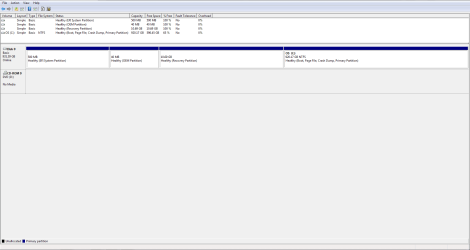
I have added a screenshot of my Disk Management section. Perhaps I was mistaken but I'm pretty sure I saw two of the same disc-like image when I put in the Windows 7 installation disc.

As of now, can I have a brief explanation of what each of these parts in my Disk Management image is for?

If not a reinstall, how about just "refreshing the OS"? Also to add, the reason my application was acting strange was because of a certificate revocation. If that is the only thing that has happened, then perhaps I don't need to touch my PC right now.
 

Attachments

  • picture.PNG
    picture.PNG
    17 KB · Views: 10

My Computer My Computer

At a glance

Windows 7 Home Premium x64Intel i7 4770 3.40Ghz16 GB DDR3Nvidia GeForce GTA 760 Ti OEM
Computer type
PC/Desktop
Computer Manufacturer/Model Number
Dell, Alienware
OS
Windows 7 Home Premium x64
CPU
Intel i7 4770 3.40Ghz
Motherboard
Micro ATX
Memory
16 GB DDR3
Graphics Card(s)
Nvidia GeForce GTA 760 Ti OEM
Monitor(s) Displays
1
Screen Resolution
1920 x 1080
Antivirus
Microsoft Security Essentials
Browser
Google Chrome, Internet Explorer 11
Other Info
OS was recently reinstalled.
Nope everything looks okay.
Like I said earlier the UAC prompt is fairly normal for programs that can make system wide changes.
I'm sure it won't be the last program to have that happen with/ click yes and move along :)
Just be tankful you don't have to enter a password like in a standard user account or in Linux ;)
 

My Computer My Computer

At a glance

Win-7-Pro64bit 7-H-Prem-64biti7-5930K 2nd i9-9940x both water blocked VRM'...Trident-z 3200C14 2nd Trident-z 3600C16EVGA 1080ti ftw3 2nd Titan Xp both water blocked
Computer type
PC/Desktop
Computer Manufacturer/Model Number
Custom assembled by me :}
OS
Win-7-Pro64bit 7-H-Prem-64bit
CPU
i7-5930K 2nd i9-9940x both water blocked VRM's too
Motherboard
ASUS SABERTOOTH X99 2nd ASUS x299 Apex
Memory
Trident-z 3200C14 2nd Trident-z 3600C16
Graphics Card(s)
EVGA 1080ti ftw3 2nd Titan Xp both water blocked
Sound Card
Built-in Realtek
Monitor(s) Displays
1-AOC G2460PG 24"G-Sync 144Hz/ 2nd 1-ASUS VG248QE 24" 144Hz
Screen Resolution
1920 x 1080 144Hz
Hard Drives
2-Samsung M.2 Evo & Evo Plus
2-Samsung 850 EVO 500GB SSD's/ 3-2.5 W.D. Black 1tb-&3-1tb/3-3.5 WD Black 1tb hdd's
PSU
EVGA SuperNOVA 1000-P2 2nd 1200-P2
Case
2-Corsair Obsidian Series 450D Black ATX Mid Tower
Cooling
Custom water loops
Keyboard
Logitech G710+/ 2nd Logitech G910
Mouse
2-RedDragon M901 Perdition 16400 dpi Gaming mouse = wired
Internet Speed
Comcast Ping 19ms 89.31mbps download speed 6.12mbps upload
Antivirus
Malwarebytes Pro/ Superantispyware Pro
Browser
FireFox & Pale moon
Other Info
2nd ASUS X299 Apex/Intel i9-9940x with Custom water loop/7H-Prem-x64/Corsair 450D case/Ram Trident-z 3600C16 4x8gb / Samsung970Evo plus 500gb SSD/Dual ssd EZ swap evo/PSU EVGA SuperNova 1200w-P2 80+Platinum/GPU Titan Xp /8-ML-140 on push-pull on 2-280GTX rads
Nope everything looks okay.
Like I said earlier the UAC prompt is fairly normal for programs that can make system wide changes.
I'm sure it won't be the last program to have that happen with/ click yes and move along :)
Just be tankful you don't have to enter a password like in a standard user account or in Linux ;)

I actually noticed that the program, Alienware Command Center, has a revoked certificate, so I get a UAC prompt because Windows 7 wants to know if I should still allow this program to run even though the license is revoked.
 

My Computer My Computer

At a glance

Windows 7 Home Premium x64Intel i7 4770 3.40Ghz16 GB DDR3Nvidia GeForce GTA 760 Ti OEM
Computer type
PC/Desktop
Computer Manufacturer/Model Number
Dell, Alienware
OS
Windows 7 Home Premium x64
CPU
Intel i7 4770 3.40Ghz
Motherboard
Micro ATX
Memory
16 GB DDR3
Graphics Card(s)
Nvidia GeForce GTA 760 Ti OEM
Monitor(s) Displays
1
Screen Resolution
1920 x 1080
Antivirus
Microsoft Security Essentials
Browser
Google Chrome, Internet Explorer 11
Other Info
OS was recently reinstalled.
If User Account bothers you, just disable it, I haven`t used it for years, it`s totally unnecessary, in my opinion.

Others have their opinion, but I think it`s useless.
 

My Computer My Computer

At a glance

Windows 10 Pro x64Intel Core i7 6700KGSkill TridentZ RGB 16GB 3600 16-16-16-36EVGA GTX 980 Ti SC x2
Computer type
PC/Desktop
Computer Manufacturer/Model Number
Skylake Special #666
OS
Windows 10 Pro x64
CPU
Intel Core i7 6700K
Motherboard
Asus Sabertooth Z170 Mark 1
Memory
GSkill TridentZ RGB 16GB 3600 16-16-16-36
Graphics Card(s)
EVGA GTX 980 Ti SC x2
Sound Card
Realtek High Definition
Monitor(s) Displays
AOC G2460PG
Screen Resolution
1920 x 1080 144Hz
Hard Drives
Samsung 860 Pro 256GB, Seagate Barracuda 4TB x2
PSU
EVGA 1000 P2, EVGA White Custom Braided Cables
Case
Corsair Vengeance C70 Gunmetal Black
Cooling
Corsair H100i v2, Corsair ML120 x2, Thermal Grizzly Kryonaut
Keyboard
Logitech G910 Orion Spectrum
Mouse
Logitech G700s
Internet Speed
Verizon Fios Quantum Gateway 75/75
Antivirus
Windows Defender, Malwarebytes Free 3.8.3
Browser
Chrome
Other Info
Corsair SP120 x4, LG Blu-ray Drive, Durabrand HT-395 100 Watt Dolby Digital Amp, Corsair H2100 Wireless 7.1 Headset
You can contact Dell or alienware and ask what's up and if they plan on updating their crapware :)
 

My Computer My Computer

At a glance

Win-7-Pro64bit 7-H-Prem-64biti7-5930K 2nd i9-9940x both water blocked VRM'...Trident-z 3200C14 2nd Trident-z 3600C16EVGA 1080ti ftw3 2nd Titan Xp both water blocked
Computer type
PC/Desktop
Computer Manufacturer/Model Number
Custom assembled by me :}
OS
Win-7-Pro64bit 7-H-Prem-64bit
CPU
i7-5930K 2nd i9-9940x both water blocked VRM's too
Motherboard
ASUS SABERTOOTH X99 2nd ASUS x299 Apex
Memory
Trident-z 3200C14 2nd Trident-z 3600C16
Graphics Card(s)
EVGA 1080ti ftw3 2nd Titan Xp both water blocked
Sound Card
Built-in Realtek
Monitor(s) Displays
1-AOC G2460PG 24"G-Sync 144Hz/ 2nd 1-ASUS VG248QE 24" 144Hz
Screen Resolution
1920 x 1080 144Hz
Hard Drives
2-Samsung M.2 Evo & Evo Plus
2-Samsung 850 EVO 500GB SSD's/ 3-2.5 W.D. Black 1tb-&3-1tb/3-3.5 WD Black 1tb hdd's
PSU
EVGA SuperNOVA 1000-P2 2nd 1200-P2
Case
2-Corsair Obsidian Series 450D Black ATX Mid Tower
Cooling
Custom water loops
Keyboard
Logitech G710+/ 2nd Logitech G910
Mouse
2-RedDragon M901 Perdition 16400 dpi Gaming mouse = wired
Internet Speed
Comcast Ping 19ms 89.31mbps download speed 6.12mbps upload
Antivirus
Malwarebytes Pro/ Superantispyware Pro
Browser
FireFox & Pale moon
Other Info
2nd ASUS X299 Apex/Intel i9-9940x with Custom water loop/7H-Prem-x64/Corsair 450D case/Ram Trident-z 3600C16 4x8gb / Samsung970Evo plus 500gb SSD/Dual ssd EZ swap evo/PSU EVGA SuperNova 1200w-P2 80+Platinum/GPU Titan Xp /8-ML-140 on push-pull on 2-280GTX rads
You can contact Dell or alienware and ask what's up and if they plan on updating their crapware :)

Haha. Crapware.

Well; there's not much more to say here. Thank you all for the help.
 

My Computer My Computer

At a glance

Windows 7 Home Premium x64Intel i7 4770 3.40Ghz16 GB DDR3Nvidia GeForce GTA 760 Ti OEM
Computer type
PC/Desktop
Computer Manufacturer/Model Number
Dell, Alienware
OS
Windows 7 Home Premium x64
CPU
Intel i7 4770 3.40Ghz
Motherboard
Micro ATX
Memory
16 GB DDR3
Graphics Card(s)
Nvidia GeForce GTA 760 Ti OEM
Monitor(s) Displays
1
Screen Resolution
1920 x 1080
Antivirus
Microsoft Security Essentials
Browser
Google Chrome, Internet Explorer 11
Other Info
OS was recently reinstalled.
Back
Top