Solved WIN7 won't boot. What should I do before trying a clean install?

So the saga continues.

I downloaded the WIN7 Prof 64 SP1 ISO and burnt it to DVD and then started the install.

I chose the custom option and deleted all the partitions on the disk and then let the install run.

The PC rebooted and then came up with the message "updating registry entries" not sure of the exact wording but immediately crashed back to black and then restarted the boot from the DVD back at the start point.

When I saw that it reminded me of the original issues I had building this PC the first time. See this post http://www.sevenforums.com/installation-setup/74263-win7-clean-install-wont-complete.html for the long story, but the short story was that I seemed to have resolved it by using the current 80GB drive for the system.
So now it seems that I'm even further behind than I was two years ago.

Looking for guidance on how to get the install working again.

I have also tried the install using the original Win7 Prof 64 DVD but got the ame result.

Given the issue I had even booting up from the Partition Wizard DVD and CD perhaps I have a more fundamental issue to address.
 

My Computer My Computer

At a glance

Windows 7 Pro 64 SP1i5 7504* 2GB 1333 DDR3 Kingston (8GB)Radeon HD5850 XFX
Computer Manufacturer/Model Number
custom build
OS
Windows 7 Pro 64 SP1
CPU
i5 750
Motherboard
Gigabyte GA-P55A-UD3P
Memory
4* 2GB 1333 DDR3 Kingston (8GB)
Graphics Card(s)
Radeon HD5850 XFX
Sound Card
Realtek HDAudio
Monitor(s) Displays
CMV CT-722A
Hard Drives
seagate 80GB sata system
seagate 1.5TB sata user data
PSU
Zalman ZM-750HP
Case
Centurion 5 II
Keyboard
PS2 generic
Mouse
HP USB
Other Info
Samsung SH-B083 BD-ROM/DVD
when you install, be sure that you only have 1 disk connected.

Evidently you can now boot from a CD/DVD.

Put Memtest86+ on a DVD, boot, run, and carry out 6 passes.

If and only if memtest86+ results are good, then:
Put SeaGate's SeaTools on a Cd/DVD and use SeaGate's SeaTools to test you hard disk.

Memtest86+ - Advanced Memory Diagnostic Tool
http://www.sevenforums.com/tutorials/105647-ram-test-memtest86.html?ltr=R

http://www.seagate.com/staticfiles/support/seatools/SeaToolsDOS223ALL.ISO

Diagnose Your Hard Disk Drive For Corrupted Data/Sectors With SeaTools

On the working Win 7, you can burn an iso to cd/dvd by simply double-clicking on the ISO file.
 

My Computer My Computer

At a glance

MS Windows 7 Ultimate SP1 64-bitAMD A10-4600M6.00 GB Dual-Channel DDR3 @ 798MHz (11-11-12-28)AMD Radeon HD 7660G
Computer Manufacturer/Model Number
Toshiba Satellite S875D-S7239 laptop
OS
MS Windows 7 Ultimate SP1 64-bit
CPU
AMD A10-4600M
Motherboard
AMD Pumori (Socket FT1)
Memory
6.00 GB Dual-Channel DDR3 @ 798MHz (11-11-12-28)
Graphics Card(s)
AMD Radeon HD 7660G
Sound Card
High Definition Audio Device
Monitor(s) Displays
Generic PnP Monitor (1600x900@60Hz)
Screen Resolution
1600x900@60Hz
Hard Drives
SSD 119GB Corsair CSSD-V128GB2 ATA Device
Keyboard
Standard PS/2 Keyboard
Mouse
HP Wireless Optical Mobile Mouse Model FHA-3410
Internet Speed
What the local pub, local coffee shop offers.
Other Info
Optical Drive:MATSHITA BD-CMB UJ160B ATA Device


Also have an Asus ha1002xp netbook with Win 7 Ultimate installed.
when you install, be sure that you only have 1 disk connected.

Evidently you can now boot from a CD/DVD.
Apart from the PartitionWizard I haven't had any problems booting from a CD/DVD
Put Memtest86+ on a DVD, boot, run, and carry out 6 passes.
Memtest ran overnight for 12 hours and completed 8 passes. No errors
memtest.GIF

If and only if memtest86+ results are good, then:
Put SeaGate's SeaTools on a Cd/DVD and use SeaGate's SeaTools to test you hard disk.

Memtest86+ - Advanced Memory Diagnostic Tool
http://www.sevenforums.com/tutorials/105647-ram-test-memtest86.html?ltr=R

http://www.seagate.com/staticfiles/support/seatools/SeaToolsDOS223ALL.ISO

Diagnose Your Hard Disk Drive For Corrupted Data/Sectors With SeaTools

On the working Win 7, you can burn an iso to cd/dvd by simply double-clicking on the ISO file.
Only the one disk is connected.
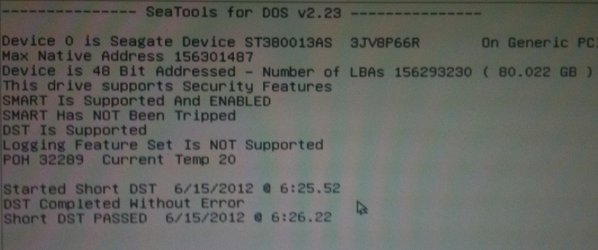
SeaTools short test has run OK with no error. The long test is running now and I'll check it when I get home tonight.
disk_short_2.JPG
On the assumption the long test will be OK what is my next step?
 

My Computer My Computer

At a glance

Windows 7 Pro 64 SP1i5 7504* 2GB 1333 DDR3 Kingston (8GB)Radeon HD5850 XFX
Computer Manufacturer/Model Number
custom build
OS
Windows 7 Pro 64 SP1
CPU
i5 750
Motherboard
Gigabyte GA-P55A-UD3P
Memory
4* 2GB 1333 DDR3 Kingston (8GB)
Graphics Card(s)
Radeon HD5850 XFX
Sound Card
Realtek HDAudio
Monitor(s) Displays
CMV CT-722A
Hard Drives
seagate 80GB sata system
seagate 1.5TB sata user data
PSU
Zalman ZM-750HP
Case
Centurion 5 II
Keyboard
PS2 generic
Mouse
HP USB
Other Info
Samsung SH-B083 BD-ROM/DVD
Excellent.
I'll await the results of the long test.
thanks,
karl
 

My Computer My Computer

At a glance

MS Windows 7 Ultimate SP1 64-bitAMD A10-4600M6.00 GB Dual-Channel DDR3 @ 798MHz (11-11-12-28)AMD Radeon HD 7660G
Computer Manufacturer/Model Number
Toshiba Satellite S875D-S7239 laptop
OS
MS Windows 7 Ultimate SP1 64-bit
CPU
AMD A10-4600M
Motherboard
AMD Pumori (Socket FT1)
Memory
6.00 GB Dual-Channel DDR3 @ 798MHz (11-11-12-28)
Graphics Card(s)
AMD Radeon HD 7660G
Sound Card
High Definition Audio Device
Monitor(s) Displays
Generic PnP Monitor (1600x900@60Hz)
Screen Resolution
1600x900@60Hz
Hard Drives
SSD 119GB Corsair CSSD-V128GB2 ATA Device
Keyboard
Standard PS/2 Keyboard
Mouse
HP Wireless Optical Mobile Mouse Model FHA-3410
Internet Speed
What the local pub, local coffee shop offers.
Other Info
Optical Drive:MATSHITA BD-CMB UJ160B ATA Device


Also have an Asus ha1002xp netbook with Win 7 Ultimate installed.
Long test is complete. No errors.
 

My Computer My Computer

At a glance

Windows 7 Pro 64 SP1i5 7504* 2GB 1333 DDR3 Kingston (8GB)Radeon HD5850 XFX
Computer Manufacturer/Model Number
custom build
OS
Windows 7 Pro 64 SP1
CPU
i5 750
Motherboard
Gigabyte GA-P55A-UD3P
Memory
4* 2GB 1333 DDR3 Kingston (8GB)
Graphics Card(s)
Radeon HD5850 XFX
Sound Card
Realtek HDAudio
Monitor(s) Displays
CMV CT-722A
Hard Drives
seagate 80GB sata system
seagate 1.5TB sata user data
PSU
Zalman ZM-750HP
Case
Centurion 5 II
Keyboard
PS2 generic
Mouse
HP USB
Other Info
Samsung SH-B083 BD-ROM/DVD
Have you wiped the HD with Diskpart Clean Command yet to try the install?

It should also be on the Seagate CD, a quick erase option.

Then boot the installer to try install to a partition you create and format, or just click Next to let the installer do it for you.

If that fails, wipe it again and create an NTFS Primary partition marked Active using Step 2.2 here: SSD - HDD Optimize for Windows Reinstallation
 
Great progress :cool:
WIN7 has installed and is running updates now.
Unfortunately I grabbed the original OEM disk rather than the one with SP1 but happy to download that and add it in later tonight.

I used the Seatools option to do a quick format - so that seems to have fixed the problem.

Now I'm just left wondering why the system stopped booting in the first place.

Thankyou to everyone who helped me - it is great to see so many people out there willing to lend a hand.
I'm sure I'll be back again one day soon.
 

My Computer My Computer

At a glance

Windows 7 Pro 64 SP1i5 7504* 2GB 1333 DDR3 Kingston (8GB)Radeon HD5850 XFX
Computer Manufacturer/Model Number
custom build
OS
Windows 7 Pro 64 SP1
CPU
i5 750
Motherboard
Gigabyte GA-P55A-UD3P
Memory
4* 2GB 1333 DDR3 Kingston (8GB)
Graphics Card(s)
Radeon HD5850 XFX
Sound Card
Realtek HDAudio
Monitor(s) Displays
CMV CT-722A
Hard Drives
seagate 80GB sata system
seagate 1.5TB sata user data
PSU
Zalman ZM-750HP
Case
Centurion 5 II
Keyboard
PS2 generic
Mouse
HP USB
Other Info
Samsung SH-B083 BD-ROM/DVD
We use Dispart Clean (Quick) Command often to overwrite the boot sector with zeroes to erase corrupt or conflicting code which causes install and boot problems.
 
Back
Top