Solved Issue Finding SM Bus and PCI Driver: Realtek?

G Force

Banned
Local time
6:13 PM
Messages
35
The special codes we are looking for is:

PCI Device PCI\VEN_10EC&DEV_5229&SUBSYS_1818103C&REV_01\4&5CFE19B&0&00E2

I am also missing this...

SM Bus Controller PCI\VEN_8086&DEV_1E22&SUBSYS_1818103C&REV_04\3&11583659&0&FB

I am running Windows 7 Professional x64. I figured the PCI device has something to do with Raeltek but I cannot figure it out further as I don't see anything matching on this webpage.

PCI Vendor and Device Lists

The SM Bus controller, I am absolutely clueless.

Windows Update did not find anything.

PCI Vendor and Device Lists

I was hoping someone from 7Forums can crack this. I cannot even crack it. I usually fix issues on my own.

Please do lend a hand! Thanks!
 
Last edited:

My Computer My Computer

Computer type
Laptop
Computer Manufacturer/Model Number
HP Pavilion dv6t-7000
OS
Windows 7 Professional x64
CPU
Intel Core i7 3612QM @ 2.10GHz
Motherboard
Hewlett-Packard 181B (U3E1)
Memory
12.0GB Dual-Channel DDR3 @ 798MHz
Graphics Card(s)
1023MB NVIDIA GeForce GT 630M (HP)
Sound Card
Casual Sound Card
Monitor(s) Displays
Casual Monitor
Screen Resolution
1366x768
Hard Drives
447GB SanDisk SDSSDHII480G (SSD)
PSU
Typical Power Supply
Case
No Case
Cooling
HAVIT HV-F2056 17" Laptop Cooling Pad, Ultra Slim (3 Blades)
Keyboard
Some keyboard with backlight
Mouse
Some lenovo mouse
Internet Speed
60 vice-versa
Antivirus
Kaspersky Internet Security 2016
Browser
Mozilla Firefox
Other Info
This information hardly matters. Ego much?
Welcome to the forum,

The top one is the card reader from Realtek.

The SM Bus controller should be fixed with the chipset driver.

If you give us the full model of the laptop we can link the drivers from HP.
 

My Computer My Computer

Computer type
PC/Desktop
Computer Manufacturer/Model Number
Self Built
OS
Win 10 Pro x64
CPU
Intel I5-2500K @3.3GHz
Motherboard
Asrock P67 Extreme4
Memory
16GB G.Skill Ripjaws X (4x4GB)
Graphics Card(s)
EVGA GeForce 750 Ti SC 2GB
Sound Card
ASUS Xonar DG 5.1 Channels 24-bit 96KHz PCI Interface Sound
Monitor(s) Displays
auria eq2367
Screen Resolution
1920 x 1080
Hard Drives
250GB Samsung 850 EVO SSD
1TB WD Blue
1TB Hitachi
PSU
SeaSonic X 650W 80 Plus Gold
Case
Corsair Obsidian 750D
Cooling
Corsair H60, Three 140mm case fans
Keyboard
Logitech Wireless Keyboard K520
Mouse
Logitech Wireless Mouse M310
Internet Speed
Wave Broadband ~ 100 dn 5 up
Antivirus
Windows Defender, Malwarebytes Premium
Browser
Edge, IE11, Chrome
Other Info
Laptop specs: HP g7-1365dx /
CPU: AMD A6-3420M APU with Radeon(tm) HD Graphics /
RAM: Crucial 8Gb (2x4Gb) /
SSD: Crucial M4-CT128M4SSD2 ATA Device/ FW 000F /
GFX: AMD Radeon HD 6520G /
OS: Windows 10 Pro x64
Welcome to the forum,

The top one is the card reader from Realtek.

The SM Bus controller should be fixed with the chipset driver.

If you give us the full model of the laptop we can link the drivers from HP.

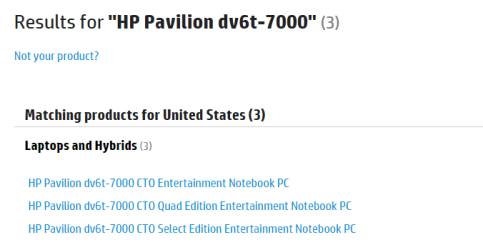
HP Pavilion dv6t-7000

Thank you for the help. I appreciate it. I tried looking there for drivers on the HP page too. It's slightly confusing to me for whatever reason with the CTO edition I believe?

Thanks for the welcome!
 
Last edited:

My Computer My Computer

Computer type
Laptop
Computer Manufacturer/Model Number
HP Pavilion dv6t-7000
OS
Windows 7 Professional x64
CPU
Intel Core i7 3612QM @ 2.10GHz
Motherboard
Hewlett-Packard 181B (U3E1)
Memory
12.0GB Dual-Channel DDR3 @ 798MHz
Graphics Card(s)
1023MB NVIDIA GeForce GT 630M (HP)
Sound Card
Casual Sound Card
Monitor(s) Displays
Casual Monitor
Screen Resolution
1366x768
Hard Drives
447GB SanDisk SDSSDHII480G (SSD)
PSU
Typical Power Supply
Case
No Case
Cooling
HAVIT HV-F2056 17" Laptop Cooling Pad, Ultra Slim (3 Blades)
Keyboard
Some keyboard with backlight
Mouse
Some lenovo mouse
Internet Speed
60 vice-versa
Antivirus
Kaspersky Internet Security 2016
Browser
Mozilla Firefox
Other Info
This information hardly matters. Ego much?
You're welcome, I wouldn't worry too much about the CTO edition, it looks they all are,

2016-01-24_21h14_49.png

I see the same drivers listed on each page, at least the ones you need,

Contact HP Customer Support | HP® Customer Support

Under chipset, I would install both of these,

2016-01-24_21h08_37.png

The card reader is under storage,

2016-01-24_21h10_37.png

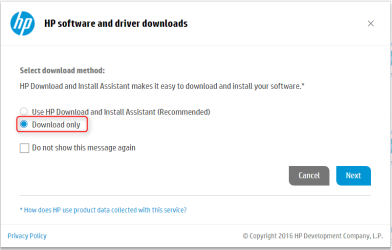
I would suggest not using the download manager, just tick this first,

2016-01-24_21h24_01.png
 

My Computer My Computer

Computer type
PC/Desktop
Computer Manufacturer/Model Number
Self Built
OS
Win 10 Pro x64
CPU
Intel I5-2500K @3.3GHz
Motherboard
Asrock P67 Extreme4
Memory
16GB G.Skill Ripjaws X (4x4GB)
Graphics Card(s)
EVGA GeForce 750 Ti SC 2GB
Sound Card
ASUS Xonar DG 5.1 Channels 24-bit 96KHz PCI Interface Sound
Monitor(s) Displays
auria eq2367
Screen Resolution
1920 x 1080
Hard Drives
250GB Samsung 850 EVO SSD
1TB WD Blue
1TB Hitachi
PSU
SeaSonic X 650W 80 Plus Gold
Case
Corsair Obsidian 750D
Cooling
Corsair H60, Three 140mm case fans
Keyboard
Logitech Wireless Keyboard K520
Mouse
Logitech Wireless Mouse M310
Internet Speed
Wave Broadband ~ 100 dn 5 up
Antivirus
Windows Defender, Malwarebytes Premium
Browser
Edge, IE11, Chrome
Other Info
Laptop specs: HP g7-1365dx /
CPU: AMD A6-3420M APU with Radeon(tm) HD Graphics /
RAM: Crucial 8Gb (2x4Gb) /
SSD: Crucial M4-CT128M4SSD2 ATA Device/ FW 000F /
GFX: AMD Radeon HD 6520G /
OS: Windows 10 Pro x64
You're welcome, I wouldn't worry too much about the CTO edition, it looks they all are,

View attachment 380459

I see the same drivers listed on each page, at least the ones you need,

Contact HP Customer Support | HP® Customer Support

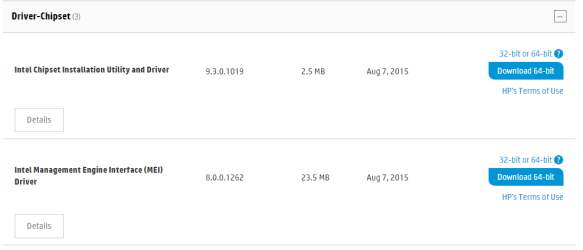
Under chipset, I would install both of these,

View attachment 380460

The card reader is under storage,

View attachment 380461

I would suggest not using the download manager, just tick this first,

View attachment 380462

Thanks a bunch. I feel so challenged. This is me having a brain fart, I do device drivers for other people's computer's just fine. I'm so weird.

I will update after I update. Lol.

JLNafmu.png


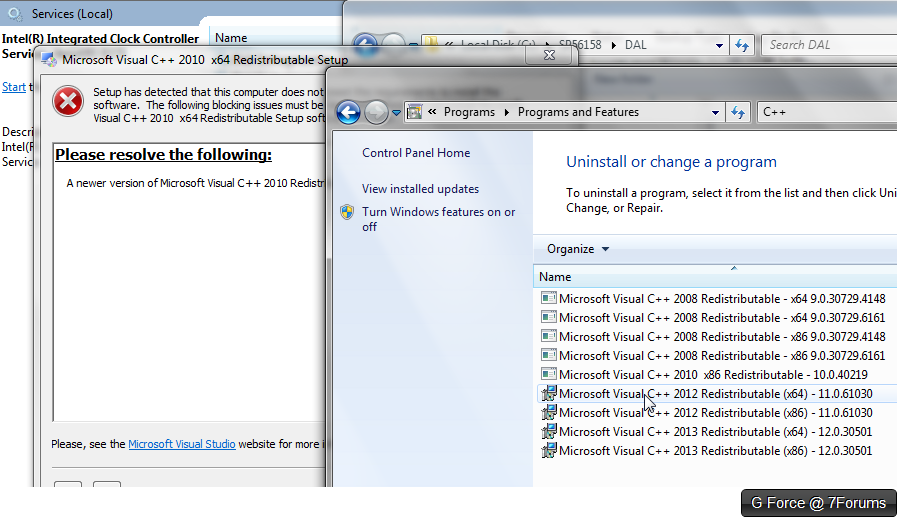
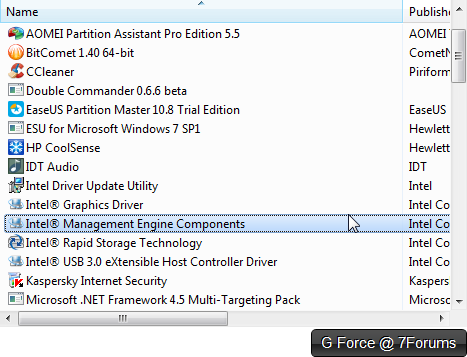
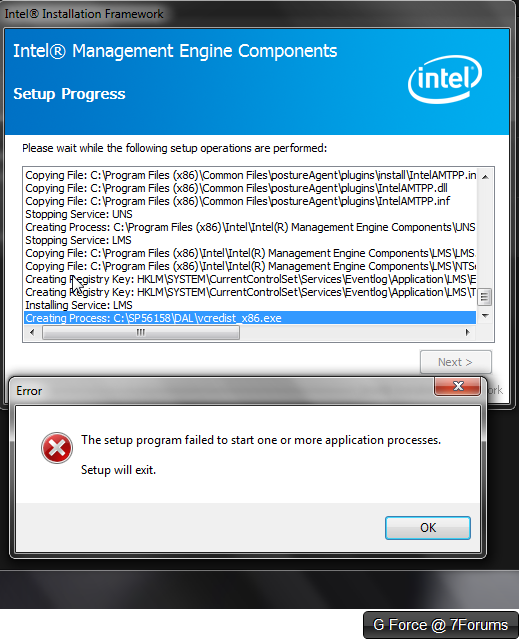
I can't seem to wrap my head around this one. I seem to have already had the MEI installed (oops) and uninstalled it because it threw this error, and now I rebooted and it's still returning this error from the installer I got. Windows does this all the time, and I don't know why. I will try clearing out my temporary files through a script I have made, see if that changes something.

Any ideas? Looks like vcedistx86 is the issue.

EDIT 3: No luck. I'm pretty swamped. Apparently I just found this out after some playing with Windows.

jrw4iIq.png

I uninstalled the "NEWER" C++ x64 package, only x86 remains. I will attempt to install this older one.
 
Last edited:

My Computer My Computer

Computer type
Laptop
Computer Manufacturer/Model Number
HP Pavilion dv6t-7000
OS
Windows 7 Professional x64
CPU
Intel Core i7 3612QM @ 2.10GHz
Motherboard
Hewlett-Packard 181B (U3E1)
Memory
12.0GB Dual-Channel DDR3 @ 798MHz
Graphics Card(s)
1023MB NVIDIA GeForce GT 630M (HP)
Sound Card
Casual Sound Card
Monitor(s) Displays
Casual Monitor
Screen Resolution
1366x768
Hard Drives
447GB SanDisk SDSSDHII480G (SSD)
PSU
Typical Power Supply
Case
No Case
Cooling
HAVIT HV-F2056 17" Laptop Cooling Pad, Ultra Slim (3 Blades)
Keyboard
Some keyboard with backlight
Mouse
Some lenovo mouse
Internet Speed
60 vice-versa
Antivirus
Kaspersky Internet Security 2016
Browser
Mozilla Firefox
Other Info
This information hardly matters. Ego much?
Forget that one for now, I was just covering both by recommending it.

Why did you uninstall it?

For that matter how did you come to need those two drivers in your first post?

I figured you had done a new install but it doesn't sound that way.
 

My Computer My Computer

Computer type
PC/Desktop
Computer Manufacturer/Model Number
Self Built
OS
Win 10 Pro x64
CPU
Intel I5-2500K @3.3GHz
Motherboard
Asrock P67 Extreme4
Memory
16GB G.Skill Ripjaws X (4x4GB)
Graphics Card(s)
EVGA GeForce 750 Ti SC 2GB
Sound Card
ASUS Xonar DG 5.1 Channels 24-bit 96KHz PCI Interface Sound
Monitor(s) Displays
auria eq2367
Screen Resolution
1920 x 1080
Hard Drives
250GB Samsung 850 EVO SSD
1TB WD Blue
1TB Hitachi
PSU
SeaSonic X 650W 80 Plus Gold
Case
Corsair Obsidian 750D
Cooling
Corsair H60, Three 140mm case fans
Keyboard
Logitech Wireless Keyboard K520
Mouse
Logitech Wireless Mouse M310
Internet Speed
Wave Broadband ~ 100 dn 5 up
Antivirus
Windows Defender, Malwarebytes Premium
Browser
Edge, IE11, Chrome
Other Info
Laptop specs: HP g7-1365dx /
CPU: AMD A6-3420M APU with Radeon(tm) HD Graphics /
RAM: Crucial 8Gb (2x4Gb) /
SSD: Crucial M4-CT128M4SSD2 ATA Device/ FW 000F /
GFX: AMD Radeon HD 6520G /
OS: Windows 10 Pro x64
Forget that one for now, I was just covering both by recommending it.

Why did you uninstall it?

For that matter how did you come to need those two drivers in your first post?

I figured you had done a new install but it doesn't sound that way.

I figured the new attempt to overwrite the previous install may have interfered with the one already installed.

Good question!

I performed a fresh install of my laptop and had obtained all drivers except the ones you found for me.

Is it safe to ignore the new error? I guess I wont have IME on my laptop any longer.
 

My Computer My Computer

Computer type
Laptop
Computer Manufacturer/Model Number
HP Pavilion dv6t-7000
OS
Windows 7 Professional x64
CPU
Intel Core i7 3612QM @ 2.10GHz
Motherboard
Hewlett-Packard 181B (U3E1)
Memory
12.0GB Dual-Channel DDR3 @ 798MHz
Graphics Card(s)
1023MB NVIDIA GeForce GT 630M (HP)
Sound Card
Casual Sound Card
Monitor(s) Displays
Casual Monitor
Screen Resolution
1366x768
Hard Drives
447GB SanDisk SDSSDHII480G (SSD)
PSU
Typical Power Supply
Case
No Case
Cooling
HAVIT HV-F2056 17" Laptop Cooling Pad, Ultra Slim (3 Blades)
Keyboard
Some keyboard with backlight
Mouse
Some lenovo mouse
Internet Speed
60 vice-versa
Antivirus
Kaspersky Internet Security 2016
Browser
Mozilla Firefox
Other Info
This information hardly matters. Ego much?
OK, I figured you did, those drivers are only needed after a clean install.

For now, just leave that and we'll see if you need it.

How did you uninstall it anyway?
 

My Computer My Computer

Computer type
PC/Desktop
Computer Manufacturer/Model Number
Self Built
OS
Win 10 Pro x64
CPU
Intel I5-2500K @3.3GHz
Motherboard
Asrock P67 Extreme4
Memory
16GB G.Skill Ripjaws X (4x4GB)
Graphics Card(s)
EVGA GeForce 750 Ti SC 2GB
Sound Card
ASUS Xonar DG 5.1 Channels 24-bit 96KHz PCI Interface Sound
Monitor(s) Displays
auria eq2367
Screen Resolution
1920 x 1080
Hard Drives
250GB Samsung 850 EVO SSD
1TB WD Blue
1TB Hitachi
PSU
SeaSonic X 650W 80 Plus Gold
Case
Corsair Obsidian 750D
Cooling
Corsair H60, Three 140mm case fans
Keyboard
Logitech Wireless Keyboard K520
Mouse
Logitech Wireless Mouse M310
Internet Speed
Wave Broadband ~ 100 dn 5 up
Antivirus
Windows Defender, Malwarebytes Premium
Browser
Edge, IE11, Chrome
Other Info
Laptop specs: HP g7-1365dx /
CPU: AMD A6-3420M APU with Radeon(tm) HD Graphics /
RAM: Crucial 8Gb (2x4Gb) /
SSD: Crucial M4-CT128M4SSD2 ATA Device/ FW 000F /
GFX: AMD Radeon HD 6520G /
OS: Windows 10 Pro x64

My Computer My Computer

Computer type
Laptop
Computer Manufacturer/Model Number
HP Pavilion dv6t-7000
OS
Windows 7 Professional x64
CPU
Intel Core i7 3612QM @ 2.10GHz
Motherboard
Hewlett-Packard 181B (U3E1)
Memory
12.0GB Dual-Channel DDR3 @ 798MHz
Graphics Card(s)
1023MB NVIDIA GeForce GT 630M (HP)
Sound Card
Casual Sound Card
Monitor(s) Displays
Casual Monitor
Screen Resolution
1366x768
Hard Drives
447GB SanDisk SDSSDHII480G (SSD)
PSU
Typical Power Supply
Case
No Case
Cooling
HAVIT HV-F2056 17" Laptop Cooling Pad, Ultra Slim (3 Blades)
Keyboard
Some keyboard with backlight
Mouse
Some lenovo mouse
Internet Speed
60 vice-versa
Antivirus
Kaspersky Internet Security 2016
Browser
Mozilla Firefox
Other Info
This information hardly matters. Ego much?
Back
Top