Once and for all...'Important/Critical' updates ?

gizmo78

New member
Local time
6:03 AM
Messages
13
[This topic could fit in a few places, but HERE is probably the broadest coverage]

I am a dedicated Windows 7 user. (1) I own four WIN7 PC's and one WIN7 LT, (2) I'm...shall we say...'well seasoned', and it is entirely possible my computer OS's will last longer then MY OS! Further, on a one month test of WIN10, I found it to have stuff neither myself or Mrs.Gizmo will ever use.

I have all these rigs set up to use OPERA 34 [present stable version], and do not use I.E. for anything. Also, I operate all of them using Sandboxie 5.06, for security. My residence is entirely Ethernet [no wireless access], and when any of my Kids, or someone looking for my computer help, come here, I cascade one of my spare routers so We and Them are on different home networks.

Since my version of Microsoft Office is a little 'old' [2003], it will no longer run in my sandbox, so if we get any E-Mail with attachments, those are taken out of the E-Mail [POP3], and forced to run IN the sandbox, at least once before general opening.

I **think** we run about as secure as a home outfit can.

The last time I installed a Hard Drive it involved 176 uSoft Updates! And WIN7 will continue to be patched until January 2020!

I find myself asking **WHY** bother ? Our installed software, drivers, etc all operate perfectly. How can anything get TO us ? I've been running Sandboxie for over six (6) years now, and not a thing has ever gotten out of the 'box...that wasn't invited out. Everybody I ever ask about it assures me that I very much NEED to keep my WIN7 machines Microsoft Up to Date...but when pressed, they never really know why. FOR US, I am thinking I have wasted my last 'time' worshiping at the alter of Patch Tuesday!

WHAT.........does anybody here, on this forum **KNOW** to make me change my mind and rejoin the herd?

Thanks for your patience; I don't know how to be complete and be any shorter in my quirey....

Giz
 

My Computer My Computer

At a glance

Windows 7 Home Premium 64bit
Computer type
PC/Desktop
OS
Windows 7 Home Premium 64bit
is any computer really safe? is windows ever 100% safe and secure? how many updates have been issued for its various operating systems since i purchased xp home sp1a retail more moons ago than i can remember? and who are you trying to keep your pc safe from? the spoilsports ratbags and shysters out to nick your money, or m/s now spying on you at every opportunity and then flogging that data? dont forget, m/s make windows and they are(going by all accounts) using every nefarious trick to infect and steal your data?

whatever you do, some scuzzbucket will find a workaround to a latest update to get into your pc. m/s will keep forcing you to update, bearing in mind those updates will also try to steal your data. you willl be damned if you dont and screwed if you do update.
 

My Computer My Computer

At a glance

Windows 7 Ultimate x64AMD A8 7600 Kaveri APUCrucial Ballistix Sport(low profile) 1600mhz ...onboard apu only
Computer type
PC/Desktop
Computer Manufacturer/Model Number
self build
OS
Windows 7 Ultimate x64
CPU
AMD A8 7600 Kaveri APU
Motherboard
Gigabyte GA-F2A88XM-DS2
Memory
Crucial Ballistix Sport(low profile) 1600mhz - 4gb
Graphics Card(s)
onboard apu only
Sound Card
onboard realtek
Monitor(s) Displays
yes
Screen Resolution
if there is one thing i do have its screen resolution
Hard Drives
various old seagates
PSU
is working
Case
yes
Cooling
yes
Keyboard
dirty
Mouse
dont have mice, i keep a clean home
Internet Speed
see below
Browser
obviously
To reiterate again something I've said before: There is a way to run Windows 7 safely, forever. Keep it off-line. Use a Linux computer online. Basically what I do, although I continue to update all three of my W7 machines, but only security and office updates. And I run the utility from Ultimate Outsider to keep W10 updates off them. I only need W7 for one thing at this point in my life: my music software won't run on Linux. Someday, even that problem will be solved, and I will leave the world of Windows forever. I will have to convert Mrs. D to Linux also, but that's going to take some doing. Fortunately, I have until 2020 to do it.
 

My Computer My Computer

At a glance

Windows 7 x64 SP1AMD Athlon 64 X2 6000+ / 3.0 GHz6 GB
Computer type
PC/Desktop
Computer Manufacturer/Model Number
Gateway GT5656
OS
Windows 7 x64 SP1
CPU
AMD Athlon 64 X2 6000+ / 3.0 GHz
Motherboard
NVIDIA GeForce 6150 SE
Memory
6 GB
Monitor(s) Displays
Lenovo LED
Screen Resolution
1920 X 1080
Hard Drives
Windows on 500 GB spinner; Ubuntu 16 on Sandisk 250GB SSD; Bodhi5 on Samsung 250GB SSD; another old spinner for fooling around.
PSU
Original that came with computer
Keyboard
Logitech wireless
Mouse
Logitech wireless
Antivirus
Microsoft Sec Essentials
Browser
Vivaldi
Microsoft never forces me to d/l and install ANY update. My question is 'why should I?' when every file, good or malware, that comes to my browser stays in the sandbox until I close the browser, when it is then deleted. I keep no files in my sandbox, and none that could be there while the browser is open is allow to execute without my specific permission.
 

My Computer My Computer

At a glance

Windows 7 Home Premium 64bit
Computer type
PC/Desktop
OS
Windows 7 Home Premium 64bit
Thank you Folks for your input. Nobody knows everything, and the idea of running your chosen browser in a Virtual Machine...even one as 'consumer oriented' as Sandboxie...is not well experienced, I guess.

Looks like my last Forum attempt is really no more productive than the others were, and the only way to see what happens is to reformat this HardDrive...no uSoft updates, and SEE WHAT HAPPENS !

Giz...your local 'tester'
 

My Computer My Computer

At a glance

Windows 7 Home Premium 64bit
Computer type
PC/Desktop
OS
Windows 7 Home Premium 64bit
I have seen a couple of posts from users who have turned off windows updates. Too bad none of them caught your post and replied to you. If you stay with W7 without any more updates (and including past 2020), just hope that your sandbox vendor keeps supporting W7 past that date too. That would be a possible 'why not' if they dropped support.

The most significant 'why not' is the zero day that beats your sandbox. It gets through and hits a critical windows function that had a known vulnerability - like a cruise missile honing in on its target. An inconvenience possibly if you can restore and then locate the patch you need to continue safely. I think finding the right patch would be quite a task.

Good luck Gizmo.
 

My Computer My Computer

At a glance

W7Pro/64
Computer type
PC/Desktop
Computer Manufacturer/Model Number
Custom build
OS
W7Pro/64
i have done 2 lots of 7 updates in the last 12 months. lot 1 at W7 end of life, march i believe, lot 2 just before crimble. both using mbsa in offline mode. lot 1, produced a stable installation. lot 2, there are so many relating to w10(which many say avoid), and there is the spyware issue of many new updates, again to avoid. i have looked at my options, my needs, and i have said sod it, lot 1 is good enough for me. at end of life, i read that only security(mwahahahaha) updates will now be published and occasional updates to fix specific problems. for an offline media player/audio editor, lot 1 is stable, and nutella n co can sit and rotate themselves on my extended middle finger annd windows update service is always disabled, except if i need to install a specific update then my internet connection is unplugged
 

My Computer My Computer

At a glance

Windows 7 Ultimate x64AMD A8 7600 Kaveri APUCrucial Ballistix Sport(low profile) 1600mhz ...onboard apu only
Computer type
PC/Desktop
Computer Manufacturer/Model Number
self build
OS
Windows 7 Ultimate x64
CPU
AMD A8 7600 Kaveri APU
Motherboard
Gigabyte GA-F2A88XM-DS2
Memory
Crucial Ballistix Sport(low profile) 1600mhz - 4gb
Graphics Card(s)
onboard apu only
Sound Card
onboard realtek
Monitor(s) Displays
yes
Screen Resolution
if there is one thing i do have its screen resolution
Hard Drives
various old seagates
PSU
is working
Case
yes
Cooling
yes
Keyboard
dirty
Mouse
dont have mice, i keep a clean home
Internet Speed
see below
Browser
obviously
Thanks, Painter. Yes, I'd have liked to hear from those with experience on the subject. I might point out to you [maybe others], Invincea bought Sandboxie from it's Israeli author, who designed it. S/B is an installed program which 'clones' program files from the installed C Drive folder(s) themselves to the sandbox folder, where the forced program, ANY forced program, in clone form, operates. This is not a 'plug' for S/B, just an explanation for why I don't fear 'zero day' stuff. My Son-in-Law professionally uses a far more complicated and 'vendor regulated' V/M, but I don't know a thing about it or any of the others.

We shall see... T'anks Ag'in
 

My Computer My Computer

At a glance

Windows 7 Home Premium 64bit
Computer type
PC/Desktop
OS
Windows 7 Home Premium 64bit
To reiterate again something I've said before: There is a way to run Windows 7 safely, forever. Keep it off-line. Use a Linux computer online. Basically what I do, although I continue to update all three of my W7 machines, but only security and office updates. And I run the utility from Ultimate Outsider to keep W10 updates off them. I only need W7 for one thing at this point in my life: my music software won't run on Linux. ...

How do you update your music software (DAW, vst's, plugins etc)???
 

My Computer My Computer

At a glance

Windows 7 Home Premium x64 SP1
Computer type
Laptop
Computer Manufacturer/Model Number
Fujitsu LifeBook AH550
OS
Windows 7 Home Premium x64 SP1
Thanks, Painter. Yes, I'd have liked to hear from those with experience on the subject. I might point out to you [maybe others], Invincea bought Sandboxie from it's Israeli author, who designed it. S/B is an installed program which 'clones' program files from the installed C Drive folder(s) themselves to the sandbox folder, where the forced program, ANY forced program, in clone form, operates. This is not a 'plug' for S/B, just an explanation for why I don't fear 'zero day' stuff. My Son-in-Law professionally uses a far more complicated and 'vendor regulated' V/M, but I don't know a thing about it or any of the others.

We shall see... T'anks Ag'in

Gizmo, you do sound quite paranoid no offense.

The Windows Updates that are released do release updates for drivers occasionally aside from said "Security" updates, which are essential to your computers at home. Additionally, there are bits and pieces of malware that can bypass sandboxie and are self-aware using Ring 0 exploits. The best set up is a set up using VMWare and Virtualize the entire OS and run your emails and what not inside there, rather than using the host machine - and bridging the network connection. There shall be no Linux talk since this is a Windows forum, once you suggest Linux, you're practically off topic.

Windows Security updates are essential to avoid random system issues via hotfixes released, updates to Windows OS software itself, Office software, and various other discovered security holes.

So yes, you do need Windows Updates to install.

However, there are unnecessary updates including telemetry updates.

Visit this website to tell you about which ones to remove via a batch script:

Stop Windows Telemetry/Tracking/Upgrading to Win10 « alaya:techne
 

My Computer My Computer

At a glance

Windows 7 Professional x64Intel Core i7 3612QM @ 2.10GHz12.0GB Dual-Channel DDR3 @ 798MHz1023MB NVIDIA GeForce GT 630M (HP)
Computer type
Laptop
Computer Manufacturer/Model Number
HP Pavilion dv6t-7000
OS
Windows 7 Professional x64
CPU
Intel Core i7 3612QM @ 2.10GHz
Motherboard
Hewlett-Packard 181B (U3E1)
Memory
12.0GB Dual-Channel DDR3 @ 798MHz
Graphics Card(s)
1023MB NVIDIA GeForce GT 630M (HP)
Sound Card
Casual Sound Card
Monitor(s) Displays
Casual Monitor
Screen Resolution
1366x768
Hard Drives
447GB SanDisk SDSSDHII480G (SSD)
PSU
Typical Power Supply
Case
No Case
Cooling
HAVIT HV-F2056 17" Laptop Cooling Pad, Ultra Slim (3 Blades)
Keyboard
Some keyboard with backlight
Mouse
Some lenovo mouse
Internet Speed
60 vice-versa
Antivirus
Kaspersky Internet Security 2016
Browser
Mozilla Firefox
Other Info
This information hardly matters. Ego much?
Thanks, Painter. Yes, I'd have liked to hear from those with experience on the subject. I might point out to you [maybe others], Invincea bought Sandboxie from it's Israeli author, who designed it. S/B is an installed program which 'clones' program files from the installed C Drive folder(s) themselves to the sandbox folder, where the forced program, ANY forced program, in clone form, operates. This is not a 'plug' for S/B, just an explanation for why I don't fear 'zero day' stuff. My Son-in-Law professionally uses a far more complicated and 'vendor regulated' V/M, but I don't know a thing about it or any of the others.

We shall see... T'anks Ag'in

Yes, SBIE is an excellent product and I have used it for years. i never browse without it (I have it forced in FF). Great for isolating USBs too. It might be a good idea if you considered EMET as an extra layer of protection when you turn off WU. It is not complicated.
 

My Computer My Computer

At a glance

W7Pro/64
Computer type
PC/Desktop
Computer Manufacturer/Model Number
Custom build
OS
W7Pro/64
"G" and Painter: Nope, not the least bit paranoid, but SECURITY is the only thing that I find real interest in...and in which a darned sparse 'software' background hampers me. Thus...here I am on this Forum! "G", your posting is exactly the type of info I've been looking for...and I get some of it.

I was initially impressed by listening to an interview with Ronen Tzur, and I 'took the bait' for Sandboxie, hook, line and sinker.

After my last reformat of a WIN7 computer with a pretty decent i7 processor, taking almost three hours to do the Download Dance, I asked WHY? Been chasing it ever since.... [Obviously I have too much time. Don't play in traffic and YOU will get here too]

Giz
 

My Computer My Computer

At a glance

Windows 7 Home Premium 64bit
Computer type
PC/Desktop
OS
Windows 7 Home Premium 64bit
"G" and Painter: Nope, not the least bit paranoid, but SECURITY is the only thing that I find real interest in...and in which a darned sparse 'software' background hampers me. Thus...here I am on this Forum! "G", your posting is exactly the type of info I've been looking for...and I get some of it.

I was initially impressed by listening to an interview with Ronen Tzur, and I 'took the bait' for Sandboxie, hook, line and sinker.

After my last reformat of a WIN7 computer with a pretty decent i7 processor, taking almost three hours to do the Download Dance, I asked WHY? Been chasing it ever since.... [Obviously I have too much time. Don't play in traffic and YOU will get here too]

Giz

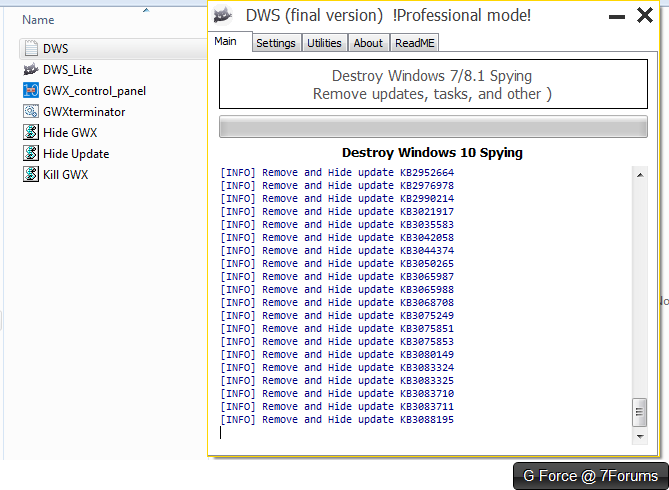
Yes. Windows Update is important. If you are worried about Microsoft's telemetry and surveillance, I would introduce to you a utility known as "DWS", one of my favorite tools among the one I just learned about with GWX Control Panel, and I have a large batch script I have compiled to attack the GWX module and prevent GWX from affecting Windows 7 - among other telemetry updates to be removed as well. Do you think it's worth making a thread to share?

Destroy Windows Spying - Windows spying removal tool

It contains a list of Telemetry suspected updates, settings, tasks and whatnot that Windows does not require, and surveillance setting removal which is all configurable.
 

My Computer My Computer

At a glance

Windows 7 Professional x64Intel Core i7 3612QM @ 2.10GHz12.0GB Dual-Channel DDR3 @ 798MHz1023MB NVIDIA GeForce GT 630M (HP)
Computer type
Laptop
Computer Manufacturer/Model Number
HP Pavilion dv6t-7000
OS
Windows 7 Professional x64
CPU
Intel Core i7 3612QM @ 2.10GHz
Motherboard
Hewlett-Packard 181B (U3E1)
Memory
12.0GB Dual-Channel DDR3 @ 798MHz
Graphics Card(s)
1023MB NVIDIA GeForce GT 630M (HP)
Sound Card
Casual Sound Card
Monitor(s) Displays
Casual Monitor
Screen Resolution
1366x768
Hard Drives
447GB SanDisk SDSSDHII480G (SSD)
PSU
Typical Power Supply
Case
No Case
Cooling
HAVIT HV-F2056 17" Laptop Cooling Pad, Ultra Slim (3 Blades)
Keyboard
Some keyboard with backlight
Mouse
Some lenovo mouse
Internet Speed
60 vice-versa
Antivirus
Kaspersky Internet Security 2016
Browser
Mozilla Firefox
Other Info
This information hardly matters. Ego much?
"Do you think it's worth making a thread to share? " Boy, you got me! From what I've picked up on Windows Weekly it sounds like the telemetry/surveilance stuff is a WIN TEN issue; at least that's how I heard it.

GWX hasn't bothered ME yet as I manually got my updates and LOOKED at each; none saying a word about WIN10 [yet]. My Sister HAS collected the little icon, but I told her to JUST DON'T CLICK ON THE $$$$$$$ THING. I think if it ever sneaked by me, that's what I would do....but now, on THIS computer, ain't none of that jazz coming in!

So far I haven't felt a lack of anything..........

Giz
 

My Computer My Computer

At a glance

Windows 7 Home Premium 64bit
Computer type
PC/Desktop
OS
Windows 7 Home Premium 64bit
"Do you think it's worth making a thread to share? " Boy, you got me! From what I've picked up on Windows Weekly it sounds like the telemetry/surveilance stuff is a WIN TEN issue; at least that's how I heard it.

GWX hasn't bothered ME yet as I manually got my updates and LOOKED at each; none saying a word about WIN10 [yet]. My Sister HAS collected the little icon, but I told her to JUST DON'T CLICK ON THE $$$$$$$ THING. I think if it ever sneaked by me, that's what I would do....but now, on THIS computer, ain't none of that jazz coming in!

So far I haven't felt a lack of anything..........

Giz

You're gravely mistaken. Microsoft has attempted to survey Windows 7 users as well, I'm surprised you had not known about it.

UwoksUM.png


That's my anti-surveillance toolbox, and it gives Windows a ever so slight performance boost which is normal.

Keep it on manual update, Google up each update, and make sure the hotfixes are hotfixes.
 

My Computer My Computer

At a glance

Windows 7 Professional x64Intel Core i7 3612QM @ 2.10GHz12.0GB Dual-Channel DDR3 @ 798MHz1023MB NVIDIA GeForce GT 630M (HP)
Computer type
Laptop
Computer Manufacturer/Model Number
HP Pavilion dv6t-7000
OS
Windows 7 Professional x64
CPU
Intel Core i7 3612QM @ 2.10GHz
Motherboard
Hewlett-Packard 181B (U3E1)
Memory
12.0GB Dual-Channel DDR3 @ 798MHz
Graphics Card(s)
1023MB NVIDIA GeForce GT 630M (HP)
Sound Card
Casual Sound Card
Monitor(s) Displays
Casual Monitor
Screen Resolution
1366x768
Hard Drives
447GB SanDisk SDSSDHII480G (SSD)
PSU
Typical Power Supply
Case
No Case
Cooling
HAVIT HV-F2056 17" Laptop Cooling Pad, Ultra Slim (3 Blades)
Keyboard
Some keyboard with backlight
Mouse
Some lenovo mouse
Internet Speed
60 vice-versa
Antivirus
Kaspersky Internet Security 2016
Browser
Mozilla Firefox
Other Info
This information hardly matters. Ego much?
'Can't argue with that, "G". Wow. Oh, well, it does say, "Destroy Windows 10 Spying" in the KB table you show.

I'm afraid 'DWS' is over my head...sorry

Nope; nobody ever surveyed me. Maybe that is for guys that buy the O.S., not OEM on a factory computer?

Giz
 

My Computer My Computer

At a glance

Windows 7 Home Premium 64bit
Computer type
PC/Desktop
OS
Windows 7 Home Premium 64bit
'Can't argue with that, "G". Wow. Oh, well, it does say, "Destroy Windows 10 Spying" in the KB table you show.

I'm afraid 'DWS' is over my head...sorry

Nope; nobody ever surveyed me. Maybe that is for guys that buy the O.S., not OEM on a factory computer?

Giz

Well then it seems that I am the paranoid one. I will go and make a thread on Removing Windows Surveillance from your system, including GWX. I'm pretty sure people would be interested on it.
 

My Computer My Computer

At a glance

Windows 7 Professional x64Intel Core i7 3612QM @ 2.10GHz12.0GB Dual-Channel DDR3 @ 798MHz1023MB NVIDIA GeForce GT 630M (HP)
Computer type
Laptop
Computer Manufacturer/Model Number
HP Pavilion dv6t-7000
OS
Windows 7 Professional x64
CPU
Intel Core i7 3612QM @ 2.10GHz
Motherboard
Hewlett-Packard 181B (U3E1)
Memory
12.0GB Dual-Channel DDR3 @ 798MHz
Graphics Card(s)
1023MB NVIDIA GeForce GT 630M (HP)
Sound Card
Casual Sound Card
Monitor(s) Displays
Casual Monitor
Screen Resolution
1366x768
Hard Drives
447GB SanDisk SDSSDHII480G (SSD)
PSU
Typical Power Supply
Case
No Case
Cooling
HAVIT HV-F2056 17" Laptop Cooling Pad, Ultra Slim (3 Blades)
Keyboard
Some keyboard with backlight
Mouse
Some lenovo mouse
Internet Speed
60 vice-versa
Antivirus
Kaspersky Internet Security 2016
Browser
Mozilla Firefox
Other Info
This information hardly matters. Ego much?
THANKS FOR **ALL** THE INPUTS. Indeed this Forum WAS more productive than others, on this topic.

Best to All....

Giz
 

My Computer My Computer

At a glance

Windows 7 Home Premium 64bit
Computer type
PC/Desktop
OS
Windows 7 Home Premium 64bit
Hi,
To date there has only been 1 Important update associated to win-10 and that was KB3112343
Everything else has been classified as recommended which might show up in the Important section if the windows updates setting box is checked to allow recommended updates to be installed the same way as Important updates.

Otherwise everything win-10 related even the telemetry ones would of been placed in the Optional section.
So ignoring all updates is a pretty wild and not at all recommended no pun intended
Important/ critical ones should of course be researched but should be installed eventually
The only one I've hid is the one I posted earlier because there is nothing to monitor if I never intent to upgrade to 10 on the machines ;)
 

My Computer My Computer

At a glance

Win-7-Pro64bit 7-H-Prem-64biti7-5930K 2nd i9-9940x both water blocked VRM'...Trident-z 3200C14 2nd Trident-z 3600C16EVGA 1080ti ftw3 2nd Titan Xp both water blocked
Computer type
PC/Desktop
Computer Manufacturer/Model Number
Custom assembled by me :}
OS
Win-7-Pro64bit 7-H-Prem-64bit
CPU
i7-5930K 2nd i9-9940x both water blocked VRM's too
Motherboard
ASUS SABERTOOTH X99 2nd ASUS x299 Apex
Memory
Trident-z 3200C14 2nd Trident-z 3600C16
Graphics Card(s)
EVGA 1080ti ftw3 2nd Titan Xp both water blocked
Sound Card
Built-in Realtek
Monitor(s) Displays
1-AOC G2460PG 24"G-Sync 144Hz/ 2nd 1-ASUS VG248QE 24" 144Hz
Screen Resolution
1920 x 1080 144Hz
Hard Drives
2-Samsung M.2 Evo & Evo Plus
2-Samsung 850 EVO 500GB SSD's/ 3-2.5 W.D. Black 1tb-&3-1tb/3-3.5 WD Black 1tb hdd's
PSU
EVGA SuperNOVA 1000-P2 2nd 1200-P2
Case
2-Corsair Obsidian Series 450D Black ATX Mid Tower
Cooling
Custom water loops
Keyboard
Logitech G710+/ 2nd Logitech G910
Mouse
2-RedDragon M901 Perdition 16400 dpi Gaming mouse = wired
Internet Speed
Comcast Ping 19ms 89.31mbps download speed 6.12mbps upload
Antivirus
Malwarebytes Pro/ Superantispyware Pro
Browser
FireFox & Pale moon
Other Info
2nd ASUS X299 Apex/Intel i9-9940x with Custom water loop/7H-Prem-x64/Corsair 450D case/Ram Trident-z 3600C16 4x8gb / Samsung970Evo plus 500gb SSD/Dual ssd EZ swap evo/PSU EVGA SuperNova 1200w-P2 80+Platinum/GPU Titan Xp /8-ML-140 on push-pull on 2-280GTX rads
Hi,
To date there has only been 1 Important update associated to win-10 and that was KB3112343
Everything else has been classified as recommended which might show up in the Important section if the windows updates setting box is checked to allow recommended updates to be installed the same way as Important updates.

Otherwise everything win-10 related even the telemetry ones would of been placed in the Optional section.
So ignoring all updates is a pretty wild and not at all recommended no pun intended
Important/ critical ones should of course be researched but should be installed eventually
The only one I've hid is the one I posted earlier because there is nothing to monitor if I never intent to upgrade to 10 on the machines ;)

Hmmm... Interesting... I was just about to ask about this very topic. If the "receive recommended updates the same as important" box is unchecked, the 'recommended' & optional updates get lumped together under optional updates. But when the above box IS checked, the 'recommended' updates show up under important updates. So, are any of the 'recommended' updates actually important, regarding system security, or not?
 

My Computer My Computer

At a glance

Windows 7 Home Premium x64 SP1
Computer type
Laptop
Computer Manufacturer/Model Number
Fujitsu LifeBook AH550
OS
Windows 7 Home Premium x64 SP1
Back
Top