
Solved Pop3 + imap

Roderunner

Exterminator
Guru
Gold Member
VIP
Local time
9:20 AM
Messages
2,362
Location
Scotland
Hi Folks,
I have been using these settings in Win. Live Mail for my Gmail account.
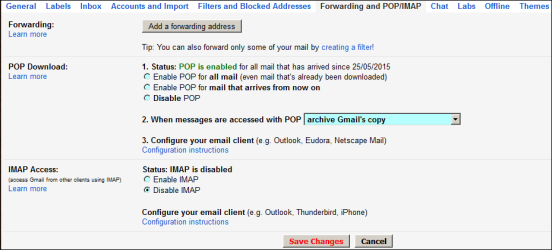
RR.PNG

I have WLM on both my pc's using the same settings.
As shown in my image, if I get a message on my Laptop, Gmail archives it. Now when I use my Desktop pc, I don't get the same message again. This is exactly how I like it.
Unfortunately Gmail now classes POP3 as not secure, and suggests changing to IMAP.
Your views on the above would be appreciated.
------
Thanks to Mozilla classing my addons for checking my 2 mail accounts as unsuitable, I had to add my AOL mail to WLM which I find to be a PITA.
I first tried it using POP3 but !!! so I changed to IMAP.
Now, I get all mail appearing on both pc's making it hard to remember what I have replied to. If I delete one message from AOL on my Laptop, it also gets deleted from my AOL account but not from my Desktop pc.
No comments re AOL please unless its some setting I've missed.
 

My Computer My Computer

At a glance

Win7 H.Prem. 32bit+SP1
Computer Manufacturer/Model Number
Look in my Signature.
OS
Win7 H.Prem. 32bit+SP1
Unfortunately Gmail now classes POP3 as not secure, and suggests changing to IMAP.

Do you have some references about that?
I don't think that's really the case (under the proper conditions) it doesn't adds any vulnerability just because of it. For one, GMail forces to use SSL to connect to POP3, so everything is encrypted while in transit. You must use a strong password for access to it, but that also in itself doesn't adds an insecure point, as the very same password is also use though the web interface.
Also, look here: brute force - It's really that insecure to have POP3 enabled in my gmail account? - Information Security Stack Exchange

I first tried it using POP3 but !!! so I changed to IMAP.
Now, I get all mail appearing on both pc's making it hard to remember what I have replied to. If I delete one message from AOL on my Laptop, it also gets deleted from my AOL account but not from my Desktop pc.

That's exactly the expected behavior, as POP3 and IMAP work substancially different.
With POP3 you download copies of your mail to your computer (optionally deleting from the server) and everything you see is locally stored. Deleting from the server means that no other client can access them, and also that you have access to your already downloaded mails even if you don't have internet access (everything is local).
With IMAP, you work directly on the server, pretty much as if you were using the web interface. You download mails temporarily, view them on your computer and the discard them. Moving, deleting and everything else happens on the server itself, contrary to POP3 that is a local operation. That's why every client has access to the very same mails, just as if you enter though the web site.

The real question would be, why you can't use POP3 on this account?
 

My Computer My Computer

At a glance

Windows 7 Ultimate x64Intel Core i7-740QM8 GB DDR3NVIDIA GeForce 330GT
Computer type
Laptop
Computer Manufacturer/Model Number
Toshiba Sattelite A665-S6092
OS
Windows 7 Ultimate x64
CPU
Intel Core i7-740QM
Memory
8 GB DDR3
Graphics Card(s)
NVIDIA GeForce 330GT
Screen Resolution
1366x768
Hard Drives
Samsung 840 SSD 500GB
1TB USB3 external HD
Cooling
Coolermaster Notepal U3 notebook cooling pad
Internet Speed
3mbps ASDL
Antivirus
ClamWin 0.98.7
Browser
Opera 12.17 x86 (main), Firefox 38 (sec), IE11 (last resort)
Nothing there even mentions POP3. Neither gives any reason for such recommendation.

Moreover, GMail forces to use SSL, which makes sure it encrypts everything while in transit. That, coupled with a good password is reasonably secure. Unless you know of a specific vulnerability, I don't see any reason to worry.
 

My Computer My Computer

At a glance

Windows 7 Ultimate x64Intel Core i7-740QM8 GB DDR3NVIDIA GeForce 330GT
Computer type
Laptop
Computer Manufacturer/Model Number
Toshiba Sattelite A665-S6092
OS
Windows 7 Ultimate x64
CPU
Intel Core i7-740QM
Memory
8 GB DDR3
Graphics Card(s)
NVIDIA GeForce 330GT
Screen Resolution
1366x768
Hard Drives
Samsung 840 SSD 500GB
1TB USB3 external HD
Cooling
Coolermaster Notepal U3 notebook cooling pad
Internet Speed
3mbps ASDL
Antivirus
ClamWin 0.98.7
Browser
Opera 12.17 x86 (main), Firefox 38 (sec), IE11 (last resort)
Back
Top