Macrium v5 Users Opinions on Macrium v6

remm

New member
Pro User
Local time
4:17 AM
Messages
373
Was wondering of those who have used Macrium v5 and gone to v6, are they happier or not? I am not sure if I like the idea of a console coming up to restore, vs inserting media, as if the console doesn't come up for some reason...
 

My Computer My Computer

OS
Win 7 Ultimate 64-bit
I tested Macrium V5 for about a year, then tried V6 when it was released.

I wasn't sure if i wanted to switch from Acronis (paid) to Macrium (free).
The new features in Macrium V6 sold me, i switched and no regrets here.

I'm not sure what you mean by "a console coming up to restore".

I can restore from a bootable Macrium Rescue media in V6, or boot the PC with Macrium if the HD hasn't failed, or restore from Macrium running on a different OS on a multi-boot PC.
 

My Computer My Computer

Computer type
PC/Desktop
Computer Manufacturer/Model Number
home built
OS
Multi-Boot W7_Pro_x64 W8.1_Pro_x64 W10_Pro_x64 +Linux_VMs +Chromium_VM
CPU
AMD Athlon II x4 620
Motherboard
Gigabyte GA-MA785G-UD3H
Memory
6GB GSkill DDR2 800
Graphics Card(s)
AMD 4670 GPU + AMD 4200 IGP
Sound Card
on board Realtek ALC889A
Monitor(s) Displays
RCA 40" LCD TV, Insignia 32" LCD TV, HP 15" LCD monitor
Screen Resolution
1680 x 1050
Hard Drives
OCZ Vertex 3 120GB,
Samsung F3 1TB (3),
Several others - WD, Seagate, Hitachi, ...
PSU
Corsair 500 W
Case
Rosewill mid tower
Cooling
CM 90mm rifle
Keyboard
Gyration wireless, Logitech wireless, Dell USB wired
Mouse
Gyration wireless, Logitech wireless, V7 USB wired
Internet Speed
Spectrum - 100Mbps D / 10Mbps U
Antivirus
Avast, MBAM3, EMET, WinPatrol
Browser
Pale Moon, Firefox, IE
Other Info
2 multi-boot PC's
Mainly HTPC/Office/Gen purpose (no gaming).
Trendnet USB KVM.
LG DVD burner/Blue Ray Player.
Tray system for removable SATA backup drives.

Not currently OCd, under-volted.
I use Hybrid sleep, rarely re-boot or shutdown.

Hauppauge HD-PVR, Avermedia PCIe TV Tuner, Hauppauge PCI TV Tuner.
I have V5 on my PC and V6 on the PC I built for my son. Both work fine and I see no shining advantage of version 6 for my purposes. I don't use or plan to use incremental or differential imaging for good reason offered by V6. Also V6 has options like automatically deleting old backups. I'll delete backups when I want to.
If your starting from scratch there are probably more potential advantages in going with the latest V6 - updates etc. I suggest you make the pe 5 (not Macrium V5!) rescue disk/ISO since it has built in USB 3 support.
 

My Computer My Computer

Computer type
PC/Desktop
Computer Manufacturer/Model Number
Own build
OS
Windows 7x64 Home Premium SP1
CPU
Intel i7 2600k
Motherboard
ASUS P8Z68 Deluxe
Memory
G.Skill Ripjaws (DDR3-1600) 2x4GB
Graphics Card(s)
Nvidia GeForce GTS 450; Intel HD Graphics 3000(GT2+)
Monitor(s) Displays
Dell Ultrasharp IPS panel U2311H, Samsung SyncMaster P2350
Screen Resolution
1920x1080
Hard Drives
Samsung 850 Pro SSD 256GB, Samsung SSD 840 120GB, Seagates 1TB Barracuda ST31000528AS x2
PSU
Seasonic M12II 520W
Case
Lian Li Lancool PC-K60
Cooling
Case: 1x120mm, 3x140mm CPU: Hyper 212+
Keyboard
Logitech MK520 (wireless)
Mouse
Logitech MK520
Internet Speed
6-7 Mbps
Antivirus
Norton Security Premium, Malwarebytes on 2 (MSE on 3rd PC)
Browser
FireFox
Other Info
Audio: Logitech Z523 2.1
I tested Macrium V5 for about a year, then tried V6 when it was released.[...] I'm not sure what you mean by "a console coming up to restore".

I can restore from a bootable Macrium Rescue media in V6, or boot the PC with Macrium if the HD hasn't failed, or restore from Macrium running on a different OS on a multi-boot PC.

Good to know. I have not tried v6 but the blurb on the M website said you don't need recovery media anymore, that there is a recovery console... that's what I was referring to. If media is still an option then that's a plus in my book... multiple options is always better than fewer.

I have V5 on my PC and V6 on the PC I built for my son. Both work fine and I see no shining advantage of version 6 for my purposes. I don't use or plan to use incremental or differential imaging for good reason offered by V6. Also V6 has options like automatically deleting old backups. I'll delete backups when I want to.

And neither would I use any of those options for the same reasons. I don't like programs deciding things for me, and I never make differential or incremental BUs.

Thanks for the input from both of you. I think there is no reason for me to upgrade at this point, even though I'd still be using the free version, from what I understand from another thread in the forums here, the newer images (e.g. made by v6) will not work with old recovery media (e.g. made with v5). I want to be able to use my v5 recovery USB sticks, so I will just stick with 5 for now. (Been using MR for years.)

 

My Computer My Computer

OS
Win 7 Ultimate 64-bit
This thread prompted me to put the Macrium V6 pe 5 ISO on my multiboot utility flash drive. It appears to work fine on my Macrium V5 images and the USB 3 drivers are working for me. Faster than the CD!
 

My Computer My Computer

Computer type
PC/Desktop
Computer Manufacturer/Model Number
Own build
OS
Windows 7x64 Home Premium SP1
CPU
Intel i7 2600k
Motherboard
ASUS P8Z68 Deluxe
Memory
G.Skill Ripjaws (DDR3-1600) 2x4GB
Graphics Card(s)
Nvidia GeForce GTS 450; Intel HD Graphics 3000(GT2+)
Monitor(s) Displays
Dell Ultrasharp IPS panel U2311H, Samsung SyncMaster P2350
Screen Resolution
1920x1080
Hard Drives
Samsung 850 Pro SSD 256GB, Samsung SSD 840 120GB, Seagates 1TB Barracuda ST31000528AS x2
PSU
Seasonic M12II 520W
Case
Lian Li Lancool PC-K60
Cooling
Case: 1x120mm, 3x140mm CPU: Hyper 212+
Keyboard
Logitech MK520 (wireless)
Mouse
Logitech MK520
Internet Speed
6-7 Mbps
Antivirus
Norton Security Premium, Malwarebytes on 2 (MSE on 3rd PC)
Browser
FireFox
Other Info
Audio: Logitech Z523 2.1
I tested Macrium V5 for about a year, then tried V6 when it was released.[...] I'm not sure what you mean by "a console coming up to restore".

I can restore from a bootable Macrium Rescue media in V6, or boot the PC with Macrium if the HD hasn't failed, or restore from Macrium running on a different OS on a multi-boot PC.

Good to know. I have not tried v6 but the blurb on the M website said you don't need recovery media anymore, that there is a recovery console... that's what I was referring to. If media is still an option then that's a plus in my book... multiple options is always better than fewer.

I have V5 on my PC and V6 on the PC I built for my son. Both work fine and I see no shining advantage of version 6 for my purposes. I don't use or plan to use incremental or differential imaging for good reason offered by V6. Also V6 has options like automatically deleting old backups. I'll delete backups when I want to.

And neither would I use any of those options for the same reasons. I don't like programs deciding things for me, and I never make differential or incremental BUs.

Thanks for the input from both of you. I think there is no reason for me to upgrade at this point, even though I'd still be using the free version, from what I understand from another thread in the forums here, the newer images (e.g. made by v6) will not work with old recovery media (e.g. made with v5). I want to be able to use my v5 recovery USB sticks, so I will just stick with 5 for now. (Been using MR for years.)

You're right, V6 images can't be restored with V5 rescue media, so a new V6 rescue media is needed when updating to V6.

Can you post a link to the site where you read this info ? :

but the blurb on the M website said you don't need recovery media anymore, that there is a recovery console... that's what I was referring to.
I'm very interested in reading about this, for me reliable backups are #1 priority.
 

My Computer My Computer

Computer type
PC/Desktop
Computer Manufacturer/Model Number
home built
OS
Multi-Boot W7_Pro_x64 W8.1_Pro_x64 W10_Pro_x64 +Linux_VMs +Chromium_VM
CPU
AMD Athlon II x4 620
Motherboard
Gigabyte GA-MA785G-UD3H
Memory
6GB GSkill DDR2 800
Graphics Card(s)
AMD 4670 GPU + AMD 4200 IGP
Sound Card
on board Realtek ALC889A
Monitor(s) Displays
RCA 40" LCD TV, Insignia 32" LCD TV, HP 15" LCD monitor
Screen Resolution
1680 x 1050
Hard Drives
OCZ Vertex 3 120GB,
Samsung F3 1TB (3),
Several others - WD, Seagate, Hitachi, ...
PSU
Corsair 500 W
Case
Rosewill mid tower
Cooling
CM 90mm rifle
Keyboard
Gyration wireless, Logitech wireless, Dell USB wired
Mouse
Gyration wireless, Logitech wireless, V7 USB wired
Internet Speed
Spectrum - 100Mbps D / 10Mbps U
Antivirus
Avast, MBAM3, EMET, WinPatrol
Browser
Pale Moon, Firefox, IE
Other Info
2 multi-boot PC's
Mainly HTPC/Office/Gen purpose (no gaming).
Trendnet USB KVM.
LG DVD burner/Blue Ray Player.
Tray system for removable SATA backup drives.

Not currently OCd, under-volted.
I use Hybrid sleep, rarely re-boot or shutdown.

Hauppauge HD-PVR, Avermedia PCIe TV Tuner, Hauppauge PCI TV Tuner.
I looked at the list of additional V6 features. None seemed to be something I would use. So I stay on V5.
 

My Computer My Computer

Computer Manufacturer/Model Number
HP, Dell, Gateway, Toshiba - 4 laptops and 2 desktops
OS
Vista, Windows7, Mint Mate, Zorin, Windows 8
CPU
from 1.6GHz Duo to i7
Monitor(s) Displays
2x HP w2207
Hard Drives
5x HDD, 7x SSD, 12x Externals
Keyboard
with trackball - no mices
Mouse
Trackball mice
Internet Speed
DSL 6000
Probably means adding to boot menu - or the tools menu on the blue box thing in win10.

You will still need bootable rec media in case you can't get the above boot menu to function.
 

My Computers My Computers

System One System Two

  • Computer type
    PC/Desktop
    OS
    7 X64
    CPU
    i5 8400
    Motherboard
    gigabyte b365m ds3h
    Memory
    2x8gb 3200mhz
    Hard Drives
    various
    PSU
    pure power 11 400w cm
    Case
    Coolermaster
    Cooling
    cryorig m9i
  • Computer type
    PC/Desktop
    OS
    7x64
    CPU
    g5400
    Motherboard
    ga b365m ds3h
    Memory
    8gb ddr4 2400
    PSU
    xfx pro 450w
For me the ability to create and verify a backup image in one process is what i really liked and sold me.
Guess i was spoiled and lazy cause with Aconis i could do this.
With Macrium v5, i had to run two processes, one to create the backup, and another to verify the backup.

With V6 they offer the option to create and verify a backup in one process.

Then i learned i really like the "Add to Boot menu" option in V6.
For me that's much quicker and easier than loading from external rescue media.

And now i'm liking the differentials in V6.
I can create a differential in 1-2 minutes for something i want to "quick test".
 

My Computer My Computer

Computer type
PC/Desktop
Computer Manufacturer/Model Number
home built
OS
Multi-Boot W7_Pro_x64 W8.1_Pro_x64 W10_Pro_x64 +Linux_VMs +Chromium_VM
CPU
AMD Athlon II x4 620
Motherboard
Gigabyte GA-MA785G-UD3H
Memory
6GB GSkill DDR2 800
Graphics Card(s)
AMD 4670 GPU + AMD 4200 IGP
Sound Card
on board Realtek ALC889A
Monitor(s) Displays
RCA 40" LCD TV, Insignia 32" LCD TV, HP 15" LCD monitor
Screen Resolution
1680 x 1050
Hard Drives
OCZ Vertex 3 120GB,
Samsung F3 1TB (3),
Several others - WD, Seagate, Hitachi, ...
PSU
Corsair 500 W
Case
Rosewill mid tower
Cooling
CM 90mm rifle
Keyboard
Gyration wireless, Logitech wireless, Dell USB wired
Mouse
Gyration wireless, Logitech wireless, V7 USB wired
Internet Speed
Spectrum - 100Mbps D / 10Mbps U
Antivirus
Avast, MBAM3, EMET, WinPatrol
Browser
Pale Moon, Firefox, IE
Other Info
2 multi-boot PC's
Mainly HTPC/Office/Gen purpose (no gaming).
Trendnet USB KVM.
LG DVD burner/Blue Ray Player.
Tray system for removable SATA backup drives.

Not currently OCd, under-volted.
I use Hybrid sleep, rarely re-boot or shutdown.

Hauppauge HD-PVR, Avermedia PCIe TV Tuner, Hauppauge PCI TV Tuner.
David, your rationale is good. Maybe I change my mind and switch to V6.
 

My Computer My Computer

Computer Manufacturer/Model Number
HP, Dell, Gateway, Toshiba - 4 laptops and 2 desktops
OS
Vista, Windows7, Mint Mate, Zorin, Windows 8
CPU
from 1.6GHz Duo to i7
Monitor(s) Displays
2x HP w2207
Hard Drives
5x HDD, 7x SSD, 12x Externals
Keyboard
with trackball - no mices
Mouse
Trackball mice
Internet Speed
DSL 6000
For me the ability to create and verify a backup image in one process is what i really liked and sold me.
Everybody has preferences that are important to them. Verify only verifies the file bit integrity of the image, not the integrity of the final restore. If you have a drive going bad it may not verify. Given the verify takes about the same time as an image I prefer to carry it out manually and occasionally. I'd prefer to spend the extra time putting an image on a second drive.

I'm still not sold on the integrity of differentials - great maybe when everything is going fine.
 

My Computer My Computer

Computer type
PC/Desktop
Computer Manufacturer/Model Number
Own build
OS
Windows 7x64 Home Premium SP1
CPU
Intel i7 2600k
Motherboard
ASUS P8Z68 Deluxe
Memory
G.Skill Ripjaws (DDR3-1600) 2x4GB
Graphics Card(s)
Nvidia GeForce GTS 450; Intel HD Graphics 3000(GT2+)
Monitor(s) Displays
Dell Ultrasharp IPS panel U2311H, Samsung SyncMaster P2350
Screen Resolution
1920x1080
Hard Drives
Samsung 850 Pro SSD 256GB, Samsung SSD 840 120GB, Seagates 1TB Barracuda ST31000528AS x2
PSU
Seasonic M12II 520W
Case
Lian Li Lancool PC-K60
Cooling
Case: 1x120mm, 3x140mm CPU: Hyper 212+
Keyboard
Logitech MK520 (wireless)
Mouse
Logitech MK520
Internet Speed
6-7 Mbps
Antivirus
Norton Security Premium, Malwarebytes on 2 (MSE on 3rd PC)
Browser
FireFox
Other Info
Audio: Logitech Z523 2.1
@Wolfgang
You know a lot more than me, so you know you would need to test V6 to see if it works better than V5 for you.

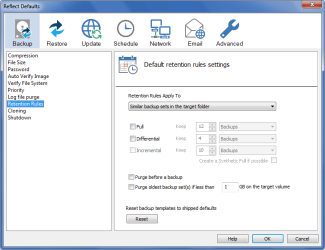
A main reason I've read for folks not liking V6 is the "Retention Rules" defaults, to delete old images.

That can be adjusted in the Macrium / Other Tasks / Edit Tasks / Retention Rules
I don't want Macrium or any program to auto delete my backups, and i've tested that Macrium doesn't with my settings.

Macrium_Defaults.png
 

My Computer My Computer

Computer type
PC/Desktop
Computer Manufacturer/Model Number
home built
OS
Multi-Boot W7_Pro_x64 W8.1_Pro_x64 W10_Pro_x64 +Linux_VMs +Chromium_VM
CPU
AMD Athlon II x4 620
Motherboard
Gigabyte GA-MA785G-UD3H
Memory
6GB GSkill DDR2 800
Graphics Card(s)
AMD 4670 GPU + AMD 4200 IGP
Sound Card
on board Realtek ALC889A
Monitor(s) Displays
RCA 40" LCD TV, Insignia 32" LCD TV, HP 15" LCD monitor
Screen Resolution
1680 x 1050
Hard Drives
OCZ Vertex 3 120GB,
Samsung F3 1TB (3),
Several others - WD, Seagate, Hitachi, ...
PSU
Corsair 500 W
Case
Rosewill mid tower
Cooling
CM 90mm rifle
Keyboard
Gyration wireless, Logitech wireless, Dell USB wired
Mouse
Gyration wireless, Logitech wireless, V7 USB wired
Internet Speed
Spectrum - 100Mbps D / 10Mbps U
Antivirus
Avast, MBAM3, EMET, WinPatrol
Browser
Pale Moon, Firefox, IE
Other Info
2 multi-boot PC's
Mainly HTPC/Office/Gen purpose (no gaming).
Trendnet USB KVM.
LG DVD burner/Blue Ray Player.
Tray system for removable SATA backup drives.

Not currently OCd, under-volted.
I use Hybrid sleep, rarely re-boot or shutdown.

Hauppauge HD-PVR, Avermedia PCIe TV Tuner, Hauppauge PCI TV Tuner.
He's already said he doesn't use V6. Just adjust your settings to suit your preferences :)
 

My Computer My Computer

Computer type
PC/Desktop
Computer Manufacturer/Model Number
Own build
OS
Windows 7x64 Home Premium SP1
CPU
Intel i7 2600k
Motherboard
ASUS P8Z68 Deluxe
Memory
G.Skill Ripjaws (DDR3-1600) 2x4GB
Graphics Card(s)
Nvidia GeForce GTS 450; Intel HD Graphics 3000(GT2+)
Monitor(s) Displays
Dell Ultrasharp IPS panel U2311H, Samsung SyncMaster P2350
Screen Resolution
1920x1080
Hard Drives
Samsung 850 Pro SSD 256GB, Samsung SSD 840 120GB, Seagates 1TB Barracuda ST31000528AS x2
PSU
Seasonic M12II 520W
Case
Lian Li Lancool PC-K60
Cooling
Case: 1x120mm, 3x140mm CPU: Hyper 212+
Keyboard
Logitech MK520 (wireless)
Mouse
Logitech MK520
Internet Speed
6-7 Mbps
Antivirus
Norton Security Premium, Malwarebytes on 2 (MSE on 3rd PC)
Browser
FireFox
Other Info
Audio: Logitech Z523 2.1
For me the ability to create and verify a backup image in one process is what i really liked and sold me.
Everybody has preferences that are important to them. Verify only verifies the file bit integrity of the image, not the integrity of the final restore. If you have a drive going bad it may not verify. Given the verify takes about the same time as an image I prefer to carry it out manually and occasionally. I'd prefer to spend the extra time putting an image on a second drive.

I'm still not sold on the integrity of differentials - great maybe when everything is going fine.

I understand a verify does not guarantee a restore will always work.
I just prefer to always do that added check when i create an image.
For me, verify runs much quicker than creating the image, and i can kick off the process and do something else while a backup/verify is running.

I hear you about differentials.
I played with with incrementals/diffs many years ago with Acronis.
I decided not to use them, i don't trust incrementals.

Since then i've quit using System Restore as it doesn't backup everything, isn't reliable, process always running, etc.
I've read about too many problems from folks that only have System Restore as an option to restore if they have problems, and it doesn't work.

I've been testing V6 Diffs and they work for me so far, but i'm prepared to restore to my last full backup if needed.
 

My Computer My Computer

Computer type
PC/Desktop
Computer Manufacturer/Model Number
home built
OS
Multi-Boot W7_Pro_x64 W8.1_Pro_x64 W10_Pro_x64 +Linux_VMs +Chromium_VM
CPU
AMD Athlon II x4 620
Motherboard
Gigabyte GA-MA785G-UD3H
Memory
6GB GSkill DDR2 800
Graphics Card(s)
AMD 4670 GPU + AMD 4200 IGP
Sound Card
on board Realtek ALC889A
Monitor(s) Displays
RCA 40" LCD TV, Insignia 32" LCD TV, HP 15" LCD monitor
Screen Resolution
1680 x 1050
Hard Drives
OCZ Vertex 3 120GB,
Samsung F3 1TB (3),
Several others - WD, Seagate, Hitachi, ...
PSU
Corsair 500 W
Case
Rosewill mid tower
Cooling
CM 90mm rifle
Keyboard
Gyration wireless, Logitech wireless, Dell USB wired
Mouse
Gyration wireless, Logitech wireless, V7 USB wired
Internet Speed
Spectrum - 100Mbps D / 10Mbps U
Antivirus
Avast, MBAM3, EMET, WinPatrol
Browser
Pale Moon, Firefox, IE
Other Info
2 multi-boot PC's
Mainly HTPC/Office/Gen purpose (no gaming).
Trendnet USB KVM.
LG DVD burner/Blue Ray Player.
Tray system for removable SATA backup drives.

Not currently OCd, under-volted.
I use Hybrid sleep, rarely re-boot or shutdown.

Hauppauge HD-PVR, Avermedia PCIe TV Tuner, Hauppauge PCI TV Tuner.
Thanks David for alerting me of the retention rules. For now I will give V6 a try on a little 2GB test partition and see what the options are.
 

My Computer My Computer

Computer Manufacturer/Model Number
HP, Dell, Gateway, Toshiba - 4 laptops and 2 desktops
OS
Vista, Windows7, Mint Mate, Zorin, Windows 8
CPU
from 1.6GHz Duo to i7
Monitor(s) Displays
2x HP w2207
Hard Drives
5x HDD, 7x SSD, 12x Externals
Keyboard
with trackball - no mices
Mouse
Trackball mice
Internet Speed
DSL 6000
I actually switched from Macrium Reflect Pro v5 to Macrium Free v6.
I know it may seem strange switching from a Pro product to free but I've found the free version 6 offers me exactly the same as Pro v5 and more.
I've always used differential images and they're a whole lot easier to setup in v6.
For me there wasn't anything added in v6 Pro that I needed, so wasn't worth me paying for an upgrade this time around. I don't use any of the deploy features, if I'm moving to a new PC, I prefer to do a clean install anyway.
The only thing I don't have now in Free v6 is incremental backups, which I didn't use anyway. No loss there.
I've been really impressed with v6.
 

My Computer My Computer

Computer type
PC/Desktop
Computer Manufacturer/Model Number
Custom Build
OS
Win 7 Ultimate, Win 8.1 Pro, Linux Mint 19 Cinnamon (All 64-Bit)
CPU
Intel i5 4690K
Motherboard
Gigabyte Z97X-UD3H
Memory
Corsair Vengeance LP 32GB DDR3
Graphics Card(s)
MSI GTX 1060 GAMING X 6GB
Sound Card
Onboard
Hard Drives
Samsung 850 EVO 250GB SSD (x2)
Samsung 860 EVO 1TB SSD (x2)
Crucial MX300 525GB SSD
WD Blue 2TB 5400rpm Intellipark Disabled (x2)
PSU
Corsair HX750i
Case
Phanteks Enthoo Pro
Cooling
CM Hyper 212 EVO on CPU, Noctua Redux NF-P14S 1500rpm (x6)
Keyboard
Corsair K70 RGB LUX
Mouse
Corsair Sabre RGB
Antivirus
Avast Free, MalwareBytes, SAS & CryptoPrevent
Browser
Chrome
Other Info
StarTech PEXESAT322I 2 Port PCI-E SATA Card
ASUS PCE-AC56 Dual-band AC1300 Wireless Card
Akasa FC.Six Manual Fan Controller
And a Partridge in a Pear Tree!
I like v6 the only thing I don't understand is why it adds (Recovered) to the os listing and b-How to remove it :/
 

My Computer My Computer

Computer type
PC/Desktop
Computer Manufacturer/Model Number
Custom assembled by me :}
OS
Win-7-Pro64bit 7-H-Prem-64bit
CPU
i7-5930K 2nd i9-9940x both water blocked VRM's too
Motherboard
ASUS SABERTOOTH X99 2nd ASUS x299 Apex
Memory
Trident-z 3200C14 2nd Trident-z 3600C16
Graphics Card(s)
EVGA 1080ti ftw3 2nd Titan Xp both water blocked
Sound Card
Built-in Realtek
Monitor(s) Displays
1-AOC G2460PG 24"G-Sync 144Hz/ 2nd 1-ASUS VG248QE 24" 144Hz
Screen Resolution
1920 x 1080 144Hz
Hard Drives
2-Samsung M.2 Evo & Evo Plus
2-Samsung 850 EVO 500GB SSD's/ 3-2.5 W.D. Black 1tb-&3-1tb/3-3.5 WD Black 1tb hdd's
PSU
EVGA SuperNOVA 1000-P2 2nd 1200-P2
Case
2-Corsair Obsidian Series 450D Black ATX Mid Tower
Cooling
Custom water loops
Keyboard
Logitech G710+/ 2nd Logitech G910
Mouse
2-RedDragon M901 Perdition 16400 dpi Gaming mouse = wired
Internet Speed
Comcast Ping 19ms 89.31mbps download speed 6.12mbps upload
Antivirus
Malwarebytes Pro/ Superantispyware Pro
Browser
FireFox & Pale moon
Other Info
2nd ASUS X299 Apex/Intel i9-9940x with Custom water loop/7H-Prem-x64/Corsair 450D case/Ram Trident-z 3600C16 4x8gb / Samsung970Evo plus 500gb SSD/Dual ssd EZ swap evo/PSU EVGA SuperNova 1200w-P2 80+Platinum/GPU Titan Xp /8-ML-140 on push-pull on 2-280GTX rads
I actually switched from Macrium Reflect Pro v5 to Macrium Free v6.
I know it may seem strange switching from a Pro product to free but I've found the free version 6 offers me exactly the same as Pro v5 and more.
I've always used differential images and they're a whole lot easier to setup in v6.
For me there wasn't anything added in v6 Pro that I needed, so wasn't worth me paying for an upgrade this time around. I don't use any of the deploy features, if I'm moving to a new PC, I prefer to do a clean install anyway.
The only thing I don't have now in Free v6 is incremental backups, which I didn't use anyway. No loss there.
I've been really impressed with v6.

The main improvement in the V6 pro for me is fast delta restores. If you are restoring a recent image over an existing install it will only restore the differences resulting in vastly improved restore times. A restore of an 80GB installation to a spinner used to take 30 minutes it now takes 5. This is almost as fast as a system restore so I have now turned system restore off.
 

My Computer My Computer

Computer type
Laptop
Computer Manufacturer/Model Number
Hewlett-Packard/G62-107SA Notebook
OS
Microsoft Windows 7 Home Premium 64-bit Service Pack 1
CPU
Intel(R) Core(TM) i3 CPU M 330 @ 2.13GHz
Motherboard
Hewlett-Packard 1425
Memory
8 GB DDR3
Graphics Card(s)
Intel(R) HD Graphics
Sound Card
Realtek High Definition Audio
Monitor(s) Displays
Builtin
Screen Resolution
1366 x 768 x 32 bits (4294967296 colors) @ 60 Hz
Hard Drives
250 GB SATA Hard Disk Drive 7200 rpm
2TB Seagate GoFlex USB 2 Drive
1TB Iomega Prestige USB 2 Drive
1.5TB Iomega Prestige USB 2 Drive (Samsung)
2TB WD MyBook Live NAS.
Mouse
Logitech Anywhere MX
Internet Speed
152 Mbs download 10 Mbs upload
Antivirus
Norton 360
Browser
Chrome
I like v6 the only thing I don't understand is why it adds (Recovered) to the os listing and b-How to remove it :/

Hey Thrash, that's unusual, the only time I've ever had recovered added to the OS boot listing was after I'd done a repair Install. Not sure why macrium has done that.
I just renamed the recovered entry using EasyBCD.
 

My Computer My Computer

Computer type
PC/Desktop
Computer Manufacturer/Model Number
Custom Build
OS
Win 7 Ultimate, Win 8.1 Pro, Linux Mint 19 Cinnamon (All 64-Bit)
CPU
Intel i5 4690K
Motherboard
Gigabyte Z97X-UD3H
Memory
Corsair Vengeance LP 32GB DDR3
Graphics Card(s)
MSI GTX 1060 GAMING X 6GB
Sound Card
Onboard
Hard Drives
Samsung 850 EVO 250GB SSD (x2)
Samsung 860 EVO 1TB SSD (x2)
Crucial MX300 525GB SSD
WD Blue 2TB 5400rpm Intellipark Disabled (x2)
PSU
Corsair HX750i
Case
Phanteks Enthoo Pro
Cooling
CM Hyper 212 EVO on CPU, Noctua Redux NF-P14S 1500rpm (x6)
Keyboard
Corsair K70 RGB LUX
Mouse
Corsair Sabre RGB
Antivirus
Avast Free, MalwareBytes, SAS & CryptoPrevent
Browser
Chrome
Other Info
StarTech PEXESAT322I 2 Port PCI-E SATA Card
ASUS PCE-AC56 Dual-band AC1300 Wireless Card
Akasa FC.Six Manual Fan Controller
And a Partridge in a Pear Tree!
I actually switched from Macrium Reflect Pro v5 to Macrium Free v6.
I know it may seem strange switching from a Pro product to free but I've found the free version 6 offers me exactly the same as Pro v5 and more.
I've always used differential images and they're a whole lot easier to setup in v6.
For me there wasn't anything added in v6 Pro that I needed, so wasn't worth me paying for an upgrade this time around. I don't use any of the deploy features, if I'm moving to a new PC, I prefer to do a clean install anyway.
The only thing I don't have now in Free v6 is incremental backups, which I didn't use anyway. No loss there.
I've been really impressed with v6.

The main improvement in the V6 pro for me is fast delta restores. If you are restoring a recent image over an existing install it will only restore the differences resulting in vastly improved restore times. A restore of an 80GB installation to a spinner used to take 30 minutes it now takes 5. This is almost as fast as a system restore so I have now turned system restore off.

Hi Kado, I did notice the rapid delta restore feature. Definitely seems like a very good feature. I don't restore images all that often though so wasn't a feature I felt I needed. I can definitely see the benefit of it though.
I don't use system restore these days either. If something isn't working right, I just restore from the image instead. Luckily, I haven't had to do it that often. :D
 

My Computer My Computer

Computer type
PC/Desktop
Computer Manufacturer/Model Number
Custom Build
OS
Win 7 Ultimate, Win 8.1 Pro, Linux Mint 19 Cinnamon (All 64-Bit)
CPU
Intel i5 4690K
Motherboard
Gigabyte Z97X-UD3H
Memory
Corsair Vengeance LP 32GB DDR3
Graphics Card(s)
MSI GTX 1060 GAMING X 6GB
Sound Card
Onboard
Hard Drives
Samsung 850 EVO 250GB SSD (x2)
Samsung 860 EVO 1TB SSD (x2)
Crucial MX300 525GB SSD
WD Blue 2TB 5400rpm Intellipark Disabled (x2)
PSU
Corsair HX750i
Case
Phanteks Enthoo Pro
Cooling
CM Hyper 212 EVO on CPU, Noctua Redux NF-P14S 1500rpm (x6)
Keyboard
Corsair K70 RGB LUX
Mouse
Corsair Sabre RGB
Antivirus
Avast Free, MalwareBytes, SAS & CryptoPrevent
Browser
Chrome
Other Info
StarTech PEXESAT322I 2 Port PCI-E SATA Card
ASUS PCE-AC56 Dual-band AC1300 Wireless Card
Akasa FC.Six Manual Fan Controller
And a Partridge in a Pear Tree!
Back
Top