Macrium v5 Users Opinions on Macrium v6

I actually switched from Macrium Reflect Pro v5 to Macrium Free v6.
I know it may seem strange switching from a Pro product to free but I've found the free version 6 offers me exactly the same as Pro v5 and more.
I've always used differential images and they're a whole lot easier to setup in v6.
For me there wasn't anything added in v6 Pro that I needed, so wasn't worth me paying for an upgrade this time around. I don't use any of the deploy features, if I'm moving to a new PC, I prefer to do a clean install anyway.
The only thing I don't have now in Free v6 is incremental backups, which I didn't use anyway. No loss there.
I've been really impressed with v6.

The main improvement in the V6 pro for me is fast delta restores. If you are restoring a recent image over an existing install it will only restore the differences resulting in vastly improved restore times. A restore of an 80GB installation to a spinner used to take 30 minutes it now takes 5. This is almost as fast as a system restore so I have now turned system restore off.

Hi Kado, I did notice the rapid delta restore feature. Definitely seems like a very good feature. I don't restore images all that often though so wasn't a feature I felt I needed. I can definitely see the benefit of it though.
I don't use system restore these days either. If something isn't working right, I just restore from the image instead. Luckily, I haven't had to do it that often. :D

I do weekly full and daily differentials so if I muck something up I can restore in 5 minutes with very little loss of data. I've done three of these so far with no problems. The last one was an unattended Photoshop update overnight which went wrong. The CC updater had become corrupted in it's update a few days before. Reinstalling didn't help and the Adobe forums were useless so rather than troubleshoot further I just restored to before the update and the updates went through with no problems.
 

My Computer My Computer

At a glance

Microsoft Windows 7 Home Premium 64-bit Servi...Intel(R) Core(TM) i3 CPU M 330 @ 2.13GHz8 GB DDR3Intel(R) HD Graphics
Computer type
Laptop
Computer Manufacturer/Model Number
Hewlett-Packard/G62-107SA Notebook
OS
Microsoft Windows 7 Home Premium 64-bit Service Pack 1
CPU
Intel(R) Core(TM) i3 CPU M 330 @ 2.13GHz
Motherboard
Hewlett-Packard 1425
Memory
8 GB DDR3
Graphics Card(s)
Intel(R) HD Graphics
Sound Card
Realtek High Definition Audio
Monitor(s) Displays
Builtin
Screen Resolution
1366 x 768 x 32 bits (4294967296 colors) @ 60 Hz
Hard Drives
250 GB SATA Hard Disk Drive 7200 rpm
2TB Seagate GoFlex USB 2 Drive
1TB Iomega Prestige USB 2 Drive
1.5TB Iomega Prestige USB 2 Drive (Samsung)
2TB WD MyBook Live NAS.
Mouse
Logitech Anywhere MX
Internet Speed
152 Mbs download 10 Mbs upload
Antivirus
Norton 360
Browser
Chrome
The main improvement in the V6 pro for me is fast delta restores. If you are restoring a recent image over an existing install it will only restore the differences resulting in vastly improved restore times. A restore of an 80GB installation to a spinner used to take 30 minutes it now takes 5. This is almost as fast as a system restore so I have now turned system restore off.

Hi Kado, I did notice the rapid delta restore feature. Definitely seems like a very good feature. I don't restore images all that often though so wasn't a feature I felt I needed. I can definitely see the benefit of it though.
I don't use system restore these days either. If something isn't working right, I just restore from the image instead. Luckily, I haven't had to do it that often. :D

I do weekly full and daily differentials so if I muck something up I can restore in 5 minutes with very little loss of data. I've done three of these so far with no problems. The last one was an unattended Photoshop update overnight which went wrong. The CC updater had become corrupted in it's update a few days before. Reinstalling didn't help and the Adobe forums were useless so rather than troubleshoot further I just restored to before the update and the updates went through with no problems.

That's a big benefit, especially with the Adobe installers being so large. Something messes up with that and it's not a simple fix if you don't have a backup. I had a similar problem a few years ago when updating Adobe Audition. I was only using Windows system imaging then but it did get me out of the mess.
I use both Windows imaging and Macrium now and my data is kept on separate drives with a different backup strategy. I use FreeFileSync with versioning on those.
Actually, that was down to your advice as I hadn't used FFS before that. :thumbsup:
 

My Computer My Computer

At a glance

Win 7 Ultimate, Win 8.1 Pro, Linux Mint 19 Ci...Intel i5 4690KCorsair Vengeance LP 32GB DDR3MSI GTX 1060 GAMING X 6GB
Computer type
PC/Desktop
Computer Manufacturer/Model Number
Custom Build
OS
Win 7 Ultimate, Win 8.1 Pro, Linux Mint 19 Cinnamon (All 64-Bit)
CPU
Intel i5 4690K
Motherboard
Gigabyte Z97X-UD3H
Memory
Corsair Vengeance LP 32GB DDR3
Graphics Card(s)
MSI GTX 1060 GAMING X 6GB
Sound Card
Onboard
Hard Drives
Samsung 850 EVO 250GB SSD (x2)
Samsung 860 EVO 1TB SSD (x2)
Crucial MX300 525GB SSD
WD Blue 2TB 5400rpm Intellipark Disabled (x2)
PSU
Corsair HX750i
Case
Phanteks Enthoo Pro
Cooling
CM Hyper 212 EVO on CPU, Noctua Redux NF-P14S 1500rpm (x6)
Keyboard
Corsair K70 RGB LUX
Mouse
Corsair Sabre RGB
Antivirus
Avast Free, MalwareBytes, SAS & CryptoPrevent
Browser
Chrome
Other Info
StarTech PEXESAT322I 2 Port PCI-E SATA Card
ASUS PCE-AC56 Dual-band AC1300 Wireless Card
Akasa FC.Six Manual Fan Controller
And a Partridge in a Pear Tree!
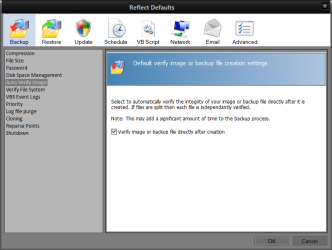
For me the ability to create and verify a backup image in one process is what i really liked and sold me.
Guess i was spoiled and lazy cause with Aconis i could do this.
With Macrium v5, i had to run two processes, one to create the backup, and another to verify the backup.

With V6 they offer the option to create and verify a backup in one process.

Then i learned i really like the "Add to Boot menu" option in V6.
For me that's much quicker and easier than loading from external rescue media.

And now i'm liking the differentials in V6.
I can create a differential in 1-2 minutes for something i want to "quick test".

The create and verify in one process is available in v5 Standard Edition.
 

Attachments

  • ReflectDefault.png
    ReflectDefault.png
    25.3 KB · Views: 1

My Computer My Computer

At a glance

1. Windows 7 Home Premium sp1 - 64bit 2. Wind...1. AMD Phenom II x2 511 3.4GHz 2. Intel i7-47...1. 5 GB - DDR3 2. 8GB DDR3-1600MHzIntegrated 1. ATI Radeon 4200 2. Intel HD Gra...
Computer type
PC/Desktop
Computer Manufacturer/Model Number
1. HP p6733w Desktop 2. HP Envy 700-515xt Desktop
OS
1. Windows 7 Home Premium sp1 - 64bit 2. Windows 7 Pro sp1 - 64bit
CPU
1. AMD Phenom II x2 511 3.4GHz 2. Intel i7-4790 Quad 4.0GHz
Motherboard
1. N-Alvorix-RS880-uATX 2. Kaili2
Memory
1. 5 GB - DDR3 2. 8GB DDR3-1600MHz
Graphics Card(s)
Integrated 1. ATI Radeon 4200 2. Intel HD Graphics 4600
Sound Card
1. Realtek High Definition Audio 2. Realtek (Neutered Beats)
Monitor(s) Displays
1. Acer V193L 2. HP 2311 Series Wide LCD
Screen Resolution
1. 1280 x 1024 2. 1920 x 1080
Hard Drives
1. 750 GB - 7200 RPM SATA 2. 1TB 7200 RPM SATA
PSU
1. 250w 2. 300w
Cooling
Stock
Keyboard
Logitech USB keyboard
Mouse
Logitech USB optical mouse
Internet Speed
1.0 - 2.0 mbps
Antivirus
Eset Smart Security v9.0.349.0
Browser
Pale Moon
Hi Kado, I did notice the rapid delta restore feature. Definitely seems like a very good feature. I don't restore images all that often though so wasn't a feature I felt I needed. I can definitely see the benefit of it though.
I don't use system restore these days either. If something isn't working right, I just restore from the image instead. Luckily, I haven't had to do it that often. :D

I do weekly full and daily differentials so if I muck something up I can restore in 5 minutes with very little loss of data. I've done three of these so far with no problems. The last one was an unattended Photoshop update overnight which went wrong. The CC updater had become corrupted in it's update a few days before. Reinstalling didn't help and the Adobe forums were useless so rather than troubleshoot further I just restored to before the update and the updates went through with no problems.

That's a big benefit, especially with the Adobe installers being so large. Something messes up with that and it's not a simple fix if you don't have a backup. I had a similar problem a few years ago when updating Adobe Audition. I was only using Windows system imaging then but it did get me out of the mess.
I use both Windows imaging and Macrium now and my data is kept on separate drives with a different backup strategy. I use FreeFileSync with versioning on those.
Actually, that was down to your advice as I hadn't used FFS before that. :thumbsup:

Yes I have used FFS with versioning for 4 years now for data backups. I've only ever had one problem which the author fixed for me in the next release. It's still being developed with a new release every month, And the best thing is it is free. Just be careful of Open Candy in the installer.
 

My Computer My Computer

At a glance

Microsoft Windows 7 Home Premium 64-bit Servi...Intel(R) Core(TM) i3 CPU M 330 @ 2.13GHz8 GB DDR3Intel(R) HD Graphics
Computer type
Laptop
Computer Manufacturer/Model Number
Hewlett-Packard/G62-107SA Notebook
OS
Microsoft Windows 7 Home Premium 64-bit Service Pack 1
CPU
Intel(R) Core(TM) i3 CPU M 330 @ 2.13GHz
Motherboard
Hewlett-Packard 1425
Memory
8 GB DDR3
Graphics Card(s)
Intel(R) HD Graphics
Sound Card
Realtek High Definition Audio
Monitor(s) Displays
Builtin
Screen Resolution
1366 x 768 x 32 bits (4294967296 colors) @ 60 Hz
Hard Drives
250 GB SATA Hard Disk Drive 7200 rpm
2TB Seagate GoFlex USB 2 Drive
1TB Iomega Prestige USB 2 Drive
1.5TB Iomega Prestige USB 2 Drive (Samsung)
2TB WD MyBook Live NAS.
Mouse
Logitech Anywhere MX
Internet Speed
152 Mbs download 10 Mbs upload
Antivirus
Norton 360
Browser
Chrome
Yep you always want unopened candy that is Halloween 101 ;)
 

My Computer My Computer

At a glance

Win-7-Pro64bit 7-H-Prem-64biti7-5930K 2nd i9-9940x both water blocked VRM'...Trident-z 3200C14 2nd Trident-z 3600C16EVGA 1080ti ftw3 2nd Titan Xp both water blocked
Computer type
PC/Desktop
Computer Manufacturer/Model Number
Custom assembled by me :}
OS
Win-7-Pro64bit 7-H-Prem-64bit
CPU
i7-5930K 2nd i9-9940x both water blocked VRM's too
Motherboard
ASUS SABERTOOTH X99 2nd ASUS x299 Apex
Memory
Trident-z 3200C14 2nd Trident-z 3600C16
Graphics Card(s)
EVGA 1080ti ftw3 2nd Titan Xp both water blocked
Sound Card
Built-in Realtek
Monitor(s) Displays
1-AOC G2460PG 24"G-Sync 144Hz/ 2nd 1-ASUS VG248QE 24" 144Hz
Screen Resolution
1920 x 1080 144Hz
Hard Drives
2-Samsung M.2 Evo & Evo Plus
2-Samsung 850 EVO 500GB SSD's/ 3-2.5 W.D. Black 1tb-&3-1tb/3-3.5 WD Black 1tb hdd's
PSU
EVGA SuperNOVA 1000-P2 2nd 1200-P2
Case
2-Corsair Obsidian Series 450D Black ATX Mid Tower
Cooling
Custom water loops
Keyboard
Logitech G710+/ 2nd Logitech G910
Mouse
2-RedDragon M901 Perdition 16400 dpi Gaming mouse = wired
Internet Speed
Comcast Ping 19ms 89.31mbps download speed 6.12mbps upload
Antivirus
Malwarebytes Pro/ Superantispyware Pro
Browser
FireFox & Pale moon
Other Info
2nd ASUS X299 Apex/Intel i9-9940x with Custom water loop/7H-Prem-x64/Corsair 450D case/Ram Trident-z 3600C16 4x8gb / Samsung970Evo plus 500gb SSD/Dual ssd EZ swap evo/PSU EVGA SuperNova 1200w-P2 80+Platinum/GPU Titan Xp /8-ML-140 on push-pull on 2-280GTX rads
I agree, love FFS for file backups. Especially now it also supports MTP, great for backing up the files from my Android phone with ease. The Dev always seems happy to help with issues. My firewall always blocks that opencandy junk.
 

My Computer My Computer

At a glance

Win 7 Ultimate, Win 8.1 Pro, Linux Mint 19 Ci...Intel i5 4690KCorsair Vengeance LP 32GB DDR3MSI GTX 1060 GAMING X 6GB
Computer type
PC/Desktop
Computer Manufacturer/Model Number
Custom Build
OS
Win 7 Ultimate, Win 8.1 Pro, Linux Mint 19 Cinnamon (All 64-Bit)
CPU
Intel i5 4690K
Motherboard
Gigabyte Z97X-UD3H
Memory
Corsair Vengeance LP 32GB DDR3
Graphics Card(s)
MSI GTX 1060 GAMING X 6GB
Sound Card
Onboard
Hard Drives
Samsung 850 EVO 250GB SSD (x2)
Samsung 860 EVO 1TB SSD (x2)
Crucial MX300 525GB SSD
WD Blue 2TB 5400rpm Intellipark Disabled (x2)
PSU
Corsair HX750i
Case
Phanteks Enthoo Pro
Cooling
CM Hyper 212 EVO on CPU, Noctua Redux NF-P14S 1500rpm (x6)
Keyboard
Corsair K70 RGB LUX
Mouse
Corsair Sabre RGB
Antivirus
Avast Free, MalwareBytes, SAS & CryptoPrevent
Browser
Chrome
Other Info
StarTech PEXESAT322I 2 Port PCI-E SATA Card
ASUS PCE-AC56 Dual-band AC1300 Wireless Card
Akasa FC.Six Manual Fan Controller
And a Partridge in a Pear Tree!
I haven't used system restore since XP; I never could get it to work in Win 7. Macrium Reflect si so much more reliable.

I use auto-verify in V5. It doubles the time it takes to make an image but that doesn't bother me since, once started, I can just ignore it, and even use the computer, until it is done. I've rarely had an image fail to verify (the rare times it did, I just made another image) and I've never had a verified image fail to restore.

I also use FFS with versioning (and the hack for verifying) to backup my data. The only thing I image is my OS drive— all my data is on other drives—which dramatically reduces the time required to make an image and the space required to store it. I no longer bother with incremental or differential images.
 

My Computer My Computer

At a glance

Win 7 Ultimate 64 bitIntel i7-3930KKingston HyperX Genesis 32GB Kit (8x4GB Modul...MSI R7850 Twin Frozr 2GD5/OC Radeon HD 7850 2...
Computer type
PC/Desktop
Computer Manufacturer/Model Number
Custom Build
OS
Win 7 Ultimate 64 bit
CPU
Intel i7-3930K
Motherboard
ASUS P9X79 WS
Memory
Kingston HyperX Genesis 32GB Kit (8x4GB Modules) 1600MHz DDR
Graphics Card(s)
MSI R7850 Twin Frozr 2GD5/OC Radeon HD 7850 2GB 256-bit GDDR
Sound Card
Asus Xonar Essence STX
Monitor(s) Displays
3x Asus VG248QE 24", Vizio 32" TV
Screen Resolution
1920 x 1080, ?
Hard Drives
Samsung 128GB 840 Pro SSD (1),
Samsung 4TB 850 EVO SSDs (4)
Samsung 4TB 850 EVO SSDs (16) external backup drives used in 2.5" hot swap bays in the computer.
PSU
Corsair HX750w
Case
Antec Two Hundred v2 (modified)
Cooling
Cooler Master GeminII S524 120mm (fan replaced with a 140mm)
Keyboard
Logitech G510s
Mouse
Logitech M525 (two in use)
Internet Speed
=< 32Mbps down, 8Mbps up
Antivirus
AVAST!, MBAM, SAS, Spybot S&D (all but MBAM free) Glary Util
Browser
IE11
Other Info
LSI 9211-8i HBA card (8 SATA III ports), 2.5" & 3.5" Hot Swap Bays, HooToo HT-CR001 PCI-E to USB 3.0 Internal Hub + 6 Slot Card Reader, and LG Model CH12LS28 BD-ROM Optical Drive. Also, ScanSnap S1500 ADF duplexing scanner, Canon 9000F flat bed scanner, Corsair SP2500 2.1 speakers, Samsung CLP 415nw laser color printer, Cyberpower PP2200SW UPS
I haven't used system restore since XP; I never could get it to work in Win 7. Macrium Reflect si so much more reliable.

I use auto-verify in V5. It doubles the time it takes to make an image but that doesn't bother me since, once started, I can just ignore it, and even use the computer, until it is done. I've rarely had an image fail to verify (the rare times it did, I just made another image) and I've never had a verified image fail to restore.

I also use FFS with versioning (and the hack for verifying) to backup my data. The only thing I image is my OS drive— all my data is on other drives—which dramatically reduces the time required to make an image and the space required to store it. I no longer bother with incremental or differential images.

The hack for verifying FFS?
 

My Computer My Computer

At a glance

Microsoft Windows 7 Home Premium 64-bit Servi...Intel(R) Core(TM) i3 CPU M 330 @ 2.13GHz8 GB DDR3Intel(R) HD Graphics
Computer type
Laptop
Computer Manufacturer/Model Number
Hewlett-Packard/G62-107SA Notebook
OS
Microsoft Windows 7 Home Premium 64-bit Service Pack 1
CPU
Intel(R) Core(TM) i3 CPU M 330 @ 2.13GHz
Motherboard
Hewlett-Packard 1425
Memory
8 GB DDR3
Graphics Card(s)
Intel(R) HD Graphics
Sound Card
Realtek High Definition Audio
Monitor(s) Displays
Builtin
Screen Resolution
1366 x 768 x 32 bits (4294967296 colors) @ 60 Hz
Hard Drives
250 GB SATA Hard Disk Drive 7200 rpm
2TB Seagate GoFlex USB 2 Drive
1TB Iomega Prestige USB 2 Drive
1.5TB Iomega Prestige USB 2 Drive (Samsung)
2TB WD MyBook Live NAS.
Mouse
Logitech Anywhere MX
Internet Speed
152 Mbs download 10 Mbs upload
Antivirus
Norton 360
Browser
Chrome
I haven't used system restore since XP; I never could get it to work in Win 7. Macrium Reflect si so much more reliable.

I use auto-verify in V5. It doubles the time it takes to make an image but that doesn't bother me since, once started, I can just ignore it, and even use the computer, until it is done. I've rarely had an image fail to verify (the rare times it did, I just made another image) and I've never had a verified image fail to restore.

I also use FFS with versioning (and the hack for verifying) to backup my data. The only thing I image is my OS drive— all my data is on other drives—which dramatically reduces the time required to make an image and the space required to store it. I no longer bother with incremental or differential images.

The hack for verifying FFS?


Verification Hack forFreeFileSync

1. Go to AppData inthe User folder.

2. Open the Roaming folder.

3. Open the FreeFileSync folder.

4. Click on GlobalSettings.xml

5. Look for the line VerifyCopiedFiles Enabled and change false to true.

6. Save when closing.

It may be necessary to repeat the above steps several timesto get the setting to “stick”.

Be aware this hack will double the amount of time needed torun FFS.
 

My Computer My Computer

At a glance

Win 7 Ultimate 64 bitIntel i7-3930KKingston HyperX Genesis 32GB Kit (8x4GB Modul...MSI R7850 Twin Frozr 2GD5/OC Radeon HD 7850 2...
Computer type
PC/Desktop
Computer Manufacturer/Model Number
Custom Build
OS
Win 7 Ultimate 64 bit
CPU
Intel i7-3930K
Motherboard
ASUS P9X79 WS
Memory
Kingston HyperX Genesis 32GB Kit (8x4GB Modules) 1600MHz DDR
Graphics Card(s)
MSI R7850 Twin Frozr 2GD5/OC Radeon HD 7850 2GB 256-bit GDDR
Sound Card
Asus Xonar Essence STX
Monitor(s) Displays
3x Asus VG248QE 24", Vizio 32" TV
Screen Resolution
1920 x 1080, ?
Hard Drives
Samsung 128GB 840 Pro SSD (1),
Samsung 4TB 850 EVO SSDs (4)
Samsung 4TB 850 EVO SSDs (16) external backup drives used in 2.5" hot swap bays in the computer.
PSU
Corsair HX750w
Case
Antec Two Hundred v2 (modified)
Cooling
Cooler Master GeminII S524 120mm (fan replaced with a 140mm)
Keyboard
Logitech G510s
Mouse
Logitech M525 (two in use)
Internet Speed
=< 32Mbps down, 8Mbps up
Antivirus
AVAST!, MBAM, SAS, Spybot S&D (all but MBAM free) Glary Util
Browser
IE11
Other Info
LSI 9211-8i HBA card (8 SATA III ports), 2.5" & 3.5" Hot Swap Bays, HooToo HT-CR001 PCI-E to USB 3.0 Internal Hub + 6 Slot Card Reader, and LG Model CH12LS28 BD-ROM Optical Drive. Also, ScanSnap S1500 ADF duplexing scanner, Canon 9000F flat bed scanner, Corsair SP2500 2.1 speakers, Samsung CLP 415nw laser color printer, Cyberpower PP2200SW UPS
I haven't used system restore since XP; I never could get it to work in Win 7. Macrium Reflect si so much more reliable.

I use auto-verify in V5. It doubles the time it takes to make an image but that doesn't bother me since, once started, I can just ignore it, and even use the computer, until it is done. I've rarely had an image fail to verify (the rare times it did, I just made another image) and I've never had a verified image fail to restore.

I also use FFS with versioning (and the hack for verifying) to backup my data. The only thing I image is my OS drive— all my data is on other drives—which dramatically reduces the time required to make an image and the space required to store it. I no longer bother with incremental or differential images.

The hack for verifying FFS?


Verification Hack forFreeFileSync

1. Go to AppData inthe User folder.

2. Open the Roaming folder.

3. Open the FreeFileSync folder.

4. Click on GlobalSettings.xml

5. Look for the line VerifyCopiedFiles Enabled and change false to true.

6. Save when closing.

It may be necessary to repeat the above steps several timesto get the setting to “stick”.

Be aware this hack will double the amount of time needed torun FFS.

Thanks
 

My Computer My Computer

At a glance

Microsoft Windows 7 Home Premium 64-bit Servi...Intel(R) Core(TM) i3 CPU M 330 @ 2.13GHz8 GB DDR3Intel(R) HD Graphics
Computer type
Laptop
Computer Manufacturer/Model Number
Hewlett-Packard/G62-107SA Notebook
OS
Microsoft Windows 7 Home Premium 64-bit Service Pack 1
CPU
Intel(R) Core(TM) i3 CPU M 330 @ 2.13GHz
Motherboard
Hewlett-Packard 1425
Memory
8 GB DDR3
Graphics Card(s)
Intel(R) HD Graphics
Sound Card
Realtek High Definition Audio
Monitor(s) Displays
Builtin
Screen Resolution
1366 x 768 x 32 bits (4294967296 colors) @ 60 Hz
Hard Drives
250 GB SATA Hard Disk Drive 7200 rpm
2TB Seagate GoFlex USB 2 Drive
1TB Iomega Prestige USB 2 Drive
1.5TB Iomega Prestige USB 2 Drive (Samsung)
2TB WD MyBook Live NAS.
Mouse
Logitech Anywhere MX
Internet Speed
152 Mbs download 10 Mbs upload
Antivirus
Norton 360
Browser
Chrome
The hack for verifying FFS?


Verification Hack forFreeFileSync

1. Go to AppData inthe User folder.

2. Open the Roaming folder.

3. Open the FreeFileSync folder.

4. Click on GlobalSettings.xml

5. Look for the line VerifyCopiedFiles Enabled and change false to true.

6. Save when closing.

It may be necessary to repeat the above steps several timesto get the setting to “stick”.

Be aware this hack will double the amount of time needed torun FFS.

Thanks

You're welcome. I'll send you a bill at the end of the month. ;)
 

My Computer My Computer

At a glance

Win 7 Ultimate 64 bitIntel i7-3930KKingston HyperX Genesis 32GB Kit (8x4GB Modul...MSI R7850 Twin Frozr 2GD5/OC Radeon HD 7850 2...
Computer type
PC/Desktop
Computer Manufacturer/Model Number
Custom Build
OS
Win 7 Ultimate 64 bit
CPU
Intel i7-3930K
Motherboard
ASUS P9X79 WS
Memory
Kingston HyperX Genesis 32GB Kit (8x4GB Modules) 1600MHz DDR
Graphics Card(s)
MSI R7850 Twin Frozr 2GD5/OC Radeon HD 7850 2GB 256-bit GDDR
Sound Card
Asus Xonar Essence STX
Monitor(s) Displays
3x Asus VG248QE 24", Vizio 32" TV
Screen Resolution
1920 x 1080, ?
Hard Drives
Samsung 128GB 840 Pro SSD (1),
Samsung 4TB 850 EVO SSDs (4)
Samsung 4TB 850 EVO SSDs (16) external backup drives used in 2.5" hot swap bays in the computer.
PSU
Corsair HX750w
Case
Antec Two Hundred v2 (modified)
Cooling
Cooler Master GeminII S524 120mm (fan replaced with a 140mm)
Keyboard
Logitech G510s
Mouse
Logitech M525 (two in use)
Internet Speed
=< 32Mbps down, 8Mbps up
Antivirus
AVAST!, MBAM, SAS, Spybot S&D (all but MBAM free) Glary Util
Browser
IE11
Other Info
LSI 9211-8i HBA card (8 SATA III ports), 2.5" & 3.5" Hot Swap Bays, HooToo HT-CR001 PCI-E to USB 3.0 Internal Hub + 6 Slot Card Reader, and LG Model CH12LS28 BD-ROM Optical Drive. Also, ScanSnap S1500 ADF duplexing scanner, Canon 9000F flat bed scanner, Corsair SP2500 2.1 speakers, Samsung CLP 415nw laser color printer, Cyberpower PP2200SW UPS
Verification Hack forFreeFileSync

1. Go to AppData inthe User folder.

2. Open the Roaming folder.

3. Open the FreeFileSync folder.

4. Click on GlobalSettings.xml

5. Look for the line VerifyCopiedFiles Enabled and change false to true.

6. Save when closing.

It may be necessary to repeat the above steps several timesto get the setting to “stick”.

Be aware this hack will double the amount of time needed torun FFS.

Thanks

You're welcome. I'll send you a bill at the end of the month. ;)

I seem to remember something about blood and stones.:D
 

My Computer My Computer

At a glance

Microsoft Windows 7 Home Premium 64-bit Servi...Intel(R) Core(TM) i3 CPU M 330 @ 2.13GHz8 GB DDR3Intel(R) HD Graphics
Computer type
Laptop
Computer Manufacturer/Model Number
Hewlett-Packard/G62-107SA Notebook
OS
Microsoft Windows 7 Home Premium 64-bit Service Pack 1
CPU
Intel(R) Core(TM) i3 CPU M 330 @ 2.13GHz
Motherboard
Hewlett-Packard 1425
Memory
8 GB DDR3
Graphics Card(s)
Intel(R) HD Graphics
Sound Card
Realtek High Definition Audio
Monitor(s) Displays
Builtin
Screen Resolution
1366 x 768 x 32 bits (4294967296 colors) @ 60 Hz
Hard Drives
250 GB SATA Hard Disk Drive 7200 rpm
2TB Seagate GoFlex USB 2 Drive
1TB Iomega Prestige USB 2 Drive
1.5TB Iomega Prestige USB 2 Drive (Samsung)
2TB WD MyBook Live NAS.
Mouse
Logitech Anywhere MX
Internet Speed
152 Mbs download 10 Mbs upload
Antivirus
Norton 360
Browser
Chrome

My Computer My Computer

At a glance

Win 7 Ultimate 64 bitIntel i7-3930KKingston HyperX Genesis 32GB Kit (8x4GB Modul...MSI R7850 Twin Frozr 2GD5/OC Radeon HD 7850 2...
Computer type
PC/Desktop
Computer Manufacturer/Model Number
Custom Build
OS
Win 7 Ultimate 64 bit
CPU
Intel i7-3930K
Motherboard
ASUS P9X79 WS
Memory
Kingston HyperX Genesis 32GB Kit (8x4GB Modules) 1600MHz DDR
Graphics Card(s)
MSI R7850 Twin Frozr 2GD5/OC Radeon HD 7850 2GB 256-bit GDDR
Sound Card
Asus Xonar Essence STX
Monitor(s) Displays
3x Asus VG248QE 24", Vizio 32" TV
Screen Resolution
1920 x 1080, ?
Hard Drives
Samsung 128GB 840 Pro SSD (1),
Samsung 4TB 850 EVO SSDs (4)
Samsung 4TB 850 EVO SSDs (16) external backup drives used in 2.5" hot swap bays in the computer.
PSU
Corsair HX750w
Case
Antec Two Hundred v2 (modified)
Cooling
Cooler Master GeminII S524 120mm (fan replaced with a 140mm)
Keyboard
Logitech G510s
Mouse
Logitech M525 (two in use)
Internet Speed
=< 32Mbps down, 8Mbps up
Antivirus
AVAST!, MBAM, SAS, Spybot S&D (all but MBAM free) Glary Util
Browser
IE11
Other Info
LSI 9211-8i HBA card (8 SATA III ports), 2.5" & 3.5" Hot Swap Bays, HooToo HT-CR001 PCI-E to USB 3.0 Internal Hub + 6 Slot Card Reader, and LG Model CH12LS28 BD-ROM Optical Drive. Also, ScanSnap S1500 ADF duplexing scanner, Canon 9000F flat bed scanner, Corsair SP2500 2.1 speakers, Samsung CLP 415nw laser color printer, Cyberpower PP2200SW UPS

My Computer My Computer

At a glance

Microsoft Windows 7 Home Premium 64-bit Servi...Intel(R) Core(TM) i3 CPU M 330 @ 2.13GHz8 GB DDR3Intel(R) HD Graphics
Computer type
Laptop
Computer Manufacturer/Model Number
Hewlett-Packard/G62-107SA Notebook
OS
Microsoft Windows 7 Home Premium 64-bit Service Pack 1
CPU
Intel(R) Core(TM) i3 CPU M 330 @ 2.13GHz
Motherboard
Hewlett-Packard 1425
Memory
8 GB DDR3
Graphics Card(s)
Intel(R) HD Graphics
Sound Card
Realtek High Definition Audio
Monitor(s) Displays
Builtin
Screen Resolution
1366 x 768 x 32 bits (4294967296 colors) @ 60 Hz
Hard Drives
250 GB SATA Hard Disk Drive 7200 rpm
2TB Seagate GoFlex USB 2 Drive
1TB Iomega Prestige USB 2 Drive
1.5TB Iomega Prestige USB 2 Drive (Samsung)
2TB WD MyBook Live NAS.
Mouse
Logitech Anywhere MX
Internet Speed
152 Mbs download 10 Mbs upload
Antivirus
Norton 360
Browser
Chrome

My Computer My Computer

At a glance

Win 7 Ultimate 64 bitIntel i7-3930KKingston HyperX Genesis 32GB Kit (8x4GB Modul...MSI R7850 Twin Frozr 2GD5/OC Radeon HD 7850 2...
Computer type
PC/Desktop
Computer Manufacturer/Model Number
Custom Build
OS
Win 7 Ultimate 64 bit
CPU
Intel i7-3930K
Motherboard
ASUS P9X79 WS
Memory
Kingston HyperX Genesis 32GB Kit (8x4GB Modules) 1600MHz DDR
Graphics Card(s)
MSI R7850 Twin Frozr 2GD5/OC Radeon HD 7850 2GB 256-bit GDDR
Sound Card
Asus Xonar Essence STX
Monitor(s) Displays
3x Asus VG248QE 24", Vizio 32" TV
Screen Resolution
1920 x 1080, ?
Hard Drives
Samsung 128GB 840 Pro SSD (1),
Samsung 4TB 850 EVO SSDs (4)
Samsung 4TB 850 EVO SSDs (16) external backup drives used in 2.5" hot swap bays in the computer.
PSU
Corsair HX750w
Case
Antec Two Hundred v2 (modified)
Cooling
Cooler Master GeminII S524 120mm (fan replaced with a 140mm)
Keyboard
Logitech G510s
Mouse
Logitech M525 (two in use)
Internet Speed
=< 32Mbps down, 8Mbps up
Antivirus
AVAST!, MBAM, SAS, Spybot S&D (all but MBAM free) Glary Util
Browser
IE11
Other Info
LSI 9211-8i HBA card (8 SATA III ports), 2.5" & 3.5" Hot Swap Bays, HooToo HT-CR001 PCI-E to USB 3.0 Internal Hub + 6 Slot Card Reader, and LG Model CH12LS28 BD-ROM Optical Drive. Also, ScanSnap S1500 ADF duplexing scanner, Canon 9000F flat bed scanner, Corsair SP2500 2.1 speakers, Samsung CLP 415nw laser color printer, Cyberpower PP2200SW UPS

My Computer My Computer

At a glance

Microsoft Windows 7 Home Premium 64-bit Servi...Intel(R) Core(TM) i3 CPU M 330 @ 2.13GHz8 GB DDR3Intel(R) HD Graphics
Computer type
Laptop
Computer Manufacturer/Model Number
Hewlett-Packard/G62-107SA Notebook
OS
Microsoft Windows 7 Home Premium 64-bit Service Pack 1
CPU
Intel(R) Core(TM) i3 CPU M 330 @ 2.13GHz
Motherboard
Hewlett-Packard 1425
Memory
8 GB DDR3
Graphics Card(s)
Intel(R) HD Graphics
Sound Card
Realtek High Definition Audio
Monitor(s) Displays
Builtin
Screen Resolution
1366 x 768 x 32 bits (4294967296 colors) @ 60 Hz
Hard Drives
250 GB SATA Hard Disk Drive 7200 rpm
2TB Seagate GoFlex USB 2 Drive
1TB Iomega Prestige USB 2 Drive
1.5TB Iomega Prestige USB 2 Drive (Samsung)
2TB WD MyBook Live NAS.
Mouse
Logitech Anywhere MX
Internet Speed
152 Mbs download 10 Mbs upload
Antivirus
Norton 360
Browser
Chrome

My Computer My Computer

At a glance

Vista, Windows7, Mint Mate, Zorin, Windows 8from 1.6GHz Duo to i7
Computer Manufacturer/Model Number
HP, Dell, Gateway, Toshiba - 4 laptops and 2 desktops
OS
Vista, Windows7, Mint Mate, Zorin, Windows 8
CPU
from 1.6GHz Duo to i7
Monitor(s) Displays
2x HP w2207
Hard Drives
5x HDD, 7x SSD, 12x Externals
Keyboard
with trackball - no mices
Mouse
Trackball mice
Internet Speed
DSL 6000
Not heard that one before.:confused:

Could be on account of the little pond between us.

Two nations separated by a common language.:rolleyes:

LOL! That is funny because it is so true! Even within the U.S., the meanings of words can vary. TX has its own language that uses English words but has different meanings for those words. Anywhere else, if I said next Sunday, it would mean the first Sunday after the day I said on. When I lived in TX for four years (the longest decade of my life), it meant the second Sunday after the day I said it on. One would have to say Sunday next to mean the first Sunday after the day that was said.
 

My Computer My Computer

At a glance

Win 7 Ultimate 64 bitIntel i7-3930KKingston HyperX Genesis 32GB Kit (8x4GB Modul...MSI R7850 Twin Frozr 2GD5/OC Radeon HD 7850 2...
Computer type
PC/Desktop
Computer Manufacturer/Model Number
Custom Build
OS
Win 7 Ultimate 64 bit
CPU
Intel i7-3930K
Motherboard
ASUS P9X79 WS
Memory
Kingston HyperX Genesis 32GB Kit (8x4GB Modules) 1600MHz DDR
Graphics Card(s)
MSI R7850 Twin Frozr 2GD5/OC Radeon HD 7850 2GB 256-bit GDDR
Sound Card
Asus Xonar Essence STX
Monitor(s) Displays
3x Asus VG248QE 24", Vizio 32" TV
Screen Resolution
1920 x 1080, ?
Hard Drives
Samsung 128GB 840 Pro SSD (1),
Samsung 4TB 850 EVO SSDs (4)
Samsung 4TB 850 EVO SSDs (16) external backup drives used in 2.5" hot swap bays in the computer.
PSU
Corsair HX750w
Case
Antec Two Hundred v2 (modified)
Cooling
Cooler Master GeminII S524 120mm (fan replaced with a 140mm)
Keyboard
Logitech G510s
Mouse
Logitech M525 (two in use)
Internet Speed
=< 32Mbps down, 8Mbps up
Antivirus
AVAST!, MBAM, SAS, Spybot S&D (all but MBAM free) Glary Util
Browser
IE11
Other Info
LSI 9211-8i HBA card (8 SATA III ports), 2.5" & 3.5" Hot Swap Bays, HooToo HT-CR001 PCI-E to USB 3.0 Internal Hub + 6 Slot Card Reader, and LG Model CH12LS28 BD-ROM Optical Drive. Also, ScanSnap S1500 ADF duplexing scanner, Canon 9000F flat bed scanner, Corsair SP2500 2.1 speakers, Samsung CLP 415nw laser color printer, Cyberpower PP2200SW UPS

My Computer My Computer

At a glance

Win 7 Ultimate 64 bitIntel i7-3930KKingston HyperX Genesis 32GB Kit (8x4GB Modul...MSI R7850 Twin Frozr 2GD5/OC Radeon HD 7850 2...
Computer type
PC/Desktop
Computer Manufacturer/Model Number
Custom Build
OS
Win 7 Ultimate 64 bit
CPU
Intel i7-3930K
Motherboard
ASUS P9X79 WS
Memory
Kingston HyperX Genesis 32GB Kit (8x4GB Modules) 1600MHz DDR
Graphics Card(s)
MSI R7850 Twin Frozr 2GD5/OC Radeon HD 7850 2GB 256-bit GDDR
Sound Card
Asus Xonar Essence STX
Monitor(s) Displays
3x Asus VG248QE 24", Vizio 32" TV
Screen Resolution
1920 x 1080, ?
Hard Drives
Samsung 128GB 840 Pro SSD (1),
Samsung 4TB 850 EVO SSDs (4)
Samsung 4TB 850 EVO SSDs (16) external backup drives used in 2.5" hot swap bays in the computer.
PSU
Corsair HX750w
Case
Antec Two Hundred v2 (modified)
Cooling
Cooler Master GeminII S524 120mm (fan replaced with a 140mm)
Keyboard
Logitech G510s
Mouse
Logitech M525 (two in use)
Internet Speed
=< 32Mbps down, 8Mbps up
Antivirus
AVAST!, MBAM, SAS, Spybot S&D (all but MBAM free) Glary Util
Browser
IE11
Other Info
LSI 9211-8i HBA card (8 SATA III ports), 2.5" & 3.5" Hot Swap Bays, HooToo HT-CR001 PCI-E to USB 3.0 Internal Hub + 6 Slot Card Reader, and LG Model CH12LS28 BD-ROM Optical Drive. Also, ScanSnap S1500 ADF duplexing scanner, Canon 9000F flat bed scanner, Corsair SP2500 2.1 speakers, Samsung CLP 415nw laser color printer, Cyberpower PP2200SW UPS
There's something wrong when a language has three words pronounced "2" all with different meanings.
 

My Computer My Computer

At a glance

1. Windows 7 Home Premium sp1 - 64bit 2. Wind...1. AMD Phenom II x2 511 3.4GHz 2. Intel i7-47...1. 5 GB - DDR3 2. 8GB DDR3-1600MHzIntegrated 1. ATI Radeon 4200 2. Intel HD Gra...
Computer type
PC/Desktop
Computer Manufacturer/Model Number
1. HP p6733w Desktop 2. HP Envy 700-515xt Desktop
OS
1. Windows 7 Home Premium sp1 - 64bit 2. Windows 7 Pro sp1 - 64bit
CPU
1. AMD Phenom II x2 511 3.4GHz 2. Intel i7-4790 Quad 4.0GHz
Motherboard
1. N-Alvorix-RS880-uATX 2. Kaili2
Memory
1. 5 GB - DDR3 2. 8GB DDR3-1600MHz
Graphics Card(s)
Integrated 1. ATI Radeon 4200 2. Intel HD Graphics 4600
Sound Card
1. Realtek High Definition Audio 2. Realtek (Neutered Beats)
Monitor(s) Displays
1. Acer V193L 2. HP 2311 Series Wide LCD
Screen Resolution
1. 1280 x 1024 2. 1920 x 1080
Hard Drives
1. 750 GB - 7200 RPM SATA 2. 1TB 7200 RPM SATA
PSU
1. 250w 2. 300w
Cooling
Stock
Keyboard
Logitech USB keyboard
Mouse
Logitech USB optical mouse
Internet Speed
1.0 - 2.0 mbps
Antivirus
Eset Smart Security v9.0.349.0
Browser
Pale Moon
Back
Top