Solved Won't Shut Down, Won't Update

anotherusername

New member
Member
Local time
1:24 AM
Messages
34
[SOLVED] Won't Shut Down, Won't Update

SOLVED; Apparently I had a non-genuine version of windows on my machine.

Having some problems since the last two weeks. Computer won't shut down properly. Also can't seem to install updates.

Win 7 Pro 64 bit
Dell Optiplex 780 SFF

When I go to shut down, it goes to the blue screen (NOT the BSOD) where windows normally pauses when it is updating.

It says something like. System is configuring. Do not turn off your computer (or something like that, it is the same message - as far as I can remember - that you get when your computer is updating).

The only thing is there are no updates being applied. It just stays in that first stage and keeps like that all night long.

Eventually I just have to power down by pressing the power button on the front of the box.

Also, the last updates I have for my computer are dated January 26, 2016. I know that isn't THAT long ago, but I thought there were more recent updates since then.

When i go to the Windows Update service, (control Panle -> System and Security -> Windows Update ) It just keeps saying "Checking for Updates"

I've tried disabling my antivirus (Avast) and I am logged into the admin account. I actually tried using normal boot and clean boot. Same thing.

When I search for any "Hidden Updates" it says that I don't have any hidden updates.

Thanks in advance for any help.
 
Last edited:

My Computer My Computer

Computer type
PC/Desktop
Computer Manufacturer/Model Number
Dell Optiplex 780
OS
win 7 Pro 64 bit
CPU
Core 2 Duo E8400
Motherboard
Yes
Memory
4 GB
Graphics Card(s)
whatever the one on the MB is.
Hard Drives
500GB spinning drive
Antivirus
Avast
Browser
FF, Opera, Chrome, PaleMoon
updates

Hi AUN,
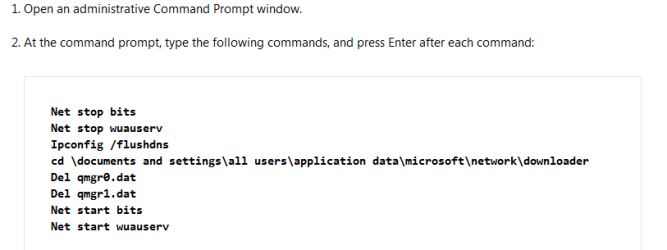
Please follow the directions below

Then please go to your Windows Update preferences and set to NEVER,
I would like to check something before we try and redownload to do this please follow the directions in this link
MgaDiag

Roy
 

Attachments

  • clear pending updates.PNG
    clear pending updates.PNG
    5.7 KB · Views: 0

My Computer My Computer

Computer type
PC/Desktop
Computer Manufacturer/Model Number
medionl/Aspire 6930G/acer x55a
OS
W7 home premium 32bit/W7HP 64bit/w10 tp insider ring
CPU
E5300 dual core
Motherboard
medion MS7366
Memory
3gb
Graphics Card(s)
Nvidia Geforce 7100 Nforce 630i
Monitor(s) Displays
avixc
Internet Speed
n (isp resticted to 72)
Antivirus
mse/pands
Browser
palemoon
Other Info
Belkin Fd7050 n USB using Railink RT2870 drivers, more upto date
MGADT Not Responding

Thank you for the link and the suggestions.

I got MGAD Tool to run by going into safe boot with networking:

Code:
Diagnostic Report (1.9.0027.0):
-----------------------------------------
Windows Validation Data-->

Validation Code: 0
Cached Online Validation Code: N/A, hr = 0x8007043c
Windows Product Key: *****-*****-MV8MH-98QJM-24367
Windows Product Key Hash: wgci5Gdejx4esg7++zTOe3LWF+4=
Windows Product ID: 00371-OEM-8992671-00437
Windows Product ID Type: 2
Windows License Type: OEM SLP
Windows OS version: 6.1.7601.2.00010100.1.0.048
ID: {65ABA5F0-FD7F-4218-8379-E241C17A9203}(3)
Is Admin: Yes
TestCab: 0x0
LegitcheckControl ActiveX: N/A, hr = 0x80070002
Signed By: N/A, hr = 0x80070002
Product Name: Windows 7 Professional
Architecture: 0x00000009
Build lab: 7601.win7sp1_gdr.151230-0600
TTS Error: 
Validation Diagnostic: 
Resolution Status: N/A

Vista WgaER Data-->
ThreatID(s): N/A, hr = 0x80070002
Version: N/A, hr = 0x80070002

Windows XP Notifications Data-->
Cached Result: N/A, hr = 0x80070002
File Exists: No
Version: N/A, hr = 0x80070002
WgaTray.exe Signed By: N/A, hr = 0x80070002
WgaLogon.dll Signed By: N/A, hr = 0x80070002

OGA Notifications Data-->
Cached Result: N/A, hr = 0x80070002
Version: N/A, hr = 0x80070002
OGAExec.exe Signed By: N/A, hr = 0x80070002
OGAAddin.dll Signed By: N/A, hr = 0x80070002

OGA Data-->
Office Status: 109 N/A
OGA Version: N/A, 0x80070002
Signed By: N/A, hr = 0x80070002
Office Diagnostics: 025D1FF3-364-80041010_025D1FF3-229-80041010_025D1FF3-230-1_025D1FF3-517-80040154_025D1FF3-237-80040154_025D1FF3-238-2_025D1FF3-244-80070002_025D1FF3-258-3

Browser Data-->
Proxy settings: N/A
User Agent: Mozilla/4.0 (compatible; MSIE 8.0; Win32)
Default Browser: C:\Program Files (x86)\Mozilla Firefox\firefox.exe
Download signed ActiveX controls: Prompt
Download unsigned ActiveX controls: Disabled
Run ActiveX controls and plug-ins: Allowed
Initialize and script ActiveX controls not marked as safe: Disabled
Allow scripting of Internet Explorer Webbrowser control: Disabled
Active scripting: Allowed
Script ActiveX controls marked as safe for scripting: Allowed

File Scan Data-->

Other data-->
Office Details: <GenuineResults><MachineData><UGUID>{65ABA5F0-FD7F-4218-8379-E241C17A9203}</UGUID><Version>1.9.0027.0</Version><OS>6.1.7601.2.00010100.1.0.048</OS><Architecture>x64</Architecture><PKey>*****-*****-*****-*****-24367</PKey><PID>00371-OEM-8992671-00437</PID><PIDType>2</PIDType><SID>S-1-5-21-2906799927-2242979233-4166846749</SID><SYSTEM><Manufacturer>Dell Inc.</Manufacturer><Model>OptiPlex 780                 </Model></SYSTEM><BIOS><Manufacturer>Dell Inc.</Manufacturer><Version>A15</Version><SMBIOSVersion major="2" minor="5"/><Date>20130806000000.000000+000</Date></BIOS><HWID>FFFF3707018400F8</HWID><UserLCID>0409</UserLCID><SystemLCID>0409</SystemLCID><TimeZone>Pacific Standard Time(GMT-08:00)</TimeZone><iJoin>0</iJoin><SBID><stat>3</stat><msppid></msppid><name></name><model></model></SBID><OEM><OEMID>DELL  </OEMID><OEMTableID>B10K   </OEMTableID></OEM><GANotification/></MachineData><Software><Office><Result>109</Result><Products/><Applications/></Office></Software></GenuineResults>  

Spsys.log Content: 0x80070002

Licensing Data-->
On a computer running Microsoft Windows non-core edition, run 'slui.exe 0x2a 0x8007043C' to display the error text.
Error: 0x8007043C 

Windows Activation Technologies-->
HrOffline: 0x00000000
HrOnline: N/A
HealthStatus: 0x0000000000000000
Event Time Stamp: N/A
ActiveX: Registered, Version: 7.1.7600.16395
Admin Service: Not Registered - 0x8007043c
HealthStatus Bitmask Output:


HWID Data-->
HWID Hash Current: MAAAAAEAAgABAAIAAQAAAAAAAgABAAEA6GEAG1iVyOtylgzVQAVY46jjnP4wOEbK

OEM Activation 1.0 Data-->
N/A

OEM Activation 2.0 Data-->
BIOS valid for OA 2.0: yes
Windows marker version: 0x20001
OEMID and OEMTableID Consistent: yes
BIOS Information: 
  ACPI Table Name    OEMID Value    OEMTableID Value
  APIC            DELL          B10K   
  FACP            DELL          B10K   
  HPET            DELL          B10K   
  BOOT            DELL          B10K   
  MCFG            DELL          B10K   
  SSDT            DELL        st_ex
  ASF!            DELL          B10K   
  ____            DELL          B10K   
  SLIC            DELL          B10K   

~~~~~~~~~~~~~~~~~~~~~~~~~~~~~~~~~
 
Last edited:

My Computer My Computer

Computer type
PC/Desktop
Computer Manufacturer/Model Number
Dell Optiplex 780
OS
win 7 Pro 64 bit
CPU
Core 2 Duo E8400
Motherboard
Yes
Memory
4 GB
Graphics Card(s)
whatever the one on the MB is.
Hard Drives
500GB spinning drive
Antivirus
Avast
Browser
FF, Opera, Chrome, PaleMoon
Windows Activation: Status Not Available

BTW: When I go into the system properties, when I scroll down and look at windows Activation, it says status not available. It also says product ID: not available.

this is a (more or less) legitimate version of Windows 7 Pro, meaning that while I did buy it off of ebay, though I bought the whole hard drive that it was sold on. I don't know for sure. The ebay seller said that was the only legitimate way to get a copy of windows 7 was to buy the HD with the OEM installed version on the hard drive.

Anyway, it has been working fine for over a year. And it had been updating all the way up to January 26th.

In the licensing section of the tool it says:

For non-core versions of run slui.exe

I've tried running slui.exe in normal mode, but whenever I run it, nothing happens. No errors, no hangs, it just doesn't even start up. When i look for it in task manager, nothing happens.

Thanks again.
 
Last edited:

My Computer My Computer

Computer type
PC/Desktop
Computer Manufacturer/Model Number
Dell Optiplex 780
OS
win 7 Pro 64 bit
CPU
Core 2 Duo E8400
Motherboard
Yes
Memory
4 GB
Graphics Card(s)
whatever the one on the MB is.
Hard Drives
500GB spinning drive
Antivirus
Avast
Browser
FF, Opera, Chrome, PaleMoon
OH dear

Hi AUN,
Sorry to be the bearer of bad news

Your ebay seller was WRONG, its not the hard drive, although that check is part of it.

The major check is the motherboard, in your case Dell, the code you have is for a Lenovo\IBM.
MS has finally identified this, and deemed your installation counterfiet.
By the way that key is all over the net, and starts 237xb-gdj7b.

As its been running for a year i doubt if youll get anything back from Ebay,
but you could report him to MS,
you MIGHT get lucky and they'll send you some legit discs, (most likely W10 thou)

Roy
 

My Computer My Computer

Computer type
PC/Desktop
Computer Manufacturer/Model Number
medionl/Aspire 6930G/acer x55a
OS
W7 home premium 32bit/W7HP 64bit/w10 tp insider ring
CPU
E5300 dual core
Motherboard
medion MS7366
Memory
3gb
Graphics Card(s)
Nvidia Geforce 7100 Nforce 630i
Monitor(s) Displays
avixc
Internet Speed
n (isp resticted to 72)
Antivirus
mse/pands
Browser
palemoon
Other Info
Belkin Fd7050 n USB using Railink RT2870 drivers, more upto date
Thanks for the reply.

Dear Roy:

Thanks for the note.

Do you mind if I ask you how confident you are in this? Meaning both:

1) How confident are you that it is tied to the motherborad and not the HD?

2) And how confident you are that this is the reason for the problem that can't update?

Can you kindly tell me where it says that it is for Lenovo / IBM in the MGAD tool report? Because the ebay seller said that it was for Dell.

Sorry if that seems like a stupid question. I just would like to know if you are PRETTY confident, or REALLY confident before I start complaining to the seller.
 

My Computer My Computer

Computer type
PC/Desktop
Computer Manufacturer/Model Number
Dell Optiplex 780
OS
win 7 Pro 64 bit
CPU
Core 2 Duo E8400
Motherboard
Yes
Memory
4 GB
Graphics Card(s)
whatever the one on the MB is.
Hard Drives
500GB spinning drive
Antivirus
Avast
Browser
FF, Opera, Chrome, PaleMoon
really

Hi AUN,
All info in this reply is in regard to details provided by the Microsoft Mgadiag tool run by you yesterday

Windows Product ID: 00371-OEM-8992671-00437.
The above is the Base ID for ALL Lenovo\IBM Windows7 Professional editions.
(If you run this report on any original and unchanged computer manufactured by them this is the ID which will be reported)

<Manufacturer>Dell Inc.</Manufacturer><Model>OptiPlex 780
This is your computers Make and Model

Windows License Type: OEM SLP
Identifies that its for use on Manufacturers factory produced models only.
(it also tells me that the code on the COA sticker has not been used)

I know 90% plus of the product ID codes. Dell included

However as the forum DOES NOT endorse, piracy of counterfieting
I AM NOT publishing it to help him.

As to your questions
The Motherboard ID code is stored on the MS activation server Data base, and is the primary check.
Thats why if you change motherboards you will have to re-activate at some stage.
(its re-classified as non-genuine)
A hard drive change will also require re-activation
(this is quite common now as people move away from HDD to SSD).

Although a lot of the ways that WAT, Windows acitivation Technologies, works is known, theres a lot more we dont.

IM REALLY SURE.
He obviously knows less than he thought.


Roy

Note if you google
MV8MH-98QJM-24367 you get
 
Last edited:

My Computer My Computer

Computer type
PC/Desktop
Computer Manufacturer/Model Number
medionl/Aspire 6930G/acer x55a
OS
W7 home premium 32bit/W7HP 64bit/w10 tp insider ring
CPU
E5300 dual core
Motherboard
medion MS7366
Memory
3gb
Graphics Card(s)
Nvidia Geforce 7100 Nforce 630i
Monitor(s) Displays
avixc
Internet Speed
n (isp resticted to 72)
Antivirus
mse/pands
Browser
palemoon
Other Info
Belkin Fd7050 n USB using Railink RT2870 drivers, more upto date
Thank you, Roy.

One more question:

I have another box with win 7 on it. I bought this one off of craigslist about 6 months ago.

It has a KMS license on it.

What little I know about KMS licensing makes me believe that this is possibly a non-genuine license key (even though all the verification test I have done with it say it is genuine).

I thought that all KMS licenses, the machine has to be in use in a "corporate environment," so my stand alone machine is certainly not in a corporate environment.

Thanks in advance.
 

My Computer My Computer

Computer type
PC/Desktop
Computer Manufacturer/Model Number
Dell Optiplex 780
OS
win 7 Pro 64 bit
CPU
Core 2 Duo E8400
Motherboard
Yes
Memory
4 GB
Graphics Card(s)
whatever the one on the MB is.
Hard Drives
500GB spinning drive
Antivirus
Avast
Browser
FF, Opera, Chrome, PaleMoon
All OEM-SLP keys are "all over the net". That means absolutely nothing since they cannot be used to "activate" the OS via normal means. Finding OEM-SLP keys on the internet has no bearing on the authenticity of a particular OS installation.


See this link for a good description of the OEM-SLP "activation" process.


Thank you, Roy.

One more question:

I have another box with win 7 on it. I bought this one off of craigslist about 6 months ago.

It has a KMS license on it.

What little I know about KMS licensing makes me believe that this is possibly a non-genuine license key (even though all the verification test I have done with it say it is genuine).

I thought that all KMS licenses, the machine has to be in use in a "corporate environment," so my stand alone machine is certainly not in a corporate environment.

Thanks in advance.
The KMS key could be genuine, but you cannot make use of it unless the computer can connect to the proper KMS server.


So far, you are two for two :-(
 

My Computer My Computer

Computer type
Laptop
Computer Manufacturer/Model Number
Employer provided Dell Latitude
OS
W7 Pro SP1 64bit
CPU
i7
Memory
8GB
Graphics Card(s)
Intel HD Graphics
Hard Drives
crappy SSD
Antivirus
Employer mandated Symantec Endpoint Protection
Browser
Pale Moon 64bit, IE11 64bit & Chrome 64bit
The KMS key could be genuine, but you cannot make use of it unless the computer can connect to the proper KMS server.

Well, that's the thing...

It has been working fine for the around 8 months I have it, it still gets windows updates, and when I go into Computer -> Properties, I do get the little symbol of genuine windows.
 

My Computer My Computer

Computer type
PC/Desktop
Computer Manufacturer/Model Number
Dell Optiplex 780
OS
win 7 Pro 64 bit
CPU
Core 2 Duo E8400
Motherboard
Yes
Memory
4 GB
Graphics Card(s)
whatever the one on the MB is.
Hard Drives
500GB spinning drive
Antivirus
Avast
Browser
FF, Opera, Chrome, PaleMoon
Back to my original box:

I saw that the product key was : Not Available, and I saw a thread that mentioned this:

http://answers.microsoft.com/en-us/...vailable/1c67078a-d006-4aca-90a9-3deb5102778d

I tried running slui.exe and nothing happened. (Well, something happened - it starts to load, but possibly doesn't load completely. It never opens a screen on my computer.)

Now, I don't normally believe in Santa Claus or the Easter Bunny, but is it possible that this is just a bad slui.exe file or some other file gone bad? Maybe this is all just a misunderstanding???

~~~~

Or is this computer taking a one-way trip to "Ubuntu Town" ???
 

My Computer My Computer

Computer type
PC/Desktop
Computer Manufacturer/Model Number
Dell Optiplex 780
OS
win 7 Pro 64 bit
CPU
Core 2 Duo E8400
Motherboard
Yes
Memory
4 GB
Graphics Card(s)
whatever the one on the MB is.
Hard Drives
500GB spinning drive
Antivirus
Avast
Browser
FF, Opera, Chrome, PaleMoon
MGadiag

Hi AUN,
when its finished doing its updates.

Run the Mgadiag tool again >> in normal mode <<

Roy
 

My Computer My Computer

Computer type
PC/Desktop
Computer Manufacturer/Model Number
medionl/Aspire 6930G/acer x55a
OS
W7 home premium 32bit/W7HP 64bit/w10 tp insider ring
CPU
E5300 dual core
Motherboard
medion MS7366
Memory
3gb
Graphics Card(s)
Nvidia Geforce 7100 Nforce 630i
Monitor(s) Displays
avixc
Internet Speed
n (isp resticted to 72)
Antivirus
mse/pands
Browser
palemoon
Other Info
Belkin Fd7050 n USB using Railink RT2870 drivers, more upto date
The KMS key could be genuine, but you cannot make use of it unless the computer can connect to the proper KMS server.
Well, that's the thing...

It has been working fine for the around 8 months I have it, it still gets windows updates, and when I go into Computer -> Properties, I do get the little symbol of genuine windows.
It probably has an activation exploit installed. In this case, a fake KMS server.
 

My Computer My Computer

Computer type
Laptop
Computer Manufacturer/Model Number
Employer provided Dell Latitude
OS
W7 Pro SP1 64bit
CPU
i7
Memory
8GB
Graphics Card(s)
Intel HD Graphics
Hard Drives
crappy SSD
Antivirus
Employer mandated Symantec Endpoint Protection
Browser
Pale Moon 64bit, IE11 64bit & Chrome 64bit
It probably has an activation exploit installed. In this case, a fake KMS server.

Heh... in that case... maybe I shouldn't try to look TOO hard to see if it has an activation exploit on it... :shock:

Man... why can't adobe start making products that run on Linux?!?!?!
 

My Computer My Computer

Computer type
PC/Desktop
Computer Manufacturer/Model Number
Dell Optiplex 780
OS
win 7 Pro 64 bit
CPU
Core 2 Duo E8400
Motherboard
Yes
Memory
4 GB
Graphics Card(s)
whatever the one on the MB is.
Hard Drives
500GB spinning drive
Antivirus
Avast
Browser
FF, Opera, Chrome, PaleMoon
Surprise. Surprise. Poor work ethics on the part of the seller :-(

It says a lot about a person that would sell counterfeit goods and not use a better exploit. The KMS exploit is easy to spot.

You should never trust that KMS computer.
Never do anything important on it...
...like online transactions, banking, taxes........

There are infections that can not be detected by antivirus apps if they load before the Windows OS does. That is why there are so many offline scanners.
 
Last edited:

My Computer My Computer

Computer type
Laptop
Computer Manufacturer/Model Number
Employer provided Dell Latitude
OS
W7 Pro SP1 64bit
CPU
i7
Memory
8GB
Graphics Card(s)
Intel HD Graphics
Hard Drives
crappy SSD
Antivirus
Employer mandated Symantec Endpoint Protection
Browser
Pale Moon 64bit, IE11 64bit & Chrome 64bit
Thank you for the tip.

I have a USB stick, and unetbootinready to go.

Will burn a rescue CD and check it out.

Thanks again.
 

My Computer My Computer

Computer type
PC/Desktop
Computer Manufacturer/Model Number
Dell Optiplex 780
OS
win 7 Pro 64 bit
CPU
Core 2 Duo E8400
Motherboard
Yes
Memory
4 GB
Graphics Card(s)
whatever the one on the MB is.
Hard Drives
500GB spinning drive
Antivirus
Avast
Browser
FF, Opera, Chrome, PaleMoon
I Found The Win 7 Disk...

@ Torchwood / Roy (or anyone else)

A bit more of a mystery here.

I found the Disk that came with the hard drive. It is a Reinstallation DVD Win 7 Pro SP-1 64 Bit.

It came in a sleeve that APPEARS to be an original sleeve from Dell as well.

The strange thing is that on the sleeve, it has a sticker with the SAME PRODUCT CODE which is for the Lenovo / IBM motherboards, namely:

237xb-gdj7b-MV8MH-98QJM-24367

(all upper-case letters).

Product code: 0KJX6D

Then there is a bar code, and then another alphanumeric string, that looks like this:

US - 0KJX6D - XXXXX - XXX - XXXX

(the X's are just for anonymity, in reality, they are numbers and / or letters)

Is that by chance a COA? Or is it just some other code?

Because if it is NOT a COA, then I don't think I have a COA for Win 7.

The CD I have is similar to the one listed here:

Dell OEM Microsoft Windows 7 Professional SP1 64-bit

The box was formerly a corporate box and it came to me without a harddrive. And I don't see any sticker at all for a COA on the box (Maybe it originally came with linux on it?!?!?!?!)

So could this be one of those situations where the COA is hidden somewhere on the motherboard?


~~~~

Also, I am going to start another thread, but I wanted to check system files on my disk with sfc, so when I ran:

sfc /scannow

It took a few minutes and then just showed this:

Windows Resource Protection could not start the repair service.
 
Last edited:

My Computer My Computer

Computer type
PC/Desktop
Computer Manufacturer/Model Number
Dell Optiplex 780
OS
win 7 Pro 64 bit
CPU
Core 2 Duo E8400
Motherboard
Yes
Memory
4 GB
Graphics Card(s)
whatever the one on the MB is.
Hard Drives
500GB spinning drive
Antivirus
Avast
Browser
FF, Opera, Chrome, PaleMoon
Hi AUN,
Sorry mates that a couterfiet, even in the post you quoted IT STATES,
A valid licence is required.
The only place you can LEGALLY get OEM reinstallation disks, in this case is Dell .

and if you google that new code you will get a hit for MS, where the answers the same. AND more importantly its signed off by Noel Paton, YOU WONT find a more knowledgable person on these issues than him.

You could look in the battery compartment for a sticker.

Roy
 

My Computer My Computer

Computer type
PC/Desktop
Computer Manufacturer/Model Number
medionl/Aspire 6930G/acer x55a
OS
W7 home premium 32bit/W7HP 64bit/w10 tp insider ring
CPU
E5300 dual core
Motherboard
medion MS7366
Memory
3gb
Graphics Card(s)
Nvidia Geforce 7100 Nforce 630i
Monitor(s) Displays
avixc
Internet Speed
n (isp resticted to 72)
Antivirus
mse/pands
Browser
palemoon
Other Info
Belkin Fd7050 n USB using Railink RT2870 drivers, more upto date
@ Roy:

Thank you so much for both your knowledge AND your patience with my ignorance of windows licensing. It is much appreciated.

Since this box is going to basically be something along the line of home theater with occasional use of cloud apps, I think I am just going to have to download the data off of it, format the sucker and just put a couple of distros of Linux on there and be done with it. (Tried Linux Mint 17 from the live boot USB and it was FLYING on the machine.)

Thanks again. Your insight and input has been very helpful.
 

My Computer My Computer

Computer type
PC/Desktop
Computer Manufacturer/Model Number
Dell Optiplex 780
OS
win 7 Pro 64 bit
CPU
Core 2 Duo E8400
Motherboard
Yes
Memory
4 GB
Graphics Card(s)
whatever the one on the MB is.
Hard Drives
500GB spinning drive
Antivirus
Avast
Browser
FF, Opera, Chrome, PaleMoon
Back
Top