I use Audacity and I would use WASAPI and did not need Stereo Mix enabled with my old headset. Now with my new headset I have to use Stereo Mix, WASAPI won't work anymore, pretty weird issue to say the least. I installed Asus Realtek Driver 6.0.1.7354 I record in Mono. My mic boost is at +0.0db. I plugged in green jack in headphone port to record system audio and it does not work. I had no issue with my old headset recording system audio. Now I have an issue with this new headset. Any help woukd be appreciated. Here is the new headset I bought from Amazon. If you want to buy this headset for yourselves I highly recommend them, they sound great and mic picks up sound really well.
If you want to RECORD you use the PINK mic jack for the microphone part of the headset. The GREEN Jack is the Speaker out (for connecting a headset or speakers).
A computer mic requires +5VDC to operate. Only the PINK mic jack has the +5VDC on the "Ring" connection.
My Computer
At a glance
Windows 10 64 bitIntel i7 6700K16GB Corsair DominatorIntel CPU Graphics
Computer type
PC/Desktop
Computer Manufacturer/Model Number
My Own Build
OS
Windows 10 64 bit
CPU
Intel i7 6700K
Motherboard
ASUS ROG Maximus VIII Hero
Memory
16GB Corsair Dominator
Graphics Card(s)
Intel CPU Graphics
Sound Card
RealTek
Monitor(s) Displays
27" Dell S2719dgf
Screen Resolution
2560X1440
Hard Drives
1 TB Samsung 850 EVO SSD for Win 10 Pro
500GB Samsung 850 EVO SSD for Win 10 Insider
2 TB drive for backup
PSU
EVGA Supernova 750G2
Case
BeQuiet Silent Base 600
Cooling
Deepcool Captain 120EX
Keyboard
Microsoft Wireless 2000
Mouse
Microsoft wireless
Internet Speed
100 MB/sec (Cable)
Antivirus
Microsoft Defender and Malwarebytes
Browser
Edge/Firefox
Other Info
Cakewalk (Sonar) by BandLab and Studio One 4.1 Pro recording studio software. MOTU 896Mk3 Hybrid recording interface, Frontier Tranzport wireless control unit, Behringer X-Touch Control Surface.
Five USB connected optical drives for CD Audio production using Nero BurningROM
If you want to RECORD you use the PINK mic jack for the microphone part of the headset. The GREEN Jack is the Speaker out (for connecting a headset or speakers).
A computer mic requires +5VDC to operate. Only the PINK mic jack has the +5VDC on the "Ring" connection.
FireBerd I already know to plug pink jack in mic port. I know to plug green jack in headphone port. That is what I did and the headset still would not record system audio. What am I doing wrong? Please Help me troubleshoot this issue.
My Computer
At a glance
Windows 7 Home Premium 64biti7 4790K16GBSapphire R9 290 Vapor X 4GB
The apparent language translation caused me to not realize you were plugging into the correct jacks.
Have you tried the new mic on a different PC? If not, that is the first thing to do since this is a new headset/mic.
My Computer
At a glance
Windows 10 64 bitIntel i7 6700K16GB Corsair DominatorIntel CPU Graphics
Computer type
PC/Desktop
Computer Manufacturer/Model Number
My Own Build
OS
Windows 10 64 bit
CPU
Intel i7 6700K
Motherboard
ASUS ROG Maximus VIII Hero
Memory
16GB Corsair Dominator
Graphics Card(s)
Intel CPU Graphics
Sound Card
RealTek
Monitor(s) Displays
27" Dell S2719dgf
Screen Resolution
2560X1440
Hard Drives
1 TB Samsung 850 EVO SSD for Win 10 Pro
500GB Samsung 850 EVO SSD for Win 10 Insider
2 TB drive for backup
PSU
EVGA Supernova 750G2
Case
BeQuiet Silent Base 600
Cooling
Deepcool Captain 120EX
Keyboard
Microsoft Wireless 2000
Mouse
Microsoft wireless
Internet Speed
100 MB/sec (Cable)
Antivirus
Microsoft Defender and Malwarebytes
Browser
Edge/Firefox
Other Info
Cakewalk (Sonar) by BandLab and Studio One 4.1 Pro recording studio software. MOTU 896Mk3 Hybrid recording interface, Frontier Tranzport wireless control unit, Behringer X-Touch Control Surface.
Five USB connected optical drives for CD Audio production using Nero BurningROM
Now there is another issue. WASAPI does not work with this headset. So now I have to use Stereo Mix to record system audio. My new headset works with stereo mix, it does record system audio now with stereo mix but the problem is the system audio stereo mix recording volume is way too loud, I can't hear myself in the recording because the system audio recording volume is too high. I tried to turn the recording volume down for stereo mix but I still, my voice sounds almost muted. What is the problem here? Am I doing something wrong?
My Computer
At a glance
Windows 7 Home Premium 64biti7 4790K16GBSapphire R9 290 Vapor X 4GB
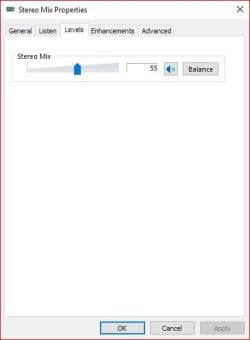
Stereo Mix, at least on my Realtek, has a level control. Check yours.
Here is my Stereo Mix
Attachments
Capture.JPG
19.7 KB
· Views: 22
My Computer
At a glance
Windows 10 64 bitIntel i7 6700K16GB Corsair DominatorIntel CPU Graphics
Computer type
PC/Desktop
Computer Manufacturer/Model Number
My Own Build
OS
Windows 10 64 bit
CPU
Intel i7 6700K
Motherboard
ASUS ROG Maximus VIII Hero
Memory
16GB Corsair Dominator
Graphics Card(s)
Intel CPU Graphics
Sound Card
RealTek
Monitor(s) Displays
27" Dell S2719dgf
Screen Resolution
2560X1440
Hard Drives
1 TB Samsung 850 EVO SSD for Win 10 Pro
500GB Samsung 850 EVO SSD for Win 10 Insider
2 TB drive for backup
PSU
EVGA Supernova 750G2
Case
BeQuiet Silent Base 600
Cooling
Deepcool Captain 120EX
Keyboard
Microsoft Wireless 2000
Mouse
Microsoft wireless
Internet Speed
100 MB/sec (Cable)
Antivirus
Microsoft Defender and Malwarebytes
Browser
Edge/Firefox
Other Info
Cakewalk (Sonar) by BandLab and Studio One 4.1 Pro recording studio software. MOTU 896Mk3 Hybrid recording interface, Frontier Tranzport wireless control unit, Behringer X-Touch Control Surface.
Five USB connected optical drives for CD Audio production using Nero BurningROM
Windows 10 64 bitIntel i7 6700K16GB Corsair DominatorIntel CPU Graphics
Computer type
PC/Desktop
Computer Manufacturer/Model Number
My Own Build
OS
Windows 10 64 bit
CPU
Intel i7 6700K
Motherboard
ASUS ROG Maximus VIII Hero
Memory
16GB Corsair Dominator
Graphics Card(s)
Intel CPU Graphics
Sound Card
RealTek
Monitor(s) Displays
27" Dell S2719dgf
Screen Resolution
2560X1440
Hard Drives
1 TB Samsung 850 EVO SSD for Win 10 Pro
500GB Samsung 850 EVO SSD for Win 10 Insider
2 TB drive for backup
PSU
EVGA Supernova 750G2
Case
BeQuiet Silent Base 600
Cooling
Deepcool Captain 120EX
Keyboard
Microsoft Wireless 2000
Mouse
Microsoft wireless
Internet Speed
100 MB/sec (Cable)
Antivirus
Microsoft Defender and Malwarebytes
Browser
Edge/Firefox
Other Info
Cakewalk (Sonar) by BandLab and Studio One 4.1 Pro recording studio software. MOTU 896Mk3 Hybrid recording interface, Frontier Tranzport wireless control unit, Behringer X-Touch Control Surface.
Five USB connected optical drives for CD Audio production using Nero BurningROM
Weird issue is I get an error message in Audacity "Error while opening sound device. Please check the input device settings and the project sample rate." whenever I use WASAPI on any computer with this headset. I set the playback device as headphones and recording device as headphones because my headset green jack is plugged in headphone port and red jack plugged in mic port. Another weird issue is the Asus Realtek audio drivers does not detect headphones when I plug headset or headphones in front headphone port on my computer. I do not see a headphones icon in playback devices nor in volume mixer when I plug in headphones. It only detects it as speakers, I still get sound from headphones but for some weird reason windows detects it as speakers
My Computer
At a glance
Windows 7 Home Premium 64biti7 4790K16GBSapphire R9 290 Vapor X 4GB