Solved New HDD--fresh install win 7---won't update

dunkinidaho

New member
Local time
8:21 AM
Messages
85
Location
michigan
Just installed a new hdd in my laptop and installed the 3 yr old version of win 7 pro without problems. I activated it after install but now it won't update. Control panel>system>windows update results in many hours of searching for updates without success. I need some help with this. I'm certain from searches that this is common. My hope is that a fix is also common

thanks
 

My Computer My Computer

At a glance

windows 7 prof 64bitIntel core i5-4570 LGA 1150 4x3.2ghz 6mb cpu+gpu32gb 1600mhz DDR3 SDRAM unbufferedAsus GT-610 Silent 1GB DDR3 memory
Computer type
PC/Desktop
Computer Manufacturer/Model Number
custom build
OS
windows 7 prof 64bit
CPU
Intel core i5-4570 LGA 1150 4x3.2ghz 6mb cpu+gpu
Motherboard
Asus H87M-plus
Memory
32gb 1600mhz DDR3 SDRAM unbuffered
Graphics Card(s)
Asus GT-610 Silent 1GB DDR3 memory
Sound Card
Asus DG pci 5.1 sound card & headphone amplifier
Monitor(s) Displays
Asus pro art PA249
Hard Drives
2x WD 500GB caviar black
Antivirus
Avast
Browser
Chrome
Sometimes it can take hours, don`t worry about the updates yet, they`ll come. Just install your software and use the pc for now.

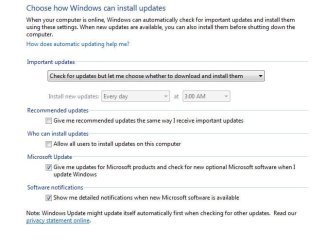
And have windows update set like this.
 

Attachments

  • WUS.JPG
    WUS.JPG
    48.4 KB · Views: 56

My Computer My Computer

At a glance

Windows 10 Pro x64Intel Core i7 6700KGSkill TridentZ RGB 16GB 3600 16-16-16-36EVGA GTX 980 Ti SC x2
Computer type
PC/Desktop
Computer Manufacturer/Model Number
Skylake Special #666
OS
Windows 10 Pro x64
CPU
Intel Core i7 6700K
Motherboard
Asus Sabertooth Z170 Mark 1
Memory
GSkill TridentZ RGB 16GB 3600 16-16-16-36
Graphics Card(s)
EVGA GTX 980 Ti SC x2
Sound Card
Realtek High Definition
Monitor(s) Displays
AOC G2460PG
Screen Resolution
1920 x 1080 144Hz
Hard Drives
Samsung 860 Pro 256GB, Seagate Barracuda 4TB x2
PSU
EVGA 1000 P2, EVGA White Custom Braided Cables
Case
Corsair Vengeance C70 Gunmetal Black
Cooling
Corsair H100i v2, Corsair ML120 x2, Thermal Grizzly Kryonaut
Keyboard
Logitech G910 Orion Spectrum
Mouse
Logitech G700s
Internet Speed
Verizon Fios Quantum Gateway 75/75
Antivirus
Windows Defender, Malwarebytes Free 3.8.3
Browser
Chrome
Other Info
Corsair SP120 x4, LG Blu-ray Drive, Durabrand HT-395 100 Watt Dolby Digital Amp, Corsair H2100 Wireless 7.1 Headset
Hi,
Yep it has been pretty common unfortunately
Couple things to try is,
Install this update client manually,
https://support.microsoft.com/en-us/kb/3135445

Also with the Install Recommended updates the same as as Important updates Unchecked
Set it to automatic,
Restart your machine,
Then click on start and type in the search box
Services click on the suggestion or enter key
Make sure these services are running and on automatic
Background intelligent transfer services
Cryptographic
Windows installer
Windows Update

You might also install this net framework manually as well
https://www.microsoft.com/en-us/download/details.aspx?id=42642
 

My Computer My Computer

At a glance

Win-7-Pro64bit 7-H-Prem-64biti7-5930K 2nd i9-9940x both water blocked VRM'...Trident-z 3200C14 2nd Trident-z 3600C16EVGA 1080ti ftw3 2nd Titan Xp both water blocked
Computer type
PC/Desktop
Computer Manufacturer/Model Number
Custom assembled by me :}
OS
Win-7-Pro64bit 7-H-Prem-64bit
CPU
i7-5930K 2nd i9-9940x both water blocked VRM's too
Motherboard
ASUS SABERTOOTH X99 2nd ASUS x299 Apex
Memory
Trident-z 3200C14 2nd Trident-z 3600C16
Graphics Card(s)
EVGA 1080ti ftw3 2nd Titan Xp both water blocked
Sound Card
Built-in Realtek
Monitor(s) Displays
1-AOC G2460PG 24"G-Sync 144Hz/ 2nd 1-ASUS VG248QE 24" 144Hz
Screen Resolution
1920 x 1080 144Hz
Hard Drives
2-Samsung M.2 Evo & Evo Plus
2-Samsung 850 EVO 500GB SSD's/ 3-2.5 W.D. Black 1tb-&3-1tb/3-3.5 WD Black 1tb hdd's
PSU
EVGA SuperNOVA 1000-P2 2nd 1200-P2
Case
2-Corsair Obsidian Series 450D Black ATX Mid Tower
Cooling
Custom water loops
Keyboard
Logitech G710+/ 2nd Logitech G910
Mouse
2-RedDragon M901 Perdition 16400 dpi Gaming mouse = wired
Internet Speed
Comcast Ping 19ms 89.31mbps download speed 6.12mbps upload
Antivirus
Malwarebytes Pro/ Superantispyware Pro
Browser
FireFox & Pale moon
Other Info
2nd ASUS X299 Apex/Intel i9-9940x with Custom water loop/7H-Prem-x64/Corsair 450D case/Ram Trident-z 3600C16 4x8gb / Samsung970Evo plus 500gb SSD/Dual ssd EZ swap evo/PSU EVGA SuperNova 1200w-P2 80+Platinum/GPU Titan Xp /8-ML-140 on push-pull on 2-280GTX rads
Hi,
Yep it has been pretty common unfortunately
Couple things to try is,
Install this update client manually,
https://support.microsoft.com/en-us/kb/3135445

Also with the Install Recommended updates the same as as Important updates Unchecked
Set it to automatic,
Restart your machine,
Then click on start and type in the search box
Services click on the suggestion or enter key
Make sure these services are running and on automatic
Background intelligent transfer services
Cryptographic
Windows installer
Windows Update

You might also install this net framework manually as well
https://www.microsoft.com/en-us/download/details.aspx?id=42642

neither download has helped. this is a 3 yr old disc so i know there are hundreds of updates that need to be done. I've let the search for updates run for 16 hours with no results. perhaps MS has shut down it's updates for 7?
 

My Computer My Computer

At a glance

windows 7 prof 64bitIntel core i5-4570 LGA 1150 4x3.2ghz 6mb cpu+gpu32gb 1600mhz DDR3 SDRAM unbufferedAsus GT-610 Silent 1GB DDR3 memory
Computer type
PC/Desktop
Computer Manufacturer/Model Number
custom build
OS
windows 7 prof 64bit
CPU
Intel core i5-4570 LGA 1150 4x3.2ghz 6mb cpu+gpu
Motherboard
Asus H87M-plus
Memory
32gb 1600mhz DDR3 SDRAM unbuffered
Graphics Card(s)
Asus GT-610 Silent 1GB DDR3 memory
Sound Card
Asus DG pci 5.1 sound card & headphone amplifier
Monitor(s) Displays
Asus pro art PA249
Hard Drives
2x WD 500GB caviar black
Antivirus
Avast
Browser
Chrome
Sometimes it can take hours, don`t worry about the updates yet, they`ll come. Just install your software and use the pc for now.

And have windows update set like this.

multiple shut down and reboots along with 16 hours of letting the search for updates run has resulted in nothing. This windows 7 disc is 3 years old so I know there are hundreds of updates available.
 

My Computer My Computer

At a glance

windows 7 prof 64bitIntel core i5-4570 LGA 1150 4x3.2ghz 6mb cpu+gpu32gb 1600mhz DDR3 SDRAM unbufferedAsus GT-610 Silent 1GB DDR3 memory
Computer type
PC/Desktop
Computer Manufacturer/Model Number
custom build
OS
windows 7 prof 64bit
CPU
Intel core i5-4570 LGA 1150 4x3.2ghz 6mb cpu+gpu
Motherboard
Asus H87M-plus
Memory
32gb 1600mhz DDR3 SDRAM unbuffered
Graphics Card(s)
Asus GT-610 Silent 1GB DDR3 memory
Sound Card
Asus DG pci 5.1 sound card & headphone amplifier
Monitor(s) Displays
Asus pro art PA249
Hard Drives
2x WD 500GB caviar black
Antivirus
Avast
Browser
Chrome
Last edited:

My Computer My Computer

At a glance

W7 Pro SP1 64biti78GBIntel HD Graphics
Computer type
Laptop
Computer Manufacturer/Model Number
Employer provided Dell Latitude
OS
W7 Pro SP1 64bit
CPU
i7
Memory
8GB
Graphics Card(s)
Intel HD Graphics
Hard Drives
crappy SSD
Antivirus
Employer mandated Symantec Endpoint Protection
Browser
Pale Moon 64bit, IE11 64bit & Chrome 64bit
I have seen it take more than 24 hours. But manually installing the latest Windows Update Client should shorten that to less than an hour. Here is the WU client for March 2016. KB3138612

edit: see this post: http://www.sevenforums.com/windows-...-client-windows-update-agent.html#post3224070


Tried to download kb3138612 but pop up says the browser is out of date. I'll just forget the whole thing. Giving this laptop away for nothing anyway.

Thanks for the advice
 

My Computer My Computer

At a glance

windows 7 prof 64bitIntel core i5-4570 LGA 1150 4x3.2ghz 6mb cpu+gpu32gb 1600mhz DDR3 SDRAM unbufferedAsus GT-610 Silent 1GB DDR3 memory
Computer type
PC/Desktop
Computer Manufacturer/Model Number
custom build
OS
windows 7 prof 64bit
CPU
Intel core i5-4570 LGA 1150 4x3.2ghz 6mb cpu+gpu
Motherboard
Asus H87M-plus
Memory
32gb 1600mhz DDR3 SDRAM unbuffered
Graphics Card(s)
Asus GT-610 Silent 1GB DDR3 memory
Sound Card
Asus DG pci 5.1 sound card & headphone amplifier
Monitor(s) Displays
Asus pro art PA249
Hard Drives
2x WD 500GB caviar black
Antivirus
Avast
Browser
Chrome
Sometimes it can take hours, don`t worry about the updates yet, they`ll come. Just install your software and use the pc for now.

And have windows update set like this.
Unfortunately, the computer might be useless for any other task once the Windows Update process starts. The update process can consume all available RAM while maxing out the CPU. It won't release the RAM to other processes (as indicated by the OS notifying the user of low resources and confirmed by the utility named RAMMap). Maybe this does not happen on all computers, but I've seen it and there have been posts to that mention the CPU/RAM issues.

:-(
 

My Computer My Computer

At a glance

W7 Pro SP1 64biti78GBIntel HD Graphics
Computer type
Laptop
Computer Manufacturer/Model Number
Employer provided Dell Latitude
OS
W7 Pro SP1 64bit
CPU
i7
Memory
8GB
Graphics Card(s)
Intel HD Graphics
Hard Drives
crappy SSD
Antivirus
Employer mandated Symantec Endpoint Protection
Browser
Pale Moon 64bit, IE11 64bit & Chrome 64bit
new HDD- fresh install windows 7

Dunkinidaho,
I faced the same issue as yours. What I did is very simple.

1)Re-install the OS and do not activate it yet.
2)Once installation is done, check for the 4 services as per mentioned above (make sure they are running).
3)Make sure the setting in windows update is set to automatic.
4)Click on "Start" and type "Turn Windows Feature on/off". Make sure "Microsoft .net Framework 3.5.1" is checked. (this part is crucial)
5)Several restarts will be required eg' ! beside the shutdown option

Once these are done, try to check for windows update. Note(Updates might take a very long time eg' the whole night)
 

My Computer My Computer

At a glance

windows 7 professional 64 bit
Computer type
PC/Desktop
OS
windows 7 professional 64 bit

My Computer My Computer

At a glance

Win-7-Pro64bit 7-H-Prem-64biti7-5930K 2nd i9-9940x both water blocked VRM'...Trident-z 3200C14 2nd Trident-z 3600C16EVGA 1080ti ftw3 2nd Titan Xp both water blocked
Computer type
PC/Desktop
Computer Manufacturer/Model Number
Custom assembled by me :}
OS
Win-7-Pro64bit 7-H-Prem-64bit
CPU
i7-5930K 2nd i9-9940x both water blocked VRM's too
Motherboard
ASUS SABERTOOTH X99 2nd ASUS x299 Apex
Memory
Trident-z 3200C14 2nd Trident-z 3600C16
Graphics Card(s)
EVGA 1080ti ftw3 2nd Titan Xp both water blocked
Sound Card
Built-in Realtek
Monitor(s) Displays
1-AOC G2460PG 24"G-Sync 144Hz/ 2nd 1-ASUS VG248QE 24" 144Hz
Screen Resolution
1920 x 1080 144Hz
Hard Drives
2-Samsung M.2 Evo & Evo Plus
2-Samsung 850 EVO 500GB SSD's/ 3-2.5 W.D. Black 1tb-&3-1tb/3-3.5 WD Black 1tb hdd's
PSU
EVGA SuperNOVA 1000-P2 2nd 1200-P2
Case
2-Corsair Obsidian Series 450D Black ATX Mid Tower
Cooling
Custom water loops
Keyboard
Logitech G710+/ 2nd Logitech G910
Mouse
2-RedDragon M901 Perdition 16400 dpi Gaming mouse = wired
Internet Speed
Comcast Ping 19ms 89.31mbps download speed 6.12mbps upload
Antivirus
Malwarebytes Pro/ Superantispyware Pro
Browser
FireFox & Pale moon
Other Info
2nd ASUS X299 Apex/Intel i9-9940x with Custom water loop/7H-Prem-x64/Corsair 450D case/Ram Trident-z 3600C16 4x8gb / Samsung970Evo plus 500gb SSD/Dual ssd EZ swap evo/PSU EVGA SuperNova 1200w-P2 80+Platinum/GPU Titan Xp /8-ML-140 on push-pull on 2-280GTX rads
After days of attempting solutions to a zero percent appearing on downloads on Windows Update (Win 7 Pro), the light came on in my brain. It is taking hours to accomplish a task that used to take minutes. What have I not done to accommodate this? Click Start; in the Search box type the word sleep. Change the "Put the computer to sleep" to "Never." Why? Because now your machine will have enough time to do the updates. (I used to leave it on overnight in update mode, but failed to realize it would quit in 30 minutes and never get the job done.) I hope this simple solution works for you. (Try not to hit yourself too hard on the forehead as you say "Duh." My bruise should subside any day now . . . )
 

My Computer My Computer

At a glance

Win 7 Pro 6436k
Computer type
PC/Desktop
Computer Manufacturer/Model Number
Custom
OS
Win 7 Pro 64
Memory
36k
Browser
EI and Chrome

My Computer My Computer

At a glance

Win-7-Pro64bit 7-H-Prem-64biti7-5930K 2nd i9-9940x both water blocked VRM'...Trident-z 3200C14 2nd Trident-z 3600C16EVGA 1080ti ftw3 2nd Titan Xp both water blocked
Computer type
PC/Desktop
Computer Manufacturer/Model Number
Custom assembled by me :}
OS
Win-7-Pro64bit 7-H-Prem-64bit
CPU
i7-5930K 2nd i9-9940x both water blocked VRM's too
Motherboard
ASUS SABERTOOTH X99 2nd ASUS x299 Apex
Memory
Trident-z 3200C14 2nd Trident-z 3600C16
Graphics Card(s)
EVGA 1080ti ftw3 2nd Titan Xp both water blocked
Sound Card
Built-in Realtek
Monitor(s) Displays
1-AOC G2460PG 24"G-Sync 144Hz/ 2nd 1-ASUS VG248QE 24" 144Hz
Screen Resolution
1920 x 1080 144Hz
Hard Drives
2-Samsung M.2 Evo & Evo Plus
2-Samsung 850 EVO 500GB SSD's/ 3-2.5 W.D. Black 1tb-&3-1tb/3-3.5 WD Black 1tb hdd's
PSU
EVGA SuperNOVA 1000-P2 2nd 1200-P2
Case
2-Corsair Obsidian Series 450D Black ATX Mid Tower
Cooling
Custom water loops
Keyboard
Logitech G710+/ 2nd Logitech G910
Mouse
2-RedDragon M901 Perdition 16400 dpi Gaming mouse = wired
Internet Speed
Comcast Ping 19ms 89.31mbps download speed 6.12mbps upload
Antivirus
Malwarebytes Pro/ Superantispyware Pro
Browser
FireFox & Pale moon
Other Info
2nd ASUS X299 Apex/Intel i9-9940x with Custom water loop/7H-Prem-x64/Corsair 450D case/Ram Trident-z 3600C16 4x8gb / Samsung970Evo plus 500gb SSD/Dual ssd EZ swap evo/PSU EVGA SuperNova 1200w-P2 80+Platinum/GPU Titan Xp /8-ML-140 on push-pull on 2-280GTX rads
I myself had this same problem 3 times.
Last week I've installed Win 7 on a laptop. WU has searched for hours and nothing. I've turned it off and on the following morning it found all the updates to install in minutes.
I think MS shuts down the server for maintenance once in a while.
 

My Computers My Computers

  • At a glance

    Windows 7 HP 64i5 6600K - 800MHz to 4200MHz4+4G GSkill DDR4 3000IG - Intel 530
    Computer type
    PC/Desktop
    Computer Manufacturer/Model Number
    custom build
    OS
    Windows 7 HP 64
    CPU
    i5 6600K - 800MHz to 4200MHz
    Motherboard
    GA-Z170-HD3P
    Memory
    4+4G GSkill DDR4 3000
    Graphics Card(s)
    IG - Intel 530
    Monitor(s) Displays
    Samsung 226BW
    Screen Resolution
    1680x1050
    Hard Drives
    (1) -1 SM951 – 128GB M.2 AHCI PCIe SSD drive for Windows 7 and Lubuntu
    (2) -1 WD SATA 3 - 1T for Data
    (3) -1 WD SATA 3 - 1T for backup
    PSU
    Thermaltake 450W TR2 gold
    Keyboard
    Old and good Chicony mechanical keyboard
    Mouse
    Logitech mX performance - 9 buttons (had to disable some)
    Internet Speed
    500Mb/s
    Browser
    Firefox 64
    Other Info
    TinyWall firewall
  • At a glance

    Windows 7 Proi7-4500U 800MHz to 3.0GHz(4+4)G DDR3 1600IG intel 4400 + NVIDIA GeForce GT 745M
    Computer type
    Laptop
    System Manufacturer/Model Number
    Asus Q550LF
    OS
    Windows 7 Pro
    CPU
    i7-4500U 800MHz to 3.0GHz
    Motherboard
    Asus Q550LF
    Memory
    (4+4)G DDR3 1600
    Graphics Card(s)
    IG intel 4400 + NVIDIA GeForce GT 745M
    Sound Card
    Realtek
    Monitor(s) Displays
    LG Display LP156WF4-SPH1
    Screen Resolution
    1920 x 1080
    Hard Drives
    BX500 120G SSD for Windows and programs +
    1T HDD for data
    Internet Speed
    500 Mb/s
    Browser
    Firefox
    Other Info
    TinyWall firewall
I myself had this same problem 3 times.
Last week I've installed Win 7 on a laptop. WU has searched for hours and nothing. I've turned it off and on the following morning it found all the updates to install in minutes.
I think MS shuts down the server for maintenance once in a while.

I'm still not able to update. I wanted to upgrade to 10 but it won't unless 7 is current with updates.
 

My Computer My Computer

At a glance

windows 7 prof 64bitIntel core i5-4570 LGA 1150 4x3.2ghz 6mb cpu+gpu32gb 1600mhz DDR3 SDRAM unbufferedAsus GT-610 Silent 1GB DDR3 memory
Computer type
PC/Desktop
Computer Manufacturer/Model Number
custom build
OS
windows 7 prof 64bit
CPU
Intel core i5-4570 LGA 1150 4x3.2ghz 6mb cpu+gpu
Motherboard
Asus H87M-plus
Memory
32gb 1600mhz DDR3 SDRAM unbuffered
Graphics Card(s)
Asus GT-610 Silent 1GB DDR3 memory
Sound Card
Asus DG pci 5.1 sound card & headphone amplifier
Monitor(s) Displays
Asus pro art PA249
Hard Drives
2x WD 500GB caviar black
Antivirus
Avast
Browser
Chrome
I think you are going to regret. Win 7 is a better OS.
Nothing better like a fresh install.
- Backup all your data on another drive.
- Make a installation USB with Win 10.
- Boot on the USB with Win 10.
- When asked just furnish the Win 7 Key. It will install and register.
 

My Computers My Computers

  • At a glance

    Windows 7 HP 64i5 6600K - 800MHz to 4200MHz4+4G GSkill DDR4 3000IG - Intel 530
    Computer type
    PC/Desktop
    Computer Manufacturer/Model Number
    custom build
    OS
    Windows 7 HP 64
    CPU
    i5 6600K - 800MHz to 4200MHz
    Motherboard
    GA-Z170-HD3P
    Memory
    4+4G GSkill DDR4 3000
    Graphics Card(s)
    IG - Intel 530
    Monitor(s) Displays
    Samsung 226BW
    Screen Resolution
    1680x1050
    Hard Drives
    (1) -1 SM951 – 128GB M.2 AHCI PCIe SSD drive for Windows 7 and Lubuntu
    (2) -1 WD SATA 3 - 1T for Data
    (3) -1 WD SATA 3 - 1T for backup
    PSU
    Thermaltake 450W TR2 gold
    Keyboard
    Old and good Chicony mechanical keyboard
    Mouse
    Logitech mX performance - 9 buttons (had to disable some)
    Internet Speed
    500Mb/s
    Browser
    Firefox 64
    Other Info
    TinyWall firewall
  • At a glance

    Windows 7 Proi7-4500U 800MHz to 3.0GHz(4+4)G DDR3 1600IG intel 4400 + NVIDIA GeForce GT 745M
    Computer type
    Laptop
    System Manufacturer/Model Number
    Asus Q550LF
    OS
    Windows 7 Pro
    CPU
    i7-4500U 800MHz to 3.0GHz
    Motherboard
    Asus Q550LF
    Memory
    (4+4)G DDR3 1600
    Graphics Card(s)
    IG intel 4400 + NVIDIA GeForce GT 745M
    Sound Card
    Realtek
    Monitor(s) Displays
    LG Display LP156WF4-SPH1
    Screen Resolution
    1920 x 1080
    Hard Drives
    BX500 120G SSD for Windows and programs +
    1T HDD for data
    Internet Speed
    500 Mb/s
    Browser
    Firefox
    Other Info
    TinyWall firewall
Back
Top