Solved Windows 7 pro can't detect the networking hardware on hp pavilion 15

Coder0523

New member
Local time
11:51 AM
Messages
8
I really need some solid help here. I'm not by any means a pc wizard but somehow I can't figure this one out. For all the pc problems I have encountered I have managed to fix by Googleing it, this time, I've failed and I need your help please.

I have an hp pavilion 15-p100dx that was running on Windows 8.1. Well, I removed the hard drive and installed an ssd, 8gb of ram and also fresh installed windows 7 pro on new ssd. It's blazing fast now and I got windows 7 pro running now. However, now I can't connect to the Internet because of the above mentioned. Not even the Ethernet is working so I can't even update any of the drivers online.

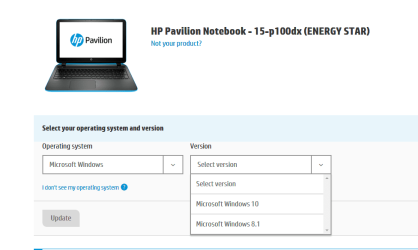
I went to hp software and updates to download network adapter drivers but it says windows 7 pro is not supported on the hp pavilion 15-p100dx so I'm at a loss now. In the BIOS it detects windows 8.1 but perhaps because windows 7 pro isn't activated yet because of lack of Internet. What else can I do now?
 

My Computer My Computer

At a glance

Windows 7 pro 64bitIntel12gb ram
Computer type
Laptop
Computer Manufacturer/Model Number
HP Pavilion p100dx
OS
Windows 7 pro 64bit
CPU
Intel
Memory
12gb ram
Hard Drives
Samsung SSD 500gb

My Computer My Computer

At a glance

Win 10 Pro x64Intel I5-2500K @3.3GHz16GB G.Skill Ripjaws X (4x4GB)EVGA GeForce 750 Ti SC 2GB
Computer type
PC/Desktop
Computer Manufacturer/Model Number
Self Built
OS
Win 10 Pro x64
CPU
Intel I5-2500K @3.3GHz
Motherboard
Asrock P67 Extreme4
Memory
16GB G.Skill Ripjaws X (4x4GB)
Graphics Card(s)
EVGA GeForce 750 Ti SC 2GB
Sound Card
ASUS Xonar DG 5.1 Channels 24-bit 96KHz PCI Interface Sound
Monitor(s) Displays
auria eq2367
Screen Resolution
1920 x 1080
Hard Drives
250GB Samsung 850 EVO SSD
1TB WD Blue
1TB Hitachi
PSU
SeaSonic X 650W 80 Plus Gold
Case
Corsair Obsidian 750D
Cooling
Corsair H60, Three 140mm case fans
Keyboard
Logitech Wireless Keyboard K520
Mouse
Logitech Wireless Mouse M310
Internet Speed
Wave Broadband ~ 100 dn 5 up
Antivirus
Windows Defender, Malwarebytes Premium
Browser
Edge, IE11, Chrome
Other Info
Laptop specs: HP g7-1365dx /
CPU: AMD A6-3420M APU with Radeon(tm) HD Graphics /
RAM: Crucial 8Gb (2x4Gb) /
SSD: Crucial M4-CT128M4SSD2 ATA Device/ FW 000F /
GFX: AMD Radeon HD 6520G /
OS: Windows 10 Pro x64
Hi, I tried but everytime I transfer file through USB disk the whole thing disappears on my other laptop that has internet. I'm not sure what to do anymore. I spent so much on ssd and memory ram and now I'm stuck without Internet. Yesterday the USB ports weren't working and somehow i was fiddling around with driver settings and they seem to work now. Are there any other options?

Welcome to the forum,

Can you do option one of this tutorial on your laptop,

http://www.sevenforums.com/tutorials/374583-system-information-file-create-windows.html#Part1

That will give us the hardware ID's of any missing drivers.
 

My Computer My Computer

At a glance

Windows 7 pro 64bitIntel12gb ram
Computer type
Laptop
Computer Manufacturer/Model Number
HP Pavilion p100dx
OS
Windows 7 pro 64bit
CPU
Intel
Memory
12gb ram
Hard Drives
Samsung SSD 500gb
Disappears huh, that's odd. How are you transferring it? It should be pretty straight forward if you just copy it to a USB thumb drive.

This tutorial here is basically what I was trying to do,

http://www.sevenforums.com/tutorials/73420-hardware-identification.html

From the description you give, I can almost certainly say you need your chipset driver before you do anything.

There is a section in this file,

http://www.sevenforums.com/tutorials/374583-system-information-file-create-windows.html#Part2

Called problem devices, that is where the info is that is needed.

Otherwise we are simply guessing.

Have you tried option two of that tutorial?

http://www.sevenforums.com/tutorials/374583-system-information-file-create-windows.html#Part2

It creates a simple text file.
 

My Computer My Computer

At a glance

Win 10 Pro x64Intel I5-2500K @3.3GHz16GB G.Skill Ripjaws X (4x4GB)EVGA GeForce 750 Ti SC 2GB
Computer type
PC/Desktop
Computer Manufacturer/Model Number
Self Built
OS
Win 10 Pro x64
CPU
Intel I5-2500K @3.3GHz
Motherboard
Asrock P67 Extreme4
Memory
16GB G.Skill Ripjaws X (4x4GB)
Graphics Card(s)
EVGA GeForce 750 Ti SC 2GB
Sound Card
ASUS Xonar DG 5.1 Channels 24-bit 96KHz PCI Interface Sound
Monitor(s) Displays
auria eq2367
Screen Resolution
1920 x 1080
Hard Drives
250GB Samsung 850 EVO SSD
1TB WD Blue
1TB Hitachi
PSU
SeaSonic X 650W 80 Plus Gold
Case
Corsair Obsidian 750D
Cooling
Corsair H60, Three 140mm case fans
Keyboard
Logitech Wireless Keyboard K520
Mouse
Logitech Wireless Mouse M310
Internet Speed
Wave Broadband ~ 100 dn 5 up
Antivirus
Windows Defender, Malwarebytes Premium
Browser
Edge, IE11, Chrome
Other Info
Laptop specs: HP g7-1365dx /
CPU: AMD A6-3420M APU with Radeon(tm) HD Graphics /
RAM: Crucial 8Gb (2x4Gb) /
SSD: Crucial M4-CT128M4SSD2 ATA Device/ FW 000F /
GFX: AMD Radeon HD 6520G /
OS: Windows 10 Pro x64
I tried following those steps and nothing. Even the text file when I place it on USB disk it the text disappears once I hook it up to the pc that has internet connection. Not sure what to do. I open that text file on this PC and it shows a blank page. I went to HP to try to dowload drivers and it says that my laptop Hp Pavilion p100dx is only supported for windows 8 and Windows 10. Do you know if there is any other site where I can download network drivers from besides HP? I'm sure it would have worked if I could download the windows 7 drivers but my laptop is not compatible since I have windows 7.

I had taken a screenshot of system information and it seems that whatever I transfer to USB disappears and working PC, not sure why. I attached a few screenshots, not really sure if it helps or not. Hope I can fix this laptop soon, it's really fast but it's useless without internet :/


Disappears huh, that's odd. How are you transferring it? It should be pretty straight forward if you just copy it to a USB thumb drive.

This tutorial here is basically what I was trying to do,

http://www.sevenforums.com/tutorials/73420-hardware-identification.html

From the description you give, I can almost certainly say you need your chipset driver before you do anything.

There is a section in this file,

http://www.sevenforums.com/tutorials/374583-system-information-file-create-windows.html#Part2

Called problem devices, that is where the info is that is needed.

Otherwise we are simply guessing.

Have you tried option two of that tutorial?

http://www.sevenforums.com/tutorials/374583-system-information-file-create-windows.html#Part2

It creates a simple text file.
 

Attachments

  • coder0523-nonetworkoption.png
    coder0523-nonetworkoption.png
    10.4 KB · Views: 14
  • Capture.PNG
    Capture.PNG
    17.7 KB · Views: 0
  • coder0523log.txt
    coder0523log.txt
    438.5 KB · Views: 2

My Computer My Computer

At a glance

Windows 7 pro 64bitIntel12gb ram
Computer type
Laptop
Computer Manufacturer/Model Number
HP Pavilion p100dx
OS
Windows 7 pro 64bit
CPU
Intel
Memory
12gb ram
Hard Drives
Samsung SSD 500gb
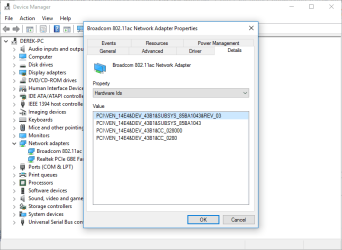
OK, that's still not the information I wanted, I need the hardware ID's like this,

2016-03-23_00h23_54.png

Yeah, I've been to the HP site too.

If you cant transfer anything, then write them down.

Look at this tutorial,

http://www.sevenforums.com/tutorials/73420-hardware-identification.html

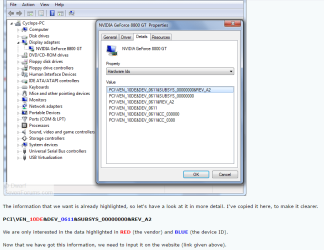
See these numbers/letters in red and blue,

2016-03-23_00h31_15.png

Those are the gold you seek. I need them for each one of those with a :warn:

383993d1458717069-windows-7-pro-cant-detect-networking-hardware-hp-pavilion-15-a-coder0523-nonetworkoption.png


The problem is by not offering Win 7 drivers at HP, we need to hunt them down with those numbers.
 

My Computer My Computer

At a glance

Win 10 Pro x64Intel I5-2500K @3.3GHz16GB G.Skill Ripjaws X (4x4GB)EVGA GeForce 750 Ti SC 2GB
Computer type
PC/Desktop
Computer Manufacturer/Model Number
Self Built
OS
Win 10 Pro x64
CPU
Intel I5-2500K @3.3GHz
Motherboard
Asrock P67 Extreme4
Memory
16GB G.Skill Ripjaws X (4x4GB)
Graphics Card(s)
EVGA GeForce 750 Ti SC 2GB
Sound Card
ASUS Xonar DG 5.1 Channels 24-bit 96KHz PCI Interface Sound
Monitor(s) Displays
auria eq2367
Screen Resolution
1920 x 1080
Hard Drives
250GB Samsung 850 EVO SSD
1TB WD Blue
1TB Hitachi
PSU
SeaSonic X 650W 80 Plus Gold
Case
Corsair Obsidian 750D
Cooling
Corsair H60, Three 140mm case fans
Keyboard
Logitech Wireless Keyboard K520
Mouse
Logitech Wireless Mouse M310
Internet Speed
Wave Broadband ~ 100 dn 5 up
Antivirus
Windows Defender, Malwarebytes Premium
Browser
Edge, IE11, Chrome
Other Info
Laptop specs: HP g7-1365dx /
CPU: AMD A6-3420M APU with Radeon(tm) HD Graphics /
RAM: Crucial 8Gb (2x4Gb) /
SSD: Crucial M4-CT128M4SSD2 ATA Device/ FW 000F /
GFX: AMD Radeon HD 6520G /
OS: Windows 10 Pro x64
I managed to transfer the info from laptop to my phone and from my phone to this working PC. i attached STEP 2 because I couldn't 7zip the NFO file, it didn't let me, I attached both just in case, I really hope you can help me out, if you're accepting donations, I'll gladly do it, I just need my laptop working :cry:


OK, that's still not the information I wanted, I need the hardware ID's like this,

View attachment 383996

Yeah, I've been to the HP site too.

If you cant transfer anything, then write them down.

Look at this tutorial,

http://www.sevenforums.com/tutorials/73420-hardware-identification.html

See these numbers/letters in red and blue,

View attachment 383997

Those are the gold you seek. I need them for each one of those with a :warn:

383993d1458717069-windows-7-pro-cant-detect-networking-hardware-hp-pavilion-15-a-coder0523-nonetworkoption.png


The problem is by not offering Win 7 drivers at HP, we need to hunt them down with those numbers.
 

Attachments

My Computer My Computer

At a glance

Windows 7 pro 64bitIntel12gb ram
Computer type
Laptop
Computer Manufacturer/Model Number
HP Pavilion p100dx
OS
Windows 7 pro 64bit
CPU
Intel
Memory
12gb ram
Hard Drives
Samsung SSD 500gb

My Computer My Computer

At a glance

Win 10 Pro x64Intel I5-2500K @3.3GHz16GB G.Skill Ripjaws X (4x4GB)EVGA GeForce 750 Ti SC 2GB
Computer type
PC/Desktop
Computer Manufacturer/Model Number
Self Built
OS
Win 10 Pro x64
CPU
Intel I5-2500K @3.3GHz
Motherboard
Asrock P67 Extreme4
Memory
16GB G.Skill Ripjaws X (4x4GB)
Graphics Card(s)
EVGA GeForce 750 Ti SC 2GB
Sound Card
ASUS Xonar DG 5.1 Channels 24-bit 96KHz PCI Interface Sound
Monitor(s) Displays
auria eq2367
Screen Resolution
1920 x 1080
Hard Drives
250GB Samsung 850 EVO SSD
1TB WD Blue
1TB Hitachi
PSU
SeaSonic X 650W 80 Plus Gold
Case
Corsair Obsidian 750D
Cooling
Corsair H60, Three 140mm case fans
Keyboard
Logitech Wireless Keyboard K520
Mouse
Logitech Wireless Mouse M310
Internet Speed
Wave Broadband ~ 100 dn 5 up
Antivirus
Windows Defender, Malwarebytes Premium
Browser
Edge, IE11, Chrome
Other Info
Laptop specs: HP g7-1365dx /
CPU: AMD A6-3420M APU with Radeon(tm) HD Graphics /
RAM: Crucial 8Gb (2x4Gb) /
SSD: Crucial M4-CT128M4SSD2 ATA Device/ FW 000F /
GFX: AMD Radeon HD 6520G /
OS: Windows 10 Pro x64

My Computer My Computer

At a glance

Win 10 Pro x64Intel I5-2500K @3.3GHz16GB G.Skill Ripjaws X (4x4GB)EVGA GeForce 750 Ti SC 2GB
Computer type
PC/Desktop
Computer Manufacturer/Model Number
Self Built
OS
Win 10 Pro x64
CPU
Intel I5-2500K @3.3GHz
Motherboard
Asrock P67 Extreme4
Memory
16GB G.Skill Ripjaws X (4x4GB)
Graphics Card(s)
EVGA GeForce 750 Ti SC 2GB
Sound Card
ASUS Xonar DG 5.1 Channels 24-bit 96KHz PCI Interface Sound
Monitor(s) Displays
auria eq2367
Screen Resolution
1920 x 1080
Hard Drives
250GB Samsung 850 EVO SSD
1TB WD Blue
1TB Hitachi
PSU
SeaSonic X 650W 80 Plus Gold
Case
Corsair Obsidian 750D
Cooling
Corsair H60, Three 140mm case fans
Keyboard
Logitech Wireless Keyboard K520
Mouse
Logitech Wireless Mouse M310
Internet Speed
Wave Broadband ~ 100 dn 5 up
Antivirus
Windows Defender, Malwarebytes Premium
Browser
Edge, IE11, Chrome
Other Info
Laptop specs: HP g7-1365dx /
CPU: AMD A6-3420M APU with Radeon(tm) HD Graphics /
RAM: Crucial 8Gb (2x4Gb) /
SSD: Crucial M4-CT128M4SSD2 ATA Device/ FW 000F /
GFX: AMD Radeon HD 6520G /
OS: Windows 10 Pro x64
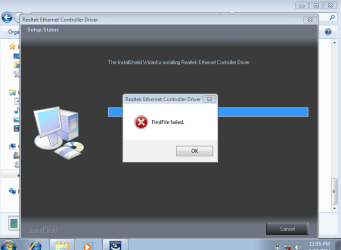
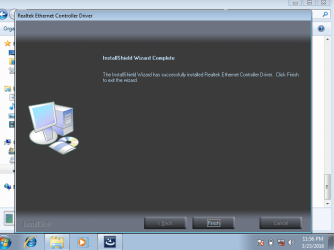
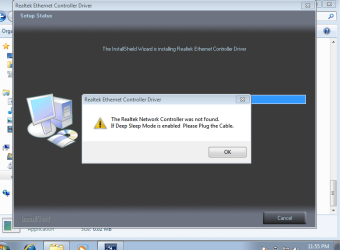
Hi, I have tried every single thing listed here and it didn't work :( I attached some screenshots of the errors I get when I try installing LAN drivers, it's just not working, not sure why. Based on more research I've done, it seems like it works for everyone but not for me, not sure why. It's a new SSD and the installation of windows 7 for the first time.
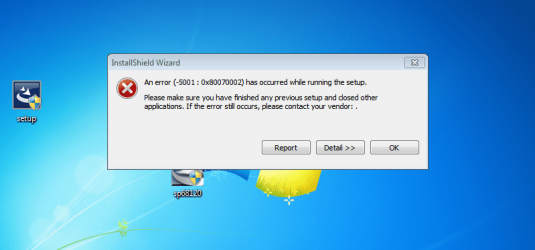
I bought the Windows 7 pro disc (including activation key) on Ebay, it says for refurbishd pcs/laptops only but I'm pretty sure after changing the SSD my laptop is technically a refurbished device. I can easily just install windows 8, but my job uses windows 7 so that's why I wanted Windows 7 instead.

Any other suggestions?
 

Attachments

  • coder0523.PNG
    coder0523.PNG
    62.9 KB · Views: 1
  • coder0523-failed.PNG
    coder0523-failed.PNG
    24.9 KB · Views: 0
  • coder0523-realtekinstalled.PNG
    coder0523-realtekinstalled.PNG
    24.1 KB · Views: 0
  • Coder0523-sleepmode.PNG
    Coder0523-sleepmode.PNG
    24 KB · Views: 0

My Computer My Computer

At a glance

Windows 7 pro 64bitIntel12gb ram
Computer type
Laptop
Computer Manufacturer/Model Number
HP Pavilion p100dx
OS
Windows 7 pro 64bit
CPU
Intel
Memory
12gb ram
Hard Drives
Samsung SSD 500gb
OK, I was afraid of that, I still think you need the chipset first to have your other hardware noticed.

Try this chipset driver, after it installs, restart and check the realtek driver again,

View attachment sp66094.zip

You probably got ripped off on that ebay deal but we'll get to that later.
 

My Computer My Computer

At a glance

Win 10 Pro x64Intel I5-2500K @3.3GHz16GB G.Skill Ripjaws X (4x4GB)EVGA GeForce 750 Ti SC 2GB
Computer type
PC/Desktop
Computer Manufacturer/Model Number
Self Built
OS
Win 10 Pro x64
CPU
Intel I5-2500K @3.3GHz
Motherboard
Asrock P67 Extreme4
Memory
16GB G.Skill Ripjaws X (4x4GB)
Graphics Card(s)
EVGA GeForce 750 Ti SC 2GB
Sound Card
ASUS Xonar DG 5.1 Channels 24-bit 96KHz PCI Interface Sound
Monitor(s) Displays
auria eq2367
Screen Resolution
1920 x 1080
Hard Drives
250GB Samsung 850 EVO SSD
1TB WD Blue
1TB Hitachi
PSU
SeaSonic X 650W 80 Plus Gold
Case
Corsair Obsidian 750D
Cooling
Corsair H60, Three 140mm case fans
Keyboard
Logitech Wireless Keyboard K520
Mouse
Logitech Wireless Mouse M310
Internet Speed
Wave Broadband ~ 100 dn 5 up
Antivirus
Windows Defender, Malwarebytes Premium
Browser
Edge, IE11, Chrome
Other Info
Laptop specs: HP g7-1365dx /
CPU: AMD A6-3420M APU with Radeon(tm) HD Graphics /
RAM: Crucial 8Gb (2x4Gb) /
SSD: Crucial M4-CT128M4SSD2 ATA Device/ FW 000F /
GFX: AMD Radeon HD 6520G /
OS: Windows 10 Pro x64
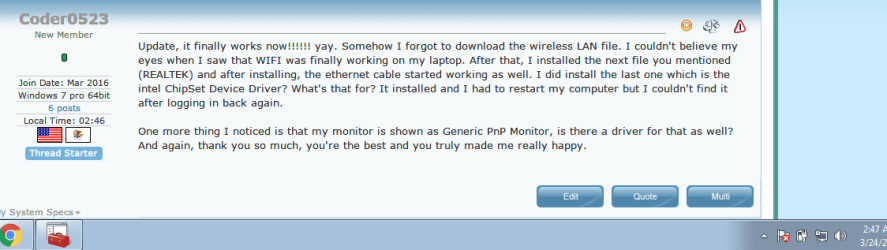
Update, it finally works now!!!!!! yay. Somehow I forgot to download the wireless LAN file. I couldn't believe my eyes when I saw that WIFI was finally working on my laptop. After that, I installed the next file you mentioned (REALTEK) and after installing, the ethernet cable started working as well. I did install the last one which is the intel ChipSet Device Driver? What's that for? It installed and I had to restart my computer but I couldn't find it after logging in back again.

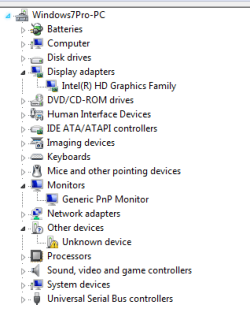
One more thing I noticed is that my monitor is shown as Generic PnP Monitor, is there a driver for that as well? And again, thank you so much, you're the best and you truly made me really happy.
 

My Computer My Computer

At a glance

Windows 7 pro 64bitIntel12gb ram
Computer type
Laptop
Computer Manufacturer/Model Number
HP Pavilion p100dx
OS
Windows 7 pro 64bit
CPU
Intel
Memory
12gb ram
Hard Drives
Samsung SSD 500gb
Thanks a bunch. Is there a tool I can use to update all drivers at once?

OK, I was afraid of that, I still think you need the chipset first to have your other hardware noticed.

Try this chipset driver, after it installs, restart and check the realtek driver again,

View attachment 384051

You probably got ripped off on that ebay deal but we'll get to that later.
 

Attachments

  • internetworksnow.PNG
    internetworksnow.PNG
    18.2 KB · Views: 0

My Computer My Computer

At a glance

Windows 7 pro 64bitIntel12gb ram
Computer type
Laptop
Computer Manufacturer/Model Number
HP Pavilion p100dx
OS
Windows 7 pro 64bit
CPU
Intel
Memory
12gb ram
Hard Drives
Samsung SSD 500gb

My Computer My Computer

At a glance

Win 10 Pro x64Intel I5-2500K @3.3GHz16GB G.Skill Ripjaws X (4x4GB)EVGA GeForce 750 Ti SC 2GB
Computer type
PC/Desktop
Computer Manufacturer/Model Number
Self Built
OS
Win 10 Pro x64
CPU
Intel I5-2500K @3.3GHz
Motherboard
Asrock P67 Extreme4
Memory
16GB G.Skill Ripjaws X (4x4GB)
Graphics Card(s)
EVGA GeForce 750 Ti SC 2GB
Sound Card
ASUS Xonar DG 5.1 Channels 24-bit 96KHz PCI Interface Sound
Monitor(s) Displays
auria eq2367
Screen Resolution
1920 x 1080
Hard Drives
250GB Samsung 850 EVO SSD
1TB WD Blue
1TB Hitachi
PSU
SeaSonic X 650W 80 Plus Gold
Case
Corsair Obsidian 750D
Cooling
Corsair H60, Three 140mm case fans
Keyboard
Logitech Wireless Keyboard K520
Mouse
Logitech Wireless Mouse M310
Internet Speed
Wave Broadband ~ 100 dn 5 up
Antivirus
Windows Defender, Malwarebytes Premium
Browser
Edge, IE11, Chrome
Other Info
Laptop specs: HP g7-1365dx /
CPU: AMD A6-3420M APU with Radeon(tm) HD Graphics /
RAM: Crucial 8Gb (2x4Gb) /
SSD: Crucial M4-CT128M4SSD2 ATA Device/ FW 000F /
GFX: AMD Radeon HD 6520G /
OS: Windows 10 Pro x64
I did install the last one which is the intel ChipSet Device Driver? What's that for? It installed and I had to restart my computer but I couldn't find it after logging in back again.

The chipset is the main set of drivers, they are motherboard drivers basically.

One more thing I noticed is that my monitor is shown as Generic PnP Monitor, is there a driver for that as well? And again, thank you so much, you're the best and you truly made me really happy.

You're welcome. :)

You need a graphics driver. This Intel one should work,

HP Software and Driver Downloads for HP Printers, Laptops, Desktops and More | HP® Customer Support

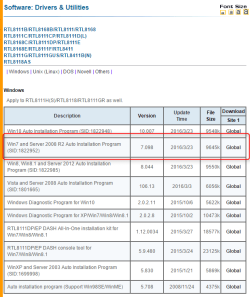
2016-03-24_01h11_10.png
 

My Computer My Computer

At a glance

Win 10 Pro x64Intel I5-2500K @3.3GHz16GB G.Skill Ripjaws X (4x4GB)EVGA GeForce 750 Ti SC 2GB
Computer type
PC/Desktop
Computer Manufacturer/Model Number
Self Built
OS
Win 10 Pro x64
CPU
Intel I5-2500K @3.3GHz
Motherboard
Asrock P67 Extreme4
Memory
16GB G.Skill Ripjaws X (4x4GB)
Graphics Card(s)
EVGA GeForce 750 Ti SC 2GB
Sound Card
ASUS Xonar DG 5.1 Channels 24-bit 96KHz PCI Interface Sound
Monitor(s) Displays
auria eq2367
Screen Resolution
1920 x 1080
Hard Drives
250GB Samsung 850 EVO SSD
1TB WD Blue
1TB Hitachi
PSU
SeaSonic X 650W 80 Plus Gold
Case
Corsair Obsidian 750D
Cooling
Corsair H60, Three 140mm case fans
Keyboard
Logitech Wireless Keyboard K520
Mouse
Logitech Wireless Mouse M310
Internet Speed
Wave Broadband ~ 100 dn 5 up
Antivirus
Windows Defender, Malwarebytes Premium
Browser
Edge, IE11, Chrome
Other Info
Laptop specs: HP g7-1365dx /
CPU: AMD A6-3420M APU with Radeon(tm) HD Graphics /
RAM: Crucial 8Gb (2x4Gb) /
SSD: Crucial M4-CT128M4SSD2 ATA Device/ FW 000F /
GFX: AMD Radeon HD 6520G /
OS: Windows 10 Pro x64
For some reason i can't 7zip the 'nfo' file but I will attach it anyways, let me know if you rather have me upload the text file instead if this doesn't work. I'm downloading Intel HD graphics driver in the meantime. Will HDMI work on my laptop after installing the Intel HD Graphics driver? I noticed there's also a driver called Intel NVIDIA, do I need to install that one or ignore? And even though these downloads are for windows 8.1, it will be okay since im using windows 7 right? Sorry for so many questions.

Update: Monitors seems to be under PnP still, is that normal?

Awesome! Can you run this again so I can see how much was fixed,

http://www.sevenforums.com/tutorials/374583-system-information-file-create-windows.html#Part1

I don't recommend driver programs or tools, they usually do more harm than good.
 

Attachments

My Computer My Computer

At a glance

Windows 7 pro 64bitIntel12gb ram
Computer type
Laptop
Computer Manufacturer/Model Number
HP Pavilion p100dx
OS
Windows 7 pro 64bit
CPU
Intel
Memory
12gb ram
Hard Drives
Samsung SSD 500gb
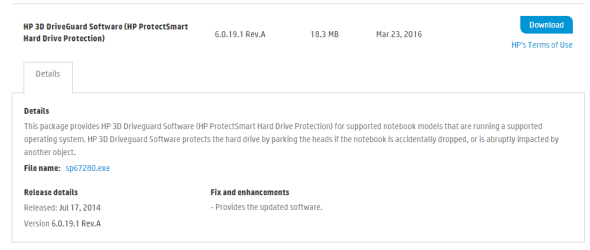
Cool, everything looks good, there is one thing missing but it's a drive guard for a spinner to park the heads, since you have an SSD we can forget about that.

That NFO uploaded fine, actually we have those as allowed files so it could have been uploaded without zipping.

There's an HDMI driver in the Intel driver I linked for you. Don't worry about the Nvidia, you only show the Intel for your system.

Looking at that report I see you already installed that too,

Code:
Name	Intel(R) HD Graphics Family
PNP Device ID	PCI\VEN_8086&DEV_0A16&SUBSYS_227E103C&REV_0B\3&11583659&0&10
Adapter Type	Intel(R) HD Graphics Family, Intel Corporation compatible
Adapter Description	Intel(R) HD Graphics Family
Adapter RAM	(2,080,374,784) bytes
Installed Drivers	igdumdim64.dll,igd10iumd64.dll,igd10iumd64.dll,igdumdim32,igd10iumd32,igd10iumd32
Driver Version	10.18.10.3574
INF File	oem16.inf (iHSWM_w7 section)

Compared to what it was,

Code:
Name	Standard VGA Graphics Adapter
PNP Device ID	PCI\VEN_8086&DEV_0A16&SUBSYS_227E103C&REV_0B\3&11583659&0&10
Adapter Type	Not Available, (Standard display types) compatible
Adapter Description	Standard VGA Graphics Adapter
Adapter RAM	Not Available
Installed Drivers	Not Available
Driver Version	6.1.7600.16385
INF File	display.inf (vga section)

I wouldn't worry about the monitor being PnP.

Right now you have a bunch of updates to catch up on.

The drivers that worked for you are also good for Win 7 so don't worry about them saying they are for windows 8/8.1.
 

My Computer My Computer

At a glance

Win 10 Pro x64Intel I5-2500K @3.3GHz16GB G.Skill Ripjaws X (4x4GB)EVGA GeForce 750 Ti SC 2GB
Computer type
PC/Desktop
Computer Manufacturer/Model Number
Self Built
OS
Win 10 Pro x64
CPU
Intel I5-2500K @3.3GHz
Motherboard
Asrock P67 Extreme4
Memory
16GB G.Skill Ripjaws X (4x4GB)
Graphics Card(s)
EVGA GeForce 750 Ti SC 2GB
Sound Card
ASUS Xonar DG 5.1 Channels 24-bit 96KHz PCI Interface Sound
Monitor(s) Displays
auria eq2367
Screen Resolution
1920 x 1080
Hard Drives
250GB Samsung 850 EVO SSD
1TB WD Blue
1TB Hitachi
PSU
SeaSonic X 650W 80 Plus Gold
Case
Corsair Obsidian 750D
Cooling
Corsair H60, Three 140mm case fans
Keyboard
Logitech Wireless Keyboard K520
Mouse
Logitech Wireless Mouse M310
Internet Speed
Wave Broadband ~ 100 dn 5 up
Antivirus
Windows Defender, Malwarebytes Premium
Browser
Edge, IE11, Chrome
Other Info
Laptop specs: HP g7-1365dx /
CPU: AMD A6-3420M APU with Radeon(tm) HD Graphics /
RAM: Crucial 8Gb (2x4Gb) /
SSD: Crucial M4-CT128M4SSD2 ATA Device/ FW 000F /
GFX: AMD Radeon HD 6520G /
OS: Windows 10 Pro x64

My Computer My Computer

At a glance

Win 10 Pro x64Intel I5-2500K @3.3GHz16GB G.Skill Ripjaws X (4x4GB)EVGA GeForce 750 Ti SC 2GB
Computer type
PC/Desktop
Computer Manufacturer/Model Number
Self Built
OS
Win 10 Pro x64
CPU
Intel I5-2500K @3.3GHz
Motherboard
Asrock P67 Extreme4
Memory
16GB G.Skill Ripjaws X (4x4GB)
Graphics Card(s)
EVGA GeForce 750 Ti SC 2GB
Sound Card
ASUS Xonar DG 5.1 Channels 24-bit 96KHz PCI Interface Sound
Monitor(s) Displays
auria eq2367
Screen Resolution
1920 x 1080
Hard Drives
250GB Samsung 850 EVO SSD
1TB WD Blue
1TB Hitachi
PSU
SeaSonic X 650W 80 Plus Gold
Case
Corsair Obsidian 750D
Cooling
Corsair H60, Three 140mm case fans
Keyboard
Logitech Wireless Keyboard K520
Mouse
Logitech Wireless Mouse M310
Internet Speed
Wave Broadband ~ 100 dn 5 up
Antivirus
Windows Defender, Malwarebytes Premium
Browser
Edge, IE11, Chrome
Other Info
Laptop specs: HP g7-1365dx /
CPU: AMD A6-3420M APU with Radeon(tm) HD Graphics /
RAM: Crucial 8Gb (2x4Gb) /
SSD: Crucial M4-CT128M4SSD2 ATA Device/ FW 000F /
GFX: AMD Radeon HD 6520G /
OS: Windows 10 Pro x64
Back
Top