Solved How do I seperate my hard drives to act as seperate drives again ?

mondonewc

New member
Local time
9:16 PM
Messages
25
Hey,

Firstly my apologies for being a complete Noob with PC's and wordings used etc.

I would like to seperate the two hard drives so they act as seperate drives, please could you tell me how I do that or link me up to a guide for how to do it. I apologise if I'm being too vague here but not sure what other information I should share, lmk if there is anything else and will reply staightaway.

Thanks very much for any help.
 

Attachments

  • 7forums.png
    7forums.png
    32.1 KB · Views: 4
Last edited:

My Computer My Computer

At a glance

Microsoft Windows 7 Home Premium 64-bit 7601 ...AMD FX(tm)-8320 Eight-Core Processor16.00 GBNVIDIA GeForce GTX 650 Ti
Computer type
PC/Desktop
Computer Manufacturer/Model Number
Custom build
OS
Microsoft Windows 7 Home Premium 64-bit 7601 Multiprocessor Free Service Pack 1
CPU
AMD FX(tm)-8320 Eight-Core Processor
Motherboard
Gigabyte Technology Co., Ltd. 990FXA-UD3
Memory
16.00 GB
Graphics Card(s)
NVIDIA GeForce GTX 650 Ti
Sound Card
(1) NVIDIA Virtual Audio Device (Wave Extensible) (WDM) (2
Screen Resolution
1680 x 1050 x 32 bits (4294967296 colors) @ 59 Hz
Hard Drives
(1) OCZ-VERTEX PLUS R2 ATA Device (2) Samsung SSD 840 Series ATA Device
PSU
800w psu
Antivirus
MSE
PS I plan a full install of Windows 7 again so it's not important I keep any data.
 

My Computer My Computer

At a glance

Microsoft Windows 7 Home Premium 64-bit 7601 ...AMD FX(tm)-8320 Eight-Core Processor16.00 GBNVIDIA GeForce GTX 650 Ti
Computer type
PC/Desktop
Computer Manufacturer/Model Number
Custom build
OS
Microsoft Windows 7 Home Premium 64-bit 7601 Multiprocessor Free Service Pack 1
CPU
AMD FX(tm)-8320 Eight-Core Processor
Motherboard
Gigabyte Technology Co., Ltd. 990FXA-UD3
Memory
16.00 GB
Graphics Card(s)
NVIDIA GeForce GTX 650 Ti
Sound Card
(1) NVIDIA Virtual Audio Device (Wave Extensible) (WDM) (2
Screen Resolution
1680 x 1050 x 32 bits (4294967296 colors) @ 59 Hz
Hard Drives
(1) OCZ-VERTEX PLUS R2 ATA Device (2) Samsung SSD 840 Series ATA Device
PSU
800w psu
Antivirus
MSE
Not clear what you want to 'seperate'.. Looks like you have 2 SSDs - one without a named partition.
 

My Computer My Computer

At a glance

Vista, Windows7, Mint Mate, Zorin, Windows 8from 1.6GHz Duo to i7
Computer Manufacturer/Model Number
HP, Dell, Gateway, Toshiba - 4 laptops and 2 desktops
OS
Vista, Windows7, Mint Mate, Zorin, Windows 8
CPU
from 1.6GHz Duo to i7
Monitor(s) Displays
2x HP w2207
Hard Drives
5x HDD, 7x SSD, 12x Externals
Keyboard
with trackball - no mices
Mouse
Trackball mice
Internet Speed
DSL 6000
Only the Samsung is a ssd thus why I don't want them acting as one drive. Maybe seperate is the wrong word ? I want to put the operating system onto the OCZ-VERT EX PLUS R2 SATA Disk Drive and then have the Samsung SSD Drive to install seperate files to, how would I do this please ? Sorry if I'm being a moron and this is very simple :)
 

My Computer My Computer

At a glance

Microsoft Windows 7 Home Premium 64-bit 7601 ...AMD FX(tm)-8320 Eight-Core Processor16.00 GBNVIDIA GeForce GTX 650 Ti
Computer type
PC/Desktop
Computer Manufacturer/Model Number
Custom build
OS
Microsoft Windows 7 Home Premium 64-bit 7601 Multiprocessor Free Service Pack 1
CPU
AMD FX(tm)-8320 Eight-Core Processor
Motherboard
Gigabyte Technology Co., Ltd. 990FXA-UD3
Memory
16.00 GB
Graphics Card(s)
NVIDIA GeForce GTX 650 Ti
Sound Card
(1) NVIDIA Virtual Audio Device (Wave Extensible) (WDM) (2
Screen Resolution
1680 x 1050 x 32 bits (4294967296 colors) @ 59 Hz
Hard Drives
(1) OCZ-VERTEX PLUS R2 ATA Device (2) Samsung SSD 840 Series ATA Device
PSU
800w psu
Antivirus
MSE
Thank you whs, your use of the word Partition was enough for me to figure the rest out lol.

Will mark as solved once I've completed the task I'm attempting, thanks again.
 

My Computer My Computer

At a glance

Microsoft Windows 7 Home Premium 64-bit 7601 ...AMD FX(tm)-8320 Eight-Core Processor16.00 GBNVIDIA GeForce GTX 650 Ti
Computer type
PC/Desktop
Computer Manufacturer/Model Number
Custom build
OS
Microsoft Windows 7 Home Premium 64-bit 7601 Multiprocessor Free Service Pack 1
CPU
AMD FX(tm)-8320 Eight-Core Processor
Motherboard
Gigabyte Technology Co., Ltd. 990FXA-UD3
Memory
16.00 GB
Graphics Card(s)
NVIDIA GeForce GTX 650 Ti
Sound Card
(1) NVIDIA Virtual Audio Device (Wave Extensible) (WDM) (2
Screen Resolution
1680 x 1050 x 32 bits (4294967296 colors) @ 59 Hz
Hard Drives
(1) OCZ-VERTEX PLUS R2 ATA Device (2) Samsung SSD 840 Series ATA Device
PSU
800w psu
Antivirus
MSE
Looks like that was simple. Have fun.
 

My Computer My Computer

At a glance

Vista, Windows7, Mint Mate, Zorin, Windows 8from 1.6GHz Duo to i7
Computer Manufacturer/Model Number
HP, Dell, Gateway, Toshiba - 4 laptops and 2 desktops
OS
Vista, Windows7, Mint Mate, Zorin, Windows 8
CPU
from 1.6GHz Duo to i7
Monitor(s) Displays
2x HP w2207
Hard Drives
5x HDD, 7x SSD, 12x Externals
Keyboard
with trackball - no mices
Mouse
Trackball mice
Internet Speed
DSL 6000

My Computer My Computer

At a glance

Windows 10 Pro x64Intel Core i7 6700KGSkill TridentZ RGB 16GB 3600 16-16-16-36EVGA GTX 980 Ti SC x2
Computer type
PC/Desktop
Computer Manufacturer/Model Number
Skylake Special #666
OS
Windows 10 Pro x64
CPU
Intel Core i7 6700K
Motherboard
Asus Sabertooth Z170 Mark 1
Memory
GSkill TridentZ RGB 16GB 3600 16-16-16-36
Graphics Card(s)
EVGA GTX 980 Ti SC x2
Sound Card
Realtek High Definition
Monitor(s) Displays
AOC G2460PG
Screen Resolution
1920 x 1080 144Hz
Hard Drives
Samsung 860 Pro 256GB, Seagate Barracuda 4TB x2
PSU
EVGA 1000 P2, EVGA White Custom Braided Cables
Case
Corsair Vengeance C70 Gunmetal Black
Cooling
Corsair H100i v2, Corsair ML120 x2, Thermal Grizzly Kryonaut
Keyboard
Logitech G910 Orion Spectrum
Mouse
Logitech G700s
Internet Speed
Verizon Fios Quantum Gateway 75/75
Antivirus
Windows Defender, Malwarebytes Free 3.8.3
Browser
Chrome
Other Info
Corsair SP120 x4, LG Blu-ray Drive, Durabrand HT-395 100 Watt Dolby Digital Amp, Corsair H2100 Wireless 7.1 Headset
Thanks AddRAM, sadly I began reinstalling a clean Windows before you posted so I should redo the whole thing now then otherwise my SSD won't work at full capacity ? (I put the OS on they other drive)
 

My Computer My Computer

At a glance

Microsoft Windows 7 Home Premium 64-bit 7601 ...AMD FX(tm)-8320 Eight-Core Processor16.00 GBNVIDIA GeForce GTX 650 Ti
Computer type
PC/Desktop
Computer Manufacturer/Model Number
Custom build
OS
Microsoft Windows 7 Home Premium 64-bit 7601 Multiprocessor Free Service Pack 1
CPU
AMD FX(tm)-8320 Eight-Core Processor
Motherboard
Gigabyte Technology Co., Ltd. 990FXA-UD3
Memory
16.00 GB
Graphics Card(s)
NVIDIA GeForce GTX 650 Ti
Sound Card
(1) NVIDIA Virtual Audio Device (Wave Extensible) (WDM) (2
Screen Resolution
1680 x 1050 x 32 bits (4294967296 colors) @ 59 Hz
Hard Drives
(1) OCZ-VERTEX PLUS R2 ATA Device (2) Samsung SSD 840 Series ATA Device
PSU
800w psu
Antivirus
MSE
If you have 2 drives connected when you install Windows, there is a chance that Windows will install stuff to both drives.

You don't want that because Windows wouldn't boot if one of the 2 drives failed or was disconnected.

If only 1 drive is connected, Windows has no choice but to install everything on that 1 connected drive.

It has nothing to do with capacity.

The only way to confirm this is to redo with 1 drive connected or to post a screen shot of Windows Disk Management so we can see if Windows in fact did install to 2 drives.

It may be easier just to reinstall if in doubt---with 1 drive connected.
 

My Computer My Computer

At a glance

Windows 7 Home Premium SP1, 64-bitIntel Skylake i5-6600K, not overclocked8 GB HyperX DDR4-2666 (2 x 4 GB)none; graphics are integrated on CPU
Computer type
PC/Desktop
Computer Manufacturer/Model Number
Ignatz Special; 4 speed manual gearbox; factory air conditioning; one of one
OS
Windows 7 Home Premium SP1, 64-bit
CPU
Intel Skylake i5-6600K, not overclocked
Motherboard
AsRock Z170M Extreme 4, micro ATX
Memory
8 GB HyperX DDR4-2666 (2 x 4 GB)
Graphics Card(s)
none; graphics are integrated on CPU
Sound Card
onboard: Realtek ALC1150; external: USB Behringer UF0-202
Monitor(s) Displays
Dell S2340M 23 inch IPS
Screen Resolution
1600 x 900
Hard Drives
System: Crucial MX100 series SSD, 128 GB;
Data: Samsung Spinpoint 103SJ, 1 TB;
Backup: WD Caviar Green WD30EZRX-00D8PB0, 3 TB
PSU
Rosewill SilentNight 500 watt fanless, semi-modular
Case
Antec Solo II
Cooling
Noctua NH-U12S; Noctua F12 intake, Noctua S12A exhaust
Keyboard
Microsoft 200 6JH-00001 USB
Mouse
Dell or Microsoft optical wired; USB
Antivirus
Microsoft Security Essentials and Malwarebytes Premium
Browser
Pale Moon
Other Info
All fans PWM; speeds at idle: CPU circa 500 rpm; intake circa 600 rpm; exhaust circa 600 rpm; CPU temps 27 idle and 47 C load in a warm room (27 C/81 F) when running Intel Extreme Tuning Utility stress test.
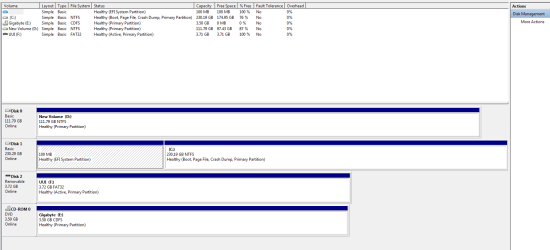
Hey ignatzatsonic, here is the screenshot requested.

Thanks.
 

Attachments

  • Disk management.png
    Disk management.png
    18.4 KB · Views: 4

My Computer My Computer

At a glance

Microsoft Windows 7 Home Premium 64-bit 7601 ...AMD FX(tm)-8320 Eight-Core Processor16.00 GBNVIDIA GeForce GTX 650 Ti
Computer type
PC/Desktop
Computer Manufacturer/Model Number
Custom build
OS
Microsoft Windows 7 Home Premium 64-bit 7601 Multiprocessor Free Service Pack 1
CPU
AMD FX(tm)-8320 Eight-Core Processor
Motherboard
Gigabyte Technology Co., Ltd. 990FXA-UD3
Memory
16.00 GB
Graphics Card(s)
NVIDIA GeForce GTX 650 Ti
Sound Card
(1) NVIDIA Virtual Audio Device (Wave Extensible) (WDM) (2
Screen Resolution
1680 x 1050 x 32 bits (4294967296 colors) @ 59 Hz
Hard Drives
(1) OCZ-VERTEX PLUS R2 ATA Device (2) Samsung SSD 840 Series ATA Device
PSU
800w psu
Antivirus
MSE
I'm not positive because I don't know much about EFI systems, but I think you are OK.

Disk 1 appears to be the system drive and is also where C is. That should be OK.

What's on D? It has about 12 GB space used.

What's F? A USB flash drive? Not sure why it's marked "active".

Disconnect or remove all drives (internal, external, USB, whatever) other than disc 1--the 240 GB drive. Does the PC still boot with only the 240 connected?
 

My Computer My Computer

At a glance

Windows 7 Home Premium SP1, 64-bitIntel Skylake i5-6600K, not overclocked8 GB HyperX DDR4-2666 (2 x 4 GB)none; graphics are integrated on CPU
Computer type
PC/Desktop
Computer Manufacturer/Model Number
Ignatz Special; 4 speed manual gearbox; factory air conditioning; one of one
OS
Windows 7 Home Premium SP1, 64-bit
CPU
Intel Skylake i5-6600K, not overclocked
Motherboard
AsRock Z170M Extreme 4, micro ATX
Memory
8 GB HyperX DDR4-2666 (2 x 4 GB)
Graphics Card(s)
none; graphics are integrated on CPU
Sound Card
onboard: Realtek ALC1150; external: USB Behringer UF0-202
Monitor(s) Displays
Dell S2340M 23 inch IPS
Screen Resolution
1600 x 900
Hard Drives
System: Crucial MX100 series SSD, 128 GB;
Data: Samsung Spinpoint 103SJ, 1 TB;
Backup: WD Caviar Green WD30EZRX-00D8PB0, 3 TB
PSU
Rosewill SilentNight 500 watt fanless, semi-modular
Case
Antec Solo II
Cooling
Noctua NH-U12S; Noctua F12 intake, Noctua S12A exhaust
Keyboard
Microsoft 200 6JH-00001 USB
Mouse
Dell or Microsoft optical wired; USB
Antivirus
Microsoft Security Essentials and Malwarebytes Premium
Browser
Pale Moon
Other Info
All fans PWM; speeds at idle: CPU circa 500 rpm; intake circa 600 rpm; exhaust circa 600 rpm; CPU temps 27 idle and 47 C load in a warm room (27 C/81 F) when running Intel Extreme Tuning Utility stress test.
The space took up on D is from installs I've put on there, it was empty after I reinstalled windows.

Yeah F was just a flash drive.

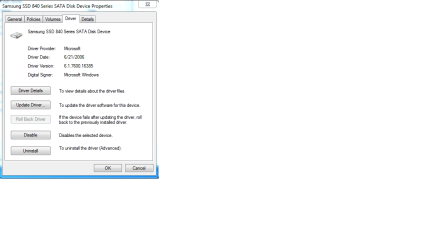
If I disable the drive here that would be suffice to then test if the PC boots off the 240gb drive yeah ?
 

Attachments

  • Samsung drive.png
    Samsung drive.png
    15.2 KB · Views: 2

My Computer My Computer

At a glance

Microsoft Windows 7 Home Premium 64-bit 7601 ...AMD FX(tm)-8320 Eight-Core Processor16.00 GBNVIDIA GeForce GTX 650 Ti
Computer type
PC/Desktop
Computer Manufacturer/Model Number
Custom build
OS
Microsoft Windows 7 Home Premium 64-bit 7601 Multiprocessor Free Service Pack 1
CPU
AMD FX(tm)-8320 Eight-Core Processor
Motherboard
Gigabyte Technology Co., Ltd. 990FXA-UD3
Memory
16.00 GB
Graphics Card(s)
NVIDIA GeForce GTX 650 Ti
Sound Card
(1) NVIDIA Virtual Audio Device (Wave Extensible) (WDM) (2
Screen Resolution
1680 x 1050 x 32 bits (4294967296 colors) @ 59 Hz
Hard Drives
(1) OCZ-VERTEX PLUS R2 ATA Device (2) Samsung SSD 840 Series ATA Device
PSU
800w psu
Antivirus
MSE
I don't think that's going to work. Why don't you just disconnect e.g. the power of the drive.
 

My Computer My Computer

At a glance

Vista, Windows7, Mint Mate, Zorin, Windows 8from 1.6GHz Duo to i7
Computer Manufacturer/Model Number
HP, Dell, Gateway, Toshiba - 4 laptops and 2 desktops
OS
Vista, Windows7, Mint Mate, Zorin, Windows 8
CPU
from 1.6GHz Duo to i7
Monitor(s) Displays
2x HP w2207
Hard Drives
5x HDD, 7x SSD, 12x Externals
Keyboard
with trackball - no mices
Mouse
Trackball mice
Internet Speed
DSL 6000
Offline for an hour, must be having technical difficulties :doh:
 

My Computer My Computer

At a glance

Windows 10 Pro x64Intel Core i7 6700KGSkill TridentZ RGB 16GB 3600 16-16-16-36EVGA GTX 980 Ti SC x2
Computer type
PC/Desktop
Computer Manufacturer/Model Number
Skylake Special #666
OS
Windows 10 Pro x64
CPU
Intel Core i7 6700K
Motherboard
Asus Sabertooth Z170 Mark 1
Memory
GSkill TridentZ RGB 16GB 3600 16-16-16-36
Graphics Card(s)
EVGA GTX 980 Ti SC x2
Sound Card
Realtek High Definition
Monitor(s) Displays
AOC G2460PG
Screen Resolution
1920 x 1080 144Hz
Hard Drives
Samsung 860 Pro 256GB, Seagate Barracuda 4TB x2
PSU
EVGA 1000 P2, EVGA White Custom Braided Cables
Case
Corsair Vengeance C70 Gunmetal Black
Cooling
Corsair H100i v2, Corsair ML120 x2, Thermal Grizzly Kryonaut
Keyboard
Logitech G910 Orion Spectrum
Mouse
Logitech G700s
Internet Speed
Verizon Fios Quantum Gateway 75/75
Antivirus
Windows Defender, Malwarebytes Free 3.8.3
Browser
Chrome
Other Info
Corsair SP120 x4, LG Blu-ray Drive, Durabrand HT-395 100 Watt Dolby Digital Amp, Corsair H2100 Wireless 7.1 Headset
If I understood correctly, I believe one can disable the 2nd physical hard-drive in Device Manager and restart; Windows should no longer see or use that disabled hard-drive; however, any externally booted dvd or usb with any sort of "looksee" can access the Windows' Device Manager-disabled hard-drive.
 

My Computer My Computer

At a glance

Windows 7 Professional 64-bitDesktop i5; Acers i5 & i7desktop 16GB; 1 Acer 8GB & 1 Acer 16GB
Computer type
PC/Desktop
Computer Manufacturer/Model Number
Antec desktop; Acer Aspire laptops
OS
Windows 7 Professional 64-bit
CPU
Desktop i5; Acers i5 & i7
Memory
desktop 16GB; 1 Acer 8GB & 1 Acer 16GB
Hard Drives
1TB split into 2 equal partitions [OS and data] usable by RJS
Internet Speed
AT&T DSL
Browser
FF, GChrome, msIE
Other Info
Windows 7 Firewall, Emsisoft AM/AV, MSE [scan-only], SpywareBlaster, Ruiware/BillP combine
Offline for an hour, must be having technical difficulties :doh:
Hahaha :)

I haven't broke it ye lol.

Been busy with some other things I had to sort, appreciate everyones help tyvm, will be back in couple hours to attempt to resolve this.
 

My Computer My Computer

At a glance

Microsoft Windows 7 Home Premium 64-bit 7601 ...AMD FX(tm)-8320 Eight-Core Processor16.00 GBNVIDIA GeForce GTX 650 Ti
Computer type
PC/Desktop
Computer Manufacturer/Model Number
Custom build
OS
Microsoft Windows 7 Home Premium 64-bit 7601 Multiprocessor Free Service Pack 1
CPU
AMD FX(tm)-8320 Eight-Core Processor
Motherboard
Gigabyte Technology Co., Ltd. 990FXA-UD3
Memory
16.00 GB
Graphics Card(s)
NVIDIA GeForce GTX 650 Ti
Sound Card
(1) NVIDIA Virtual Audio Device (Wave Extensible) (WDM) (2
Screen Resolution
1680 x 1050 x 32 bits (4294967296 colors) @ 59 Hz
Hard Drives
(1) OCZ-VERTEX PLUS R2 ATA Device (2) Samsung SSD 840 Series ATA Device
PSU
800w psu
Antivirus
MSE
If I understood correctly, I believe one can disable the 2nd physical hard-drive in Device Manager and restart; Windows should no longer see or use that disabled hard-drive; however, any externally booted dvd or usb with any sort of "looksee" can access the Windows' Device Manager-disabled hard-drive.

So I can click to disable it like I showed in the pic above and that would do the trick or I need to do it whs' way ?
 

My Computer My Computer

At a glance

Microsoft Windows 7 Home Premium 64-bit 7601 ...AMD FX(tm)-8320 Eight-Core Processor16.00 GBNVIDIA GeForce GTX 650 Ti
Computer type
PC/Desktop
Computer Manufacturer/Model Number
Custom build
OS
Microsoft Windows 7 Home Premium 64-bit 7601 Multiprocessor Free Service Pack 1
CPU
AMD FX(tm)-8320 Eight-Core Processor
Motherboard
Gigabyte Technology Co., Ltd. 990FXA-UD3
Memory
16.00 GB
Graphics Card(s)
NVIDIA GeForce GTX 650 Ti
Sound Card
(1) NVIDIA Virtual Audio Device (Wave Extensible) (WDM) (2
Screen Resolution
1680 x 1050 x 32 bits (4294967296 colors) @ 59 Hz
Hard Drives
(1) OCZ-VERTEX PLUS R2 ATA Device (2) Samsung SSD 840 Series ATA Device
PSU
800w psu
Antivirus
MSE
I would do what WHS said. only takes a minute or so to do.
 

My Computer My Computer

At a glance

win 10
Computer type
PC/Desktop
Computer Manufacturer/Model Number
dell xps 9000
OS
win 10
I would do what WHS said. only takes a minute or so to do.

Yeah it was just I wasn't too keen on touching anything inside the tower since, as I've made very clear itt, I'm a noob with all this stuff :)

But I was brave and did it the way whs said and the OS loaded up fine so that's everything solved I believe, for now lol.

Thanks again for all your help everyone, really great site, tyty.
 

My Computer My Computer

At a glance

Microsoft Windows 7 Home Premium 64-bit 7601 ...AMD FX(tm)-8320 Eight-Core Processor16.00 GBNVIDIA GeForce GTX 650 Ti
Computer type
PC/Desktop
Computer Manufacturer/Model Number
Custom build
OS
Microsoft Windows 7 Home Premium 64-bit 7601 Multiprocessor Free Service Pack 1
CPU
AMD FX(tm)-8320 Eight-Core Processor
Motherboard
Gigabyte Technology Co., Ltd. 990FXA-UD3
Memory
16.00 GB
Graphics Card(s)
NVIDIA GeForce GTX 650 Ti
Sound Card
(1) NVIDIA Virtual Audio Device (Wave Extensible) (WDM) (2
Screen Resolution
1680 x 1050 x 32 bits (4294967296 colors) @ 59 Hz
Hard Drives
(1) OCZ-VERTEX PLUS R2 ATA Device (2) Samsung SSD 840 Series ATA Device
PSU
800w psu
Antivirus
MSE
Very good and I am glad you learned something on the way.
 

My Computer My Computer

At a glance

Vista, Windows7, Mint Mate, Zorin, Windows 8from 1.6GHz Duo to i7
Computer Manufacturer/Model Number
HP, Dell, Gateway, Toshiba - 4 laptops and 2 desktops
OS
Vista, Windows7, Mint Mate, Zorin, Windows 8
CPU
from 1.6GHz Duo to i7
Monitor(s) Displays
2x HP w2207
Hard Drives
5x HDD, 7x SSD, 12x Externals
Keyboard
with trackball - no mices
Mouse
Trackball mice
Internet Speed
DSL 6000
Back
Top