HP DV-7 Intel i5 Video Card Issues

MannyLNJ

New member
Local time
1:31 PM
Messages
8
I am trying to solve this problem for a friend,

She has a Pavilion DV-7 that would only display video in safe mode. It was bogged down with malware so I used an OEM install image of HP Home Premium.

The install went fine but when it tried to update the video drivers my desktop went black and never came back. If I boot into safemode the desktop appears but in normal mode it won't.

I need assistance in figuring out what is causing the problem and resolving the problem
 

My Computer My Computer

Computer type
Tablet
Computer Manufacturer/Model Number
Lenovo Ideapad Z560
OS
Windows 7 Ultimate 64 Bit
CPU
i5
Boot into safe mode and uninstall the graphics driver for the video card. Reboot and try to install again.

What kind of card is it?

EDIT:

I see it's a laptop. Can you flip it over and give us the exact model number from the back, please?
 

My Computer My Computer

Computer type
PC/Desktop
Computer Manufacturer/Model Number
Mellon Labs (custom build)
OS
Win 7 Pro x64/Win 10 Pro x64 dual boot
CPU
AMD FX 8350 Vishera @ 4200
Motherboard
ASUS M5A97 R2.0
Memory
16 GB Mushkin Blackline DDR3-2400 @ 1866 (9-10-10-10-31)
Graphics Card(s)
XFX Radeon R9 280 Double D Black Edition
Sound Card
Realtek HD Audio on MB. Sounds great.
Monitor(s) Displays
Acer 24", Acer 22"
Screen Resolution
3840 x 1080
Hard Drives
1 x Mushkin Chronos 120 GB SSD (Win 10)
1 x Samsung 850 EVO 250 GB SSD (Win 7)
1 x WD 1TB SATA Blue
1 x WD 1TB SATA Green
PSU
Corsair TX-750
Case
CoolerMaster HAF 912+
Cooling
Coolermaster Seidon 240M Liquid AIO. 6 case fans
Keyboard
Logitech G710+
Mouse
Logitech G500s
Internet Speed
Much better since I got fiber, but still way overpriced.
Antivirus
MSE, Malware Bytes for scanning
Browser
Firefox
Other Info
Corsair VOID USB headphones.

A Mellon Labs X-1 - LCD Smartie driven system status display.

Brought to you by the letter E
HP Pavilion

Is it getting really hot, especially on the bottom of the laptop (no need to disassemble)? I had problems with 2 HP laptops - cause overheating. Upon disassembling the laptop (before getting ready to discard it, the plastic was warped and orange/red. It had become so hot that it had warped the plastic. I am not sure whether the fan broke or not, but I know some of the old HP Pavilion laptops were recalled after much much consumer pressure. I think those had NVidia cards though. This was between 2007-2010.
 

My Computer My Computer

Computer type
Laptop
Computer Manufacturer/Model Number
ASUSTeK COMPUTER INC. X555UA (U3E1)
OS
Windows 7 Professional 64-bit SP1
CPU
Intel Core i7 6600U @ 2.50GHz Skylake-U/Y
Motherboard
X555UA (U3E1)
Memory
Samsung 4GB DDR3 Configured with 4GB DDR3 1066MHz (max 8GB)
Graphics Card(s)
Intel HD Graphics 520
Sound Card
Realtek High Definition Audio
Monitor(s) Displays
ASUS ASUS VS247 External Monitor
Screen Resolution
1920 x 1080
Hard Drives
Seagate ST1000LM024 1TB
PSU
65W (19V 3.42A) 100-240V/50-60Hz AC Adapter. Battery failing
Cooling
Unknown (Fan came with Laptop). It does run most of the time
Keyboard
Microsoft Sculpt Keyboard for Business
Mouse
Anker
Internet Speed
16 mbps
Browser
Mozilla Firefox, Google Chrome, IE 11
Other Info
Realtek Bluetooth 4.0 Adapter,
Boot into safe mode and uninstall the graphics driver for the video card. Reboot and try to install again.

What kind of card is it?

EDIT:

I see it's a laptop. Can you flip it over and give us the exact model number from the back, please?

The sticker with the model # was peeled off. The System Information screen shows the product # as XZ030UA#ABA

I've tried safemode and uninstalling the graphics card twice. The system has two graphics systems one is an ATI Mobility 6370 and the other is listed as Intel(R) HD Graphics
 

My Computer My Computer

Computer type
Tablet
Computer Manufacturer/Model Number
Lenovo Ideapad Z560
OS
Windows 7 Ultimate 64 Bit
CPU
i5
Is it getting really hot, especially on the bottom of the laptop (no need to disassemble)? I had problems with 2 HP laptops - cause overheating. Upon disassembling the laptop (before getting ready to discard it, the plastic was warped and orange/red. It had become so hot that it had warped the plastic. I am not sure whether the fan broke or not, but I know some of the old HP Pavilion laptops were recalled after much much consumer pressure. I think those had NVidia cards though. This was between 2007-2010.

I knew some of the pavilion laptops had heat issues causing video card problems but this one is running cool. No warped plastic. There is no battery installed and it's running off AC
 

My Computer My Computer

Computer type
Tablet
Computer Manufacturer/Model Number
Lenovo Ideapad Z560
OS
Windows 7 Ultimate 64 Bit
CPU
i5
The sticker with the model # was peeled off. The System Information screen shows the product # as XZ030UA#ABA

I've tried safemode and uninstalling the graphics card twice. The system has two graphics systems one is an ATI Mobility 6370 and the other is listed as Intel(R) HD Graphics
Thanks for the information.

Where did you get the drivers for the video cards? And which ones are you installing first? I believe that the correct order is Intel first, reboot, then the ATI card drivers.

You should have obtained the drivers from here (if you didn't):
HP Software and Driver Downloads for HP Printers, Laptops, Desktops and More | HP® Customer Support

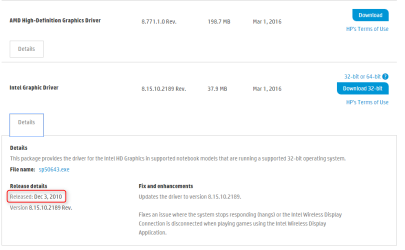
The drivers are new as of March 1st of this year, so they should be fully up to date.
 

My Computer My Computer

Computer type
PC/Desktop
Computer Manufacturer/Model Number
Mellon Labs (custom build)
OS
Win 7 Pro x64/Win 10 Pro x64 dual boot
CPU
AMD FX 8350 Vishera @ 4200
Motherboard
ASUS M5A97 R2.0
Memory
16 GB Mushkin Blackline DDR3-2400 @ 1866 (9-10-10-10-31)
Graphics Card(s)
XFX Radeon R9 280 Double D Black Edition
Sound Card
Realtek HD Audio on MB. Sounds great.
Monitor(s) Displays
Acer 24", Acer 22"
Screen Resolution
3840 x 1080
Hard Drives
1 x Mushkin Chronos 120 GB SSD (Win 10)
1 x Samsung 850 EVO 250 GB SSD (Win 7)
1 x WD 1TB SATA Blue
1 x WD 1TB SATA Green
PSU
Corsair TX-750
Case
CoolerMaster HAF 912+
Cooling
Coolermaster Seidon 240M Liquid AIO. 6 case fans
Keyboard
Logitech G710+
Mouse
Logitech G500s
Internet Speed
Much better since I got fiber, but still way overpriced.
Antivirus
MSE, Malware Bytes for scanning
Browser
Firefox
Other Info
Corsair VOID USB headphones.

A Mellon Labs X-1 - LCD Smartie driven system status display.

Brought to you by the letter E
The sticker with the model # was peeled off. The System Information screen shows the product # as XZ030UA#ABA

I've tried safemode and uninstalling the graphics card twice. The system has two graphics systems one is an ATI Mobility 6370 and the other is listed as Intel(R) HD Graphics
Thanks for the information.

Where did you get the drivers for the video cards? And which ones are you installing first? I believe that the correct order is Intel first, reboot, then the ATI card drivers.

You should have obtained the drivers from here (if you didn't):
HP Software and Driver Downloads for HP Printers, Laptops, Desktops and More | HP® Customer Support

The drivers are new as of March 1st of this year, so they should be fully up to date.

I let Windows find and install the correct drivers. I don't know the order they installed. After doing some playing I have determined if I disable the Intel graphics then I do get a desktop in normal mode,
 

My Computer My Computer

Computer type
Tablet
Computer Manufacturer/Model Number
Lenovo Ideapad Z560
OS
Windows 7 Ultimate 64 Bit
CPU
i5

My Computer My Computer

Computer type
PC/Desktop
Computer Manufacturer/Model Number
Self Built
OS
Win 10 Pro x64
CPU
Intel I5-2500K @3.3GHz
Motherboard
Asrock P67 Extreme4
Memory
16GB G.Skill Ripjaws X (4x4GB)
Graphics Card(s)
EVGA GeForce 750 Ti SC 2GB
Sound Card
ASUS Xonar DG 5.1 Channels 24-bit 96KHz PCI Interface Sound
Monitor(s) Displays
auria eq2367
Screen Resolution
1920 x 1080
Hard Drives
250GB Samsung 850 EVO SSD
1TB WD Blue
1TB Hitachi
PSU
SeaSonic X 650W 80 Plus Gold
Case
Corsair Obsidian 750D
Cooling
Corsair H60, Three 140mm case fans
Keyboard
Logitech Wireless Keyboard K520
Mouse
Logitech Wireless Mouse M310
Internet Speed
Wave Broadband ~ 100 dn 5 up
Antivirus
Windows Defender, Malwarebytes Premium
Browser
Edge, IE11, Chrome
Other Info
Laptop specs: HP g7-1365dx /
CPU: AMD A6-3420M APU with Radeon(tm) HD Graphics /
RAM: Crucial 8Gb (2x4Gb) /
SSD: Crucial M4-CT128M4SSD2 ATA Device/ FW 000F /
GFX: AMD Radeon HD 6520G /
OS: Windows 10 Pro x64
Updating drivers from HP.com

Whenever possible, download the latest drivers from your P's manufacturer site, not through WIndows update. Unsure which product model you have?

HP Software and Driver Downloads for HP Printers, Laptops, Desktops and More | HP® Customer Support

Click Identify Now. It may work best in Internet Explorer. It detects exactly what model/type of product you have and will take you to the support page (you must click install/okay on the prompts to install ActiveX or whatever it asks you). Others on the forums are more experienced than me, but I have had a ton of experience with HP Printers, and some of their PC hardware. Staying up to date is important.
 

My Computer My Computer

Computer type
Laptop
Computer Manufacturer/Model Number
ASUSTeK COMPUTER INC. X555UA (U3E1)
OS
Windows 7 Professional 64-bit SP1
CPU
Intel Core i7 6600U @ 2.50GHz Skylake-U/Y
Motherboard
X555UA (U3E1)
Memory
Samsung 4GB DDR3 Configured with 4GB DDR3 1066MHz (max 8GB)
Graphics Card(s)
Intel HD Graphics 520
Sound Card
Realtek High Definition Audio
Monitor(s) Displays
ASUS ASUS VS247 External Monitor
Screen Resolution
1920 x 1080
Hard Drives
Seagate ST1000LM024 1TB
PSU
65W (19V 3.42A) 100-240V/50-60Hz AC Adapter. Battery failing
Cooling
Unknown (Fan came with Laptop). It does run most of the time
Keyboard
Microsoft Sculpt Keyboard for Business
Mouse
Anker
Internet Speed
16 mbps
Browser
Mozilla Firefox, Google Chrome, IE 11
Other Info
Realtek Bluetooth 4.0 Adapter,
Back
Top