
KB3136000 keeps wanting to be installed

ADarkDividedGem

New member
Local time
4:41 AM
Messages
2
Hi,

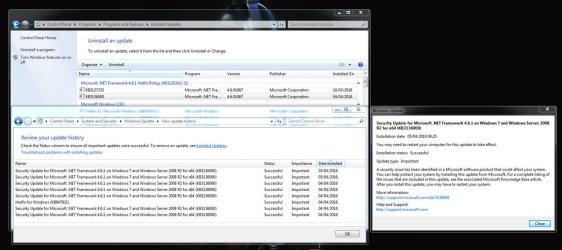
The following update keeps getting installed:
"Security Update for Microsoft .NET Framework 4.6.1 on Windows 7 and Windows Server 2008 R2 for x64 (KB3136000)" here is further information about how I have tried to resolve the problem:
  • The update says it was installed successfully
  • Downloaded and installed SURT
  • Deleted the C:\Windows\SoftwareDistribution folder so it got recreated again.
  • Windows Resource Protection did not find any integrity violations.
  • Have uninstalled it and then downloaded and installed it directly from:
    https://www.microsoft.com/en-us/download/details.aspx?id=51423
  • The compressed CBS folder is 150MB but I have attached the WindowsUpdate.log file if it helps.
 

Attachments
My Computer My Computer

Computer type
PC/Desktop
OS
Windows 7 64bit
Hi and welcome to SevenForums,
https://support.microsoft.com/en-us/kb/3149737
Symptoms


When you try to install update 3135996 or 3136000, the installation process fails. Additionally, you receive the following error message:

A certificate chain could not be built to a trusted root authority.

Cause


This issue occurs when you operate in an environment that's disconnected from the Internet or that has a firewall that blocks content from the following URL:

403 - Forbidden: Access is denied.
Code:
[url=http://ctldl.windowsupdate.com/msdownload/update/v3/static/trustedr/en]403 - Forbidden: Access is denied.[/url]
The resolutions list is below the quoted part I posted from the link.
 

My Computer My Computer

Computer type
PC/Desktop
Computer Manufacturer/Model Number
Custom assembled by me :}
OS
Win-7-Pro64bit 7-H-Prem-64bit
CPU
i7-5930K 2nd i9-9940x both water blocked VRM's too
Motherboard
ASUS SABERTOOTH X99 2nd ASUS x299 Apex
Memory
Trident-z 3200C14 2nd Trident-z 3600C16
Graphics Card(s)
EVGA 1080ti ftw3 2nd Titan Xp both water blocked
Sound Card
Built-in Realtek
Monitor(s) Displays
1-AOC G2460PG 24"G-Sync 144Hz/ 2nd 1-ASUS VG248QE 24" 144Hz
Screen Resolution
1920 x 1080 144Hz
Hard Drives
2-Samsung M.2 Evo & Evo Plus
2-Samsung 850 EVO 500GB SSD's/ 3-2.5 W.D. Black 1tb-&3-1tb/3-3.5 WD Black 1tb hdd's
PSU
EVGA SuperNOVA 1000-P2 2nd 1200-P2
Case
2-Corsair Obsidian Series 450D Black ATX Mid Tower
Cooling
Custom water loops
Keyboard
Logitech G710+/ 2nd Logitech G910
Mouse
2-RedDragon M901 Perdition 16400 dpi Gaming mouse = wired
Internet Speed
Comcast Ping 19ms 89.31mbps download speed 6.12mbps upload
Antivirus
Malwarebytes Pro/ Superantispyware Pro
Browser
FireFox & Pale moon
Other Info
2nd ASUS X299 Apex/Intel i9-9940x with Custom water loop/7H-Prem-x64/Corsair 450D case/Ram Trident-z 3600C16 4x8gb / Samsung970Evo plus 500gb SSD/Dual ssd EZ swap evo/PSU EVGA SuperNova 1200w-P2 80+Platinum/GPU Titan Xp /8-ML-140 on push-pull on 2-280GTX rads
Hi ADDG,
please turn off the update driver option, its having a prob with one.
might correct the problem.
When you deleted the folder did you stop windowsupdates service if not that would create more issues.

Roy
 

My Computer My Computer

Computer type
PC/Desktop
Computer Manufacturer/Model Number
medionl/Aspire 6930G/acer x55a
OS
W7 home premium 32bit/W7HP 64bit/w10 tp insider ring
CPU
E5300 dual core
Motherboard
medion MS7366
Memory
3gb
Graphics Card(s)
Nvidia Geforce 7100 Nforce 630i
Monitor(s) Displays
avixc
Internet Speed
n (isp resticted to 72)
Antivirus
mse/pands
Browser
palemoon
Other Info
Belkin Fd7050 n USB using Railink RT2870 drivers, more upto date
Thanks but the installation processes doesn't fail and I am able to to connect to:
403 - Forbidden: Access is denied. (Link to URL automatically gets displayed as 403 on this forum)
Which redirects me to:
http://arrcache.download.windowsupd...RR-CSHOST=arrcache.download.windowsupdate.com

I can also download cab files from that same folder:
http://ctldl.windowsupdate.com/msdownload/update/v3/static/trustedr/en/disallowedcertstl.cab
http://ctldl.windowsupdate.com/msdownload/update/v3/static/trustedr/en/authrootstl.cab

As provided here:
https://support.microsoft.com/en-us/kb/2677070

I even reinstalled the update with my firewall and antivirus disabled which had no affect.

please turn off the update driver option, its having a prob with one.
might correct the problem.
Carried out the instructions here if that's what you meant:
https://support.microsoft.com/en-us/kb/2500967

Unfortunately that change didn't help.

When you deleted the folder did you stop windowsupdates service if not that would create more issues.
Yes I stopped the service before I deleted the folder.

The best I can do at the moment is to hide the update but I would like to try and get to the bottom of it.
 
Last edited:

My Computer My Computer

Computer type
PC/Desktop
OS
Windows 7 64bit

My Computer My Computer

Computer type
PC/Desktop
Computer Manufacturer/Model Number
Custom assembled by me :}
OS
Win-7-Pro64bit 7-H-Prem-64bit
CPU
i7-5930K 2nd i9-9940x both water blocked VRM's too
Motherboard
ASUS SABERTOOTH X99 2nd ASUS x299 Apex
Memory
Trident-z 3200C14 2nd Trident-z 3600C16
Graphics Card(s)
EVGA 1080ti ftw3 2nd Titan Xp both water blocked
Sound Card
Built-in Realtek
Monitor(s) Displays
1-AOC G2460PG 24"G-Sync 144Hz/ 2nd 1-ASUS VG248QE 24" 144Hz
Screen Resolution
1920 x 1080 144Hz
Hard Drives
2-Samsung M.2 Evo & Evo Plus
2-Samsung 850 EVO 500GB SSD's/ 3-2.5 W.D. Black 1tb-&3-1tb/3-3.5 WD Black 1tb hdd's
PSU
EVGA SuperNOVA 1000-P2 2nd 1200-P2
Case
2-Corsair Obsidian Series 450D Black ATX Mid Tower
Cooling
Custom water loops
Keyboard
Logitech G710+/ 2nd Logitech G910
Mouse
2-RedDragon M901 Perdition 16400 dpi Gaming mouse = wired
Internet Speed
Comcast Ping 19ms 89.31mbps download speed 6.12mbps upload
Antivirus
Malwarebytes Pro/ Superantispyware Pro
Browser
FireFox & Pale moon
Other Info
2nd ASUS X299 Apex/Intel i9-9940x with Custom water loop/7H-Prem-x64/Corsair 450D case/Ram Trident-z 3600C16 4x8gb / Samsung970Evo plus 500gb SSD/Dual ssd EZ swap evo/PSU EVGA SuperNova 1200w-P2 80+Platinum/GPU Titan Xp /8-ML-140 on push-pull on 2-280GTX rads

My Computer My Computer

Computer type
PC/Desktop
Computer Manufacturer/Model Number
medionl/Aspire 6930G/acer x55a
OS
W7 home premium 32bit/W7HP 64bit/w10 tp insider ring
CPU
E5300 dual core
Motherboard
medion MS7366
Memory
3gb
Graphics Card(s)
Nvidia Geforce 7100 Nforce 630i
Monitor(s) Displays
avixc
Internet Speed
n (isp resticted to 72)
Antivirus
mse/pands
Browser
palemoon
Other Info
Belkin Fd7050 n USB using Railink RT2870 drivers, more upto date
Back
Top