
Can't get new 6600K build to POST; AsRock motherboard

ignatzatsonic

Aspiring Gnome
Guru
Gold Member
VIP
Local time
4:05 PM
Messages
12,011
In the last couple of days, I've been trying to assemble a new build with these new parts:

AsRock Z170M Extreme 4 micro ATX motherboard
Intel 6600K processor
Two 4 GB sticks of HyperX DDR4 2666 RAM 1.2 volt; matched pair sold as a single package.

All other parts carried over from working i5-2500 and all of these parts were working fine as recently as Friday.

No video card. I'm using integrated CPU graphics only.

I have no previous experience with AsRock or UEFI motherboards or Skylake processors.

Monitor connected by DVI-D. My monitor does NOT have an HDMI connector.

When powered up, I get nothing on the display at all. Nothing. Fans spin, drives spin, DVD burner drawer will open. Case speaker gives NO beeps whatsoever.

Manual says to hit delete or F2 to enter UEFI, but my mice and keyboards have no effect at all. Nothing on screen.

I've connected them to all possible combinations of all 8 USB ports: 4 USB 3.0 on the rear, 2 USB 3.0 on the front, and 2 USB 2.0 on the front. Shouldn't I get some screen output even with NO mouse and keyboard?

I've tried all the troubleshooting steps I can think of, including:

Clearing CMOS
Using 2 different mice and keyboards
One stick of RAM tried in all 4 slots.
The other stick of RAM tried in all 4 slots.
Both sticks of RAM tried in the recommended slots as well as other slots.
Disconnected all drives.

I even removed the board from the case and tried again with it sitting on cardboard with just the power switch, power cable, ATX 12 volt, and CPU fan connected. Same response: CPU fan spins, no beeps, and no on-screen response whatsoever.

I'm nowhere near attempting to install an OS.

I have no idea what BIOS I am on and obviously have no way of flashing or any reason to think that would help.

Please give me your best suggestions and let me know what should be expected on-screen IF hardware is NOT defective.
 

My Computer My Computer

At a glance

Windows 7 Home Premium SP1, 64-bitIntel Skylake i5-6600K, not overclocked8 GB HyperX DDR4-2666 (2 x 4 GB)none; graphics are integrated on CPU
Computer type
PC/Desktop
Computer Manufacturer/Model Number
Ignatz Special; 4 speed manual gearbox; factory air conditioning; one of one
OS
Windows 7 Home Premium SP1, 64-bit
CPU
Intel Skylake i5-6600K, not overclocked
Motherboard
AsRock Z170M Extreme 4, micro ATX
Memory
8 GB HyperX DDR4-2666 (2 x 4 GB)
Graphics Card(s)
none; graphics are integrated on CPU
Sound Card
onboard: Realtek ALC1150; external: USB Behringer UF0-202
Monitor(s) Displays
Dell S2340M 23 inch IPS
Screen Resolution
1600 x 900
Hard Drives
System: Crucial MX100 series SSD, 128 GB;
Data: Samsung Spinpoint 103SJ, 1 TB;
Backup: WD Caviar Green WD30EZRX-00D8PB0, 3 TB
PSU
Rosewill SilentNight 500 watt fanless, semi-modular
Case
Antec Solo II
Cooling
Noctua NH-U12S; Noctua F12 intake, Noctua S12A exhaust
Keyboard
Microsoft 200 6JH-00001 USB
Mouse
Dell or Microsoft optical wired; USB
Antivirus
Microsoft Security Essentials and Malwarebytes Premium
Browser
Pale Moon
Other Info
All fans PWM; speeds at idle: CPU circa 500 rpm; intake circa 600 rpm; exhaust circa 600 rpm; CPU temps 27 idle and 47 C load in a warm room (27 C/81 F) when running Intel Extreme Tuning Utility stress test.
Most new/newer motherboards require two power connections. The 24 pin and either a 4 pin or 8 pin power connection. Do you have both power connections?

BTW, I'm using an older ASRock Z77 motherboard (with UEFI). Works great.
 

My Computer My Computer

At a glance

Windows 10 64 bitIntel i7 6700K16GB Corsair DominatorIntel CPU Graphics
Computer type
PC/Desktop
Computer Manufacturer/Model Number
My Own Build
OS
Windows 10 64 bit
CPU
Intel i7 6700K
Motherboard
ASUS ROG Maximus VIII Hero
Memory
16GB Corsair Dominator
Graphics Card(s)
Intel CPU Graphics
Sound Card
RealTek
Monitor(s) Displays
27" Dell S2719dgf
Screen Resolution
2560X1440
Hard Drives
1 TB Samsung 850 EVO SSD for Win 10 Pro
500GB Samsung 850 EVO SSD for Win 10 Insider
2 TB drive for backup
PSU
EVGA Supernova 750G2
Case
BeQuiet Silent Base 600
Cooling
Deepcool Captain 120EX
Keyboard
Microsoft Wireless 2000
Mouse
Microsoft wireless
Internet Speed
100 MB/sec (Cable)
Antivirus
Microsoft Defender and Malwarebytes
Browser
Edge/Firefox
Other Info
Cakewalk (Sonar) by BandLab and Studio One 4.1 Pro recording studio software. MOTU 896Mk3 Hybrid recording interface, Frontier Tranzport wireless control unit, Behringer X-Touch Control Surface.
Five USB connected optical drives for CD Audio production using Nero BurningROM

My Computer My Computer

At a glance

Win-7-Pro64bit 7-H-Prem-64biti7-5930K 2nd i9-9940x both water blocked VRM'...Trident-z 3200C14 2nd Trident-z 3600C16EVGA 1080ti ftw3 2nd Titan Xp both water blocked
Computer type
PC/Desktop
Computer Manufacturer/Model Number
Custom assembled by me :}
OS
Win-7-Pro64bit 7-H-Prem-64bit
CPU
i7-5930K 2nd i9-9940x both water blocked VRM's too
Motherboard
ASUS SABERTOOTH X99 2nd ASUS x299 Apex
Memory
Trident-z 3200C14 2nd Trident-z 3600C16
Graphics Card(s)
EVGA 1080ti ftw3 2nd Titan Xp both water blocked
Sound Card
Built-in Realtek
Monitor(s) Displays
1-AOC G2460PG 24"G-Sync 144Hz/ 2nd 1-ASUS VG248QE 24" 144Hz
Screen Resolution
1920 x 1080 144Hz
Hard Drives
2-Samsung M.2 Evo & Evo Plus
2-Samsung 850 EVO 500GB SSD's/ 3-2.5 W.D. Black 1tb-&3-1tb/3-3.5 WD Black 1tb hdd's
PSU
EVGA SuperNOVA 1000-P2 2nd 1200-P2
Case
2-Corsair Obsidian Series 450D Black ATX Mid Tower
Cooling
Custom water loops
Keyboard
Logitech G710+/ 2nd Logitech G910
Mouse
2-RedDragon M901 Perdition 16400 dpi Gaming mouse = wired
Internet Speed
Comcast Ping 19ms 89.31mbps download speed 6.12mbps upload
Antivirus
Malwarebytes Pro/ Superantispyware Pro
Browser
FireFox & Pale moon
Other Info
2nd ASUS X299 Apex/Intel i9-9940x with Custom water loop/7H-Prem-x64/Corsair 450D case/Ram Trident-z 3600C16 4x8gb / Samsung970Evo plus 500gb SSD/Dual ssd EZ swap evo/PSU EVGA SuperNova 1200w-P2 80+Platinum/GPU Titan Xp /8-ML-140 on push-pull on 2-280GTX rads
Most new/newer motherboards require two power connections. The 24 pin and either a 4 pin or 8 pin power connection. Do you have both power connections?

BTW, I'm using an older ASRock Z77 motherboard (with UEFI). Works great.

Hey Jack:

Would you expect screen output of some type when the monitor is connected to DVI-D only, with no user intervention???

No drives. No keyboard. No mouse. I'd assume I should see SOMETHING on screen, but I get nothing.

I've got all these parts out of the case right now, sitting on cardboard.

I'm aware of the 12 volt ATX connector.

My PSU has that ATX 12 volt cable connector split into 2 parts of 4 pins each. The 2 parts CANNOT be joined together into a single unit and then inserted into the board. Each is inserted as a separate unit, one after the other or simultaneously, but they are NOT connected to each other.

I used just one of the 2 halves (4 pins) and inserted it into the right half of the motherboard 8 pin header. It locks right in with the attached clip, as expected.

That worked well on my Sandy Bridge i5-2500.

Asrock support says that's also fine for a Skylake 6600K if you don't have severe wattage requirements such as high overclocking or multiple video cards. Asrock says no problem, because the right half of the header includes pins 1 and 5, which ARE required. I am connecting to pins 1, 2, 5 and 6, according to the user guide pin out diagram.

I don't use video cards at all. This system can't draw 200 watts at gunpoint. Maybe not even 150.

Nothing in the slots other than RAM. No cards.

4 hard drives. Mouse, keyboard, 23 inch monitor. That's it.

So why don't I use ALL 8 pins of the ATX connector?

Well----it's complex.

Those things are keyed as you know and will only fit one way.

Each half has a separate locking mechanism that slips down over a ledge on the back side of the motherboard header to lock it in place.

The right half that I'm using fits as expected, with the locking clip facing toward the top of the case, and the clip locks into the ledge on the back side of the motherboard port.

However--------------the other half of the cable connector is a problem.

Using reasonable force, it will not slide down into the left half of the motherboard 8 pin.

I wondered why and got out my magnifying glass and examined both the motherboard header and the cable connectors that fit into it.

Under magnification, some of the 4 pins on the left half connector are square and some have a rounded arcing edge. This is expected and what makes it a keyway when trying to put it into the motherboard. We're talking thirtyseconds of an inch here.

As near as my magnified eyesight will tell me, the left hand clip has been wired incorrectly by the PSU manufacturer. It won't fit into the board header with the expected orientation (locking clip facing to the top of the case, just like the right half) because it was wired 90 degrees out of rotation, incorrectly. The keyway does not line up if you have the locking clip facing the top of the case just as on the right half of the cable.

It WILL fit if you rotate the plug so that the locking clip faces left, toward 9 o'clock, rather than straight up 12.

However, I'm spooked of trying this for 3 reasons:

1: it's non-standard. I've never seen a 2 part locking mechanism arrangement in which each half had a different locking clip orientation.
2: there is no locking ledge along the 9 o'clock edge of the motherboard header, indicating that's not correct.
3: When in place, the right hand half locks in correctly and shows 2 yellow wires along the top, closest to you. The bottom 2 wires are black. If the left hand part of the cable is inserted the only way it will fit, locking clip facing left, you end up with black and yellow wires at the top, rather than yellow and yellow like the right hand half.

I could:

1: Assume Asrock support is accurate and that I only need 4 pins of the 8 pin ATX, regardless.

2: Assume my eyes are deceiving me and get out a bigger hammer and try to force the left half of the cable

3: Install the left half of the cable the only way it will fit, with the locking clip facing left, even though there is no ledge on that side to form a lock.

4: Listen to some people who insist 8 pins are required, despite what Asrock says.

5: Get another PSU out of the closet and see if that changes anything, presumably using all 8 pins of the ATX 12 volt connector.

6: Assume I've got a board problem and RMA for?


Or?

How do I eliminate the possibility of a bad CPU with no testing tools? It's rare, but happens.

Sorry for long post, but I had to give details on the ATX 12 volt thing.
 
Last edited:

My Computer My Computer

At a glance

Windows 7 Home Premium SP1, 64-bitIntel Skylake i5-6600K, not overclocked8 GB HyperX DDR4-2666 (2 x 4 GB)none; graphics are integrated on CPU
Computer type
PC/Desktop
Computer Manufacturer/Model Number
Ignatz Special; 4 speed manual gearbox; factory air conditioning; one of one
OS
Windows 7 Home Premium SP1, 64-bit
CPU
Intel Skylake i5-6600K, not overclocked
Motherboard
AsRock Z170M Extreme 4, micro ATX
Memory
8 GB HyperX DDR4-2666 (2 x 4 GB)
Graphics Card(s)
none; graphics are integrated on CPU
Sound Card
onboard: Realtek ALC1150; external: USB Behringer UF0-202
Monitor(s) Displays
Dell S2340M 23 inch IPS
Screen Resolution
1600 x 900
Hard Drives
System: Crucial MX100 series SSD, 128 GB;
Data: Samsung Spinpoint 103SJ, 1 TB;
Backup: WD Caviar Green WD30EZRX-00D8PB0, 3 TB
PSU
Rosewill SilentNight 500 watt fanless, semi-modular
Case
Antec Solo II
Cooling
Noctua NH-U12S; Noctua F12 intake, Noctua S12A exhaust
Keyboard
Microsoft 200 6JH-00001 USB
Mouse
Dell or Microsoft optical wired; USB
Antivirus
Microsoft Security Essentials and Malwarebytes Premium
Browser
Pale Moon
Other Info
All fans PWM; speeds at idle: CPU circa 500 rpm; intake circa 600 rpm; exhaust circa 600 rpm; CPU temps 27 idle and 47 C load in a warm room (27 C/81 F) when running Intel Extreme Tuning Utility stress test.
The 8 pin power connector on my motherboard is keyed for the connector(s). The connectors from my power supply are also split in two 4 pin parts. My ATX power jack sounds exactly like yours (the manual says use the right portion on some applications).

Since you are not using a separate video card, possibly both halves of the power connector must be connected?

Other than that, you are faced with either a defective motherboard or CPU. I don't know how you can determine which is bad.

Jack
 

My Computer My Computer

At a glance

Windows 10 64 bitIntel i7 6700K16GB Corsair DominatorIntel CPU Graphics
Computer type
PC/Desktop
Computer Manufacturer/Model Number
My Own Build
OS
Windows 10 64 bit
CPU
Intel i7 6700K
Motherboard
ASUS ROG Maximus VIII Hero
Memory
16GB Corsair Dominator
Graphics Card(s)
Intel CPU Graphics
Sound Card
RealTek
Monitor(s) Displays
27" Dell S2719dgf
Screen Resolution
2560X1440
Hard Drives
1 TB Samsung 850 EVO SSD for Win 10 Pro
500GB Samsung 850 EVO SSD for Win 10 Insider
2 TB drive for backup
PSU
EVGA Supernova 750G2
Case
BeQuiet Silent Base 600
Cooling
Deepcool Captain 120EX
Keyboard
Microsoft Wireless 2000
Mouse
Microsoft wireless
Internet Speed
100 MB/sec (Cable)
Antivirus
Microsoft Defender and Malwarebytes
Browser
Edge/Firefox
Other Info
Cakewalk (Sonar) by BandLab and Studio One 4.1 Pro recording studio software. MOTU 896Mk3 Hybrid recording interface, Frontier Tranzport wireless control unit, Behringer X-Touch Control Surface.
Five USB connected optical drives for CD Audio production using Nero BurningROM
The 8 pin power connector on my motherboard is keyed for the connector(s). The connectors from my power supply are also split in two 4 pin parts. My ATX power jack sounds exactly like yours (the manual says use the right portion on some applications).

Since you are not using a separate video card, possibly both halves of the power connector must be connected?

Asrock forum says no and that only 4 pins are needed for a standard setup.

But I will assume they are wrong and try my other PSU, hoping that it's keyed correctly and all 8 pins will go right in.

I don't expect that to make any difference.

I'm also going to remove the Noctua cooler and reseat the CPU.

If all was well, would you expect some onscreen text immediately after startup, just like on every other PC I've used, without using a keyboard at all?

I know nothing about UEFI, but expected something on screen and then hit F2 or Delete key to bring up some type of menu.

I borrowed a case speaker from another case. It gives NO beeps at ANY time, regardless of any variations I've made in configuration. I'm guessing the speaker is not defective.
 

My Computer My Computer

At a glance

Windows 7 Home Premium SP1, 64-bitIntel Skylake i5-6600K, not overclocked8 GB HyperX DDR4-2666 (2 x 4 GB)none; graphics are integrated on CPU
Computer type
PC/Desktop
Computer Manufacturer/Model Number
Ignatz Special; 4 speed manual gearbox; factory air conditioning; one of one
OS
Windows 7 Home Premium SP1, 64-bit
CPU
Intel Skylake i5-6600K, not overclocked
Motherboard
AsRock Z170M Extreme 4, micro ATX
Memory
8 GB HyperX DDR4-2666 (2 x 4 GB)
Graphics Card(s)
none; graphics are integrated on CPU
Sound Card
onboard: Realtek ALC1150; external: USB Behringer UF0-202
Monitor(s) Displays
Dell S2340M 23 inch IPS
Screen Resolution
1600 x 900
Hard Drives
System: Crucial MX100 series SSD, 128 GB;
Data: Samsung Spinpoint 103SJ, 1 TB;
Backup: WD Caviar Green WD30EZRX-00D8PB0, 3 TB
PSU
Rosewill SilentNight 500 watt fanless, semi-modular
Case
Antec Solo II
Cooling
Noctua NH-U12S; Noctua F12 intake, Noctua S12A exhaust
Keyboard
Microsoft 200 6JH-00001 USB
Mouse
Dell or Microsoft optical wired; USB
Antivirus
Microsoft Security Essentials and Malwarebytes Premium
Browser
Pale Moon
Other Info
All fans PWM; speeds at idle: CPU circa 500 rpm; intake circa 600 rpm; exhaust circa 600 rpm; CPU temps 27 idle and 47 C load in a warm room (27 C/81 F) when running Intel Extreme Tuning Utility stress test.
Possibly Tommie can verify the plug you're questioning
Is this the psu in your spec's ?
PSU Rosewill SilentNight 500 watt fanless, semi-modular

I would expect no screen or beeps to mean no power ?
 

My Computer My Computer

At a glance

Win-7-Pro64bit 7-H-Prem-64biti7-5930K 2nd i9-9940x both water blocked VRM'...Trident-z 3200C14 2nd Trident-z 3600C16EVGA 1080ti ftw3 2nd Titan Xp both water blocked
Computer type
PC/Desktop
Computer Manufacturer/Model Number
Custom assembled by me :}
OS
Win-7-Pro64bit 7-H-Prem-64bit
CPU
i7-5930K 2nd i9-9940x both water blocked VRM's too
Motherboard
ASUS SABERTOOTH X99 2nd ASUS x299 Apex
Memory
Trident-z 3200C14 2nd Trident-z 3600C16
Graphics Card(s)
EVGA 1080ti ftw3 2nd Titan Xp both water blocked
Sound Card
Built-in Realtek
Monitor(s) Displays
1-AOC G2460PG 24"G-Sync 144Hz/ 2nd 1-ASUS VG248QE 24" 144Hz
Screen Resolution
1920 x 1080 144Hz
Hard Drives
2-Samsung M.2 Evo & Evo Plus
2-Samsung 850 EVO 500GB SSD's/ 3-2.5 W.D. Black 1tb-&3-1tb/3-3.5 WD Black 1tb hdd's
PSU
EVGA SuperNOVA 1000-P2 2nd 1200-P2
Case
2-Corsair Obsidian Series 450D Black ATX Mid Tower
Cooling
Custom water loops
Keyboard
Logitech G710+/ 2nd Logitech G910
Mouse
2-RedDragon M901 Perdition 16400 dpi Gaming mouse = wired
Internet Speed
Comcast Ping 19ms 89.31mbps download speed 6.12mbps upload
Antivirus
Malwarebytes Pro/ Superantispyware Pro
Browser
FireFox & Pale moon
Other Info
2nd ASUS X299 Apex/Intel i9-9940x with Custom water loop/7H-Prem-x64/Corsair 450D case/Ram Trident-z 3600C16 4x8gb / Samsung970Evo plus 500gb SSD/Dual ssd EZ swap evo/PSU EVGA SuperNova 1200w-P2 80+Platinum/GPU Titan Xp /8-ML-140 on push-pull on 2-280GTX rads
Possibly Tommie can verify the plug you're questioning
Is this the psu in your spec's ?
PSU Rosewill SilentNight 500 watt fanless, semi-modular

I would expect no screen or beeps to mean no power ?

Yeah, that's my PSU.

From my first post in this thread:

"When powered up, I get nothing on the display at all. Nothing. Fans spin, drives spin, DVD burner drawer will open. Case speaker gives NO beeps whatsoever.
 

My Computer My Computer

At a glance

Windows 7 Home Premium SP1, 64-bitIntel Skylake i5-6600K, not overclocked8 GB HyperX DDR4-2666 (2 x 4 GB)none; graphics are integrated on CPU
Computer type
PC/Desktop
Computer Manufacturer/Model Number
Ignatz Special; 4 speed manual gearbox; factory air conditioning; one of one
OS
Windows 7 Home Premium SP1, 64-bit
CPU
Intel Skylake i5-6600K, not overclocked
Motherboard
AsRock Z170M Extreme 4, micro ATX
Memory
8 GB HyperX DDR4-2666 (2 x 4 GB)
Graphics Card(s)
none; graphics are integrated on CPU
Sound Card
onboard: Realtek ALC1150; external: USB Behringer UF0-202
Monitor(s) Displays
Dell S2340M 23 inch IPS
Screen Resolution
1600 x 900
Hard Drives
System: Crucial MX100 series SSD, 128 GB;
Data: Samsung Spinpoint 103SJ, 1 TB;
Backup: WD Caviar Green WD30EZRX-00D8PB0, 3 TB
PSU
Rosewill SilentNight 500 watt fanless, semi-modular
Case
Antec Solo II
Cooling
Noctua NH-U12S; Noctua F12 intake, Noctua S12A exhaust
Keyboard
Microsoft 200 6JH-00001 USB
Mouse
Dell or Microsoft optical wired; USB
Antivirus
Microsoft Security Essentials and Malwarebytes Premium
Browser
Pale Moon
Other Info
All fans PWM; speeds at idle: CPU circa 500 rpm; intake circa 600 rpm; exhaust circa 600 rpm; CPU temps 27 idle and 47 C load in a warm room (27 C/81 F) when running Intel Extreme Tuning Utility stress test.
The monitor if not connected and on you get at the very least No DVI-D cable image floating around around the screen :)

If not even getting that :confused:
 

My Computer My Computer

At a glance

Win-7-Pro64bit 7-H-Prem-64biti7-5930K 2nd i9-9940x both water blocked VRM'...Trident-z 3200C14 2nd Trident-z 3600C16EVGA 1080ti ftw3 2nd Titan Xp both water blocked
Computer type
PC/Desktop
Computer Manufacturer/Model Number
Custom assembled by me :}
OS
Win-7-Pro64bit 7-H-Prem-64bit
CPU
i7-5930K 2nd i9-9940x both water blocked VRM's too
Motherboard
ASUS SABERTOOTH X99 2nd ASUS x299 Apex
Memory
Trident-z 3200C14 2nd Trident-z 3600C16
Graphics Card(s)
EVGA 1080ti ftw3 2nd Titan Xp both water blocked
Sound Card
Built-in Realtek
Monitor(s) Displays
1-AOC G2460PG 24"G-Sync 144Hz/ 2nd 1-ASUS VG248QE 24" 144Hz
Screen Resolution
1920 x 1080 144Hz
Hard Drives
2-Samsung M.2 Evo & Evo Plus
2-Samsung 850 EVO 500GB SSD's/ 3-2.5 W.D. Black 1tb-&3-1tb/3-3.5 WD Black 1tb hdd's
PSU
EVGA SuperNOVA 1000-P2 2nd 1200-P2
Case
2-Corsair Obsidian Series 450D Black ATX Mid Tower
Cooling
Custom water loops
Keyboard
Logitech G710+/ 2nd Logitech G910
Mouse
2-RedDragon M901 Perdition 16400 dpi Gaming mouse = wired
Internet Speed
Comcast Ping 19ms 89.31mbps download speed 6.12mbps upload
Antivirus
Malwarebytes Pro/ Superantispyware Pro
Browser
FireFox & Pale moon
Other Info
2nd ASUS X299 Apex/Intel i9-9940x with Custom water loop/7H-Prem-x64/Corsair 450D case/Ram Trident-z 3600C16 4x8gb / Samsung970Evo plus 500gb SSD/Dual ssd EZ swap evo/PSU EVGA SuperNova 1200w-P2 80+Platinum/GPU Titan Xp /8-ML-140 on push-pull on 2-280GTX rads
Stab in the dark, but I`ve always found that nothing on the monitor means the cpu is not supported (wild stab there) or something to that affect. I`m sure it is, but start there.

It`s always best to lay new equipment out on a table and get it up and running before even considering putting it in the box, my Z170 sat on the table for a month before I even thought of the mega task of the rip out and reinstall into the case.

http://www.sevenforums.com/pc-custom-builds-overclocking/386595-another-skylake-journey.html

Troubleshoot it one step at a time Ignatz and I`m confident you`ll get it.

If not, return the board.

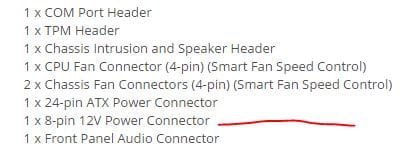
Oh, and I would definitely use the 8 pin power connector, regardless of what Asrock told you. The specs list it, so I would use it.
 

Attachments

  • Capture.JPG
    Capture.JPG
    18.2 KB · Views: 34
Last edited:

My Computer My Computer

At a glance

Windows 10 Pro x64Intel Core i7 6700KGSkill TridentZ RGB 16GB 3600 16-16-16-36EVGA GTX 980 Ti SC x2
Computer type
PC/Desktop
Computer Manufacturer/Model Number
Skylake Special #666
OS
Windows 10 Pro x64
CPU
Intel Core i7 6700K
Motherboard
Asus Sabertooth Z170 Mark 1
Memory
GSkill TridentZ RGB 16GB 3600 16-16-16-36
Graphics Card(s)
EVGA GTX 980 Ti SC x2
Sound Card
Realtek High Definition
Monitor(s) Displays
AOC G2460PG
Screen Resolution
1920 x 1080 144Hz
Hard Drives
Samsung 860 Pro 256GB, Seagate Barracuda 4TB x2
PSU
EVGA 1000 P2, EVGA White Custom Braided Cables
Case
Corsair Vengeance C70 Gunmetal Black
Cooling
Corsair H100i v2, Corsair ML120 x2, Thermal Grizzly Kryonaut
Keyboard
Logitech G910 Orion Spectrum
Mouse
Logitech G700s
Internet Speed
Verizon Fios Quantum Gateway 75/75
Antivirus
Windows Defender, Malwarebytes Free 3.8.3
Browser
Chrome
Other Info
Corsair SP120 x4, LG Blu-ray Drive, Durabrand HT-395 100 Watt Dolby Digital Amp, Corsair H2100 Wireless 7.1 Headset
Yep that is just silly not to use all 8 pins :)
 

My Computer My Computer

At a glance

Win-7-Pro64bit 7-H-Prem-64biti7-5930K 2nd i9-9940x both water blocked VRM'...Trident-z 3200C14 2nd Trident-z 3600C16EVGA 1080ti ftw3 2nd Titan Xp both water blocked
Computer type
PC/Desktop
Computer Manufacturer/Model Number
Custom assembled by me :}
OS
Win-7-Pro64bit 7-H-Prem-64bit
CPU
i7-5930K 2nd i9-9940x both water blocked VRM's too
Motherboard
ASUS SABERTOOTH X99 2nd ASUS x299 Apex
Memory
Trident-z 3200C14 2nd Trident-z 3600C16
Graphics Card(s)
EVGA 1080ti ftw3 2nd Titan Xp both water blocked
Sound Card
Built-in Realtek
Monitor(s) Displays
1-AOC G2460PG 24"G-Sync 144Hz/ 2nd 1-ASUS VG248QE 24" 144Hz
Screen Resolution
1920 x 1080 144Hz
Hard Drives
2-Samsung M.2 Evo & Evo Plus
2-Samsung 850 EVO 500GB SSD's/ 3-2.5 W.D. Black 1tb-&3-1tb/3-3.5 WD Black 1tb hdd's
PSU
EVGA SuperNOVA 1000-P2 2nd 1200-P2
Case
2-Corsair Obsidian Series 450D Black ATX Mid Tower
Cooling
Custom water loops
Keyboard
Logitech G710+/ 2nd Logitech G910
Mouse
2-RedDragon M901 Perdition 16400 dpi Gaming mouse = wired
Internet Speed
Comcast Ping 19ms 89.31mbps download speed 6.12mbps upload
Antivirus
Malwarebytes Pro/ Superantispyware Pro
Browser
FireFox & Pale moon
Other Info
2nd ASUS X299 Apex/Intel i9-9940x with Custom water loop/7H-Prem-x64/Corsair 450D case/Ram Trident-z 3600C16 4x8gb / Samsung970Evo plus 500gb SSD/Dual ssd EZ swap evo/PSU EVGA SuperNova 1200w-P2 80+Platinum/GPU Titan Xp /8-ML-140 on push-pull on 2-280GTX rads
Update:

The parts have been laying on a table for the last 24 hours.

It's getting even worse.

Now, I cannot even get fans to spin. No signs of life AT ALL.

I've reseated the CPU and cooler. I found nothing wrong with the previous seating.

I've used a second power supply using all 8 pins--a Seasonic 560M.

Using just one stick of RAM. Even with no RAM, I'd expect fans to spin.

So, I'm down to the last few crazy ideas.

Like, I don't really have the PSU cable plugged into the wall.

Or, my eyes are playing tricks on me and I don't have the front panel power switch connected to the right header on the board.

Or, I didn't really install the CPU.

AddRam: if all hardware were good and NO keyboard, NO mouse, and NO drives were connected, what EXACTLY would you expect to see on the screen if you simply hit the power button and walked away? Something similar to what you'd see on a Sandy Bridge---normal POST stuff?

Would I come to a menu choice?

Or an error message?

This is a UEFI setup and I have no experience. This is the ONLY Asrock product I've ever laid eyes on.

Any last straw ideas? I'm going to give it the rest of today and if no joy, it goes back to Newegg tomorrow.

I have no idea what I'd get to replace it. I'd be spooked to get another Asrock. I do NOT need a 200 dollar board with a bunch of features. I don't even need ATX.

I don't use video cards and would have NOTHING in the slots.

I'm looking at Gigabyte UD3 model and Asus Z170A, but of course they have their share of bad reviews. I realize all brands do and it's a crap shoot. I seem to have crapped out on this one.

I've had an Asus fail on me. I've owned 1 Gigabyte board and it did not fail. I realize those two facts don't mean a damn thing.

Back to this Asrock board:

Any final ideas?

I am so frazzled that I keep thinking I'm doing something totally stupid.
 

My Computer My Computer

At a glance

Windows 7 Home Premium SP1, 64-bitIntel Skylake i5-6600K, not overclocked8 GB HyperX DDR4-2666 (2 x 4 GB)none; graphics are integrated on CPU
Computer type
PC/Desktop
Computer Manufacturer/Model Number
Ignatz Special; 4 speed manual gearbox; factory air conditioning; one of one
OS
Windows 7 Home Premium SP1, 64-bit
CPU
Intel Skylake i5-6600K, not overclocked
Motherboard
AsRock Z170M Extreme 4, micro ATX
Memory
8 GB HyperX DDR4-2666 (2 x 4 GB)
Graphics Card(s)
none; graphics are integrated on CPU
Sound Card
onboard: Realtek ALC1150; external: USB Behringer UF0-202
Monitor(s) Displays
Dell S2340M 23 inch IPS
Screen Resolution
1600 x 900
Hard Drives
System: Crucial MX100 series SSD, 128 GB;
Data: Samsung Spinpoint 103SJ, 1 TB;
Backup: WD Caviar Green WD30EZRX-00D8PB0, 3 TB
PSU
Rosewill SilentNight 500 watt fanless, semi-modular
Case
Antec Solo II
Cooling
Noctua NH-U12S; Noctua F12 intake, Noctua S12A exhaust
Keyboard
Microsoft 200 6JH-00001 USB
Mouse
Dell or Microsoft optical wired; USB
Antivirus
Microsoft Security Essentials and Malwarebytes Premium
Browser
Pale Moon
Other Info
All fans PWM; speeds at idle: CPU circa 500 rpm; intake circa 600 rpm; exhaust circa 600 rpm; CPU temps 27 idle and 47 C load in a warm room (27 C/81 F) when running Intel Extreme Tuning Utility stress test.
Yea I believe Brian showed the onboard graphic's for the 6700 on his z170 sabertooth as 7.8 on his thread :)
Definitely a RMA
I imagine a swap out would be at least worth a shot
If another fails the same way ?
 

My Computer My Computer

At a glance

Win-7-Pro64bit 7-H-Prem-64biti7-5930K 2nd i9-9940x both water blocked VRM'...Trident-z 3200C14 2nd Trident-z 3600C16EVGA 1080ti ftw3 2nd Titan Xp both water blocked
Computer type
PC/Desktop
Computer Manufacturer/Model Number
Custom assembled by me :}
OS
Win-7-Pro64bit 7-H-Prem-64bit
CPU
i7-5930K 2nd i9-9940x both water blocked VRM's too
Motherboard
ASUS SABERTOOTH X99 2nd ASUS x299 Apex
Memory
Trident-z 3200C14 2nd Trident-z 3600C16
Graphics Card(s)
EVGA 1080ti ftw3 2nd Titan Xp both water blocked
Sound Card
Built-in Realtek
Monitor(s) Displays
1-AOC G2460PG 24"G-Sync 144Hz/ 2nd 1-ASUS VG248QE 24" 144Hz
Screen Resolution
1920 x 1080 144Hz
Hard Drives
2-Samsung M.2 Evo & Evo Plus
2-Samsung 850 EVO 500GB SSD's/ 3-2.5 W.D. Black 1tb-&3-1tb/3-3.5 WD Black 1tb hdd's
PSU
EVGA SuperNOVA 1000-P2 2nd 1200-P2
Case
2-Corsair Obsidian Series 450D Black ATX Mid Tower
Cooling
Custom water loops
Keyboard
Logitech G710+/ 2nd Logitech G910
Mouse
2-RedDragon M901 Perdition 16400 dpi Gaming mouse = wired
Internet Speed
Comcast Ping 19ms 89.31mbps download speed 6.12mbps upload
Antivirus
Malwarebytes Pro/ Superantispyware Pro
Browser
FireFox & Pale moon
Other Info
2nd ASUS X299 Apex/Intel i9-9940x with Custom water loop/7H-Prem-x64/Corsair 450D case/Ram Trident-z 3600C16 4x8gb / Samsung970Evo plus 500gb SSD/Dual ssd EZ swap evo/PSU EVGA SuperNova 1200w-P2 80+Platinum/GPU Titan Xp /8-ML-140 on push-pull on 2-280GTX rads
I let it sit untouched for 24 hours while I got some good sleep and collected my thoughts for one last attempt.

It still won't post.

I've tried 2 known good power supplies, with a 4 pin ATX 12 volt header connection and also with an 8 pin ATX 12 volt header connection; 2 different known good monitors. Cleared CMOS 4 or 5 times. Pulled CMOS battery out several times for 4 hours. Once for 24 hours.

No case speaker beeps.

Each stick of RAM in all slots one at a time. Paired sticks tried in each channel.

The only response I get is a spinning CPU fan.

I'm starting the RMA process within a half hour at Newegg. Not sure what hoops I will have to jump through.

My backup PC that I'm using right now is a bit shaky, so may use the phone for RMA.

Not sure what board I will choose to replace. Leaning toward Asus Z170-A even though it's ATX that I don't need and $40 more expensive than this AsRock I'm returning.
 

My Computer My Computer

At a glance

Windows 7 Home Premium SP1, 64-bitIntel Skylake i5-6600K, not overclocked8 GB HyperX DDR4-2666 (2 x 4 GB)none; graphics are integrated on CPU
Computer type
PC/Desktop
Computer Manufacturer/Model Number
Ignatz Special; 4 speed manual gearbox; factory air conditioning; one of one
OS
Windows 7 Home Premium SP1, 64-bit
CPU
Intel Skylake i5-6600K, not overclocked
Motherboard
AsRock Z170M Extreme 4, micro ATX
Memory
8 GB HyperX DDR4-2666 (2 x 4 GB)
Graphics Card(s)
none; graphics are integrated on CPU
Sound Card
onboard: Realtek ALC1150; external: USB Behringer UF0-202
Monitor(s) Displays
Dell S2340M 23 inch IPS
Screen Resolution
1600 x 900
Hard Drives
System: Crucial MX100 series SSD, 128 GB;
Data: Samsung Spinpoint 103SJ, 1 TB;
Backup: WD Caviar Green WD30EZRX-00D8PB0, 3 TB
PSU
Rosewill SilentNight 500 watt fanless, semi-modular
Case
Antec Solo II
Cooling
Noctua NH-U12S; Noctua F12 intake, Noctua S12A exhaust
Keyboard
Microsoft 200 6JH-00001 USB
Mouse
Dell or Microsoft optical wired; USB
Antivirus
Microsoft Security Essentials and Malwarebytes Premium
Browser
Pale Moon
Other Info
All fans PWM; speeds at idle: CPU circa 500 rpm; intake circa 600 rpm; exhaust circa 600 rpm; CPU temps 27 idle and 47 C load in a warm room (27 C/81 F) when running Intel Extreme Tuning Utility stress test.
Better to have some goodies and not need or use them than need them and not have them :)
Newegg makes RMA pretty easy.
 

My Computer My Computer

At a glance

Win-7-Pro64bit 7-H-Prem-64biti7-5930K 2nd i9-9940x both water blocked VRM'...Trident-z 3200C14 2nd Trident-z 3600C16EVGA 1080ti ftw3 2nd Titan Xp both water blocked
Computer type
PC/Desktop
Computer Manufacturer/Model Number
Custom assembled by me :}
OS
Win-7-Pro64bit 7-H-Prem-64bit
CPU
i7-5930K 2nd i9-9940x both water blocked VRM's too
Motherboard
ASUS SABERTOOTH X99 2nd ASUS x299 Apex
Memory
Trident-z 3200C14 2nd Trident-z 3600C16
Graphics Card(s)
EVGA 1080ti ftw3 2nd Titan Xp both water blocked
Sound Card
Built-in Realtek
Monitor(s) Displays
1-AOC G2460PG 24"G-Sync 144Hz/ 2nd 1-ASUS VG248QE 24" 144Hz
Screen Resolution
1920 x 1080 144Hz
Hard Drives
2-Samsung M.2 Evo & Evo Plus
2-Samsung 850 EVO 500GB SSD's/ 3-2.5 W.D. Black 1tb-&3-1tb/3-3.5 WD Black 1tb hdd's
PSU
EVGA SuperNOVA 1000-P2 2nd 1200-P2
Case
2-Corsair Obsidian Series 450D Black ATX Mid Tower
Cooling
Custom water loops
Keyboard
Logitech G710+/ 2nd Logitech G910
Mouse
2-RedDragon M901 Perdition 16400 dpi Gaming mouse = wired
Internet Speed
Comcast Ping 19ms 89.31mbps download speed 6.12mbps upload
Antivirus
Malwarebytes Pro/ Superantispyware Pro
Browser
FireFox & Pale moon
Other Info
2nd ASUS X299 Apex/Intel i9-9940x with Custom water loop/7H-Prem-x64/Corsair 450D case/Ram Trident-z 3600C16 4x8gb / Samsung970Evo plus 500gb SSD/Dual ssd EZ swap evo/PSU EVGA SuperNova 1200w-P2 80+Platinum/GPU Titan Xp /8-ML-140 on push-pull on 2-280GTX rads
Two 4 GB sticks of HyperX DDR4 2666 RAM 1.2 volt; matched pair sold as a single package.
A longshot but apart from the above is the actual module code on the compatibility list.
I had an AsRock build using DDR3 memory (GSkill) and needed to swap it.
ASRock > Z170M Extreme4
 

My Computer My Computer

At a glance

Windows 7x64 Home Premium SP1Intel i7 2600kG.Skill Ripjaws (DDR3-1600) 2x4GBNvidia GeForce GTS 450; Intel HD Graphics 300...
Computer type
PC/Desktop
Computer Manufacturer/Model Number
Own build
OS
Windows 7x64 Home Premium SP1
CPU
Intel i7 2600k
Motherboard
ASUS P8Z68 Deluxe
Memory
G.Skill Ripjaws (DDR3-1600) 2x4GB
Graphics Card(s)
Nvidia GeForce GTS 450; Intel HD Graphics 3000(GT2+)
Monitor(s) Displays
Dell Ultrasharp IPS panel U2311H, Samsung SyncMaster P2350
Screen Resolution
1920x1080
Hard Drives
Samsung 850 Pro SSD 256GB, Samsung SSD 840 120GB, Seagates 1TB Barracuda ST31000528AS x2
PSU
Seasonic M12II 520W
Case
Lian Li Lancool PC-K60
Cooling
Case: 1x120mm, 3x140mm CPU: Hyper 212+
Keyboard
Logitech MK520 (wireless)
Mouse
Logitech MK520
Internet Speed
6-7 Mbps
Antivirus
Norton Security Premium, Malwarebytes on 2 (MSE on 3rd PC)
Browser
FireFox
Other Info
Audio: Logitech Z523 2.1
Two 4 GB sticks of HyperX DDR4 2666 RAM 1.2 volt; matched pair sold as a single package.
A longshot but apart from the above is the actual module code on the compatibility list.
I had an AsRock build using DDR3 memory (GSkill) and needed to swap it.
ASRock > Z170M Extreme4

MJF:

Yeah, I ordered RAM specifically shown on that compatibility list.

Here's a screen shot of a portion of that list.

I ordered the middle one:

HX426C15FBK2/8

That code does in fact match what I received and have here beside me right now.

However: unless I have completely lost my mind, I would expect a boot attempt with bad RAM or some other unqualified RAM or no RAM whatsoever to nonetheless result in some type of screen output if all other hardware was good and connections were proper.

I get no screen output via DVI-D. My monitor does not support HDMI or Display Port, etc.

I know little to nothing about Skylake or UEFI or AsRock. If you have some knowledge indicating that there is some special Voodoo that I have to invoke to get screen output or POST, please tell me in so many words.

The AsRock board was dropped off at a FedEx collection point 4 hours ago.

I got a good Newegg rep on the phone. He emailed me a pre-paid FedEx shipping label. No charge, no re-stocking fee.

He and I talked about my options and agreed it's always a crapshoot.

So, I agreed to try one more example of this very same board. If that pukes, I'll return it and go with Asus Z170-A or Gigabyte Z170X-UD3.

Both of which are unneeded ATX, but in my price range and both of which have their fair share of dubious reviews involving slots and RAM, among other things.

But what are you gonna do? Wait for a board with no bad reviews? Spend $200 or $300 on the laughable assumption that quality is better? Hardly. These things are rank commodities flying off an assembly line in Timbuktu.

I'm committed to a new build and must shoot craps. I did.

I've got probably a week before the new board gets here. Just as well. Gives me time to cool off.
 

Attachments

  • ram.JPG
    ram.JPG
    22.2 KB · Views: 1

My Computer My Computer

At a glance

Windows 7 Home Premium SP1, 64-bitIntel Skylake i5-6600K, not overclocked8 GB HyperX DDR4-2666 (2 x 4 GB)none; graphics are integrated on CPU
Computer type
PC/Desktop
Computer Manufacturer/Model Number
Ignatz Special; 4 speed manual gearbox; factory air conditioning; one of one
OS
Windows 7 Home Premium SP1, 64-bit
CPU
Intel Skylake i5-6600K, not overclocked
Motherboard
AsRock Z170M Extreme 4, micro ATX
Memory
8 GB HyperX DDR4-2666 (2 x 4 GB)
Graphics Card(s)
none; graphics are integrated on CPU
Sound Card
onboard: Realtek ALC1150; external: USB Behringer UF0-202
Monitor(s) Displays
Dell S2340M 23 inch IPS
Screen Resolution
1600 x 900
Hard Drives
System: Crucial MX100 series SSD, 128 GB;
Data: Samsung Spinpoint 103SJ, 1 TB;
Backup: WD Caviar Green WD30EZRX-00D8PB0, 3 TB
PSU
Rosewill SilentNight 500 watt fanless, semi-modular
Case
Antec Solo II
Cooling
Noctua NH-U12S; Noctua F12 intake, Noctua S12A exhaust
Keyboard
Microsoft 200 6JH-00001 USB
Mouse
Dell or Microsoft optical wired; USB
Antivirus
Microsoft Security Essentials and Malwarebytes Premium
Browser
Pale Moon
Other Info
All fans PWM; speeds at idle: CPU circa 500 rpm; intake circa 600 rpm; exhaust circa 600 rpm; CPU temps 27 idle and 47 C load in a warm room (27 C/81 F) when running Intel Extreme Tuning Utility stress test.

Serious RAM issues would cause the board to beep (if it has an on board speaker, or is connected to chassis speaker). There would be no video output. Looking at an image of your board, I don't see an on board speaker. So unless you connected a chassis speaker, you may have missed some very, very vital information.

Otherwise, I've once or twice seen less serious RAM problems present during the quick RAM test at the beginning of POST, but of course video is active by that point.
 

My Computer My Computer

At a glance

Windows 7 Professional x64, Arch Linux
Computer type
PC/Desktop
OS
Windows 7 Professional x64, Arch Linux
Serious RAM issues would cause the board to beep (if it has an on board speaker, or is connected to chassis speaker). There would be no video output. Looking at an image of your board, I don't see an on board speaker. So unless you connected a chassis speaker, you may have missed some very, very vital information.

Otherwise, I've once or twice seen less serious RAM problems present during the quick RAM test at the beginning of POST, but of course video is active by that point.

The board has a speaker output header at the lower right corner, near CMOS clear and front panel connectors.

There is no "onboard speaker" per se.

My case (Antec SOLO II) does NOT come with a speaker. BUT---I do have an unused 2 wire chassis speaker that came with a LanCool case. So I hooked that up to the AsRock board speaker output header.

I have no idea whatsoever if the Lancool speaker is good or if the AsRock speaker header is functioning. Just guessing---I'd guess the speaker does work. Whether the motherboard speaker header is working is rank speculation.

The only thing I know for a fact about the board is that it is getting power to some extent because the Noctua fan on the Noctua cooler spins--with 2 different PSUs. Anything beyond that is more speculation.

The board has no LED indicators or LED readouts of any type.
 

My Computer My Computer

At a glance

Windows 7 Home Premium SP1, 64-bitIntel Skylake i5-6600K, not overclocked8 GB HyperX DDR4-2666 (2 x 4 GB)none; graphics are integrated on CPU
Computer type
PC/Desktop
Computer Manufacturer/Model Number
Ignatz Special; 4 speed manual gearbox; factory air conditioning; one of one
OS
Windows 7 Home Premium SP1, 64-bit
CPU
Intel Skylake i5-6600K, not overclocked
Motherboard
AsRock Z170M Extreme 4, micro ATX
Memory
8 GB HyperX DDR4-2666 (2 x 4 GB)
Graphics Card(s)
none; graphics are integrated on CPU
Sound Card
onboard: Realtek ALC1150; external: USB Behringer UF0-202
Monitor(s) Displays
Dell S2340M 23 inch IPS
Screen Resolution
1600 x 900
Hard Drives
System: Crucial MX100 series SSD, 128 GB;
Data: Samsung Spinpoint 103SJ, 1 TB;
Backup: WD Caviar Green WD30EZRX-00D8PB0, 3 TB
PSU
Rosewill SilentNight 500 watt fanless, semi-modular
Case
Antec Solo II
Cooling
Noctua NH-U12S; Noctua F12 intake, Noctua S12A exhaust
Keyboard
Microsoft 200 6JH-00001 USB
Mouse
Dell or Microsoft optical wired; USB
Antivirus
Microsoft Security Essentials and Malwarebytes Premium
Browser
Pale Moon
Other Info
All fans PWM; speeds at idle: CPU circa 500 rpm; intake circa 600 rpm; exhaust circa 600 rpm; CPU temps 27 idle and 47 C load in a warm room (27 C/81 F) when running Intel Extreme Tuning Utility stress test.
Chassis speakers are dead simple - especially the piezo-buzzer type - so it's hard to imagine one going bad. As long as you hooked it up correctly (polarity matters), if you didn't hear any beeps then I'd say you did due diligence.
 

My Computer My Computer

At a glance

Windows 7 Professional x64, Arch Linux
Computer type
PC/Desktop
OS
Windows 7 Professional x64, Arch Linux
Back
Top