
Partial Internet Connectivity Problem

Genuine

New member
Local time
5:41 AM
Messages
19
Hello all.

Here are my desktop PC specs:

- Windows 7 Ultimate x64
- Gigabyte Z77X-D3H motherboard
- Intel Core i5-3750K
- 8GB RAM
- Nvidia GeForce GTX 660ti

Just recently I am unable to load up any website in my browser except for certain google-based sites. I can load into Gmail, Google, and sometimes Youtube. But NO other website loads. The browsers status bar reads "Establishing secure connection..." and sometimes "Waiting for...." until the page says that it could not be loaded due to no internet connection. I've tried Internet Explorer and Google Chrome browsers.

I am able to connect to and play online games which are not browser based, such as Path of Exile and Diablo II without any problems at all. Windows applications, dropbox, and anti-virus updates for example will not connect. Only google works, until you need to connect to an external site.


Things I've tried / tested:
- I swapped my cable modem for a new one and had my ISP send a tech to my home to test the connection (no fix)
- All other computers on the network that are wired or wifi connect fine
- ***I tried tethering to my smartphone via usb cable and the "Network Sharing Centre" as well as the taskbar corner icon FREEZES. The second I disconnect from tethering "Network Sharing Centre" will unfreeze and the window pops up to select whether the network is Public/Private/Home.

My thoughts:
- Could this be a hidden virus? Why am I unable to tether via a different network device and why does this cause things to freeze?

- I recall this problem arising after installing an update for a video conversion program called "eRightsoft SUPER" which is free online. A program that I have been using and updating constantly for the past 6 years. I noticed that SUPER tried prompting me to install some 3rd party software in a separate installation window, which I closed out of, and than proceeded with the normal installation.
- After installing SUPER I installed a program called "Kodi" which is a media streaming application. This program required the installation of "Microsoft Visual C++ 2010 x86 Redistributable - 10.0.40219" and "Microsoft Visual C++ 2013 Redistributable (x86) - 12.0.30501"

- I tried "System Restore" to the date when the Microsoft Visual C++ was installed, as well as to earlier dates. After the PC restarts I get the following error message, telling me that the restore was unsuccessful:
PICTURE IS ATTACHED

As of yet, my Kaspersky Internet Security does not find any viruses on my PC.

Any suggestions? HELP!
 

Attachments
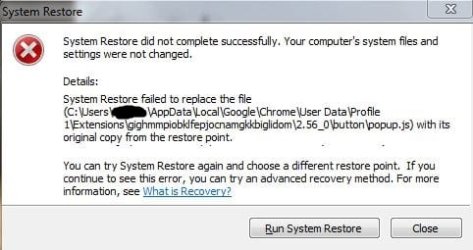
  • restoreerror1.JPG
    restoreerror1.JPG
    28.8 KB · Views: 27

My Computer My Computer

At a glance

Windows 7 x64
OS
Windows 7 x64
Check the DNS settings on your adapter and network proxy settings on your browser. I just had a similar issue and only Google sites would load. It was just a simple DNS problem.
 

My Computer My Computer

At a glance

Windows 7 Home Premium x64Intel Core 2 Duo T6500 / 2.1 GHz4.0GB Dual-Channel DDR2 @ 398MHz (6-6-6-18)Onboard - Intel GMA 4500MHD 128MB
Computer Manufacturer/Model Number
Toshiba A505-S6960
OS
Windows 7 Home Premium x64
CPU
Intel Core 2 Duo T6500 / 2.1 GHz
Memory
4.0GB Dual-Channel DDR2 @ 398MHz (6-6-6-18)
Graphics Card(s)
Onboard - Intel GMA 4500MHD 128MB
Sound Card
Onboard

My Computer My Computer

At a glance

10 Pro x64Ryzen 9 3900X64GB(4x16GB) DDR4EVGA 1080ti FTW3
Computer type
PC/Desktop
Computer Manufacturer/Model Number
Custom
OS
10 Pro x64
CPU
Ryzen 9 3900X
Motherboard
Asrock x370 Tachi
Memory
64GB(4x16GB) DDR4
Graphics Card(s)
EVGA 1080ti FTW3
Sound Card
ASUS Xonar Essence STX (V4 Bursons), ODAC rev B, NFB-11, O2
Monitor(s) Displays
3xASUS PB278Q/R, Optoma HD142X
Screen Resolution
3x1440p, 1080p
Hard Drives
512GB 850 EVO(OS, Programs)
4TB (Movies)
3TB (Downloads)
3TB (Programs)
1TB HDD (Games)
2x6TB R1 (videos)
PSU
AX760
Case
Fractal Define R5
Cooling
NH-D15S
Keyboard
Massdrop Ctrl with Box Navy's
Mouse
G903, Alioth XXL Mat
Internet Speed
280/40
Antivirus
MBAM, ESET
Browser
Canary 64 Bit
Other Info
I also own a Thinkpad P50 Xeon 4K, X220T, X1C5
Yup see what it currently is using with start, cmd (right click and pick run as admin), ipconfig /all then hit enter. If it looks good also try flushing your DNS.
DNS Resolver Cache - Flush and Reset in Windows

And if you need to change it.
http://www.sevenforums.com/tutorials/15037-dns-addressing-how-change-windows-7-a.html

I ran "ipconfig /all" but I'm not sure if its good or bad. My ethernet adapter shows DHCP Enabled--> Yes, Autoconfiguration enabled--> Yes, two different DNS server IPs, and lots more information (no blank fields).

Next, I followed the instructions to flush DNS. It did not fix the problem.

In my network adapter properties, TCP/IPv4 and IPv6 are both set to obtain an IPv4 or 6 address automatically and obtain DNS server automatically. They were always set like this.

I do not use a proxy and nothing is set to use a proxy.

I just attempted to connect to my modem/router with the IP 192.168.0.10 and the page will not load. All other PCs on the network can login to the modem/router page fine...
 

My Computer My Computer

At a glance

Windows 7 x64
OS
Windows 7 x64
Change the DNS to use manual then use 8.8.8.8 and line 2 use 8.8.4.4. These are googles public DNS servers and will determine if your ISP or router is causing the issue.
 

My Computer My Computer

At a glance

10 Pro x64Ryzen 9 3900X64GB(4x16GB) DDR4EVGA 1080ti FTW3
Computer type
PC/Desktop
Computer Manufacturer/Model Number
Custom
OS
10 Pro x64
CPU
Ryzen 9 3900X
Motherboard
Asrock x370 Tachi
Memory
64GB(4x16GB) DDR4
Graphics Card(s)
EVGA 1080ti FTW3
Sound Card
ASUS Xonar Essence STX (V4 Bursons), ODAC rev B, NFB-11, O2
Monitor(s) Displays
3xASUS PB278Q/R, Optoma HD142X
Screen Resolution
3x1440p, 1080p
Hard Drives
512GB 850 EVO(OS, Programs)
4TB (Movies)
3TB (Downloads)
3TB (Programs)
1TB HDD (Games)
2x6TB R1 (videos)
PSU
AX760
Case
Fractal Define R5
Cooling
NH-D15S
Keyboard
Massdrop Ctrl with Box Navy's
Mouse
G903, Alioth XXL Mat
Internet Speed
280/40
Antivirus
MBAM, ESET
Browser
Canary 64 Bit
Other Info
I also own a Thinkpad P50 Xeon 4K, X220T, X1C5
Change the DNS to use manual then use 8.8.8.8 and line 2 use 8.8.4.4. These are googles public DNS servers and will determine if your ISP or router is causing the issue.

I tried using 8.8.8.8 / 8.8.4.4 and rebooting. It did not fix the problem, as of right now I cannot reach google websites or any other website using the above DNS or automatic. Is there any more steps?

Also, in my local area connection status window, IPv4 Connectivity shows "Internet" and IPv6 Connectivity shows "No Internet Access". Does that seem right?
 

My Computer My Computer

At a glance

Windows 7 x64
OS
Windows 7 x64
(Ignore anything that has been already tried)

Internet for IPv4 and No Internet Access for IPv6 are normal within that window.

Did you check your browsers network settings? Does this occur on only one device, do you have multiple devices to test on? If this occurs on multiple devices check your routers DNS settings. Check Internet Explorer DNS settings as well. Some apps share IE network settings.

Just a tip, you don't need to reboot after changing DNS settings.

If you open a cmd prompt and ping google.com is the response time within normal ranges? (usually ~32ms).
 

My Computer My Computer

At a glance

Windows 7 Home Premium x64Intel Core 2 Duo T6500 / 2.1 GHz4.0GB Dual-Channel DDR2 @ 398MHz (6-6-6-18)Onboard - Intel GMA 4500MHD 128MB
Computer Manufacturer/Model Number
Toshiba A505-S6960
OS
Windows 7 Home Premium x64
CPU
Intel Core 2 Duo T6500 / 2.1 GHz
Memory
4.0GB Dual-Channel DDR2 @ 398MHz (6-6-6-18)
Graphics Card(s)
Onboard - Intel GMA 4500MHD 128MB
Sound Card
Onboard
(Ignore anything that has been already tried)

Internet for IPv4 and No Internet Access for IPv6 are normal within that window.

Did you check your browsers network settings? Does this occur on only one device, do you have multiple devices to test on? If this occurs on multiple devices check your routers DNS settings. Check Internet Explorer DNS settings as well. Some apps share IE network settings.

Just a tip, you don't need to reboot after changing DNS settings.

If you open a cmd prompt and ping google.com is the response time within normal ranges? (usually ~32ms).

I checked the browsers network settings but I do not know what to look for here. Is the window called "Internet properties"? In here, my LAN Settings are set to automatically detect settings, and no proxy.

I cannot open my modem/router webpage at 192.168.0.10 either. Pinging websites through command prompt works and I am getting latencies of around 12-32ms. I cannot open ANY webpages in any browser however.

I tried a TP-Link USB wifi dongle and connecting to the same router. It connects just fine, but I am still unable to reach any web page. In contrast, two individual laptops are able to connect properly via the same wifi signal and through the same ethernet ports. The same problem is experienced when connected to a different wifi network with working internet...

I updated my bios as well.
 

My Computer My Computer

At a glance

Windows 7 x64
OS
Windows 7 x64
Fix!

I found the problem!

I uninstalled Microsoft Visual C++ 2010 x86 Redistributable - 10.0.40219 and Microsoft Visual C++ 2013 Redistributable (x86) - 12.0.30501. Immediately the problem went away and I can now connect properly...
 

My Computer My Computer

At a glance

Windows 7 x64
OS
Windows 7 x64
Glad you figured it out, guess it had messed up your sockets.
 

My Computer My Computer

At a glance

10 Pro x64Ryzen 9 3900X64GB(4x16GB) DDR4EVGA 1080ti FTW3
Computer type
PC/Desktop
Computer Manufacturer/Model Number
Custom
OS
10 Pro x64
CPU
Ryzen 9 3900X
Motherboard
Asrock x370 Tachi
Memory
64GB(4x16GB) DDR4
Graphics Card(s)
EVGA 1080ti FTW3
Sound Card
ASUS Xonar Essence STX (V4 Bursons), ODAC rev B, NFB-11, O2
Monitor(s) Displays
3xASUS PB278Q/R, Optoma HD142X
Screen Resolution
3x1440p, 1080p
Hard Drives
512GB 850 EVO(OS, Programs)
4TB (Movies)
3TB (Downloads)
3TB (Programs)
1TB HDD (Games)
2x6TB R1 (videos)
PSU
AX760
Case
Fractal Define R5
Cooling
NH-D15S
Keyboard
Massdrop Ctrl with Box Navy's
Mouse
G903, Alioth XXL Mat
Internet Speed
280/40
Antivirus
MBAM, ESET
Browser
Canary 64 Bit
Other Info
I also own a Thinkpad P50 Xeon 4K, X220T, X1C5
Back
Top