Solved Pc freezes randomly unknow device drivers detected.

Jeff Wellekens

New member
Local time
5:48 AM
Messages
9
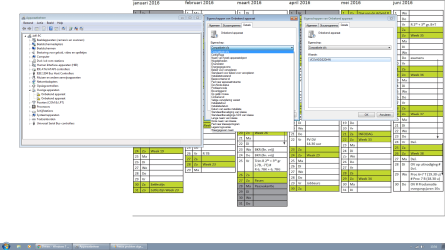
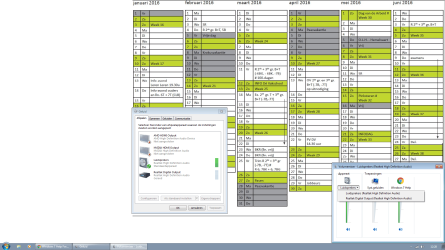
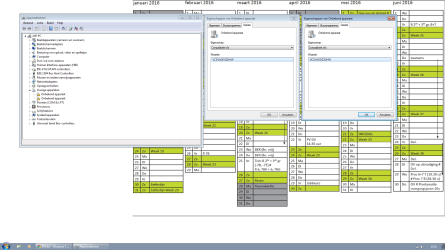
Hello i have a serious problem. Not so long ago my pc started freezing randomly i doesnt have a pattern or when i do something its completly random. When its frozen and i need to manually restart my pc. It is loading in the windows startup screen and then freezes their tho then i restart it again and its ask safe mode safe mode with network and so on and i click on last know good startup options. Then it starts normally. I maybe think its coming from an unknow driver. I tried almost everything and i cant seem to fix it. unknow device drivers.png freeze problem algemeen.png freeze problem dropdown list.png
 
Last edited:

My Computer My Computer

At a glance

Microsoft Windows 7 Professional 64-bits 7601...Pentium(R) Dual-Core CPU E5200 @ 2.50GHzDDR-2 4,00 GBAMD Radeon HD 5670
Computer type
PC/Desktop
Computer Manufacturer/Model Number
Custom Build
OS
Microsoft Windows 7 Professional 64-bits 7601 Multiprocessor Free Service Pack 1
CPU
Pentium(R) Dual-Core CPU E5200 @ 2.50GHz
Motherboard
ACER MCP73PV
Memory
DDR-2 4,00 GB
Graphics Card(s)
AMD Radeon HD 5670
Sound Card
(1) NVIDIA High Definition Audio (2) Realtek High Definition
Screen Resolution
1920 x 1080 x 32 bits (4294967296 colors) @ 60 Hz
Hard Drives
(1) ST364062 3AS SCSI Disk Device (2) WDC WD50 00AAKS-22V1A SCSI Disk Device
Browser
Google Chrome
Hello and welcome Jeff mate I don't know what the languages so have no idea what the screens are titled and personally I haven't seen screens with the green boxes.

Now if you have a rough idea when the problems started then I would be inclined to do a system restore to before the date you may suspect this stated to happen. I would do that in safe mode as wll as these
http://www.sevenforums.com/tutorials/1538-sfc-scannow-command-system-file-checker.html
http://www.sevenforums.com/tutorials/433-disk-check.html < if necessary include the /f and /r in the command line as per Option2 run these in safe mode and the sfc often best run for two to three runs
 

My Computer My Computer

At a glance

Desk1 7 Home Prem / Desk2 10 Pro / Main lap A...Desk1 i5 3750K / Laptop i7 GTX 860M / Desk2 i...Desk1 8GB (1866) / Desk2 16GB (1333) / Laptop...Desk 1& 2NVidia GTX 650 & Laptops on board Intel
Computer type
PC/Desktop
Computer Manufacturer/Model Number
Own build (new) Desk1 / Asus ROG Win 7 / Desk2 1st build
OS
Desk1 7 Home Prem / Desk2 10 Pro / Main lap Asus ROG 10 Pro 2 laptop Toshiba 7 Pro Asus P2520 7 & 10
CPU
Desk1 i5 3750K / Laptop i7 GTX 860M / Desk2 i5 2500
Motherboard
Desk1 Asus P877-V / Desk2 Gigabyte H67 UD3H / Laptop ?
Memory
Desk1 8GB (1866) / Desk2 16GB (1333) / Laptop 8Gb DDR3
Graphics Card(s)
Desk 1& 2NVidia GTX 650 & Laptops on board Intel
Sound Card
Desk 1 & 2 -XONAR DG Realtek High Def audio Laptop
Monitor(s) Displays
Desk 1 Benq HD 2450 / Desk2 Philips 24" / Laptop 17.5"
Screen Resolution
1920x1080 D1 & D2 & Laptop 1
Hard Drives
Desk1 Samsung 120GB 830 SSD
Asus ROG 256GB 850 Pro SSD
Desk2 Samsung 840 256 SSD
Toshiba 120GB EVO
PSU
Desk 1 Corsair HX 1050/ Laptop ? / Desk 2 Corsair HX 650
Case
Desk 1 Cooler HAF XM ? Toshiba laptop / Desk2 Coolermaster
Cooling
Fans on all Desk1 -2 Desk2 - all Coolermasters 5 Laptop ?
Keyboard
Desk 1 MS Sidewinder X6 Desk 2 MS Sidewinder X 4
Mouse
Desk 1&2 - Gigabyte MS 900 gamer - laptop - Logitec wireless
Internet Speed
ADSL2+
Other Info
One other Desktop (tester) and spare Toshba laptop both with SSD's
Running Kaspersky 2016 ISS on all machines config'd identically
Logitec audio stereo systems on each machine (x3)
Canon MG5250MFC
Router/modem TP-Link running WPA2SK
Hello and welcome Jeff mate I don't know what the languages so have no idea what the screens are titled and personally I haven't seen screens with the green boxes.

Now if you have a rough idea when the problems started then I would be inclined to do a system restore to before the date you may suspect this stated to happen. I would do that in safe mode as wll as these
http://www.sevenforums.com/tutorials/1538-sfc-scannow-command-system-file-checker.html
http://www.sevenforums.com/tutorials/433-disk-check.html < if necessary include the /f and /r in the command line as per Option2 run these in safe mode and the sfc often best run for two to three runs
The language is dutch. :) Oh the green boxes is my background its a school agenda. I will try those links out. Thanks for the help so far :)
 

My Computer My Computer

At a glance

Microsoft Windows 7 Professional 64-bits 7601...Pentium(R) Dual-Core CPU E5200 @ 2.50GHzDDR-2 4,00 GBAMD Radeon HD 5670
Computer type
PC/Desktop
Computer Manufacturer/Model Number
Custom Build
OS
Microsoft Windows 7 Professional 64-bits 7601 Multiprocessor Free Service Pack 1
CPU
Pentium(R) Dual-Core CPU E5200 @ 2.50GHz
Motherboard
ACER MCP73PV
Memory
DDR-2 4,00 GB
Graphics Card(s)
AMD Radeon HD 5670
Sound Card
(1) NVIDIA High Definition Audio (2) Realtek High Definition
Screen Resolution
1920 x 1080 x 32 bits (4294967296 colors) @ 60 Hz
Hard Drives
(1) ST364062 3AS SCSI Disk Device (2) WDC WD50 00AAKS-22V1A SCSI Disk Device
Browser
Google Chrome
Hello and welcome Jeff mate I don't know what the languages so have no idea what the screens are titled and personally I haven't seen screens with the green boxes.

Now if you have a rough idea when the problems started then I would be inclined to do a system restore to before the date you may suspect this stated to happen. I would do that in safe mode as wll as these
http://www.sevenforums.com/tutorials/1538-sfc-scannow-command-system-file-checker.html
http://www.sevenforums.com/tutorials/433-disk-check.html < if necessary include the /f and /r in the command line as per Option2 run these in safe mode and the sfc often best run for two to three runs
Unfortunately it didnt work i did the things you said sfc scannow and disk check disck check didnt had any errors or problems sfc scannow detected some problems it said it fixed them but the freezing still happens i still think its because of the unknow device driver :( but thanks for the help anyway .
 

My Computer My Computer

At a glance

Microsoft Windows 7 Professional 64-bits 7601...Pentium(R) Dual-Core CPU E5200 @ 2.50GHzDDR-2 4,00 GBAMD Radeon HD 5670
Computer type
PC/Desktop
Computer Manufacturer/Model Number
Custom Build
OS
Microsoft Windows 7 Professional 64-bits 7601 Multiprocessor Free Service Pack 1
CPU
Pentium(R) Dual-Core CPU E5200 @ 2.50GHz
Motherboard
ACER MCP73PV
Memory
DDR-2 4,00 GB
Graphics Card(s)
AMD Radeon HD 5670
Sound Card
(1) NVIDIA High Definition Audio (2) Realtek High Definition
Screen Resolution
1920 x 1080 x 32 bits (4294967296 colors) @ 60 Hz
Hard Drives
(1) ST364062 3AS SCSI Disk Device (2) WDC WD50 00AAKS-22V1A SCSI Disk Device
Browser
Google Chrome
Ok Jeff so the machine is booting but still freezes and yes I am thinking driver issues so can you look in Device Mnager and see if any devices have yellow triangles against them.

My other thought is maybe malware so can you run these if possible and just to eliminate causes form that direction .

SUPERAntiSpyware | Remove Malware | Remove Spyware - AntiMalware, AntiSpyware, AntiAdware!
Malwarebytes | Malwarebytes Anti-Malware Premium
AdwCleaner Download
ADW download from bleeping computer delete any rubbish found with the malware scans
 

My Computer My Computer

At a glance

Desk1 7 Home Prem / Desk2 10 Pro / Main lap A...Desk1 i5 3750K / Laptop i7 GTX 860M / Desk2 i...Desk1 8GB (1866) / Desk2 16GB (1333) / Laptop...Desk 1& 2NVidia GTX 650 & Laptops on board Intel
Computer type
PC/Desktop
Computer Manufacturer/Model Number
Own build (new) Desk1 / Asus ROG Win 7 / Desk2 1st build
OS
Desk1 7 Home Prem / Desk2 10 Pro / Main lap Asus ROG 10 Pro 2 laptop Toshiba 7 Pro Asus P2520 7 & 10
CPU
Desk1 i5 3750K / Laptop i7 GTX 860M / Desk2 i5 2500
Motherboard
Desk1 Asus P877-V / Desk2 Gigabyte H67 UD3H / Laptop ?
Memory
Desk1 8GB (1866) / Desk2 16GB (1333) / Laptop 8Gb DDR3
Graphics Card(s)
Desk 1& 2NVidia GTX 650 & Laptops on board Intel
Sound Card
Desk 1 & 2 -XONAR DG Realtek High Def audio Laptop
Monitor(s) Displays
Desk 1 Benq HD 2450 / Desk2 Philips 24" / Laptop 17.5"
Screen Resolution
1920x1080 D1 & D2 & Laptop 1
Hard Drives
Desk1 Samsung 120GB 830 SSD
Asus ROG 256GB 850 Pro SSD
Desk2 Samsung 840 256 SSD
Toshiba 120GB EVO
PSU
Desk 1 Corsair HX 1050/ Laptop ? / Desk 2 Corsair HX 650
Case
Desk 1 Cooler HAF XM ? Toshiba laptop / Desk2 Coolermaster
Cooling
Fans on all Desk1 -2 Desk2 - all Coolermasters 5 Laptop ?
Keyboard
Desk 1 MS Sidewinder X6 Desk 2 MS Sidewinder X 4
Mouse
Desk 1&2 - Gigabyte MS 900 gamer - laptop - Logitec wireless
Internet Speed
ADSL2+
Other Info
One other Desktop (tester) and spare Toshba laptop both with SSD's
Running Kaspersky 2016 ISS on all machines config'd identically
Logitec audio stereo systems on each machine (x3)
Canon MG5250MFC
Router/modem TP-Link running WPA2SK
Ok Jeff so the machine is booting but still freezes and yes I am thinking driver issues so can you look in Device Mnager and see if any devices have yellow triangles against them.

My other thought is maybe malware so can you run these if possible and just to eliminate causes form that direction .

SUPERAntiSpyware | Remove Malware | Remove Spyware - AntiMalware, AntiSpyware, AntiAdware!
Malwarebytes | Malwarebytes Anti-Malware Premium
AdwCleaner Download
ADW download from bleeping computer delete any rubbish found with the malware scans

Yes the machine is booting. Yes there are two unknow drivers that have a yellow icon on the left of them. I tried also to disable them it did nothing and the problem still happens the freezing at random times but in safe mode it doesnt freeze. I will definitely try all the anti virus programms you linked thanks.
 

My Computer My Computer

At a glance

Microsoft Windows 7 Professional 64-bits 7601...Pentium(R) Dual-Core CPU E5200 @ 2.50GHzDDR-2 4,00 GBAMD Radeon HD 5670
Computer type
PC/Desktop
Computer Manufacturer/Model Number
Custom Build
OS
Microsoft Windows 7 Professional 64-bits 7601 Multiprocessor Free Service Pack 1
CPU
Pentium(R) Dual-Core CPU E5200 @ 2.50GHz
Motherboard
ACER MCP73PV
Memory
DDR-2 4,00 GB
Graphics Card(s)
AMD Radeon HD 5670
Sound Card
(1) NVIDIA High Definition Audio (2) Realtek High Definition
Screen Resolution
1920 x 1080 x 32 bits (4294967296 colors) @ 60 Hz
Hard Drives
(1) ST364062 3AS SCSI Disk Device (2) WDC WD50 00AAKS-22V1A SCSI Disk Device
Browser
Google Chrome
Ok mate any chance of a pic of the devices with the triangles??
 

My Computer My Computer

At a glance

Desk1 7 Home Prem / Desk2 10 Pro / Main lap A...Desk1 i5 3750K / Laptop i7 GTX 860M / Desk2 i...Desk1 8GB (1866) / Desk2 16GB (1333) / Laptop...Desk 1& 2NVidia GTX 650 & Laptops on board Intel
Computer type
PC/Desktop
Computer Manufacturer/Model Number
Own build (new) Desk1 / Asus ROG Win 7 / Desk2 1st build
OS
Desk1 7 Home Prem / Desk2 10 Pro / Main lap Asus ROG 10 Pro 2 laptop Toshiba 7 Pro Asus P2520 7 & 10
CPU
Desk1 i5 3750K / Laptop i7 GTX 860M / Desk2 i5 2500
Motherboard
Desk1 Asus P877-V / Desk2 Gigabyte H67 UD3H / Laptop ?
Memory
Desk1 8GB (1866) / Desk2 16GB (1333) / Laptop 8Gb DDR3
Graphics Card(s)
Desk 1& 2NVidia GTX 650 & Laptops on board Intel
Sound Card
Desk 1 & 2 -XONAR DG Realtek High Def audio Laptop
Monitor(s) Displays
Desk 1 Benq HD 2450 / Desk2 Philips 24" / Laptop 17.5"
Screen Resolution
1920x1080 D1 & D2 & Laptop 1
Hard Drives
Desk1 Samsung 120GB 830 SSD
Asus ROG 256GB 850 Pro SSD
Desk2 Samsung 840 256 SSD
Toshiba 120GB EVO
PSU
Desk 1 Corsair HX 1050/ Laptop ? / Desk 2 Corsair HX 650
Case
Desk 1 Cooler HAF XM ? Toshiba laptop / Desk2 Coolermaster
Cooling
Fans on all Desk1 -2 Desk2 - all Coolermasters 5 Laptop ?
Keyboard
Desk 1 MS Sidewinder X6 Desk 2 MS Sidewinder X 4
Mouse
Desk 1&2 - Gigabyte MS 900 gamer - laptop - Logitec wireless
Internet Speed
ADSL2+
Other Info
One other Desktop (tester) and spare Toshba laptop both with SSD's
Running Kaspersky 2016 ISS on all machines config'd identically
Logitec audio stereo systems on each machine (x3)
Canon MG5250MFC
Router/modem TP-Link running WPA2SK
Looking at those ID's in the first post,

vcsvadds2dhw

Do you have a virtual audio device or software installed?

Those ID's seem to be related to the AVnex Virtual Audio Device.
 

My Computer My Computer

At a glance

Win 10 Pro x64Intel I5-2500K @3.3GHz16GB G.Skill Ripjaws X (4x4GB)EVGA GeForce 750 Ti SC 2GB
Computer type
PC/Desktop
Computer Manufacturer/Model Number
Self Built
OS
Win 10 Pro x64
CPU
Intel I5-2500K @3.3GHz
Motherboard
Asrock P67 Extreme4
Memory
16GB G.Skill Ripjaws X (4x4GB)
Graphics Card(s)
EVGA GeForce 750 Ti SC 2GB
Sound Card
ASUS Xonar DG 5.1 Channels 24-bit 96KHz PCI Interface Sound
Monitor(s) Displays
auria eq2367
Screen Resolution
1920 x 1080
Hard Drives
250GB Samsung 850 EVO SSD
1TB WD Blue
1TB Hitachi
PSU
SeaSonic X 650W 80 Plus Gold
Case
Corsair Obsidian 750D
Cooling
Corsair H60, Three 140mm case fans
Keyboard
Logitech Wireless Keyboard K520
Mouse
Logitech Wireless Mouse M310
Internet Speed
Wave Broadband ~ 100 dn 5 up
Antivirus
Windows Defender, Malwarebytes Premium
Browser
Edge, IE11, Chrome
Other Info
Laptop specs: HP g7-1365dx /
CPU: AMD A6-3420M APU with Radeon(tm) HD Graphics /
RAM: Crucial 8Gb (2x4Gb) /
SSD: Crucial M4-CT128M4SSD2 ATA Device/ FW 000F /
GFX: AMD Radeon HD 6520G /
OS: Windows 10 Pro x64

My Computer My Computer

At a glance

Microsoft Windows 7 Professional 64-bits 7601...Pentium(R) Dual-Core CPU E5200 @ 2.50GHzDDR-2 4,00 GBAMD Radeon HD 5670
Computer type
PC/Desktop
Computer Manufacturer/Model Number
Custom Build
OS
Microsoft Windows 7 Professional 64-bits 7601 Multiprocessor Free Service Pack 1
CPU
Pentium(R) Dual-Core CPU E5200 @ 2.50GHz
Motherboard
ACER MCP73PV
Memory
DDR-2 4,00 GB
Graphics Card(s)
AMD Radeon HD 5670
Sound Card
(1) NVIDIA High Definition Audio (2) Realtek High Definition
Screen Resolution
1920 x 1080 x 32 bits (4294967296 colors) @ 60 Hz
Hard Drives
(1) ST364062 3AS SCSI Disk Device (2) WDC WD50 00AAKS-22V1A SCSI Disk Device
Browser
Google Chrome
Looking at those ID's in the first post,

vcsvadds2dhw

Do you have a virtual audio device or software installed?

Those ID's seem to be related to the AVnex Virtual Audio Device.

Not that i know of. Thats weird.
 

My Computer My Computer

At a glance

Microsoft Windows 7 Professional 64-bits 7601...Pentium(R) Dual-Core CPU E5200 @ 2.50GHzDDR-2 4,00 GBAMD Radeon HD 5670
Computer type
PC/Desktop
Computer Manufacturer/Model Number
Custom Build
OS
Microsoft Windows 7 Professional 64-bits 7601 Multiprocessor Free Service Pack 1
CPU
Pentium(R) Dual-Core CPU E5200 @ 2.50GHz
Motherboard
ACER MCP73PV
Memory
DDR-2 4,00 GB
Graphics Card(s)
AMD Radeon HD 5670
Sound Card
(1) NVIDIA High Definition Audio (2) Realtek High Definition
Screen Resolution
1920 x 1080 x 32 bits (4294967296 colors) @ 60 Hz
Hard Drives
(1) ST364062 3AS SCSI Disk Device (2) WDC WD50 00AAKS-22V1A SCSI Disk Device
Browser
Google Chrome
Yes mate I did see that and again the language is a problem with me so out of interest are there any error notices when you click on these devices with the triangles??
 

My Computer My Computer

At a glance

Desk1 7 Home Prem / Desk2 10 Pro / Main lap A...Desk1 i5 3750K / Laptop i7 GTX 860M / Desk2 i...Desk1 8GB (1866) / Desk2 16GB (1333) / Laptop...Desk 1& 2NVidia GTX 650 & Laptops on board Intel
Computer type
PC/Desktop
Computer Manufacturer/Model Number
Own build (new) Desk1 / Asus ROG Win 7 / Desk2 1st build
OS
Desk1 7 Home Prem / Desk2 10 Pro / Main lap Asus ROG 10 Pro 2 laptop Toshiba 7 Pro Asus P2520 7 & 10
CPU
Desk1 i5 3750K / Laptop i7 GTX 860M / Desk2 i5 2500
Motherboard
Desk1 Asus P877-V / Desk2 Gigabyte H67 UD3H / Laptop ?
Memory
Desk1 8GB (1866) / Desk2 16GB (1333) / Laptop 8Gb DDR3
Graphics Card(s)
Desk 1& 2NVidia GTX 650 & Laptops on board Intel
Sound Card
Desk 1 & 2 -XONAR DG Realtek High Def audio Laptop
Monitor(s) Displays
Desk 1 Benq HD 2450 / Desk2 Philips 24" / Laptop 17.5"
Screen Resolution
1920x1080 D1 & D2 & Laptop 1
Hard Drives
Desk1 Samsung 120GB 830 SSD
Asus ROG 256GB 850 Pro SSD
Desk2 Samsung 840 256 SSD
Toshiba 120GB EVO
PSU
Desk 1 Corsair HX 1050/ Laptop ? / Desk 2 Corsair HX 650
Case
Desk 1 Cooler HAF XM ? Toshiba laptop / Desk2 Coolermaster
Cooling
Fans on all Desk1 -2 Desk2 - all Coolermasters 5 Laptop ?
Keyboard
Desk 1 MS Sidewinder X6 Desk 2 MS Sidewinder X 4
Mouse
Desk 1&2 - Gigabyte MS 900 gamer - laptop - Logitec wireless
Internet Speed
ADSL2+
Other Info
One other Desktop (tester) and spare Toshba laptop both with SSD's
Running Kaspersky 2016 ISS on all machines config'd identically
Logitec audio stereo systems on each machine (x3)
Canon MG5250MFC
Router/modem TP-Link running WPA2SK
Looking at those ID's in the first post,

vcsvadds2dhw

Do you have a virtual audio device or software installed?

Those ID's seem to be related to the AVnex Virtual Audio Device.

Not that i know of. Thats weird.

No voice altering software? Microphone?

I see references to those on the net.
 

My Computer My Computer

At a glance

Win 10 Pro x64Intel I5-2500K @3.3GHz16GB G.Skill Ripjaws X (4x4GB)EVGA GeForce 750 Ti SC 2GB
Computer type
PC/Desktop
Computer Manufacturer/Model Number
Self Built
OS
Win 10 Pro x64
CPU
Intel I5-2500K @3.3GHz
Motherboard
Asrock P67 Extreme4
Memory
16GB G.Skill Ripjaws X (4x4GB)
Graphics Card(s)
EVGA GeForce 750 Ti SC 2GB
Sound Card
ASUS Xonar DG 5.1 Channels 24-bit 96KHz PCI Interface Sound
Monitor(s) Displays
auria eq2367
Screen Resolution
1920 x 1080
Hard Drives
250GB Samsung 850 EVO SSD
1TB WD Blue
1TB Hitachi
PSU
SeaSonic X 650W 80 Plus Gold
Case
Corsair Obsidian 750D
Cooling
Corsair H60, Three 140mm case fans
Keyboard
Logitech Wireless Keyboard K520
Mouse
Logitech Wireless Mouse M310
Internet Speed
Wave Broadband ~ 100 dn 5 up
Antivirus
Windows Defender, Malwarebytes Premium
Browser
Edge, IE11, Chrome
Other Info
Laptop specs: HP g7-1365dx /
CPU: AMD A6-3420M APU with Radeon(tm) HD Graphics /
RAM: Crucial 8Gb (2x4Gb) /
SSD: Crucial M4-CT128M4SSD2 ATA Device/ FW 000F /
GFX: AMD Radeon HD 6520G /
OS: Windows 10 Pro x64
Yes mate I did see that and again the language is a problem with me so out of interest are there any error notices when you click on these devices with the triangles??

This is what is says i used google translate so their can be wrong words.

The drivers for this device are not installed. (Code 28)

There is no driver installed for the data set of the data element of the device .


Click Update Driver A driver for this device to | search .

and i already tried installing it by searching the web en computer. But couldnt find it.
 

My Computer My Computer

At a glance

Microsoft Windows 7 Professional 64-bits 7601...Pentium(R) Dual-Core CPU E5200 @ 2.50GHzDDR-2 4,00 GBAMD Radeon HD 5670
Computer type
PC/Desktop
Computer Manufacturer/Model Number
Custom Build
OS
Microsoft Windows 7 Professional 64-bits 7601 Multiprocessor Free Service Pack 1
CPU
Pentium(R) Dual-Core CPU E5200 @ 2.50GHz
Motherboard
ACER MCP73PV
Memory
DDR-2 4,00 GB
Graphics Card(s)
AMD Radeon HD 5670
Sound Card
(1) NVIDIA High Definition Audio (2) Realtek High Definition
Screen Resolution
1920 x 1080 x 32 bits (4294967296 colors) @ 60 Hz
Hard Drives
(1) ST364062 3AS SCSI Disk Device (2) WDC WD50 00AAKS-22V1A SCSI Disk Device
Browser
Google Chrome
Looking at those ID's in the first post,

vcsvadds2dhw

Do you have a virtual audio device or software installed?

Those ID's seem to be related to the AVnex Virtual Audio Device.

Not that i know of. Thats weird.

No voice altering software? Microphone?

I see references to those on the net.

I used clownfish a long time ago but i uninstalled everything a long time ago. And what i already tried also i disabled all startup programs and services and that didnt change anything.
png freeze problem.png
 

My Computer My Computer

At a glance

Microsoft Windows 7 Professional 64-bits 7601...Pentium(R) Dual-Core CPU E5200 @ 2.50GHzDDR-2 4,00 GBAMD Radeon HD 5670
Computer type
PC/Desktop
Computer Manufacturer/Model Number
Custom Build
OS
Microsoft Windows 7 Professional 64-bits 7601 Multiprocessor Free Service Pack 1
CPU
Pentium(R) Dual-Core CPU E5200 @ 2.50GHz
Motherboard
ACER MCP73PV
Memory
DDR-2 4,00 GB
Graphics Card(s)
AMD Radeon HD 5670
Sound Card
(1) NVIDIA High Definition Audio (2) Realtek High Definition
Screen Resolution
1920 x 1080 x 32 bits (4294967296 colors) @ 60 Hz
Hard Drives
(1) ST364062 3AS SCSI Disk Device (2) WDC WD50 00AAKS-22V1A SCSI Disk Device
Browser
Google Chrome
When i go into safe mode and look at the device manager i see that the two unknow device's are disabled and in safe mode i dont have the freezing but when i am not in safe mode and disable the device's it still happens.
 

My Computer My Computer

At a glance

Microsoft Windows 7 Professional 64-bits 7601...Pentium(R) Dual-Core CPU E5200 @ 2.50GHzDDR-2 4,00 GBAMD Radeon HD 5670
Computer type
PC/Desktop
Computer Manufacturer/Model Number
Custom Build
OS
Microsoft Windows 7 Professional 64-bits 7601 Multiprocessor Free Service Pack 1
CPU
Pentium(R) Dual-Core CPU E5200 @ 2.50GHz
Motherboard
ACER MCP73PV
Memory
DDR-2 4,00 GB
Graphics Card(s)
AMD Radeon HD 5670
Sound Card
(1) NVIDIA High Definition Audio (2) Realtek High Definition
Screen Resolution
1920 x 1080 x 32 bits (4294967296 colors) @ 60 Hz
Hard Drives
(1) ST364062 3AS SCSI Disk Device (2) WDC WD50 00AAKS-22V1A SCSI Disk Device
Browser
Google Chrome
Back
Top