Simplifying updates for Windows 7 and 8.1

Here's an article that explains everything nicely, with some convenient direct download links and also a list of all the updates included in the rollup package:

Install All Post-SP1 Updates Offline in Windows 7 Using Convenience Rollup Package - AskVG

Feel free to move my post if it belongs in another thread. Thanks.
Thanks for that info kerodo. :)
Unfortunately I can't give you any Rep Points in this section. :(

The first link on that page just takes you to the useless MUC page.

The real links are about 1/3 of the way down the page.
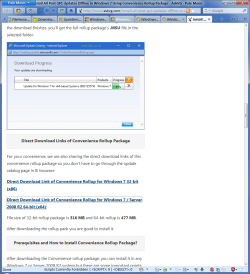
W7 Update Pack Links on AskVG.png
Still how many updates (out of the total number of W7 updates) does this pack have?
477 MB is much less that what I (eventually) managed to download last weekend.
 
Last edited:

My Computer My Computer

Computer type
PC/Desktop
Computer Manufacturer/Model Number
n/a
OS
W7 Ultimate SP1, LM19.2 MATE, W10 Home 1703, W10 Pro 1703 VM, #All 64 bit
CPU
AMD Phenom II x6 1100T, 3.3 GHz
Motherboard
ASUS M4A88T-M/USB3 (AM3)
Memory
12GB DDR3 1333 G-Skill (4GB x 2), G-Skill (2GB x 2)
Graphics Card(s)
NVIDIA GeForce GTX 660
Sound Card
Realtek?
Monitor(s) Displays
Samsung S23B350
Screen Resolution
1920x1080
Hard Drives
WD Green 2TB (SATA), WD Green 3TB (SATA), WD Blue 4TB (SATA), WD Blue 6TB (SATA)
PSU
Cooler Master
Case
Antec GX300 Tower
Cooling
3x Antec TRICOOL 120mm Fans
Mouse
Wired Optical
Internet Speed
DSL
Antivirus
Avast
Browser
Pale Moon (64 bit)
Other Info
2018-12-27 Upgraded HDDs
2015-12-10 Upgraded case, graphics card, storage
2015-08-15 Upgraded motherboard & RAM
2015-07-15 Upgraded LM17.1 to LM17.2
~~~
Still how many updates (out of the total number of W7 updates) does this pack have?
~~~

The post/link that you quoted from kerodo claims to lists each update in the roll up. It seems to be the same info on the MUC website. I would not go so far as to say that the list of updates that the roll up replaces is the same as the list of updates that the roll up contains. The roll up might contain an update that replaces several other updates.

The MUC website shows this:

muc.png

Code:
 Update for Windows 7 for x64-based  Systems (KB2574819) 
 Update for Windows 7 for x64-based  Systems (KB2603229) 
 Update for Windows 7 for x64-based  Systems (KB2607047) 
 Update for Windows 7 for x64-based  Systems (KB2607576) 
 Update for Windows 7 for x64-based  Systems (KB2633952) 
 Update for Windows 7 for x64-based  Systems (KB2639308) 
 Update for Windows 7 for x64-based  Systems (KB2640148) 
 Update for Windows 7 for x64-based  Systems (KB2647753) 
 Update for Windows 7 for x64-based  Systems (KB2660075) 
 Update for Windows 7 for x64-based  Systems (KB2661254) 
 Update for Windows 7 for x64-based  Systems (KB2677070) 
 Update for Windows 7 for x64-based  Systems (KB2679255) 
 Update for Windows 7 for x64-based  Systems (KB2699779) 
 Update for Windows 7 for x64-based  Systems (KB2709630) 
 Update for Windows 7 for x64-based  Systems (KB2709981) 
 Update for Windows 7 for x64-based  Systems (KB2719857) 
 Update for Windows 7 for x64-based  Systems (KB2726535) 
 Update for Windows 7 for x64-based  Systems (KB2731771) 
 Update for Windows 7 for x64-based  Systems (KB2732059) 
 Update for Windows 7 for x64-based  Systems (KB2732487) 
 Update for Windows 7 for x64-based  Systems (KB2732500) 
 Update for Windows 7 for x64-based  Systems (KB2735855) 
 Update for Windows 7 for x64-based  Systems (KB2739159) 
 Update for Windows 7 for x64-based  Systems (KB2741355) 
 Update for Windows 7 for x64-based  Systems (KB2749655) 
 Update for Windows 7 for x64-based  Systems (KB2756822) 
 Update for Windows 7 for x64-based  Systems (KB2760730) 
 Update for Windows 7 for x64-based  Systems (KB2762895) 
 Update for Windows 7 for x64-based  Systems (KB2763523) 
 Update for Windows 7 for x64-based  Systems (KB2773072) 
 Update for Windows 7 for x64-based  Systems (KB2779562) 
 Update for Windows 7 for x64-based  Systems (KB2786081) 
 Update for Windows 7 for x64-based  Systems (KB2786400) 
 Update for Windows 7 for x64-based  Systems (KB2791765) 
 Update for Windows 7 for x64-based  Systems (KB2794119) 
 Update for Windows 7 for x64-based  Systems (KB2798162) 
 Update for Windows 7 for x64-based  Systems (KB2799926) 
 Update for Windows 7 for x64-based  Systems (KB2800095) 
 Update for Windows 7 for x64-based  Systems (KB2808679) 
 Update for Windows 7 for x64-based  Systems (KB2813956) 
 Update for Windows 7 for x64-based  Systems (KB2829104) 
 Update for Windows 7 for x64-based  Systems (KB2830477) 
 Update for Windows 7 for x64-based  Systems (KB2834140) 
 Update for Windows 7 for x64-based  Systems (KB2835174) 
 Update for Windows 7 for x64-based  Systems (KB2836502) 
 Update for Windows 7 for x64-based  Systems (KB2843630) 
 Update for Windows 7 for x64-based  Systems (KB2846960) 
 Update for Windows 7 for x64-based  Systems (KB2846960) 
 Update for Windows 7 for x64-based  Systems (KB2847077) 
 Update for Windows 7 for x64-based  Systems (KB2852386) 
 Update for Windows 7 for x64-based  Systems (KB2853952) 
 Update for Windows 7 for x64-based  Systems (KB2863058) 
 Update for Windows 7 for x64-based  Systems (KB2868116) 
 Update for Windows 7 for x64-based  Systems (KB2882822) 
 Update for Windows 7 for x64-based  Systems (KB2888049) 
 Update for Windows 7 for x64-based  Systems (KB2890882) 
 Update for Windows 7 for x64-based  Systems (KB2891804) 
 Update for Windows 7 for x64-based  Systems (KB2893519) 
 Update for Windows 7 for x64-based  Systems (KB2904266) 
 Update for Windows 7 for x64-based  Systems (KB2905454) 
 Update for Windows 7 for x64-based  Systems (KB2908783) 
 Update for Windows 7 for x64-based  Systems (KB2913152) 
 Update for Windows 7 for x64-based  Systems (KB2913431) 
 Update for Windows 7 for x64-based  Systems (KB2913751) 
 Update for Windows 7 for x64-based  Systems (KB2918077) 
 Update for Windows 7 for x64-based  Systems (KB2919469) 
 Update for Windows 7 for x64-based  Systems (KB2922717) 
 Update for Windows 7 for x64-based  Systems (KB2923398) 
 Update for Windows 7 for x64-based  Systems (KB2923545) 
 Update for Windows 7 for x64-based  Systems (KB2928562) 
 Update for Windows 7 for x64-based  Systems (KB2929733) 
 Update for Windows 7 for x64-based  Systems (KB2929755) 
 Update for Windows 7 for x64-based  Systems (KB2966583) 
 Update for Windows 7 for x64-based  Systems (KB2970228) 
 Update for Windows 7 for x64-based  Systems (KB2973337) 
 Update for Windows 7 for x64-based  Systems (KB2977728) 
 Update for Windows 7 for x64-based  Systems (KB2978092) 
 Update for Windows 7 for x64-based  Systems (KB2980245) 
 Update for Windows 7 for x64-based  Systems (KB2981580) 
 Update for Windows 7 for x64-based  Systems (KB2985461) 
 Update for Windows 7 for x64-based  Systems (KB2994023) 
 Update for Windows 7 for x64-based  Systems (KB2998527) 
 Update for Windows 7 for x64-based  Systems (KB2999226) 
 Update for Windows 7 for x64-based  Systems (KB3000988) 
 Update for Windows 7 for x64-based  Systems (KB3001554) 
 Update for Windows 7 for x64-based  Systems (KB3004394) 
 Update for Windows 7 for x64-based  Systems (KB3005788) 
 Update for Windows 7 for x64-based  Systems (KB3006121) 
 Update for Windows 7 for x64-based  Systems (KB3006137) 
 Update for Windows 7 for x64-based  Systems (KB3006625) 
 Update for Windows 7 for x64-based  Systems (KB3008627) 
 Update for Windows 7 for x64-based  Systems (KB3009736) 
 Update for Windows 7 for x64-based  Systems (KB3013410) 
 Update for Windows 7 for x64-based  Systems (KB3013531) 
 Update for Windows 7 for x64-based  Systems (KB3014406) 
 Update for Windows 7 for x64-based  Systems (KB3020338) 
 Update for Windows 7 for x64-based  Systems (KB3020370) 
 Update for Windows 7 for x64-based  Systems (KB3040272) 
 Update for Windows 7 for x64-based  Systems (KB3045645) 
 Update for Windows 7 for x64-based  Systems (KB3048761) 
 Update for Windows 7 for x64-based  Systems (KB3049874) 
 Update for Windows 7 for x64-based  Systems (KB3054476) 
 Update for Windows 7 for x64-based  Systems (KB3065979) 
 Update for Windows 7 for x64-based  Systems (KB3068708) 
 Update for Windows 7 for x64-based  Systems (KB3075249) 
 Update for Windows 7 for x64-based  Systems (KB3077715) 
 Update for Windows 7 for x64-based  Systems (KB3078667) 
 Update for Windows 7 for x64-based  Systems (KB3080079) 
 Update for Windows 7 for x64-based  Systems (KB3080149) 
 Update for Windows 7 for x64-based  Systems (KB3081954) 
 Update for Windows 7 for x64-based  Systems (KB3092627) 
 Update for Windows 7 for x64-based  Systems (KB3095649) 
 Update for Windows 7 for x64-based  Systems (KB3102429) 
 Update for Windows 7 for x64-based  Systems (KB3107998) 
 Update for Windows 7 for x64-based  Systems (KB3112148) 
 Update for Windows 7 for x64-based  Systems (KB3118401) 
 Update for Windows 7 for x64-based  Systems (KB3121255) 
 Update for Windows 7 for x64-based  Systems (KB3133977) 
 Update for Windows 7 for x64-based  Systems (KB3137061) 
 Update for Windows 7 for x64-based  Systems (KB3138378) 
 Update for Windows 7 for x64-based  Systems (KB3138901) 
 Update for Windows 7 for x64-based  Systems (KB3147071) 
 Update for Windows 7 for x64-based  Systems (KB3148851)
 

My Computer My Computer

Computer type
Laptop
Computer Manufacturer/Model Number
Employer provided Dell Latitude
OS
W7 Pro SP1 64bit
CPU
i7
Memory
8GB
Graphics Card(s)
Intel HD Graphics
Hard Drives
crappy SSD
Antivirus
Employer mandated Symantec Endpoint Protection
Browser
Pale Moon 64bit, IE11 64bit & Chrome 64bit
I saw the list on AskVG.

I asked that question because the W7 VM (I was battling with last week) hadn't been updated for ~1 year.

There were over 500 MB of updates listed in the Windows Update list. :eek:
 

My Computer My Computer

Computer type
PC/Desktop
Computer Manufacturer/Model Number
n/a
OS
W7 Ultimate SP1, LM19.2 MATE, W10 Home 1703, W10 Pro 1703 VM, #All 64 bit
CPU
AMD Phenom II x6 1100T, 3.3 GHz
Motherboard
ASUS M4A88T-M/USB3 (AM3)
Memory
12GB DDR3 1333 G-Skill (4GB x 2), G-Skill (2GB x 2)
Graphics Card(s)
NVIDIA GeForce GTX 660
Sound Card
Realtek?
Monitor(s) Displays
Samsung S23B350
Screen Resolution
1920x1080
Hard Drives
WD Green 2TB (SATA), WD Green 3TB (SATA), WD Blue 4TB (SATA), WD Blue 6TB (SATA)
PSU
Cooler Master
Case
Antec GX300 Tower
Cooling
3x Antec TRICOOL 120mm Fans
Mouse
Wired Optical
Internet Speed
DSL
Antivirus
Avast
Browser
Pale Moon (64 bit)
Other Info
2018-12-27 Upgraded HDDs
2015-12-10 Upgraded case, graphics card, storage
2015-08-15 Upgraded motherboard & RAM
2015-07-15 Upgraded LM17.1 to LM17.2
I found the Prerequisite for I.E. 11 here, just case anyone else wants it.

https://support.microsoft.com/en-us/kb/2847882

Prerequisites for IE11 aren't necessarily needed anymore Groze. If you install IE11 online, the installer will automatically download and install them before installing IE11.

Yea, I know that. However, after reading this thread it seems some are having trouble doing a clean install of windows 7 with sp1.

I wonder if you need to unplug then internet connection.

Here is kind of how I would do it.
Make sure computer is disconnected from the internet
Install windows 7 (You may not need this if you already have windows 7 sp1 install disk)
Install windows 7 service pack 1
Disable windows update.
Install all drivers
Install I.E. prerequisites including the optional ones.
Install I.E. 11
Install prerequisite Windows 7 roll-up
Install Windows 7 roll-up
Restore internet connection.
 

My Computer My Computer

Computer type
PC/Desktop
Computer Manufacturer/Model Number
Dell All in one Inspiron 2020
OS
W10 32 bit, XUbuntu 18.xx 64 bit
CPU
Intel(R) Celeron(R) CPU G1620T @ 2.40GHz, 2400 Mhz
Motherboard
Dell
Memory
4GB
Graphics Card(s)
Intel HD graphics
Sound Card
High Definition Audio Device
Monitor(s) Displays
20 inch Screen
Screen Resolution
W7=1280 x 720 & Linux Mint Xfce=1360 x 768
Hard Drives
500 GB hard drive
Keyboard
Usb
Mouse
Usb
Internet Speed
High-Speed
Antivirus
MSE
Browser
Main Browser Firefox
Other Info
I have done a clean install of Windows 7 using Dell re-installation disk (Dell sent me one). I also use Free Macrium reflect backup and restore.
@lehnerus2000

Sorry, I don't really know too much aside from what's been posted in that link above. It's possible that some updates are not included, I thought I remembered something about IE updates needing to be downloaded separately, not sure. It's also possible that some of the "telemetry" related updates that people like to avoid are included also. I ran into this link first on Wilders, where I frequent mostly. At this point, I'm waiting to hear from people who have actually tried it and what their experience is. On the one hand, this could be great for those doing a clean install of Win 7 SP1, saving a lot of time, but then on the other hand, it seems a little out of character for MS to be doing anything to help Win 7 users lately. So... I can't help with much more info, but I'm hoping other users can in time.
 

My Computer My Computer

OS
Windows 7 Ultimate x64
Hi jaknapceu and welcome to Seven Forums. There are a couple of posts earlier where people have tried that without any success. Keep an eye on this thread and we'll get an answer sometime.
You are absolutely right kado, I erred in making that suggestion [real life had me in a bind and I was in a hurry, my apologies, :o], it is early in the process and I'm sure there will be better methods. One might be the one in the tutorials: http://www.sevenforums.com/tutorial...ows-7-sp1-into-installation-dvd-iso-file.html
There is an integration at step: 12. To Integrate Windows Updates and still be able to Slipstream SP1 (if not already)

Anak you were quite right. Once I'd added that other update to the mix it worked.
Now to figure out how to burn a new DVD with what files etc.OK have "slipstreamed" the rollup into my disk image but how to burn these to DVD? I can't seem to make a bootable DVD - IMGBurn refuses to accept all the files below and Nero rejects when DVD Boot is selected saying install.wim is too large, select DVD UDF.
Glad that worked out for you.
About doing that burn; Some burners set a 2GB limit on burning the install.wim, that's why Nero wants you to go to Universal Disk Format (UDF) so, check the UDF settings in either IMGBurn or Nero to see if you can change the UDF setting.

I use Ashampoo Burning Studio and my UDF's are listed under Expert Format Options, but, what sets my file size are my ISO settings, I can go up to 4GB in size; Check your Help Files.


I have same question i got files like program files, program files x86 etc.. dunno how to create from it ISO..
jak, I'm not quite sure which way you want to go, if the slipstream tutorial doesn't help check at the bottom of it under "related tutorials" see if one of those may help you.

I'll post "Related" here to help you and others in this thread that have similar questions.

Related Tutorials


Hi All,
Can someone answer these questions about this roll-up :

1) back in 2013, MS released a post SP1 hot-fix rollup : KB2775511. Does anyone know if the new rollup (KB3125574) includes the hotfixes from the 2013 rollup - or do we have to install the old one first ?
2) if I read correctly, the new roll-up does NOT include IE11 (crazy). If I do win updates afterwards, will it install IE11 normally, or do I need to manually install the IE11 pre-requisites first ? I'm hoping win updates will do all that ??
3) has anyone written a nice step by step guide for slip-steaming the new update ? The MS article on TechNet "Add or Remove Packages Offline" is a PITA to follow. Hopefully someone here has written a step-by-step guide that includes all steps (eg extracting the ISO file, etc)

Thanks !!
Your IE question may be answered here: https://Microsoft Issues Windows 7 SP1 'Convenience Rollups' | redmondmag.com
However, Microsoft did not include Internet Explorer browser updates in these convenience rollups, according to Microsoft's Knowledge Base article on the topic. Those updates can be had by getting "the latest security update" for IE, per the article.
 

My Computer My Computer

Computer type
PC/Desktop
Computer Manufacturer/Model Number
Gateway DX4831-01e (Mid-Tower Desktop)
OS
Originally Win 7 Hm Prem x64 Ver 6.1.7600 Build 7601-SP1 | Upgraded to Windows 10 December 14, 2019
CPU
Intel i3 530 2.93GHz, 2933MHz 2 Cores 4 Logical Processors
Motherboard
Gateway H57M01 133 megahertz
Memory
6GB of 1,333MHz DDR3 SDRAM
Graphics Card(s)
32MB Intel Graphics Media Accelerator HD IGChip
Sound Card
Realtek High Definition Audio
Monitor(s) Displays
Gateway HX2000 20inch TFT active matrix TN
Screen Resolution
1600 x 900 x 59 hertz
Hard Drives
WDC WD10EADS-00M2B0 [HDD] (1000.20 GB) -- drive 0,
HL-DT-ST DVDRAM GH41N [CD-ROM dr]
Four card readers, and Four USB 2.0
PSU
300watts.
Case
Mid-Tower Desktop
Cooling
Stock from Gateway
Keyboard
Natural Ergonomic Keyboard 4000, see Other Info
Mouse
Orig. Gateway wore out now using Insignia USB wired optical
Internet Speed
Vz FIOS 10ms png 57.64Mbps down 65.53Mbps up Speedtest.org
Antivirus
Zamana Anti-logger with Anti-malware, MSE, Windows Firewall,
Browser
IE11.0.9600.19399-Upd ver11.0.135, Firefox 68.0.1 x64
Other Info
System Specs by Belarc.

BIOS: American Megatrends Inc. P01-A0 11/17/2009

Replaced the MS 'Natural' Standard PS/2 Enhanced 101-102 Keyboard with a new Natural Ergonomic Keyboard 4000 on August 1st 2014.

Canon Pixma MG3222 Printer.

Updated to IE11 on 12102015 | Fios Quantum Router g1100

Additional AV: SpywareBlaster, manual Mbam, SAS
~~~
Still how many updates (out of the total number of W7 updates) does this pack have?
~~~

The post/link that you quoted from kerodo claims to lists each update in the roll up. It seems to be the same info on the MUC website. I would not go so far as to say that the list of updates that the roll up replaces is the same as the list of updates that the roll up contains. The roll up might contain an update that replaces several other updates.

The MUC website shows this:

View attachment 386925

Code:
 Update for Windows 7 for x64-based  Systems (KB2574819) 
 Update for Windows 7 for x64-based  Systems (KB2603229) 
 Update for Windows 7 for x64-based  Systems (KB2607047) 
 Update for Windows 7 for x64-based  Systems (KB2607576) 
 Update for Windows 7 for x64-based  Systems (KB2633952) 
 Update for Windows 7 for x64-based  Systems (KB2639308) 
 Update for Windows 7 for x64-based  Systems (KB2640148) 
 Update for Windows 7 for x64-based  Systems (KB2647753) 
 Update for Windows 7 for x64-based  Systems (KB2660075) 
 Update for Windows 7 for x64-based  Systems (KB2661254) 
 Update for Windows 7 for x64-based  Systems (KB2677070) 
 Update for Windows 7 for x64-based  Systems (KB2679255) 
 Update for Windows 7 for x64-based  Systems (KB2699779) 
 Update for Windows 7 for x64-based  Systems (KB2709630) 
 Update for Windows 7 for x64-based  Systems (KB2709981) 
 Update for Windows 7 for x64-based  Systems (KB2719857) 
 Update for Windows 7 for x64-based  Systems (KB2726535) 
 Update for Windows 7 for x64-based  Systems (KB2731771) 
 Update for Windows 7 for x64-based  Systems (KB2732059) 
 Update for Windows 7 for x64-based  Systems (KB2732487) 
 Update for Windows 7 for x64-based  Systems (KB2732500) 
 Update for Windows 7 for x64-based  Systems (KB2735855) 
 Update for Windows 7 for x64-based  Systems (KB2739159) 
 Update for Windows 7 for x64-based  Systems (KB2741355) 
 Update for Windows 7 for x64-based  Systems (KB2749655) 
 Update for Windows 7 for x64-based  Systems (KB2756822) 
 Update for Windows 7 for x64-based  Systems (KB2760730) 
 Update for Windows 7 for x64-based  Systems (KB2762895) 
 Update for Windows 7 for x64-based  Systems (KB2763523) 
 Update for Windows 7 for x64-based  Systems (KB2773072) 
 Update for Windows 7 for x64-based  Systems (KB2779562) 
 Update for Windows 7 for x64-based  Systems (KB2786081) 
 Update for Windows 7 for x64-based  Systems (KB2786400) 
 Update for Windows 7 for x64-based  Systems (KB2791765) 
 Update for Windows 7 for x64-based  Systems (KB2794119) 
 Update for Windows 7 for x64-based  Systems (KB2798162) 
 Update for Windows 7 for x64-based  Systems (KB2799926) 
 Update for Windows 7 for x64-based  Systems (KB2800095) 
 Update for Windows 7 for x64-based  Systems (KB2808679) 
 Update for Windows 7 for x64-based  Systems (KB2813956) 
 Update for Windows 7 for x64-based  Systems (KB2829104) 
 Update for Windows 7 for x64-based  Systems (KB2830477) 
 Update for Windows 7 for x64-based  Systems (KB2834140) 
 Update for Windows 7 for x64-based  Systems (KB2835174) 
 Update for Windows 7 for x64-based  Systems (KB2836502) 
 Update for Windows 7 for x64-based  Systems (KB2843630) 
 Update for Windows 7 for x64-based  Systems (KB2846960) 
 Update for Windows 7 for x64-based  Systems (KB2846960) 
 Update for Windows 7 for x64-based  Systems (KB2847077) 
 Update for Windows 7 for x64-based  Systems (KB2852386) 
 Update for Windows 7 for x64-based  Systems (KB2853952) 
 Update for Windows 7 for x64-based  Systems (KB2863058) 
 Update for Windows 7 for x64-based  Systems (KB2868116) 
 Update for Windows 7 for x64-based  Systems (KB2882822) 
 Update for Windows 7 for x64-based  Systems (KB2888049) 
 Update for Windows 7 for x64-based  Systems (KB2890882) 
 Update for Windows 7 for x64-based  Systems (KB2891804) 
 Update for Windows 7 for x64-based  Systems (KB2893519) 
 Update for Windows 7 for x64-based  Systems (KB2904266) 
 Update for Windows 7 for x64-based  Systems (KB2905454) 
 Update for Windows 7 for x64-based  Systems (KB2908783) 
 Update for Windows 7 for x64-based  Systems (KB2913152) 
 Update for Windows 7 for x64-based  Systems (KB2913431) 
 Update for Windows 7 for x64-based  Systems (KB2913751) 
 Update for Windows 7 for x64-based  Systems (KB2918077) 
 Update for Windows 7 for x64-based  Systems (KB2919469) 
 Update for Windows 7 for x64-based  Systems (KB2922717) 
 Update for Windows 7 for x64-based  Systems (KB2923398) 
 Update for Windows 7 for x64-based  Systems (KB2923545) 
 Update for Windows 7 for x64-based  Systems (KB2928562) 
 Update for Windows 7 for x64-based  Systems (KB2929733) 
 Update for Windows 7 for x64-based  Systems (KB2929755) 
 Update for Windows 7 for x64-based  Systems (KB2966583) 
 Update for Windows 7 for x64-based  Systems (KB2970228) 
 Update for Windows 7 for x64-based  Systems (KB2973337) 
 Update for Windows 7 for x64-based  Systems (KB2977728) 
 Update for Windows 7 for x64-based  Systems (KB2978092) 
 Update for Windows 7 for x64-based  Systems (KB2980245) 
 Update for Windows 7 for x64-based  Systems (KB2981580) 
 Update for Windows 7 for x64-based  Systems (KB2985461) 
 Update for Windows 7 for x64-based  Systems (KB2994023) 
 Update for Windows 7 for x64-based  Systems (KB2998527) 
 Update for Windows 7 for x64-based  Systems (KB2999226) 
 Update for Windows 7 for x64-based  Systems (KB3000988) 
 Update for Windows 7 for x64-based  Systems (KB3001554) 
 Update for Windows 7 for x64-based  Systems (KB3004394) 
 Update for Windows 7 for x64-based  Systems (KB3005788) 
 Update for Windows 7 for x64-based  Systems (KB3006121) 
 Update for Windows 7 for x64-based  Systems (KB3006137) 
 Update for Windows 7 for x64-based  Systems (KB3006625) 
 Update for Windows 7 for x64-based  Systems (KB3008627) 
 Update for Windows 7 for x64-based  Systems (KB3009736) 
 Update for Windows 7 for x64-based  Systems (KB3013410) 
 Update for Windows 7 for x64-based  Systems (KB3013531) 
 Update for Windows 7 for x64-based  Systems (KB3014406) 
 Update for Windows 7 for x64-based  Systems (KB3020338) 
 Update for Windows 7 for x64-based  Systems (KB3020370) 
 Update for Windows 7 for x64-based  Systems (KB3040272) 
 Update for Windows 7 for x64-based  Systems (KB3045645) 
 Update for Windows 7 for x64-based  Systems (KB3048761) 
 Update for Windows 7 for x64-based  Systems (KB3049874) 
 Update for Windows 7 for x64-based  Systems (KB3054476) 
 Update for Windows 7 for x64-based  Systems (KB3065979) 
 Update for Windows 7 for x64-based  Systems (KB3068708) 
 Update for Windows 7 for x64-based  Systems (KB3075249) 
 Update for Windows 7 for x64-based  Systems (KB3077715) 
 Update for Windows 7 for x64-based  Systems (KB3078667) 
 Update for Windows 7 for x64-based  Systems (KB3080079) 
 Update for Windows 7 for x64-based  Systems (KB3080149) 
 Update for Windows 7 for x64-based  Systems (KB3081954) 
 Update for Windows 7 for x64-based  Systems (KB3092627) 
 Update for Windows 7 for x64-based  Systems (KB3095649) 
 Update for Windows 7 for x64-based  Systems (KB3102429) 
 Update for Windows 7 for x64-based  Systems (KB3107998) 
 Update for Windows 7 for x64-based  Systems (KB3112148) 
 Update for Windows 7 for x64-based  Systems (KB3118401) 
 Update for Windows 7 for x64-based  Systems (KB3121255) 
 Update for Windows 7 for x64-based  Systems (KB3133977) 
 Update for Windows 7 for x64-based  Systems (KB3137061) 
 Update for Windows 7 for x64-based  Systems (KB3138378) 
 Update for Windows 7 for x64-based  Systems (KB3138901) 
 Update for Windows 7 for x64-based  Systems (KB3147071) 
 Update for Windows 7 for x64-based  Systems (KB3148851)

Now this is puzzling. According to UNI's list from the MUC site, the convenience rollup DOES contain some on my skip list. However, after I installed the rollup those updates show up in Windows update ready to install.
Why would they show up again if already installed?

The main culprits on my skip list are:
KB3068708
Kb3075249
Kb3080149

In the VM I've tested, these do show up again in Windows update after installing the pack. :confused:
 

My Computer My Computer

Computer type
PC/Desktop
Computer Manufacturer/Model Number
Custom Build
OS
Win 7 Ultimate, Win 8.1 Pro, Linux Mint 19 Cinnamon (All 64-Bit)
CPU
Intel i5 4690K
Motherboard
Gigabyte Z97X-UD3H
Memory
Corsair Vengeance LP 32GB DDR3
Graphics Card(s)
MSI GTX 1060 GAMING X 6GB
Sound Card
Onboard
Hard Drives
Samsung 850 EVO 250GB SSD (x2)
Samsung 860 EVO 1TB SSD (x2)
Crucial MX300 525GB SSD
WD Blue 2TB 5400rpm Intellipark Disabled (x2)
PSU
Corsair HX750i
Case
Phanteks Enthoo Pro
Cooling
CM Hyper 212 EVO on CPU, Noctua Redux NF-P14S 1500rpm (x6)
Keyboard
Corsair K70 RGB LUX
Mouse
Corsair Sabre RGB
Antivirus
Avast Free, MalwareBytes, SAS & CryptoPrevent
Browser
Chrome
Other Info
StarTech PEXESAT322I 2 Port PCI-E SATA Card
ASUS PCE-AC56 Dual-band AC1300 Wireless Card
Akasa FC.Six Manual Fan Controller
And a Partridge in a Pear Tree!
Anak thanks for your response. I'll switch to AShampoo if I have to but yesterday I ended up using an obsolete version of RT7Lite. Today am trying again with v2.6 which still works. It's usually used to slipstream a service pack but it also serves to do many other tasks plus it has that 'magic' burn option at the end, so am waiting currently to see if it works as planned. So far so good as they say, but slow.

Edit: Success. Anyone wanting the software - check the Tute on Slipstreaming: http://www.sevenforums.com/tutorial...ows-7-sp1-into-installation-dvd-iso-file.html
 
Last edited:

My Computer My Computer

Computer type
PC/Desktop
Computer Manufacturer/Model Number
Alienware® ALX X58
OS
Win 7 Ult SP1/Win 10 Pro (all x64)
CPU
Intel® Core™ i7-975 Extreme O/C to 4.02 GHz, 8MB Cache
Motherboard
Asus® P6T Deluxe V2 X58 LGA1366
Memory
24GB Corsair Vengeance DDR3 SDRAM at 1600MHz - 6 x 4096MB
Graphics Card(s)
1792 MB NVIDIA® GeForce® GTX 295 Dual Core
Sound Card
Onboard Soundmax® High-Definition 7.1 Performance Audio
Monitor(s) Displays
Samsung XL2370 LED backlit 23" W/S 2ms response time
Screen Resolution
1920 X 1080
Hard Drives
2 x 500gb SATA II
1 x 1TB SATA II
1 external eSATA LaCie 3TB
(Non-RAID)
PSU
Alienware® 1200 Watt Multi-GPU
Case
Alienware® P2 ALX Chassis with AlienIce™ 3.0 Video Cooling
Cooling
Alienware® High-Perf. Liquid Cooling + Acoustic Dampening
Keyboard
Microsoft® Wireless Entertainment 8000 + Logitech® G15 Wired
Mouse
Microsoft® Wireless Laser 8000 + Logitech® G9 Wired
Internet Speed
1Gb/s
Antivirus
McAfee LiveSafe
Browser
Firefox - latest
Other Info
Using non-RAID on purpose as I find RAID to be too temperamental.
Now set to AHCI
Everyone who don't want STUCK at checking for updates here is simple FIX:

First when you installing Windows 7 you need in installation turn off Windows Updates..

When you install Windows download update KB3135445

Download:

x64: https://www.microsoft.com/en-US/download/confirmation.aspx?id=50797
x86: https://www.microsoft.com/en-US/download/confirmation.aspx?id=50793

Install it and restart computer after that go to Windows Update and search for updates..

Updates will show within 10 - 15 minutes..I try it with Windows 7 Professional x64 and it works.

Have a nice day :) Hope I help you.
 
Last edited:

My Computer My Computer

Computer type
Laptop
Computer Manufacturer/Model Number
HP
OS
Windows 10 Home x64
CPU
Intel Celeron N2840
Memory
8gb
Graphics Card(s)
iGPUä
Just a question to those who are testing out the W7 convenience rollup ...

After you installed the convenience rollup on your W7 system did you see a plugin for it in the Disk Cleanup wizard ? Currently the DCW addon is for W7 SP1.

The Disk Cleanup wizard detects Windows updates that you do not need on your computer, so I was just wondering how it is responding to the convenience rollup. Not sure if another plugin is required. Does it even recognize the rollup as multiple windows updates or just one update?
 

My Computer My Computer

Computer type
PC/Desktop
Computer Manufacturer/Model Number
Custom build
OS
W7Pro/64
Seeing as this roll up includes updates through May I would think it already had March's update client on it.
 

My Computer My Computer

Computer type
PC/Desktop
Computer Manufacturer/Model Number
Custom assembled by me :}
OS
Win-7-Pro64bit 7-H-Prem-64bit
CPU
i7-5930K 2nd i9-9940x both water blocked VRM's too
Motherboard
ASUS SABERTOOTH X99 2nd ASUS x299 Apex
Memory
Trident-z 3200C14 2nd Trident-z 3600C16
Graphics Card(s)
EVGA 1080ti ftw3 2nd Titan Xp both water blocked
Sound Card
Built-in Realtek
Monitor(s) Displays
1-AOC G2460PG 24"G-Sync 144Hz/ 2nd 1-ASUS VG248QE 24" 144Hz
Screen Resolution
1920 x 1080 144Hz
Hard Drives
2-Samsung M.2 Evo & Evo Plus
2-Samsung 850 EVO 500GB SSD's/ 3-2.5 W.D. Black 1tb-&3-1tb/3-3.5 WD Black 1tb hdd's
PSU
EVGA SuperNOVA 1000-P2 2nd 1200-P2
Case
2-Corsair Obsidian Series 450D Black ATX Mid Tower
Cooling
Custom water loops
Keyboard
Logitech G710+/ 2nd Logitech G910
Mouse
2-RedDragon M901 Perdition 16400 dpi Gaming mouse = wired
Internet Speed
Comcast Ping 19ms 89.31mbps download speed 6.12mbps upload
Antivirus
Malwarebytes Pro/ Superantispyware Pro
Browser
FireFox & Pale moon
Other Info
2nd ASUS X299 Apex/Intel i9-9940x with Custom water loop/7H-Prem-x64/Corsair 450D case/Ram Trident-z 3600C16 4x8gb / Samsung970Evo plus 500gb SSD/Dual ssd EZ swap evo/PSU EVGA SuperNova 1200w-P2 80+Platinum/GPU Titan Xp /8-ML-140 on push-pull on 2-280GTX rads
Everyone who don't want STUCK at checking for updates here is simple FIX:

First when you installing Windows 7 you need in installation turn off Windows Updates..

When you install Windows download update KB3135445

Download:

x64: https://www.microsoft.com/en-US/download/confirmation.aspx?id=50797
x86: https://www.microsoft.com/en-US/download/confirmation.aspx?id=50793

Install it and restart computer after that go to Windows Update and search for updates..

Updates will show within 10 - 15 minutes..I try it with Windows 7 Professional x64 and it works.

Have a nice day :) Hope I help you.

KB3135445 is superseded. Latest Update Client is KB3138612 - March2016 :)
 

My Computer My Computer

Computer type
Laptop
Computer Manufacturer/Model Number
MSI PE60 6QE
OS
Win 10 Pro x64, Win 7 Pro x64
CPU
Intel Core i7-6700HQ Skylake
Motherboard
MSI MS-16J5
Memory
16gb Crucial DDR4
Graphics Card(s)
NVIDIA GeForce GTX 960M 2 GB
Screen Resolution
1920 x 1080
Hard Drives
Samsung 850 EVO 250 GB M.2 SSD (MZ-N5E250BW)
HGST 1TB @7200 RPM HTS721010A9E630
Case
Plastic
Keyboard
Got one...
Mouse
Yep, one of those too.
Internet Speed
FIOS 75/75
Antivirus
Defender
Browser
Chrome/FFox/Ex-PLODE-r/(L)Edge
Other Info
Defender, Custom Hosts, uBlock, regular backups w/ Macrium (Free)
But with this update checking for updates take 10 - 15 minutes not hours or days :)
 

My Computer My Computer

Computer type
Laptop
Computer Manufacturer/Model Number
HP
OS
Windows 10 Home x64
CPU
Intel Celeron N2840
Memory
8gb
Graphics Card(s)
iGPUä
Last edited:

My Computer My Computer

Computer type
Laptop
Computer Manufacturer/Model Number
MSI PE60 6QE
OS
Win 10 Pro x64, Win 7 Pro x64
CPU
Intel Core i7-6700HQ Skylake
Motherboard
MSI MS-16J5
Memory
16gb Crucial DDR4
Graphics Card(s)
NVIDIA GeForce GTX 960M 2 GB
Screen Resolution
1920 x 1080
Hard Drives
Samsung 850 EVO 250 GB M.2 SSD (MZ-N5E250BW)
HGST 1TB @7200 RPM HTS721010A9E630
Case
Plastic
Keyboard
Got one...
Mouse
Yep, one of those too.
Internet Speed
FIOS 75/75
Antivirus
Defender
Browser
Chrome/FFox/Ex-PLODE-r/(L)Edge
Other Info
Defender, Custom Hosts, uBlock, regular backups w/ Macrium (Free)
But with this update checking for updates take 10 - 15 minutes not hours or days :)

Yea installing those are really band-aids it really doesn't fix anything but actually finding the rest of April/ May updates.

The machine still has the original issue of not finding updates shortly after startup the way windows and update system is supposed to function.
 

My Computer My Computer

Computer type
PC/Desktop
Computer Manufacturer/Model Number
Custom assembled by me :}
OS
Win-7-Pro64bit 7-H-Prem-64bit
CPU
i7-5930K 2nd i9-9940x both water blocked VRM's too
Motherboard
ASUS SABERTOOTH X99 2nd ASUS x299 Apex
Memory
Trident-z 3200C14 2nd Trident-z 3600C16
Graphics Card(s)
EVGA 1080ti ftw3 2nd Titan Xp both water blocked
Sound Card
Built-in Realtek
Monitor(s) Displays
1-AOC G2460PG 24"G-Sync 144Hz/ 2nd 1-ASUS VG248QE 24" 144Hz
Screen Resolution
1920 x 1080 144Hz
Hard Drives
2-Samsung M.2 Evo & Evo Plus
2-Samsung 850 EVO 500GB SSD's/ 3-2.5 W.D. Black 1tb-&3-1tb/3-3.5 WD Black 1tb hdd's
PSU
EVGA SuperNOVA 1000-P2 2nd 1200-P2
Case
2-Corsair Obsidian Series 450D Black ATX Mid Tower
Cooling
Custom water loops
Keyboard
Logitech G710+/ 2nd Logitech G910
Mouse
2-RedDragon M901 Perdition 16400 dpi Gaming mouse = wired
Internet Speed
Comcast Ping 19ms 89.31mbps download speed 6.12mbps upload
Antivirus
Malwarebytes Pro/ Superantispyware Pro
Browser
FireFox & Pale moon
Other Info
2nd ASUS X299 Apex/Intel i9-9940x with Custom water loop/7H-Prem-x64/Corsair 450D case/Ram Trident-z 3600C16 4x8gb / Samsung970Evo plus 500gb SSD/Dual ssd EZ swap evo/PSU EVGA SuperNova 1200w-P2 80+Platinum/GPU Titan Xp /8-ML-140 on push-pull on 2-280GTX rads
But with this update checking for updates take 10 - 15 minutes not hours or days :)

I've tried those suggestions in a few different VM's, must have done about 50 different VM's and god knows how many combinations of WU update clients, installing, uninstalling, reinstalling in the past 6 months. Tried suggestions from many different members. It'll work one day and then borked again another day. Sometimes it's quick (not often), sometimes it does nothing for hours. Again, hit and miss and pot luck as to how it's going to act.
I have still yet to find a permanent solution on my systems. I'm running a VM now with only the latest client installed and...well see below it's been running for the last 3 hours. :(

Capture-06.jpg
 

My Computer My Computer

Computer type
PC/Desktop
Computer Manufacturer/Model Number
Custom Build
OS
Win 7 Ultimate, Win 8.1 Pro, Linux Mint 19 Cinnamon (All 64-Bit)
CPU
Intel i5 4690K
Motherboard
Gigabyte Z97X-UD3H
Memory
Corsair Vengeance LP 32GB DDR3
Graphics Card(s)
MSI GTX 1060 GAMING X 6GB
Sound Card
Onboard
Hard Drives
Samsung 850 EVO 250GB SSD (x2)
Samsung 860 EVO 1TB SSD (x2)
Crucial MX300 525GB SSD
WD Blue 2TB 5400rpm Intellipark Disabled (x2)
PSU
Corsair HX750i
Case
Phanteks Enthoo Pro
Cooling
CM Hyper 212 EVO on CPU, Noctua Redux NF-P14S 1500rpm (x6)
Keyboard
Corsair K70 RGB LUX
Mouse
Corsair Sabre RGB
Antivirus
Avast Free, MalwareBytes, SAS & CryptoPrevent
Browser
Chrome
Other Info
StarTech PEXESAT322I 2 Port PCI-E SATA Card
ASUS PCE-AC56 Dual-band AC1300 Wireless Card
Akasa FC.Six Manual Fan Controller
And a Partridge in a Pear Tree!
Yea my usual suggestion is to have net 4.5.2 installed if it's not.

Ultimately I would also just use Brink's option 3 to reset the updates system services.....
And let the buzzard run
That so far has fixed my acer.
 

My Computer My Computer

Computer type
PC/Desktop
Computer Manufacturer/Model Number
Custom assembled by me :}
OS
Win-7-Pro64bit 7-H-Prem-64bit
CPU
i7-5930K 2nd i9-9940x both water blocked VRM's too
Motherboard
ASUS SABERTOOTH X99 2nd ASUS x299 Apex
Memory
Trident-z 3200C14 2nd Trident-z 3600C16
Graphics Card(s)
EVGA 1080ti ftw3 2nd Titan Xp both water blocked
Sound Card
Built-in Realtek
Monitor(s) Displays
1-AOC G2460PG 24"G-Sync 144Hz/ 2nd 1-ASUS VG248QE 24" 144Hz
Screen Resolution
1920 x 1080 144Hz
Hard Drives
2-Samsung M.2 Evo & Evo Plus
2-Samsung 850 EVO 500GB SSD's/ 3-2.5 W.D. Black 1tb-&3-1tb/3-3.5 WD Black 1tb hdd's
PSU
EVGA SuperNOVA 1000-P2 2nd 1200-P2
Case
2-Corsair Obsidian Series 450D Black ATX Mid Tower
Cooling
Custom water loops
Keyboard
Logitech G710+/ 2nd Logitech G910
Mouse
2-RedDragon M901 Perdition 16400 dpi Gaming mouse = wired
Internet Speed
Comcast Ping 19ms 89.31mbps download speed 6.12mbps upload
Antivirus
Malwarebytes Pro/ Superantispyware Pro
Browser
FireFox & Pale moon
Other Info
2nd ASUS X299 Apex/Intel i9-9940x with Custom water loop/7H-Prem-x64/Corsair 450D case/Ram Trident-z 3600C16 4x8gb / Samsung970Evo plus 500gb SSD/Dual ssd EZ swap evo/PSU EVGA SuperNova 1200w-P2 80+Platinum/GPU Titan Xp /8-ML-140 on push-pull on 2-280GTX rads
Seeing as this roll up includes updates through May I would think it already had March's update client on it.
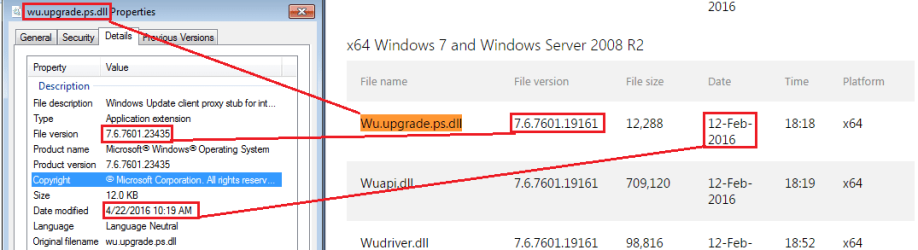
This roll up seems to install a newer version of the WU client.

Starting with W7pro64bit SP1 that has never checked for updates, I installed this roll up. I then looked at the properties of Wu.upgrade.ps.dll and compared the File version and Date modified to the W7 64bit info for KB3138612 (March WUC update). The Wu.upgrade.ps.dll file installed by this roll up seems newer.

WU.png
 

My Computer My Computer

Computer type
Laptop
Computer Manufacturer/Model Number
Employer provided Dell Latitude
OS
W7 Pro SP1 64bit
CPU
i7
Memory
8GB
Graphics Card(s)
Intel HD Graphics
Hard Drives
crappy SSD
Antivirus
Employer mandated Symantec Endpoint Protection
Browser
Pale Moon 64bit, IE11 64bit & Chrome 64bit
Didn't seem to make any difference. It was still glacial.
 

My Computer My Computer

Computer type
Laptop
Computer Manufacturer/Model Number
Hewlett-Packard/G62-107SA Notebook
OS
Microsoft Windows 7 Home Premium 64-bit Service Pack 1
CPU
Intel(R) Core(TM) i3 CPU M 330 @ 2.13GHz
Motherboard
Hewlett-Packard 1425
Memory
8 GB DDR3
Graphics Card(s)
Intel(R) HD Graphics
Sound Card
Realtek High Definition Audio
Monitor(s) Displays
Builtin
Screen Resolution
1366 x 768 x 32 bits (4294967296 colors) @ 60 Hz
Hard Drives
250 GB SATA Hard Disk Drive 7200 rpm
2TB Seagate GoFlex USB 2 Drive
1TB Iomega Prestige USB 2 Drive
1.5TB Iomega Prestige USB 2 Drive (Samsung)
2TB WD MyBook Live NAS.
Mouse
Logitech Anywhere MX
Internet Speed
152 Mbs download 10 Mbs upload
Antivirus
Norton 360
Browser
Chrome
UNI,
Well I did see a new KB3156417 delivered the other day possibly it updates the update client too ?
 

My Computer My Computer

Computer type
PC/Desktop
Computer Manufacturer/Model Number
Custom assembled by me :}
OS
Win-7-Pro64bit 7-H-Prem-64bit
CPU
i7-5930K 2nd i9-9940x both water blocked VRM's too
Motherboard
ASUS SABERTOOTH X99 2nd ASUS x299 Apex
Memory
Trident-z 3200C14 2nd Trident-z 3600C16
Graphics Card(s)
EVGA 1080ti ftw3 2nd Titan Xp both water blocked
Sound Card
Built-in Realtek
Monitor(s) Displays
1-AOC G2460PG 24"G-Sync 144Hz/ 2nd 1-ASUS VG248QE 24" 144Hz
Screen Resolution
1920 x 1080 144Hz
Hard Drives
2-Samsung M.2 Evo & Evo Plus
2-Samsung 850 EVO 500GB SSD's/ 3-2.5 W.D. Black 1tb-&3-1tb/3-3.5 WD Black 1tb hdd's
PSU
EVGA SuperNOVA 1000-P2 2nd 1200-P2
Case
2-Corsair Obsidian Series 450D Black ATX Mid Tower
Cooling
Custom water loops
Keyboard
Logitech G710+/ 2nd Logitech G910
Mouse
2-RedDragon M901 Perdition 16400 dpi Gaming mouse = wired
Internet Speed
Comcast Ping 19ms 89.31mbps download speed 6.12mbps upload
Antivirus
Malwarebytes Pro/ Superantispyware Pro
Browser
FireFox & Pale moon
Other Info
2nd ASUS X299 Apex/Intel i9-9940x with Custom water loop/7H-Prem-x64/Corsair 450D case/Ram Trident-z 3600C16 4x8gb / Samsung970Evo plus 500gb SSD/Dual ssd EZ swap evo/PSU EVGA SuperNova 1200w-P2 80+Platinum/GPU Titan Xp /8-ML-140 on push-pull on 2-280GTX rads
Back
Top