Simplifying updates for Windows 7 and 8.1

~~~
It'll work one day and then borked again another day. Sometimes it's quick (not often), sometimes it does nothing for hours. Again, hit and miss and pot luck as to how it's going to act.
~~~
I see this too... very hit and miss.
I have a VM searching right now and it has been much longer than my experiment a few weeks ago - when I got the long list of updated within 10 to 15 minutes. I was able to repeat that 3 times using 3 different WU clients.

If I decide to post something to try, it usually includes:
update WUC while not connected to the Internet
connect to the Internet
let WU search 24+ hours
If it fails to find a list of updates by then - reset WU per the tut.
 

My Computer My Computer

Computer type
Laptop
Computer Manufacturer/Model Number
Employer provided Dell Latitude
OS
W7 Pro SP1 64bit
CPU
i7
Memory
8GB
Graphics Card(s)
Intel HD Graphics
Hard Drives
crappy SSD
Antivirus
Employer mandated Symantec Endpoint Protection
Browser
Pale Moon 64bit, IE11 64bit & Chrome 64bit
Yea my usual suggestion is to have net 4.5.2 installed if it's not.

Ultimately I would also just use Brink's option 3 to reset the updates system services.....
And let the buzzard run
That so far has fixed my acer.

Didn't seem to make any difference. It was still glacial.

~~~
It'll work one day and then borked again another day. Sometimes it's quick (not often), sometimes it does nothing for hours. Again, hit and miss and pot luck as to how it's going to act.
~~~
I see this too... very hit and miss.
I have a VM searching right now and it has been much longer than my experiment a few weeks ago - when I got the long list of updated within 10 to 15 minutes. I was able to repeat that 3 times using 3 different WU clients.

If I decide to post something to try, it usually includes:
update WUC while not connected to the Internet
connect to the Internet
let WU search 24+ hours
If it fails to find a list of updates by then - reset WU per the tut.

This is why I've switched to manual updating on my main system UNI. It's 10-15 minutes of manual updating a month vs a guessing game of minutes or hours... who knows? :banghead:

I know which method I prefer right now.
 

My Computer My Computer

Computer type
PC/Desktop
Computer Manufacturer/Model Number
Custom Build
OS
Win 7 Ultimate, Win 8.1 Pro, Linux Mint 19 Cinnamon (All 64-Bit)
CPU
Intel i5 4690K
Motherboard
Gigabyte Z97X-UD3H
Memory
Corsair Vengeance LP 32GB DDR3
Graphics Card(s)
MSI GTX 1060 GAMING X 6GB
Sound Card
Onboard
Hard Drives
Samsung 850 EVO 250GB SSD (x2)
Samsung 860 EVO 1TB SSD (x2)
Crucial MX300 525GB SSD
WD Blue 2TB 5400rpm Intellipark Disabled (x2)
PSU
Corsair HX750i
Case
Phanteks Enthoo Pro
Cooling
CM Hyper 212 EVO on CPU, Noctua Redux NF-P14S 1500rpm (x6)
Keyboard
Corsair K70 RGB LUX
Mouse
Corsair Sabre RGB
Antivirus
Avast Free, MalwareBytes, SAS & CryptoPrevent
Browser
Chrome
Other Info
StarTech PEXESAT322I 2 Port PCI-E SATA Card
ASUS PCE-AC56 Dual-band AC1300 Wireless Card
Akasa FC.Six Manual Fan Controller
And a Partridge in a Pear Tree!
~~~
Still how many updates (out of the total number of W7 updates) does this pack have?
~~~

The post/link that you quoted from kerodo claims to lists each update in the roll up. It seems to be the same info on the MUC website. I would not go so far as to say that the list of updates that the roll up replaces is the same as the list of updates that the roll up contains. The roll up might contain an update that replaces several other updates.

The MUC website shows this:

View attachment 386925

Code:
 Update for Windows 7 for x64-based  Systems (KB2574819) 
 Update for Windows 7 for x64-based  Systems (KB2603229) 
 Update for Windows 7 for x64-based  Systems (KB2607047) 
 Update for Windows 7 for x64-based  Systems (KB2607576) 
 Update for Windows 7 for x64-based  Systems (KB2633952) 
 Update for Windows 7 for x64-based  Systems (KB2639308) 
 Update for Windows 7 for x64-based  Systems (KB2640148) 
 Update for Windows 7 for x64-based  Systems (KB2647753) 
 Update for Windows 7 for x64-based  Systems (KB2660075) 
 Update for Windows 7 for x64-based  Systems (KB2661254) 
 Update for Windows 7 for x64-based  Systems (KB2677070) 
 Update for Windows 7 for x64-based  Systems (KB2679255) 
 Update for Windows 7 for x64-based  Systems (KB2699779) 
 Update for Windows 7 for x64-based  Systems (KB2709630) 
 Update for Windows 7 for x64-based  Systems (KB2709981) 
 Update for Windows 7 for x64-based  Systems (KB2719857) 
 Update for Windows 7 for x64-based  Systems (KB2726535) 
 Update for Windows 7 for x64-based  Systems (KB2731771) 
 Update for Windows 7 for x64-based  Systems (KB2732059) 
 Update for Windows 7 for x64-based  Systems (KB2732487) 
 Update for Windows 7 for x64-based  Systems (KB2732500) 
 Update for Windows 7 for x64-based  Systems (KB2735855) 
 Update for Windows 7 for x64-based  Systems (KB2739159) 
 Update for Windows 7 for x64-based  Systems (KB2741355) 
 Update for Windows 7 for x64-based  Systems (KB2749655) 
 Update for Windows 7 for x64-based  Systems (KB2756822) 
 Update for Windows 7 for x64-based  Systems (KB2760730) 
 Update for Windows 7 for x64-based  Systems (KB2762895) 
 Update for Windows 7 for x64-based  Systems (KB2763523) 
 Update for Windows 7 for x64-based  Systems (KB2773072) 
 Update for Windows 7 for x64-based  Systems (KB2779562) 
 Update for Windows 7 for x64-based  Systems (KB2786081) 
 Update for Windows 7 for x64-based  Systems (KB2786400) 
 Update for Windows 7 for x64-based  Systems (KB2791765) 
 Update for Windows 7 for x64-based  Systems (KB2794119) 
 Update for Windows 7 for x64-based  Systems (KB2798162) 
 Update for Windows 7 for x64-based  Systems (KB2799926) 
 Update for Windows 7 for x64-based  Systems (KB2800095) 
 Update for Windows 7 for x64-based  Systems (KB2808679) 
 Update for Windows 7 for x64-based  Systems (KB2813956) 
 Update for Windows 7 for x64-based  Systems (KB2829104) 
 Update for Windows 7 for x64-based  Systems (KB2830477) 
 Update for Windows 7 for x64-based  Systems (KB2834140) 
 Update for Windows 7 for x64-based  Systems (KB2835174) 
 Update for Windows 7 for x64-based  Systems (KB2836502) 
 Update for Windows 7 for x64-based  Systems (KB2843630) 
 Update for Windows 7 for x64-based  Systems (KB2846960) 
 Update for Windows 7 for x64-based  Systems (KB2846960) 
 Update for Windows 7 for x64-based  Systems (KB2847077) 
 Update for Windows 7 for x64-based  Systems (KB2852386) 
 Update for Windows 7 for x64-based  Systems (KB2853952) 
 Update for Windows 7 for x64-based  Systems (KB2863058) 
 Update for Windows 7 for x64-based  Systems (KB2868116) 
 Update for Windows 7 for x64-based  Systems (KB2882822) 
 Update for Windows 7 for x64-based  Systems (KB2888049) 
 Update for Windows 7 for x64-based  Systems (KB2890882) 
 Update for Windows 7 for x64-based  Systems (KB2891804) 
 Update for Windows 7 for x64-based  Systems (KB2893519) 
 Update for Windows 7 for x64-based  Systems (KB2904266) 
 Update for Windows 7 for x64-based  Systems (KB2905454) 
 Update for Windows 7 for x64-based  Systems (KB2908783) 
 Update for Windows 7 for x64-based  Systems (KB2913152) 
 Update for Windows 7 for x64-based  Systems (KB2913431) 
 Update for Windows 7 for x64-based  Systems (KB2913751) 
 Update for Windows 7 for x64-based  Systems (KB2918077) 
 Update for Windows 7 for x64-based  Systems (KB2919469) 
 Update for Windows 7 for x64-based  Systems (KB2922717) 
 Update for Windows 7 for x64-based  Systems (KB2923398) 
 Update for Windows 7 for x64-based  Systems (KB2923545) 
 Update for Windows 7 for x64-based  Systems (KB2928562) 
 Update for Windows 7 for x64-based  Systems (KB2929733) 
 Update for Windows 7 for x64-based  Systems (KB2929755) 
 Update for Windows 7 for x64-based  Systems (KB2966583) 
 Update for Windows 7 for x64-based  Systems (KB2970228) 
 Update for Windows 7 for x64-based  Systems (KB2973337) 
 Update for Windows 7 for x64-based  Systems (KB2977728) 
 Update for Windows 7 for x64-based  Systems (KB2978092) 
 Update for Windows 7 for x64-based  Systems (KB2980245) 
 Update for Windows 7 for x64-based  Systems (KB2981580) 
 Update for Windows 7 for x64-based  Systems (KB2985461) 
 Update for Windows 7 for x64-based  Systems (KB2994023) 
 Update for Windows 7 for x64-based  Systems (KB2998527) 
 Update for Windows 7 for x64-based  Systems (KB2999226) 
 Update for Windows 7 for x64-based  Systems (KB3000988) 
 Update for Windows 7 for x64-based  Systems (KB3001554) 
 Update for Windows 7 for x64-based  Systems (KB3004394) 
 Update for Windows 7 for x64-based  Systems (KB3005788) 
 Update for Windows 7 for x64-based  Systems (KB3006121) 
 Update for Windows 7 for x64-based  Systems (KB3006137) 
 Update for Windows 7 for x64-based  Systems (KB3006625) 
 Update for Windows 7 for x64-based  Systems (KB3008627) 
 Update for Windows 7 for x64-based  Systems (KB3009736) 
 Update for Windows 7 for x64-based  Systems (KB3013410) 
 Update for Windows 7 for x64-based  Systems (KB3013531) 
 Update for Windows 7 for x64-based  Systems (KB3014406) 
 Update for Windows 7 for x64-based  Systems (KB3020338) 
 Update for Windows 7 for x64-based  Systems (KB3020370) 
 Update for Windows 7 for x64-based  Systems (KB3040272) 
 Update for Windows 7 for x64-based  Systems (KB3045645) 
 Update for Windows 7 for x64-based  Systems (KB3048761) 
 Update for Windows 7 for x64-based  Systems (KB3049874) 
 Update for Windows 7 for x64-based  Systems (KB3054476) 
 Update for Windows 7 for x64-based  Systems (KB3065979) 
 Update for Windows 7 for x64-based  Systems (KB3068708) 
 Update for Windows 7 for x64-based  Systems (KB3075249) 
 Update for Windows 7 for x64-based  Systems (KB3077715) 
 Update for Windows 7 for x64-based  Systems (KB3078667) 
 Update for Windows 7 for x64-based  Systems (KB3080079) 
 Update for Windows 7 for x64-based  Systems (KB3080149) 
 Update for Windows 7 for x64-based  Systems (KB3081954) 
 Update for Windows 7 for x64-based  Systems (KB3092627) 
 Update for Windows 7 for x64-based  Systems (KB3095649) 
 Update for Windows 7 for x64-based  Systems (KB3102429) 
 Update for Windows 7 for x64-based  Systems (KB3107998) 
 Update for Windows 7 for x64-based  Systems (KB3112148) 
 Update for Windows 7 for x64-based  Systems (KB3118401) 
 Update for Windows 7 for x64-based  Systems (KB3121255) 
 Update for Windows 7 for x64-based  Systems (KB3133977) 
 Update for Windows 7 for x64-based  Systems (KB3137061) 
 Update for Windows 7 for x64-based  Systems (KB3138378) 
 Update for Windows 7 for x64-based  Systems (KB3138901) 
 Update for Windows 7 for x64-based  Systems (KB3147071) 
 Update for Windows 7 for x64-based  Systems (KB3148851)

Now this is puzzling. According to UNI's list from the MUC site, the convenience rollup DOES contain some on my skip list. However, after I installed the rollup those updates show up in Windows update ready to install.
Why would they show up again if already installed?

The main culprits on my skip list are:
KB3068708
Kb3075249
Kb3080149

In the VM I've tested, these do show up again in Windows update after installing the pack. :confused:


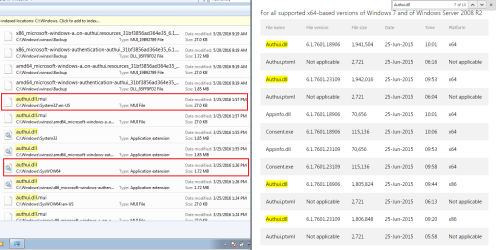
There is file info for KB3075249.
(shown on the right below)

KB3075249.png

This roll up seems to install a newer version of that KB too. Or maybe we cannot look at the files and tell what is going on. I certainly don't understand why those three KBs showed up for you after installing this roll up. I am attempting to replicate the issue, but WU has yet to return with a list of updates after installing this roll up. WU is searching... searching... searching...
:-(
 

My Computer My Computer

Computer type
Laptop
Computer Manufacturer/Model Number
Employer provided Dell Latitude
OS
W7 Pro SP1 64bit
CPU
i7
Memory
8GB
Graphics Card(s)
Intel HD Graphics
Hard Drives
crappy SSD
Antivirus
Employer mandated Symantec Endpoint Protection
Browser
Pale Moon 64bit, IE11 64bit & Chrome 64bit
It never ends UNI! Mine is till searching :roflmao:

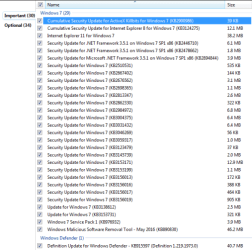
Anyway, on the VM I installed the rollup on, this is what I had left to install, be interesting to see if yours comes up with the same updates?

Capture-04.png

Capture-05.png

EDIT: My mistake, KB3075249 didn't come up after all. But the other two do show up.
 

My Computer My Computer

Computer type
PC/Desktop
Computer Manufacturer/Model Number
Custom Build
OS
Win 7 Ultimate, Win 8.1 Pro, Linux Mint 19 Cinnamon (All 64-Bit)
CPU
Intel i5 4690K
Motherboard
Gigabyte Z97X-UD3H
Memory
Corsair Vengeance LP 32GB DDR3
Graphics Card(s)
MSI GTX 1060 GAMING X 6GB
Sound Card
Onboard
Hard Drives
Samsung 850 EVO 250GB SSD (x2)
Samsung 860 EVO 1TB SSD (x2)
Crucial MX300 525GB SSD
WD Blue 2TB 5400rpm Intellipark Disabled (x2)
PSU
Corsair HX750i
Case
Phanteks Enthoo Pro
Cooling
CM Hyper 212 EVO on CPU, Noctua Redux NF-P14S 1500rpm (x6)
Keyboard
Corsair K70 RGB LUX
Mouse
Corsair Sabre RGB
Antivirus
Avast Free, MalwareBytes, SAS & CryptoPrevent
Browser
Chrome
Other Info
StarTech PEXESAT322I 2 Port PCI-E SATA Card
ASUS PCE-AC56 Dual-band AC1300 Wireless Card
Akasa FC.Six Manual Fan Controller
And a Partridge in a Pear Tree!
Yea my usual suggestion is to have net 4.5.2 installed if it's not.

Ultimately I would also just use Brink's option 3 to reset the updates system services.....
And let the buzzard run
That so far has fixed my acer.

Didn't seem to make any difference. It was still glacial.

~~~
It'll work one day and then borked again another day. Sometimes it's quick (not often), sometimes it does nothing for hours. Again, hit and miss and pot luck as to how it's going to act.
~~~
I see this too... very hit and miss.
I have a VM searching right now and it has been much longer than my experiment a few weeks ago - when I got the long list of updated within 10 to 15 minutes. I was able to repeat that 3 times using 3 different WU clients.

If I decide to post something to try, it usually includes:
update WUC while not connected to the Internet
connect to the Internet
let WU search 24+ hours
If it fails to find a list of updates by then - reset WU per the tut.

This is why I've switched to manual updating on my main system UNI. It's 10-15 minutes of manual updating a month vs a guessing game of minutes or hours... who knows? :banghead:

I know which method I prefer right now.

Fortunately, Windows Update is not a problem for me. I was issued a new laptop late last year and I'm letting SCCM handle Windows Update from servers inside the company's network. For the dozens of computers that I support outside of work, WU is set to automatically install updates [with registry settings to stop W10 from installing].

WU seems to be a problem for those that are watching the pot boil. I understand the desire to keep certain updates off of a computer, I just support too many computers to do that.
 

My Computer My Computer

Computer type
Laptop
Computer Manufacturer/Model Number
Employer provided Dell Latitude
OS
W7 Pro SP1 64bit
CPU
i7
Memory
8GB
Graphics Card(s)
Intel HD Graphics
Hard Drives
crappy SSD
Antivirus
Employer mandated Symantec Endpoint Protection
Browser
Pale Moon 64bit, IE11 64bit & Chrome 64bit
Anak thanks for your response. I'll switch to AShampoo if I have to but yesterday I ended up using an obsolete version of RT7Lite. Today am trying again with v2.6 which still works. It's usually used to slipstream a service pack but it also serves to do many other tasks plus it has that 'magic' burn option at the end, so am waiting currently to see if it works as planned. So far so good as they say, but slow.

Edit: Success. Anyone wanting the software - check the Tute on Slipstreaming: http://www.sevenforums.com/tutorial...ows-7-sp1-into-installation-dvd-iso-file.html

Would the tutorial work with an dell oem_slp installation dvd? It is legit, dell sent me one with a drivers disk.

You can only use a retail copy or student copy of a Windows 7 installation DVD, bootable USB flash drive, or ISO file to create a slipstream Windows 7 SP1 with.
 

My Computer My Computer

Computer type
PC/Desktop
Computer Manufacturer/Model Number
Dell All in one Inspiron 2020
OS
W10 32 bit, XUbuntu 18.xx 64 bit
CPU
Intel(R) Celeron(R) CPU G1620T @ 2.40GHz, 2400 Mhz
Motherboard
Dell
Memory
4GB
Graphics Card(s)
Intel HD graphics
Sound Card
High Definition Audio Device
Monitor(s) Displays
20 inch Screen
Screen Resolution
W7=1280 x 720 & Linux Mint Xfce=1360 x 768
Hard Drives
500 GB hard drive
Keyboard
Usb
Mouse
Usb
Internet Speed
High-Speed
Antivirus
MSE
Browser
Main Browser Firefox
Other Info
I have done a clean install of Windows 7 using Dell re-installation disk (Dell sent me one). I also use Free Macrium reflect backup and restore.
"...We are making this change – shifting to rollup updates, to improve the reliability and quality of our updates."

How does rolling them up improve the reliability and quality of the updates?
I wondered about that statement too... but it seems that the files being installed are newer (better?) than the files in the updates being replaced.
 

My Computer My Computer

Computer type
Laptop
Computer Manufacturer/Model Number
Employer provided Dell Latitude
OS
W7 Pro SP1 64bit
CPU
i7
Memory
8GB
Graphics Card(s)
Intel HD Graphics
Hard Drives
crappy SSD
Antivirus
Employer mandated Symantec Endpoint Protection
Browser
Pale Moon 64bit, IE11 64bit & Chrome 64bit
If you want to call a cpu or ram getting devoured as watching a pot boil than yes.
Especially when it is obviously hung up with no network or disk activity.
This usually renders dual core machines useless.
 

My Computer My Computer

Computer type
PC/Desktop
Computer Manufacturer/Model Number
Custom assembled by me :}
OS
Win-7-Pro64bit 7-H-Prem-64bit
CPU
i7-5930K 2nd i9-9940x both water blocked VRM's too
Motherboard
ASUS SABERTOOTH X99 2nd ASUS x299 Apex
Memory
Trident-z 3200C14 2nd Trident-z 3600C16
Graphics Card(s)
EVGA 1080ti ftw3 2nd Titan Xp both water blocked
Sound Card
Built-in Realtek
Monitor(s) Displays
1-AOC G2460PG 24"G-Sync 144Hz/ 2nd 1-ASUS VG248QE 24" 144Hz
Screen Resolution
1920 x 1080 144Hz
Hard Drives
2-Samsung M.2 Evo & Evo Plus
2-Samsung 850 EVO 500GB SSD's/ 3-2.5 W.D. Black 1tb-&3-1tb/3-3.5 WD Black 1tb hdd's
PSU
EVGA SuperNOVA 1000-P2 2nd 1200-P2
Case
2-Corsair Obsidian Series 450D Black ATX Mid Tower
Cooling
Custom water loops
Keyboard
Logitech G710+/ 2nd Logitech G910
Mouse
2-RedDragon M901 Perdition 16400 dpi Gaming mouse = wired
Internet Speed
Comcast Ping 19ms 89.31mbps download speed 6.12mbps upload
Antivirus
Malwarebytes Pro/ Superantispyware Pro
Browser
FireFox & Pale moon
Other Info
2nd ASUS X299 Apex/Intel i9-9940x with Custom water loop/7H-Prem-x64/Corsair 450D case/Ram Trident-z 3600C16 4x8gb / Samsung970Evo plus 500gb SSD/Dual ssd EZ swap evo/PSU EVGA SuperNova 1200w-P2 80+Platinum/GPU Titan Xp /8-ML-140 on push-pull on 2-280GTX rads
So I downloaded the update, tried to install it, got as far as "Initializing," where it got hung-up for an hour, after which I cancelled. Let me know when Microsoft REALLY fixes this problem, for everyone. no, it's not my computer, it's Windows that is the problem. Maybe they should call the Ubuntu folks for some pointers on how to do updates?
 

My Computer My Computer

Computer type
PC/Desktop
Computer Manufacturer/Model Number
Gateway GT5656
OS
Windows 7 x64 SP1
CPU
AMD Athlon 64 X2 6000+ / 3.0 GHz
Motherboard
NVIDIA GeForce 6150 SE
Memory
6 GB
Monitor(s) Displays
Lenovo LED
Screen Resolution
1920 X 1080
Hard Drives
Windows on 500 GB spinner; Ubuntu 16 on Sandisk 250GB SSD; Bodhi5 on Samsung 250GB SSD; another old spinner for fooling around.
PSU
Original that came with computer
Keyboard
Logitech wireless
Mouse
Logitech wireless
Antivirus
Microsoft Sec Essentials
Browser
Vivaldi
It never ends UNI! Mine is till searching :roflmao:

Anyway, on the VM I installed the rollup on, this is what I had left to install, be interesting to see if yours comes up with the same updates?

EDIT: My mistake, KB3075249 didn't come up after all. But the other two do show up.


I didn't check *every* update but my machine seems to need the same 30 and 34 updates after the roll up is installed.

Kevin
 

My Computer My Computer

Computer type
PC/Desktop
Computer Manufacturer/Model Number
Gateway DX4850
OS
Windows 7
If you want to call a cpu or ram getting devoured as watching a pot boil than yes.
Especially when it is obviously hung up with no network or disk activity.
This usually renders dual core machines useless.
I was referring to users that manually start the search process and periodically check the status of the search.

Most of the computers that I support are left on 24/7. I do not recall any of my users complaining about their computer slowing during the day. But it could be happening and they are not telling me. Most are not exactly power users.


I've watched Resource Monitor and Process Monitor during the high CPU and high RAM WU issue... and you are right, there is almost no hard drive activity. There is some. Not enough to light up the hard drive light, but some. The same is true for network activity. Wireshark shows very little activity for hours... not enough to show in Task Manager. I was hoping to see the WU process try different MS servers, but I could not make much sense out of the traffic that was flowing.
 

My Computer My Computer

Computer type
Laptop
Computer Manufacturer/Model Number
Employer provided Dell Latitude
OS
W7 Pro SP1 64bit
CPU
i7
Memory
8GB
Graphics Card(s)
Intel HD Graphics
Hard Drives
crappy SSD
Antivirus
Employer mandated Symantec Endpoint Protection
Browser
Pale Moon 64bit, IE11 64bit & Chrome 64bit
I upgraded from Vista to 7 using a manufacturer disk (not a clean install).

After that it found only 5 updates (including SP1). Latest update was the update client (ending in 320). After that it would search for updates for days and never stop.

So, with the help of fellow members here, I installed another client (the KB ending in 810). In just 10 minutes I had almost 200 updates ready to be installed.

I haven't yet installed them.

Should I install those 200 updates or just install this KB3125574?

A lot of the 200 updates are for Framework 3.5.1. My W7 installation came with Framework 4.5.2. What am I missing?
 

My Computer My Computer

Computer type
Laptop
Computer Manufacturer/Model Number
Toshiba
OS
Windows 7 Home Premium 64
CPU
Intel T6400 Core 2 Duo
Memory
4GB
Graphics Card(s)
Intel 4500MHD
If you want to call a cpu or ram getting devoured as watching a pot boil than yes.
Especially when it is obviously hung up with no network or disk activity.
This usually renders dual core machines useless.
I was referring to users that manually start the search process and periodically check the status of the search.

Most of the computers that I support are left on 24/7. I do not recall any of my users complaining about their computer slowing during the day. But it could be happening and they are not telling me. Most are not exactly power users.


I've watched Resource Monitor and Process Monitor during the high CPU and high RAM WU issue... and you are right, there is almost no hard drive activity. There is some. Not enough to light up the hard drive light, but some. The same is true for network activity. Wireshark shows very little activity for hours... not enough to show in Task Manager. I was hoping to see the WU process try different MS servers, but I could not make much sense out of the traffic that was flowing.

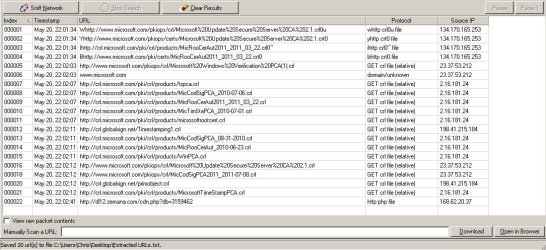
Okay don't know if it helps but here's what I see using something other than Wireshark.

List of URL's and ip addresses connected to during a manual WU check:

Note: Ignore the last entry - it's Zemana AM autoupdating as it does every 30 minutes.

URLS.jpg

Total time taken for WU check - 38 seconds.
 
Last edited:

My Computer My Computer

Computer type
Laptop
Computer Manufacturer/Model Number
ASUS
OS
Microsoft Windows 7 Home Premium 64-bit 7601 Multiprocessor Free Service Pack 1
CPU
AMD C-60 APU with Radeon(tm) HD Graphics
Motherboard
ASUSTeK COMPUTER INC. X501U
Memory
4.00 GB
Graphics Card(s)
AMD Radeon HD 6290 Graphics
Sound Card
(1) AMD High Definition Audio Device (2) Realtek High Defi
Screen Resolution
1366 x 768 x 32 bits (4294967296 colors) @ 60 Hz
Hard Drives
Hitachi HTS545050A7E380 SATA Disk Device
Antivirus
Comodo CIS & FW, SecureAplus App Whitelisting, Threatfire
Browser
Cyberfox 64bit, Opera 64bit, Airfox
Other Info
Spy-The-Spy, HitmanPro.Alert, Norton Connect Safe, MJRegWatcher, BitDefender TrafficLight, Voodoo Shield, Zemana AntiMalware
I upgraded from Vista to 7 using a manufacturer disk (not a clean install).

After that it found only 5 updates (including SP1). Latest update was the update client (ending in 320). After that it would search for updates for days and never stop.

So, with the help of fellow members here, I installed another client (the KB ending in 810). In just 10 minutes I had almost 200 updates ready to be installed.

I haven't yet installed them.

Should I install those 200 updates or just install this KB3125574?

A lot of the 200 updates are for Framework 3.5.1. My W7 installation came with Framework 4.5.2. What am I missing?

EDIT: To be clear, did you install SP1 yet? If not what's written below is moot because SP1 is required to install the Rollup update along with KB3020369.

If you install the convienience rollup (I would in your position) first install KB3020369 (Servicing Stack update, prerequisite for rollup) and recommend installing KB2670838 (Platform Update, also a prerequisite for IE11) IE11, KB3138612 (Latest Update Client) KB3145739 & KB3153199 (Latest Kernel-Mode Drivers) BEFORE you install KB3125574.

HTH :)
 
Last edited:

My Computer My Computer

Computer type
Laptop
Computer Manufacturer/Model Number
MSI PE60 6QE
OS
Win 10 Pro x64, Win 7 Pro x64
CPU
Intel Core i7-6700HQ Skylake
Motherboard
MSI MS-16J5
Memory
16gb Crucial DDR4
Graphics Card(s)
NVIDIA GeForce GTX 960M 2 GB
Screen Resolution
1920 x 1080
Hard Drives
Samsung 850 EVO 250 GB M.2 SSD (MZ-N5E250BW)
HGST 1TB @7200 RPM HTS721010A9E630
Case
Plastic
Keyboard
Got one...
Mouse
Yep, one of those too.
Internet Speed
FIOS 75/75
Antivirus
Defender
Browser
Chrome/FFox/Ex-PLODE-r/(L)Edge
Other Info
Defender, Custom Hosts, uBlock, regular backups w/ Macrium (Free)
A lot of the 200 updates are for Framework 3.5.1. My W7 installation came with Framework 4.5.2. What am I missing?

Framework 3.5 is included into Windows 7 OS and should not be removed. Updates are needed for it.

Windows 7 comes with .NET Framework 3.5, 3.0 and 2.0 pre-installed.

When .NET Framework is included as part of the OS, it does not appear in Programs and Features.

Bottom line: If a program that you installed requires a particular version of .NET Framework then it's best to leave that version installed.
 

My Computer My Computer

Computer type
Laptop
Computer Manufacturer/Model Number
ASUS
OS
Microsoft Windows 7 Home Premium 64-bit 7601 Multiprocessor Free Service Pack 1
CPU
AMD C-60 APU with Radeon(tm) HD Graphics
Motherboard
ASUSTeK COMPUTER INC. X501U
Memory
4.00 GB
Graphics Card(s)
AMD Radeon HD 6290 Graphics
Sound Card
(1) AMD High Definition Audio Device (2) Realtek High Defi
Screen Resolution
1366 x 768 x 32 bits (4294967296 colors) @ 60 Hz
Hard Drives
Hitachi HTS545050A7E380 SATA Disk Device
Antivirus
Comodo CIS & FW, SecureAplus App Whitelisting, Threatfire
Browser
Cyberfox 64bit, Opera 64bit, Airfox
Other Info
Spy-The-Spy, HitmanPro.Alert, Norton Connect Safe, MJRegWatcher, BitDefender TrafficLight, Voodoo Shield, Zemana AntiMalware
A lot of the 200 updates are for Framework 3.5.1. My W7 installation came with Framework 4.5.2. What am I missing?

Framework 3.5 is included into Windows 7 OS and should not be removed. Updates are needed for it.

Windows 7 comes with .NET Framework 3.5, 3.0 and 2.0 pre-installed.

When .NET Framework is included as part of the OS, it does not appear in Programs and Features.
Bottom line: If a program that you installed requires a particular version of .NET Framework then it's best to leave that version installed.

Thank you
 

My Computer My Computer

Computer type
Laptop
Computer Manufacturer/Model Number
Toshiba
OS
Windows 7 Home Premium 64
CPU
Intel T6400 Core 2 Duo
Memory
4GB
Graphics Card(s)
Intel 4500MHD
I upgraded from Vista to 7 using a manufacturer disk (not a clean install).

After that it found only 5 updates (including SP1). Latest update was the update client (ending in 320). After that it would search for updates for days and never stop.

So, with the help of fellow members here, I installed another client (the KB ending in 810). In just 10 minutes I had almost 200 updates ready to be installed.

I haven't yet installed them.

Should I install those 200 updates or just install this KB3125574?

A lot of the 200 updates are for Framework 3.5.1. My W7 installation came with Framework 4.5.2. What am I missing?

EDIT: To be clear, did you install SP1 yet? If not what's written below is moot because SP1 is required to install the Rollup update along with KB3020369.

Yes, it was installed the day I upgraded.
 

My Computer My Computer

Computer type
Laptop
Computer Manufacturer/Model Number
Toshiba
OS
Windows 7 Home Premium 64
CPU
Intel T6400 Core 2 Duo
Memory
4GB
Graphics Card(s)
Intel 4500MHD
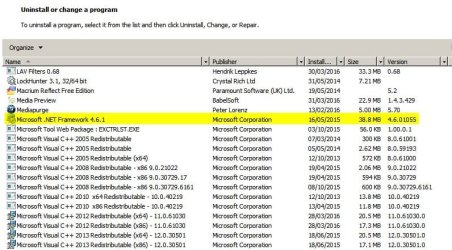
I see, but shouldn't these be present in Program List in Control Panel? The only framework I can see there is 4.5.2 installed exactly the day I upgraded to Win7.

No that's not right. Here's what I see.

Programs and Features.jpg

The above is correct and does not show all versions.

You can run this (free) utility to check installed versions.

ASoft .NET Version Detector


My results:

Code:
<32Bit>
2.0.50727.5485
  ->C:\Windows\Microsoft.NET\Framework\v2.0.50727
4.6.1076.0
  ->C:\Windows\Microsoft.NET\Framework\v4.0.30319

<64Bit>
2.0.50727.5485
  ->C:\Windows\Microsoft.NET\Framework64\v2.0.50727
4.6.1076.0
  ->C:\Windows\Microsoft.NET\Framework64\v4.0.30319

[B]< Installed .NET Frameworks >
.NET FW 2.0 SP 2  (CLR:2.0)
.NET FW 3.0 SP 2  (CLR:2.0)
.NET FW 3.5 SP 1  (CLR:2.0)
.NET FW 4.6.1  (CLR:4.0)
[/B]
< Installed Updates >
Microsoft .NET Framework 4 Client Profile 
 KB2468871 Update for Microsoft .NET Framework 4 Client Profile (KB2468871)
 KB2468871v2
 KB2478063
 KB2533523 Update for Microsoft .NET Framework 4 Client Profile (KB2533523)
 KB2544514
 KB2600211
 KB2600217 Update for Microsoft .NET Framework 4 Client Profile (KB2600217)
Microsoft .NET Framework 4 Extended 
 KB2468871 Update for Microsoft .NET Framework 4 Extended (KB2468871)
 KB2468871v2
 KB2478063
 KB2533523 Update for Microsoft .NET Framework 4 Extended (KB2533523)
 KB2544514
 KB2600211
 KB2600217 Update for Microsoft .NET Framework 4 Extended (KB2600217)
 KB2468871 Update for Microsoft .NET Framework 4 Extended (KB2468871)
 KB2468871v2
 KB2478063
 KB2533523 Update for Microsoft .NET Framework 4 Extended (KB2533523)
 KB2544514
 KB2600211
 KB2600217 Update for Microsoft .NET Framework 4 Extended (KB2600217)
Microsoft .NET Framework 4.5 
 KB2729460
 KB2737083
 KB2742613
 KB2745582
 KB2748645
 KB2750147
 KB2756203
 KB2759112
 KB2783808
 KB2789648
 KB2794055
 KB2803754
 KB2804582
 KB2805221
 KB2805226
 KB2805290
 KB2822218
 KB2823493
 KB2828841
 KB2835622
 KB2858725
 KB2861193
 KB2861208
 KB2862063
 KB2872778
 KB2885201
 KB2889889
 KB2894849
 KB2894854
 KB2898864
 KB2898869
 KB2901118
 KB2901126
 KB2901983
 KB2908383
 KB2925382
 KB2931368
 KB2936388
 KB2937676
 KB2938782
 KB2954853
 KB2969355
 KB3006566
 KB3033093
 KB3045561
 KB3076093
 KB3086153
 KB3088517
 KB3102433
Microsoft .NET Framework 4.5.1 
 KB2898869 Security Update for Microsoft .NET Framework 4.5.1 (KB2898869)
 KB2901126 Security Update for Microsoft .NET Framework 4.5.1 (KB2901126)
 KB2931368 Security Update for Microsoft .NET Framework 4.5.1 (KB2931368)
 KB2898869 Security Update for Microsoft .NET Framework 4.5.1 (KB2898869)
 KB2901126 Security Update for Microsoft .NET Framework 4.5.1 (KB2901126)
 KB2931368 Security Update for Microsoft .NET Framework 4.5.1 (KB2931368)
Microsoft .NET Framework 4.6.1 
 KB3122661 Security Update for Microsoft .NET Framework 4.6.1 (KB3122661)
 KB3127233 Security Update for Microsoft .NET Framework 4.6.1 (KB3127233)
 KB3136000 Security Update for Microsoft .NET Framework 4.6.1 (KB3136000)
 KB3136000v2 Security Update for Microsoft .NET Framework 4.6.1 (KB3136000v2)
 KB3142037 Security Update for Microsoft .NET Framework 4.6.1 (KB3142037)
 KB3143693 Security Update for Microsoft .NET Framework 4.6.1 (KB3143693)

< Installed Languages 3.0>
English - United States
< Installed Languages 3.5.x>
English - United States
< Installed Languages 4.x>
English - United States
 

My Computer My Computer

Computer type
Laptop
Computer Manufacturer/Model Number
ASUS
OS
Microsoft Windows 7 Home Premium 64-bit 7601 Multiprocessor Free Service Pack 1
CPU
AMD C-60 APU with Radeon(tm) HD Graphics
Motherboard
ASUSTeK COMPUTER INC. X501U
Memory
4.00 GB
Graphics Card(s)
AMD Radeon HD 6290 Graphics
Sound Card
(1) AMD High Definition Audio Device (2) Realtek High Defi
Screen Resolution
1366 x 768 x 32 bits (4294967296 colors) @ 60 Hz
Hard Drives
Hitachi HTS545050A7E380 SATA Disk Device
Antivirus
Comodo CIS & FW, SecureAplus App Whitelisting, Threatfire
Browser
Cyberfox 64bit, Opera 64bit, Airfox
Other Info
Spy-The-Spy, HitmanPro.Alert, Norton Connect Safe, MJRegWatcher, BitDefender TrafficLight, Voodoo Shield, Zemana AntiMalware
...but shouldn't these be present in Program List in Control Panel? The only framework I can see there is 4.5.2 installed exactly the day I upgraded to Win7.

DotNet 3.5.1 is a core component of Windows 7, it is integrated in the system... 4.5.2 (or 4.6) is an installed component and hence listed in Program List in CP. You can find DNF 3.5.1 if you go to Control Panel>> Programs & Features>> Turn Window Features on or off, and as Callender mentioned you should keep it installed & updated IMHO.

dnf.JPG
 

My Computer My Computer

Computer type
Laptop
Computer Manufacturer/Model Number
MSI PE60 6QE
OS
Win 10 Pro x64, Win 7 Pro x64
CPU
Intel Core i7-6700HQ Skylake
Motherboard
MSI MS-16J5
Memory
16gb Crucial DDR4
Graphics Card(s)
NVIDIA GeForce GTX 960M 2 GB
Screen Resolution
1920 x 1080
Hard Drives
Samsung 850 EVO 250 GB M.2 SSD (MZ-N5E250BW)
HGST 1TB @7200 RPM HTS721010A9E630
Case
Plastic
Keyboard
Got one...
Mouse
Yep, one of those too.
Internet Speed
FIOS 75/75
Antivirus
Defender
Browser
Chrome/FFox/Ex-PLODE-r/(L)Edge
Other Info
Defender, Custom Hosts, uBlock, regular backups w/ Macrium (Free)
DotNet 3.5.1 is a core component of Windows 7, it is integrated in the system... 4.5.2 (or 4.6) is an installed component and hence listed in Program List in CP. You can find DNF 3.5.1 if you go to Control Panel>> Programs & Features>> Turn Window Features on or off:

View attachment 386965

Cheers!

:)
 

My Computer My Computer

Computer type
Laptop
Computer Manufacturer/Model Number
ASUS
OS
Microsoft Windows 7 Home Premium 64-bit 7601 Multiprocessor Free Service Pack 1
CPU
AMD C-60 APU with Radeon(tm) HD Graphics
Motherboard
ASUSTeK COMPUTER INC. X501U
Memory
4.00 GB
Graphics Card(s)
AMD Radeon HD 6290 Graphics
Sound Card
(1) AMD High Definition Audio Device (2) Realtek High Defi
Screen Resolution
1366 x 768 x 32 bits (4294967296 colors) @ 60 Hz
Hard Drives
Hitachi HTS545050A7E380 SATA Disk Device
Antivirus
Comodo CIS & FW, SecureAplus App Whitelisting, Threatfire
Browser
Cyberfox 64bit, Opera 64bit, Airfox
Other Info
Spy-The-Spy, HitmanPro.Alert, Norton Connect Safe, MJRegWatcher, BitDefender TrafficLight, Voodoo Shield, Zemana AntiMalware
Back
Top