How to remove Windows 10 upgrade updates in Windows 7 and 8

My Computer My Computer

At a glance

Win-7-Pro64bit 7-H-Prem-64biti7-5930K 2nd i9-9940x both water blocked VRM'...Trident-z 3200C14 2nd Trident-z 3600C16EVGA 1080ti ftw3 2nd Titan Xp both water blocked
Computer type
PC/Desktop
Computer Manufacturer/Model Number
Custom assembled by me :}
OS
Win-7-Pro64bit 7-H-Prem-64bit
CPU
i7-5930K 2nd i9-9940x both water blocked VRM's too
Motherboard
ASUS SABERTOOTH X99 2nd ASUS x299 Apex
Memory
Trident-z 3200C14 2nd Trident-z 3600C16
Graphics Card(s)
EVGA 1080ti ftw3 2nd Titan Xp both water blocked
Sound Card
Built-in Realtek
Monitor(s) Displays
1-AOC G2460PG 24"G-Sync 144Hz/ 2nd 1-ASUS VG248QE 24" 144Hz
Screen Resolution
1920 x 1080 144Hz
Hard Drives
2-Samsung M.2 Evo & Evo Plus
2-Samsung 850 EVO 500GB SSD's/ 3-2.5 W.D. Black 1tb-&3-1tb/3-3.5 WD Black 1tb hdd's
PSU
EVGA SuperNOVA 1000-P2 2nd 1200-P2
Case
2-Corsair Obsidian Series 450D Black ATX Mid Tower
Cooling
Custom water loops
Keyboard
Logitech G710+/ 2nd Logitech G910
Mouse
2-RedDragon M901 Perdition 16400 dpi Gaming mouse = wired
Internet Speed
Comcast Ping 19ms 89.31mbps download speed 6.12mbps upload
Antivirus
Malwarebytes Pro/ Superantispyware Pro
Browser
FireFox & Pale moon
Other Info
2nd ASUS X299 Apex/Intel i9-9940x with Custom water loop/7H-Prem-x64/Corsair 450D case/Ram Trident-z 3600C16 4x8gb / Samsung970Evo plus 500gb SSD/Dual ssd EZ swap evo/PSU EVGA SuperNova 1200w-P2 80+Platinum/GPU Titan Xp /8-ML-140 on push-pull on 2-280GTX rads
I did have a scare last month when booted and suddenly realized it was downloading updates when no authority from myself.Panicked to be honest and switched it off. Booted again and again it started. ....

Oh wow! It really seems like Microsoft is trying to force everyone to upgrade to Windows 10, when not everyone wants to upgrade! I've heard that now people's computers are upgrading without their permission! Hopefully all of these updates will go away when Windows 10 won't be free anymore. Also when you say you did a recovery, do you mean from an image backup?! It sounded like it as you lost a few programs!

Been seeing more reports about this. Susan Bradley reported today that it happened to her -- she writes the "Patch Watch" column for the Windows Secrets website. [Note: many articles there, like the "Patch Watch" ones, require a paid subscription to be able to read the whole thing.]

She pointed out that most of the time, there's a very easy miss opt-out link on the Win10 upgrade dialog. But on one of her Win7 machines, "there was no option to cancel the upgrade; the installation process started without my explicit approval, and at this time I'm simply waiting for the system to reboot."

Looks like MS is getting sneaky (or just plain desperate) to make people upgrade to Windows 10 whether they want to or not.

EDIT: Heh... just saw that A Guy has posted the link to Bradley's blog where she calls out MS for being a huge bully. Coincidence that a few days later one of her systems is forced to upgrade to Win10...? :sarc:
 
Last edited:

My Computer My Computer

At a glance

Win7 Ult x64AMD Phenon II Black 9558 GB DDR3 1600MSI GTX 550-Ti
Computer type
PC/Desktop
OS
Win7 Ult x64
CPU
AMD Phenon II Black 955
Motherboard
Asus M5A99X EVO
Memory
8 GB DDR3 1600
Graphics Card(s)
MSI GTX 550-Ti
Hard Drives
Samsung 850 Pro 512 GB (system)
WD 1 TB Black (data)
PSU
Seasonic G-650 Gold
Cooling
Cooler Master 212+; positive pressure sys: (3) 200mm fans
Other Info
Imaging programs: Image for Windows & Drive Snapshot
Hard to have sympathy for anyone looking at the gwx icon on the taskbar for about 12 months to not think win-10 is coming to them sooner or later :)
 

My Computer My Computer

At a glance

Win-7-Pro64bit 7-H-Prem-64biti7-5930K 2nd i9-9940x both water blocked VRM'...Trident-z 3200C14 2nd Trident-z 3600C16EVGA 1080ti ftw3 2nd Titan Xp both water blocked
Computer type
PC/Desktop
Computer Manufacturer/Model Number
Custom assembled by me :}
OS
Win-7-Pro64bit 7-H-Prem-64bit
CPU
i7-5930K 2nd i9-9940x both water blocked VRM's too
Motherboard
ASUS SABERTOOTH X99 2nd ASUS x299 Apex
Memory
Trident-z 3200C14 2nd Trident-z 3600C16
Graphics Card(s)
EVGA 1080ti ftw3 2nd Titan Xp both water blocked
Sound Card
Built-in Realtek
Monitor(s) Displays
1-AOC G2460PG 24"G-Sync 144Hz/ 2nd 1-ASUS VG248QE 24" 144Hz
Screen Resolution
1920 x 1080 144Hz
Hard Drives
2-Samsung M.2 Evo & Evo Plus
2-Samsung 850 EVO 500GB SSD's/ 3-2.5 W.D. Black 1tb-&3-1tb/3-3.5 WD Black 1tb hdd's
PSU
EVGA SuperNOVA 1000-P2 2nd 1200-P2
Case
2-Corsair Obsidian Series 450D Black ATX Mid Tower
Cooling
Custom water loops
Keyboard
Logitech G710+/ 2nd Logitech G910
Mouse
2-RedDragon M901 Perdition 16400 dpi Gaming mouse = wired
Internet Speed
Comcast Ping 19ms 89.31mbps download speed 6.12mbps upload
Antivirus
Malwarebytes Pro/ Superantispyware Pro
Browser
FireFox & Pale moon
Other Info
2nd ASUS X299 Apex/Intel i9-9940x with Custom water loop/7H-Prem-x64/Corsair 450D case/Ram Trident-z 3600C16 4x8gb / Samsung970Evo plus 500gb SSD/Dual ssd EZ swap evo/PSU EVGA SuperNova 1200w-P2 80+Platinum/GPU Titan Xp /8-ML-140 on push-pull on 2-280GTX rads
Recovery as in System restore. Old faithful. Always do system restore point before adding anything new and not known etc. Serviced me well.

I do have backups on ext HD via W7 but l have always done cut and paste of my docs and used Mozbackup for settings etc. Had back up programs let me down.

shame Mozbackup isnt being undated for later Firefox. But it still worked for older settings on latest version when reinstalled. Meant got most of bookmarks etc.
And Recuva got me back emails - great program that one too.
 

My Computer My Computer

At a glance

Windows 7 Home Premium (x64)bit build 7601Intel Premium G2030 3000MHz4GBytes single channelIvy Intel Bridge-DT GT1 Intergrated graphics ...
Computer type
PC/Desktop
Computer Manufacturer/Model Number
Gigabyte
OS
Windows 7 Home Premium (x64)bit build 7601
CPU
Intel Premium G2030 3000MHz
Motherboard
Gigabyte H61M-USB3H Intel 61 Cougar Point
Memory
4GBytes single channel
Graphics Card(s)
Ivy Intel Bridge-DT GT1 Intergrated graphics control
Hard Drives
Hitachi HDS 721010CLA630 1000GB
Keyboard
MS 3000 USB
Mouse
MS optical
Internet Speed
ADSL2 12MB average
Antivirus
Avast
Browser
Firefox, Opera, IE11

My Computer My Computer

At a glance

Win 7 Ultimate, Win 8.1 Pro, Linux Mint 19 Ci...Intel i5 4690KCorsair Vengeance LP 32GB DDR3MSI GTX 1060 GAMING X 6GB
Computer type
PC/Desktop
Computer Manufacturer/Model Number
Custom Build
OS
Win 7 Ultimate, Win 8.1 Pro, Linux Mint 19 Cinnamon (All 64-Bit)
CPU
Intel i5 4690K
Motherboard
Gigabyte Z97X-UD3H
Memory
Corsair Vengeance LP 32GB DDR3
Graphics Card(s)
MSI GTX 1060 GAMING X 6GB
Sound Card
Onboard
Hard Drives
Samsung 850 EVO 250GB SSD (x2)
Samsung 860 EVO 1TB SSD (x2)
Crucial MX300 525GB SSD
WD Blue 2TB 5400rpm Intellipark Disabled (x2)
PSU
Corsair HX750i
Case
Phanteks Enthoo Pro
Cooling
CM Hyper 212 EVO on CPU, Noctua Redux NF-P14S 1500rpm (x6)
Keyboard
Corsair K70 RGB LUX
Mouse
Corsair Sabre RGB
Antivirus
Avast Free, MalwareBytes, SAS & CryptoPrevent
Browser
Chrome
Other Info
StarTech PEXESAT322I 2 Port PCI-E SATA Card
ASUS PCE-AC56 Dual-band AC1300 Wireless Card
Akasa FC.Six Manual Fan Controller
And a Partridge in a Pear Tree!
To their perverse minds, the "Download now, upgrade later" button is probably the equivalent of cancel button...

I was "comfortably numb" about this WRT my own machine, but now I have to prepare a repaired Win7 machine for deployment to a customer. My company only sold maybe a handful of Win7 machines, and only this one is still in service, so there is no policy in place for dealing with this.
 

My Computer My Computer

At a glance

Windows 7 Professional x64, Arch Linux
Computer type
PC/Desktop
OS
Windows 7 Professional x64, Arch Linux
Recovery as in System restore. Old faithful. Always do system restore point before adding anything new and not known etc. Serviced me well.

I do have backups on ext HD via W7 but l have always done cut and paste of my docs and used Mozbackup for settings etc. Had back up programs let me down.

shame Mozbackup isnt being undated for later Firefox. But it still worked for older settings on latest version when reinstalled. Meant got most of bookmarks etc.
And Recuva got me back emails - great program that one too.
Ohh that's what you meant! Yep it's always a great idea to do that! I've created them and they have always worked well! It's strange how it deleted emails and things in programs, as it shouldn't affect your personal files. One time I did a System Restore recently and it deleted one of my programs. However when I reinstalled it, all of my settings were still there! Also this was in Windows 7, not in Windows 10!
 
Recovery as in System restore. Old faithful. Always do system restore point before adding anything new and not known etc. Serviced me well.

I do have backups on ext HD via W7 but l have always done cut and paste of my docs and used Mozbackup for settings etc. Had back up programs let me down.

shame Mozbackup isnt being undated for later Firefox. But it still worked for older settings on latest version when reinstalled. Meant got most of bookmarks etc.
And Recuva got me back emails - great program that one too.
Ohh that's what you meant! Yep it's always a great idea to do that! I've created them and they have always worked well! It's strange how it deleted emails and things in programs, as it shouldn't affect your personal files. One time I did a System Restore recently and it deleted one of my programs. However when I reinstalled it, all of my settings were still there! Also this was in Windows 7, not in Windows 10!

I am sure it did - but I think that they had tried to download the W10 or part thereof via KB and that's is why lost emails etc as prior as you said - stayed with me.
I'm counting the weeks til end of free. Then maybe we who are adamant do not want to lose W 7 paid for and loved in exchange for W10 new gremlin inhabited and yet to be loved by all or even get past 2 years like so many M$ lemon OS's. :D

whatever - now my mouse died on me late last night - M$ 3000 to go with keyboard. Had same one for hubbies lap top so borrowed it - configured it - still keeps on going busy on me and hovering not able to land it etc and click - so out of control - seen that before somewhere but forgot the way to stop it. Any ideas welcome.

And since last re=install get a lot of browser etc not responding .............spooky reckon they left "gremlins" because I refused to quietly follow their command to accept W10 thereby giving them "my info and data" to sell off - must be going to or why give away millions of $ :devil:
 

My Computer My Computer

At a glance

Windows 7 Home Premium (x64)bit build 7601Intel Premium G2030 3000MHz4GBytes single channelIvy Intel Bridge-DT GT1 Intergrated graphics ...
Computer type
PC/Desktop
Computer Manufacturer/Model Number
Gigabyte
OS
Windows 7 Home Premium (x64)bit build 7601
CPU
Intel Premium G2030 3000MHz
Motherboard
Gigabyte H61M-USB3H Intel 61 Cougar Point
Memory
4GBytes single channel
Graphics Card(s)
Ivy Intel Bridge-DT GT1 Intergrated graphics control
Hard Drives
Hitachi HDS 721010CLA630 1000GB
Keyboard
MS 3000 USB
Mouse
MS optical
Internet Speed
ADSL2 12MB average
Antivirus
Avast
Browser
Firefox, Opera, IE11
Trying and Failing

W10 is still trying to install itself (and fortunately failing) on my main desktop despite:

  • Blocking various updates
  • Not having GWX on my PC
W10 Attempted Install (Modified).png
I'm starting to suspect that part of the reason for the W7 update problems is that the updater isn't looking for installed W7 updates, it's trying to find a way of sneaking past the PC's defences so that it can install W10.
 

My Computer My Computer

At a glance

W7 Ultimate SP1, LM19.2 MATE, W10 Home 1703, ...AMD Phenom II x6 1100T, 3.3 GHz12GB DDR3 1333 G-Skill (4GB x 2), G-Skill (2G...NVIDIA GeForce GTX 660
Computer type
PC/Desktop
Computer Manufacturer/Model Number
n/a
OS
W7 Ultimate SP1, LM19.2 MATE, W10 Home 1703, W10 Pro 1703 VM, #All 64 bit
CPU
AMD Phenom II x6 1100T, 3.3 GHz
Motherboard
ASUS M4A88T-M/USB3 (AM3)
Memory
12GB DDR3 1333 G-Skill (4GB x 2), G-Skill (2GB x 2)
Graphics Card(s)
NVIDIA GeForce GTX 660
Sound Card
Realtek?
Monitor(s) Displays
Samsung S23B350
Screen Resolution
1920x1080
Hard Drives
WD Green 2TB (SATA), WD Green 3TB (SATA), WD Blue 4TB (SATA), WD Blue 6TB (SATA)
PSU
Cooler Master
Case
Antec GX300 Tower
Cooling
3x Antec TRICOOL 120mm Fans
Mouse
Wired Optical
Internet Speed
DSL
Antivirus
Avast
Browser
Pale Moon (64 bit)
Other Info
2018-12-27 Upgraded HDDs
2015-12-10 Upgraded case, graphics card, storage
2015-08-15 Upgraded motherboard & RAM
2015-07-15 Upgraded LM17.1 to LM17.2
W10 is still trying to install itself (and fortunately failing) on my main desktop despite:

  • Blocking various updates
  • Not having GWX on my PC
I'm starting to suspect that part of the reason for the W7 update problems is that the updater isn't looking for installed W7 updates, it's trying to find a way of sneaking past the PC's defences so that it can install W10.

lehnerus2000,

I haven't had this issue-yet. Did you make sure that most of the updates below are not installed?


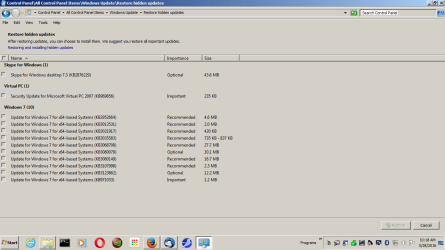
Here are my hidden updates in the picture below


KB969856 won’t install
KB971033 won’t install without removing another update, this is because of my system being a legit dell oemslp system

As add protection I use Never10 from grc as I have said before. I can't use windows 10 at all unless I want to stand the graphic driver blinking. I am hoping the Anniversary update fixes that, after trying an insider build, the blinking was even worse. I don't think Intel officially supports this driver but still provides a driver to Microsoft. I may be stuck with windows 7 sp1 & Linux mint 17.3 even when not supported any longer. I did find out opensuse tumbleweed 32 bit works but the screen is to bright.
 

Attachments

  • Hiddenup.png
    Hiddenup.png
    29.6 KB · Views: 10

My Computer My Computer

At a glance

W10 32 bit, XUbuntu 18.xx 64 bitIntel(R) Celeron(R) CPU G1620T @ 2.40GHz, 240...4GBIntel HD graphics
Computer type
PC/Desktop
Computer Manufacturer/Model Number
Dell All in one Inspiron 2020
OS
W10 32 bit, XUbuntu 18.xx 64 bit
CPU
Intel(R) Celeron(R) CPU G1620T @ 2.40GHz, 2400 Mhz
Motherboard
Dell
Memory
4GB
Graphics Card(s)
Intel HD graphics
Sound Card
High Definition Audio Device
Monitor(s) Displays
20 inch Screen
Screen Resolution
W7=1280 x 720 & Linux Mint Xfce=1360 x 768
Hard Drives
500 GB hard drive
Keyboard
Usb
Mouse
Usb
Internet Speed
High-Speed
Antivirus
MSE
Browser
Main Browser Firefox
Other Info
I have done a clean install of Windows 7 using Dell re-installation disk (Dell sent me one). I also use Free Macrium reflect backup and restore.

My Computer My Computer

At a glance

Win 7 Ultimate, Win 8.1 Pro, Linux Mint 19 Ci...Intel i5 4690KCorsair Vengeance LP 32GB DDR3MSI GTX 1060 GAMING X 6GB
Computer type
PC/Desktop
Computer Manufacturer/Model Number
Custom Build
OS
Win 7 Ultimate, Win 8.1 Pro, Linux Mint 19 Cinnamon (All 64-Bit)
CPU
Intel i5 4690K
Motherboard
Gigabyte Z97X-UD3H
Memory
Corsair Vengeance LP 32GB DDR3
Graphics Card(s)
MSI GTX 1060 GAMING X 6GB
Sound Card
Onboard
Hard Drives
Samsung 850 EVO 250GB SSD (x2)
Samsung 860 EVO 1TB SSD (x2)
Crucial MX300 525GB SSD
WD Blue 2TB 5400rpm Intellipark Disabled (x2)
PSU
Corsair HX750i
Case
Phanteks Enthoo Pro
Cooling
CM Hyper 212 EVO on CPU, Noctua Redux NF-P14S 1500rpm (x6)
Keyboard
Corsair K70 RGB LUX
Mouse
Corsair Sabre RGB
Antivirus
Avast Free, MalwareBytes, SAS & CryptoPrevent
Browser
Chrome
Other Info
StarTech PEXESAT322I 2 Port PCI-E SATA Card
ASUS PCE-AC56 Dual-band AC1300 Wireless Card
Akasa FC.Six Manual Fan Controller
And a Partridge in a Pear Tree!
Some Differences

W10 is still trying to install itself (and fortunately failing) on my main desktop despite:

  • Blocking various updates
  • Not having GWX on my PC
I'm starting to suspect that part of the reason for the W7 update problems is that the updater isn't looking for installed W7 updates, it's trying to find a way of sneaking past the PC's defences so that it can install W10.

lehnerus2000,

I haven't had this issue-yet. Did you make sure that most of the updates below are not installed?
This is the second time I've noticed this.
I must have installed something earlier this year that is triggering it.

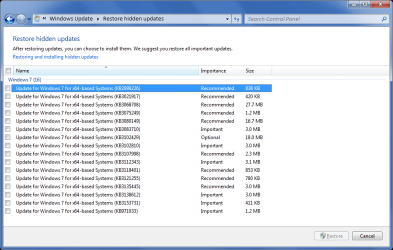
My list is different from yours (I'm NOT saying I'm right and you're wrong). :)

I don't have KB2952664 & KB3035583 in my list.
They appear in my "Optional Updates" list.
I guess I don't have them installed as I can't find them listed in my "Installed Updates".
W7 Blocked Updates 2016-05-29.png
 

My Computer My Computer

At a glance

W7 Ultimate SP1, LM19.2 MATE, W10 Home 1703, ...AMD Phenom II x6 1100T, 3.3 GHz12GB DDR3 1333 G-Skill (4GB x 2), G-Skill (2G...NVIDIA GeForce GTX 660
Computer type
PC/Desktop
Computer Manufacturer/Model Number
n/a
OS
W7 Ultimate SP1, LM19.2 MATE, W10 Home 1703, W10 Pro 1703 VM, #All 64 bit
CPU
AMD Phenom II x6 1100T, 3.3 GHz
Motherboard
ASUS M4A88T-M/USB3 (AM3)
Memory
12GB DDR3 1333 G-Skill (4GB x 2), G-Skill (2GB x 2)
Graphics Card(s)
NVIDIA GeForce GTX 660
Sound Card
Realtek?
Monitor(s) Displays
Samsung S23B350
Screen Resolution
1920x1080
Hard Drives
WD Green 2TB (SATA), WD Green 3TB (SATA), WD Blue 4TB (SATA), WD Blue 6TB (SATA)
PSU
Cooler Master
Case
Antec GX300 Tower
Cooling
3x Antec TRICOOL 120mm Fans
Mouse
Wired Optical
Internet Speed
DSL
Antivirus
Avast
Browser
Pale Moon (64 bit)
Other Info
2018-12-27 Upgraded HDDs
2015-12-10 Upgraded case, graphics card, storage
2015-08-15 Upgraded motherboard & RAM
2015-07-15 Upgraded LM17.1 to LM17.2
lehnerus2000
Whether it is recommended or optional. I usually install most updates unless it is related to Windows 10 or telemetry or won't install. Skype update is a little strange, I did install it once. I installed that update, then when downloaded skype itself it updated again. That skype update is pointless at least for me if I want to use skype.

One thing you might want to try to install is Microsoft Virtual PC. I don't know for sure if it really helps or stops windows 10 from being installed but at least you get a prompt to remove it. I crashed the installation of 10 when I chose not to reboot.
 

My Computer My Computer

At a glance

W10 32 bit, XUbuntu 18.xx 64 bitIntel(R) Celeron(R) CPU G1620T @ 2.40GHz, 240...4GBIntel HD graphics
Computer type
PC/Desktop
Computer Manufacturer/Model Number
Dell All in one Inspiron 2020
OS
W10 32 bit, XUbuntu 18.xx 64 bit
CPU
Intel(R) Celeron(R) CPU G1620T @ 2.40GHz, 2400 Mhz
Motherboard
Dell
Memory
4GB
Graphics Card(s)
Intel HD graphics
Sound Card
High Definition Audio Device
Monitor(s) Displays
20 inch Screen
Screen Resolution
W7=1280 x 720 & Linux Mint Xfce=1360 x 768
Hard Drives
500 GB hard drive
Keyboard
Usb
Mouse
Usb
Internet Speed
High-Speed
Antivirus
MSE
Browser
Main Browser Firefox
Other Info
I have done a clean install of Windows 7 using Dell re-installation disk (Dell sent me one). I also use Free Macrium reflect backup and restore.
One thing you might want to try to install is Microsoft Virtual PC. I don't know for sure if it really helps or stops windows 10 from being installed but at least you get a prompt to remove it. I crashed the installation of 10 when I chose not to reboot.
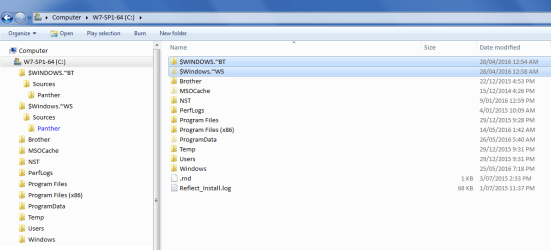
Luckily (for me) it tries to start the install procedure (i.e. it creates those 2 folders and some sub-folders) but it fails to download the W10 installer.

If I get some spare time, I'll look at the Event Viewer to see if there are any interesting events for that date.
 

My Computer My Computer

At a glance

W7 Ultimate SP1, LM19.2 MATE, W10 Home 1703, ...AMD Phenom II x6 1100T, 3.3 GHz12GB DDR3 1333 G-Skill (4GB x 2), G-Skill (2G...NVIDIA GeForce GTX 660
Computer type
PC/Desktop
Computer Manufacturer/Model Number
n/a
OS
W7 Ultimate SP1, LM19.2 MATE, W10 Home 1703, W10 Pro 1703 VM, #All 64 bit
CPU
AMD Phenom II x6 1100T, 3.3 GHz
Motherboard
ASUS M4A88T-M/USB3 (AM3)
Memory
12GB DDR3 1333 G-Skill (4GB x 2), G-Skill (2GB x 2)
Graphics Card(s)
NVIDIA GeForce GTX 660
Sound Card
Realtek?
Monitor(s) Displays
Samsung S23B350
Screen Resolution
1920x1080
Hard Drives
WD Green 2TB (SATA), WD Green 3TB (SATA), WD Blue 4TB (SATA), WD Blue 6TB (SATA)
PSU
Cooler Master
Case
Antec GX300 Tower
Cooling
3x Antec TRICOOL 120mm Fans
Mouse
Wired Optical
Internet Speed
DSL
Antivirus
Avast
Browser
Pale Moon (64 bit)
Other Info
2018-12-27 Upgraded HDDs
2015-12-10 Upgraded case, graphics card, storage
2015-08-15 Upgraded motherboard & RAM
2015-07-15 Upgraded LM17.1 to LM17.2
Tookeri, thanks for the post. I used your instructions for removing those updates on my Windows 7 PC, but the KB2952664 one keeps coming back. Any suggestions?
 

My Computer My Computer

At a glance

Windows 7 Home Premium 64BitIntel Core 2 Quad Q6600G.Skill PC2-6400 DDR2 8GBASUS NVIDIA GeForce 9600 GSO
Computer type
PC/Desktop
OS
Windows 7 Home Premium 64Bit
CPU
Intel Core 2 Quad Q6600
Motherboard
GIGABYTE P35-DS4
Memory
G.Skill PC2-6400 DDR2 8GB
Graphics Card(s)
ASUS NVIDIA GeForce 9600 GSO
Sound Card
Diamond XS51 Xtreme 5.1
Monitor(s) Displays
(2) DELL S2340M 23" HD LEDs
Hard Drives
Seagate ST1000DM003-1ER162 1TB | Seagate ST500DM002-1BD142 500GB | ASUS DRW-24B1ST DVD+R DL
PSU
PC Power & Cooling Silencer 610
Case
Ultra m998
Cooling
ThermalRight Ultra 120E
Keyboard
Logitech K811, K360
Mouse
Logitech Performance MX
Hi and welcome to SevenForums,
Let it collect digital dust in the Optional section as you have found it returns and it always will.
If it shows in the Important section then your windows updates settings are off
Go to the top right and click on Change settings and uncheck the box Give me recommended updates the same way as Important ones.
 

My Computer My Computer

At a glance

Win-7-Pro64bit 7-H-Prem-64biti7-5930K 2nd i9-9940x both water blocked VRM'...Trident-z 3200C14 2nd Trident-z 3600C16EVGA 1080ti ftw3 2nd Titan Xp both water blocked
Computer type
PC/Desktop
Computer Manufacturer/Model Number
Custom assembled by me :}
OS
Win-7-Pro64bit 7-H-Prem-64bit
CPU
i7-5930K 2nd i9-9940x both water blocked VRM's too
Motherboard
ASUS SABERTOOTH X99 2nd ASUS x299 Apex
Memory
Trident-z 3200C14 2nd Trident-z 3600C16
Graphics Card(s)
EVGA 1080ti ftw3 2nd Titan Xp both water blocked
Sound Card
Built-in Realtek
Monitor(s) Displays
1-AOC G2460PG 24"G-Sync 144Hz/ 2nd 1-ASUS VG248QE 24" 144Hz
Screen Resolution
1920 x 1080 144Hz
Hard Drives
2-Samsung M.2 Evo & Evo Plus
2-Samsung 850 EVO 500GB SSD's/ 3-2.5 W.D. Black 1tb-&3-1tb/3-3.5 WD Black 1tb hdd's
PSU
EVGA SuperNOVA 1000-P2 2nd 1200-P2
Case
2-Corsair Obsidian Series 450D Black ATX Mid Tower
Cooling
Custom water loops
Keyboard
Logitech G710+/ 2nd Logitech G910
Mouse
2-RedDragon M901 Perdition 16400 dpi Gaming mouse = wired
Internet Speed
Comcast Ping 19ms 89.31mbps download speed 6.12mbps upload
Antivirus
Malwarebytes Pro/ Superantispyware Pro
Browser
FireFox & Pale moon
Other Info
2nd ASUS X299 Apex/Intel i9-9940x with Custom water loop/7H-Prem-x64/Corsair 450D case/Ram Trident-z 3600C16 4x8gb / Samsung970Evo plus 500gb SSD/Dual ssd EZ swap evo/PSU EVGA SuperNova 1200w-P2 80+Platinum/GPU Titan Xp /8-ML-140 on push-pull on 2-280GTX rads
My list updated to include June updates, I've tried to include as much info as possible.
HOPEFULLY this will be the last time I update this, as the end of the upgrade offer is near!! :party: :party: :party:

Windows 7

Telemetry/Unnecessary:
KB2952664 - Compatibility update for Windows 7 SP1 https://support.microsoft.com/kb/2952664
KB2977759 - Compatibility update for Windows 7 RTM (Without SP1) https://support.microsoft.com/en-us/kb/2977759
KB3021917 - Update to Windows 7 SP1 for performance improvements https://support.microsoft.com/kb/3021917
KB3022345 - Update for customer experience diagnostic telemetry (superseded by KB3068708) https://support.microsoft.com/en-us/kb/3022345
KB3035583 - "Get Windows 10" App (System Tray Nagware/Telemetry) https://support.microsoft.com/en-us/kb/3035583
KB3068708 - Update for customer experience diagnostic telemetry (superseded by KB3080149) https://support.microsoft.com/en-us/kb/3068708
KB3075249 - Update that adds telemetry points to UAC in Windows 7 https://support.microsoft.com/en-us/kb/3075249
KB3080149 - Update for customer experience diagnostic telemetry (replaces previous 2 CEDT updates) https://support.microsoft.com/en-us/kb/3080149
KB3123862 - Updated capabilities to upgrade Windows 8.1 and Windows 7 https://support.microsoft.com/en-us/kb/3123862
KB3150513 - May 2016 Compatibility Update for Windows https://support.microsoft.com/en-us/kb/3150513
KB3173040 - Windows 8.1 and Windows 7 SP1 end of free upgrade offer notification https://support.microsoft.com/en-us/kb/3173040

Windows Update Client:
KB2990214 - Update that enables you to upgrade from Win7 to Win10 https://support.microsoft.com/en-us/kb/2990214
KB3050265 - Windows Update Client for Windows 7: June 2015 https://support.microsoft.com/en-us/kb/3050265
KB3065987 - Windows Update Client for Windows 7: July 2015 https://support.microsoft.com/en-us/kb/3065987
KB3075851 - Windows Update Client for Windows 7: August 2015 https://support.microsoft.com/en-us/kb/3075851
KB3083324 - Windows Update Client for Windows 7: September 2015 https://support.microsoft.com/en-us/kb/3083324
KB3083710 - Windows Update Client for Windows 7: October 2015 https://support.microsoft.com/en-us/kb/3083710
KB3102810 - Windows Update Client for Windows 7 - High CPU/Long Scan Fix https://support.microsoft.com/en-us/kb/3102810
(Recommend installing KB3102810 if you have installed the previous Windows Update Client Updates)
KB3112343 - Windows Update Client for Windows 7: December 2015 https://support.microsoft.com/en-us/kb/3112343
KB3135445 - Windows Update Client for Windows 7: February 2016 https://support.microsoft.com/en-us/kb/3135445
KB3138612 - Windows Update Client for Windows 7: March 2016 https://support.microsoft.com/en-us/kb/3138612
KB3161608 - June 2016 Update Rollup for Windows 7 SP1 (Includes Windows Update Client for Windows 7: June 2016) https://support.microsoft.com/en-us/kb/3161608

==================================================================

Windows 8/8.1

Telemetry/Unnecessary:
KB2976978 - Compatibility update for Windows 8/8.1 https://support.microsoft.com/en-us/kb/2976978
KB3022345 - Update for customer experience diagnostic telemetry (superseded by KB3068708) https://support.microsoft.com/en-us/kb/3022345
KB3035583 - "Get Windows 10" App (System Tray Nagware/Telemetry) https://support.microsoft.com/en-us/kb/3035583
KB3064683 - Windows 8.1 OOBE modifications to reserve Windows 10 https://support.microsoft.com/en-us/kb/3064683
KB3068708 - Update for customer experience diagnostic telemetry (superseded by KB3080149) https://support.microsoft.com/en-us/kb/3068708
KB3072318 - Update for Windows 8.1 OOBE to upgrade to Windows 10 https://support.microsoft.com/en-us/kb/3072318
KB3075249 - Update that adds telemetry points to UAC in Windows 8.1 https://support.microsoft.com/en-us/kb/3075249
KB3080149 - Update for customer experience diagnostic telemetry (replaces previous 2 CEDT updates) https://support.microsoft.com/en-us/kb/3080149
KB3123862 - Updated capabilities to upgrade Windows 8.1 and Windows 7 https://support.microsoft.com/en-us/kb/3123862
KB3173040 - Windows 8.1 and Windows 7 SP1 end of free upgrade offer notification https://support.microsoft.com/en-us/kb/3173040

Windows Update Client:
KB3044374 - Update that enables you to upgrade from Win8.1 to Win10 https://support.microsoft.com/en-us/kb/3044374
KB3050267 - Windows Update Client for Windows 8.1: June 2015 https://support.microsoft.com/en-us/kb/3050267
KB3065988 - Windows Update Client for Windows 8.1: July 2015 https://support.microsoft.com/en-us/kb/3065988
KB3075853 - Windows Update Client for Windows 8.1: August 2015 https://support.microsoft.com/en-us/kb/3075853
KB3083325 - Windows Update Client for Windows 8.1: September 2015 https://support.microsoft.com/en-us/kb/3083325
KB3083711 - Windows Update Client for Windows 8.1: October 2015 https://support.microsoft.com/en-us/kb/3083711
KB3102812 - Windows Update Client for Windows 8.1 - High CPU/Long Scan Fix https://support.microsoft.com/en-us/kb/3102812
(Recommend installing KB3102812 if you have installed the previous Windows Update Client Updates)
KB3112336 - Windows Update Client for Windows 8.1: December 2015 https://support.microsoft.com/en-us/kb/3112336
KB3135449 - Windows Update Client for Windows 8.1: February 2016 https://support.microsoft.com/en-us/kb/3135449
KB3138615 - Windows Update Client for Windows 8.1: March 2016 https://support.microsoft.com/en-us/kb/3138615
KB3161606 - June 2016 Update Rollup for Windows 8.1 (Includes Windows Update Client for Windows 8.1: June 2016) https://support.microsoft.com/en-us/kb/3161606

 

My Computer My Computer

At a glance

Win 7 Ultimate, Win 8.1 Pro, Linux Mint 19 Ci...Intel i5 4690KCorsair Vengeance LP 32GB DDR3MSI GTX 1060 GAMING X 6GB
Computer type
PC/Desktop
Computer Manufacturer/Model Number
Custom Build
OS
Win 7 Ultimate, Win 8.1 Pro, Linux Mint 19 Cinnamon (All 64-Bit)
CPU
Intel i5 4690K
Motherboard
Gigabyte Z97X-UD3H
Memory
Corsair Vengeance LP 32GB DDR3
Graphics Card(s)
MSI GTX 1060 GAMING X 6GB
Sound Card
Onboard
Hard Drives
Samsung 850 EVO 250GB SSD (x2)
Samsung 860 EVO 1TB SSD (x2)
Crucial MX300 525GB SSD
WD Blue 2TB 5400rpm Intellipark Disabled (x2)
PSU
Corsair HX750i
Case
Phanteks Enthoo Pro
Cooling
CM Hyper 212 EVO on CPU, Noctua Redux NF-P14S 1500rpm (x6)
Keyboard
Corsair K70 RGB LUX
Mouse
Corsair Sabre RGB
Antivirus
Avast Free, MalwareBytes, SAS & CryptoPrevent
Browser
Chrome
Other Info
StarTech PEXESAT322I 2 Port PCI-E SATA Card
ASUS PCE-AC56 Dual-band AC1300 Wireless Card
Akasa FC.Six Manual Fan Controller
And a Partridge in a Pear Tree!
Thank Brds7t7

My list updated to include June updates, I've tried to include as much info as possible.
HOPEFULLY this will be the last time I update this, as the end of the upgrade offer is near!! :party: :party: :party:
...
Thanks for the updated list. :)
 

My Computer My Computer

At a glance

W7 Ultimate SP1, LM19.2 MATE, W10 Home 1703, ...AMD Phenom II x6 1100T, 3.3 GHz12GB DDR3 1333 G-Skill (4GB x 2), G-Skill (2G...NVIDIA GeForce GTX 660
Computer type
PC/Desktop
Computer Manufacturer/Model Number
n/a
OS
W7 Ultimate SP1, LM19.2 MATE, W10 Home 1703, W10 Pro 1703 VM, #All 64 bit
CPU
AMD Phenom II x6 1100T, 3.3 GHz
Motherboard
ASUS M4A88T-M/USB3 (AM3)
Memory
12GB DDR3 1333 G-Skill (4GB x 2), G-Skill (2GB x 2)
Graphics Card(s)
NVIDIA GeForce GTX 660
Sound Card
Realtek?
Monitor(s) Displays
Samsung S23B350
Screen Resolution
1920x1080
Hard Drives
WD Green 2TB (SATA), WD Green 3TB (SATA), WD Blue 4TB (SATA), WD Blue 6TB (SATA)
PSU
Cooler Master
Case
Antec GX300 Tower
Cooling
3x Antec TRICOOL 120mm Fans
Mouse
Wired Optical
Internet Speed
DSL
Antivirus
Avast
Browser
Pale Moon (64 bit)
Other Info
2018-12-27 Upgraded HDDs
2015-12-10 Upgraded case, graphics card, storage
2015-08-15 Upgraded motherboard & RAM
2015-07-15 Upgraded LM17.1 to LM17.2
My list updated to include June updates, I've tried to include as much info as possible.
HOPEFULLY this will be the last time I update this, as the end of the upgrade offer is near!! :party: :party: :party:

Windows 7

Telemetry/Unnecessary:
KB2952664 - Compatibility update for Windows 7 SP1 https://support.microsoft.com/kb/2952664
KB2977759 - Compatibility update for Windows 7 RTM (Without SP1) https://support.microsoft.com/en-us/kb/2977759
KB3021917 - Update to Windows 7 SP1 for performance improvements https://support.microsoft.com/kb/3021917
KB3022345 - Update for customer experience diagnostic telemetry (superseded by KB3068708) https://support.microsoft.com/en-us/kb/3022345
KB3035583 - "Get Windows 10" App (System Tray Nagware/Telemetry) https://support.microsoft.com/en-us/kb/3035583
KB3068708 - Update for customer experience diagnostic telemetry (superseded by KB3080149) https://support.microsoft.com/en-us/kb/3068708
KB3075249 - Update that adds telemetry points to UAC in Windows 7 https://support.microsoft.com/en-us/kb/3075249
KB3080149 - Update for customer experience diagnostic telemetry (replaces previous 2 CEDT updates) https://support.microsoft.com/en-us/kb/3080149
KB3123862 - Updated capabilities to upgrade Windows 8.1 and Windows 7 https://support.microsoft.com/en-us/kb/3123862
KB3150513 - May 2016 Compatibility Update for Windows https://support.microsoft.com/en-us/kb/3150513
KB3173040 - Windows 8.1 and Windows 7 SP1 end of free upgrade offer notification https://support.microsoft.com/en-us/kb/3173040

Windows Update Client:
KB2990214 - Update that enables you to upgrade from Win7 to Win10 https://support.microsoft.com/en-us/kb/2990214
KB3050265 - Windows Update Client for Windows 7: June 2015 https://support.microsoft.com/en-us/kb/3050265
KB3065987 - Windows Update Client for Windows 7: July 2015 https://support.microsoft.com/en-us/kb/3065987
KB3075851 - Windows Update Client for Windows 7: August 2015 https://support.microsoft.com/en-us/kb/3075851
KB3083324 - Windows Update Client for Windows 7: September 2015 https://support.microsoft.com/en-us/kb/3083324
KB3083710 - Windows Update Client for Windows 7: October 2015 https://support.microsoft.com/en-us/kb/3083710
KB3102810 - Windows Update Client for Windows 7 - High CPU/Long Scan Fix https://support.microsoft.com/en-us/kb/3102810
(Recommend installing KB3102810 if you have installed the previous Windows Update Client Updates)
KB3112343 - Windows Update Client for Windows 7: December 2015 https://support.microsoft.com/en-us/kb/3112343
KB3135445 - Windows Update Client for Windows 7: February 2016 https://support.microsoft.com/en-us/kb/3135445
KB3138612 - Windows Update Client for Windows 7: March 2016 https://support.microsoft.com/en-us/kb/3138612
KB3161608 - June 2016 Update Rollup for Windows 7 SP1 (Includes Windows Update Client for Windows 7: June 2016) https://support.microsoft.com/en-us/kb/3161608

==================================================================

Windows 8/8.1

Telemetry/Unnecessary:
KB2976978 - Compatibility update for Windows 8/8.1 https://support.microsoft.com/en-us/kb/2976978
KB3022345 - Update for customer experience diagnostic telemetry (superseded by KB3068708) https://support.microsoft.com/en-us/kb/3022345
KB3035583 - "Get Windows 10" App (System Tray Nagware/Telemetry) https://support.microsoft.com/en-us/kb/3035583
KB3064683 - Windows 8.1 OOBE modifications to reserve Windows 10 https://support.microsoft.com/en-us/kb/3064683
KB3068708 - Update for customer experience diagnostic telemetry (superseded by KB3080149) https://support.microsoft.com/en-us/kb/3068708
KB3072318 - Update for Windows 8.1 OOBE to upgrade to Windows 10 https://support.microsoft.com/en-us/kb/3072318
KB3075249 - Update that adds telemetry points to UAC in Windows 8.1 https://support.microsoft.com/en-us/kb/3075249
KB3080149 - Update for customer experience diagnostic telemetry (replaces previous 2 CEDT updates) https://support.microsoft.com/en-us/kb/3080149
KB3123862 - Updated capabilities to upgrade Windows 8.1 and Windows 7 https://support.microsoft.com/en-us/kb/3123862
KB3173040 - Windows 8.1 and Windows 7 SP1 end of free upgrade offer notification https://support.microsoft.com/en-us/kb/3173040

Windows Update Client:
KB3044374 - Update that enables you to upgrade from Win8.1 to Win10 https://support.microsoft.com/en-us/kb/3044374
KB3050267 - Windows Update Client for Windows 8.1: June 2015 https://support.microsoft.com/en-us/kb/3050267
KB3065988 - Windows Update Client for Windows 8.1: July 2015 https://support.microsoft.com/en-us/kb/3065988
KB3075853 - Windows Update Client for Windows 8.1: August 2015 https://support.microsoft.com/en-us/kb/3075853
KB3083325 - Windows Update Client for Windows 8.1: September 2015 https://support.microsoft.com/en-us/kb/3083325
KB3083711 - Windows Update Client for Windows 8.1: October 2015 https://support.microsoft.com/en-us/kb/3083711
KB3102812 - Windows Update Client for Windows 8.1 - High CPU/Long Scan Fix https://support.microsoft.com/en-us/kb/3102812
(Recommend installing KB3102812 if you have installed the previous Windows Update Client Updates)
KB3112336 - Windows Update Client for Windows 8.1: December 2015 https://support.microsoft.com/en-us/kb/3112336
KB3135449 - Windows Update Client for Windows 8.1: February 2016 https://support.microsoft.com/en-us/kb/3135449
KB3138615 - Windows Update Client for Windows 8.1: March 2016 https://support.microsoft.com/en-us/kb/3138615
KB3161606 - June 2016 Update Rollup for Windows 8.1 (Includes Windows Update Client for Windows 8.1: June 2016) https://support.microsoft.com/en-us/kb/3161606
Hi!
I'm a bit confused...
I uninstalled all from "Telemetry/Unnecessar" & also KB2990214 from "Windows Update Client". But I kept everything else from "Windows Update Client" installed.
I did it correct? Or should I install KB2990214 back? Or should I uninstall everything else from "Windows Update Client" too?
Thanks!

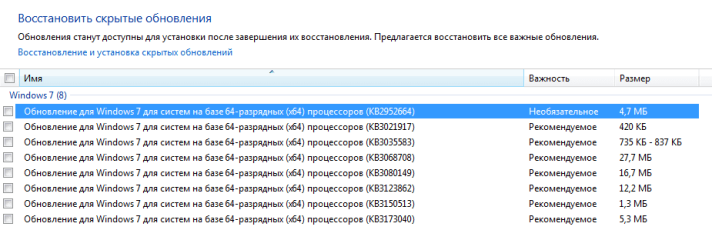
P.S. Here's what I have "hidden" at the moment:
 

Attachments

  • Untitled.png
    Untitled.png
    9.7 KB · Views: 3
Last edited:

My Computer My Computer

At a glance

Windows 7 Ultimate x64Intel i7-2630QM 2.0GHz8GBNVIDIA GeForce GTX 460M 1.5GB
Computer type
Laptop
Computer Manufacturer/Model Number
ASUS G73SW
OS
Windows 7 Ultimate x64
CPU
Intel i7-2630QM 2.0GHz
Memory
8GB
Graphics Card(s)
NVIDIA GeForce GTX 460M 1.5GB
Screen Resolution
1920 x 1080 x 120Hz
Hard Drives
750GB HDD + 750GB HDD
Antivirus
ESET Smart Security 4
Browser
Mozilla Firefox
Hi Helel,

If you want the WU client update installed, you only need the latest as they replace the earlier versions anyway. KB3138612 or the June update rollup will give you the latest.

Hope that helps?
 

My Computer My Computer

At a glance

Win 7 Ultimate, Win 8.1 Pro, Linux Mint 19 Ci...Intel i5 4690KCorsair Vengeance LP 32GB DDR3MSI GTX 1060 GAMING X 6GB
Computer type
PC/Desktop
Computer Manufacturer/Model Number
Custom Build
OS
Win 7 Ultimate, Win 8.1 Pro, Linux Mint 19 Cinnamon (All 64-Bit)
CPU
Intel i5 4690K
Motherboard
Gigabyte Z97X-UD3H
Memory
Corsair Vengeance LP 32GB DDR3
Graphics Card(s)
MSI GTX 1060 GAMING X 6GB
Sound Card
Onboard
Hard Drives
Samsung 850 EVO 250GB SSD (x2)
Samsung 860 EVO 1TB SSD (x2)
Crucial MX300 525GB SSD
WD Blue 2TB 5400rpm Intellipark Disabled (x2)
PSU
Corsair HX750i
Case
Phanteks Enthoo Pro
Cooling
CM Hyper 212 EVO on CPU, Noctua Redux NF-P14S 1500rpm (x6)
Keyboard
Corsair K70 RGB LUX
Mouse
Corsair Sabre RGB
Antivirus
Avast Free, MalwareBytes, SAS & CryptoPrevent
Browser
Chrome
Other Info
StarTech PEXESAT322I 2 Port PCI-E SATA Card
ASUS PCE-AC56 Dual-band AC1300 Wireless Card
Akasa FC.Six Manual Fan Controller
And a Partridge in a Pear Tree!
Back
Top