
audiodrome
New member
- Local time
- 12:18 AM
- Messages
- 7
I have categorized folders of thousands of pictures and every once in a while I need to sort through and certain files for a specific project. The way I've been doing this is to select one file at a time or if there happens to be a consecutive run of pictures I can grab the whole group and then copy and paste.
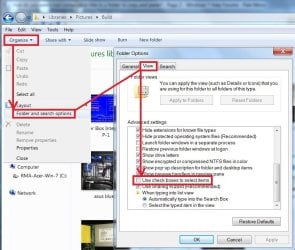
Is there a way to select one file and then select another file three files away and then another file ten files away? In other words highlighting and selecting non consecutive files to copy and paste. I'm thinking that Windows must have the capability to do this and I just haven't found the trick yet. Every time I do a search online all I find are instructions on how to select consecutive files.
Is there a way to select one file and then select another file three files away and then another file ten files away? In other words highlighting and selecting non consecutive files to copy and paste. I'm thinking that Windows must have the capability to do this and I just haven't found the trick yet. Every time I do a search online all I find are instructions on how to select consecutive files.
My Computer
At a glance
Windows 7 Home Premium 64bit Service Pack 1AMD Athlon 64x2 Dual Core Processor 5200+ 2.7...4.00 GBnVidia
- Computer type
- PC/Desktop
- Computer Manufacturer/Model Number
- Custom
- OS
- Windows 7 Home Premium 64bit Service Pack 1
- CPU
- AMD Athlon 64x2 Dual Core Processor 5200+ 2.7 GHz
- Memory
- 4.00 GB
- Graphics Card(s)
- nVidia
- Antivirus
- Avast
- Browser
- IE 11/Chrome



 . Much the best way and easy to configure.Thanks, ThrashZone.


