Service Pack 1, SP1, for my Windows 7 Ultimate system will not install

krazykat sevenf

New member
Local time
2:02 AM
Messages
16
Hi, Windows Sevenforums

I am having a problem installing the Service Pack 1, SP1, for my Windows 7 Ultimate system. I need to install the SP1 so that I can go to the next step and upgrade to Windows 10.

I found this “old” posting: http://www.sevenforums.com/windows-updates-activation/324632-windows-7-service-pack-1-x64-based-systems-kb976932-failed.html that talked about the same problem. I do not believe that post is still open to accept the CBS logs. Do I need to start a new post with my current problem?

Here are the details of my current problem and what I have done. Please excuse the details, but hopefully the details will lead to a solution.


My system is a Dell Vostro 1510 laptop running Windows 7 Ultimate. I verified my copy of Win 7 Ultimate is Genuine and registered. Product ID is:
0042-OEM-899XXXX-XXXXX (x’s represent the other digits if the product ID)

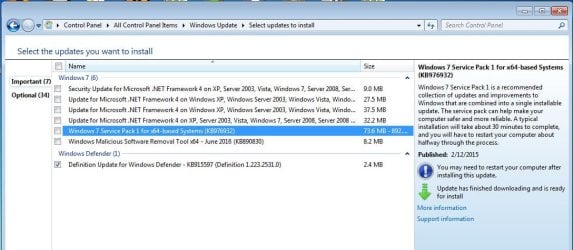
I have installed all of the available Win 7 updates, except the ones shown in the screenshot #1

Screenshot # 1 attached


The SP1 update is item 5. I select only item 5 and click “install”. Install proceeds -- to a point. Sometimes during the install I receive a “failed to install” with error code 80070002, twice install has completed and Windows has asked for a restart to finish the install. When restart is complete, with no error messages, I check status of updates. Status shows SP1 install as “failed” .

On the update status page I clicked on the “Try windows troubleshooter”. Went to Start, Control Panel, Troubleshooting, system and security, select “Fix problems with windows update”. Immediately received error message:

An error occurred while troubleshooting. An unexpected error has occurred. The troubleshooter wizard can’t continue --error code 80131700.

I have researched both error codes and applied the suggested fixes, and still unable to install SP1.

One Microsoft page said I needed the file “ Windows 6.1-KB976932-X64.exe” , which has the same KB number as the Windows update file in line 5 of the screenshot ( Windows 7 Service Pack 1 for x64-systems (KB967032)).
Another page gave this advice: The problem was the same as mine, but with Windows 7 Home Premium X64.
Since you don't have Service Pack 1 installed then get the Windows 7 Home Premium x64 RTM: X15-65733.iso file and burn that iso file to a DVD. Then perform the repair install of Windows using the DVD that you made.” The problem was the same as mine, but with Windows 7 Home Premium X64.

This sounds promising --- EXCEPT -- it was silent what changes the “repair” would make to the installed OS. EG. Would there be corruption on the current installed WIN 7? What settings,if any, would be changed, would installed programs and files be deleted, etc.

Is there a Windows 7 Ultimate x64 RTM: X15-?????.iso file ?

COMMENTS?

Also, trying to individually install each of the first 5 updates in the
screenshot #1 produces the 8070002 error code before the update install finishes.


I would really appreciate any tips, or links on how to Obviously, I am not doing something right, but I am out of things to try.
 

Attachments
  • Upgrade 01.JPG
    Upgrade 01.JPG
    86.5 KB · Views: 0

My Computer My Computer

At a glance

Windows 7 PRO 64 bit
OS
Windows 7 PRO 64 bit
I am having a problem installing the Service Pack 1, SP1, for my Windows 7 Ultimate system. I need to install the SP1 so that I can go to the next step and upgrade to Windows 10.

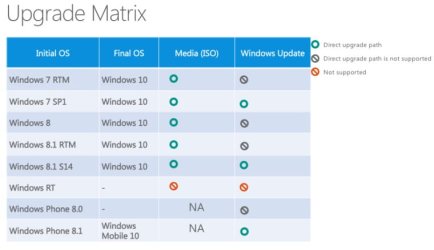
Actually, you don't need to do that to upgrade to 10, that is only if you want to upgrade through windows update,

Windows-10-Upgrade-Path.jpg

Windows 10 - Upgrade Installation - Windows 10 Forums

All but one or two of the methods there will upgrade for you.

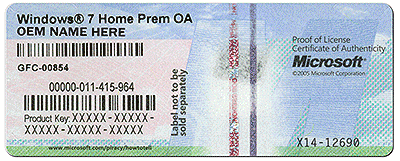
If you are having problems like you mention with 7, you may want to just clean install 10 using your win 7 product key on the COA.

coa-stickers.gif

Windows 10 - Clean Install - Windows 10 Forums
 

My Computer My Computer

At a glance

Win 10 Pro x64Intel I5-2500K @3.3GHz16GB G.Skill Ripjaws X (4x4GB)EVGA GeForce 750 Ti SC 2GB
Computer type
PC/Desktop
Computer Manufacturer/Model Number
Self Built
OS
Win 10 Pro x64
CPU
Intel I5-2500K @3.3GHz
Motherboard
Asrock P67 Extreme4
Memory
16GB G.Skill Ripjaws X (4x4GB)
Graphics Card(s)
EVGA GeForce 750 Ti SC 2GB
Sound Card
ASUS Xonar DG 5.1 Channels 24-bit 96KHz PCI Interface Sound
Monitor(s) Displays
auria eq2367
Screen Resolution
1920 x 1080
Hard Drives
250GB Samsung 850 EVO SSD
1TB WD Blue
1TB Hitachi
PSU
SeaSonic X 650W 80 Plus Gold
Case
Corsair Obsidian 750D
Cooling
Corsair H60, Three 140mm case fans
Keyboard
Logitech Wireless Keyboard K520
Mouse
Logitech Wireless Mouse M310
Internet Speed
Wave Broadband ~ 100 dn 5 up
Antivirus
Windows Defender, Malwarebytes Premium
Browser
Edge, IE11, Chrome
Other Info
Laptop specs: HP g7-1365dx /
CPU: AMD A6-3420M APU with Radeon(tm) HD Graphics /
RAM: Crucial 8Gb (2x4Gb) /
SSD: Crucial M4-CT128M4SSD2 ATA Device/ FW 000F /
GFX: AMD Radeon HD 6520G /
OS: Windows 10 Pro x64
hi Krazykat,

Did you mean this code for your product code,
00426-OEM-8992662-00400, as this is only for a factory installed W7 Ultimate.

If it is then thats why SP1 will not install, and your W10 install will fail as well.

We can check if you run this tool, and copy/paste the results
http://go.microsoft.com/fwlink/?LinkID=52012

Roy
 

My Computer My Computer

At a glance

W7 home premium 32bit/W7HP 64bit/w10 tp insid...E5300 dual core3gbNvidia Geforce 7100 Nforce 630i
Computer type
PC/Desktop
Computer Manufacturer/Model Number
medionl/Aspire 6930G/acer x55a
OS
W7 home premium 32bit/W7HP 64bit/w10 tp insider ring
CPU
E5300 dual core
Motherboard
medion MS7366
Memory
3gb
Graphics Card(s)
Nvidia Geforce 7100 Nforce 630i
Monitor(s) Displays
avixc
Internet Speed
n (isp resticted to 72)
Antivirus
mse/pands
Browser
palemoon
Other Info
Belkin Fd7050 n USB using Railink RT2870 drivers, more upto date
Roy,
I ran the Microsoft Genuine Advantage Tool and the results are pasted below. I also ran the "Is this computer Genuine" tool and the results are attached as JPG. Activation says "Genuine". Let me know what Advantage Tool says.

Thanks

Code:
Diagnostic Report (1.9.0027.0):
-----------------------------------------
Windows Validation Data-->

Validation Code: 0
Cached Online Validation Code: N/A, hr = 0xc004f012
Windows Product Key: *****-*****-X92GV-V7DCV-P4K27
Windows Product Key Hash: aU2z1/fnhnLHmhBm699qYZT2E6s=
Windows Product ID: 00426-OEM-8992662-00400
Windows Product ID Type: 2
Windows License Type: OEM SLP
Windows OS version: 6.1.7600.2.00010100.0.0.001
ID: {1F335456-118F-453F-A35F-75B54024B69F}(1)
Is Admin: Yes
TestCab: 0x0
LegitcheckControl ActiveX: N/A, hr = 0x80070002
Signed By: N/A, hr = 0x80070002
Product Name: Windows 7 Ultimate
Architecture: 0x00000009
Build lab: 7600.win7_gdr.150318-1623
TTS Error: 
Validation Diagnostic: 
Resolution Status: N/A

Vista WgaER Data-->
ThreatID(s): N/A, hr = 0x80070002
Version: N/A, hr = 0x80070002

Windows XP Notifications Data-->
Cached Result: N/A, hr = 0x80070002
File Exists: Yes
Version: 1.9.40.0
WgaTray.exe Signed By: Microsoft
WgaLogon.dll Signed By: Microsoft

OGA Notifications Data-->
Cached Result: N/A, hr = 0x80070002
Version: N/A, hr = 0x80070002
OGAExec.exe Signed By: N/A, hr = 0x80070002
OGAAddin.dll Signed By: N/A, hr = 0x80070002

OGA Data-->
Office Status: 101 Not Activated
Microsoft Office Professional 2007 - 101 Not Activated
OGA Version: N/A, 0x80070002
Signed By: N/A, hr = 0x80070002
Office Diagnostics: B4D0AA8B-604-645_025D1FF3-364-8007007e_025D1FF3-229-8007007e_025D1FF3-230-1_025D1FF3-517-8007007e_025D1FF3-237-8007007e_025D1FF3-238-2_025D1FF3-244-80070002_025D1FF3-258-3_672A8F41-320-80004005_672A8F41-349-80004005_672A8F41-244-80004005

Browser Data-->
Proxy settings: N/A
User Agent: Mozilla/4.0 (compatible; MSIE 8.0; Win32)
Default Browser: C:\Program Files (x86)\Mozilla Firefox\firefox.exe
Download signed ActiveX controls: Prompt
Download unsigned ActiveX controls: Disabled
Run ActiveX controls and plug-ins: Allowed
Initialize and script ActiveX controls not marked as safe: Disabled
Allow scripting of Internet Explorer Webbrowser control: Disabled
Active scripting: Allowed
Script ActiveX controls marked as safe for scripting: Allowed

File Scan Data-->
File Mismatch: C:\Windows\system32\wat\watadminsvc.exe[Hr = 0x80070003]
File Mismatch: C:\Windows\system32\wat\npwatweb.dll[Hr = 0x80070003]
File Mismatch: C:\Windows\system32\wat\watux.exe[Hr = 0x80070003]
File Mismatch: C:\Windows\system32\wat\watweb.dll[Hr = 0x80070003]

Other data-->
Office Details: <GenuineResults><MachineData><UGUID>{1F335456-118F-453F-A35F-75B54024B69F}</UGUID><Version>1.9.0027.0</Version><OS>6.1.7600.2.00010100.0.0.001</OS><Architecture>x64</Architecture><PKey>*****-*****-*****-*****-P4K27</PKey><PID>00426-OEM-8992662-00400</PID><PIDType>2</PIDType><SID>S-1-5-21-103662713-359189287-1742920759</SID><SYSTEM><Manufacturer>Dell Inc.</Manufacturer><Model>Vostro1510</Model></SYSTEM><BIOS><Manufacturer>Dell Inc.</Manufacturer><Version>A11</Version><SMBIOSVersion major="2" minor="4"/><Date>20080731000000.000000+000</Date></BIOS><HWID>F236332F0184607A</HWID><UserLCID>0409</UserLCID><SystemLCID>0409</SystemLCID><TimeZone>Pacific Standard Time(GMT-08:00)</TimeZone><iJoin>0</iJoin><SBID><stat>3</stat><msppid></msppid><name></name><model></model></SBID><OEM><OEMID>DELL  </OEMID><OEMTableID>QA09   </OEMTableID></OEM><GANotification><File Name="WgaTray.exe" Version="1.9.40.0"/><File Name="WgaLogon.dll" Version="1.9.40.0"/></GANotification></MachineData><Software><Office><Result>101</Result><Products><Product GUID="{91120000-0014-0000-0000-0000000FF1CE}"><LegitResult>101</LegitResult><Name>Microsoft Office Professional 2007</Name><Ver>12</Ver><Val>81CD5A0E9313F0E</Val><Hash>53CtjPu7u41j6D9AOVQVY9zH3Zc=</Hash><Pid>81605-903-7205941-65306</Pid><PidType>1</PidType></Product></Products><Applications><App Id="15" Version="12" Result="101"/><App Id="16" Version="12" Result="101"/><App Id="18" Version="12" Result="101"/><App Id="19" Version="12" Result="101"/><App Id="1A" Version="12" Result="101"/><App Id="1B" Version="12" Result="101"/></Applications></Office></Software></GenuineResults>  

Spsys.log Content: 0x80070002

Licensing Data-->
Software licensing service version: 6.1.7600.16385

Name: Windows(R) 7, Ultimate edition
Description: Windows Operating System - Windows(R) 7, OEM_SLP channel
Activation ID: 7cfd4696-69a9-4af7-af36-ff3d12b6b6c8
Application ID: 55c92734-d682-4d71-983e-d6ec3f16059f
Extended PID: 00426-00178-926-600400-02-1033-7600.0000-0552015
Installation ID: 018900513714522074439640458184175780631481843786124516
Processor Certificate URL: [url=http://go.microsoft.com/fwlink/?LinkID=88338]SpcService Web Service[/url]
Machine Certificate URL: [url=http://go.microsoft.com/fwlink/?LinkID=88339]RacService Web Service[/url]
Use License URL: [url=http://go.microsoft.com/fwlink/?LinkID=88341]UseLicenseService Web Service[/url]
Product Key Certificate URL: [url=http://go.microsoft.com/fwlink/?LinkID=88340]PkcService Web Service[/url]
Partial Product Key: P4K27
License Status: Licensed
Remaining Windows rearm count: 3
Trusted time: 6/28/2016 5:22:58 PM

Windows Activation Technologies-->
HrOffline: 0x00000000
HrOnline: N/A
HealthStatus: 0x0000000000000000
Event Time Stamp: N/A
ActiveX: Not Registered - 0x80040154
Admin Service: Not Registered - 0x80040154
HealthStatus Bitmask Output:


HWID Data-->
HWID Hash Current: MgAAAAEABAABAAEAAAABAAAAAgABAAEA6GFgLZyLUGI01EaDBgwCMPr2bi7sECbgKoU=

OEM Activation 1.0 Data-->
N/A

OEM Activation 2.0 Data-->
BIOS valid for OA 2.0: yes
Windows marker version: 0x20001
OEMID and OEMTableID Consistent: yes
BIOS Information: 
  ACPI Table Name    OEMID Value    OEMTableID Value
  APIC            INTEL         CRESTLNE
  FACP            TOSCPL        CRESTLNE
  HPET            INTEL         CRESTLNE
  BOOT            PTLTD         $SBFTBL$
  MCFG            INTEL         CRESTLNE
  TCPA            Intel         CRESTLNE
  TMOR            PTLTD                 
  OSFR            TOSHIB        A+2nd ID
  APIC            INTEL         CRESTLNE
  SSDT            SataRe        SataAhci
  SSDT            SataRe        SataAhci
  SSDT            SataRe        SataAhci
  SSDT            SataRe        SataAhci
  SLIC            DELL          QA09
 

Attachments

  • WIN7 Vostro 1510 is GENUINE      (062416)  #2.jpg
    WIN7 Vostro 1510 is GENUINE (062416) #2.jpg
    23.9 KB · Views: 23
Last edited by a moderator:

My Computer My Computer

At a glance

Windows 7 PRO 64 bit
OS
Windows 7 PRO 64 bit
Your Vostro DID NOT come with Ultimate installed or even W7.
(Ultimate was installed 2015, initially Vista)
Even thou it has passed PART of the genuine test, it is not REGISTERED, nor is the Office 2007 install activated or registered.
(presumably told not to use the key for this, as it would break the hack)

There is evidence of a tamper within the report to circumvent WAT.

The ony way your going to get W10 is to buy a license


Roy
 
Last edited:

My Computer My Computer

At a glance

W7 home premium 32bit/W7HP 64bit/w10 tp insid...E5300 dual core3gbNvidia Geforce 7100 Nforce 630i
Computer type
PC/Desktop
Computer Manufacturer/Model Number
medionl/Aspire 6930G/acer x55a
OS
W7 home premium 32bit/W7HP 64bit/w10 tp insider ring
CPU
E5300 dual core
Motherboard
medion MS7366
Memory
3gb
Graphics Card(s)
Nvidia Geforce 7100 Nforce 630i
Monitor(s) Displays
avixc
Internet Speed
n (isp resticted to 72)
Antivirus
mse/pands
Browser
palemoon
Other Info
Belkin Fd7050 n USB using Railink RT2870 drivers, more upto date
Back
Top