Should I upgrade motherboard drivers after new graphic card?

archz2

New member
Member
Local time
2:34 AM
Messages
55
My pc is running windows 7 - 64 bit ultimate. I upgraded the motherboard of my PC in 2011 with second generation i3 processor and 4GB RAM. It has integrated intel graphics already.
Today I installed new Kingston DDR3 – 4GB RAM. My pc has detected it and running fine.

I also installed ZOTAC NVIDIA GT 730 (2GB) DDR5 Graphics Card in its PCI slot.


My motherboard is ECS (model H61H2-M2)
Here are the full specifications
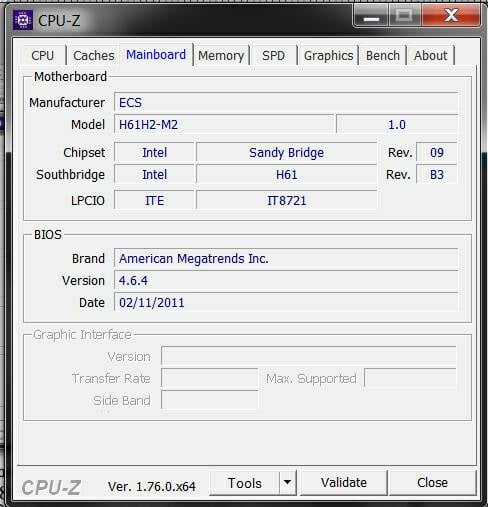
aaadf77d7f7e34d0e930c876f22c1cd1.jpg


Here are the full specifications of my CPU

388412d1466594027-4gb-graphics-card-without-fan-vs-2gb-card-fan-cpu-info.jpg


After installing the graphics card, I downloaded and installed the latest drivers from the official nvidia geforce website.

My PC has accepted the graphics card perfectly and I am experiencing a nice boost in the performance.


I have been running old drivers of my motherboard which were available in 2011 without any trouble. Should I download new drivers for chipset and other parts? Updated drivers of year 2013 are available on the ECS website. Moreover, updated intel integrated drivers are also available.

I tried updating the BIOS too of my motherboard, but I got the ROM files error.

I am planning to upgrade to windows 8.1. ECS guys are saying that they added special support for windows 8 in the new BIOS.

Should I upgrade my BIOS as well?
 

My Computer My Computer

At a glance

Windows 7 64 bit Ultimatei3( Pc), i5 (lappy)4GbIntel hd graphics (PC), Ati sunpro (lappy)
Computer type
PC/Desktop
OS
Windows 7 64 bit Ultimate
CPU
i3( Pc), i5 (lappy)
Memory
4Gb
Graphics Card(s)
Intel hd graphics (PC), Ati sunpro (lappy)
Hard Drives
500GB SATA
Antivirus
Kaspersky Internet Security
Browser
Chrome and firefox
If all is working well - leave it alone. The BIOS does not need an update based on what you added.
DO NOT go to Windows 8 - in my experience you will be better off to stay with W-7. Remember that Windows 10 is the replacement for W-8/8.1. Just my 2 cents.
 

My Computer My Computer

At a glance

Windows 7 Enterprise 64bit Desktops; Windows ...AMD Athlon 2 X3; I5-6200 6th gen (Dell)8 Gig Desktop, 8Gig Laptop, 16Gig LaptopRadeon R5450 1Gig
Computer type
PC/Desktop
Computer Manufacturer/Model Number
Custom Desktop (2 alike) Dell inspiron 13" W10 Laptop Dell Inspiron 17 5759
OS
Windows 7 Enterprise 64bit Desktops; Windows 7 Professional 64Bit 17"Laptop
CPU
AMD Athlon 2 X3; I5-6200 6th gen (Dell)
Motherboard
Gigabyte GA 78LMT-USB3 (2 Desktops)
Memory
8 Gig Desktop, 8Gig Laptop, 16Gig Laptop
Graphics Card(s)
Radeon R5450 1Gig
Sound Card
Creative SB X-Fi Titanium Extreme Audio Desktop 1
Monitor(s) Displays
Dell 2419
Screen Resolution
1920x1080
Hard Drives
Crucial M500 500GB SSD Desktop 1 and Laptops
Samsung 850EVO 250GB - Desktop 2
PSU
Thermaltake 600watt
Case
Rosewill
Cooling
Scythe Typhoon 120mm
Keyboard
Kensington
Mouse
Logitech M310
Internet Speed
50/50
Antivirus
Avast
Browser
Firefox 68
Agreed, if your computer is running fine then there is no need to update your drivers.
 

My Computer My Computer

At a glance

windows 7 Home 64 bit
Computer type
PC/Desktop
OS
windows 7 Home 64 bit
If you are gonna install windows 8, then why bother ?

For the life of me, I don`t know why you would install Windows 8.1, it`s horrible and you will hate it :sick:

Windows 8 and 8.1 are not computer friendly operating systems, they are meant for tablets, it was the worst OS ever made for a home PC, and that includes Windows ME

There is nothing special you need in a bios to install Windows 8, it`s just an operating system.

There is no TRYING to update the BIOS, either you do it or it fails and you may ruin your motherboard and you`ll be buying a new one.

If you don`t know what you`re doing, leave it to someone who does.

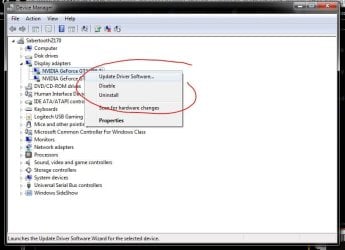
If you want to update drivers, just go to the item you want to update in Device Manager and choose Update Driver.
 

Attachments

  • Capture.JPG
    Capture.JPG
    57.2 KB · Views: 3

My Computer My Computer

At a glance

Windows 10 Pro x64Intel Core i7 6700KGSkill TridentZ RGB 16GB 3600 16-16-16-36EVGA GTX 980 Ti SC x2
Computer type
PC/Desktop
Computer Manufacturer/Model Number
Skylake Special #666
OS
Windows 10 Pro x64
CPU
Intel Core i7 6700K
Motherboard
Asus Sabertooth Z170 Mark 1
Memory
GSkill TridentZ RGB 16GB 3600 16-16-16-36
Graphics Card(s)
EVGA GTX 980 Ti SC x2
Sound Card
Realtek High Definition
Monitor(s) Displays
AOC G2460PG
Screen Resolution
1920 x 1080 144Hz
Hard Drives
Samsung 860 Pro 256GB, Seagate Barracuda 4TB x2
PSU
EVGA 1000 P2, EVGA White Custom Braided Cables
Case
Corsair Vengeance C70 Gunmetal Black
Cooling
Corsair H100i v2, Corsair ML120 x2, Thermal Grizzly Kryonaut
Keyboard
Logitech G910 Orion Spectrum
Mouse
Logitech G700s
Internet Speed
Verizon Fios Quantum Gateway 75/75
Antivirus
Windows Defender, Malwarebytes Free 3.8.3
Browser
Chrome
Other Info
Corsair SP120 x4, LG Blu-ray Drive, Durabrand HT-395 100 Watt Dolby Digital Amp, Corsair H2100 Wireless 7.1 Headset
A bit more ram would probably be more effective.
Art.
 

My Computer My Computer

At a glance

Win7 sp1 Pro 64bit / XP sp2 Pro (games only)Intel Core 2 Duo E8400 @ 3.00GHz8.00 GB Dual-Channel DDR2 @ 400MHz (5-5-5-18)1024MB GeForce GTX 560
Computer type
PC/Desktop
Computer Manufacturer/Model Number
Home built
OS
Win7 sp1 Pro 64bit / XP sp2 Pro (games only)
CPU
Intel Core 2 Duo E8400 @ 3.00GHz
Motherboard
Intel Corporation DP35DP (CPU1)
Memory
8.00 GB Dual-Channel DDR2 @ 400MHz (5-5-5-18)
Graphics Card(s)
1024MB GeForce GTX 560
Sound Card
NVIDIA High Definition Audio
Monitor(s) Displays
SyncMaster (2048x1152@60Hz)
Hard Drives
240GB Sandisc Extreme Pro SSD
244GB Seagate ST3250410AS
488GB Seagate ST500DM002-1BD142
931GB Western Digital WDC WD1003FZEX
PSU
Corsair 720
Case
ATX
Keyboard
HID Keyboard Device Logitech
Mouse
HID-compliant mouse Microsoft
Other Info
TSSTcorp CDDVDW SH-S223L

HL-DT-ST BD-RE BH12LS35

My Computer My Computer

At a glance

Windows 7 64 bit Ultimatei3( Pc), i5 (lappy)4GbIntel hd graphics (PC), Ati sunpro (lappy)
Computer type
PC/Desktop
OS
Windows 7 64 bit Ultimate
CPU
i3( Pc), i5 (lappy)
Memory
4Gb
Graphics Card(s)
Intel hd graphics (PC), Ati sunpro (lappy)
Hard Drives
500GB SATA
Antivirus
Kaspersky Internet Security
Browser
Chrome and firefox
Hi,
Yep I'm on bios from 2009 it makes no real difference
Although win-8-8.1 and now 10 use Fast start which is hibernation on steroids your motherboard may not be compatible with that even on 2011 bios because that is before win-8 was released I believe so a bios flash wouldn't help that anyway.

Best to simply disable Hibernation using cmd as admin with powercfg -h off
Using the conventional menus win-8 or 10 might re-enable fast start after major updates
Fast Startup - Turn On or Off in Windows 10 - Windows 10 Forums
 

My Computer My Computer

At a glance

Win-7-Pro64bit 7-H-Prem-64biti7-5930K 2nd i9-9940x both water blocked VRM'...Trident-z 3200C14 2nd Trident-z 3600C16EVGA 1080ti ftw3 2nd Titan Xp both water blocked
Computer type
PC/Desktop
Computer Manufacturer/Model Number
Custom assembled by me :}
OS
Win-7-Pro64bit 7-H-Prem-64bit
CPU
i7-5930K 2nd i9-9940x both water blocked VRM's too
Motherboard
ASUS SABERTOOTH X99 2nd ASUS x299 Apex
Memory
Trident-z 3200C14 2nd Trident-z 3600C16
Graphics Card(s)
EVGA 1080ti ftw3 2nd Titan Xp both water blocked
Sound Card
Built-in Realtek
Monitor(s) Displays
1-AOC G2460PG 24"G-Sync 144Hz/ 2nd 1-ASUS VG248QE 24" 144Hz
Screen Resolution
1920 x 1080 144Hz
Hard Drives
2-Samsung M.2 Evo & Evo Plus
2-Samsung 850 EVO 500GB SSD's/ 3-2.5 W.D. Black 1tb-&3-1tb/3-3.5 WD Black 1tb hdd's
PSU
EVGA SuperNOVA 1000-P2 2nd 1200-P2
Case
2-Corsair Obsidian Series 450D Black ATX Mid Tower
Cooling
Custom water loops
Keyboard
Logitech G710+/ 2nd Logitech G910
Mouse
2-RedDragon M901 Perdition 16400 dpi Gaming mouse = wired
Internet Speed
Comcast Ping 19ms 89.31mbps download speed 6.12mbps upload
Antivirus
Malwarebytes Pro/ Superantispyware Pro
Browser
FireFox & Pale moon
Other Info
2nd ASUS X299 Apex/Intel i9-9940x with Custom water loop/7H-Prem-x64/Corsair 450D case/Ram Trident-z 3600C16 4x8gb / Samsung970Evo plus 500gb SSD/Dual ssd EZ swap evo/PSU EVGA SuperNova 1200w-P2 80+Platinum/GPU Titan Xp /8-ML-140 on push-pull on 2-280GTX rads
Back
Top