Reformatting a Laptop With Win10

Richardc267

New member
Local time
1:02 PM
Messages
39
Hey all. I've got this laptop that has Windows 10 on it, and I want to format it to put Windows 7 64bit OS on it. The laptop's model is an HP 17-g121WM. However, since it does not tell me when or what buttons to press to get into the BIOS, I'm not sure how I can do this. When the laptop starts booting up, it doesn't do the regular boot sequence a normal desktop PC does that shows what it's doing. Instead, it shows an HP screen with an icon under it in the form of a few dots circuling each other, then it starts up the Win10 loading screen before it comes to the login screen.

I'm not entirely sure what the system specs are. The only thing I'm unsure about is what GHz the CPU is other than it's a Quad Core ranging from 1.8GHz to 3.2GHz (according to website sources).

It has an AMD Radeon R6 Graphics with up to 4352 RAM on the GPU.
It also has 8 gigs of RAM.

I have a Windows 7 Home Premium DVD that I can install on this laptop. If there's no way I can put 7 on it...then I probably won't keep it, because I can't stand Windows 10 and I already hate this OS. It's basically just another Windows 8 to me. Any help is great. Thanks.
 

My Computer My Computer

Computer type
PC/Desktop
OS
Windows 7 64 Bit Home Premium
You don't have to format anything.

You need to boot from your installation DVD and follow the prompts. Formatting will be done automatically as needed by the Windows 7 installation process.

Some HP machines use F9 to enter the boot menu. Not sure about your particular machine. Choose your DVD drive from that menu.

You shouldn't have to enter the BIOS at all.
 

My Computer My Computer

Computer type
PC/Desktop
Computer Manufacturer/Model Number
Ignatz Special; 4 speed manual gearbox; factory air conditioning; one of one
OS
Windows 7 Home Premium SP1, 64-bit
CPU
Intel Skylake i5-6600K, not overclocked
Motherboard
AsRock Z170M Extreme 4, micro ATX
Memory
8 GB HyperX DDR4-2666 (2 x 4 GB)
Graphics Card(s)
none; graphics are integrated on CPU
Sound Card
onboard: Realtek ALC1150; external: USB Behringer UF0-202
Monitor(s) Displays
Dell S2340M 23 inch IPS
Screen Resolution
1600 x 900
Hard Drives
System: Crucial MX100 series SSD, 128 GB;
Data: Samsung Spinpoint 103SJ, 1 TB;
Backup: WD Caviar Green WD30EZRX-00D8PB0, 3 TB
PSU
Rosewill SilentNight 500 watt fanless, semi-modular
Case
Antec Solo II
Cooling
Noctua NH-U12S; Noctua F12 intake, Noctua S12A exhaust
Keyboard
Microsoft 200 6JH-00001 USB
Mouse
Dell or Microsoft optical wired; USB
Antivirus
Microsoft Security Essentials and Malwarebytes Premium
Browser
Pale Moon
Other Info
All fans PWM; speeds at idle: CPU circa 500 rpm; intake circa 600 rpm; exhaust circa 600 rpm; CPU temps 27 idle and 47 C load in a warm room (27 C/81 F) when running Intel Extreme Tuning Utility stress test.
You don't have to format anything.

You need to boot from your installation DVD and follow the prompts. Formatting will be done automatically as needed by the Windows 7 installation process.

Some HP machines use F9 to enter the boot menu. Not sure about your particular machine. Choose your DVD drive from that menu.

You shouldn't have to enter the BIOS at all.

Problem is...it doesnt tell me what buttons to push to get into the boot menu. I've tried putting my Windows 7 disk into the drive, but it just ignores it and continues loading into Windows 10. I'm quite ignorant when it comes to Laptops. I'm a desktop user.

Edit: Okay, I tried what you said. It worked. I'm now in the BIOS. I'll come back to let you know what happens.
 

My Computer My Computer

Computer type
PC/Desktop
OS
Windows 7 64 Bit Home Premium
Okay, I did it. Windows 7 has now been installed on this machine. Now I need to download drivers for it from my desktop.

Edit: Search results don't come up with much. Anyone know of any good links for drivers for the HP 17-g121WM for Win 7 64bit? Obviously HP doesn't have them for Windows 7 on their website.
 

My Computer My Computer

Computer type
PC/Desktop
OS
Windows 7 64 Bit Home Premium
Okay, I did it. Windows 7 has now been installed on this machine. Now I need to download drivers for it from my desktop.

Edit: Search results don't come up with much. Anyone know of any good links for drivers for the HP 17-g121WM for Win 7 64bit? Obviously HP doesn't have them for Windows 7 on their website.

Why do you need more drivers? The Windows 7 installation disc installed a bunch of them.

What hardware does not work as expected?

Do you have any bangs in Device Manager?

You need to deal with Windows Update--which will likely offer you a bunch of stuff, including drivers. It's up to you to decide whether or not to accept them.

My general rule is don't update drivers as a routine matter. Update only if you are having issues of some type.
 

My Computer My Computer

Computer type
PC/Desktop
Computer Manufacturer/Model Number
Ignatz Special; 4 speed manual gearbox; factory air conditioning; one of one
OS
Windows 7 Home Premium SP1, 64-bit
CPU
Intel Skylake i5-6600K, not overclocked
Motherboard
AsRock Z170M Extreme 4, micro ATX
Memory
8 GB HyperX DDR4-2666 (2 x 4 GB)
Graphics Card(s)
none; graphics are integrated on CPU
Sound Card
onboard: Realtek ALC1150; external: USB Behringer UF0-202
Monitor(s) Displays
Dell S2340M 23 inch IPS
Screen Resolution
1600 x 900
Hard Drives
System: Crucial MX100 series SSD, 128 GB;
Data: Samsung Spinpoint 103SJ, 1 TB;
Backup: WD Caviar Green WD30EZRX-00D8PB0, 3 TB
PSU
Rosewill SilentNight 500 watt fanless, semi-modular
Case
Antec Solo II
Cooling
Noctua NH-U12S; Noctua F12 intake, Noctua S12A exhaust
Keyboard
Microsoft 200 6JH-00001 USB
Mouse
Dell or Microsoft optical wired; USB
Antivirus
Microsoft Security Essentials and Malwarebytes Premium
Browser
Pale Moon
Other Info
All fans PWM; speeds at idle: CPU circa 500 rpm; intake circa 600 rpm; exhaust circa 600 rpm; CPU temps 27 idle and 47 C load in a warm room (27 C/81 F) when running Intel Extreme Tuning Utility stress test.
Okay, I did it. Windows 7 has now been installed on this machine. Now I need to download drivers for it from my desktop.

Edit: Search results don't come up with much. Anyone know of any good links for drivers for the HP 17-g121WM for Win 7 64bit? Obviously HP doesn't have them for Windows 7 on their website.

Why do you need more drivers? The Windows 7 installation disc installed a bunch of them.

What hardware does not work as expected?

Do you have any bangs in Device Manager?

You need to deal with Windows Update--which will likely offer you a bunch of stuff, including drivers. It's up to you to decide whether or not to accept them.

My general rule is don't update drivers as a routine matter. Update only if you are having issues of some type.

This HP laptop came with Windows 10, so the Windows 7 disk don't have the drivers, that's why. And HP Support page doesn't have the drivers available in Windows 7. Only 10.
 

My Computer My Computer

Computer type
PC/Desktop
OS
Windows 7 64 Bit Home Premium
You have a Windows 7 installation disk that has no drivers?

I've never heard of that.

What bangs do you have in Device Manager? What doesn't work?
 

My Computer My Computer

Computer type
PC/Desktop
Computer Manufacturer/Model Number
Ignatz Special; 4 speed manual gearbox; factory air conditioning; one of one
OS
Windows 7 Home Premium SP1, 64-bit
CPU
Intel Skylake i5-6600K, not overclocked
Motherboard
AsRock Z170M Extreme 4, micro ATX
Memory
8 GB HyperX DDR4-2666 (2 x 4 GB)
Graphics Card(s)
none; graphics are integrated on CPU
Sound Card
onboard: Realtek ALC1150; external: USB Behringer UF0-202
Monitor(s) Displays
Dell S2340M 23 inch IPS
Screen Resolution
1600 x 900
Hard Drives
System: Crucial MX100 series SSD, 128 GB;
Data: Samsung Spinpoint 103SJ, 1 TB;
Backup: WD Caviar Green WD30EZRX-00D8PB0, 3 TB
PSU
Rosewill SilentNight 500 watt fanless, semi-modular
Case
Antec Solo II
Cooling
Noctua NH-U12S; Noctua F12 intake, Noctua S12A exhaust
Keyboard
Microsoft 200 6JH-00001 USB
Mouse
Dell or Microsoft optical wired; USB
Antivirus
Microsoft Security Essentials and Malwarebytes Premium
Browser
Pale Moon
Other Info
All fans PWM; speeds at idle: CPU circa 500 rpm; intake circa 600 rpm; exhaust circa 600 rpm; CPU temps 27 idle and 47 C load in a warm room (27 C/81 F) when running Intel Extreme Tuning Utility stress test.
You have a Windows 7 installation disk that has no drivers?

I've never heard of that.

What bangs do you have in Device Manager? What doesn't work?

Why would Windows 7 disks have drivers for a laptop that was made for Widows 10?

I need drivers for:
Ethernet Controller
Network Controller
PCI Device
PCI Device
PCI Encryption/Decryption Controller
SM Bus Controller
USB Controller
Unknown Device
Unknown Device
Unknown Device

As I said...HP Support (seeing as this is a HP laptop) has no drivers for it's hardware in Windows 7. I can ONLY select Windows 10 for this model of Laptop on their website, hence why I am looking for Windows 7 drivers.
 

My Computer My Computer

Computer type
PC/Desktop
OS
Windows 7 64 Bit Home Premium
Okay, I did it. Windows 7 has now been installed on this machine. Now I need to download drivers for it from my desktop.

Edit: Search results don't come up with much. Anyone know of any good links for drivers for the HP 17-g121WM for Win 7 64bit? Obviously HP doesn't have them for Windows 7 on their website.

Why do you need more drivers? The Windows 7 installation disc installed a bunch of them.

What hardware does not work as expected?

Do you have any bangs in Device Manager?

You need to deal with Windows Update--which will likely offer you a bunch of stuff, including drivers. It's up to you to decide whether or not to accept them.

My general rule is don't update drivers as a routine matter. Update only if you are having issues of some type.

This HP laptop came with Windows 10, so the Windows 7 disk don't have the drivers, that's why. And HP Support page doesn't have the drivers available in Windows 7. Only 10.

So you could be screwed. Why did you buy a Windows 10 PC only to install Windows 7 ?

HP sells plenty of Laptops with 7 downgrade rights, so they must have drivers, why don`t you call them, they would know and help you.

http://store.hp.com/us/en/ContentVi...inder&storeId=10151&langId=-1&catalogId=10051

There`s nothing wrong with Windows 10 after you get use to it, it`s just an operating system. Albeit not Windows 7 :)
 
Last edited:

My Computer My Computer

Computer type
PC/Desktop
Computer Manufacturer/Model Number
Skylake Special #666
OS
Windows 10 Pro x64
CPU
Intel Core i7 6700K
Motherboard
Asus Sabertooth Z170 Mark 1
Memory
GSkill TridentZ RGB 16GB 3600 16-16-16-36
Graphics Card(s)
EVGA GTX 980 Ti SC x2
Sound Card
Realtek High Definition
Monitor(s) Displays
AOC G2460PG
Screen Resolution
1920 x 1080 144Hz
Hard Drives
Samsung 860 Pro 256GB, Seagate Barracuda 4TB x2
PSU
EVGA 1000 P2, EVGA White Custom Braided Cables
Case
Corsair Vengeance C70 Gunmetal Black
Cooling
Corsair H100i v2, Corsair ML120 x2, Thermal Grizzly Kryonaut
Keyboard
Logitech G910 Orion Spectrum
Mouse
Logitech G700s
Internet Speed
Verizon Fios Quantum Gateway 75/75
Antivirus
Windows Defender, Malwarebytes Free 3.8.3
Browser
Chrome
Other Info
Corsair SP120 x4, LG Blu-ray Drive, Durabrand HT-395 100 Watt Dolby Digital Amp, Corsair H2100 Wireless 7.1 Headset
Why do you need more drivers? The Windows 7 installation disc installed a bunch of them.

What hardware does not work as expected?

Do you have any bangs in Device Manager?

You need to deal with Windows Update--which will likely offer you a bunch of stuff, including drivers. It's up to you to decide whether or not to accept them.

My general rule is don't update drivers as a routine matter. Update only if you are having issues of some type.

This HP laptop came with Windows 10, so the Windows 7 disk don't have the drivers, that's why. And HP Support page doesn't have the drivers available in Windows 7. Only 10.

So you could be screwed. Why did you buy a Windows 10 PC only to install Windows 7 ?

There`s nothing wrong with Windows 10 after you get use to it, it`s just an operating system.

Didn't buy it. Found it in the trash.

As for Windows 10...feels too much like Windows 8. Want nothing to do with it.
 

My Computer My Computer

Computer type
PC/Desktop
OS
Windows 7 64 Bit Home Premium
You have a Windows 7 installation disk that has no drivers?

I've never heard of that.

What bangs do you have in Device Manager? What doesn't work?

Why would Windows 7 disks have drivers for a laptop that was made for Widows 10?

I need drivers for:
Ethernet Controller
Network Controller
PCI Device
PCI Device
PCI Encryption/Decryption Controller
SM Bus Controller
USB Controller
Unknown Device
Unknown Device
Unknown Device

As I said...HP Support (seeing as this is a HP laptop) has no drivers for it's hardware in Windows 7. I can ONLY select Windows 10 for this model of Laptop on their website, hence why I am looking for Windows 7 drivers.

We might be able to find something using the hardware ID's, can you run this on that laptop and transfer the file to a working computer to upload here,

http://www.sevenforums.com/tutorials/374583-system-information-file-create-windows.html#Part1
 

My Computer My Computer

Computer type
PC/Desktop
Computer Manufacturer/Model Number
Self Built
OS
Win 10 Pro x64
CPU
Intel I5-2500K @3.3GHz
Motherboard
Asrock P67 Extreme4
Memory
16GB G.Skill Ripjaws X (4x4GB)
Graphics Card(s)
EVGA GeForce 750 Ti SC 2GB
Sound Card
ASUS Xonar DG 5.1 Channels 24-bit 96KHz PCI Interface Sound
Monitor(s) Displays
auria eq2367
Screen Resolution
1920 x 1080
Hard Drives
250GB Samsung 850 EVO SSD
1TB WD Blue
1TB Hitachi
PSU
SeaSonic X 650W 80 Plus Gold
Case
Corsair Obsidian 750D
Cooling
Corsair H60, Three 140mm case fans
Keyboard
Logitech Wireless Keyboard K520
Mouse
Logitech Wireless Mouse M310
Internet Speed
Wave Broadband ~ 100 dn 5 up
Antivirus
Windows Defender, Malwarebytes Premium
Browser
Edge, IE11, Chrome
Other Info
Laptop specs: HP g7-1365dx /
CPU: AMD A6-3420M APU with Radeon(tm) HD Graphics /
RAM: Crucial 8Gb (2x4Gb) /
SSD: Crucial M4-CT128M4SSD2 ATA Device/ FW 000F /
GFX: AMD Radeon HD 6520G /
OS: Windows 10 Pro x64
The ethernet port is either an Intel or Realtek one, so download one from realtek for windows 7 and one from intel for windows 7, if that works you can start to run windows update, but it might be an uphill battle.

As I mentioned contact HP as it may have had windows 7 downgrade rights, but they may not help you at all because you did not buy it, but who knows :)
 

My Computer My Computer

Computer type
PC/Desktop
Computer Manufacturer/Model Number
Skylake Special #666
OS
Windows 10 Pro x64
CPU
Intel Core i7 6700K
Motherboard
Asus Sabertooth Z170 Mark 1
Memory
GSkill TridentZ RGB 16GB 3600 16-16-16-36
Graphics Card(s)
EVGA GTX 980 Ti SC x2
Sound Card
Realtek High Definition
Monitor(s) Displays
AOC G2460PG
Screen Resolution
1920 x 1080 144Hz
Hard Drives
Samsung 860 Pro 256GB, Seagate Barracuda 4TB x2
PSU
EVGA 1000 P2, EVGA White Custom Braided Cables
Case
Corsair Vengeance C70 Gunmetal Black
Cooling
Corsair H100i v2, Corsair ML120 x2, Thermal Grizzly Kryonaut
Keyboard
Logitech G910 Orion Spectrum
Mouse
Logitech G700s
Internet Speed
Verizon Fios Quantum Gateway 75/75
Antivirus
Windows Defender, Malwarebytes Free 3.8.3
Browser
Chrome
Other Info
Corsair SP120 x4, LG Blu-ray Drive, Durabrand HT-395 100 Watt Dolby Digital Amp, Corsair H2100 Wireless 7.1 Headset
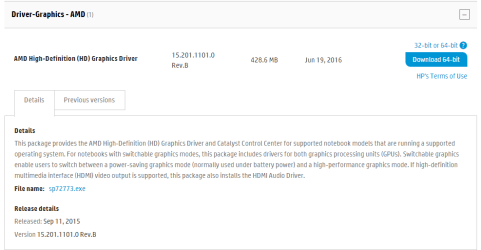
Just unpacking this graphics driver,

2016-06-28_21h11_38.png

HP Software and Driver Downloads for HP Printers, Laptops, Desktops and More | HP® Customer Support

I see a few W764 folders in the drivers folder, you need to get the chipset going then the network.

Unpack that driver with 7-zip and point these two,

Code:
SM Bus Controller
USB Controller

(You can try the two PCI devices too just to see if it finds something.)

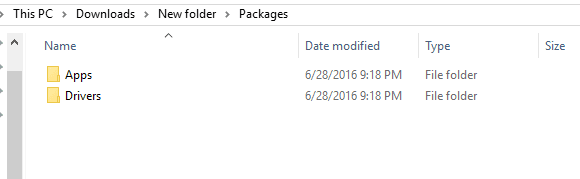
To the unpacked Drivers folder inside the packages folder,

2016-06-28_21h19_05.png

Using this method,

http://www.sevenforums.com/tutorials/97061-driver-install-device-manager.html
 

My Computer My Computer

Computer type
PC/Desktop
Computer Manufacturer/Model Number
Self Built
OS
Win 10 Pro x64
CPU
Intel I5-2500K @3.3GHz
Motherboard
Asrock P67 Extreme4
Memory
16GB G.Skill Ripjaws X (4x4GB)
Graphics Card(s)
EVGA GeForce 750 Ti SC 2GB
Sound Card
ASUS Xonar DG 5.1 Channels 24-bit 96KHz PCI Interface Sound
Monitor(s) Displays
auria eq2367
Screen Resolution
1920 x 1080
Hard Drives
250GB Samsung 850 EVO SSD
1TB WD Blue
1TB Hitachi
PSU
SeaSonic X 650W 80 Plus Gold
Case
Corsair Obsidian 750D
Cooling
Corsair H60, Three 140mm case fans
Keyboard
Logitech Wireless Keyboard K520
Mouse
Logitech Wireless Mouse M310
Internet Speed
Wave Broadband ~ 100 dn 5 up
Antivirus
Windows Defender, Malwarebytes Premium
Browser
Edge, IE11, Chrome
Other Info
Laptop specs: HP g7-1365dx /
CPU: AMD A6-3420M APU with Radeon(tm) HD Graphics /
RAM: Crucial 8Gb (2x4Gb) /
SSD: Crucial M4-CT128M4SSD2 ATA Device/ FW 000F /
GFX: AMD Radeon HD 6520G /
OS: Windows 10 Pro x64
sorry it took so long to respond. I've managed to have a little bit of success. Video drivers & sound card are installed. But a few just didn't want to install. I was at a local area yesterday (not at my house) and I was trying to run WU and it just sat there searching for 2 hours. Might be because I haven't registered the key yet, no idea. But I'm at home now and maybe this time I won't be waiting so long.

Here's the list of stuff that still doesn't have drivers yet:

Ethernet Controller
PCI Device
PCI Encryptiom
Unknown Device
Unknown Device
Unknown Device

Edit: Almost forgot that file.
 

Attachments

My Computer My Computer

Computer type
PC/Desktop
OS
Windows 7 64 Bit Home Premium
OK, the ethernet is Reatek, you can try this,

http://www.realtek.com.tw/downloads...d=5&Level=5&Conn=4&DownTypeID=3&GetDown=false

This is the card reader,

Code:
PCI Device	PCI\VEN_10EC&DEV_5229&SUBSYS_80B0103C&REV_01\4&16246919&0&0012	The drivers for this device are not installed.

Which should be covered in this driver,

Drivers & Software - HP Support Center.

This is the Drive Guard,

Code:
Not Available	ACPI\HPQ6007\3&11583659&0	The drivers for this device are not installed.

Which you can get under software solutions here,

HP Software and Driver Downloads for HP Printers, Laptops, Desktops and More | HP® Customer Support

I checked it and there is a W7 folder in it.

This is the TPM,

Code:
Not Available	ACPI\MSFT0101\1	The drivers for this device are not installed.

This should fix that,

https://support.microsoft.com/en-us/kb/2920188

For this one can you try the method I posted above about pointing to the drivers folder of the unpacked graphics driver, it should be in the AMDPSP folder, there are W7 drivers in there,

Code:
PCI Encryption/Decryption Controller	PCI\VEN_1022&DEV_1578&SUBSYS_80B0103C&REV_00\3&11583659&0&40	The drivers for this device are not installed.

This one I'm getting mixed results as either Synaptics touchpad or wireless button so lets leave that for a minute,

Code:
Not Available	ACPI\SMB0001\3&11583659&0	The drivers for this device are not installed.
 

My Computer My Computer

Computer type
PC/Desktop
Computer Manufacturer/Model Number
Self Built
OS
Win 10 Pro x64
CPU
Intel I5-2500K @3.3GHz
Motherboard
Asrock P67 Extreme4
Memory
16GB G.Skill Ripjaws X (4x4GB)
Graphics Card(s)
EVGA GeForce 750 Ti SC 2GB
Sound Card
ASUS Xonar DG 5.1 Channels 24-bit 96KHz PCI Interface Sound
Monitor(s) Displays
auria eq2367
Screen Resolution
1920 x 1080
Hard Drives
250GB Samsung 850 EVO SSD
1TB WD Blue
1TB Hitachi
PSU
SeaSonic X 650W 80 Plus Gold
Case
Corsair Obsidian 750D
Cooling
Corsair H60, Three 140mm case fans
Keyboard
Logitech Wireless Keyboard K520
Mouse
Logitech Wireless Mouse M310
Internet Speed
Wave Broadband ~ 100 dn 5 up
Antivirus
Windows Defender, Malwarebytes Premium
Browser
Edge, IE11, Chrome
Other Info
Laptop specs: HP g7-1365dx /
CPU: AMD A6-3420M APU with Radeon(tm) HD Graphics /
RAM: Crucial 8Gb (2x4Gb) /
SSD: Crucial M4-CT128M4SSD2 ATA Device/ FW 000F /
GFX: AMD Radeon HD 6520G /
OS: Windows 10 Pro x64
sorry it took so long to respond. I've managed to have a little bit of success. Video drivers & sound card are installed. But a few just didn't want to install. I was at a local area yesterday (not at my house) and I was trying to run WU and it just sat there searching for 2 hours. Might be because I haven't registered the key yet, no idea. But I'm at home now and maybe this time I won't be waiting so long.

Here's the list of stuff that still doesn't have drivers yet:

Ethernet Controller
PCI Device
PCI Encryptiom
Unknown Device
Unknown Device
Unknown Device

Edit: Almost forgot that file.

Windows 7 could take a day to search for updates and download them, it`s an issue that`s been going on for months, just let it run overnight and all will be well in the morning, do not let the PC go to sleep of course. :)
 

My Computer My Computer

Computer type
PC/Desktop
Computer Manufacturer/Model Number
Skylake Special #666
OS
Windows 10 Pro x64
CPU
Intel Core i7 6700K
Motherboard
Asus Sabertooth Z170 Mark 1
Memory
GSkill TridentZ RGB 16GB 3600 16-16-16-36
Graphics Card(s)
EVGA GTX 980 Ti SC x2
Sound Card
Realtek High Definition
Monitor(s) Displays
AOC G2460PG
Screen Resolution
1920 x 1080 144Hz
Hard Drives
Samsung 860 Pro 256GB, Seagate Barracuda 4TB x2
PSU
EVGA 1000 P2, EVGA White Custom Braided Cables
Case
Corsair Vengeance C70 Gunmetal Black
Cooling
Corsair H100i v2, Corsair ML120 x2, Thermal Grizzly Kryonaut
Keyboard
Logitech G910 Orion Spectrum
Mouse
Logitech G700s
Internet Speed
Verizon Fios Quantum Gateway 75/75
Antivirus
Windows Defender, Malwarebytes Free 3.8.3
Browser
Chrome
Other Info
Corsair SP120 x4, LG Blu-ray Drive, Durabrand HT-395 100 Watt Dolby Digital Amp, Corsair H2100 Wireless 7.1 Headset
sorry it took so long to respond. I've managed to have a little bit of success. Video drivers & sound card are installed. But a few just didn't want to install. I was at a local area yesterday (not at my house) and I was trying to run WU and it just sat there searching for 2 hours. Might be because I haven't registered the key yet, no idea. But I'm at home now and maybe this time I won't be waiting so long.

Here's the list of stuff that still doesn't have drivers yet:

Ethernet Controller
PCI Device
PCI Encryptiom
Unknown Device
Unknown Device
Unknown Device

Edit: Almost forgot that file.

Windows 7 could take a day to search for updates and download them, it`s an issue that`s been going on for months, just let it run overnight and all will be well in the morning, do not let the PC go to sleep of course. :)


Well, today I turned off sleep mode & i am going to let WU go the whole day and see how it goes. Sorry for the slow responses. I managed to install the LAN card drivers, but no wireless drivers yet. I am stuck using wireless (dont really have access to hard wiring it) for now. I will tell you in a few hours how it goes (and I promise I will give everyone rep for whoever helped me when I am done)
 

My Computer My Computer

Computer type
PC/Desktop
OS
Windows 7 64 Bit Home Premium
sorry it took so long to respond. I've managed to have a little bit of success. Video drivers & sound card are installed. But a few just didn't want to install. I was at a local area yesterday (not at my house) and I was trying to run WU and it just sat there searching for 2 hours. Might be because I haven't registered the key yet, no idea. But I'm at home now and maybe this time I won't be waiting so long.

Here's the list of stuff that still doesn't have drivers yet:

Ethernet Controller
PCI Device
PCI Encryptiom
Unknown Device
Unknown Device
Unknown Device

Edit: Almost forgot that file.

Windows 7 could take a day to search for updates and download them, it`s an issue that`s been going on for months, just let it run overnight and all will be well in the morning, do not let the PC go to sleep of course. :)


Well, today I turned off sleep mode & i am going to let WU go the whole day and see how it goes. Sorry for the slow responses. I managed to install the LAN card drivers, but no wireless drivers yet. I am stuck using wireless (dont really have access to hard wiring it) for now. I will tell you in a few hours how it goes (and I promise I will give everyone rep for whoever helped me when I am done)


Well its been 6 fookin' hours and it's STILL searching! >_> FFS.
 

My Computer My Computer

Computer type
PC/Desktop
OS
Windows 7 64 Bit Home Premium
well, you are using wireless :(
 

My Computer My Computer

Computer type
PC/Desktop
Computer Manufacturer/Model Number
Skylake Special #666
OS
Windows 10 Pro x64
CPU
Intel Core i7 6700K
Motherboard
Asus Sabertooth Z170 Mark 1
Memory
GSkill TridentZ RGB 16GB 3600 16-16-16-36
Graphics Card(s)
EVGA GTX 980 Ti SC x2
Sound Card
Realtek High Definition
Monitor(s) Displays
AOC G2460PG
Screen Resolution
1920 x 1080 144Hz
Hard Drives
Samsung 860 Pro 256GB, Seagate Barracuda 4TB x2
PSU
EVGA 1000 P2, EVGA White Custom Braided Cables
Case
Corsair Vengeance C70 Gunmetal Black
Cooling
Corsair H100i v2, Corsair ML120 x2, Thermal Grizzly Kryonaut
Keyboard
Logitech G910 Orion Spectrum
Mouse
Logitech G700s
Internet Speed
Verizon Fios Quantum Gateway 75/75
Antivirus
Windows Defender, Malwarebytes Free 3.8.3
Browser
Chrome
Other Info
Corsair SP120 x4, LG Blu-ray Drive, Durabrand HT-395 100 Watt Dolby Digital Amp, Corsair H2100 Wireless 7.1 Headset
Normally when I want to upgrade a laptop (that has special hardware) I copy Windows folder to a USB drive and, after installing the OS, with device manager I search for the drive on it. Now it's too late for this solution.
Don't give up!!!
You fist have to have your LAN (or wireless) working.
My suggestion is to open Device Manager and find your cable LAN network adapter. If it's not working, go to Properties and on Details tab look for Manufacture and Hardware ID. On Hardware ID, copy (on paper or to a USB flash drive) the longest string and on another computer Google it. Find the appropriate drive, download it to a USB flash drive and try to install it on your laptop. Once you have access to the internet try to find the remaining drives by right click on the faulty ones and do a Update Driver Software.
Some of them you will have to go to Properties and on Details tab look for Manufacture and Hardware ID. On Hardware ID, copy the longest string and Google it. Find the appropriate drive, download to it and try to install it.
You can also try Windows Update to see if it finds the right drive, but normally it doesn't.
 

My Computers My Computers

System One System Two

  • Computer type
    PC/Desktop
    Computer Manufacturer/Model Number
    custom build
    OS
    Windows 7 HP 64
    CPU
    i5 6600K - 800MHz to 4200MHz
    Motherboard
    GA-Z170-HD3P
    Memory
    4+4G GSkill DDR4 3000
    Graphics Card(s)
    IG - Intel 530
    Monitor(s) Displays
    Samsung 226BW
    Screen Resolution
    1680x1050
    Hard Drives
    (1) -1 SM951 – 128GB M.2 AHCI PCIe SSD drive for Windows 7 and Lubuntu
    (2) -1 WD SATA 3 - 1T for Data
    (3) -1 WD SATA 3 - 1T for backup
    PSU
    Thermaltake 450W TR2 gold
    Keyboard
    Old and good Chicony mechanical keyboard
    Mouse
    Logitech mX performance - 9 buttons (had to disable some)
    Internet Speed
    500Mb/s
    Browser
    Firefox 64
    Other Info
    TinyWall firewall
  • Computer type
    Laptop
    System Manufacturer/Model Number
    Asus Q550LF
    OS
    Windows 7 Pro
    CPU
    i7-4500U 800MHz to 3.0GHz
    Motherboard
    Asus Q550LF
    Memory
    (4+4)G DDR3 1600
    Graphics Card(s)
    IG intel 4400 + NVIDIA GeForce GT 745M
    Sound Card
    Realtek
    Monitor(s) Displays
    LG Display LP156WF4-SPH1
    Screen Resolution
    1920 x 1080
    Hard Drives
    BX500 120G SSD for Windows and programs +
    1T HDD for data
    Internet Speed
    500 Mb/s
    Browser
    Firefox
    Other Info
    TinyWall firewall
Back
Top