Trying to reinstall Win 7 SP1 and not lost my stuff

rbaron

New member
Local time
8:39 AM
Messages
22
I built my own computer and at that time I purchased a copy of Win 7 SP 1. I installed it without a problem and it has been working well for 2 years.

Lately things have started to slip.... my Windows Media Player stopped working and I tried everything I seen on YouTube to fix but can't get it.

So, I decided to reinstall Win 7 SP 1 and I am trying not to lose my programs and data. I do have backups but want to try and avoid that.

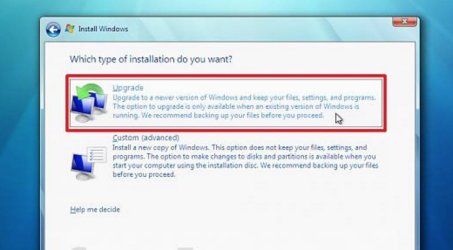
So, I put the Win 7 DVD into the drive, restarted and got the computer to boot from the DVD. I accepted the terms of use agreement and then I had two choices; 1. Install upgrade etc or 2. Clean install.

I know clean install is not what I want so I choose the top choice. When I clicked it a notice came up that I should stop the install, eject the DVD, let the computer start normally then reinsert the DVD and perform the install after computer boots normally.

So, I did that, inserted the DVD but nothing. The DVD does not even show up in my device list.

Any help would be appreciated.......
 

My Computer My Computer

At a glance

Windows 7.... 64 bit6 Gig
Computer Manufacturer/Model Number
HP Pavilian
OS
Windows 7.... 64 bit
Memory
6 Gig
Before you reinstall Windows, there might be a way to fix your Media Player. == Try a http://www.sevenforums.com/tutorials/700-system-restore.html This will restore your PC to the way it was as of the date of the System Restore you choose. Go back to the date before you had the problem. If that does not solve your problem, try this next. == Follow this tutorial and do a http://www.sevenforums.com/tutorials/3413-repair-install.html This WILL NOT erase any of your programs. It will repair any problems in Windows. Do that and get back to us and see if it helped. == One more thing that would help get things corrected is to fill your System Specs in completely so we know what your PC is.
 

My Computer My Computer

At a glance

Windows 7 Home Premium 32-Bit - Build 7600 SP1Intel Core i3-2120 3.30GhzKingston 4 GB DDR3 1333 mhzAMD Radeon HD6670
Computer type
PC/Desktop
Computer Manufacturer/Model Number
Custom Build
OS
Windows 7 Home Premium 32-Bit - Build 7600 SP1
CPU
Intel Core i3-2120 3.30Ghz
Motherboard
Asus P8Z68-V LX Intel Z68 Socket H2 ATX
Memory
Kingston 4 GB DDR3 1333 mhz
Graphics Card(s)
AMD Radeon HD6670
Sound Card
Sound Blaster Audigy SE 24-Bit
Monitor(s) Displays
Asus VE228
Screen Resolution
1440 X 900
Hard Drives
OCZ Vertex 3 120 GB Sata 3 SSD ==
Kingston SH103/S3 120 G Hyper X 120 GB SSD ==
Western Digital 500 GB Caviar Green 7200 RPM ==
PSU
Corsair CX600M == 600 Watt
Case
NZXT Apollo - Silver with Clear Side Panel
Cooling
Three 120 mm Fans
Keyboard
Microsoft Natural 4000
Mouse
Microsoft Custom Optical 3000
Internet Speed
AT&T Fiber Optic Wireless Network
Antivirus
Microsoft Security Essentials
Browser
Chrome
Other Info
120 mm Blue LED Fan -- Three Blue LED Lazer Light Sticks
bigmck,

I will give that a try. I already did the system restore with no luck so it will be on to the next fix.

Thanks much,

Rich
 

My Computer My Computer

At a glance

Windows 7.... 64 bit6 Gig
Computer Manufacturer/Model Number
HP Pavilian
OS
Windows 7.... 64 bit
Memory
6 Gig
If you are still having problems, try this. Click on your "Start Button" and type in Device Manager and hit enter. See if there are any "Yellow Exclamation Marks". This is a sign something is wrong. Tell us what it is next to.
 

My Computer My Computer

At a glance

Windows 7 Home Premium 32-Bit - Build 7600 SP1Intel Core i3-2120 3.30GhzKingston 4 GB DDR3 1333 mhzAMD Radeon HD6670
Computer type
PC/Desktop
Computer Manufacturer/Model Number
Custom Build
OS
Windows 7 Home Premium 32-Bit - Build 7600 SP1
CPU
Intel Core i3-2120 3.30Ghz
Motherboard
Asus P8Z68-V LX Intel Z68 Socket H2 ATX
Memory
Kingston 4 GB DDR3 1333 mhz
Graphics Card(s)
AMD Radeon HD6670
Sound Card
Sound Blaster Audigy SE 24-Bit
Monitor(s) Displays
Asus VE228
Screen Resolution
1440 X 900
Hard Drives
OCZ Vertex 3 120 GB Sata 3 SSD ==
Kingston SH103/S3 120 G Hyper X 120 GB SSD ==
Western Digital 500 GB Caviar Green 7200 RPM ==
PSU
Corsair CX600M == 600 Watt
Case
NZXT Apollo - Silver with Clear Side Panel
Cooling
Three 120 mm Fans
Keyboard
Microsoft Natural 4000
Mouse
Microsoft Custom Optical 3000
Internet Speed
AT&T Fiber Optic Wireless Network
Antivirus
Microsoft Security Essentials
Browser
Chrome
Other Info
120 mm Blue LED Fan -- Three Blue LED Lazer Light Sticks
Before you do much of anything, backup your data. You never know when something will go wrong.
If you can. create an image backup to an external hard drive using a program like Macrium Reflect Free.

If you can't do that backup your important data (pictures, documents, music, etc) to a flash drive.

Most people don't backup until after they have lost important data. Don't be one of them.
 

My Computer My Computer

At a glance

Windows 10 Pro X64Intel Quad Core i7-4770 @ 3.4Ghz16.0GB PC3-12800 DDR3 SDRAM 1600 MHzIntel Integrated HD Graphics
Computer type
PC/Desktop
Computer Manufacturer/Model Number
Lenovo IdeaCenter 450
OS
Windows 10 Pro X64
CPU
Intel Quad Core i7-4770 @ 3.4Ghz
Memory
16.0GB PC3-12800 DDR3 SDRAM 1600 MHz
Graphics Card(s)
Intel Integrated HD Graphics
Sound Card
Realtek HD Audio
Monitor(s) Displays
HP 22" LCD
Screen Resolution
1680 x 1050
Hard Drives
250GB Samsung EVO SATA-3 SSD
2TB Seagate ST2000DM001 SATA-2
1.5TB Seagate ST3150041AS SATA
Keyboard
Dell USB
Mouse
Lenovo USB
Internet Speed
Cable via Road Runner 3MB Upload, 30MB Download
Antivirus
Windows Defender, MBAM Pro, MBAE
Browser
Seamonkey
Other Info
UEFI/GPT
PLDS DVD-RW DH16AERSH
Why didn`t you ever create a disk image :confused::(

All you have to do to correct everything is do a repair install.

You should not be storing data on your windows partition.

And why is it such a big deal to reinstall programs.

Once again, if you had made frequent disk images you would not have this problem, all you`d have to do is re image windows, it takes 20 minutes.
 

My Computer My Computer

At a glance

Windows 10 Pro x64Intel Core i7 6700KGSkill TridentZ RGB 16GB 3600 16-16-16-36EVGA GTX 980 Ti SC x2
Computer type
PC/Desktop
Computer Manufacturer/Model Number
Skylake Special #666
OS
Windows 10 Pro x64
CPU
Intel Core i7 6700K
Motherboard
Asus Sabertooth Z170 Mark 1
Memory
GSkill TridentZ RGB 16GB 3600 16-16-16-36
Graphics Card(s)
EVGA GTX 980 Ti SC x2
Sound Card
Realtek High Definition
Monitor(s) Displays
AOC G2460PG
Screen Resolution
1920 x 1080 144Hz
Hard Drives
Samsung 860 Pro 256GB, Seagate Barracuda 4TB x2
PSU
EVGA 1000 P2, EVGA White Custom Braided Cables
Case
Corsair Vengeance C70 Gunmetal Black
Cooling
Corsair H100i v2, Corsair ML120 x2, Thermal Grizzly Kryonaut
Keyboard
Logitech G910 Orion Spectrum
Mouse
Logitech G700s
Internet Speed
Verizon Fios Quantum Gateway 75/75
Antivirus
Windows Defender, Malwarebytes Free 3.8.3
Browser
Chrome
Other Info
Corsair SP120 x4, LG Blu-ray Drive, Durabrand HT-395 100 Watt Dolby Digital Amp, Corsair H2100 Wireless 7.1 Headset
Ok, I finally got the Windows 7 software to reinstall itself and keep my programs BUT.....

I'm starting to panic. Everything went fine up until the step of: Transfering files, settings, and programs started. All went well and it made it to 72% restored. This is where it has stuck. I get a message at the bottom of the window saying, Please wait..... and the numbers are 1165432 of 1165748. And that's where it is staying. Just Please Wait, then how much was transferred and over and over again.

Anyone have any suggestions? It has been like 30 minutes and that is how far it got. It's 30 minutes of the transferring files and settings step.

Should I restart even tho the upgrade is technically still running?

Anyone.... please advise.

*** I tried to click the red X to stop the stuck screen but I got a message stating that stopping now may cause my computer to a potentially unstable condition.

So there you go.... can't quit it and unless it fixes itself and gets out of the "stuck" mode I guess I just have to turn the computer off and then back on to see what happens. I will wait for a response from this forum before I do that.
 
Last edited:

My Computer My Computer

At a glance

Windows 7.... 64 bit6 Gig
Computer Manufacturer/Model Number
HP Pavilian
OS
Windows 7.... 64 bit
Memory
6 Gig
I am not sure what you are doing. It sounds like you are Reinstalling Windows. Did you do the Repair Install? If you are doing anything else besides a Repair Install you are going to lose all of your files. Please get back with us.
 

My Computer My Computer

At a glance

Windows 7 Home Premium 32-Bit - Build 7600 SP1Intel Core i3-2120 3.30GhzKingston 4 GB DDR3 1333 mhzAMD Radeon HD6670
Computer type
PC/Desktop
Computer Manufacturer/Model Number
Custom Build
OS
Windows 7 Home Premium 32-Bit - Build 7600 SP1
CPU
Intel Core i3-2120 3.30Ghz
Motherboard
Asus P8Z68-V LX Intel Z68 Socket H2 ATX
Memory
Kingston 4 GB DDR3 1333 mhz
Graphics Card(s)
AMD Radeon HD6670
Sound Card
Sound Blaster Audigy SE 24-Bit
Monitor(s) Displays
Asus VE228
Screen Resolution
1440 X 900
Hard Drives
OCZ Vertex 3 120 GB Sata 3 SSD ==
Kingston SH103/S3 120 G Hyper X 120 GB SSD ==
Western Digital 500 GB Caviar Green 7200 RPM ==
PSU
Corsair CX600M == 600 Watt
Case
NZXT Apollo - Silver with Clear Side Panel
Cooling
Three 120 mm Fans
Keyboard
Microsoft Natural 4000
Mouse
Microsoft Custom Optical 3000
Internet Speed
AT&T Fiber Optic Wireless Network
Antivirus
Microsoft Security Essentials
Browser
Chrome
Other Info
120 mm Blue LED Fan -- Three Blue LED Lazer Light Sticks
I did the install that said (something Like) Click here if you don't want to erase or lose all of your files etc."

It is on this screen......
 

Attachments

  • scrn_capture.jpeg
    scrn_capture.jpeg
    51.9 KB · Views: 1

My Computer My Computer

At a glance

Windows 7.... 64 bit6 Gig
Computer Manufacturer/Model Number
HP Pavilian
OS
Windows 7.... 64 bit
Memory
6 Gig
Well, I have screwed it up royal now. I hit the reset button because the installation just kept on the transferring files, settings, and programs screen. All went well and it made it to 72% restored. After 2 hours I pressed the restart button.

Then I get this message......

"The computer restarted unexpectedly or encountered an unexpected error. Windows installation cannot proceed. To install Windows, click "OK" to restart the computer, and then restart the installation."

When I click the OK button I get a message that "Setup will continue after restarting your computer."

And the computer just keeps doing that, over and over.

Do you think I have to reinstall the entire Windows 7?
 

My Computer My Computer

At a glance

Windows 7.... 64 bit6 Gig
Computer Manufacturer/Model Number
HP Pavilian
OS
Windows 7.... 64 bit
Memory
6 Gig
Either you didn't follow the tutorial previously posted or you missed this.

You can only do a repair install from within Windows 7.
You do not boot into the Windows 7 dvd to do the repair install but you have to load the disk while running Windows and run the setup program. Windows attempted a clean install and that failed so now your install is screwed. The first thing that you should do is to download a bootable linux distribution such as Ubuntu or knoppix, make a dvd of it, boot into that dvd, attach an external hard drive or thumb drive, and attempt to recover any files that haven't been overwritten. Then you will need to perform a clean install of Windows. Do not at this point attempt anything else until you have recovered your data.
 

My Computers My Computers

  • At a glance

    Windows 7 pro/Windows 10 ProIntel i7 860 Quad core 2.8 ghz8 gbATI Radeon HD 5770 1 gb ram
    Computer type
    PC/Desktop
    Computer Manufacturer/Model Number
    HP Pavillion Elite HPE-250f
    OS
    Windows 7 pro/Windows 10 Pro
    CPU
    Intel i7 860 Quad core 2.8 ghz
    Memory
    8 gb
    Graphics Card(s)
    ATI Radeon HD 5770 1 gb ram
    Monitor(s) Displays
    Alienware 25 AW2521HF & Viewsonic
    Screen Resolution
    1920 x1080 & 1680x1050
    Hard Drives
    WD blue 1 tb & 500 gb.
    Browser
    FF of course.
    Other Info
    https://www.bestbuy.com/site/hp-pavilion-elite-desktop-intel-core-i7-processor-8gb-memory-1tb-hard-drive/9921493.p?skuId=9921493
  • At a glance

    Windows 2012 R2 Data center/Linux Minti3 9100 3.6GHz, 8M cache, 4C/4T8GB 2666MT/s DDR4 ECC UDIMM
    Computer type
    PC/Desktop
    System Manufacturer/Model Number
    Dell Poweredge T140
    OS
    Windows 2012 R2 Data center/Linux Mint
    CPU
    i3 9100 3.6GHz, 8M cache, 4C/4T
    Memory
    8GB 2666MT/s DDR4 ECC UDIMM
    Monitor(s) Displays
    Viewsonic
    Screen Resolution
    1680x1050
    Hard Drives
    1 TB & 750 GB
    Other Info
    https://www.dell.com/en-us/work/shop/productdetailstxn/poweredge-t140?~ck=bt
I did the install that said (something Like) Click here if you don't want to erase or lose all of your files etc."

It is on this screen......


You should not be doing upgrade.
This is like; Windows 7 UPGRADE to Windows 10.
Upgrade means that your have an existing Windows OS, hence Windows 10 is using "upgrade", not retail.
This is to create another Windows version over the existing version, if any (option)
It may rename your existing Windows version to another folder, if any. (option)
Then the upgrade will take over all the folder from the existing windows version.

I would say you do not really understand between "Upgrade" and "Custom advanced"
For upgrade you may not be able to select and similar to re-install.
Custom with Advance is for you to choose what you want to install, it is not fully install, as what you think.
Unless you did not select which individual files (prog) - this is what you thought.

The message could mean a full install.

In the first place, if you follow bigmck on using "System Restore", this problem will never appeared.
I did encountered problems, and decide in not losing my data & license software, i used system restore.
Result: Every in order as problem resolved.

Do understand this feature from Windows, on "System Restore". There are also procedure.


bigmck Provide some suggestion to him.
 

My Computer My Computer

At a glance

Windows 7 x64
Computer type
Laptop
Computer Manufacturer/Model Number
Toshiba L630 and L735
OS
Windows 7 x64
Hard Drives
240 GB SSD
You did not want to do "Upgrade". Read what it says in Message 9. It installs a newer version of Windows. You are not doing that. Most likely a portion of your Windows is gone. You have to install everything again. You should not have done anything. We were working together and their were other things to try yet, but no need now. Your next step might as well be http://www.sevenforums.com/tutorials/31402-clean-install-upgrade-windows-7-version.html Let us know how it is going. == Try one thing before you do a Clean Install. Shut down your computer and see if it boots. If not, the Clean Install is in order. If it does boot, get back to us.
 

My Computer My Computer

At a glance

Windows 7 Home Premium 32-Bit - Build 7600 SP1Intel Core i3-2120 3.30GhzKingston 4 GB DDR3 1333 mhzAMD Radeon HD6670
Computer type
PC/Desktop
Computer Manufacturer/Model Number
Custom Build
OS
Windows 7 Home Premium 32-Bit - Build 7600 SP1
CPU
Intel Core i3-2120 3.30Ghz
Motherboard
Asus P8Z68-V LX Intel Z68 Socket H2 ATX
Memory
Kingston 4 GB DDR3 1333 mhz
Graphics Card(s)
AMD Radeon HD6670
Sound Card
Sound Blaster Audigy SE 24-Bit
Monitor(s) Displays
Asus VE228
Screen Resolution
1440 X 900
Hard Drives
OCZ Vertex 3 120 GB Sata 3 SSD ==
Kingston SH103/S3 120 G Hyper X 120 GB SSD ==
Western Digital 500 GB Caviar Green 7200 RPM ==
PSU
Corsair CX600M == 600 Watt
Case
NZXT Apollo - Silver with Clear Side Panel
Cooling
Three 120 mm Fans
Keyboard
Microsoft Natural 4000
Mouse
Microsoft Custom Optical 3000
Internet Speed
AT&T Fiber Optic Wireless Network
Antivirus
Microsoft Security Essentials
Browser
Chrome
Other Info
120 mm Blue LED Fan -- Three Blue LED Lazer Light Sticks
Ok, I finally got the Windows 7 software to reinstall itself and keep my programs BUT.....

I'm starting to panic. Everything went fine up until the step of: Transfering files, settings, and programs started. All went well and it made it to 72% restored. This is where it has stuck. I get a message at the bottom of the window saying, Please wait..... and the numbers are 1165432 of 1165748. And that's where it is staying. Just Please Wait, then how much was transferred and over and over again.

Anyone have any suggestions? It has been like 30 minutes and that is how far it got. It's 30 minutes of the transferring files and settings step.

Should you encountered this stuck at 72%, turn off the computer (switch off power), as this is acceptable.

When the computer start, just keep pressing (touch and let go, repeatedly) on key F12
F12 is it will go into Start Menu option, then select install, by DVD.
If the process still stuck at any $, then turn off.

Turn on the computer and keeping tapping the F12, alternately F2 to Bios menu.
Select the DVD of Win 7 to boot.
When it ask for format, it is best to select FULL Formatting.

This will mark a bad sector in hard disk if found to be corrupted.
This way it will effectively no writing to that bad sector.
 

My Computer My Computer

At a glance

Windows 7 x64
Computer type
Laptop
Computer Manufacturer/Model Number
Toshiba L630 and L735
OS
Windows 7 x64
Hard Drives
240 GB SSD
No, it does not boot. I get the "unexpected error" message. Then I click the OK button and it is in a loop.

I downloaded a copy of knoppix but I am NOT sure how to use it. Also, I do not have another PC to work from. Just a MacBook Pro which is what I am using now to type this.

After downloading knoppix, I don't see anything for a Mac to create the DVD to rescue my data. Do I just copy all the files downloaded to a dvd and boot from that? That's what I will try to do.
 

My Computer My Computer

At a glance

Windows 7.... 64 bit6 Gig
Computer Manufacturer/Model Number
HP Pavilian
OS
Windows 7.... 64 bit
Memory
6 Gig

My Computers My Computers

  • At a glance

    Windows 7 pro/Windows 10 ProIntel i7 860 Quad core 2.8 ghz8 gbATI Radeon HD 5770 1 gb ram
    Computer type
    PC/Desktop
    Computer Manufacturer/Model Number
    HP Pavillion Elite HPE-250f
    OS
    Windows 7 pro/Windows 10 Pro
    CPU
    Intel i7 860 Quad core 2.8 ghz
    Memory
    8 gb
    Graphics Card(s)
    ATI Radeon HD 5770 1 gb ram
    Monitor(s) Displays
    Alienware 25 AW2521HF & Viewsonic
    Screen Resolution
    1920 x1080 & 1680x1050
    Hard Drives
    WD blue 1 tb & 500 gb.
    Browser
    FF of course.
    Other Info
    https://www.bestbuy.com/site/hp-pavilion-elite-desktop-intel-core-i7-processor-8gb-memory-1tb-hard-drive/9921493.p?skuId=9921493
  • At a glance

    Windows 2012 R2 Data center/Linux Minti3 9100 3.6GHz, 8M cache, 4C/4T8GB 2666MT/s DDR4 ECC UDIMM
    Computer type
    PC/Desktop
    System Manufacturer/Model Number
    Dell Poweredge T140
    OS
    Windows 2012 R2 Data center/Linux Mint
    CPU
    i3 9100 3.6GHz, 8M cache, 4C/4T
    Memory
    8GB 2666MT/s DDR4 ECC UDIMM
    Monitor(s) Displays
    Viewsonic
    Screen Resolution
    1680x1050
    Hard Drives
    1 TB & 750 GB
    Other Info
    https://www.dell.com/en-us/work/shop/productdetailstxn/poweredge-t140?~ck=bt
No, it does not boot. I get the "unexpected error" message. Then I click the OK button and it is in a loop.

I downloaded a copy of knoppix but I am NOT sure how to use it. Also, I do not have another PC to work from. Just a MacBook Pro which is what I am using now to type this.

After downloading knoppix, I don't see anything for a Mac to create the DVD to rescue my data. Do I just copy all the files downloaded to a dvd and boot from that? That's what I will try to do.

When you turned off your PC, files were loading and what was on your HDD was corrupted. It may be impossible to save anything, I don't know. My advice would be to do a Clean Install with the instructions from Message #13. That will be your fastest way to get this problem behind you.
 

My Computer My Computer

At a glance

Windows 7 Home Premium 32-Bit - Build 7600 SP1Intel Core i3-2120 3.30GhzKingston 4 GB DDR3 1333 mhzAMD Radeon HD6670
Computer type
PC/Desktop
Computer Manufacturer/Model Number
Custom Build
OS
Windows 7 Home Premium 32-Bit - Build 7600 SP1
CPU
Intel Core i3-2120 3.30Ghz
Motherboard
Asus P8Z68-V LX Intel Z68 Socket H2 ATX
Memory
Kingston 4 GB DDR3 1333 mhz
Graphics Card(s)
AMD Radeon HD6670
Sound Card
Sound Blaster Audigy SE 24-Bit
Monitor(s) Displays
Asus VE228
Screen Resolution
1440 X 900
Hard Drives
OCZ Vertex 3 120 GB Sata 3 SSD ==
Kingston SH103/S3 120 G Hyper X 120 GB SSD ==
Western Digital 500 GB Caviar Green 7200 RPM ==
PSU
Corsair CX600M == 600 Watt
Case
NZXT Apollo - Silver with Clear Side Panel
Cooling
Three 120 mm Fans
Keyboard
Microsoft Natural 4000
Mouse
Microsoft Custom Optical 3000
Internet Speed
AT&T Fiber Optic Wireless Network
Antivirus
Microsoft Security Essentials
Browser
Chrome
Other Info
120 mm Blue LED Fan -- Three Blue LED Lazer Light Sticks
I want to thank you guy's for all the help you offered me. It is all back to normal now.

Before I started messing with the C drive I had made a Windows Image Backup of the drive. I was able to find or should I say, stumble on the recovery part of the Windows 7 DVD.

Anyway, long story short, it is all recovered and everything is where it is suppose to be so thanks again for all the help.

One more thing..... can someone direct me to a good backup program so in the event this happens again I can restore everything the way it was before or should I just stick with the Windows Backup?
 

My Computer My Computer

At a glance

Windows 7.... 64 bit6 Gig
Computer Manufacturer/Model Number
HP Pavilian
OS
Windows 7.... 64 bit
Memory
6 Gig
One more thing..... can someone direct me to a good backup program so in the event this happens again I can restore everything the way it was before or should I just stick with the Windows Backup?

Macrium Reflect Free

Windows Backup does not work well for me.
Macrium works perfectly for me, best thing since sliced bread :p
 

My Computer My Computer

At a glance

Multi-Boot W7_Pro_x64 W8.1_Pro_x64 W10_Pro_x6...AMD Athlon II x4 6206GB GSkill DDR2 800AMD 4670 GPU + AMD 4200 IGP
Computer type
PC/Desktop
Computer Manufacturer/Model Number
home built
OS
Multi-Boot W7_Pro_x64 W8.1_Pro_x64 W10_Pro_x64 +Linux_VMs +Chromium_VM
CPU
AMD Athlon II x4 620
Motherboard
Gigabyte GA-MA785G-UD3H
Memory
6GB GSkill DDR2 800
Graphics Card(s)
AMD 4670 GPU + AMD 4200 IGP
Sound Card
on board Realtek ALC889A
Monitor(s) Displays
RCA 40" LCD TV, Insignia 32" LCD TV, HP 15" LCD monitor
Screen Resolution
1680 x 1050
Hard Drives
OCZ Vertex 3 120GB,
Samsung F3 1TB (3),
Several others - WD, Seagate, Hitachi, ...
PSU
Corsair 500 W
Case
Rosewill mid tower
Cooling
CM 90mm rifle
Keyboard
Gyration wireless, Logitech wireless, Dell USB wired
Mouse
Gyration wireless, Logitech wireless, V7 USB wired
Internet Speed
Spectrum - 100Mbps D / 10Mbps U
Antivirus
Avast, MBAM3, EMET, WinPatrol
Browser
Pale Moon, Firefox, IE
Other Info
2 multi-boot PC's
Mainly HTPC/Office/Gen purpose (no gaming).
Trendnet USB KVM.
LG DVD burner/Blue Ray Player.
Tray system for removable SATA backup drives.

Not currently OCd, under-volted.
I use Hybrid sleep, rarely re-boot or shutdown.

Hauppauge HD-PVR, Avermedia PCIe TV Tuner, Hauppauge PCI TV Tuner.
I agree Macrium Reflect is the best. Just get the Free One, you don't need the Pay Copy. Set the automatic backup for once a week and forget about it. It only takes 15 minutes to restore. You will be glad you did one day.
 

My Computer My Computer

At a glance

Windows 7 Home Premium 32-Bit - Build 7600 SP1Intel Core i3-2120 3.30GhzKingston 4 GB DDR3 1333 mhzAMD Radeon HD6670
Computer type
PC/Desktop
Computer Manufacturer/Model Number
Custom Build
OS
Windows 7 Home Premium 32-Bit - Build 7600 SP1
CPU
Intel Core i3-2120 3.30Ghz
Motherboard
Asus P8Z68-V LX Intel Z68 Socket H2 ATX
Memory
Kingston 4 GB DDR3 1333 mhz
Graphics Card(s)
AMD Radeon HD6670
Sound Card
Sound Blaster Audigy SE 24-Bit
Monitor(s) Displays
Asus VE228
Screen Resolution
1440 X 900
Hard Drives
OCZ Vertex 3 120 GB Sata 3 SSD ==
Kingston SH103/S3 120 G Hyper X 120 GB SSD ==
Western Digital 500 GB Caviar Green 7200 RPM ==
PSU
Corsair CX600M == 600 Watt
Case
NZXT Apollo - Silver with Clear Side Panel
Cooling
Three 120 mm Fans
Keyboard
Microsoft Natural 4000
Mouse
Microsoft Custom Optical 3000
Internet Speed
AT&T Fiber Optic Wireless Network
Antivirus
Microsoft Security Essentials
Browser
Chrome
Other Info
120 mm Blue LED Fan -- Three Blue LED Lazer Light Sticks
Back
Top