
Realtek Front Panel Icons Not Turning off

DrGhobar

New member
Local time
12:09 PM
Messages
38
Hello
My front audio panel was not working. I installed " Realtek High Definition Audio Driver 6.0.1.7541" and "Realtek AC'97 Audio 5.37". Front panel is back to life.
But after unplugging headphone, it does NOT say "You just unplugged a device...", and Realtek front panel icons remain lit, as is obvious in the attached picture. What is your idea?
 

Attachments
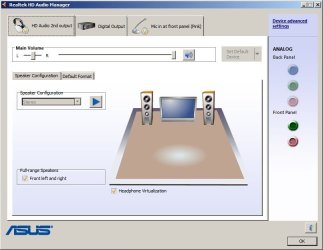
  • front panel.jpg
    front panel.jpg
    42.2 KB · Views: 1

My Computer My Computer

Computer type
PC/Desktop
OS
windows 7 ultimate, a 32bit and a 64bit
Do you have "Speakers" set as default audio playback device? Also, Stereo Mix should be set as the default playback device.

I do not have Headphone Vitualizaton set, but don't know if that will make a difference.
 

My Computer My Computer

Computer type
PC/Desktop
Computer Manufacturer/Model Number
My Own Build
OS
Windows 10 64 bit
CPU
Intel i7 6700K
Motherboard
ASUS ROG Maximus VIII Hero
Memory
16GB Corsair Dominator
Graphics Card(s)
Intel CPU Graphics
Sound Card
RealTek
Monitor(s) Displays
27" Dell S2719dgf
Screen Resolution
2560X1440
Hard Drives
1 TB Samsung 850 EVO SSD for Win 10 Pro
500GB Samsung 850 EVO SSD for Win 10 Insider
2 TB drive for backup
PSU
EVGA Supernova 750G2
Case
BeQuiet Silent Base 600
Cooling
Deepcool Captain 120EX
Keyboard
Microsoft Wireless 2000
Mouse
Microsoft wireless
Internet Speed
100 MB/sec (Cable)
Antivirus
Microsoft Defender and Malwarebytes
Browser
Edge/Firefox
Other Info
Cakewalk (Sonar) by BandLab and Studio One 4.1 Pro recording studio software. MOTU 896Mk3 Hybrid recording interface, Frontier Tranzport wireless control unit, Behringer X-Touch Control Surface.
Five USB connected optical drives for CD Audio production using Nero BurningROM
Do you have "Speakers" set as default audio playback device? Also, Stereo Mix should be set as the default playback device.

I do not have Headphone Vitualizaton set, but don't know if that will make a difference.

Yes, "Speakers" are set as default.
Under "Speaker Configuration", from the dropdown, "Stereo" is selected. Is this what you mean by "Stereo Mix"?
 

My Computer My Computer

Computer type
PC/Desktop
OS
windows 7 ultimate, a 32bit and a 64bit
I'm sorry I meant the Stereo Mix should be set as default "Recording" device.
With two different Realtek drivers installed, that could be at least part of your problem. AC97 is for older Realtek hardware.

Did this ever work correctly?

What is your PC brand and model? Can't check to see what you have as you didn't fill in the My System Specs (helps us to try and help you).

I'll be gone for a while today so it will be later today before I can answer any more questions.
 

My Computer My Computer

Computer type
PC/Desktop
Computer Manufacturer/Model Number
My Own Build
OS
Windows 10 64 bit
CPU
Intel i7 6700K
Motherboard
ASUS ROG Maximus VIII Hero
Memory
16GB Corsair Dominator
Graphics Card(s)
Intel CPU Graphics
Sound Card
RealTek
Monitor(s) Displays
27" Dell S2719dgf
Screen Resolution
2560X1440
Hard Drives
1 TB Samsung 850 EVO SSD for Win 10 Pro
500GB Samsung 850 EVO SSD for Win 10 Insider
2 TB drive for backup
PSU
EVGA Supernova 750G2
Case
BeQuiet Silent Base 600
Cooling
Deepcool Captain 120EX
Keyboard
Microsoft Wireless 2000
Mouse
Microsoft wireless
Internet Speed
100 MB/sec (Cable)
Antivirus
Microsoft Defender and Malwarebytes
Browser
Edge/Firefox
Other Info
Cakewalk (Sonar) by BandLab and Studio One 4.1 Pro recording studio software. MOTU 896Mk3 Hybrid recording interface, Frontier Tranzport wireless control unit, Behringer X-Touch Control Surface.
Five USB connected optical drives for CD Audio production using Nero BurningROM
I'm sorry I meant the Stereo Mix should be set as default "Recording" device.
With two different Realtek drivers installed, that could be at least part of your problem. AC97 is for older Realtek hardware.

Did this ever work correctly?

What is your PC brand and model? Can't check to see what you have as you didn't fill in the My System Specs (helps us to try and help you).

I'll be gone for a while today so it will be later today before I can answer any more questions.

1. The default recording device is rear panel microphone.
2. After I posted this thread I uninstalled both AC97 and Realtek driver, and downloaded the only audio driver from Asus website, and installed it, but the problem is still there.
3. The motherboard is Asus P5GC-MX/1333, the operating system is Windows 7 32-bit. (Because I have different systems, I cannot fill My System Specs.)
4. Thank you for trying to solve this problem.
 

My Computer My Computer

Computer type
PC/Desktop
OS
windows 7 ultimate, a 32bit and a 64bit
The Realtek version for this system is an older version on the ASUS site.
Two things to try (1) Go to the Device Manager and uninstall the Realtek and also the drivers. Then restart the PC and (if compatible) when Windows starts it will install the generic, basic function, High Definition Audio Codec (Drivers). Check it out and see how it works. This won't have all the bells and whistles that the Realtek has but it will help to determine if the sound is working.
(2) Go to the ASUS site and download the Realtek there (Version V51005904_V6015904). Install that (reboot after the install) and then see how/if its working.
https://www.asus.com/Motherboards/P5GCMX1333/HelpDesk_Download/

Finally, with Stereo Mix set as default any input will be heard/used and if you want to record audio from the internet you must have Stereo Mix.
 

My Computer My Computer

Computer type
PC/Desktop
Computer Manufacturer/Model Number
My Own Build
OS
Windows 10 64 bit
CPU
Intel i7 6700K
Motherboard
ASUS ROG Maximus VIII Hero
Memory
16GB Corsair Dominator
Graphics Card(s)
Intel CPU Graphics
Sound Card
RealTek
Monitor(s) Displays
27" Dell S2719dgf
Screen Resolution
2560X1440
Hard Drives
1 TB Samsung 850 EVO SSD for Win 10 Pro
500GB Samsung 850 EVO SSD for Win 10 Insider
2 TB drive for backup
PSU
EVGA Supernova 750G2
Case
BeQuiet Silent Base 600
Cooling
Deepcool Captain 120EX
Keyboard
Microsoft Wireless 2000
Mouse
Microsoft wireless
Internet Speed
100 MB/sec (Cable)
Antivirus
Microsoft Defender and Malwarebytes
Browser
Edge/Firefox
Other Info
Cakewalk (Sonar) by BandLab and Studio One 4.1 Pro recording studio software. MOTU 896Mk3 Hybrid recording interface, Frontier Tranzport wireless control unit, Behringer X-Touch Control Surface.
Five USB connected optical drives for CD Audio production using Nero BurningROM
The Realtek version for this system is an older version on the ASUS site.
Two things to try (1) Go to the Device Manager and uninstall the Realtek and also the drivers. Then restart the PC and (if compatible) when Windows starts it will install the generic, basic function, High Definition Audio Codec (Drivers). Check it out and see how it works. This won't have all the bells and whistles that the Realtek has but it will help to determine if the sound is working.
(2) Go to the ASUS site and download the Realtek there (Version V51005904_V6015904). Install that (reboot after the install) and then see how/if its working.
https://www.asus.com/Motherboards/P5GCMX1333/HelpDesk_Download/

Finally, with Stereo Mix set as default any input will be heard/used and if you want to record audio from the internet you must have Stereo Mix.
1. before installing Realtek, I was with "the generic, basic function, High Definition Audio Codec (Drivers)" and front panel was out of life so far as I supposed its hardware is broken. So why test it again?
2. As I suggested in the above posts, I have downloaded Realtek from the same page as you said. It faces the same problem.
3. In my Sound section of Control Panel I do not have a device or option named "Stereo Mix", and so I cannot set as default a non-existent.
4. I do not have any problem of hearing sounds; the problem is only that after unplugging headphone, the Realtek does not turn off the icon of front panel and does not pop up the message "You have just unplugged a device".
 

My Computer My Computer

Computer type
PC/Desktop
OS
windows 7 ultimate, a 32bit and a 64bit
With older motherboards and AC97 front panel connection to the motherboard, it does not have all the jack sensing that the later "HD Audio" connection has. Possibly that is the issue and you may never get that resolved.
 

My Computer My Computer

Computer type
PC/Desktop
Computer Manufacturer/Model Number
My Own Build
OS
Windows 10 64 bit
CPU
Intel i7 6700K
Motherboard
ASUS ROG Maximus VIII Hero
Memory
16GB Corsair Dominator
Graphics Card(s)
Intel CPU Graphics
Sound Card
RealTek
Monitor(s) Displays
27" Dell S2719dgf
Screen Resolution
2560X1440
Hard Drives
1 TB Samsung 850 EVO SSD for Win 10 Pro
500GB Samsung 850 EVO SSD for Win 10 Insider
2 TB drive for backup
PSU
EVGA Supernova 750G2
Case
BeQuiet Silent Base 600
Cooling
Deepcool Captain 120EX
Keyboard
Microsoft Wireless 2000
Mouse
Microsoft wireless
Internet Speed
100 MB/sec (Cable)
Antivirus
Microsoft Defender and Malwarebytes
Browser
Edge/Firefox
Other Info
Cakewalk (Sonar) by BandLab and Studio One 4.1 Pro recording studio software. MOTU 896Mk3 Hybrid recording interface, Frontier Tranzport wireless control unit, Behringer X-Touch Control Surface.
Five USB connected optical drives for CD Audio production using Nero BurningROM
Back
Top