Another diskpart clean tale of woe

CurlyBen

New member
Local time
9:22 AM
Messages
22
Location
Kailua Kona
Hi guys,

Apologies for making my first post a plea for help, but I'm running out of ideas!

Brief background - I have an Intel NUC (i5/Win 10 Pro x64) running as a server while I’m living overseas, with 3 (WD Passport) external hard drives attached. I have no reason to suspect any hardware issues with any of the drives. One or more of these drives interfere with the boot sequence, and I assumed that was because there was a boot sector but no OS. I turned to google for advice and followed instructions without really understanding what they were doing which turned out to be a mistake…
(Quick edit: the NUC runs headless, using Remote Desktop from my Macbook when I need to access it)

- I ran the diskpart clean (not clean all) command on all three drives and rebooted, and found 3 unformatted drives waiting for me in Windows

- I think I inadvertently created GPT partition tables at this point, when I opened up the Windows Disk Management page and dismissed a pop up without reading it. I ran diskpart clean again to get rid of that partition table after some reading around suggested I probably wasn’t going to do any more damage. No partitions were created.

- I’ve run more or less every bit of partition recovery software I can find. I recovered one drive more or less at the first attempt, which was a single NTFS partition

- The other two drives are much more problematic, I think because they weren’t NTFS partitions (I have a Mac which doesn’t play nicely with NTFS). My 1tb drive had a single 931gb ExFAT partition on it, and my 500gb had a 200gb HFS (or more likely HFS+) partition and a further 240gb ExFAT partition. I don’t know whether either drive was using MBR or GPT

- Amongst others I’ve tried EaseUS Data Recovery Wizard, Eassos Partition Guru, Find and Mount, MiniTool Partition Wizard and a few others and none have found the ExFAT partitions. They have found lots of others, mostly sub <100mb with labels like EFIBOOT, and a couple of <100gb partitions I don’t remember ever creating. I haven't gone any further than scanning for partitions with any of these tools so they should(!) not have alterered anything on the disk.

- I’ve tried Testdisk and it doesn’t find anything useful either. I don’t know which partition table type I should be trying, but I’ve tried Intel and EFI GPT on the 1TB drive and neither have found the ExFAT partition. (When I ran the EFI GPT scan it hung at about 77% on the deeper scan - but as it had been running for close to 5 days by that point and wasn’t showing anything promising I didn’t restart it). Testdisk has been running under Windows 10, but I could boot to Linux if it will make any difference

- The most crucial files (all the photos I’ve taken in my last 2 years living in the US) were backed up… from the 1tb drive to the 500gb drive. I’ll be devastated if I’ve lost them!

- I guess I have two questions really: 1) is there anything different I should try to restore the partitions, or are they likely to be too far gone? and 2) assuming partition recovery is unlikely, how can I go about recovering files, given there’s no partition there at the moment? I have a new 2tb hard drive on the way and my intention is to clone the drives before trying any data recovery.

Any advice very gratefully received… I’ve been trying to fix this for over a week now. I've read lots of other threads tackling similar problems but none seem to tackle non-NTFS partitions. If I could go back in time and break my fingers before I typed ‘diskpart’ I would!!
 

My Computer My Computer

At a glance

Windows 10 Pro x64i5
Computer type
PC/Desktop
Computer Manufacturer/Model Number
Intel NUC
OS
Windows 10 Pro x64
CPU
i5
Hard Drives
128gb SSD
WD Passport 500gb
WD Passport 1tb
WD Passport Ultra 2tb
Hello and welcome Ben mate if the data is your main concern then try this little ditty of mine to recover it - well most of it because it will not deal with some types of files pics and docs are usually good.
BOOTABLE UBUNTU
Make a bootable Ubuntu disk Get Ubuntu | Download | Ubuntu
Set the BIOS to boot from the optical when the machine boots it will show you a screen with TRY or INSTALL > select TRY not INSTALL
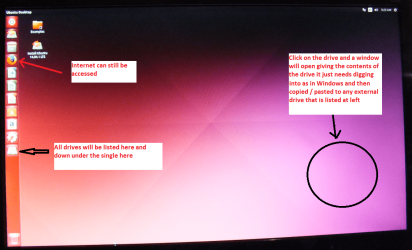
When it is finished - it takes very little time you will get a screen like in the pic .
Open the drive you want > User and dig down until you get to the data / settings you may be able to copy / paste the material you want to an external source or other installed drive doing this.
I am not sure if it will but I have recovered tons of data etc using this method both on "dead" or just plain drives that you cannot get data from using Windows.
There is an alternative one too that doesn't use Windows as does not Ubuntu http://www.sevenforums.com/tutorials/287439-emergency-kit-save-your-files-dead-os.html but I find the Ubuntu run a little easier. The choice is yours of course - that is enough to get a start on this issue anyway.

Edit Just as an afterthought it may be worth running one of those undelete softwares as clean only makes the disk overwritable and not completely nuked
 

Attachments

  • UBUNTU SCREEN X2.PNG
    UBUNTU SCREEN X2.PNG
    272.7 KB · Views: 0

My Computer My Computer

At a glance

Desk1 7 Home Prem / Desk2 10 Pro / Main lap A...Desk1 i5 3750K / Laptop i7 GTX 860M / Desk2 i...Desk1 8GB (1866) / Desk2 16GB (1333) / Laptop...Desk 1& 2NVidia GTX 650 & Laptops on board Intel
Computer type
PC/Desktop
Computer Manufacturer/Model Number
Own build (new) Desk1 / Asus ROG Win 7 / Desk2 1st build
OS
Desk1 7 Home Prem / Desk2 10 Pro / Main lap Asus ROG 10 Pro 2 laptop Toshiba 7 Pro Asus P2520 7 & 10
CPU
Desk1 i5 3750K / Laptop i7 GTX 860M / Desk2 i5 2500
Motherboard
Desk1 Asus P877-V / Desk2 Gigabyte H67 UD3H / Laptop ?
Memory
Desk1 8GB (1866) / Desk2 16GB (1333) / Laptop 8Gb DDR3
Graphics Card(s)
Desk 1& 2NVidia GTX 650 & Laptops on board Intel
Sound Card
Desk 1 & 2 -XONAR DG Realtek High Def audio Laptop
Monitor(s) Displays
Desk 1 Benq HD 2450 / Desk2 Philips 24" / Laptop 17.5"
Screen Resolution
1920x1080 D1 & D2 & Laptop 1
Hard Drives
Desk1 Samsung 120GB 830 SSD
Asus ROG 256GB 850 Pro SSD
Desk2 Samsung 840 256 SSD
Toshiba 120GB EVO
PSU
Desk 1 Corsair HX 1050/ Laptop ? / Desk 2 Corsair HX 650
Case
Desk 1 Cooler HAF XM ? Toshiba laptop / Desk2 Coolermaster
Cooling
Fans on all Desk1 -2 Desk2 - all Coolermasters 5 Laptop ?
Keyboard
Desk 1 MS Sidewinder X6 Desk 2 MS Sidewinder X 4
Mouse
Desk 1&2 - Gigabyte MS 900 gamer - laptop - Logitec wireless
Internet Speed
ADSL2+
Other Info
One other Desktop (tester) and spare Toshba laptop both with SSD's
Running Kaspersky 2016 ISS on all machines config'd identically
Logitec audio stereo systems on each machine (x3)
Canon MG5250MFC
Router/modem TP-Link running WPA2SK
Thanks ICIT2LOL, but Ubuntu still sees the drive as unpartitioned free space with no files on it. I don't think any OS is going to let me see files without recovering the partition or using specific data recovery software.
 

My Computer My Computer

At a glance

Windows 10 Pro x64i5
Computer type
PC/Desktop
Computer Manufacturer/Model Number
Intel NUC
OS
Windows 10 Pro x64
CPU
i5
Hard Drives
128gb SSD
WD Passport 500gb
WD Passport 1tb
WD Passport Ultra 2tb
My Computer My Computer

At a glance

Desk1 7 Home Prem / Desk2 10 Pro / Main lap A...Desk1 i5 3750K / Laptop i7 GTX 860M / Desk2 i...Desk1 8GB (1866) / Desk2 16GB (1333) / Laptop...Desk 1& 2NVidia GTX 650 & Laptops on board Intel
Computer type
PC/Desktop
Computer Manufacturer/Model Number
Own build (new) Desk1 / Asus ROG Win 7 / Desk2 1st build
OS
Desk1 7 Home Prem / Desk2 10 Pro / Main lap Asus ROG 10 Pro 2 laptop Toshiba 7 Pro Asus P2520 7 & 10
CPU
Desk1 i5 3750K / Laptop i7 GTX 860M / Desk2 i5 2500
Motherboard
Desk1 Asus P877-V / Desk2 Gigabyte H67 UD3H / Laptop ?
Memory
Desk1 8GB (1866) / Desk2 16GB (1333) / Laptop 8Gb DDR3
Graphics Card(s)
Desk 1& 2NVidia GTX 650 & Laptops on board Intel
Sound Card
Desk 1 & 2 -XONAR DG Realtek High Def audio Laptop
Monitor(s) Displays
Desk 1 Benq HD 2450 / Desk2 Philips 24" / Laptop 17.5"
Screen Resolution
1920x1080 D1 & D2 & Laptop 1
Hard Drives
Desk1 Samsung 120GB 830 SSD
Asus ROG 256GB 850 Pro SSD
Desk2 Samsung 840 256 SSD
Toshiba 120GB EVO
PSU
Desk 1 Corsair HX 1050/ Laptop ? / Desk 2 Corsair HX 650
Case
Desk 1 Cooler HAF XM ? Toshiba laptop / Desk2 Coolermaster
Cooling
Fans on all Desk1 -2 Desk2 - all Coolermasters 5 Laptop ?
Keyboard
Desk 1 MS Sidewinder X6 Desk 2 MS Sidewinder X 4
Mouse
Desk 1&2 - Gigabyte MS 900 gamer - laptop - Logitec wireless
Internet Speed
ADSL2+
Other Info
One other Desktop (tester) and spare Toshba laptop both with SSD's
Running Kaspersky 2016 ISS on all machines config'd identically
Logitec audio stereo systems on each machine (x3)
Canon MG5250MFC
Router/modem TP-Link running WPA2SK
Hmm. Not having a great deal of luck with file recovery software so far - it's picking up files from the RAW partition, but losing the folder structure (unsurprising) and the file name. Whilst it's better than losing the files completely, losing the file names is a big issue - not least because I have 20,000 photos and if the names change then I effectively lose every edit I've made in Lightroom. It seems that part of the issue is that programs like Recuva work with a damaged/modified partition table, but diskpart clean appears to have written 00 to blocks 01 to 2049 of the drives and nuked any remnants of the partition table.
 

My Computer My Computer

At a glance

Windows 10 Pro x64i5
Computer type
PC/Desktop
Computer Manufacturer/Model Number
Intel NUC
OS
Windows 10 Pro x64
CPU
i5
Hard Drives
128gb SSD
WD Passport 500gb
WD Passport 1tb
WD Passport Ultra 2tb
Yes well the clean is just meant to leave the disk to be overwritten the clean all fries everything. I don't really know what else to suggest.
Might ask for some help.
 

My Computer My Computer

At a glance

Desk1 7 Home Prem / Desk2 10 Pro / Main lap A...Desk1 i5 3750K / Laptop i7 GTX 860M / Desk2 i...Desk1 8GB (1866) / Desk2 16GB (1333) / Laptop...Desk 1& 2NVidia GTX 650 & Laptops on board Intel
Computer type
PC/Desktop
Computer Manufacturer/Model Number
Own build (new) Desk1 / Asus ROG Win 7 / Desk2 1st build
OS
Desk1 7 Home Prem / Desk2 10 Pro / Main lap Asus ROG 10 Pro 2 laptop Toshiba 7 Pro Asus P2520 7 & 10
CPU
Desk1 i5 3750K / Laptop i7 GTX 860M / Desk2 i5 2500
Motherboard
Desk1 Asus P877-V / Desk2 Gigabyte H67 UD3H / Laptop ?
Memory
Desk1 8GB (1866) / Desk2 16GB (1333) / Laptop 8Gb DDR3
Graphics Card(s)
Desk 1& 2NVidia GTX 650 & Laptops on board Intel
Sound Card
Desk 1 & 2 -XONAR DG Realtek High Def audio Laptop
Monitor(s) Displays
Desk 1 Benq HD 2450 / Desk2 Philips 24" / Laptop 17.5"
Screen Resolution
1920x1080 D1 & D2 & Laptop 1
Hard Drives
Desk1 Samsung 120GB 830 SSD
Asus ROG 256GB 850 Pro SSD
Desk2 Samsung 840 256 SSD
Toshiba 120GB EVO
PSU
Desk 1 Corsair HX 1050/ Laptop ? / Desk 2 Corsair HX 650
Case
Desk 1 Cooler HAF XM ? Toshiba laptop / Desk2 Coolermaster
Cooling
Fans on all Desk1 -2 Desk2 - all Coolermasters 5 Laptop ?
Keyboard
Desk 1 MS Sidewinder X6 Desk 2 MS Sidewinder X 4
Mouse
Desk 1&2 - Gigabyte MS 900 gamer - laptop - Logitec wireless
Internet Speed
ADSL2+
Other Info
One other Desktop (tester) and spare Toshba laptop both with SSD's
Running Kaspersky 2016 ISS on all machines config'd identically
Logitec audio stereo systems on each machine (x3)
Canon MG5250MFC
Router/modem TP-Link running WPA2SK
Hi CurlyBen, welcome to 7F! :)

I don't have much experience with data recovery, but I found a few threads that may have tools that can help you.

  • This one thread uses Partitionwizard post #4 and an illustrated guide for Test Disk post #9 I believe it goes without saying you shouldn't use the disk(s) you used the clean CMD on because you will lose more. From reading this thread it sounds like you will lose certain sectors no matter what: post #19.


Related:

This link is a sevenforums search for: recover files after using diskpart clean You can also research at the bottom of each page in a section called "Similar Threads".
 

My Computer My Computer

At a glance

Originally Win 7 Hm Prem x64 Ver 6.1.7600 Bui...Intel i3 530 2.93GHz, 2933MHz 2 Cores 4 Logic...6GB of 1,333MHz DDR3 SDRAM32MB Intel Graphics Media Accelerator HD IGChip
Computer type
PC/Desktop
Computer Manufacturer/Model Number
Gateway DX4831-01e (Mid-Tower Desktop)
OS
Originally Win 7 Hm Prem x64 Ver 6.1.7600 Build 7601-SP1 | Upgraded to Windows 10 December 14, 2019
CPU
Intel i3 530 2.93GHz, 2933MHz 2 Cores 4 Logical Processors
Motherboard
Gateway H57M01 133 megahertz
Memory
6GB of 1,333MHz DDR3 SDRAM
Graphics Card(s)
32MB Intel Graphics Media Accelerator HD IGChip
Sound Card
Realtek High Definition Audio
Monitor(s) Displays
Gateway HX2000 20inch TFT active matrix TN
Screen Resolution
1600 x 900 x 59 hertz
Hard Drives
WDC WD10EADS-00M2B0 [HDD] (1000.20 GB) -- drive 0,
HL-DT-ST DVDRAM GH41N [CD-ROM dr]
Four card readers, and Four USB 2.0
PSU
300watts.
Case
Mid-Tower Desktop
Cooling
Stock from Gateway
Keyboard
Natural Ergonomic Keyboard 4000, see Other Info
Mouse
Orig. Gateway wore out now using Insignia USB wired optical
Internet Speed
Vz FIOS 10ms png 57.64Mbps down 65.53Mbps up Speedtest.org
Antivirus
Zamana Anti-logger with Anti-malware, MSE, Windows Firewall,
Browser
IE11.0.9600.19399-Upd ver11.0.135, Firefox 68.0.1 x64
Other Info
System Specs by Belarc.

BIOS: American Megatrends Inc. P01-A0 11/17/2009

Replaced the MS 'Natural' Standard PS/2 Enhanced 101-102 Keyboard with a new Natural Ergonomic Keyboard 4000 on August 1st 2014.

Canon Pixma MG3222 Printer.

Updated to IE11 on 12102015 | Fios Quantum Router g1100

Additional AV: SpywareBlaster, manual Mbam, SAS
Did you not research that command before using it? A simple google search turned up this. https://technet.microsoft.com/en-us/library/cc766465%28v=ws.10%29.aspx Without partitions the sectors are marked as "free" and can be overwritten. If you tried to recreate a partition that might have further damaged the data. Also the new partition has no way to know that files are there. There are all kinds of free and paid recovery software but none of them are guaranteed to work and likely won't be able to work once the data is overwritten. If those pictures are that important to you you might consider paid software over free or hiring a data recovery company but again you might not ever be able to get the data back. Sorry but I don't have anything else to offer.
 

My Computers My Computers

  • At a glance

    Windows 7 pro/Windows 10 ProIntel i7 860 Quad core 2.8 ghz8 gbATI Radeon HD 5770 1 gb ram
    Computer type
    PC/Desktop
    Computer Manufacturer/Model Number
    HP Pavillion Elite HPE-250f
    OS
    Windows 7 pro/Windows 10 Pro
    CPU
    Intel i7 860 Quad core 2.8 ghz
    Memory
    8 gb
    Graphics Card(s)
    ATI Radeon HD 5770 1 gb ram
    Monitor(s) Displays
    Alienware 25 AW2521HF & Viewsonic
    Screen Resolution
    1920 x1080 & 1680x1050
    Hard Drives
    WD blue 1 tb & 500 gb.
    Browser
    FF of course.
    Other Info
    https://www.bestbuy.com/site/hp-pavilion-elite-desktop-intel-core-i7-processor-8gb-memory-1tb-hard-drive/9921493.p?skuId=9921493
  • At a glance

    Windows 2012 R2 Data center/Linux Minti3 9100 3.6GHz, 8M cache, 4C/4T8GB 2666MT/s DDR4 ECC UDIMM
    Computer type
    PC/Desktop
    System Manufacturer/Model Number
    Dell Poweredge T140
    OS
    Windows 2012 R2 Data center/Linux Mint
    CPU
    i3 9100 3.6GHz, 8M cache, 4C/4T
    Memory
    8GB 2666MT/s DDR4 ECC UDIMM
    Monitor(s) Displays
    Viewsonic
    Screen Resolution
    1680x1050
    Hard Drives
    1 TB & 750 GB
    Other Info
    https://www.dell.com/en-us/work/shop/productdetailstxn/poweredge-t140?~ck=bt
If those pictures are that important to you you might consider paid software over free or hiring a data recovery company but again you might not ever be able to get the data back. Sorry but I don't have anything else to offer.

Yes amte that has been tried and even the Ubuntu boot I suggested which usually will pick up lost stuff even off of dead drives. Personally I think the drive is gone or at least the data has:(
 

My Computer My Computer

At a glance

Desk1 7 Home Prem / Desk2 10 Pro / Main lap A...Desk1 i5 3750K / Laptop i7 GTX 860M / Desk2 i...Desk1 8GB (1866) / Desk2 16GB (1333) / Laptop...Desk 1& 2NVidia GTX 650 & Laptops on board Intel
Computer type
PC/Desktop
Computer Manufacturer/Model Number
Own build (new) Desk1 / Asus ROG Win 7 / Desk2 1st build
OS
Desk1 7 Home Prem / Desk2 10 Pro / Main lap Asus ROG 10 Pro 2 laptop Toshiba 7 Pro Asus P2520 7 & 10
CPU
Desk1 i5 3750K / Laptop i7 GTX 860M / Desk2 i5 2500
Motherboard
Desk1 Asus P877-V / Desk2 Gigabyte H67 UD3H / Laptop ?
Memory
Desk1 8GB (1866) / Desk2 16GB (1333) / Laptop 8Gb DDR3
Graphics Card(s)
Desk 1& 2NVidia GTX 650 & Laptops on board Intel
Sound Card
Desk 1 & 2 -XONAR DG Realtek High Def audio Laptop
Monitor(s) Displays
Desk 1 Benq HD 2450 / Desk2 Philips 24" / Laptop 17.5"
Screen Resolution
1920x1080 D1 & D2 & Laptop 1
Hard Drives
Desk1 Samsung 120GB 830 SSD
Asus ROG 256GB 850 Pro SSD
Desk2 Samsung 840 256 SSD
Toshiba 120GB EVO
PSU
Desk 1 Corsair HX 1050/ Laptop ? / Desk 2 Corsair HX 650
Case
Desk 1 Cooler HAF XM ? Toshiba laptop / Desk2 Coolermaster
Cooling
Fans on all Desk1 -2 Desk2 - all Coolermasters 5 Laptop ?
Keyboard
Desk 1 MS Sidewinder X6 Desk 2 MS Sidewinder X 4
Mouse
Desk 1&2 - Gigabyte MS 900 gamer - laptop - Logitec wireless
Internet Speed
ADSL2+
Other Info
One other Desktop (tester) and spare Toshba laptop both with SSD's
Running Kaspersky 2016 ISS on all machines config'd identically
Logitec audio stereo systems on each machine (x3)
Canon MG5250MFC
Router/modem TP-Link running WPA2SK
Thanks all for the input, I appreciate it. I've had a ray of hope using DMDE, which is the first piece of software to identify ExFAT partitions on either drive. I've managed to recover some photos using it, though a number are damaged. I've just paid for the licence (which is $20 for a year, which makes it a relatively cheap option) and set it to work on the rest of the drive. I'll update later when I know how much data has been recovered, and whether it's worth spending any more time chasing the remaining data or whether just to wave goodbye to it.

Did you not research that command before using it? A simple google search turned up this. https://technet.microsoft.com/en-us/library/cc766465%28v=ws.10%29.aspx Without partitions the sectors are marked as "free" and can be overwritten. If you tried to recreate a partition that might have further damaged the data. Also the new partition has no way to know that files are there. There are all kinds of free and paid recovery software but none of them are guaranteed to work and likely won't be able to work once the data is overwritten. If those pictures are that important to you you might consider paid software over free or hiring a data recovery company but again you might not ever be able to get the data back. Sorry but I don't have anything else to offer.

I used it after finding a forum post on how to remove the boot flag from a USB drive. Unfortunately said post didn't mention that it removed the partitions as well... as soon as I looked for the drives I knew what it had done, I didn't need to google!

My understanding is a little different from what you've described - diskpart clean obliterates the partition table, but without that table the OS doesn't know where to write (or read) data which is why the files appear lost. That gives me a little more hope that the data is recoverable, as it's still all there - it's just the 'map' which tells the OS where to find it that's missing. The problem is that 'map' is crucial and most file recovery software works with that map - so when it's gone they're stuck. DMDE allows you to view the raw data on the drive, and it's pretty clear that diskpart has written 0 to every byte in sectors 1-2049, i.e. the first 2mb of the drive. I've never been so desperate for 2mb of data before!

I also think a large part of the problem is that they're not NTFS partitions. My 2tb drive was NTFS formatted and I was able to recover the partition there at pretty much the first attempt. Unfortunately that was mostly easily replaceable as it was my film collection!
 

My Computer My Computer

At a glance

Windows 10 Pro x64i5
Computer type
PC/Desktop
Computer Manufacturer/Model Number
Intel NUC
OS
Windows 10 Pro x64
CPU
i5
Hard Drives
128gb SSD
WD Passport 500gb
WD Passport 1tb
WD Passport Ultra 2tb
You may be right about exfat. It isn't too widely used so you might have problems finding software that supports it. Your problem now isn't just that there isn't a partition table but that since windows doesn't know that anything is there it considers the entire drive fair game and can at any time overwrite a sector that one of your pictures resides on. Good luck but don't expect to get everything back.
 

My Computers My Computers

  • At a glance

    Windows 7 pro/Windows 10 ProIntel i7 860 Quad core 2.8 ghz8 gbATI Radeon HD 5770 1 gb ram
    Computer type
    PC/Desktop
    Computer Manufacturer/Model Number
    HP Pavillion Elite HPE-250f
    OS
    Windows 7 pro/Windows 10 Pro
    CPU
    Intel i7 860 Quad core 2.8 ghz
    Memory
    8 gb
    Graphics Card(s)
    ATI Radeon HD 5770 1 gb ram
    Monitor(s) Displays
    Alienware 25 AW2521HF & Viewsonic
    Screen Resolution
    1920 x1080 & 1680x1050
    Hard Drives
    WD blue 1 tb & 500 gb.
    Browser
    FF of course.
    Other Info
    https://www.bestbuy.com/site/hp-pavilion-elite-desktop-intel-core-i7-processor-8gb-memory-1tb-hard-drive/9921493.p?skuId=9921493
  • At a glance

    Windows 2012 R2 Data center/Linux Minti3 9100 3.6GHz, 8M cache, 4C/4T8GB 2666MT/s DDR4 ECC UDIMM
    Computer type
    PC/Desktop
    System Manufacturer/Model Number
    Dell Poweredge T140
    OS
    Windows 2012 R2 Data center/Linux Mint
    CPU
    i3 9100 3.6GHz, 8M cache, 4C/4T
    Memory
    8GB 2666MT/s DDR4 ECC UDIMM
    Monitor(s) Displays
    Viewsonic
    Screen Resolution
    1680x1050
    Hard Drives
    1 TB & 750 GB
    Other Info
    https://www.dell.com/en-us/work/shop/productdetailstxn/poweredge-t140?~ck=bt
The recovery is still running, but so far the results on my 1TB drive are promising although not perfect. There are a lot of corrupt CR2 (Canon RAW photo files), which is disappointing as those are the ones I was most keen to save. JPGs seem fine, but I haven't been shooting JPG files for the last six months. Perhaps the strangest bit is that when recovering the same batch of files, occasionally one will be corrupt at the first attempt but not at the second. I think I'm going to contact the software developers to see if this is an issue with the way the files are being recovered. As these photos were backed up onto the other drive that I also wiped the partition table on I'm hoping that I'll be able to extract uncorrupted copies of those files from the backup. A number of pieces of GoPro footage also won't open, but I haven't looked at them much. At first I thought it was down to filesize (the GoPro footage is about 4gb a file, and the CR2 files are relatively large picture files at 25-30mb each) but I successfully opened a 4gb ISO file.

You may be right about exfat. It isn't too widely used so you might have problems finding software that supports it. Your problem now isn't just that there isn't a partition table but that since windows doesn't know that anything is there it considers the entire drive fair game and can at any time overwrite a sector that one of your pictures resides on. Good luck but don't expect to get everything back.
Actually my understanding is that without a partition table the OS can't write to the drive, for the same reason it can't read from it, so the OS shouldn't be able to overwrite any of the data. The issue is whether enough of the partition table can be resurrected to make it readable again.
 

My Computer My Computer

At a glance

Windows 10 Pro x64i5
Computer type
PC/Desktop
Computer Manufacturer/Model Number
Intel NUC
OS
Windows 10 Pro x64
CPU
i5
Hard Drives
128gb SSD
WD Passport 500gb
WD Passport 1tb
WD Passport Ultra 2tb
I have been watching this thread but did not want to enter because the 1TB drive was exFat and the other one HFS+exFAT.

OK, today I got to work on it atleast on the exFat drive - I have no clue still about the HFS+exFat - and have picked up courage to have a go with it.

I created a single exFat volume on my 750GB trial drive and copied some jpgs into it. Using bootice I viewed the partition structure. Sector 0 had the MBR code and partition table. Sector 1-2047 was all zeros. Sector 2048 had the volume bootsector. I zeroed sector 0. So now sectors 0 to 2047 is all zeroes - the same that would be when you run diskpart clean. After this when I opened Windows Disk Management, it asked to be initialised. I didn't, for I want to recover the data without doing that.

Partition Wizard - Quick Scan did not find the volume boot sector at 2048. Conclusion: PW cannot handle exFat. It is blind.

TestDisk was sucessful in finding the partition and writing it to sector 0. Drive accessible again after a reboot.

So if what you have done is only diskpart clean, and we can confirm that sectors 0 - 2047 are all 00s and sector 2048 still has the volume boot sector, you should be able to recover the drive.

After you finish with your current data recovery process, install Bootice 64 bit version on your Windows 10 64bit machine to which the 1TB external drive is connected, examine and confirm that sectors 0 to 2047 are all 00s and sector 2048 still has the volume boot sector. Post a screenshot of sector 2048.

http://www.sevenforums.com/hardware-devices/310295-lost-partitions.html#post2584426
 
Last edited:

My Computer My Computer

At a glance

Windows 7 Home Premium 32 bit
OS
Windows 7 Home Premium 32 bit
Hi Jumanji, thanks for looking into this, I really appreciate it. I've had partial success with file recovery software, but there are a lot of damaged files and verifying which are good and which aren't is an enormous task.

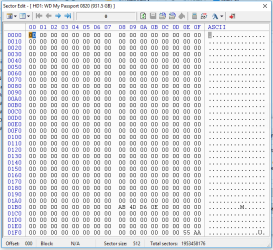
I've installed Bootice and looked at both the 1tb ExFAT and 500gb ExFAT/HFS drives and they show very similar results, although they differ from yours. Sector 0 of each drive is almost but not entirely zeroes, sectors 2-2049 are all zeroes, and sector 2050 is the first sector after sector 0 with data. Sector 2050 of each drive has identical first and last lines, but to avoid confusion I have only posted screenshots of the 1tb ExFAT drive.

Sector 0
Screenshot 2016-07-14 16.29.48.png

Sector 2050
Screenshot 2016-07-14 16.29.00.png

A couple of other points which may or may not be relevant:

- The last 2048 sectors (i.e. 1,953,456,128 to 1,953,458,175) of the 1tb drive are also zeroes (my understanding is that diskpart clean zeroes the first and last 2mb of the drive)

- Immediately after running diskpart clean I rebooted. When the drives didn't show up I opened Windows Disk Management and inadvertently re-initialised the drives. I then ran diskpart clean again, thinking that would put me back in the situation I was in prior to initialising the drives. I successfully recovered the NTFS partition on my 2tb drive after doing this, so I hope no further damage was done

- A couple of days ago I ran testdisk again on the 1tb drive, using the 'none' partition table option. As with the 'Intel' and 'GPT' attempts it found numerous partitions, but no ExFAT partitions. However DMDE did find traces of the ExFAT partitions on both the 1tb and 500gb drives, although it doesn't seem to have a partition recovery option and didn't manage to extract all the files

- I am now reasonably (80%) certain that all the drives were using MBR. All are WD Passport drives and I bought another WD 2tb drive to use for data recovery, and that is using MBR. All the other drives are older and I don't believe I converted them to GPT at any point - though it's possible (I think unlikely) that OSX may have done so for the 500gb drive

- The 1tb drive is very much the drive I want to save. I think the 500gb drive only had training footage and the backup of my photos on it - whilst it would be a shame to lose some of the footage, it's by no means a disaster

Thanks again!
 
Last edited:

My Computer My Computer

At a glance

Windows 10 Pro x64i5
Computer type
PC/Desktop
Computer Manufacturer/Model Number
Intel NUC
OS
Windows 10 Pro x64
CPU
i5
Hard Drives
128gb SSD
WD Passport 500gb
WD Passport 1tb
WD Passport Ultra 2tb
I've just been looking at the 'Templates' in Bootice, and I see that in the template for an NTFS partition there are entries for the start cluster of $MFT and $MFTMirror, so if I'm understanding it correctly the file tables are not located in the first 2048 sectors and so aren't wiped by diskpart clean. When partition recovery software runs, is it these file tables it looks for and finds to recreate the partition? I can't see an equivalent entry for file tables in the ExFAT template, and I'm wondering if this is why recovering ExFAT partitions is harder. Apologies if this is a complex question, I'm just trying to understand a little better how the partition system works.
 

My Computer My Computer

At a glance

Windows 10 Pro x64i5
Computer type
PC/Desktop
Computer Manufacturer/Model Number
Intel NUC
OS
Windows 10 Pro x64
CPU
i5
Hard Drives
128gb SSD
WD Passport 500gb
WD Passport 1tb
WD Passport Ultra 2tb
If it's of any use, I've attached a screenshot of the DMDE search results for the 1tb disk. Testdisk also found a lot of HFS/HFS+ partitions on this drive, which surprised me as I don't recall having had any on there, but not the ExFAT partitions. DMDE doesn't support HFS, and I only scanned for NTFS and ExFAT partitions (Testdisk found some FAT12 and FAT16 partitions, but they were megabytes in size with labels such as 'Boot'). The documentation for DMDE isn't great, and for example I'm not sure why there are two figures in the '%' column.

Screenshot 2016-07-14 18.19.23.png
 

My Computer My Computer

At a glance

Windows 10 Pro x64i5
Computer type
PC/Desktop
Computer Manufacturer/Model Number
Intel NUC
OS
Windows 10 Pro x64
CPU
i5
Hard Drives
128gb SSD
WD Passport 500gb
WD Passport 1tb
WD Passport Ultra 2tb
As far as I know and perceive exFat does not have MFT but only File Allocation Table. ( I am just learning about exFat because of your problem, and that is still not complete :D)

Your sector 0 does show it as an MBR drive but without the partition table. ( an external drive really does not need the MBR code)

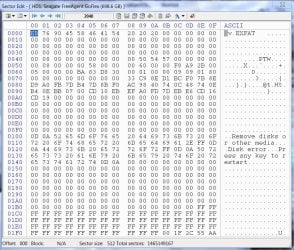
I want to see sector 2048 ( seeing is believing :D). So select sector 2048 with bootice and post a screen shot. The exFat volume bootsector at 2048 will look like this screenshot.

15-07-2016 10-00-32.jpg
 

My Computer My Computer

At a glance

Windows 7 Home Premium 32 bit
OS
Windows 7 Home Premium 32 bit
I do not know much about DMDE and so cannot comment on it. But on my recommendation atleast one user used DMDE , learnt about it with his own effort and successfully retrieved the hidden space on his HDD. I commented I had to learn using DMDE from him :).
 

My Computer My Computer

At a glance

Windows 7 Home Premium 32 bit
OS
Windows 7 Home Premium 32 bit
Unfortunately my sector 2048 doesn't look like yours!

Screenshot 2016-07-14 18.44.03.png

I have set DMDE searching for the string "EXFAT" (I couldn't see a search command in Bootice) so I'll report back if it finds anything.
 

My Computer My Computer

At a glance

Windows 10 Pro x64i5
Computer type
PC/Desktop
Computer Manufacturer/Model Number
Intel NUC
OS
Windows 10 Pro x64
CPU
i5
Hard Drives
128gb SSD
WD Passport 500gb
WD Passport 1tb
WD Passport Ultra 2tb
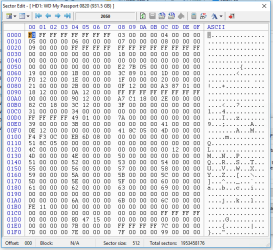
OK, the exFAT volume bootsector is missing. I have to do some more experimentation now and see what could be done to retrieve that situation. Will take quite sometime. shall return after another 10 hours from now.

Whatever you do, try not to write anything on the drive. ( I have a lingering fear using the drive with MacOS could have written something on your exFat drive and spoilt it. Apple and Microsoft don't go well together.)
 

My Computer My Computer

At a glance

Windows 7 Home Premium 32 bit
OS
Windows 7 Home Premium 32 bit
Back
Top