Accidently did diskpart clean. Installed Windows. Urgent..

satishynd

New member
Local time
8:55 PM
Messages
7
Dear All,

I messed up real time and now I don't know what to do.

I accidently followed diskpart clean tutorial while installing Windows 10. (due to MBR,GPT error)
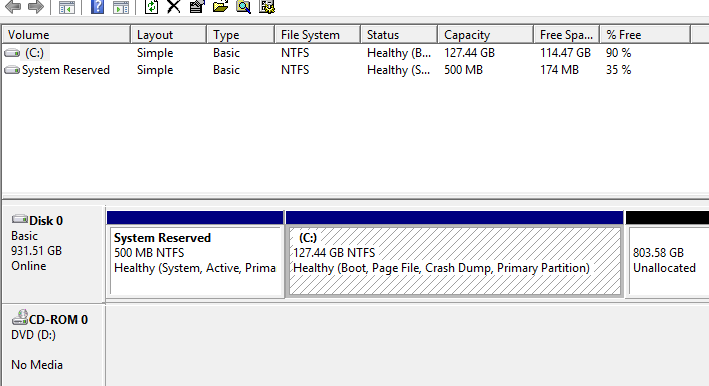
Now, to make it even worse I created a separate 131GB partition out of 1 TB HD to install windows.

I am posting this through the same windows. Is there any hope at all to recover any data??? I had lot of important stuff on HD :(

My current diskmgmt says..
bR4kIjE.png
 

My Computer My Computer

OS
Windows 7 x64
You may be able to recover files that have not been overwritten.

Stop using that drive.

Try Recuva first as it is free. Recuva - Builds

If that doesn't look useful,

Suggest you run active file recovery. If it finds them , you would need to buy a license to do the recovery. It seems to be one of the best, and cheaper than the others also.
Active@ File Recovery searches for lost RAIDs
 

My Computers My Computers

System One System Two

  • Computer type
    PC/Desktop
    OS
    7 X64
    CPU
    i5 8400
    Motherboard
    gigabyte b365m ds3h
    Memory
    2x8gb 3200mhz
    Hard Drives
    various
    PSU
    pure power 11 400w cm
    Case
    Coolermaster
    Cooling
    cryorig m9i
  • Computer type
    PC/Desktop
    OS
    7x64
    CPU
    g5400
    Motherboard
    ga b365m ds3h
    Memory
    8gb ddr4 2400
    PSU
    xfx pro 450w
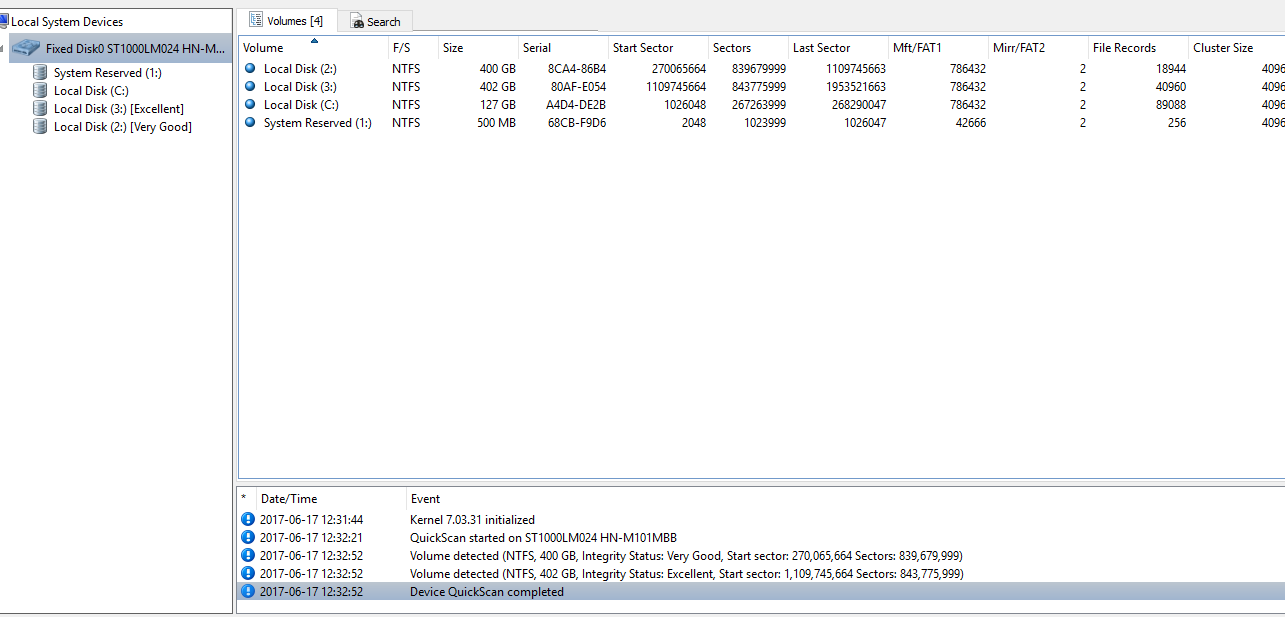
I scanned through Active Recovery

GXudyBs.png


Have these results.. ..erm what should I do now??

Previously there were three drives. 2 of 400GB and 1 of remaning ~130GB
 

My Computer My Computer

OS
Windows 7 x64
You click on a drive in the left pane and select scan. Have a look at them all and see if it can find the files you want.
 

My Computers My Computers

System One System Two

  • Computer type
    PC/Desktop
    OS
    7 X64
    CPU
    i5 8400
    Motherboard
    gigabyte b365m ds3h
    Memory
    2x8gb 3200mhz
    Hard Drives
    various
    PSU
    pure power 11 400w cm
    Case
    Coolermaster
    Cooling
    cryorig m9i
  • Computer type
    PC/Desktop
    OS
    7x64
    CPU
    g5400
    Motherboard
    ga b365m ds3h
    Memory
    8gb ddr4 2400
    PSU
    xfx pro 450w

My Computers My Computers

System One System Two

  • Computer type
    PC/Desktop
    OS
    7 X64
    CPU
    i5 8400
    Motherboard
    gigabyte b365m ds3h
    Memory
    2x8gb 3200mhz
    Hard Drives
    various
    PSU
    pure power 11 400w cm
    Case
    Coolermaster
    Cooling
    cryorig m9i
  • Computer type
    PC/Desktop
    OS
    7x64
    CPU
    g5400
    Motherboard
    ga b365m ds3h
    Memory
    8gb ddr4 2400
    PSU
    xfx pro 450w
satishynd, did you succeed?
 

My Computer My Computer

Computer type
PC/Desktop
Computer Manufacturer/Model Number
Antec desktop; Acer Aspire laptops
OS
Windows 7 Professional 64-bit
CPU
Desktop i5; Acers i5 & i7
Memory
desktop 16GB; 1 Acer 8GB & 1 Acer 16GB
Hard Drives
1TB split into 2 equal partitions [OS and data] usable by RJS
Internet Speed
AT&T DSL
Browser
FF, GChrome, msIE
Other Info
Windows 7 Firewall, Emsisoft AM/AV, MSE [scan-only], SpywareBlaster, Ruiware/BillP combine
I'm so sorry for not replying earlier.

IT FINALLY WORKED!! :)) SIW2 seriously ..thank you!! _/|\_ (Indian handsymbol of thank you)
If you're a girl i'd give you a kiss :p and if you're a guy ..i'd really buy you a beer but, god! finally got all my files back.

AOMEI Partition Assistant did the trick! Had to do full scan for 10 hrs staright. Had around 3 different softwares doing full scan. Others had limitations of 1GB data or so etc etc. AOMEI was free and it detected the partitions and just assigned labels to them.

Phew. Thanks :)
 

My Computer My Computer

OS
Windows 7 x64
Back
Top