Windows 7 boot up with no problem but not other programs

imcanadian

New member
Local time
12:54 PM
Messages
54
Location
Canada (Belleville, ON)
I decided to go back to Windows 7 Home Premium which is on my secondary drive (2 TB hard drive ) and still have Windows 10 Home Premium on my primary drive ( 240 GB SSD ). Yes I did unplug the cables from the SSD and then boot up Windows 7 from my secondary drive. I was surprised to see that no problem to boot up Windows 7 but can't get any programs from Windows 7. Like for example I try to click the icon of Google Chrome or Internet Explorer or CCleaner on desktop and got the message saying that dll file missing or exe file missing for each program. I remember from last year when my desktop got upgrade from Windows 7 to Windows 10 on hard drive then about one month later I decided to go ahead to get 240 GB Solid State Drive and cloned Windows 10 on AOMEI Backupper Standard Edition 2.0.2. Now my operating system of Windows 10 is in C drive and Windows 7 left behind on hard drive with E drive. Also I made a mistake that Windows.old folder ( Windows 7 ) is gone good from the SSD which I should have leave them alone in the first place. This is my big mistake with this. Anyway how can I get the programs working again in Windows 7? What program do I have to get to fix the exe or dll files repair. Or the only way is to format the hard drive then reinstall the operating system of Windows 7 Home Premium again which I really don't want to do this. Your help would be appreciated!

Thank you,

John :mad: :devil: :shock:
 

My Computer

Computer type
PC/Desktop
OS
Windows 7 Home Premium 64bit

My Computer

Computer type
PC/Desktop
Computer Manufacturer/Model Number
Custom Build
OS
Windows 7 Home Premium 32-Bit - Build 7600 SP1
CPU
Intel Core i3-2120 3.30Ghz
Motherboard
Asus P8Z68-V LX Intel Z68 Socket H2 ATX
Memory
Kingston 4 GB DDR3 1333 mhz
Graphics Card(s)
AMD Radeon HD6670
Sound Card
Sound Blaster Audigy SE 24-Bit
Monitor(s) Displays
Asus VE228
Screen Resolution
1440 X 900
Hard Drives
OCZ Vertex 3 120 GB Sata 3 SSD ==
Kingston SH103/S3 120 G Hyper X 120 GB SSD ==
Western Digital 500 GB Caviar Green 7200 RPM ==
PSU
Corsair CX600M == 600 Watt
Case
NZXT Apollo - Silver with Clear Side Panel
Cooling
Three 120 mm Fans
Keyboard
Microsoft Natural 4000
Mouse
Microsoft Custom Optical 3000
Internet Speed
AT&T Fiber Optic Wireless Network
Antivirus
Microsoft Security Essentials
Browser
Chrome
Other Info
120 mm Blue LED Fan -- Three Blue LED Lazer Light Sticks

My Computer

Computer type
PC/Desktop
Computer Manufacturer/Model Number
Self Built
OS
Win 10 Pro x64
CPU
Intel I5-2500K @3.3GHz
Motherboard
Asrock P67 Extreme4
Memory
16GB G.Skill Ripjaws X (4x4GB)
Graphics Card(s)
EVGA GeForce 750 Ti SC 2GB
Sound Card
ASUS Xonar DG 5.1 Channels 24-bit 96KHz PCI Interface Sound
Monitor(s) Displays
auria eq2367
Screen Resolution
1920 x 1080
Hard Drives
250GB Samsung 850 EVO SSD
1TB WD Blue
1TB Hitachi
PSU
SeaSonic X 650W 80 Plus Gold
Case
Corsair Obsidian 750D
Cooling
Corsair H60, Three 140mm case fans
Keyboard
Logitech Wireless Keyboard K520
Mouse
Logitech Wireless Mouse M310
Internet Speed
Wave Broadband ~ 100 dn 5 up
Antivirus
Windows Defender, Malwarebytes Premium
Browser
Edge, IE11, Chrome
Other Info
Laptop specs: HP g7-1365dx /
CPU: AMD A6-3420M APU with Radeon(tm) HD Graphics /
RAM: Crucial 8Gb (2x4Gb) /
SSD: Crucial M4-CT128M4SSD2 ATA Device/ FW 000F /
GFX: AMD Radeon HD 6520G /
OS: Windows 10 Pro x64
Hello imcanadian

You cannot change or swap HDD around.

If you just swap the HDD this may cause Windows to read differently.

Both HDD must remain as where it is when you install Windows.

Use the BIOS setting, or Boot menu, to select which HDD /SSD /DVD, etc, to boot from.

Put back the HDD to the original as when you install Windows.

It is path was wrong, not missing dll files.
Hence, the Windows cannot load properly.

Meaning that it is searching the other HDD for the dll files.

Windows use PATH to look for Windows files/exe.
 

My Computer

Computer type
Laptop
Computer Manufacturer/Model Number
Toshiba L630 and L735
OS
Windows 7 x64
Hard Drives
240 GB SSD
I remember from last year when my desktop got upgrade from Windows 7 to Windows 10 on hard drive then about one month later I decided to go ahead to get 240 GB Solid State Drive and cloned Windows 10 on AOMEI Backupper Standard Edition 2.0.2. Now my operating system of Windows 10 is in C drive and Windows 7 left behind on hard drive with E drive.

How did you do the upgrade to Win 10 ?
Did you use the MS Upgrade option from Windows Update (upgrade install)
, or did you do a clean install of Win 10, etc. ?
I thought using the Windows Update upgrade option would replace Win 7 with Win 10, so you would no longer have a Win 7 OS.

If you did an upgrade install, how did you get the Win 7 OS back on the HD after cloning Win 10 to the new SSD ?

When you boot Win 7 is the OS drive letter C or E ?
 

My Computer

Computer type
PC/Desktop
Computer Manufacturer/Model Number
home built
OS
Multi-Boot W7_Pro_x64 W8.1_Pro_x64 W10_Pro_x64 +Linux_VMs +Chromium_VM
CPU
AMD Athlon II x4 620
Motherboard
Gigabyte GA-MA785G-UD3H
Memory
6GB GSkill DDR2 800
Graphics Card(s)
AMD 4670 GPU + AMD 4200 IGP
Sound Card
on board Realtek ALC889A
Monitor(s) Displays
RCA 40" LCD TV, Insignia 32" LCD TV, HP 15" LCD monitor
Screen Resolution
1680 x 1050
Hard Drives
OCZ Vertex 3 120GB,
Samsung F3 1TB (3),
Several others - WD, Seagate, Hitachi, ...
PSU
Corsair 500 W
Case
Rosewill mid tower
Cooling
CM 90mm rifle
Keyboard
Gyration wireless, Logitech wireless, Dell USB wired
Mouse
Gyration wireless, Logitech wireless, V7 USB wired
Internet Speed
Spectrum - 100Mbps D / 10Mbps U
Antivirus
Avast, MBAM3, EMET, WinPatrol
Browser
Pale Moon, Firefox, IE
Other Info
2 multi-boot PC's
Mainly HTPC/Office/Gen purpose (no gaming).
Trendnet USB KVM.
LG DVD burner/Blue Ray Player.
Tray system for removable SATA backup drives.

Not currently OCd, under-volted.
I use Hybrid sleep, rarely re-boot or shutdown.

Hauppauge HD-PVR, Avermedia PCIe TV Tuner, Hauppauge PCI TV Tuner.
Hello imcanadian

You cannot change or swap HDD around.

If you just swap the HDD this may cause Windows to read differently.

Both HDD must remain as where it is when you install Windows.


Use the BIOS setting, or Boot menu, to select which HDD /SSD /DVD, etc, to boot from.

Put back the HDD to the original as when you install Windows.

It is path was wrong, not missing dll files.
Hence, the Windows cannot load properly.

Meaning that it is searching the other HDD for the dll files.

Windows use PATH to look for Windows files/exe.

That is not true. Don't confuse the issue.
 

My Computer

Computer type
PC/Desktop
Computer Manufacturer/Model Number
Custom Build
OS
Windows 7 Home Premium 32-Bit - Build 7600 SP1
CPU
Intel Core i3-2120 3.30Ghz
Motherboard
Asus P8Z68-V LX Intel Z68 Socket H2 ATX
Memory
Kingston 4 GB DDR3 1333 mhz
Graphics Card(s)
AMD Radeon HD6670
Sound Card
Sound Blaster Audigy SE 24-Bit
Monitor(s) Displays
Asus VE228
Screen Resolution
1440 X 900
Hard Drives
OCZ Vertex 3 120 GB Sata 3 SSD ==
Kingston SH103/S3 120 G Hyper X 120 GB SSD ==
Western Digital 500 GB Caviar Green 7200 RPM ==
PSU
Corsair CX600M == 600 Watt
Case
NZXT Apollo - Silver with Clear Side Panel
Cooling
Three 120 mm Fans
Keyboard
Microsoft Natural 4000
Mouse
Microsoft Custom Optical 3000
Internet Speed
AT&T Fiber Optic Wireless Network
Antivirus
Microsoft Security Essentials
Browser
Chrome
Other Info
120 mm Blue LED Fan -- Three Blue LED Lazer Light Sticks
Thank you to all who have replied to my messages and I realized that I can't do this and will do dual boot with Widows 10 and Windows 7. OK Windows 7 is in E drive which I have the hard drive before and switched to SSD with Windows 7 through clone. And now the operating system of Windows 10 is in C drive from the upgrade with Windows 7 to Windows 10 last year. The operating system of Windows 7 (earlier version ) was left behind in E drive. Now I wonder what can I do to delete the operating system of Windows 7 from the hard drive? Through DBAN or any suggestion to remove the operating system.

Thank you to all who have better tips than I have here and look forward to see more tips about this to remove the operating system of Windows 7 in E drive ( hard drive ).

Thank you again,

John
 

My Computer

Computer type
PC/Desktop
OS
Windows 7 Home Premium 64bit
Add to my message above and have a question for bigmck or derekimo. My question is that I have decided to go ahead to dual boot Windows 10 with Windows 7. But I already have Windows 10 operating system in the C drive with Solid State Drive and plan to install Windows 7 in C drive. Or that will not work. Also my other question is that I will have to clean the operating system of Windows 10 out from C drive then I will reinstall the operating system of Windows 7 first then next with Windows 10. Both are Home Premium 64X. Or that is not necessary to do this. Your help would be appreciated. Let me know about this please.

Thank you again,

John
 

My Computer

Computer type
PC/Desktop
OS
Windows 7 Home Premium 64bit
imcanadian just a thought that might help these good folks trying to help can better understand what you have and what you want to do.

1. Their is no such thing as a "C" Drive.
"C" is a partition on a Drive (Disk)

2. Drives (Disk) have numbers: 0, 1, 2, 3 which have partitions; C, D, E ect.
Knowing what Drives (Disk) you have and where you want partitions to install Windows on would be helpful.

Using the proper terms I believe would be helpful. Of course their will be someone that thinks I'm crazy.

Examples would be; from my computer.
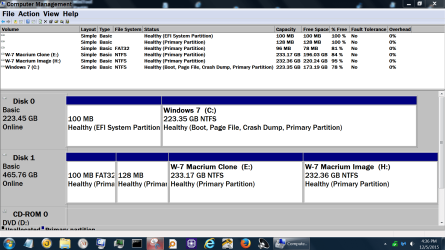
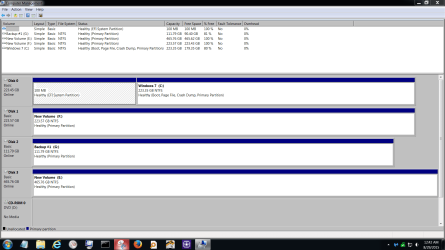
Disk Management Dec 5 2015.PNG

Disk Management.PNG

**Notice the Disk Drives have numbers and within those Disk Drives their are partition with letters.**

If you could complete this tutorial by Brink with your drives pluggen in it should be helpful.

http://www.sevenforums.com/tutorials/274797-disk-management-post-screen-capture-image-2.html
 

My Computer

Computer type
PC/Desktop
Computer Manufacturer/Model Number
Home made Desktop
OS
Windows 10 Pro. 64/ version 1709 Windows 7 Pro/64
CPU
Intel i7-6800K @ 4.3
Motherboard
ASUS X-99 Deluxe II
Memory
Corsair Platinum 16 gig @2400
Graphics Card(s)
EVGA GTX 1070 OC
Monitor(s) Displays
Asus 27" LED LCD/VE278Q
Screen Resolution
1920-1080 or 1280-720 HDMI
Hard Drives
INTEL SSD 730-240 Gb Sata 3.0/
PSU
EVGA Platium 1200W
Case
Phanteks Luxe Tempered Glass 8 fans/ one radiator
Cooling
XSPC/ Water Cooled CPU
Keyboard
Das 4 Professional
Mouse
Logitech M705/MX Anywhere 2-S
Internet Speed
100 mbits
Antivirus
Microsoft Security Essentials/ Malwarebytes Premium 3.0/ SAS
Browser
I.E. 11 default/Firefox/ ISP Time Warner Cable/Spectrum
Other Info
LG BluRay Burner/
Sound system-KLipsch-THX/
Icy Dock ssd Hot Swap bays.
Add to my message above and have a question for bigmck or derekimo. My question is that I have decided to go ahead to dual boot Windows 10 with Windows 7. But I already have Windows 10 operating system in the C drive with Solid State Drive and plan to install Windows 7 in C drive. Or that will not work. Also my other question is that I will have to clean the operating system of Windows 10 out from C drive then I will reinstall the operating system of Windows 7 first then next with Windows 10. Both are Home Premium 64X. Or that is not necessary to do this. Your help would be appreciated. Let me know about this please.

Thank you again,

John

John -- This thread has a couple conversations on it, but this is for you. :) == Before you change anything else, lets make sure your Boot Files are OK. Do this http://www.sevenforums.com/tutorials/274797-disk-management-post-screen-capture-image.html and be sure to spread the columns so we can read all of the print.
 

My Computer

Computer type
PC/Desktop
Computer Manufacturer/Model Number
Custom Build
OS
Windows 7 Home Premium 32-Bit - Build 7600 SP1
CPU
Intel Core i3-2120 3.30Ghz
Motherboard
Asus P8Z68-V LX Intel Z68 Socket H2 ATX
Memory
Kingston 4 GB DDR3 1333 mhz
Graphics Card(s)
AMD Radeon HD6670
Sound Card
Sound Blaster Audigy SE 24-Bit
Monitor(s) Displays
Asus VE228
Screen Resolution
1440 X 900
Hard Drives
OCZ Vertex 3 120 GB Sata 3 SSD ==
Kingston SH103/S3 120 G Hyper X 120 GB SSD ==
Western Digital 500 GB Caviar Green 7200 RPM ==
PSU
Corsair CX600M == 600 Watt
Case
NZXT Apollo - Silver with Clear Side Panel
Cooling
Three 120 mm Fans
Keyboard
Microsoft Natural 4000
Mouse
Microsoft Custom Optical 3000
Internet Speed
AT&T Fiber Optic Wireless Network
Antivirus
Microsoft Security Essentials
Browser
Chrome
Other Info
120 mm Blue LED Fan -- Three Blue LED Lazer Light Sticks
imcanadian just a thought that might help these good folks trying to help can better understand what you have and what you want to do.

1. Their is no such thing as a "C" Drive.
"C" is a partition on a Drive (Disk)

2. Drives (Disk) have numbers: 0, 1, 2, 3 which have partitions; C, D, E ect.
Knowing what Drives (Disk) you have and where you want partitions to install Windows on would be helpful.

Using the proper terms I believe would be helpful. Of course their will be someone that thinks I'm crazy.

You are not crazy, as i do follow according to your points 1 & 2 very closely.

Windows OS can be in any partition, not necessary in Disk 0.
As far as i know, when the partition which boot up the OS, it may also consider as C:\ not necessary in Disk 0 so long as the partition is mark Active, boot.
 

My Computer

Computer type
Laptop
Computer Manufacturer/Model Number
Toshiba L630 and L735
OS
Windows 7 x64
Hard Drives
240 GB SSD
Back
Top