Upgrading to SSD

ComputerNoob407

New member
Local time
5:15 PM
Messages
24
I'm still a noob at computers. My lenovo y50 uses windows 8. I purchased a new Samsung 850 EVO SSD 500gb to replace my 5400 rpm WD slim 1 tb. Without formatting the drive, I inserted the empty drive into a external enclosure, attached a SATA connector though USB on the laptop. First I tried Samsung's data migration to clone, which was successful, but when I replaced the WD slim, after booting it showed the lenovo screen and it immediately went to a blank black screen (mouse shows and HDD activity light blinks). I take the drive out, put back in the enclosure and used Macrium Reflect to clone it. Replaced the drive again and upon booting, it showed the lenovo logo and at the bottom was performing automatic repair. After a few minutes, it said automatic repair couldn't be performed and asked to shut down, this was an endless loop. Both times, the bios recognizes the SSD. So I finally decided to just create an image from macrium reflect on an external hard drive. The image went successful and it passed the verify option, no errors. My question is, do I have to reformat the SSD though disk management again? To restore the image on the SSD, can I put the SSD in an external enslosure with a SATA connector attached via USB and restore the image that way? Would still that be considered an image? If I replaced the HD again, I want to be 100% sure it will boot normally with no problems and function normal. Thanks for advice!
 

My Computer My Computer

Computer type
Laptop
OS
Windows 7 home premium 64 bit

My Computer My Computer

Computer type
PC/Desktop
OS
Microsoft Windows 7 Home Premium 64-bit 7601 Multiprocessor Free Service Pack 1
CPU
Intel(R) Core(TM) i7-3770 CPU @ 3.40GHz
Motherboard
ASUSTeK COMPUTER INC. P8H77-M
Memory
8.00 GB
Graphics Card(s)
Intel(R) HD Graphics 4000
Sound Card
On Board
Monitor(s) Displays
Dell 24"
Screen Resolution
1920 x 1080
Hard Drives
(1) INTEL SSDSC2CT180A3 ATA Device (2) ST500DM002-1BD142 ATA Device (3) WDC WD3200AAKS-75L9A0 ATA Device (4) Generic- Compact Flash USB Device (5) Generic- MS/MS-Pro USB Device (6) Generic- SD/MMC USB Device (7) Generic- SM/xD-Picture USB
PSU
500w Corsair
Case
Cooler Master
Cooling
3 Fans
Keyboard
Logitech MK300
Mouse
Logitech WOM
Internet Speed
75Mb
Antivirus
Norton 360
Browser
Firefox, Opera, IE
see comments in bold

My question is, do I have to reformat the SSD though disk management again?

You shouldn't have to. An image restoration will do the necessary formatting automatically.


To restore the image on the SSD, can I put the SSD in an external enslosure with a SATA connector attached via USB and restore the image that way?

I've never tried it as I don't use enclosures, but why not just put the SSD into the internal bay where it's supposed to be and restore to that from the external? I'd think restoring to the SSD in an enclosure would just be an unnecessary complication.


If I replaced the HD again, I want to be 100% sure it will boot normally with no problems and function normal.

You are imaging. Therefore, you cannot be 100% sure of anything. It's not a foolproof process, but it seems to be more reliable than cloning. You have to be prepared to have imaging and cloning both fail and have another plan--typically a clean install.
 

My Computer My Computer

Computer type
PC/Desktop
Computer Manufacturer/Model Number
Ignatz Special; 4 speed manual gearbox; factory air conditioning; one of one
OS
Windows 7 Home Premium SP1, 64-bit
CPU
Intel Skylake i5-6600K, not overclocked
Motherboard
AsRock Z170M Extreme 4, micro ATX
Memory
8 GB HyperX DDR4-2666 (2 x 4 GB)
Graphics Card(s)
none; graphics are integrated on CPU
Sound Card
onboard: Realtek ALC1150; external: USB Behringer UF0-202
Monitor(s) Displays
Dell S2340M 23 inch IPS
Screen Resolution
1600 x 900
Hard Drives
System: Crucial MX100 series SSD, 128 GB;
Data: Samsung Spinpoint 103SJ, 1 TB;
Backup: WD Caviar Green WD30EZRX-00D8PB0, 3 TB
PSU
Rosewill SilentNight 500 watt fanless, semi-modular
Case
Antec Solo II
Cooling
Noctua NH-U12S; Noctua F12 intake, Noctua S12A exhaust
Keyboard
Microsoft 200 6JH-00001 USB
Mouse
Dell or Microsoft optical wired; USB
Antivirus
Microsoft Security Essentials and Malwarebytes Premium
Browser
Pale Moon
Other Info
All fans PWM; speeds at idle: CPU circa 500 rpm; intake circa 600 rpm; exhaust circa 600 rpm; CPU temps 27 idle and 47 C load in a warm room (27 C/81 F) when running Intel Extreme Tuning Utility stress test.
Hi,
Normally I would create the system image onto the same drive as the os I was imaging if I didn't have an extra one to place the system image on.

Then I would create the WinPE recovery media so I had that to boot to and use to restore the system image.

I would then remove the old hdd and install the new ssd where it was,
Install the old hdd with the system image into the external enclosure.
Boot to the WinPE recovery cd or flash media and restore the image to the new ssd.

Seeing this is a win-8 machine you'd probably have to disable fast start and Secure boot so you could boot to the WinPE recovery media.
 

My Computer My Computer

Computer type
PC/Desktop
Computer Manufacturer/Model Number
Custom assembled by me :}
OS
Win-7-Pro64bit 7-H-Prem-64bit
CPU
i7-5930K 2nd i9-9940x both water blocked VRM's too
Motherboard
ASUS SABERTOOTH X99 2nd ASUS x299 Apex
Memory
Trident-z 3200C14 2nd Trident-z 3600C16
Graphics Card(s)
EVGA 1080ti ftw3 2nd Titan Xp both water blocked
Sound Card
Built-in Realtek
Monitor(s) Displays
1-AOC G2460PG 24"G-Sync 144Hz/ 2nd 1-ASUS VG248QE 24" 144Hz
Screen Resolution
1920 x 1080 144Hz
Hard Drives
2-Samsung M.2 Evo & Evo Plus
2-Samsung 850 EVO 500GB SSD's/ 3-2.5 W.D. Black 1tb-&3-1tb/3-3.5 WD Black 1tb hdd's
PSU
EVGA SuperNOVA 1000-P2 2nd 1200-P2
Case
2-Corsair Obsidian Series 450D Black ATX Mid Tower
Cooling
Custom water loops
Keyboard
Logitech G710+/ 2nd Logitech G910
Mouse
2-RedDragon M901 Perdition 16400 dpi Gaming mouse = wired
Internet Speed
Comcast Ping 19ms 89.31mbps download speed 6.12mbps upload
Antivirus
Malwarebytes Pro/ Superantispyware Pro
Browser
FireFox & Pale moon
Other Info
2nd ASUS X299 Apex/Intel i9-9940x with Custom water loop/7H-Prem-x64/Corsair 450D case/Ram Trident-z 3600C16 4x8gb / Samsung970Evo plus 500gb SSD/Dual ssd EZ swap evo/PSU EVGA SuperNova 1200w-P2 80+Platinum/GPU Titan Xp /8-ML-140 on push-pull on 2-280GTX rads
Whenever you reimage a drive, it automatically reformats the target drive. You don`t have to do it.

My question is, why aren`t you doing a clean install on the new ssd ?

That way you`ll have a beautifully clean pristine PC ?

Other then the fact that you will still be using Windows 8 :(
 

My Computer My Computer

Computer type
PC/Desktop
Computer Manufacturer/Model Number
Skylake Special #666
OS
Windows 10 Pro x64
CPU
Intel Core i7 6700K
Motherboard
Asus Sabertooth Z170 Mark 1
Memory
GSkill TridentZ RGB 16GB 3600 16-16-16-36
Graphics Card(s)
EVGA GTX 980 Ti SC x2
Sound Card
Realtek High Definition
Monitor(s) Displays
AOC G2460PG
Screen Resolution
1920 x 1080 144Hz
Hard Drives
Samsung 860 Pro 256GB, Seagate Barracuda 4TB x2
PSU
EVGA 1000 P2, EVGA White Custom Braided Cables
Case
Corsair Vengeance C70 Gunmetal Black
Cooling
Corsair H100i v2, Corsair ML120 x2, Thermal Grizzly Kryonaut
Keyboard
Logitech G910 Orion Spectrum
Mouse
Logitech G700s
Internet Speed
Verizon Fios Quantum Gateway 75/75
Antivirus
Windows Defender, Malwarebytes Free 3.8.3
Browser
Chrome
Other Info
Corsair SP120 x4, LG Blu-ray Drive, Durabrand HT-395 100 Watt Dolby Digital Amp, Corsair H2100 Wireless 7.1 Headset
I swapped my laptop 750gb HDD w/a Samsung Pro 500gb SSD a few months ago. Take addRAM's advice and perform a clean install! Can't tell you how many hrs I wasted on the clone/image route... encountered far too many issues to even list here, so I won't. Eventually performed a clean OS install, downloaded & installed apps and then just migrated old HDD data files to the new SSD.
 

My Computer My Computer

Computer type
Laptop
Computer Manufacturer/Model Number
Fujitsu LifeBook AH550
OS
Windows 7 Home Premium x64 SP1
Hi,
Funny I just restored an image on a 850 evo last weekend worked great and operates great :)
Of course I went from one ssd to another ssd :)

An hdd might need a little cleanup but reflect does trim operation pretty well I believe.
 

My Computer My Computer

Computer type
PC/Desktop
Computer Manufacturer/Model Number
Custom assembled by me :}
OS
Win-7-Pro64bit 7-H-Prem-64bit
CPU
i7-5930K 2nd i9-9940x both water blocked VRM's too
Motherboard
ASUS SABERTOOTH X99 2nd ASUS x299 Apex
Memory
Trident-z 3200C14 2nd Trident-z 3600C16
Graphics Card(s)
EVGA 1080ti ftw3 2nd Titan Xp both water blocked
Sound Card
Built-in Realtek
Monitor(s) Displays
1-AOC G2460PG 24"G-Sync 144Hz/ 2nd 1-ASUS VG248QE 24" 144Hz
Screen Resolution
1920 x 1080 144Hz
Hard Drives
2-Samsung M.2 Evo & Evo Plus
2-Samsung 850 EVO 500GB SSD's/ 3-2.5 W.D. Black 1tb-&3-1tb/3-3.5 WD Black 1tb hdd's
PSU
EVGA SuperNOVA 1000-P2 2nd 1200-P2
Case
2-Corsair Obsidian Series 450D Black ATX Mid Tower
Cooling
Custom water loops
Keyboard
Logitech G710+/ 2nd Logitech G910
Mouse
2-RedDragon M901 Perdition 16400 dpi Gaming mouse = wired
Internet Speed
Comcast Ping 19ms 89.31mbps download speed 6.12mbps upload
Antivirus
Malwarebytes Pro/ Superantispyware Pro
Browser
FireFox & Pale moon
Other Info
2nd ASUS X299 Apex/Intel i9-9940x with Custom water loop/7H-Prem-x64/Corsair 450D case/Ram Trident-z 3600C16 4x8gb / Samsung970Evo plus 500gb SSD/Dual ssd EZ swap evo/PSU EVGA SuperNova 1200w-P2 80+Platinum/GPU Titan Xp /8-ML-140 on push-pull on 2-280GTX rads
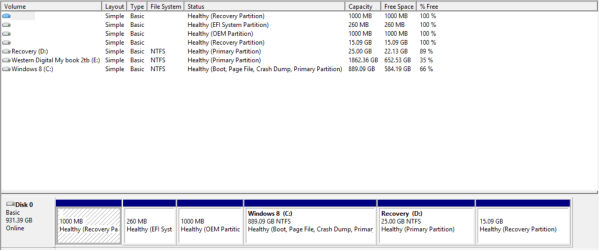
Thank you for all the replies. A clean install sounds really good, but I don't want to reinstall all the programs, windows updates and games from steam and origin. After imaging, I noticed from the macrium reflect log history #2: SYSTEM_DRV and #3: LRS_ESP, the actual size is 4 mb less. #2 total size is 260 mb and #3 is 1000 gb, than the original. What is #4 Will this be a problem when restoring to the SSD? Why is the total size off? Verify option was a success, no errors and from the log, there was no errors as well.
 

Attachments

  • Macrium reflect before image 2.jpg
    Macrium reflect before image 2.jpg
    31.1 KB · Views: 10

My Computer My Computer

Computer type
Laptop
OS
Windows 7 home premium 64 bit
What settings did you make within Macrium just before you made the image file?

Specifically--did you select certain partitions manually and leave certain partitions unselected?

Or did you choose "image selected disks on this computer"?

Or did you choose "create an image of the partition(s) required to backup and restore Windows"?

Or did you do something else?

You need to post a screen shot of Windows Disk Management show we can see the details of your partition layout. The pic you did post doesn't show that detail.

Lastly--have you made Macrium restore (recovery) media?

The successful verification is no guarantee that an image restoration will succeed.
 

My Computer My Computer

Computer type
PC/Desktop
Computer Manufacturer/Model Number
Ignatz Special; 4 speed manual gearbox; factory air conditioning; one of one
OS
Windows 7 Home Premium SP1, 64-bit
CPU
Intel Skylake i5-6600K, not overclocked
Motherboard
AsRock Z170M Extreme 4, micro ATX
Memory
8 GB HyperX DDR4-2666 (2 x 4 GB)
Graphics Card(s)
none; graphics are integrated on CPU
Sound Card
onboard: Realtek ALC1150; external: USB Behringer UF0-202
Monitor(s) Displays
Dell S2340M 23 inch IPS
Screen Resolution
1600 x 900
Hard Drives
System: Crucial MX100 series SSD, 128 GB;
Data: Samsung Spinpoint 103SJ, 1 TB;
Backup: WD Caviar Green WD30EZRX-00D8PB0, 3 TB
PSU
Rosewill SilentNight 500 watt fanless, semi-modular
Case
Antec Solo II
Cooling
Noctua NH-U12S; Noctua F12 intake, Noctua S12A exhaust
Keyboard
Microsoft 200 6JH-00001 USB
Mouse
Dell or Microsoft optical wired; USB
Antivirus
Microsoft Security Essentials and Malwarebytes Premium
Browser
Pale Moon
Other Info
All fans PWM; speeds at idle: CPU circa 500 rpm; intake circa 600 rpm; exhaust circa 600 rpm; CPU temps 27 idle and 47 C load in a warm room (27 C/81 F) when running Intel Extreme Tuning Utility stress test.
Well, when macrium reflect v5.1.5870 opened, all the partitions were already selected and I chose to 'image this disk' below. I used the recommended settings 'medium compression level', 'intelligent sector copy', 'automatic file size', and 'highest priority'. I created the image using an admin. account I disabled real time protection on my antivirus and didn't have anything open or running in task manager while the image was being created, screen saver was off. Yes I created a bootable USB 'windows PE 4.0' Here is disk management of my OEM hard drive, this was before the image was created.
 

Attachments

  • Disk managment actual partition size.PNG
    Disk managment actual partition size.PNG
    45.4 KB · Views: 5

My Computer My Computer

Computer type
Laptop
OS
Windows 7 home premium 64 bit
Hmmm.....two recovery partitions. I can't recall seeing that before. May not matter or be an issue.

You say "all partitions were selected". I assume you do NOT mean E was included?

Will your PC in fact boot from that recovery media you made?

If it will, and ALL partitions on disc 0 are included in that single image file you made, then I'd say you've done about all you can do.

It should restore. It may not. You'll never know for sure until you try it. If it goes up in flames, be prepared to do a clean install even though you don't want to do that.
 

My Computer My Computer

Computer type
PC/Desktop
Computer Manufacturer/Model Number
Ignatz Special; 4 speed manual gearbox; factory air conditioning; one of one
OS
Windows 7 Home Premium SP1, 64-bit
CPU
Intel Skylake i5-6600K, not overclocked
Motherboard
AsRock Z170M Extreme 4, micro ATX
Memory
8 GB HyperX DDR4-2666 (2 x 4 GB)
Graphics Card(s)
none; graphics are integrated on CPU
Sound Card
onboard: Realtek ALC1150; external: USB Behringer UF0-202
Monitor(s) Displays
Dell S2340M 23 inch IPS
Screen Resolution
1600 x 900
Hard Drives
System: Crucial MX100 series SSD, 128 GB;
Data: Samsung Spinpoint 103SJ, 1 TB;
Backup: WD Caviar Green WD30EZRX-00D8PB0, 3 TB
PSU
Rosewill SilentNight 500 watt fanless, semi-modular
Case
Antec Solo II
Cooling
Noctua NH-U12S; Noctua F12 intake, Noctua S12A exhaust
Keyboard
Microsoft 200 6JH-00001 USB
Mouse
Dell or Microsoft optical wired; USB
Antivirus
Microsoft Security Essentials and Malwarebytes Premium
Browser
Pale Moon
Other Info
All fans PWM; speeds at idle: CPU circa 500 rpm; intake circa 600 rpm; exhaust circa 600 rpm; CPU temps 27 idle and 47 C load in a warm room (27 C/81 F) when running Intel Extreme Tuning Utility stress test.
Yes, the 'E' drive is the external backup. Can I test the marcrium boot USB by booting from and and exiting the PE environment?
 

My Computer My Computer

Computer type
Laptop
OS
Windows 7 home premium 64 bit
Can I test the marcrium boot USB by booting from and and exiting the PE environment?

Why "test" it?

As I understand it, you want to restore that image to an SSD.

See if you can do that.

If you cannot for whatever reason, you don't need a separate "test" to tell you something is wrong.

It isn't enough that the recovery media will boot. You need to know if you can restore. You won't know until you try to do exactly that.
 

My Computer My Computer

Computer type
PC/Desktop
Computer Manufacturer/Model Number
Ignatz Special; 4 speed manual gearbox; factory air conditioning; one of one
OS
Windows 7 Home Premium SP1, 64-bit
CPU
Intel Skylake i5-6600K, not overclocked
Motherboard
AsRock Z170M Extreme 4, micro ATX
Memory
8 GB HyperX DDR4-2666 (2 x 4 GB)
Graphics Card(s)
none; graphics are integrated on CPU
Sound Card
onboard: Realtek ALC1150; external: USB Behringer UF0-202
Monitor(s) Displays
Dell S2340M 23 inch IPS
Screen Resolution
1600 x 900
Hard Drives
System: Crucial MX100 series SSD, 128 GB;
Data: Samsung Spinpoint 103SJ, 1 TB;
Backup: WD Caviar Green WD30EZRX-00D8PB0, 3 TB
PSU
Rosewill SilentNight 500 watt fanless, semi-modular
Case
Antec Solo II
Cooling
Noctua NH-U12S; Noctua F12 intake, Noctua S12A exhaust
Keyboard
Microsoft 200 6JH-00001 USB
Mouse
Dell or Microsoft optical wired; USB
Antivirus
Microsoft Security Essentials and Malwarebytes Premium
Browser
Pale Moon
Other Info
All fans PWM; speeds at idle: CPU circa 500 rpm; intake circa 600 rpm; exhaust circa 600 rpm; CPU temps 27 idle and 47 C load in a warm room (27 C/81 F) when running Intel Extreme Tuning Utility stress test.
Well...um what I'm asking is....can I put the SSD in an external enclosure attached to SATA cable from usb and goto into the PE enoviroment and restore from there? I don't want to take apart my laptop again just to find out the rescue usb or image isn't working...sorry for the confusion. First time I took the bottom cover off I broke 4 tabs near the hinge, and there are some plastic pieces scattered inside, and i've taken the bottom cover off about 4 more times because the first two clones didn't work.
 

My Computer My Computer

Computer type
Laptop
OS
Windows 7 home premium 64 bit
note to all
the replacement SSD is SMALLER than the original drive 1t >> 500GB.

Roy
 

My Computer My Computer

Computer type
PC/Desktop
Computer Manufacturer/Model Number
medionl/Aspire 6930G/acer x55a
OS
W7 home premium 32bit/W7HP 64bit/w10 tp insider ring
CPU
E5300 dual core
Motherboard
medion MS7366
Memory
3gb
Graphics Card(s)
Nvidia Geforce 7100 Nforce 630i
Monitor(s) Displays
avixc
Internet Speed
n (isp resticted to 72)
Antivirus
mse/pands
Browser
palemoon
Other Info
Belkin Fd7050 n USB using Railink RT2870 drivers, more upto date
Well...um what I'm asking is....can I put the SSD in an external enclosure attached to SATA cable from usb and goto into the PE enoviroment and restore from there? I don't want to take apart my laptop again just to find out the rescue usb or image isn't working...sorry for the confusion.

I have no idea. I don't use externals or enclosures.

You won't know squat until you try it.

Aren't you going to have to take your laptop apart sooner or later anyway, even if you can restore to an SSD in an enclosure? How else would you eventually get the SSD into the laptop?
 

My Computer My Computer

Computer type
PC/Desktop
Computer Manufacturer/Model Number
Ignatz Special; 4 speed manual gearbox; factory air conditioning; one of one
OS
Windows 7 Home Premium SP1, 64-bit
CPU
Intel Skylake i5-6600K, not overclocked
Motherboard
AsRock Z170M Extreme 4, micro ATX
Memory
8 GB HyperX DDR4-2666 (2 x 4 GB)
Graphics Card(s)
none; graphics are integrated on CPU
Sound Card
onboard: Realtek ALC1150; external: USB Behringer UF0-202
Monitor(s) Displays
Dell S2340M 23 inch IPS
Screen Resolution
1600 x 900
Hard Drives
System: Crucial MX100 series SSD, 128 GB;
Data: Samsung Spinpoint 103SJ, 1 TB;
Backup: WD Caviar Green WD30EZRX-00D8PB0, 3 TB
PSU
Rosewill SilentNight 500 watt fanless, semi-modular
Case
Antec Solo II
Cooling
Noctua NH-U12S; Noctua F12 intake, Noctua S12A exhaust
Keyboard
Microsoft 200 6JH-00001 USB
Mouse
Dell or Microsoft optical wired; USB
Antivirus
Microsoft Security Essentials and Malwarebytes Premium
Browser
Pale Moon
Other Info
All fans PWM; speeds at idle: CPU circa 500 rpm; intake circa 600 rpm; exhaust circa 600 rpm; CPU temps 27 idle and 47 C load in a warm room (27 C/81 F) when running Intel Extreme Tuning Utility stress test.
note to all
the replacement SSD is SMALLER than the original drive 1t >> 500GB.

Roy

I don't think I mention that sorry, my current hard is a 1 tb capacity and the SSD is 500 gb capacity (which I want to transfer). The image created from macrium reflect shows around 320 gb used space.
 

My Computer My Computer

Computer type
Laptop
OS
Windows 7 home premium 64 bit
Well...um what I'm asking is....can I put the SSD in an external enclosure attached to SATA cable from usb and goto into the PE enoviroment and restore from there? I don't want to take apart my laptop again just to find out the rescue usb or image isn't working...sorry for the confusion.

I have no idea. I don't use externals or enclosures.

You won't know squat until you try it.

Aren't you going to have to take your laptop apart sooner or later anyway, even if you can restore to an SSD in an enclosure? How else would you eventually get the SSD into the laptop?

I think I know what your saying. If I restore the image on the SSD in a external enclosure attached to SATA from usb, even though the image restore was successful, I still have to take the cover off to replace the current one. But while the SSD is still in the enclosure, can I boot off that while the current HD is still inside the laptop to be sure it works fine, or will that cause boot problems?
 

My Computer My Computer

Computer type
Laptop
OS
Windows 7 home premium 64 bit
To belabor the point yet again: you won't know squat until you try it.

Nothing matters until and unless you can get the SSD working properly with the restored image when the SSD is installed inside the laptop. Why concern yourself with something else? Why insert unnecessary steps and hardware such as enclosures?
 

My Computer My Computer

Computer type
PC/Desktop
Computer Manufacturer/Model Number
Ignatz Special; 4 speed manual gearbox; factory air conditioning; one of one
OS
Windows 7 Home Premium SP1, 64-bit
CPU
Intel Skylake i5-6600K, not overclocked
Motherboard
AsRock Z170M Extreme 4, micro ATX
Memory
8 GB HyperX DDR4-2666 (2 x 4 GB)
Graphics Card(s)
none; graphics are integrated on CPU
Sound Card
onboard: Realtek ALC1150; external: USB Behringer UF0-202
Monitor(s) Displays
Dell S2340M 23 inch IPS
Screen Resolution
1600 x 900
Hard Drives
System: Crucial MX100 series SSD, 128 GB;
Data: Samsung Spinpoint 103SJ, 1 TB;
Backup: WD Caviar Green WD30EZRX-00D8PB0, 3 TB
PSU
Rosewill SilentNight 500 watt fanless, semi-modular
Case
Antec Solo II
Cooling
Noctua NH-U12S; Noctua F12 intake, Noctua S12A exhaust
Keyboard
Microsoft 200 6JH-00001 USB
Mouse
Dell or Microsoft optical wired; USB
Antivirus
Microsoft Security Essentials and Malwarebytes Premium
Browser
Pale Moon
Other Info
All fans PWM; speeds at idle: CPU circa 500 rpm; intake circa 600 rpm; exhaust circa 600 rpm; CPU temps 27 idle and 47 C load in a warm room (27 C/81 F) when running Intel Extreme Tuning Utility stress test.
note to all
the replacement SSD is SMALLER than the original drive 1t >> 500GB.

Roy

I don't think I mention that sorry, my current hard is a 1 tb capacity and the SSD is 500 gb capacity (which I want to transfer). The image created from macrium reflect shows around 320 gb used space.
Not much room to grow
ssd's need additional space to write to because of trim unlike hdd's which is I believe 10-20% of the ssd space.

You should clean install and use the hdd or another one for your personal files
Just install windows and programs on the ssd.
If you have games you can install them on the hdd along with personal files.
 

My Computer My Computer

Computer type
PC/Desktop
Computer Manufacturer/Model Number
Custom assembled by me :}
OS
Win-7-Pro64bit 7-H-Prem-64bit
CPU
i7-5930K 2nd i9-9940x both water blocked VRM's too
Motherboard
ASUS SABERTOOTH X99 2nd ASUS x299 Apex
Memory
Trident-z 3200C14 2nd Trident-z 3600C16
Graphics Card(s)
EVGA 1080ti ftw3 2nd Titan Xp both water blocked
Sound Card
Built-in Realtek
Monitor(s) Displays
1-AOC G2460PG 24"G-Sync 144Hz/ 2nd 1-ASUS VG248QE 24" 144Hz
Screen Resolution
1920 x 1080 144Hz
Hard Drives
2-Samsung M.2 Evo & Evo Plus
2-Samsung 850 EVO 500GB SSD's/ 3-2.5 W.D. Black 1tb-&3-1tb/3-3.5 WD Black 1tb hdd's
PSU
EVGA SuperNOVA 1000-P2 2nd 1200-P2
Case
2-Corsair Obsidian Series 450D Black ATX Mid Tower
Cooling
Custom water loops
Keyboard
Logitech G710+/ 2nd Logitech G910
Mouse
2-RedDragon M901 Perdition 16400 dpi Gaming mouse = wired
Internet Speed
Comcast Ping 19ms 89.31mbps download speed 6.12mbps upload
Antivirus
Malwarebytes Pro/ Superantispyware Pro
Browser
FireFox & Pale moon
Other Info
2nd ASUS X299 Apex/Intel i9-9940x with Custom water loop/7H-Prem-x64/Corsair 450D case/Ram Trident-z 3600C16 4x8gb / Samsung970Evo plus 500gb SSD/Dual ssd EZ swap evo/PSU EVGA SuperNova 1200w-P2 80+Platinum/GPU Titan Xp /8-ML-140 on push-pull on 2-280GTX rads
Back
Top