I need an app that can do this

Alloneword

New member
Member
Local time
12:45 AM
Messages
80
Hi i hope i'm not breaking any rules here as this is not stricktly a win 7 issue, more a case of picking your brains for an app i need.

I'm looking for an app that will tell me what files belong to what app i have installed on my system, a wee bit like Windows Task Manager and the processes tab, but i won't it to scan the whole drive not just live processes.

I have tried to google it but coming up with nothing worth looking at, can anyone shed any light on this for me?

All1
 

My Computer My Computer

Computer Manufacturer/Model Number
Home Brew
OS
Windows 7 64bit Ultimate (Retail)
CPU
Intel Core 2 Duo 8400 @ 3Ghz
Motherboard
Asus P5E3 Premium
Memory
8GB DDR3 @ 1333
Graphics Card(s)
ATI 1GB 4350 (Passive)
Sound Card
Creative Audigy 2 ZS
Monitor(s) Displays
BenQ G2420HDBL (Digital) [24" LCD]
Screen Resolution
1920x1080
Hard Drives
Floppy Drive (Still come in handy sometimes)
WDC WD6400AAKS-22A7B0 (596 GB)
WDC WD7501AALS-00J7B0 (698 GB)
WDC WD1002FAEX-00Y9A0 (931 GB)
SAMSUNG HD204UI (2000 GB)
SAMSUNG HD204UI (
PSU
Corsair HX 750W ATX Modular
Case
Antec SX-1030
Cooling
Can't remember
Keyboard
Airkey Wireless
Mouse
MS Intellimouse Explorer 2.0
Internet Speed
about 5 mbits
This isn't possible in a general sense. Files do not contain any information as to which program created them or has used them and it usually isn't possible to determine this. For the most part files are not owned by specific applications. Some file types such as PDF are normally associated with PDF readers while TXT files could be used by many types of application.

If you could describe why you need such functionality there may be something that can be done.
 

My Computer My Computer

Computer type
PC/Desktop
Computer Manufacturer/Model Number
HP
OS
Windows 7 Pro 64 bit
CPU
Xeon W3520
Memory
8 GB
Graphics Card(s)
Nvidia Geforce 210
The only way is with some scans which will scan before you install then again after and give you a list of files and reg keys
 

My Computer My Computer

Computer type
PC/Desktop
OS
win 8 32 bit
Files do not belong to any particular program, there is no such a relationship.
Software will only open files while in use, then close and leave them alone, but that don't links them in any way, any file in a system can be potentially used by any program out there, as long as it know what to do with the file and as long as permissions allow.

I don't get your example of the "a wee bit like Windows Task Manager and the processes tab", what did you mean by that? Can you explain that a bit more?

And also, what are you looking for, what are you trying to achieve?
 

My Computer My Computer

Computer type
Laptop
Computer Manufacturer/Model Number
Toshiba Sattelite A665-S6092
OS
Windows 7 Ultimate x64
CPU
Intel Core i7-740QM
Memory
8 GB DDR3
Graphics Card(s)
NVIDIA GeForce 330GT
Screen Resolution
1366x768
Hard Drives
Samsung 840 SSD 500GB
1TB USB3 external HD
Cooling
Coolermaster Notepal U3 notebook cooling pad
Internet Speed
3mbps ASDL
Antivirus
ClamWin 0.98.7
Browser
Opera 12.17 x86 (main), Firefox 38 (sec), IE11 (last resort)
Files do not belong to any particular program, there is no such a relationship.
Well that can't be true.

For example if i installed an app called "NewsLeecher" then no doubt the files that go into the NL folder may be shared with some other apps but "Newsleecher.exe" will be only for NL not VLP player, i know it's a simple way of putting it but hopefully you get my drift.

There is an app called "Security Task Manage" but that is only for apps that are running but i guess the best thing for me is to use the option that samuria suggested.

All1
 

My Computer My Computer

Computer Manufacturer/Model Number
Home Brew
OS
Windows 7 64bit Ultimate (Retail)
CPU
Intel Core 2 Duo 8400 @ 3Ghz
Motherboard
Asus P5E3 Premium
Memory
8GB DDR3 @ 1333
Graphics Card(s)
ATI 1GB 4350 (Passive)
Sound Card
Creative Audigy 2 ZS
Monitor(s) Displays
BenQ G2420HDBL (Digital) [24" LCD]
Screen Resolution
1920x1080
Hard Drives
Floppy Drive (Still come in handy sometimes)
WDC WD6400AAKS-22A7B0 (596 GB)
WDC WD7501AALS-00J7B0 (698 GB)
WDC WD1002FAEX-00Y9A0 (931 GB)
SAMSUNG HD204UI (2000 GB)
SAMSUNG HD204UI (
PSU
Corsair HX 750W ATX Modular
Case
Antec SX-1030
Cooling
Can't remember
Keyboard
Airkey Wireless
Mouse
MS Intellimouse Explorer 2.0
Internet Speed
about 5 mbits
It appears your concept of "file ownership" is different from any I have ever heard of. Files are owned by user accounts, not applications.
 

My Computer My Computer

Computer type
PC/Desktop
Computer Manufacturer/Model Number
HP
OS
Windows 7 Pro 64 bit
CPU
Xeon W3520
Memory
8 GB
Graphics Card(s)
Nvidia Geforce 210
Files do not belong to any particular program, there is no such a relationship.
Well that can't be true.

For example if i installed an app called "NewsLeecher" then no doubt the files that go into the NL folder may be shared with some other apps but "Newsleecher.exe" will be only for NL not VLP player, i know it's a simple way of putting it but hopefully you get my drift.

Executable file

is not the same as

Data file


It sounds as if you might be confusing the 2.
Yes, the Newsleecher.exe belongs to Newsleecher.
Firefox.exe belongs to Firefox.

But a data file does not "belong" to a particular program.
A "doc" file might be created in/opened with MS Word, Libre Office, Word Perfect, etc.

HTH,
MM
 

My Computer My Computer

Computer type
PC/Desktop
Computer Manufacturer/Model Number
Dell Studio XPS 8500
OS
OEM Windows 7 Ult (x64) SP1
CPU
Intel Core-i7 3770 @ 3.4 GHz
Motherboard
"Dell" branded
Memory
16 GB DDR3 SDRAM @ 1333 MHz
Graphics Card(s)
NVidia GeForce GT620 1 GB
Sound Card
THX TruStudio PC
Monitor(s) Displays
Dell U2410 Full HD
Hard Drives
2.0 TB SATA2 @ 7200 RPM
PSU
350W
Keyboard
MS 4000 Ergon - Wired
Mouse
Logitech Anywhere MX
Internet Speed
Cable HSI w/Turbo (router)
Antivirus
KIS-MBAM Premium-MBAE Premium
Browser
Fx (current version); IE
Other Info
And a Win7/64 Pro laptop; And a Win10/64 Pro desktop.
Maybe i didn't explain myself 100% when i talk about data file i'm refering to files that get installed for the running of the pc, so dll's, ini's etc, i know pdf-adobe etc but was more looking at the files that get installed with the OS and apps, and as for file ownership maybe i should have used the word "associated".

Sorry for the misunderstanding

All1
 

My Computer My Computer

Computer Manufacturer/Model Number
Home Brew
OS
Windows 7 64bit Ultimate (Retail)
CPU
Intel Core 2 Duo 8400 @ 3Ghz
Motherboard
Asus P5E3 Premium
Memory
8GB DDR3 @ 1333
Graphics Card(s)
ATI 1GB 4350 (Passive)
Sound Card
Creative Audigy 2 ZS
Monitor(s) Displays
BenQ G2420HDBL (Digital) [24" LCD]
Screen Resolution
1920x1080
Hard Drives
Floppy Drive (Still come in handy sometimes)
WDC WD6400AAKS-22A7B0 (596 GB)
WDC WD7501AALS-00J7B0 (698 GB)
WDC WD1002FAEX-00Y9A0 (931 GB)
SAMSUNG HD204UI (2000 GB)
SAMSUNG HD204UI (
PSU
Corsair HX 750W ATX Modular
Case
Antec SX-1030
Cooling
Can't remember
Keyboard
Airkey Wireless
Mouse
MS Intellimouse Explorer 2.0
Internet Speed
about 5 mbits
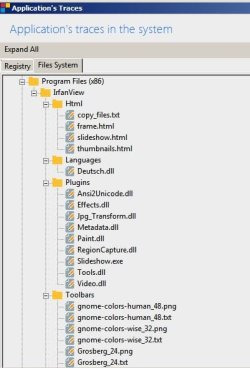
You should research apps that can do traced install/ uninstall. Here's screenshots of Irfanview (traced) but the file details will not all fit into one screen and I'm not going to post multiple screenshots!

Traced Install.jpg

Traced Install 2.jpg
 

My Computer My Computer

Computer type
Laptop
Computer Manufacturer/Model Number
ASUS
OS
Microsoft Windows 7 Home Premium 64-bit 7601 Multiprocessor Free Service Pack 1
CPU
AMD C-60 APU with Radeon(tm) HD Graphics
Motherboard
ASUSTeK COMPUTER INC. X501U
Memory
4.00 GB
Graphics Card(s)
AMD Radeon HD 6290 Graphics
Sound Card
(1) AMD High Definition Audio Device (2) Realtek High Defi
Screen Resolution
1366 x 768 x 32 bits (4294967296 colors) @ 60 Hz
Hard Drives
Hitachi HTS545050A7E380 SATA Disk Device
Antivirus
Comodo CIS & FW, SecureAplus App Whitelisting, Threatfire
Browser
Cyberfox 64bit, Opera 64bit, Airfox
Other Info
Spy-The-Spy, HitmanPro.Alert, Norton Connect Safe, MJRegWatcher, BitDefender TrafficLight, Voodoo Shield, Zemana AntiMalware
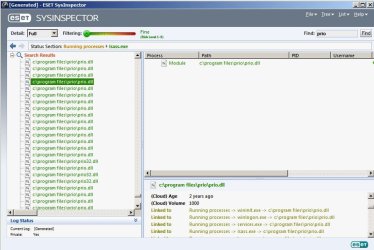
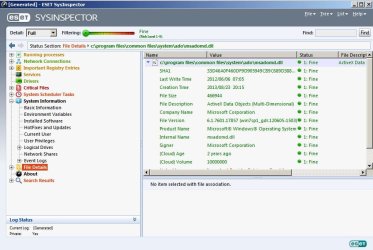
I reckon that ESET SysInspector might possibly meet you needs.

The search tool is handy. Also ignore detections (shown in red) and don't be tempted to automatically delete them. Research is needed. For executables including dll's just expand the file list.

ESET SysInspector.jpg

ESET SysInspector 2.jpg
 

My Computer My Computer

Computer type
Laptop
Computer Manufacturer/Model Number
ASUS
OS
Microsoft Windows 7 Home Premium 64-bit 7601 Multiprocessor Free Service Pack 1
CPU
AMD C-60 APU with Radeon(tm) HD Graphics
Motherboard
ASUSTeK COMPUTER INC. X501U
Memory
4.00 GB
Graphics Card(s)
AMD Radeon HD 6290 Graphics
Sound Card
(1) AMD High Definition Audio Device (2) Realtek High Defi
Screen Resolution
1366 x 768 x 32 bits (4294967296 colors) @ 60 Hz
Hard Drives
Hitachi HTS545050A7E380 SATA Disk Device
Antivirus
Comodo CIS & FW, SecureAplus App Whitelisting, Threatfire
Browser
Cyberfox 64bit, Opera 64bit, Airfox
Other Info
Spy-The-Spy, HitmanPro.Alert, Norton Connect Safe, MJRegWatcher, BitDefender TrafficLight, Voodoo Shield, Zemana AntiMalware
Back
Top