Solved is there an app that will compare 2 drives and duplicate differences

iknowjohnny

New member
Power User
VIP
Local time
3:48 AM
Messages
237
What i mean to say is, an app that will allow you to pick 2 drives and tell it to compare them and any files that drive 2 does not have that drive 1 does, add them to drive 2. If thats not clear let m explain. I have to very large drives for storage with many gigs of files. They are meant to be storage for important files and the seconds of the 2 drives is there only for backup in case drive 1 dies. So it needs to have all the same files as drive one. But i'm constantly adding new files to drive one and unless i also add them to drive 2 i will lose files if 1 dies. Of course the simple solution would be every time i add files to 1, add them to 2 as well. Problem is, i often forget to do that so 2 is always missing some files that i have saved on 1. So i want an app that i can use every so often to evaluate both drives and allow me the option to have it copy any files it sees on 1 but not on 2 to 2. It would evaluate them by name and files size and if both match exactly it would copy. I there a app that will do this exactly? I know i could copy all files, but trust me i've tried and the computer can't handle doing that and usually freezes or something always happens to screw things up, not to mention it takes forever.
 

My Computer My Computer

At a glance

windows 7 professional
OS
windows 7 professional

My Computer My Computer

At a glance

Windows 7 Pro with SP1 32bit2 gigs of RAMIntel(R) 82845G/GL/GE/PE/GV Graphics Controller
Computer Manufacturer/Model Number
Custom Built
OS
Windows 7 Pro with SP1 32bit
Motherboard
Intel D845GVS1 X86-based PC
Memory
2 gigs of RAM
Graphics Card(s)
Intel(R) 82845G/GL/GE/PE/GV Graphics Controller
Sound Card
Realtek AC'97 Audio
Monitor(s) Displays
Samsung SyncMaster 931BF Black 19" LCD Monitor
Screen Resolution
1280X960
Hard Drives
1. SAMSUNG SP0822N ATA Device ~ 80 GigaBytes

2. Seagate FreeAgent Go USB Device ~ 500 GigaBytes
Keyboard
COMPAQ Standard PS/2 Keyboard
Mouse
iBall Laser Precise Speedster
Internet Speed
4 mb/sec
Seemed like the perfect app, thanks. But i say seemed because used the echo function which seemed to be what i wanted, and when it was done it said done with errors and showed that it didn't copy any files. Unfortunately thats all it told me so i have no idea what the errors are. Any idea?
 

My Computer My Computer

At a glance

windows 7 professional
OS
windows 7 professional
You could consider creating a RAID mirror then anything you add or delete to/from drive 1 will automatically be applied to drive 2. In fact, drive 2 won't be visible at all, the computer will see drive 2 only as a mirror of drive 1 :)

I have 3 RAID mirrors on my system - 6 drives that look like 3. In fact I have had 2 drives fail over time. When this happened the system just informed me of the failure, I bought a new drive, replaced the dead drive and the system rebuilt the new drive, all automatically. :)

Now THAT's security AND convenience....
 

My Computer My Computer

At a glance

Windows 7 Professional x64 (Desktop) Home Pre...i7 870 (Desktop) i7 2630QM (Laptop)8Gb 2000 (Desktop) 8Gb 1333 (Laptop)ATI HD5770
Computer Manufacturer/Model Number
self built (Desktop) HP dv6 (Laptop)
OS
Windows 7 Professional x64 (Desktop) Home Premium x64 (Laptop)
CPU
i7 870 (Desktop) i7 2630QM (Laptop)
Motherboard
GA-P55A-UD7
Memory
8Gb 2000 (Desktop) 8Gb 1333 (Laptop)
Graphics Card(s)
ATI HD5770
Sound Card
On Board
Monitor(s) Displays
Kogan 32" LED LCD TV
Screen Resolution
1920 X 1080 (Desktop) 1366 X 768 (Laptop)
Hard Drives
2X3Tb, 4X2Tb, 4X1.5Tb, 2X750Gb and 640Gb, 1Tb plus 1.5Tb portable externals :)
PSU
Antec 750 True Power
Case
Antec Dark Fleet DF-85
Cooling
Hybrid Silent Pipe
Keyboard
Logitech Cordless Desktop MX 5500 Revolution
Mouse
MX Revolution
Internet Speed
ADSL2+
I really don't want to go to any trouble. I just want the same files on the 2 drives.

Now i just ran it again and it did nothing, no changes. And this time no error. So i guess the first time it didn't work due to some error then decided to consider them synced even tho they are not. So i ran it a 3rd time only this time I created a new file on drive one and sure enough it copied it to drive 2. So does this mean that the app needs to initially be run with the 2 folders already 100% identical and then will only work after that?

EDIT: ok, now i'm more puzzled. I started looking at the 2 drives and it appears it DID work because i have a folder that i'm positive i've added files to without adding them to the same folder on drive 2. Yet the properties show the same amount of files and same size. So that folder is apparently synced which i assume means the rest of the filles and folders are also synced. But here are the 2 things that have me puzzled....1- when i look in my computer and compared the 2 drives, one shows 87 GB free and the other shows 76 GB frees. Whats even odder is it's the #2 drive which is the one i alway forget to add files to that says 76 GB free, meaning it's more full than drive 1 ! And remember, drive 2 is just a copy of 1 and it should have less files because i forget to add to it when i add to #1. Makes no sense ! 2-the folders appear to automatically sync now...if i delete a file from one, that delete happens to the other. Thats great and what i want.....but how does this happen without the synctoys app even running? is it that you only have to run it once after you select the folders and after that they are automatically synced and therefore the app is no longer needed unless you want to use it to sync other folders?
 

My Computer My Computer

At a glance

windows 7 professional
OS
windows 7 professional
Seemed like the perfect app, thanks. But i say seemed because used the echo function which seemed to be what i wanted, and when it was done it said done with errors and showed that it didn't copy any files. Unfortunately thats all it told me so i have no idea what the errors are. Any idea?
Most likely you've got some file name which are too long.

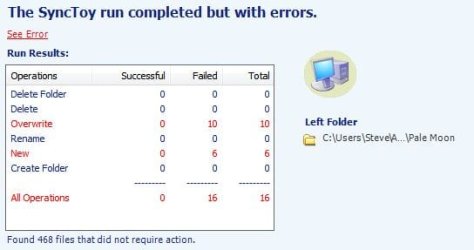
Click on the See Error thing, which is cleverly designed to look like plain text. ;)

I've been using this for several months and it has been quite reliable. I did rename a few folders to reduce the 255+ character path limit.
 

Attachments

  • SyncToy Errors.JPG
    SyncToy Errors.JPG
    23.4 KB · Views: 23

My Computer My Computer

At a glance

Main - Windows 7 Pro SP1 64-Bit; 2nd - Window...Main - Core i7 2600K; 2nd - Core i7 920Main - 16GB Corsair Vengeance; 2nd - 12GB Cor...Main - XFX Radeon 6870 1GB; 2nd - XFX Radeon ...
Computer Manufacturer/Model Number
Self
OS
Main - Windows 7 Pro SP1 64-Bit; 2nd - Windows Server 2008 R2
CPU
Main - Core i7 2600K; 2nd - Core i7 920
Motherboard
Main - Asus P8Z68-V Pro/Gen3; 2nd - Gigabyte GA-EX58-UDR3
Memory
Main - 16GB Corsair Vengeance; 2nd - 12GB Corsair Vengeance
Graphics Card(s)
Main - XFX Radeon 6870 1GB; 2nd - XFX Radeon 4870 1GB
Sound Card
Both: Onboard Realtek Azalia
Monitor(s) Displays
Main - Hann 25" + I-INC 25" + Acer 23"; 2nd - Upgrading Soon
Screen Resolution
Main - 1920x1080 (All Three Monitors); 2nd - Upgrading Soon
Hard Drives
Main - (1) Crucial M4 128GB (Boot)
Main - (1) Seagate 2TB 64MB Cache (Data)
Main - (1) Seagate 2TB 64MB Cache (Data Backup)
2nd - (1) Intel X25-M SSD 80GB (Boot)
2nd - (3) Seagate 1TB 32MB Cache (Data Backup)
2nd - (1) Seagate 320GB (Because)
PSU
Main - OCZ 600W Modular; 2nd - OCZ 600W
Case
Main - Thermaltake Element G; 2nd - NZXT something or other
Cooling
Main - Corsair H80; 2nd - Prolimatech Megahalems
Keyboard
Main - Razer Reclusa; 2nd - Old MS Keyboard
Mouse
Main - Logitech MX Revolution; 2nd - Old MS Mouse
Internet Speed
20Mbps Time-Warner Cable
I did click on it but all it did was show what you have posted there but with zero everything....nothing showed successful or failed or anything. Just all zeros.
What do you mean by "255+ character path limit" ?
 

My Computer My Computer

At a glance

windows 7 professional
OS
windows 7 professional
You can't have a path to a file longer than 255 characters, for example:

C:\Folder\A Subfolder\another subfolder\picture.jpg
can't exceed 255 characters in length. The example I listed is about 50 characters long.

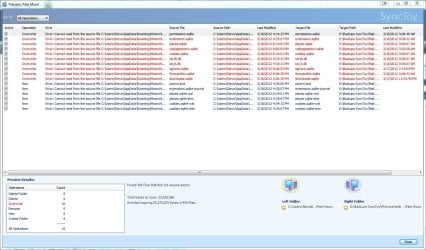
When I tested it I got this screenshot, though my error was due to the browser (Pale Moon) being open:
 

Attachments

  • SyncToy Errors-02.JPG
    SyncToy Errors-02.JPG
    176.1 KB · Views: 17

My Computer My Computer

At a glance

Main - Windows 7 Pro SP1 64-Bit; 2nd - Window...Main - Core i7 2600K; 2nd - Core i7 920Main - 16GB Corsair Vengeance; 2nd - 12GB Cor...Main - XFX Radeon 6870 1GB; 2nd - XFX Radeon ...
Computer Manufacturer/Model Number
Self
OS
Main - Windows 7 Pro SP1 64-Bit; 2nd - Windows Server 2008 R2
CPU
Main - Core i7 2600K; 2nd - Core i7 920
Motherboard
Main - Asus P8Z68-V Pro/Gen3; 2nd - Gigabyte GA-EX58-UDR3
Memory
Main - 16GB Corsair Vengeance; 2nd - 12GB Corsair Vengeance
Graphics Card(s)
Main - XFX Radeon 6870 1GB; 2nd - XFX Radeon 4870 1GB
Sound Card
Both: Onboard Realtek Azalia
Monitor(s) Displays
Main - Hann 25" + I-INC 25" + Acer 23"; 2nd - Upgrading Soon
Screen Resolution
Main - 1920x1080 (All Three Monitors); 2nd - Upgrading Soon
Hard Drives
Main - (1) Crucial M4 128GB (Boot)
Main - (1) Seagate 2TB 64MB Cache (Data)
Main - (1) Seagate 2TB 64MB Cache (Data Backup)
2nd - (1) Intel X25-M SSD 80GB (Boot)
2nd - (3) Seagate 1TB 32MB Cache (Data Backup)
2nd - (1) Seagate 320GB (Because)
PSU
Main - OCZ 600W Modular; 2nd - OCZ 600W
Case
Main - Thermaltake Element G; 2nd - NZXT something or other
Cooling
Main - Corsair H80; 2nd - Prolimatech Megahalems
Keyboard
Main - Razer Reclusa; 2nd - Old MS Keyboard
Mouse
Main - Logitech MX Revolution; 2nd - Old MS Mouse
Internet Speed
20Mbps Time-Warner Cable
I see. Well, there are no subfolders i have deep enough to come anywhere near that many characters.
In any case, they are synced now and i'm good aside from not knowing why the 2 drives show much different total file amounts, one 76 GB free and the other about 80.
 

My Computer My Computer

At a glance

windows 7 professional
OS
windows 7 professional
Oh geez....it never ends ! Now it is no longer syncing when i delete or add a file to either drive. As i said before, even with the app not running i could do anything to either drive and it would automatically do the same to the other. Now it's no longer doing that. Is this app just buggy or what?:banghead:
 

My Computer My Computer

At a glance

windows 7 professional
OS
windows 7 professional

My Computer My Computer

At a glance

Windows 7 Ultimate SP1 64-BitIntel Core i7 870 @ 2.93GHz8Gb Dual-Channel DDR3 @ 664MHznVidia GeForce GTX 460 1024MB dedicated RAM
Computer Manufacturer/Model Number
HP Pavilion Elite 495UK
OS
Windows 7 Ultimate SP1 64-Bit
CPU
Intel Core i7 870 @ 2.93GHz
Motherboard
MSI 2A9C (CPU1)
Memory
8Gb Dual-Channel DDR3 @ 664MHz
Graphics Card(s)
nVidia GeForce GTX 460 1024MB dedicated RAM
Sound Card
Realtek HD Audio
Monitor(s) Displays
HP2310i
Screen Resolution
1920 x 1080
Hard Drives
1x1954GB Hitachi HDS22020ALA 330 (RAID), 1x1954GB Hitachi External for backup and storage
PSU
460W
Case
HP Elite
Cooling
Air cooled
Keyboard
Logitech K750 solar-powered keyboard
Mouse
Logitech Wireless M180 mouse
Internet Speed
2Mb
Other Info
Pure Avanti Flow Internet Radio with iPod Dock, 64Gb iPod, HP USB Speakers, Sony MDR-V500 Headphones, Sony Vaio F-Series Laptop
Oh geez....it never ends ! Now it is no longer syncing when i delete or add a file to either drive. As i said before, even with the app not running i could do anything to either drive and it would automatically do the same to the other. Now it's no longer doing that. Is this app just buggy or what?:banghead:
You can have it run automatically through Task Scheduler.

Sync Toy as a scheduled task
 

My Computer My Computer

At a glance

Main - Windows 7 Pro SP1 64-Bit; 2nd - Window...Main - Core i7 2600K; 2nd - Core i7 920Main - 16GB Corsair Vengeance; 2nd - 12GB Cor...Main - XFX Radeon 6870 1GB; 2nd - XFX Radeon ...
Computer Manufacturer/Model Number
Self
OS
Main - Windows 7 Pro SP1 64-Bit; 2nd - Windows Server 2008 R2
CPU
Main - Core i7 2600K; 2nd - Core i7 920
Motherboard
Main - Asus P8Z68-V Pro/Gen3; 2nd - Gigabyte GA-EX58-UDR3
Memory
Main - 16GB Corsair Vengeance; 2nd - 12GB Corsair Vengeance
Graphics Card(s)
Main - XFX Radeon 6870 1GB; 2nd - XFX Radeon 4870 1GB
Sound Card
Both: Onboard Realtek Azalia
Monitor(s) Displays
Main - Hann 25" + I-INC 25" + Acer 23"; 2nd - Upgrading Soon
Screen Resolution
Main - 1920x1080 (All Three Monitors); 2nd - Upgrading Soon
Hard Drives
Main - (1) Crucial M4 128GB (Boot)
Main - (1) Seagate 2TB 64MB Cache (Data)
Main - (1) Seagate 2TB 64MB Cache (Data Backup)
2nd - (1) Intel X25-M SSD 80GB (Boot)
2nd - (3) Seagate 1TB 32MB Cache (Data Backup)
2nd - (1) Seagate 320GB (Because)
PSU
Main - OCZ 600W Modular; 2nd - OCZ 600W
Case
Main - Thermaltake Element G; 2nd - NZXT something or other
Cooling
Main - Corsair H80; 2nd - Prolimatech Megahalems
Keyboard
Main - Razer Reclusa; 2nd - Old MS Keyboard
Mouse
Main - Logitech MX Revolution; 2nd - Old MS Mouse
Internet Speed
20Mbps Time-Warner Cable
The program is from Microsoft and so it is unlikely that it is buggy. You are taking time to learn on how to use it properly.

There may be a help file available either in the program's environment or on the Net. Please look for it and read it. It shall guide you on what to do.

Oh geez....it never ends ! Now it is no longer syncing when i delete or add a file to either drive. As i said before, even with the app not running i could do anything to either drive and it would automatically do the same to the other. Now it's no longer doing that. Is this app just buggy or what?:banghead:
 

My Computer My Computer

At a glance

Windows 7 Pro with SP1 32bit2 gigs of RAMIntel(R) 82845G/GL/GE/PE/GV Graphics Controller
Computer Manufacturer/Model Number
Custom Built
OS
Windows 7 Pro with SP1 32bit
Motherboard
Intel D845GVS1 X86-based PC
Memory
2 gigs of RAM
Graphics Card(s)
Intel(R) 82845G/GL/GE/PE/GV Graphics Controller
Sound Card
Realtek AC'97 Audio
Monitor(s) Displays
Samsung SyncMaster 931BF Black 19" LCD Monitor
Screen Resolution
1280X960
Hard Drives
1. SAMSUNG SP0822N ATA Device ~ 80 GigaBytes

2. Seagate FreeAgent Go USB Device ~ 500 GigaBytes
Keyboard
COMPAQ Standard PS/2 Keyboard
Mouse
iBall Laser Precise Speedster
Internet Speed
4 mb/sec
Is this app just buggy or what?:banghead:

It's not buggy that I know of, but there are many other apps that can synchronize the contents of two drives.

Here are a few you can find with Google.

Allway Sync
Folder clone
GFI backup home edition
Karen's replicator
Syncback
Synchromagic
Second Copy

Most are free and generally use the same principle. The interfaces would be different.

Try them and use the one you understand.
 

My Computer My Computer

At a glance

Windows 7 Home Premium SP1, 64-bitIntel Skylake i5-6600K, not overclocked8 GB HyperX DDR4-2666 (2 x 4 GB)none; graphics are integrated on CPU
Computer type
PC/Desktop
Computer Manufacturer/Model Number
Ignatz Special; 4 speed manual gearbox; factory air conditioning; one of one
OS
Windows 7 Home Premium SP1, 64-bit
CPU
Intel Skylake i5-6600K, not overclocked
Motherboard
AsRock Z170M Extreme 4, micro ATX
Memory
8 GB HyperX DDR4-2666 (2 x 4 GB)
Graphics Card(s)
none; graphics are integrated on CPU
Sound Card
onboard: Realtek ALC1150; external: USB Behringer UF0-202
Monitor(s) Displays
Dell S2340M 23 inch IPS
Screen Resolution
1600 x 900
Hard Drives
System: Crucial MX100 series SSD, 128 GB;
Data: Samsung Spinpoint 103SJ, 1 TB;
Backup: WD Caviar Green WD30EZRX-00D8PB0, 3 TB
PSU
Rosewill SilentNight 500 watt fanless, semi-modular
Case
Antec Solo II
Cooling
Noctua NH-U12S; Noctua F12 intake, Noctua S12A exhaust
Keyboard
Microsoft 200 6JH-00001 USB
Mouse
Dell or Microsoft optical wired; USB
Antivirus
Microsoft Security Essentials and Malwarebytes Premium
Browser
Pale Moon
Other Info
All fans PWM; speeds at idle: CPU circa 500 rpm; intake circa 600 rpm; exhaust circa 600 rpm; CPU temps 27 idle and 47 C load in a warm room (27 C/81 F) when running Intel Extreme Tuning Utility stress test.
I admit at first i didn't learn it well, but i think now i understand it pretty fully. But it does seem buggy to me. The one thing i'd really like to understand which i mentioned already is this. At one point i saw that if i deleted or added a file to either one of the drives, that same function would happen to the other. Thats great and all, thats what i wanted, tho i figured you have to use the app to do that. But why did it do that WITH THE APP CLOSED AND NOT RUNNING? Then to add to the weirdness, later on it did NOT do that anymore. Thats the most confusing thing so far. I would love it if the 2 drives were synced in that i never had to duplicate any changes i make to either drive because it would automatically be mirrored on the other, all without having to run the app. That would be fabulous, and it was doing that for a bit then stopped. If thats not buggy then tell me what i'm missing so i can make it do that always. that would be perfect.

If i have to i'll try another app, but i hate to install 10 different apps to find one that works and is easy to learn.
 

My Computer My Computer

At a glance

windows 7 professional
OS
windows 7 professional
But why did it do that WITH THE APP CLOSED AND NOT RUNNING?


I would love it if the 2 drives were synced in that i never had to duplicate any changes i make to either drive because it would automatically be mirrored on the other, all without having to run the app.

What????

How would an app do anything if it wasn't running?

These apps generally do the synching when ordered to manually from a menu or according to a schedule that the user configures.
 

My Computer My Computer

At a glance

Windows 7 Home Premium SP1, 64-bitIntel Skylake i5-6600K, not overclocked8 GB HyperX DDR4-2666 (2 x 4 GB)none; graphics are integrated on CPU
Computer type
PC/Desktop
Computer Manufacturer/Model Number
Ignatz Special; 4 speed manual gearbox; factory air conditioning; one of one
OS
Windows 7 Home Premium SP1, 64-bit
CPU
Intel Skylake i5-6600K, not overclocked
Motherboard
AsRock Z170M Extreme 4, micro ATX
Memory
8 GB HyperX DDR4-2666 (2 x 4 GB)
Graphics Card(s)
none; graphics are integrated on CPU
Sound Card
onboard: Realtek ALC1150; external: USB Behringer UF0-202
Monitor(s) Displays
Dell S2340M 23 inch IPS
Screen Resolution
1600 x 900
Hard Drives
System: Crucial MX100 series SSD, 128 GB;
Data: Samsung Spinpoint 103SJ, 1 TB;
Backup: WD Caviar Green WD30EZRX-00D8PB0, 3 TB
PSU
Rosewill SilentNight 500 watt fanless, semi-modular
Case
Antec Solo II
Cooling
Noctua NH-U12S; Noctua F12 intake, Noctua S12A exhaust
Keyboard
Microsoft 200 6JH-00001 USB
Mouse
Dell or Microsoft optical wired; USB
Antivirus
Microsoft Security Essentials and Malwarebytes Premium
Browser
Pale Moon
Other Info
All fans PWM; speeds at idle: CPU circa 500 rpm; intake circa 600 rpm; exhaust circa 600 rpm; CPU temps 27 idle and 47 C load in a warm room (27 C/81 F) when running Intel Extreme Tuning Utility stress test.
You just have to trust me on this...i closed synctoys and I have both drives open in 2 different windows set the same so i could see duplicate files, then deleted, added, etc, and everything i did to either drive was instantly duplicated on the other. Why do you think i mentioned it being "buggy" and "weird" ! But it's not doing that now. Wish it were ! It would be great to be able to simply choose 2 drives/folders to sync together always with no app running, just a windows feature.
 

My Computer My Computer

At a glance

windows 7 professional
OS
windows 7 professional
I have tried sync toy on three different computers over the last year and have found that it did not work properly on all of them. It is a very buggy software.
I had different problems on all of the computers and in fact I would have lost a lot of data had i Not had it backed up to another drive.
Don't trust it with files you don't want to lose.
 

My Computer My Computer

At a glance

Windows 10 Pro x64i7-4770K16Gig DDR3-2400Gigabyte GT740
Computer type
PC/Desktop
Computer Manufacturer/Model Number
Self Built Custom Computer.
OS
Windows 10 Pro x64
CPU
i7-4770K
Motherboard
Asus Z87 Sabertooth
Memory
16Gig DDR3-2400
Graphics Card(s)
Gigabyte GT740
Sound Card
Onboard
Monitor(s) Displays
Benq 27" - Dell 23' - Benq 22"
Screen Resolution
1680x1050
Hard Drives
Samsung 840 Pro 128g SSD
1xWestern Digital Caviar Green 1tb
2xWestern Digital Caviar Green 2 tb
PSU
Seasonic 760 watt Platinum
Case
Coolermaster Haf - X
Cooling
Noctua NH-C12P CPU Cooler
Keyboard
Logitech illuminated keyboard
Mouse
Logitech Perfomance MX
Internet Speed
Cable = speeds to 20Mbps downsteam and 512kbps upsteam
Antivirus
Avast Internet Security
Browser
Firefox
Thanks ! I was afraid of that with all the weirdness i experienced. guess i'd toss it and try one of those others. Anyone know of one thats definitely reliable and reasonably simple to learn?
 

My Computer My Computer

At a glance

windows 7 professional
OS
windows 7 professional
Thanks ! I was afraid of that with all the weirdness i experienced. guess i'd toss it and try one of those others. Anyone know of one thats definitely reliable and reasonably simple to learn?

Second Copy.

It's been around close to 15 years. I've used it for 10 years with NO problems.

Free 30 day trial.

Then $30, if you want to continue using it.
 

My Computer My Computer

At a glance

Windows 7 Home Premium SP1, 64-bitIntel Skylake i5-6600K, not overclocked8 GB HyperX DDR4-2666 (2 x 4 GB)none; graphics are integrated on CPU
Computer type
PC/Desktop
Computer Manufacturer/Model Number
Ignatz Special; 4 speed manual gearbox; factory air conditioning; one of one
OS
Windows 7 Home Premium SP1, 64-bit
CPU
Intel Skylake i5-6600K, not overclocked
Motherboard
AsRock Z170M Extreme 4, micro ATX
Memory
8 GB HyperX DDR4-2666 (2 x 4 GB)
Graphics Card(s)
none; graphics are integrated on CPU
Sound Card
onboard: Realtek ALC1150; external: USB Behringer UF0-202
Monitor(s) Displays
Dell S2340M 23 inch IPS
Screen Resolution
1600 x 900
Hard Drives
System: Crucial MX100 series SSD, 128 GB;
Data: Samsung Spinpoint 103SJ, 1 TB;
Backup: WD Caviar Green WD30EZRX-00D8PB0, 3 TB
PSU
Rosewill SilentNight 500 watt fanless, semi-modular
Case
Antec Solo II
Cooling
Noctua NH-U12S; Noctua F12 intake, Noctua S12A exhaust
Keyboard
Microsoft 200 6JH-00001 USB
Mouse
Dell or Microsoft optical wired; USB
Antivirus
Microsoft Security Essentials and Malwarebytes Premium
Browser
Pale Moon
Other Info
All fans PWM; speeds at idle: CPU circa 500 rpm; intake circa 600 rpm; exhaust circa 600 rpm; CPU temps 27 idle and 47 C load in a warm room (27 C/81 F) when running Intel Extreme Tuning Utility stress test.
Back
Top