Installing Windows 7 Home Premium OEM on a new hard drive

rumpled103

New member
Local time
4:55 PM
Messages
7
Ok, so I have a computer that came pre-installed with Windows 7 Home Premium 64-bit. Now I was trying to backup the computer using Acronis True Image, but during the beginning of that, it gave me a lot of sector errors, so I just chose to ignore all of them. The backup operation completed after an hour or so. Now, I was told that I may have to do chkdsk /r, it will try to fix the bad sectors as well as any errors. But I might end up losing all my data. I was also directed to an Acer website from the UK with a hard disk checker. It also reported bad sectors and gave me the option to repair them. I chose no. Here's the link: http://acer--uk.custhelp.com/app/answers/detail/a_id/11... Now, I am thinking about getting a new 1 TB hard drive, my current one is 640 GB and made by WD. Now I have an .iso file for Win 7 Home Premium which I got from getintopc. And I would need to be able to install Windows on the new hard drive. But I don't wanna do that because I'm afraid it'll be detected as a new computer and it'll see that I still have an activated Windows on the old hard drive, thereform not allowing me to activate Windows on the new hard drive. So how do I go about uninstalling Windows on the old hard drive and reinstalling and activating it on the new one? Do I need to format the old hard drive?

Edit: Sorry if you see any typos, I was on my phone.
 

My Computer My Computer

At a glance

Windows 7 Home Premium 64-bit2.70 gigahertz AMD Athlon II X2 2158 GBATI Radeon HD 4250 Graphics
Computer type
PC/Desktop
Computer Manufacturer/Model Number
Acer
OS
Windows 7 Home Premium 64-bit
CPU
2.70 gigahertz AMD Athlon II X2 215
Motherboard
Acer Veriton M430
Memory
8 GB
Graphics Card(s)
ATI Radeon HD 4250 Graphics
Hard Drives
WDC WD2003FZEX-00Z4S SCSI Disk Device 2 TB
(old) WDC WD6400AAKS-22A7B SCSI Disk Device 640 GB
Antivirus
Mcafee Anti-Virus, MSE, MalwareBytes Anti-Malware
Ok, so I have a computer that came pre-installed with Windows 7 Home Premium 64-bit. Now I was trying to backup the computer using Acronis True Image, but during the beginning of that, it gave me a lot of sector errors, so I just chose to ignore all of them. The backup operation completed after an hour or so. Now, I was told that I may have to do chkdsk /r, it will try to fix the bad sectors as well as any errors. But I might end up losing all my data. I was also directed to an Acer website from the UK with a hard disk checker. It also reported bad sectors and gave me the option to repair them. I chose no. Here's the link: http://acer--uk.custhelp.com/app/answers/detail/a_id/11... Now, I am thinking about getting a new 1 TB hard drive, my current one is 640 GB and made by WD. Now I have an .iso file for Win 7 Home Premium which I got from getintopc. And I would need to be able to install Windows on the new hard drive. But I don't wanna do that because I'm afraid it'll be detected as a new computer and it'll see that I still have an activated Windows on the old hard drive, thereform not allowing me to activate Windows on the new hard drive. So how do I go about uninstalling Windows on the old hard drive and reinstalling and activating it on the new one? Do I need to format the old hard drive?

Edit: Sorry if you see any typos, I was on my phone.

Hi,

Good to get a new hard disk than the old because the Old hard disk having sector errors

Format C:\ in the old hard disk

Here is a link which haves 5 Ways for formatting C:\

How To Format C From Recovery Console
 

My Computer My Computer

At a glance

Windows 7 Home Basic x64Intel Core i34096MB 1333MhzIntel HD Graphics 3000
Computer type
Laptop
Computer Manufacturer/Model Number
Dell
OS
Windows 7 Home Basic x64
CPU
Intel Core i3
Memory
4096MB 1333Mhz
Graphics Card(s)
Intel HD Graphics 3000
Screen Resolution
14"
Hard Drives
Toshiba 500GB
Keyboard
Built-In Keyboard
Mouse
HP G57
Internet Speed
10.50MB , 2MB
Antivirus
McAfee Total Protection
Browser
Chrome
I am thinking about getting a new 1 TB hard drive, my current one is 640 GB and made by WD. Now I have an .iso file for Win 7 Home Premium which I got from getintopc. And I would need to be able to install Windows on the new hard drive.

But I don't wanna do that because I'm afraid it'll be detected as a new computer and it'll see that I still have an activated Windows on the old hard drive, therefore not allowing me to activate Windows on the new hard drive. So how do I go about uninstalling Windows on the old hard drive and reinstalling and activating it on the new one? Do I need to format the old hard drive?

Hard drives fail all the time. Replacing a failed drive with a new drive should not have any affect on your Windows license.

But..............

You will have to activate your new installation on the new drive.

To do that, you need to enter a 25 character code that should be on a "Certificate of Authenticity" sticker somewhere on that Acer PC.

It's in the form of xxxxx-xxxxx-xxxxx-xxxxx-xxxxx. Five groups of five characters.

If you DON'T have that sticker, you have problems and may have to buy a new Windows.

I'm assuming this ISO you got from "getintopc" is legitimate. If it is not, you may have more problems. I have no idea who that is. If it's a bogus outfit, you should be able to download a legitimate ISO from Microsoft directly.

The only thing you should have to do with the old drive is to disconnect it BEFORE you begin installing on the new drive. You don't want 2 drives connected when you install Windows.

Once the new drive is up and running and activated, you can do whatever you want with the old drive---most likely wipe everything off it or destroy it literally (hammer, blowtorch, saw) and throw it in the trash.
 

My Computer My Computer

At a glance

Windows 7 Home Premium SP1, 64-bitIntel Skylake i5-6600K, not overclocked8 GB HyperX DDR4-2666 (2 x 4 GB)none; graphics are integrated on CPU
Computer type
PC/Desktop
Computer Manufacturer/Model Number
Ignatz Special; 4 speed manual gearbox; factory air conditioning; one of one
OS
Windows 7 Home Premium SP1, 64-bit
CPU
Intel Skylake i5-6600K, not overclocked
Motherboard
AsRock Z170M Extreme 4, micro ATX
Memory
8 GB HyperX DDR4-2666 (2 x 4 GB)
Graphics Card(s)
none; graphics are integrated on CPU
Sound Card
onboard: Realtek ALC1150; external: USB Behringer UF0-202
Monitor(s) Displays
Dell S2340M 23 inch IPS
Screen Resolution
1600 x 900
Hard Drives
System: Crucial MX100 series SSD, 128 GB;
Data: Samsung Spinpoint 103SJ, 1 TB;
Backup: WD Caviar Green WD30EZRX-00D8PB0, 3 TB
PSU
Rosewill SilentNight 500 watt fanless, semi-modular
Case
Antec Solo II
Cooling
Noctua NH-U12S; Noctua F12 intake, Noctua S12A exhaust
Keyboard
Microsoft 200 6JH-00001 USB
Mouse
Dell or Microsoft optical wired; USB
Antivirus
Microsoft Security Essentials and Malwarebytes Premium
Browser
Pale Moon
Other Info
All fans PWM; speeds at idle: CPU circa 500 rpm; intake circa 600 rpm; exhaust circa 600 rpm; CPU temps 27 idle and 47 C load in a warm room (27 C/81 F) when running Intel Extreme Tuning Utility stress test.
I have the COA 25 character product key on the side of my computer case. It's still legible. And if it's not, there's always ProduKey. I have the product ID and product key on a Word document. Now the question is, how do I go and activate the product key? Do I go right-click on Computer > Properties > Activate Product Key, enter it, and then click ok? I heard somewhere that this might actually work. I don't know if internet activation will work with OEM keys. If it doesn't work, then I might have to do it by phone activation.

Oh, and by the way, I can't download legitimate Windows 7 .isos from Microsoft. They ask you to put in a product key, but I tried it and it doesn't work. I don't think it works with OEM keys, only retail keys. It seems as though Microsoft is really trying to make it hard to you to download .isos from them.
 

My Computer My Computer

At a glance

Windows 7 Home Premium 64-bit2.70 gigahertz AMD Athlon II X2 2158 GBATI Radeon HD 4250 Graphics
Computer type
PC/Desktop
Computer Manufacturer/Model Number
Acer
OS
Windows 7 Home Premium 64-bit
CPU
2.70 gigahertz AMD Athlon II X2 215
Motherboard
Acer Veriton M430
Memory
8 GB
Graphics Card(s)
ATI Radeon HD 4250 Graphics
Hard Drives
WDC WD2003FZEX-00Z4S SCSI Disk Device 2 TB
(old) WDC WD6400AAKS-22A7B SCSI Disk Device 640 GB
Antivirus
Mcafee Anti-Virus, MSE, MalwareBytes Anti-Malware
I have the COA 25 character product key on the side of my computer case. It's still legible. And if it's not, there's always ProduKey. I have the product ID and product key on a Word document. Now the question is, how do I go and activate the product key? Do I click on Activate Product Key, enter it, and then click ok? I heard somewhere that this might actually work. I don't know if internet activation will work with OEM keys. If it doesn't work, then I might have to do it by phone activation.

You don't do anything now regarding the Product Key.

The COA must match the ISO you have by type (Home Premium in your case, I assume).

You burn that ISO you have to a DVD or get it onto a bootable USB stick.

Then install the new drive and install Windows onto it using your burned DVD or USB stick.

Then use the Product Key to activate Windows within the new Windows installation after it's up and running. You have 30 days to do that. I think you are offered the choice of doing it immediately during the installation, but you can say no to that and do it later.

You might go to Acer's website now and download their up-to-date drivers. You might not have to actually use them. I'd be sure to get the Ethernet (NIC) driver as it's critical to getting on the Internet. The Windows installer normally provides most if not all drivers.

After the install, get anti-virus going and then do your Windows Updates, install apps, and carry on.
 

My Computer My Computer

At a glance

Windows 7 Home Premium SP1, 64-bitIntel Skylake i5-6600K, not overclocked8 GB HyperX DDR4-2666 (2 x 4 GB)none; graphics are integrated on CPU
Computer type
PC/Desktop
Computer Manufacturer/Model Number
Ignatz Special; 4 speed manual gearbox; factory air conditioning; one of one
OS
Windows 7 Home Premium SP1, 64-bit
CPU
Intel Skylake i5-6600K, not overclocked
Motherboard
AsRock Z170M Extreme 4, micro ATX
Memory
8 GB HyperX DDR4-2666 (2 x 4 GB)
Graphics Card(s)
none; graphics are integrated on CPU
Sound Card
onboard: Realtek ALC1150; external: USB Behringer UF0-202
Monitor(s) Displays
Dell S2340M 23 inch IPS
Screen Resolution
1600 x 900
Hard Drives
System: Crucial MX100 series SSD, 128 GB;
Data: Samsung Spinpoint 103SJ, 1 TB;
Backup: WD Caviar Green WD30EZRX-00D8PB0, 3 TB
PSU
Rosewill SilentNight 500 watt fanless, semi-modular
Case
Antec Solo II
Cooling
Noctua NH-U12S; Noctua F12 intake, Noctua S12A exhaust
Keyboard
Microsoft 200 6JH-00001 USB
Mouse
Dell or Microsoft optical wired; USB
Antivirus
Microsoft Security Essentials and Malwarebytes Premium
Browser
Pale Moon
Other Info
All fans PWM; speeds at idle: CPU circa 500 rpm; intake circa 600 rpm; exhaust circa 600 rpm; CPU temps 27 idle and 47 C load in a warm room (27 C/81 F) when running Intel Extreme Tuning Utility stress test.
Oh, and by the way, I can't download legitimate Windows 7 .isos from Microsoft. They ask you to put in a product key, but I tried it and it doesn't work. I don't think it works with OEM keys, only retail keys. It seems as though Microsoft is really trying to make it hard to you to download .isos from them.

You're probably looking in the wrong location.

There is a MS site that only works with retail keys. That must be where you went.

Looky here:

https://heidoc.net/joomla/technology-science/microsoft/14-windows-7-direct-download-links
 

My Computer My Computer

At a glance

Windows 7 Home Premium SP1, 64-bitIntel Skylake i5-6600K, not overclocked8 GB HyperX DDR4-2666 (2 x 4 GB)none; graphics are integrated on CPU
Computer type
PC/Desktop
Computer Manufacturer/Model Number
Ignatz Special; 4 speed manual gearbox; factory air conditioning; one of one
OS
Windows 7 Home Premium SP1, 64-bit
CPU
Intel Skylake i5-6600K, not overclocked
Motherboard
AsRock Z170M Extreme 4, micro ATX
Memory
8 GB HyperX DDR4-2666 (2 x 4 GB)
Graphics Card(s)
none; graphics are integrated on CPU
Sound Card
onboard: Realtek ALC1150; external: USB Behringer UF0-202
Monitor(s) Displays
Dell S2340M 23 inch IPS
Screen Resolution
1600 x 900
Hard Drives
System: Crucial MX100 series SSD, 128 GB;
Data: Samsung Spinpoint 103SJ, 1 TB;
Backup: WD Caviar Green WD30EZRX-00D8PB0, 3 TB
PSU
Rosewill SilentNight 500 watt fanless, semi-modular
Case
Antec Solo II
Cooling
Noctua NH-U12S; Noctua F12 intake, Noctua S12A exhaust
Keyboard
Microsoft 200 6JH-00001 USB
Mouse
Dell or Microsoft optical wired; USB
Antivirus
Microsoft Security Essentials and Malwarebytes Premium
Browser
Pale Moon
Other Info
All fans PWM; speeds at idle: CPU circa 500 rpm; intake circa 600 rpm; exhaust circa 600 rpm; CPU temps 27 idle and 47 C load in a warm room (27 C/81 F) when running Intel Extreme Tuning Utility stress test.
Oh, and by the way, I can't download legitimate Windows 7 .isos from Microsoft. They ask you to put in a product key, but I tried it and it doesn't work. I don't think it works with OEM keys, only retail keys. It seems as though Microsoft is really trying to make it hard to you to download .isos from them.

You're probably looking in the wrong location.

There is a MS site that only works with retail keys. That must be where you went.

Looky here:

https://heidoc.net/joomla/technology-science/microsoft/14-windows-7-direct-download-links
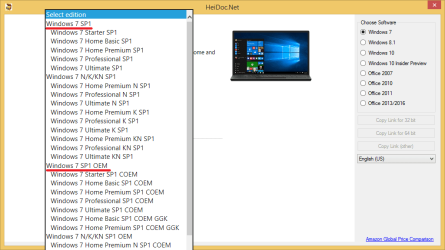
What is COEM? Is that the same thing as OEM? And is there a difference between Windows 7 Home Premium SPI .iso and Windows 7 Home Premium SPI COEM .iso? Will it make a difference which one I choose?
 

My Computer My Computer

At a glance

Windows 7 Home Premium 64-bit2.70 gigahertz AMD Athlon II X2 2158 GBATI Radeon HD 4250 Graphics
Computer type
PC/Desktop
Computer Manufacturer/Model Number
Acer
OS
Windows 7 Home Premium 64-bit
CPU
2.70 gigahertz AMD Athlon II X2 215
Motherboard
Acer Veriton M430
Memory
8 GB
Graphics Card(s)
ATI Radeon HD 4250 Graphics
Hard Drives
WDC WD2003FZEX-00Z4S SCSI Disk Device 2 TB
(old) WDC WD6400AAKS-22A7B SCSI Disk Device 640 GB
Antivirus
Mcafee Anti-Virus, MSE, MalwareBytes Anti-Malware
I think COEM may be a system builder's license. Not sure.

I'd avoid it.

Just get plain old standard Windows 7 Home Premium, either 64 bit or 32 bit.

The 64 bit version is X17-58997.iso
 

My Computer My Computer

At a glance

Windows 7 Home Premium SP1, 64-bitIntel Skylake i5-6600K, not overclocked8 GB HyperX DDR4-2666 (2 x 4 GB)none; graphics are integrated on CPU
Computer type
PC/Desktop
Computer Manufacturer/Model Number
Ignatz Special; 4 speed manual gearbox; factory air conditioning; one of one
OS
Windows 7 Home Premium SP1, 64-bit
CPU
Intel Skylake i5-6600K, not overclocked
Motherboard
AsRock Z170M Extreme 4, micro ATX
Memory
8 GB HyperX DDR4-2666 (2 x 4 GB)
Graphics Card(s)
none; graphics are integrated on CPU
Sound Card
onboard: Realtek ALC1150; external: USB Behringer UF0-202
Monitor(s) Displays
Dell S2340M 23 inch IPS
Screen Resolution
1600 x 900
Hard Drives
System: Crucial MX100 series SSD, 128 GB;
Data: Samsung Spinpoint 103SJ, 1 TB;
Backup: WD Caviar Green WD30EZRX-00D8PB0, 3 TB
PSU
Rosewill SilentNight 500 watt fanless, semi-modular
Case
Antec Solo II
Cooling
Noctua NH-U12S; Noctua F12 intake, Noctua S12A exhaust
Keyboard
Microsoft 200 6JH-00001 USB
Mouse
Dell or Microsoft optical wired; USB
Antivirus
Microsoft Security Essentials and Malwarebytes Premium
Browser
Pale Moon
Other Info
All fans PWM; speeds at idle: CPU circa 500 rpm; intake circa 600 rpm; exhaust circa 600 rpm; CPU temps 27 idle and 47 C load in a warm room (27 C/81 F) when running Intel Extreme Tuning Utility stress test.

My Computer My Computer

At a glance

Win-7-Pro64bit 7-H-Prem-64biti7-5930K 2nd i9-9940x both water blocked VRM'...Trident-z 3200C14 2nd Trident-z 3600C16EVGA 1080ti ftw3 2nd Titan Xp both water blocked
Computer type
PC/Desktop
Computer Manufacturer/Model Number
Custom assembled by me :}
OS
Win-7-Pro64bit 7-H-Prem-64bit
CPU
i7-5930K 2nd i9-9940x both water blocked VRM's too
Motherboard
ASUS SABERTOOTH X99 2nd ASUS x299 Apex
Memory
Trident-z 3200C14 2nd Trident-z 3600C16
Graphics Card(s)
EVGA 1080ti ftw3 2nd Titan Xp both water blocked
Sound Card
Built-in Realtek
Monitor(s) Displays
1-AOC G2460PG 24"G-Sync 144Hz/ 2nd 1-ASUS VG248QE 24" 144Hz
Screen Resolution
1920 x 1080 144Hz
Hard Drives
2-Samsung M.2 Evo & Evo Plus
2-Samsung 850 EVO 500GB SSD's/ 3-2.5 W.D. Black 1tb-&3-1tb/3-3.5 WD Black 1tb hdd's
PSU
EVGA SuperNOVA 1000-P2 2nd 1200-P2
Case
2-Corsair Obsidian Series 450D Black ATX Mid Tower
Cooling
Custom water loops
Keyboard
Logitech G710+/ 2nd Logitech G910
Mouse
2-RedDragon M901 Perdition 16400 dpi Gaming mouse = wired
Internet Speed
Comcast Ping 19ms 89.31mbps download speed 6.12mbps upload
Antivirus
Malwarebytes Pro/ Superantispyware Pro
Browser
FireFox & Pale moon
Other Info
2nd ASUS X299 Apex/Intel i9-9940x with Custom water loop/7H-Prem-x64/Corsair 450D case/Ram Trident-z 3600C16 4x8gb / Samsung970Evo plus 500gb SSD/Dual ssd EZ swap evo/PSU EVGA SuperNova 1200w-P2 80+Platinum/GPU Titan Xp /8-ML-140 on push-pull on 2-280GTX rads

My Computer My Computer

At a glance

Windows 7 Home Basic x64Intel Core i34096MB 1333MhzIntel HD Graphics 3000
Computer type
Laptop
Computer Manufacturer/Model Number
Dell
OS
Windows 7 Home Basic x64
CPU
Intel Core i3
Memory
4096MB 1333Mhz
Graphics Card(s)
Intel HD Graphics 3000
Screen Resolution
14"
Hard Drives
Toshiba 500GB
Keyboard
Built-In Keyboard
Mouse
HP G57
Internet Speed
10.50MB , 2MB
Antivirus
McAfee Total Protection
Browser
Chrome
Back
Top