Can't Type in Firefox Location Bar upon opening

jsquareg

New member
Power User
Local time
1:56 PM
Messages
400
I have Firefox 41.0.1 under Win7 set to open to a blank page. Whenever I open it from a Desktop Icon there is a blinking cursor in the location bar but I can't type an URL or search term until I click the location bar with the mouse. That is inconvenient if the mouse is not connected or, more likely, buried underneath a pile of papers.

Is there a way to allow typing in the location bar immediately upon opening Firefox?

Thank you.
 

My Computer My Computer

At a glance

Windows 7 Home Premium (Retail) Full version ...3.10 Gig Intel Core i5-3350P8192 Megabytes Usable Installed Memory
Computer type
PC/Desktop
Computer Manufacturer/Model Number
Dell XPS-8500
OS
Windows 7 Home Premium (Retail) Full version - With SP1
CPU
3.10 Gig Intel Core i5-3350P
Motherboard
Dell 0NW73C A00
Memory
8192 Megabytes Usable Installed Memory
Monitor(s) Displays
Samsung SyncMaster [Monitor] (19.1"vis, s/n HVELA10194, Octo
Screen Resolution
1024 X 768
Hard Drives
INTEL SSDSA2CW120G3 ATA Device [Hard drive] (120.03 GB)
INTEL SSDSA2CW080G3 ATA Device [Hard drive] (80.02 GB)
Keyboard
HID Keyboard Device (HP)
Mouse
Dell (came with computer)
Internet Speed
cox high speed
Other Info
The above taken with Bel Arc Advisor
Hi:

Firefox 41.0.1 is very old (by Firefox standards), having been released in Sept 2015.
It is several versions out of date (current release version is 48.0.2) and insecure.

So, at some point, you'll need to update to the current version.
It can be downloaded here:

Firefox - Releases


Having said that, most performance problems originate in the user's profile, not in the program itself.
Likely causes are wonky/outdated/unsupported extensions, as well as problems with global plug-ins and add-ons.

The first, most basic step in troubleshooting is to try Mozilla Safe Mode (not to be confused with Windows Safe Mode). It is a reversible, temporary, "debugging" process. If your problem goes away in Safe Mode, then that points to an extension as the likely cause of the problem. Further steps can then be taken to identify and fix the underlying cause. I suggest starting here:

Mozilla Safe Mode

Depending on how that turns out, we will know what direction to take.

>>Please let us know if your problem is resolved in Safe Mode.

Thanks,
MM
 
Last edited:

My Computer My Computer

At a glance

OEM Windows 7 Ult (x64) SP1Intel Core-i7 3770 @ 3.4 GHz16 GB DDR3 SDRAM @ 1333 MHzNVidia GeForce GT620 1 GB
Computer type
PC/Desktop
Computer Manufacturer/Model Number
Dell Studio XPS 8500
OS
OEM Windows 7 Ult (x64) SP1
CPU
Intel Core-i7 3770 @ 3.4 GHz
Motherboard
"Dell" branded
Memory
16 GB DDR3 SDRAM @ 1333 MHz
Graphics Card(s)
NVidia GeForce GT620 1 GB
Sound Card
THX TruStudio PC
Monitor(s) Displays
Dell U2410 Full HD
Hard Drives
2.0 TB SATA2 @ 7200 RPM
PSU
350W
Keyboard
MS 4000 Ergon - Wired
Mouse
Logitech Anywhere MX
Internet Speed
Cable HSI w/Turbo (router)
Antivirus
KIS-MBAM Premium-MBAE Premium
Browser
Fx (current version); IE
Other Info
And a Win7/64 Pro laptop; And a Win10/64 Pro desktop.
Thank you MoxeMama. I didn't realize I was that far out of date. I just upgraded to 48.0.2 and the problem still exists even in Safe Mode.
 

My Computer My Computer

At a glance

Windows 7 Home Premium (Retail) Full version ...3.10 Gig Intel Core i5-3350P8192 Megabytes Usable Installed Memory
Computer type
PC/Desktop
Computer Manufacturer/Model Number
Dell XPS-8500
OS
Windows 7 Home Premium (Retail) Full version - With SP1
CPU
3.10 Gig Intel Core i5-3350P
Motherboard
Dell 0NW73C A00
Memory
8192 Megabytes Usable Installed Memory
Monitor(s) Displays
Samsung SyncMaster [Monitor] (19.1"vis, s/n HVELA10194, Octo
Screen Resolution
1024 X 768
Hard Drives
INTEL SSDSA2CW120G3 ATA Device [Hard drive] (120.03 GB)
INTEL SSDSA2CW080G3 ATA Device [Hard drive] (80.02 GB)
Keyboard
HID Keyboard Device (HP)
Mouse
Dell (came with computer)
Internet Speed
cox high speed
Other Info
The above taken with Bel Arc Advisor
Hi:

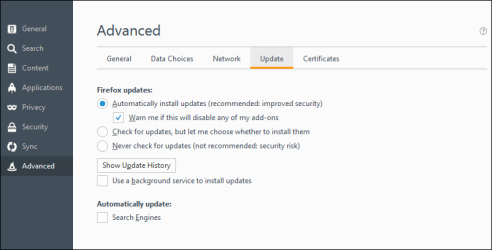
Re: version updates. Many hands-on users like to upgrade manually (we keep track of new version releases). But, if you're not that sort of user, then it's probably safer to make sure you have Firefox configured to automatically update (or at least to automatically check for updates and notify you). New versions are released approximately every 6 weeks, with minor updates in between. It's important to stay current, mostly for SECURITY reasons. Screen shot shows where to find and adjust that setting.

Back to the issue at hand...

If Safe Mode did not fix the issue, then your profile may be corrupt.

I suggest starting, in order, with steps 4 through 7 here:

Troubleshoot and diagnose Firefox problems

Before attempting the reinstall or the refresh, I suggest -- as a precaution -- that you back up your profile, or at least critical data, such as bookmarks, "just in case".
There are many ways to do that, but the easiest may be with the FEBE Extension.

Some of the procedures look more complicated than they are. It may help to print them out before you proceed.

Let us know how it goes.
Also, please tell us: what AV and other security software do you have?


MM
 

Attachments

  • 2016-08-28_14-08-58.png
    2016-08-28_14-08-58.png
    10.6 KB · Views: 0

My Computer My Computer

At a glance

OEM Windows 7 Ult (x64) SP1Intel Core-i7 3770 @ 3.4 GHz16 GB DDR3 SDRAM @ 1333 MHzNVidia GeForce GT620 1 GB
Computer type
PC/Desktop
Computer Manufacturer/Model Number
Dell Studio XPS 8500
OS
OEM Windows 7 Ult (x64) SP1
CPU
Intel Core-i7 3770 @ 3.4 GHz
Motherboard
"Dell" branded
Memory
16 GB DDR3 SDRAM @ 1333 MHz
Graphics Card(s)
NVidia GeForce GT620 1 GB
Sound Card
THX TruStudio PC
Monitor(s) Displays
Dell U2410 Full HD
Hard Drives
2.0 TB SATA2 @ 7200 RPM
PSU
350W
Keyboard
MS 4000 Ergon - Wired
Mouse
Logitech Anywhere MX
Internet Speed
Cable HSI w/Turbo (router)
Antivirus
KIS-MBAM Premium-MBAE Premium
Browser
Fx (current version); IE
Other Info
And a Win7/64 Pro laptop; And a Win10/64 Pro desktop.

My Computer My Computer

At a glance

W7 home premium 32bit/W7HP 64bit/w10 tp insid...E5300 dual core3gbNvidia Geforce 7100 Nforce 630i
Computer type
PC/Desktop
Computer Manufacturer/Model Number
medionl/Aspire 6930G/acer x55a
OS
W7 home premium 32bit/W7HP 64bit/w10 tp insider ring
CPU
E5300 dual core
Motherboard
medion MS7366
Memory
3gb
Graphics Card(s)
Nvidia Geforce 7100 Nforce 630i
Monitor(s) Displays
avixc
Internet Speed
n (isp resticted to 72)
Antivirus
mse/pands
Browser
palemoon
Other Info
Belkin Fd7050 n USB using Railink RT2870 drivers, more upto date
Hi JS,
As MM stated its more likely your FF profile.
Presumably you upgraded via the "stub" option, this only updates the system, it will not change your profile settings.
Download >>ONLY<< from this link to install the full version, NOW uninstall your old version, REBOOT.
run the installer
Mozilla Firefox Web Browser — Download Firefox in your language — Mozilla


Roy

Good idea!

That's why I provided the link to the full, localized installers in my previous reply.;):D

Cheers,

MM
 

My Computer My Computer

At a glance

OEM Windows 7 Ult (x64) SP1Intel Core-i7 3770 @ 3.4 GHz16 GB DDR3 SDRAM @ 1333 MHzNVidia GeForce GT620 1 GB
Computer type
PC/Desktop
Computer Manufacturer/Model Number
Dell Studio XPS 8500
OS
OEM Windows 7 Ult (x64) SP1
CPU
Intel Core-i7 3770 @ 3.4 GHz
Motherboard
"Dell" branded
Memory
16 GB DDR3 SDRAM @ 1333 MHz
Graphics Card(s)
NVidia GeForce GT620 1 GB
Sound Card
THX TruStudio PC
Monitor(s) Displays
Dell U2410 Full HD
Hard Drives
2.0 TB SATA2 @ 7200 RPM
PSU
350W
Keyboard
MS 4000 Ergon - Wired
Mouse
Logitech Anywhere MX
Internet Speed
Cable HSI w/Turbo (router)
Antivirus
KIS-MBAM Premium-MBAE Premium
Browser
Fx (current version); IE
Other Info
And a Win7/64 Pro laptop; And a Win10/64 Pro desktop.
Funny thing! While back on 41.0.1 I went to Help/About/Check for Updates and it told me Firefox was up to date. I then opened FF by single clicking on the FF icon in the task bar and that corrected the problem. If I doubled clicked that icon the problem came back. If I doubled or single clicked the icon on the Desktop it went away again. I will try the 48.0.1 using the suggestions from everyone who posted here once more just to get updated and see what happens

Thanks again to all who made suggestions.
 

My Computer My Computer

At a glance

Windows 7 Home Premium (Retail) Full version ...3.10 Gig Intel Core i5-3350P8192 Megabytes Usable Installed Memory
Computer type
PC/Desktop
Computer Manufacturer/Model Number
Dell XPS-8500
OS
Windows 7 Home Premium (Retail) Full version - With SP1
CPU
3.10 Gig Intel Core i5-3350P
Motherboard
Dell 0NW73C A00
Memory
8192 Megabytes Usable Installed Memory
Monitor(s) Displays
Samsung SyncMaster [Monitor] (19.1"vis, s/n HVELA10194, Octo
Screen Resolution
1024 X 768
Hard Drives
INTEL SSDSA2CW120G3 ATA Device [Hard drive] (120.03 GB)
INTEL SSDSA2CW080G3 ATA Device [Hard drive] (80.02 GB)
Keyboard
HID Keyboard Device (HP)
Mouse
Dell (came with computer)
Internet Speed
cox high speed
Other Info
The above taken with Bel Arc Advisor
Hi:

Yes, it sounds as if something is broken in your Firefox profile.

As for internal auto-updater, I agree with @torchwood that downloading and running the full setup file from the link we both provided is often more reliable than the auto-updater/stub file.

(I merely pointed out the auto-update setting in Firefox so that you would know where it is. Auto updates are probably "best" for users who are not very hands-on with Firefox and who do not want to perform frequent manual updates. Either way, it's important to keep Firefox updated for security reasons.)

In any event...

...I suggest starting, in order, with steps 4 through 7 here:

Troubleshoot and diagnose Firefox problems

Before attempting the reinstall or the refresh, I suggest -- as a precaution -- that you back up your profile, or at least critical data, such as bookmarks, "just in case".
There are many ways to do that, but the easiest may be with the FEBE Extension.

Some of the procedures look more complicated than they are. It may help to print them out before you proceed.

Please let us know how it goes.
Also, please tell us: what AV and other security software do you have?


Thanks,
MM
 

My Computer My Computer

At a glance

OEM Windows 7 Ult (x64) SP1Intel Core-i7 3770 @ 3.4 GHz16 GB DDR3 SDRAM @ 1333 MHzNVidia GeForce GT620 1 GB
Computer type
PC/Desktop
Computer Manufacturer/Model Number
Dell Studio XPS 8500
OS
OEM Windows 7 Ult (x64) SP1
CPU
Intel Core-i7 3770 @ 3.4 GHz
Motherboard
"Dell" branded
Memory
16 GB DDR3 SDRAM @ 1333 MHz
Graphics Card(s)
NVidia GeForce GT620 1 GB
Sound Card
THX TruStudio PC
Monitor(s) Displays
Dell U2410 Full HD
Hard Drives
2.0 TB SATA2 @ 7200 RPM
PSU
350W
Keyboard
MS 4000 Ergon - Wired
Mouse
Logitech Anywhere MX
Internet Speed
Cable HSI w/Turbo (router)
Antivirus
KIS-MBAM Premium-MBAE Premium
Browser
Fx (current version); IE
Other Info
And a Win7/64 Pro laptop; And a Win10/64 Pro desktop.
Back
Top