
Solved Image restore not on D drive but C

RonCz

New member
Local time
9:23 AM
Messages
23
Location
North Royalton Ohio
I created an image and know I put it on (D) drive storage. When I did a quick look at image restore it said the image was on (C) drive however I can clearly see the folder on the (D) drive.

If I reformatted the (C) drive is the image really on the (D) drive?

I also noticed that the folder on the (D) storage drive did not show any data but appeared empty however I suspect it does have the image on that drive.
 

My Computers My Computers

  • At a glance

    Windows 10 Home 64 bitntel(R) Core(TM) i9-10900K CPU @ 3.70GHz 3.70...80 gbNVIDIA Ge Force RTX 2070 super/ NVIDIA GeForc...
    Computer type
    PC/Desktop
    Computer Manufacturer/Model Number
    Custom
    OS
    Windows 10 Home 64 bit
    CPU
    ntel(R) Core(TM) i9-10900K CPU @ 3.70GHz 3.70 GHz
    Motherboard
    Z490 AORUS Ultra
    Memory
    80 gb
    Graphics Card(s)
    NVIDIA Ge Force RTX 2070 super/ NVIDIA GeForce GTX 1650
    Sound Card
    NVIDIA High Definition Audio/ Realtech High Definition Audio
    Monitor(s) Displays
    Gateway FHD2402Two
    Screen Resolution
    1920x1080
    Internet Speed
    500 GB download
    Antivirus
    defender
    Other Info
    Two graphics cards take up all slots for anything else to be added.
  • At a glance

    Windows 10 Home 64Intel® Core™ i7-8750H (2.2 GHz base frequency...16 GB DDR4-2666 SDRAM (1 x 16 GB)NVIDIA® GeForce® GTX 1060 (6 GB GDDR5 dedicated)
    Computer type
    Laptop
    System Manufacturer/Model Number
    OMEN by HP - 15-dc0051nr
    OS
    Windows 10 Home 64
    CPU
    Intel® Core™ i7-8750H (2.2 GHz base frequency, up to 4.1 GHz with Intel® Turbo Boost Technology, 9 M
    Memory
    16 GB DDR4-2666 SDRAM (1 x 16 GB)
    Graphics Card(s)
    NVIDIA® GeForce® GTX 1060 (6 GB GDDR5 dedicated)
    Screen Resolution
    1920x1080
    Hard Drives
    1 TB 7200 rpm SATA 256 GB PCIe® NVMe™ M.2 SSD
    Other Info
    Ports:
    1 Thunderbolt™ 3 (Data Transfer up to 40 Gb/s, DP1.2, HP Sleep and Charge); 3 USB 3.1 Gen 1 (1 HP Sleep and Charge); 1 Mini DisplayPort™; 1 HDMI; 1 RJ-45; 1 headphone/microphone combo; 1 microphone-in
    Expansion slots:
    1 multi-format SD media card reader
    Power supply type:
    200 W AC power adapter
    Battery type:
    4-cell, 70 Wh Li-ion
What sort of image from what? If its a disk image and you restore it then it formats the drive so you dont need to format first that being the case if its on c the software wont restore so you will know. The best way to be sure is boot into cmd prompt then look for the file with dir d:\folder\*.* is it there
 

My Computer My Computer

At a glance

win 8 32 bit
Computer type
PC/Desktop
OS
win 8 32 bit
No it's not on the "C" drive it on a partition called "D" storage. I made the image by going to Backup/create system image, I put the image on "D" drive.

I did the Command Prompt and it did find the folder but there is no information in the folder. I know I save the image to D drive buy maybe I should redo it. When I went to restore image it found it in the "C" drive.
 

My Computers My Computers

  • At a glance

    Windows 10 Home 64 bitntel(R) Core(TM) i9-10900K CPU @ 3.70GHz 3.70...80 gbNVIDIA Ge Force RTX 2070 super/ NVIDIA GeForc...
    Computer type
    PC/Desktop
    Computer Manufacturer/Model Number
    Custom
    OS
    Windows 10 Home 64 bit
    CPU
    ntel(R) Core(TM) i9-10900K CPU @ 3.70GHz 3.70 GHz
    Motherboard
    Z490 AORUS Ultra
    Memory
    80 gb
    Graphics Card(s)
    NVIDIA Ge Force RTX 2070 super/ NVIDIA GeForce GTX 1650
    Sound Card
    NVIDIA High Definition Audio/ Realtech High Definition Audio
    Monitor(s) Displays
    Gateway FHD2402Two
    Screen Resolution
    1920x1080
    Internet Speed
    500 GB download
    Antivirus
    defender
    Other Info
    Two graphics cards take up all slots for anything else to be added.
  • At a glance

    Windows 10 Home 64Intel® Core™ i7-8750H (2.2 GHz base frequency...16 GB DDR4-2666 SDRAM (1 x 16 GB)NVIDIA® GeForce® GTX 1060 (6 GB GDDR5 dedicated)
    Computer type
    Laptop
    System Manufacturer/Model Number
    OMEN by HP - 15-dc0051nr
    OS
    Windows 10 Home 64
    CPU
    Intel® Core™ i7-8750H (2.2 GHz base frequency, up to 4.1 GHz with Intel® Turbo Boost Technology, 9 M
    Memory
    16 GB DDR4-2666 SDRAM (1 x 16 GB)
    Graphics Card(s)
    NVIDIA® GeForce® GTX 1060 (6 GB GDDR5 dedicated)
    Screen Resolution
    1920x1080
    Hard Drives
    1 TB 7200 rpm SATA 256 GB PCIe® NVMe™ M.2 SSD
    Other Info
    Ports:
    1 Thunderbolt™ 3 (Data Transfer up to 40 Gb/s, DP1.2, HP Sleep and Charge); 3 USB 3.1 Gen 1 (1 HP Sleep and Charge); 1 Mini DisplayPort™; 1 HDMI; 1 RJ-45; 1 headphone/microphone combo; 1 microphone-in
    Expansion slots:
    1 multi-format SD media card reader
    Power supply type:
    200 W AC power adapter
    Battery type:
    4-cell, 70 Wh Li-ion
I noticed the "D" drive has 137 GB free out of 465 GB. There are no other folders that have much data so the image folder which is reading as empty must have data in it because the hard drive space is gone.

I could delete that folder and see if it frees up space but why would it show no data?
 

My Computers My Computers

  • At a glance

    Windows 10 Home 64 bitntel(R) Core(TM) i9-10900K CPU @ 3.70GHz 3.70...80 gbNVIDIA Ge Force RTX 2070 super/ NVIDIA GeForc...
    Computer type
    PC/Desktop
    Computer Manufacturer/Model Number
    Custom
    OS
    Windows 10 Home 64 bit
    CPU
    ntel(R) Core(TM) i9-10900K CPU @ 3.70GHz 3.70 GHz
    Motherboard
    Z490 AORUS Ultra
    Memory
    80 gb
    Graphics Card(s)
    NVIDIA Ge Force RTX 2070 super/ NVIDIA GeForce GTX 1650
    Sound Card
    NVIDIA High Definition Audio/ Realtech High Definition Audio
    Monitor(s) Displays
    Gateway FHD2402Two
    Screen Resolution
    1920x1080
    Internet Speed
    500 GB download
    Antivirus
    defender
    Other Info
    Two graphics cards take up all slots for anything else to be added.
  • At a glance

    Windows 10 Home 64Intel® Core™ i7-8750H (2.2 GHz base frequency...16 GB DDR4-2666 SDRAM (1 x 16 GB)NVIDIA® GeForce® GTX 1060 (6 GB GDDR5 dedicated)
    Computer type
    Laptop
    System Manufacturer/Model Number
    OMEN by HP - 15-dc0051nr
    OS
    Windows 10 Home 64
    CPU
    Intel® Core™ i7-8750H (2.2 GHz base frequency, up to 4.1 GHz with Intel® Turbo Boost Technology, 9 M
    Memory
    16 GB DDR4-2666 SDRAM (1 x 16 GB)
    Graphics Card(s)
    NVIDIA® GeForce® GTX 1060 (6 GB GDDR5 dedicated)
    Screen Resolution
    1920x1080
    Hard Drives
    1 TB 7200 rpm SATA 256 GB PCIe® NVMe™ M.2 SSD
    Other Info
    Ports:
    1 Thunderbolt™ 3 (Data Transfer up to 40 Gb/s, DP1.2, HP Sleep and Charge); 3 USB 3.1 Gen 1 (1 HP Sleep and Charge); 1 Mini DisplayPort™; 1 HDMI; 1 RJ-45; 1 headphone/microphone combo; 1 microphone-in
    Expansion slots:
    1 multi-format SD media card reader
    Power supply type:
    200 W AC power adapter
    Battery type:
    4-cell, 70 Wh Li-ion

My Computer My Computer

At a glance

Windows 7 Home Premium SP1, 64-bitIntel Skylake i5-6600K, not overclocked8 GB HyperX DDR4-2666 (2 x 4 GB)none; graphics are integrated on CPU
Computer type
PC/Desktop
Computer Manufacturer/Model Number
Ignatz Special; 4 speed manual gearbox; factory air conditioning; one of one
OS
Windows 7 Home Premium SP1, 64-bit
CPU
Intel Skylake i5-6600K, not overclocked
Motherboard
AsRock Z170M Extreme 4, micro ATX
Memory
8 GB HyperX DDR4-2666 (2 x 4 GB)
Graphics Card(s)
none; graphics are integrated on CPU
Sound Card
onboard: Realtek ALC1150; external: USB Behringer UF0-202
Monitor(s) Displays
Dell S2340M 23 inch IPS
Screen Resolution
1600 x 900
Hard Drives
System: Crucial MX100 series SSD, 128 GB;
Data: Samsung Spinpoint 103SJ, 1 TB;
Backup: WD Caviar Green WD30EZRX-00D8PB0, 3 TB
PSU
Rosewill SilentNight 500 watt fanless, semi-modular
Case
Antec Solo II
Cooling
Noctua NH-U12S; Noctua F12 intake, Noctua S12A exhaust
Keyboard
Microsoft 200 6JH-00001 USB
Mouse
Dell or Microsoft optical wired; USB
Antivirus
Microsoft Security Essentials and Malwarebytes Premium
Browser
Pale Moon
Other Info
All fans PWM; speeds at idle: CPU circa 500 rpm; intake circa 600 rpm; exhaust circa 600 rpm; CPU temps 27 idle and 47 C load in a warm room (27 C/81 F) when running Intel Extreme Tuning Utility stress test.
Thanks that showed the folder has data at 321GB. I don't know why it's not showing the size from the browser window.

I realized it's that large because it held on to all the data in windows old.

Question can I change the folder name from windowsimagebackup to lets say windowsBKUPaftercleaninstall ?

Update: I guess it rewrites the backup when you save another copy. Therefore you can only have one backup (unless you use disc).
 
Last edited:

My Computers My Computers

  • At a glance

    Windows 10 Home 64 bitntel(R) Core(TM) i9-10900K CPU @ 3.70GHz 3.70...80 gbNVIDIA Ge Force RTX 2070 super/ NVIDIA GeForc...
    Computer type
    PC/Desktop
    Computer Manufacturer/Model Number
    Custom
    OS
    Windows 10 Home 64 bit
    CPU
    ntel(R) Core(TM) i9-10900K CPU @ 3.70GHz 3.70 GHz
    Motherboard
    Z490 AORUS Ultra
    Memory
    80 gb
    Graphics Card(s)
    NVIDIA Ge Force RTX 2070 super/ NVIDIA GeForce GTX 1650
    Sound Card
    NVIDIA High Definition Audio/ Realtech High Definition Audio
    Monitor(s) Displays
    Gateway FHD2402Two
    Screen Resolution
    1920x1080
    Internet Speed
    500 GB download
    Antivirus
    defender
    Other Info
    Two graphics cards take up all slots for anything else to be added.
  • At a glance

    Windows 10 Home 64Intel® Core™ i7-8750H (2.2 GHz base frequency...16 GB DDR4-2666 SDRAM (1 x 16 GB)NVIDIA® GeForce® GTX 1060 (6 GB GDDR5 dedicated)
    Computer type
    Laptop
    System Manufacturer/Model Number
    OMEN by HP - 15-dc0051nr
    OS
    Windows 10 Home 64
    CPU
    Intel® Core™ i7-8750H (2.2 GHz base frequency, up to 4.1 GHz with Intel® Turbo Boost Technology, 9 M
    Memory
    16 GB DDR4-2666 SDRAM (1 x 16 GB)
    Graphics Card(s)
    NVIDIA® GeForce® GTX 1060 (6 GB GDDR5 dedicated)
    Screen Resolution
    1920x1080
    Hard Drives
    1 TB 7200 rpm SATA 256 GB PCIe® NVMe™ M.2 SSD
    Other Info
    Ports:
    1 Thunderbolt™ 3 (Data Transfer up to 40 Gb/s, DP1.2, HP Sleep and Charge); 3 USB 3.1 Gen 1 (1 HP Sleep and Charge); 1 Mini DisplayPort™; 1 HDMI; 1 RJ-45; 1 headphone/microphone combo; 1 microphone-in
    Expansion slots:
    1 multi-format SD media card reader
    Power supply type:
    200 W AC power adapter
    Battery type:
    4-cell, 70 Wh Li-ion
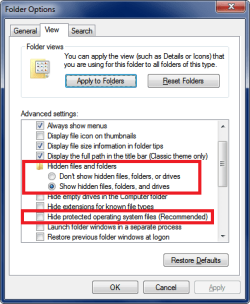
Temporarily change your settings on whatever folders you want to see more files and folders.
In Windows Explorer / Tools / Folder Options, set it so you can see Hidden Files and Protected Files.
See if those changes make a difference in seeing your backup file.

FolderOptions.png

Here is a tutorial that should help with changing a Windows Image Backup filename:
http://www.sevenforums.com/tutorials/675-system-image-recovery.html

The built-in Windows backup/imaging utility is more difficult to use than many other 3rd party programs.
I use Macrium Reflect free.

Whenever possible, post screen prints of what you see, it will help others trying to help you, if they can see what you see.
http://www.sevenforums.com/tutorials/9733-screenshots-files-upload-post-seven-forums.html

I don't understand why you are seeing a discrepancy in where the backup image is, or [D]. It will also help if you post a screen print of Disk Management. [URL]http://www.sevenforums.com/tutorials/274797-disk-management-post-screen-capture-image.html[/URL] Do you have any Dynamic disks listed in Disk Management ?
 

My Computer My Computer

At a glance

Multi-Boot W7_Pro_x64 W8.1_Pro_x64 W10_Pro_x6...AMD Athlon II x4 6206GB GSkill DDR2 800AMD 4670 GPU + AMD 4200 IGP
Computer type
PC/Desktop
Computer Manufacturer/Model Number
home built
OS
Multi-Boot W7_Pro_x64 W8.1_Pro_x64 W10_Pro_x64 +Linux_VMs +Chromium_VM
CPU
AMD Athlon II x4 620
Motherboard
Gigabyte GA-MA785G-UD3H
Memory
6GB GSkill DDR2 800
Graphics Card(s)
AMD 4670 GPU + AMD 4200 IGP
Sound Card
on board Realtek ALC889A
Monitor(s) Displays
RCA 40" LCD TV, Insignia 32" LCD TV, HP 15" LCD monitor
Screen Resolution
1680 x 1050
Hard Drives
OCZ Vertex 3 120GB,
Samsung F3 1TB (3),
Several others - WD, Seagate, Hitachi, ...
PSU
Corsair 500 W
Case
Rosewill mid tower
Cooling
CM 90mm rifle
Keyboard
Gyration wireless, Logitech wireless, Dell USB wired
Mouse
Gyration wireless, Logitech wireless, V7 USB wired
Internet Speed
Spectrum - 100Mbps D / 10Mbps U
Antivirus
Avast, MBAM3, EMET, WinPatrol
Browser
Pale Moon, Firefox, IE
Other Info
2 multi-boot PC's
Mainly HTPC/Office/Gen purpose (no gaming).
Trendnet USB KVM.
LG DVD burner/Blue Ray Player.
Tray system for removable SATA backup drives.

Not currently OCd, under-volted.
I use Hybrid sleep, rarely re-boot or shutdown.

Hauppauge HD-PVR, Avermedia PCIe TV Tuner, Hauppauge PCI TV Tuner.
I created an image and know I put it on (D) drive storage. When I did a quick look at image restore it said the image was on (C) drive however I can clearly see the folder on the (D) drive.

If I reformatted the (C) drive is the image really on the (D) drive?

I also noticed that the folder on the (D) storage drive did not show any data but appeared empty however I suspect it does have the image on that drive.

When you indicate as (D) drive storage, are you referring to D as a folder.
Then look for the folder named D.

Actual label should be D:\ as this indicate as D drive.
Just look for the D folder or name.
 

My Computer My Computer

At a glance

Windows 7 x64
Computer type
Laptop
Computer Manufacturer/Model Number
Toshiba L630 and L735
OS
Windows 7 x64
Hard Drives
240 GB SSD
No "D" storage is the partition
 

My Computers My Computers

  • At a glance

    Windows 10 Home 64 bitntel(R) Core(TM) i9-10900K CPU @ 3.70GHz 3.70...80 gbNVIDIA Ge Force RTX 2070 super/ NVIDIA GeForc...
    Computer type
    PC/Desktop
    Computer Manufacturer/Model Number
    Custom
    OS
    Windows 10 Home 64 bit
    CPU
    ntel(R) Core(TM) i9-10900K CPU @ 3.70GHz 3.70 GHz
    Motherboard
    Z490 AORUS Ultra
    Memory
    80 gb
    Graphics Card(s)
    NVIDIA Ge Force RTX 2070 super/ NVIDIA GeForce GTX 1650
    Sound Card
    NVIDIA High Definition Audio/ Realtech High Definition Audio
    Monitor(s) Displays
    Gateway FHD2402Two
    Screen Resolution
    1920x1080
    Internet Speed
    500 GB download
    Antivirus
    defender
    Other Info
    Two graphics cards take up all slots for anything else to be added.
  • At a glance

    Windows 10 Home 64Intel® Core™ i7-8750H (2.2 GHz base frequency...16 GB DDR4-2666 SDRAM (1 x 16 GB)NVIDIA® GeForce® GTX 1060 (6 GB GDDR5 dedicated)
    Computer type
    Laptop
    System Manufacturer/Model Number
    OMEN by HP - 15-dc0051nr
    OS
    Windows 10 Home 64
    CPU
    Intel® Core™ i7-8750H (2.2 GHz base frequency, up to 4.1 GHz with Intel® Turbo Boost Technology, 9 M
    Memory
    16 GB DDR4-2666 SDRAM (1 x 16 GB)
    Graphics Card(s)
    NVIDIA® GeForce® GTX 1060 (6 GB GDDR5 dedicated)
    Screen Resolution
    1920x1080
    Hard Drives
    1 TB 7200 rpm SATA 256 GB PCIe® NVMe™ M.2 SSD
    Other Info
    Ports:
    1 Thunderbolt™ 3 (Data Transfer up to 40 Gb/s, DP1.2, HP Sleep and Charge); 3 USB 3.1 Gen 1 (1 HP Sleep and Charge); 1 Mini DisplayPort™; 1 HDMI; 1 RJ-45; 1 headphone/microphone combo; 1 microphone-in
    Expansion slots:
    1 multi-format SD media card reader
    Power supply type:
    200 W AC power adapter
    Battery type:
    4-cell, 70 Wh Li-ion
No "D" storage is the partition


Normally for this, it will auto backup to another drive, not in folder or partition in the C:\ drive.

You may have accidentally created this "D" folder in D:\ drive.
Hence, it will backup to the folder when you select destination.

In most case, backup will best put in the root, meaning, D:\ and not any folder.

You can rename the folder or the file itself, as this name is standard if you do not provide the name.
When restore, it may ask for the location and filename of the backup.
So go ahead and name it, say, date of creation, although it may be indicate in windows explorer.
But the windows explorer date is modified version, even if you copy or move the file, the explorer date/time may change.
By putting the date on the filename as it is easy to locate.
 

My Computer My Computer

At a glance

Windows 7 x64
Computer type
Laptop
Computer Manufacturer/Model Number
Toshiba L630 and L735
OS
Windows 7 x64
Hard Drives
240 GB SSD
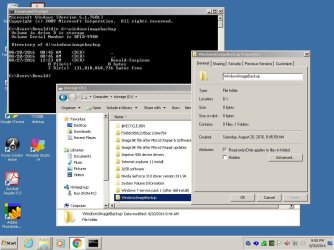
I changed my folder options but that did not show the data in the Windowsimagebackup folder.

Here I prepared a screen shot of what I am seeing in the Cmd line and explorer folder.
 

Attachments

  • IMAGE BACKUP PROBLEM.JPG
    IMAGE BACKUP PROBLEM.JPG
    105.5 KB · Views: 4

My Computers My Computers

  • At a glance

    Windows 10 Home 64 bitntel(R) Core(TM) i9-10900K CPU @ 3.70GHz 3.70...80 gbNVIDIA Ge Force RTX 2070 super/ NVIDIA GeForc...
    Computer type
    PC/Desktop
    Computer Manufacturer/Model Number
    Custom
    OS
    Windows 10 Home 64 bit
    CPU
    ntel(R) Core(TM) i9-10900K CPU @ 3.70GHz 3.70 GHz
    Motherboard
    Z490 AORUS Ultra
    Memory
    80 gb
    Graphics Card(s)
    NVIDIA Ge Force RTX 2070 super/ NVIDIA GeForce GTX 1650
    Sound Card
    NVIDIA High Definition Audio/ Realtech High Definition Audio
    Monitor(s) Displays
    Gateway FHD2402Two
    Screen Resolution
    1920x1080
    Internet Speed
    500 GB download
    Antivirus
    defender
    Other Info
    Two graphics cards take up all slots for anything else to be added.
  • At a glance

    Windows 10 Home 64Intel® Core™ i7-8750H (2.2 GHz base frequency...16 GB DDR4-2666 SDRAM (1 x 16 GB)NVIDIA® GeForce® GTX 1060 (6 GB GDDR5 dedicated)
    Computer type
    Laptop
    System Manufacturer/Model Number
    OMEN by HP - 15-dc0051nr
    OS
    Windows 10 Home 64
    CPU
    Intel® Core™ i7-8750H (2.2 GHz base frequency, up to 4.1 GHz with Intel® Turbo Boost Technology, 9 M
    Memory
    16 GB DDR4-2666 SDRAM (1 x 16 GB)
    Graphics Card(s)
    NVIDIA® GeForce® GTX 1060 (6 GB GDDR5 dedicated)
    Screen Resolution
    1920x1080
    Hard Drives
    1 TB 7200 rpm SATA 256 GB PCIe® NVMe™ M.2 SSD
    Other Info
    Ports:
    1 Thunderbolt™ 3 (Data Transfer up to 40 Gb/s, DP1.2, HP Sleep and Charge); 3 USB 3.1 Gen 1 (1 HP Sleep and Charge); 1 Mini DisplayPort™; 1 HDMI; 1 RJ-45; 1 headphone/microphone combo; 1 microphone-in
    Expansion slots:
    1 multi-format SD media card reader
    Power supply type:
    200 W AC power adapter
    Battery type:
    4-cell, 70 Wh Li-ion
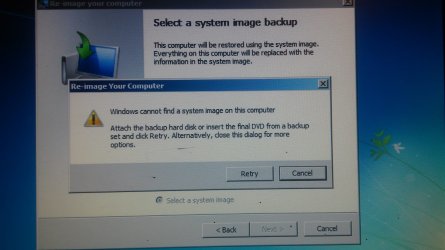
I tried changing the folder name and although you can change it when you try to reinstall the OS it can not find the windowsimagebackup it is looking for. I guess you have to leave the folder alone and can not change to record multiple image backups.

Or rather you can but when you are ready to reinstall you have to change the name however that would be hard if you system is not booting well.
 

Attachments

  • Windows can not find system image.jpg
    Windows can not find system image.jpg
    754.6 KB · Views: 1

My Computers My Computers

  • At a glance

    Windows 10 Home 64 bitntel(R) Core(TM) i9-10900K CPU @ 3.70GHz 3.70...80 gbNVIDIA Ge Force RTX 2070 super/ NVIDIA GeForc...
    Computer type
    PC/Desktop
    Computer Manufacturer/Model Number
    Custom
    OS
    Windows 10 Home 64 bit
    CPU
    ntel(R) Core(TM) i9-10900K CPU @ 3.70GHz 3.70 GHz
    Motherboard
    Z490 AORUS Ultra
    Memory
    80 gb
    Graphics Card(s)
    NVIDIA Ge Force RTX 2070 super/ NVIDIA GeForce GTX 1650
    Sound Card
    NVIDIA High Definition Audio/ Realtech High Definition Audio
    Monitor(s) Displays
    Gateway FHD2402Two
    Screen Resolution
    1920x1080
    Internet Speed
    500 GB download
    Antivirus
    defender
    Other Info
    Two graphics cards take up all slots for anything else to be added.
  • At a glance

    Windows 10 Home 64Intel® Core™ i7-8750H (2.2 GHz base frequency...16 GB DDR4-2666 SDRAM (1 x 16 GB)NVIDIA® GeForce® GTX 1060 (6 GB GDDR5 dedicated)
    Computer type
    Laptop
    System Manufacturer/Model Number
    OMEN by HP - 15-dc0051nr
    OS
    Windows 10 Home 64
    CPU
    Intel® Core™ i7-8750H (2.2 GHz base frequency, up to 4.1 GHz with Intel® Turbo Boost Technology, 9 M
    Memory
    16 GB DDR4-2666 SDRAM (1 x 16 GB)
    Graphics Card(s)
    NVIDIA® GeForce® GTX 1060 (6 GB GDDR5 dedicated)
    Screen Resolution
    1920x1080
    Hard Drives
    1 TB 7200 rpm SATA 256 GB PCIe® NVMe™ M.2 SSD
    Other Info
    Ports:
    1 Thunderbolt™ 3 (Data Transfer up to 40 Gb/s, DP1.2, HP Sleep and Charge); 3 USB 3.1 Gen 1 (1 HP Sleep and Charge); 1 Mini DisplayPort™; 1 HDMI; 1 RJ-45; 1 headphone/microphone combo; 1 microphone-in
    Expansion slots:
    1 multi-format SD media card reader
    Power supply type:
    200 W AC power adapter
    Battery type:
    4-cell, 70 Wh Li-ion

My Computer My Computer

At a glance

Multi-Boot W7_Pro_x64 W8.1_Pro_x64 W10_Pro_x6...AMD Athlon II x4 6206GB GSkill DDR2 800AMD 4670 GPU + AMD 4200 IGP
Computer type
PC/Desktop
Computer Manufacturer/Model Number
home built
OS
Multi-Boot W7_Pro_x64 W8.1_Pro_x64 W10_Pro_x64 +Linux_VMs +Chromium_VM
CPU
AMD Athlon II x4 620
Motherboard
Gigabyte GA-MA785G-UD3H
Memory
6GB GSkill DDR2 800
Graphics Card(s)
AMD 4670 GPU + AMD 4200 IGP
Sound Card
on board Realtek ALC889A
Monitor(s) Displays
RCA 40" LCD TV, Insignia 32" LCD TV, HP 15" LCD monitor
Screen Resolution
1680 x 1050
Hard Drives
OCZ Vertex 3 120GB,
Samsung F3 1TB (3),
Several others - WD, Seagate, Hitachi, ...
PSU
Corsair 500 W
Case
Rosewill mid tower
Cooling
CM 90mm rifle
Keyboard
Gyration wireless, Logitech wireless, Dell USB wired
Mouse
Gyration wireless, Logitech wireless, V7 USB wired
Internet Speed
Spectrum - 100Mbps D / 10Mbps U
Antivirus
Avast, MBAM3, EMET, WinPatrol
Browser
Pale Moon, Firefox, IE
Other Info
2 multi-boot PC's
Mainly HTPC/Office/Gen purpose (no gaming).
Trendnet USB KVM.
LG DVD burner/Blue Ray Player.
Tray system for removable SATA backup drives.

Not currently OCd, under-volted.
I use Hybrid sleep, rarely re-boot or shutdown.

Hauppauge HD-PVR, Avermedia PCIe TV Tuner, Hauppauge PCI TV Tuner.
Back
Top