Windows 7 Home Premium: Please help...Programs Will Not Update

flashdrive

New member
Member
Local time
12:22 PM
Messages
75
For the past couple months I've noticed something odd on my PC. Programs that need updating (Windows, nVidia, MSE, etc.) will not download any updates. I click the update buttons in these programs and it starts the progress bar, but then after a few minutes it says it cannot download any updates. I don't have the firewall on and I don't have any aggressive settings in browsers or Windows. I've ran a couple tools - Microsoft EasyFix, Windows Update Diagnostic - but still the problem persists.

I've never had any issues getting updates with my programs before so I'm curious what the issue could be. I thought I would ask the WinExperts here about this, because you guys have always been very helpful in the past with my other PC issues.

Just let me know what you need me to do. Thanks!
 

My Computer My Computer

Computer type
PC/Desktop
OS
Windows 7 Home Premium 64Bit
CPU
Intel Core 2 Quad Q6600
Motherboard
GIGABYTE P35-DS4
Memory
G.Skill PC2-6400 DDR2 8GB
Graphics Card(s)
ASUS NVIDIA GeForce 9600 GSO
Sound Card
Diamond XS51 Xtreme 5.1
Monitor(s) Displays
(2) DELL S2340M 23" HD LEDs
Hard Drives
Seagate ST1000DM003-1ER162 1TB | Seagate ST500DM002-1BD142 500GB | ASUS DRW-24B1ST DVD+R DL
PSU
PC Power & Cooling Silencer 610
Case
Ultra m998
Cooling
ThermalRight Ultra 120E
Keyboard
Logitech K811, K360
Mouse
Logitech Performance MX
Hi Flash,
sounds like Malware.
Please D/L run
Malwarebytes free, uncheck the trial and in dashboard settings check rootkits.
then run Eset on-line (dissable any other AV)

report findings

Roy
 

My Computer My Computer

Computer type
PC/Desktop
Computer Manufacturer/Model Number
medionl/Aspire 6930G/acer x55a
OS
W7 home premium 32bit/W7HP 64bit/w10 tp insider ring
CPU
E5300 dual core
Motherboard
medion MS7366
Memory
3gb
Graphics Card(s)
Nvidia Geforce 7100 Nforce 630i
Monitor(s) Displays
avixc
Internet Speed
n (isp resticted to 72)
Antivirus
mse/pands
Browser
palemoon
Other Info
Belkin Fd7050 n USB using Railink RT2870 drivers, more upto date
Hi Torch, thanks for the reply. What is Eset on-line? I have Malwarebytes, but it's out of date, too. Tried updating the virus database, but same as the others. Just run it anyway?

Ok, correction....it just downloaded an updated version of the program and it seems to have installed the updates. I will run it now.
 

My Computer My Computer

Computer type
PC/Desktop
OS
Windows 7 Home Premium 64Bit
CPU
Intel Core 2 Quad Q6600
Motherboard
GIGABYTE P35-DS4
Memory
G.Skill PC2-6400 DDR2 8GB
Graphics Card(s)
ASUS NVIDIA GeForce 9600 GSO
Sound Card
Diamond XS51 Xtreme 5.1
Monitor(s) Displays
(2) DELL S2340M 23" HD LEDs
Hard Drives
Seagate ST1000DM003-1ER162 1TB | Seagate ST500DM002-1BD142 500GB | ASUS DRW-24B1ST DVD+R DL
PSU
PC Power & Cooling Silencer 610
Case
Ultra m998
Cooling
ThermalRight Ultra 120E
Keyboard
Logitech K811, K360
Mouse
Logitech Performance MX
Eset is an AV in its own right

Roy
 

My Computer My Computer

Computer type
PC/Desktop
Computer Manufacturer/Model Number
medionl/Aspire 6930G/acer x55a
OS
W7 home premium 32bit/W7HP 64bit/w10 tp insider ring
CPU
E5300 dual core
Motherboard
medion MS7366
Memory
3gb
Graphics Card(s)
Nvidia Geforce 7100 Nforce 630i
Monitor(s) Displays
avixc
Internet Speed
n (isp resticted to 72)
Antivirus
mse/pands
Browser
palemoon
Other Info
Belkin Fd7050 n USB using Railink RT2870 drivers, more upto date
Ok, is that this one? Should I do that after Malwarebytes is done? Do you need a log report from Malwarebytes or just me to tell you if it found anything?
 

My Computer My Computer

Computer type
PC/Desktop
OS
Windows 7 Home Premium 64Bit
CPU
Intel Core 2 Quad Q6600
Motherboard
GIGABYTE P35-DS4
Memory
G.Skill PC2-6400 DDR2 8GB
Graphics Card(s)
ASUS NVIDIA GeForce 9600 GSO
Sound Card
Diamond XS51 Xtreme 5.1
Monitor(s) Displays
(2) DELL S2340M 23" HD LEDs
Hard Drives
Seagate ST1000DM003-1ER162 1TB | Seagate ST500DM002-1BD142 500GB | ASUS DRW-24B1ST DVD+R DL
PSU
PC Power & Cooling Silencer 610
Case
Ultra m998
Cooling
ThermalRight Ultra 120E
Keyboard
Logitech K811, K360
Mouse
Logitech Performance MX
Malwarebytes is done. When I first ran it closed after 2 seconds and said, "Threat Scan Cancelled". I ran it again and it went for about 15 minutes and detected no threats. Now I'll run the other one...
 

My Computer My Computer

Computer type
PC/Desktop
OS
Windows 7 Home Premium 64Bit
CPU
Intel Core 2 Quad Q6600
Motherboard
GIGABYTE P35-DS4
Memory
G.Skill PC2-6400 DDR2 8GB
Graphics Card(s)
ASUS NVIDIA GeForce 9600 GSO
Sound Card
Diamond XS51 Xtreme 5.1
Monitor(s) Displays
(2) DELL S2340M 23" HD LEDs
Hard Drives
Seagate ST1000DM003-1ER162 1TB | Seagate ST500DM002-1BD142 500GB | ASUS DRW-24B1ST DVD+R DL
PSU
PC Power & Cooling Silencer 610
Case
Ultra m998
Cooling
ThermalRight Ultra 120E
Keyboard
Logitech K811, K360
Mouse
Logitech Performance MX
Eset was scanning and it had found 6 threats. It was about halfway done and had been running for about an hour so I left and did some errands. When I came back I checked the little window and it is totally blank. I have no idea if it is done or something happened to it. All I did was turn my monitor off while I was away, when I turned it back on the app window was just blank. I couldn't click on it or close it so I had to use Task Manager to close it.

Should I try running it again?
 

My Computer My Computer

Computer type
PC/Desktop
OS
Windows 7 Home Premium 64Bit
CPU
Intel Core 2 Quad Q6600
Motherboard
GIGABYTE P35-DS4
Memory
G.Skill PC2-6400 DDR2 8GB
Graphics Card(s)
ASUS NVIDIA GeForce 9600 GSO
Sound Card
Diamond XS51 Xtreme 5.1
Monitor(s) Displays
(2) DELL S2340M 23" HD LEDs
Hard Drives
Seagate ST1000DM003-1ER162 1TB | Seagate ST500DM002-1BD142 500GB | ASUS DRW-24B1ST DVD+R DL
PSU
PC Power & Cooling Silencer 610
Case
Ultra m998
Cooling
ThermalRight Ultra 120E
Keyboard
Logitech K811, K360
Mouse
Logitech Performance MX
I just tried using Device Manager to get my nVidia updates manually for my card, but the update screen just kept spinning its wheels. I couldn't close that either - had to use Task Manager again. Definitely something going on.
 

My Computer My Computer

Computer type
PC/Desktop
OS
Windows 7 Home Premium 64Bit
CPU
Intel Core 2 Quad Q6600
Motherboard
GIGABYTE P35-DS4
Memory
G.Skill PC2-6400 DDR2 8GB
Graphics Card(s)
ASUS NVIDIA GeForce 9600 GSO
Sound Card
Diamond XS51 Xtreme 5.1
Monitor(s) Displays
(2) DELL S2340M 23" HD LEDs
Hard Drives
Seagate ST1000DM003-1ER162 1TB | Seagate ST500DM002-1BD142 500GB | ASUS DRW-24B1ST DVD+R DL
PSU
PC Power & Cooling Silencer 610
Case
Ultra m998
Cooling
ThermalRight Ultra 120E
Keyboard
Logitech K811, K360
Mouse
Logitech Performance MX
Hi Flash,
can you search for the Eset/malwarebytes log files.
post them.
Roy
 

My Computer My Computer

Computer type
PC/Desktop
Computer Manufacturer/Model Number
medionl/Aspire 6930G/acer x55a
OS
W7 home premium 32bit/W7HP 64bit/w10 tp insider ring
CPU
E5300 dual core
Motherboard
medion MS7366
Memory
3gb
Graphics Card(s)
Nvidia Geforce 7100 Nforce 630i
Monitor(s) Displays
avixc
Internet Speed
n (isp resticted to 72)
Antivirus
mse/pands
Browser
palemoon
Other Info
Belkin Fd7050 n USB using Railink RT2870 drivers, more upto date
Here's the Malwarebytes file. The other one didn't finish scanning so I don't know if there was a log file created, or where it would be if it did.
 

Attachments

My Computer My Computer

Computer type
PC/Desktop
OS
Windows 7 Home Premium 64Bit
CPU
Intel Core 2 Quad Q6600
Motherboard
GIGABYTE P35-DS4
Memory
G.Skill PC2-6400 DDR2 8GB
Graphics Card(s)
ASUS NVIDIA GeForce 9600 GSO
Sound Card
Diamond XS51 Xtreme 5.1
Monitor(s) Displays
(2) DELL S2340M 23" HD LEDs
Hard Drives
Seagate ST1000DM003-1ER162 1TB | Seagate ST500DM002-1BD142 500GB | ASUS DRW-24B1ST DVD+R DL
PSU
PC Power & Cooling Silencer 610
Case
Ultra m998
Cooling
ThermalRight Ultra 120E
Keyboard
Logitech K811, K360
Mouse
Logitech Performance MX
Hi Flash,
How can I view the ESET Online Scanner log file?
The ESET Online Scanner saves a log file after running, which can be examined or sent in to ESET for further analysis. The path to the log file is "C:\Program Files\EsetOnlineScanner\log.txt". You can view this file by navigating to the directory and double-clicking it in Windows Explorer, or by copying and pasting the path specification above (including the quotation marks) into the Start - Run dialog box from the Start Menu on the desktop.

Roy
 

My Computer My Computer

Computer type
PC/Desktop
Computer Manufacturer/Model Number
medionl/Aspire 6930G/acer x55a
OS
W7 home premium 32bit/W7HP 64bit/w10 tp insider ring
CPU
E5300 dual core
Motherboard
medion MS7366
Memory
3gb
Graphics Card(s)
Nvidia Geforce 7100 Nforce 630i
Monitor(s) Displays
avixc
Internet Speed
n (isp resticted to 72)
Antivirus
mse/pands
Browser
palemoon
Other Info
Belkin Fd7050 n USB using Railink RT2870 drivers, more upto date
There is no file in that location. In fact there is no Eset folder on my computer. When I used the free scan on the website it just downloaded and executable file that ran the scan. It isn't a program installed on my computer.

So what did you learn from the Malwarebytes file I attached in my last post?
 
Last edited:

My Computer My Computer

Computer type
PC/Desktop
OS
Windows 7 Home Premium 64Bit
CPU
Intel Core 2 Quad Q6600
Motherboard
GIGABYTE P35-DS4
Memory
G.Skill PC2-6400 DDR2 8GB
Graphics Card(s)
ASUS NVIDIA GeForce 9600 GSO
Sound Card
Diamond XS51 Xtreme 5.1
Monitor(s) Displays
(2) DELL S2340M 23" HD LEDs
Hard Drives
Seagate ST1000DM003-1ER162 1TB | Seagate ST500DM002-1BD142 500GB | ASUS DRW-24B1ST DVD+R DL
PSU
PC Power & Cooling Silencer 610
Case
Ultra m998
Cooling
ThermalRight Ultra 120E
Keyboard
Logitech K811, K360
Mouse
Logitech Performance MX
Any feedback on my last post? If anyone else has any suggestions I'd be glad to hear them.
 

My Computer My Computer

Computer type
PC/Desktop
OS
Windows 7 Home Premium 64Bit
CPU
Intel Core 2 Quad Q6600
Motherboard
GIGABYTE P35-DS4
Memory
G.Skill PC2-6400 DDR2 8GB
Graphics Card(s)
ASUS NVIDIA GeForce 9600 GSO
Sound Card
Diamond XS51 Xtreme 5.1
Monitor(s) Displays
(2) DELL S2340M 23" HD LEDs
Hard Drives
Seagate ST1000DM003-1ER162 1TB | Seagate ST500DM002-1BD142 500GB | ASUS DRW-24B1ST DVD+R DL
PSU
PC Power & Cooling Silencer 610
Case
Ultra m998
Cooling
ThermalRight Ultra 120E
Keyboard
Logitech K811, K360
Mouse
Logitech Performance MX
There is no file in that location. In fact there is no Eset folder on my computer. When I used the free scan on the website it just downloaded and executable file that ran the scan. It isn't a program installed on my computer.

So what did you learn from the Malwarebytes file I attached in my last post?
Clearly Malwarebytes looked fine. I'm just trying to add some advice because it seems folks are busy. I think you should run the ESET again, or use some kind of standalone scanner. I don't know that you are infected but you said ESET was reporting something? So run ESET again but watch it a little closer, it may have asked at the end if you wanted to save the log, I have not used this so don’t know for sure. Or maybe the Malware interfered and you need to try again.

Are you sure there is not file at the ESET location posted above?

Or, considering your pc don't seem to be functioning well, you could do a scan from Safe Mode. I'm no Malware Tech though so it's up to you. I think you need some good diagnostics done to find out what is wrong.

Considering this started out as an Update issue it may help if you are in the Update Section of this form, and go from there. Or, do the ESET SCAN again and if you are infected move over to the Malware Section.
 

My Computer My Computer

Computer type
Laptop
Computer Manufacturer/Model Number
HP Pavilion dv7-6c23cl
OS
Windows 7 Home Premium 64bit
CPU
AMD A8-3520M
Motherboard
Hewlett-Packard 180B (Socket FS1)
Memory
6.00GB DDR3 @ 674MHz (9-9-9-24)
Graphics Card(s)
512MB ATI AMD Radeon HD 6620G
Sound Card
IDT High Definition Audio CODEC
Monitor(s) Displays
Generic PnP Monitor
Screen Resolution
(1600x900@60Hz)
Hard Drives
Samsung 850 EVO 250GB SSD
Mouse
Logitec M525
Internet Speed
30-75Mbps
Antivirus
Avast Free, Unfortunately
Browser
Google Chrome, Firefox, IE
Try downloading MiniToolbox.

MiniToolBox Download

Run it and upload the report.

Maybe something will show up.
 

My Computer My Computer

Computer type
Laptop
Computer Manufacturer/Model Number
ASUS
OS
Microsoft Windows 7 Home Premium 64-bit 7601 Multiprocessor Free Service Pack 1
CPU
AMD C-60 APU with Radeon(tm) HD Graphics
Motherboard
ASUSTeK COMPUTER INC. X501U
Memory
4.00 GB
Graphics Card(s)
AMD Radeon HD 6290 Graphics
Sound Card
(1) AMD High Definition Audio Device (2) Realtek High Defi
Screen Resolution
1366 x 768 x 32 bits (4294967296 colors) @ 60 Hz
Hard Drives
Hitachi HTS545050A7E380 SATA Disk Device
Antivirus
Comodo CIS & FW, SecureAplus App Whitelisting, Threatfire
Browser
Cyberfox 64bit, Opera 64bit, Airfox
Other Info
Spy-The-Spy, HitmanPro.Alert, Norton Connect Safe, MJRegWatcher, BitDefender TrafficLight, Voodoo Shield, Zemana AntiMalware
Nasty, Callender - thanks for the replies. I will run Eset again. Attached is the MiniToolbox file.
 

Attachments

My Computer My Computer

Computer type
PC/Desktop
OS
Windows 7 Home Premium 64Bit
CPU
Intel Core 2 Quad Q6600
Motherboard
GIGABYTE P35-DS4
Memory
G.Skill PC2-6400 DDR2 8GB
Graphics Card(s)
ASUS NVIDIA GeForce 9600 GSO
Sound Card
Diamond XS51 Xtreme 5.1
Monitor(s) Displays
(2) DELL S2340M 23" HD LEDs
Hard Drives
Seagate ST1000DM003-1ER162 1TB | Seagate ST500DM002-1BD142 500GB | ASUS DRW-24B1ST DVD+R DL
PSU
PC Power & Cooling Silencer 610
Case
Ultra m998
Cooling
ThermalRight Ultra 120E
Keyboard
Logitech K811, K360
Mouse
Logitech Performance MX
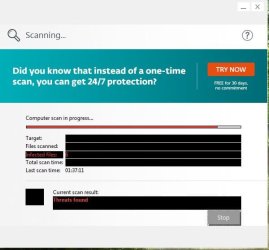
Once again I have reached the place where the Eset scanner freezes. Attached is a screenshot. Last time this little window was blank. This time it has all these black bars. Again, the program is frozen and cannot be closed unless I use Task Manager.
 

Attachments

  • eset.JPG
    eset.JPG
    35.4 KB · Views: 14

My Computer My Computer

Computer type
PC/Desktop
OS
Windows 7 Home Premium 64Bit
CPU
Intel Core 2 Quad Q6600
Motherboard
GIGABYTE P35-DS4
Memory
G.Skill PC2-6400 DDR2 8GB
Graphics Card(s)
ASUS NVIDIA GeForce 9600 GSO
Sound Card
Diamond XS51 Xtreme 5.1
Monitor(s) Displays
(2) DELL S2340M 23" HD LEDs
Hard Drives
Seagate ST1000DM003-1ER162 1TB | Seagate ST500DM002-1BD142 500GB | ASUS DRW-24B1ST DVD+R DL
PSU
PC Power & Cooling Silencer 610
Case
Ultra m998
Cooling
ThermalRight Ultra 120E
Keyboard
Logitech K811, K360
Mouse
Logitech Performance MX
I thought I'd try a different virus scanner so I downloaded and installed Panda Cloud Cleaner. Once it was installed my computer froze. I had to manually shut it down. When I restarted it it took me right to the login screen. I was going to try using Safe Mode but the post screen would not appear - it went right to the login screen.

I'm not sure what's going on. Just tried running the Panda Scanner and my computer froze again. Tomorrow I'm going to take the tower outside and blow it out. Not sure if that will change anything, but it's overdue for that anyway.
 
Last edited:

My Computer My Computer

Computer type
PC/Desktop
OS
Windows 7 Home Premium 64Bit
CPU
Intel Core 2 Quad Q6600
Motherboard
GIGABYTE P35-DS4
Memory
G.Skill PC2-6400 DDR2 8GB
Graphics Card(s)
ASUS NVIDIA GeForce 9600 GSO
Sound Card
Diamond XS51 Xtreme 5.1
Monitor(s) Displays
(2) DELL S2340M 23" HD LEDs
Hard Drives
Seagate ST1000DM003-1ER162 1TB | Seagate ST500DM002-1BD142 500GB | ASUS DRW-24B1ST DVD+R DL
PSU
PC Power & Cooling Silencer 610
Case
Ultra m998
Cooling
ThermalRight Ultra 120E
Keyboard
Logitech K811, K360
Mouse
Logitech Performance MX
Wait for someone to read the MTB Logs, there are quite a few Errors there. I wouldn't have tried the Panda thing, as I said, you would have been better off with a Standalone Scanner, not one that needs installing. It's difficult to install and AV to an infected computer. Wish I could help but I don't know what to do with the results of MTB.

Again, perhaps you should be in the "System Security" section, maybe you'll get more attention there. I'm a bit new to the site, but usually folks that know about this stuff will spend more time in that section.
http://www.sevenforums.com/system-security/
 

My Computer My Computer

Computer type
Laptop
Computer Manufacturer/Model Number
HP Pavilion dv7-6c23cl
OS
Windows 7 Home Premium 64bit
CPU
AMD A8-3520M
Motherboard
Hewlett-Packard 180B (Socket FS1)
Memory
6.00GB DDR3 @ 674MHz (9-9-9-24)
Graphics Card(s)
512MB ATI AMD Radeon HD 6620G
Sound Card
IDT High Definition Audio CODEC
Monitor(s) Displays
Generic PnP Monitor
Screen Resolution
(1600x900@60Hz)
Hard Drives
Samsung 850 EVO 250GB SSD
Mouse
Logitec M525
Internet Speed
30-75Mbps
Antivirus
Avast Free, Unfortunately
Browser
Google Chrome, Firefox, IE
From your log:

Code:
NetBIOS over Tcpip. . . . . . . . : Enabled

- not a problem but should be disabled.

Code:
Error: (09/23/2016 10:59:26 AM) (Source: Application Error) (User: )
Description: Faulting application name: NvStreamUserAgent.exe, version: 7.1.2084.9592, time stamp: 0x57605c64
Faulting module name: ntdll.dll, version: 6.1.7601.23539, time stamp: 0x57c99b8f
Exception code: 0xc0000005
Fault offset: 0x000000000004d7f6
Faulting process id: 0xd78
Faulting application start time: 0xNvStreamUserAgent.exe0
Faulting application path: NvStreamUserAgent.exe1
Faulting module path: NvStreamUserAgent.exe2
Report Id: NvStreamUserAgent.exe3

Don't know anything about the above.

Code:
Error: (09/22/2016 03:21:35 PM) (Source: Application Hang) (User: )
Description: The program esetonlinescanner_enu.exe version 2.0.12.0 stopped interacting with Windows

Error: (09/22/2016 01:20:41 PM) (Source: Service Control Manager) (User: )
Description: The eapihdrv service failed to start due to the following error: 
%%1275 = This driver has been blocked from loading


Error: (09/22/2016 01:20:41 PM) (Source: Application Popup) (User: )
Description: \??\C:\Users\Doug\AppData\Local\Temp\ehdrv.sys has been blocked from loading due to incompatibility with this system. Please contact your software vendor for a compatible version of the driver.

Error: (09/22/2016 01:20:40 PM) (Source: Service Control Manager) (User: )
Description: The eapihdrv service failed to start due to the following error: 
%%1275 = This driver has been blocked from loading


Error: (09/22/2016 01:20:40 PM) (Source: Application Popup) (User: )
Description: \??\C:\Users\Doug\AppData\Local\Temp\ehdrv.sys has been blocked from loading due to incompatibility with this system. Please contact your software vendor for a compatible version of the driver.

Error: (09/22/2016 01:20:40 PM) (Source: Service Control Manager) (User: )
Description: The eapihdrv service failed to start due to the following error: 
%%1275 = This driver has been blocked from loading

There's a problem with ESET driver. Perhaps your onboard security blocked it?

I agree with the suggestion to get help from a malware removal expert in the System Security section
 

My Computer My Computer

Computer type
Laptop
Computer Manufacturer/Model Number
ASUS
OS
Microsoft Windows 7 Home Premium 64-bit 7601 Multiprocessor Free Service Pack 1
CPU
AMD C-60 APU with Radeon(tm) HD Graphics
Motherboard
ASUSTeK COMPUTER INC. X501U
Memory
4.00 GB
Graphics Card(s)
AMD Radeon HD 6290 Graphics
Sound Card
(1) AMD High Definition Audio Device (2) Realtek High Defi
Screen Resolution
1366 x 768 x 32 bits (4294967296 colors) @ 60 Hz
Hard Drives
Hitachi HTS545050A7E380 SATA Disk Device
Antivirus
Comodo CIS & FW, SecureAplus App Whitelisting, Threatfire
Browser
Cyberfox 64bit, Opera 64bit, Airfox
Other Info
Spy-The-Spy, HitmanPro.Alert, Norton Connect Safe, MJRegWatcher, BitDefender TrafficLight, Voodoo Shield, Zemana AntiMalware
Back
Top