Solved 169GB unknown file in windirstat

keredd

New member
Member
Local time
6:33 AM
Messages
37
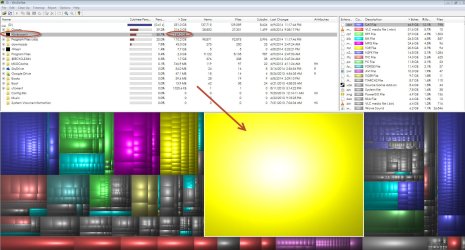
Windirstat is showing a 169GB file and it is not restore points. This is on a secondary drive that does not contain OS files it simply stores all the program files. What could this file be and is there a way to delete it without having to reformat the drive and lose all my programs. All help is greatly appreciated.
 

Attachments
  • Uknown file.jpg
    Uknown file.jpg
    225.7 KB · Views: 50

My Computer My Computer

At a glance

Windows 7 Ultimate x64AMD|PH II X4 840 3.2G AM3 RT2Gx2|GSK F3-10600CL8D-4GBHK R
Computer Manufacturer/Model Number
self built
OS
Windows 7 Ultimate x64
CPU
AMD|PH II X4 840 3.2G AM3 RT
Motherboard
ASUS - M4A88T-V EVO/USB3
Memory
2Gx2|GSK F3-10600CL8D-4GBHK R
Monitor(s) Displays
viewsonic
Hard Drives
C:/: SSD 32G|CORSAIR CSSD-V32GB2-BRKT R
D: SEAGATE 7K ST31000528AS OEM - OEM
PSU
CORSAIR|650W CMPSU-650TXV2 R
Case
CASE ANTEC|THREE HUNDRED BK RT
It's probably restore points or backup shadow copies.
 

My Computer My Computer

At a glance

Windows 7 Pro-x64i7-2600 3.4GHz - 3.8GHz Turbo8Gb - 2x4GB, Muskin 991770 PC3-1333Integrated Intel HD 2000
Computer type
PC/Desktop
Computer Manufacturer/Model Number
Built 2/11/2011
OS
Windows 7 Pro-x64
CPU
i7-2600 3.4GHz - 3.8GHz Turbo
Motherboard
Intel DH67BL-B3
Memory
8Gb - 2x4GB, Muskin 991770 PC3-1333
Graphics Card(s)
Integrated Intel HD 2000
Sound Card
Integrated Intel 10.1 HD, RealTek ALC892
Monitor(s) Displays
Asus LCD VH222H, Haier HL24XSL2a
Screen Resolution
1920x1080, 1920x1080
Hard Drives
Crucial SSD C300-128Gb,
Western Digital WD5002AALX - 500Gb,
Western Digital WD7501AALS - 750Gb
PSU
Seasonic 650W 80+ Gold Modular
Case
Rosewill Defender
Cooling
Stock CPU, Four 120mm case fans, PCH fan added
Keyboard
Logitech EX100 Y-RBH94 Wireless
Mouse
Logitech EX100 M-RCE95 Wireless
Internet Speed
3.0/1.5 Mbs
Antivirus
Microsoft Security Essentials
Browser
Microsoft Internet Explorer 11
Other Info
Antec Veris Premier-Multimedia IR Station,
Cyber Accoustics-3602 Speakers,
AFT XM-5U Card Reader,
Hauppauge TV-HVR-2250,
Sony LX300 USB Turntable
I tried to going to disk clean up to delete the recovery points and the file is still there.:(
 

My Computer My Computer

At a glance

Windows 7 Ultimate x64AMD|PH II X4 840 3.2G AM3 RT2Gx2|GSK F3-10600CL8D-4GBHK R
Computer Manufacturer/Model Number
self built
OS
Windows 7 Ultimate x64
CPU
AMD|PH II X4 840 3.2G AM3 RT
Motherboard
ASUS - M4A88T-V EVO/USB3
Memory
2Gx2|GSK F3-10600CL8D-4GBHK R
Monitor(s) Displays
viewsonic
Hard Drives
C:/: SSD 32G|CORSAIR CSSD-V32GB2-BRKT R
D: SEAGATE 7K ST31000528AS OEM - OEM
PSU
CORSAIR|650W CMPSU-650TXV2 R
Case
CASE ANTEC|THREE HUNDRED BK RT
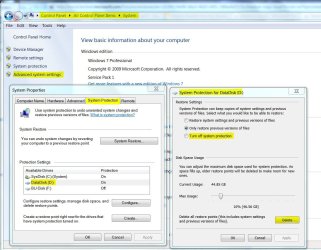
Post an image of your system Advanced System Settings under the System Protection Tab and the Configuration for the disk. It will look like the image below. You can delete the restore points but the disk space is still allocated. You need to delete the restore points, turn off protection or reduce the size for the disk then reboot.
 

Attachments

  • Restore Points.JPG
    Restore Points.JPG
    132.6 KB · Views: 7

My Computer My Computer

At a glance

Windows 7 Pro-x64i7-2600 3.4GHz - 3.8GHz Turbo8Gb - 2x4GB, Muskin 991770 PC3-1333Integrated Intel HD 2000
Computer type
PC/Desktop
Computer Manufacturer/Model Number
Built 2/11/2011
OS
Windows 7 Pro-x64
CPU
i7-2600 3.4GHz - 3.8GHz Turbo
Motherboard
Intel DH67BL-B3
Memory
8Gb - 2x4GB, Muskin 991770 PC3-1333
Graphics Card(s)
Integrated Intel HD 2000
Sound Card
Integrated Intel 10.1 HD, RealTek ALC892
Monitor(s) Displays
Asus LCD VH222H, Haier HL24XSL2a
Screen Resolution
1920x1080, 1920x1080
Hard Drives
Crucial SSD C300-128Gb,
Western Digital WD5002AALX - 500Gb,
Western Digital WD7501AALS - 750Gb
PSU
Seasonic 650W 80+ Gold Modular
Case
Rosewill Defender
Cooling
Stock CPU, Four 120mm case fans, PCH fan added
Keyboard
Logitech EX100 Y-RBH94 Wireless
Mouse
Logitech EX100 M-RCE95 Wireless
Internet Speed
3.0/1.5 Mbs
Antivirus
Microsoft Security Essentials
Browser
Microsoft Internet Explorer 11
Other Info
Antec Veris Premier-Multimedia IR Station,
Cyber Accoustics-3602 Speakers,
AFT XM-5U Card Reader,
Hauppauge TV-HVR-2250,
Sony LX300 USB Turntable

My Computer My Computer

At a glance

Win 10 Pro x64Intel I5-2500K @3.3GHz16GB G.Skill Ripjaws X (4x4GB)EVGA GeForce 750 Ti SC 2GB
Computer type
PC/Desktop
Computer Manufacturer/Model Number
Self Built
OS
Win 10 Pro x64
CPU
Intel I5-2500K @3.3GHz
Motherboard
Asrock P67 Extreme4
Memory
16GB G.Skill Ripjaws X (4x4GB)
Graphics Card(s)
EVGA GeForce 750 Ti SC 2GB
Sound Card
ASUS Xonar DG 5.1 Channels 24-bit 96KHz PCI Interface Sound
Monitor(s) Displays
auria eq2367
Screen Resolution
1920 x 1080
Hard Drives
250GB Samsung 850 EVO SSD
1TB WD Blue
1TB Hitachi
PSU
SeaSonic X 650W 80 Plus Gold
Case
Corsair Obsidian 750D
Cooling
Corsair H60, Three 140mm case fans
Keyboard
Logitech Wireless Keyboard K520
Mouse
Logitech Wireless Mouse M310
Internet Speed
Wave Broadband ~ 100 dn 5 up
Antivirus
Windows Defender, Malwarebytes Premium
Browser
Edge, IE11, Chrome
Other Info
Laptop specs: HP g7-1365dx /
CPU: AMD A6-3420M APU with Radeon(tm) HD Graphics /
RAM: Crucial 8Gb (2x4Gb) /
SSD: Crucial M4-CT128M4SSD2 ATA Device/ FW 000F /
GFX: AMD Radeon HD 6520G /
OS: Windows 10 Pro x64
Check Disk cleared the space!

I am not sure what the issue was but after running a check disk (the full one that fixes bad sectors) the unknown file space completely disappeared! So although I never found out what the issue was at least it is resolved. Thank you everyone for your suggestions.
 

My Computer My Computer

At a glance

Windows 7 Ultimate x64AMD|PH II X4 840 3.2G AM3 RT2Gx2|GSK F3-10600CL8D-4GBHK R
Computer Manufacturer/Model Number
self built
OS
Windows 7 Ultimate x64
CPU
AMD|PH II X4 840 3.2G AM3 RT
Motherboard
ASUS - M4A88T-V EVO/USB3
Memory
2Gx2|GSK F3-10600CL8D-4GBHK R
Monitor(s) Displays
viewsonic
Hard Drives
C:/: SSD 32G|CORSAIR CSSD-V32GB2-BRKT R
D: SEAGATE 7K ST31000528AS OEM - OEM
PSU
CORSAIR|650W CMPSU-650TXV2 R
Case
CASE ANTEC|THREE HUNDRED BK RT
Correct. I do have the Star Wars game installed. I wouldn't be surprised if that had something to do with those unknown files. I rarely play it so I am just going to go ahead remove it. Thanks for your help.
 

My Computer My Computer

At a glance

Windows 7 Ultimate x64AMD|PH II X4 840 3.2G AM3 RT2Gx2|GSK F3-10600CL8D-4GBHK R
Computer Manufacturer/Model Number
self built
OS
Windows 7 Ultimate x64
CPU
AMD|PH II X4 840 3.2G AM3 RT
Motherboard
ASUS - M4A88T-V EVO/USB3
Memory
2Gx2|GSK F3-10600CL8D-4GBHK R
Monitor(s) Displays
viewsonic
Hard Drives
C:/: SSD 32G|CORSAIR CSSD-V32GB2-BRKT R
D: SEAGATE 7K ST31000528AS OEM - OEM
PSU
CORSAIR|650W CMPSU-650TXV2 R
Case
CASE ANTEC|THREE HUNDRED BK RT
You're welcome, glad you got it sorted out.
 

My Computer My Computer

At a glance

Win 10 Pro x64Intel I5-2500K @3.3GHz16GB G.Skill Ripjaws X (4x4GB)EVGA GeForce 750 Ti SC 2GB
Computer type
PC/Desktop
Computer Manufacturer/Model Number
Self Built
OS
Win 10 Pro x64
CPU
Intel I5-2500K @3.3GHz
Motherboard
Asrock P67 Extreme4
Memory
16GB G.Skill Ripjaws X (4x4GB)
Graphics Card(s)
EVGA GeForce 750 Ti SC 2GB
Sound Card
ASUS Xonar DG 5.1 Channels 24-bit 96KHz PCI Interface Sound
Monitor(s) Displays
auria eq2367
Screen Resolution
1920 x 1080
Hard Drives
250GB Samsung 850 EVO SSD
1TB WD Blue
1TB Hitachi
PSU
SeaSonic X 650W 80 Plus Gold
Case
Corsair Obsidian 750D
Cooling
Corsair H60, Three 140mm case fans
Keyboard
Logitech Wireless Keyboard K520
Mouse
Logitech Wireless Mouse M310
Internet Speed
Wave Broadband ~ 100 dn 5 up
Antivirus
Windows Defender, Malwarebytes Premium
Browser
Edge, IE11, Chrome
Other Info
Laptop specs: HP g7-1365dx /
CPU: AMD A6-3420M APU with Radeon(tm) HD Graphics /
RAM: Crucial 8Gb (2x4Gb) /
SSD: Crucial M4-CT128M4SSD2 ATA Device/ FW 000F /
GFX: AMD Radeon HD 6520G /
OS: Windows 10 Pro x64
Sorry to necro the thread, but I thought I'd just drop in to point out that carwiz's solution did actually solve my problem. Previously had 60GB unknown space in windirstat and now, after turning off drive protection, it has reached the extremely high value of 0 bytes. Thank you carwiz.
 

My Computer My Computer

At a glance

Windows 7 Ultimate 64bitAMD Athlon 5050e @ 2.63GHz8gb DDR2 @ 800MHzASUS R9 270x @ 975MHz
Computer type
PC/Desktop
Computer Manufacturer/Model Number
custom
OS
Windows 7 Ultimate 64bit
CPU
AMD Athlon 5050e @ 2.63GHz
Motherboard
Old gigabyte board
Memory
8gb DDR2 @ 800MHz
Graphics Card(s)
ASUS R9 270x @ 975MHz
Hard Drives
120GB SSD
4TB, 2TB, 500GB x 2 HDDs
Antivirus
Avast
Browser
Chrome (latest build)
This was driving me nuts on my Dell I-570. Almost half of my 500G hard drive was occupied by "unknown" according to windirstat. I shrunk the space available for restore points (this worked on my notebook computer) but that didn't help. I uninstalled the Dell backup utility but that didn't help. I ran chkdsk/r and rebooted more than once but that didn't help. I ran PatchCleaner which recovered a little (20G) space but I still had that huge (almost 200G) of unknown. I had run DiskCleanup, but that didn't help because I missed a step.

FINALLY I ran Disk Cleanup (AGAIN) and here is the trick that worked for me: After DiskCleanup has computed the space it can gain back it displays a small window that lists the file categories you can delete (like Downloaded Program Files) with check boxes so you can select categories to "clean up". BUT, at the top of that window is a tab with More Options. Click on that tab and then check the "Clean up..." box for System Restore and Shadow Copies. And very soon (without rebooting) my missing space was available again.

Hope this helps someone.
 

My Computer My Computer

At a glance

windows 7 home premium 64 bit
Computer type
PC/Desktop
Computer Manufacturer/Model Number
dell inspiron 570
OS
windows 7 home premium 64 bit
I agree, TreeSize Free is better than winDirStat

After spending weeks trying to find the missing space of 146GB, it turned out to be the printer spooled file which I was able to locate through TreeSize Free
I deleted it and it is gone:)
 

My Computer My Computer

At a glance

windows 8.1
Computer type
PC/Desktop
OS
windows 8.1
After spending weeks trying to find the missing space of 146GB, it turned out to be the printer spooled file which I was able to locate through TreeSize Free
I deleted it and it is gone:)

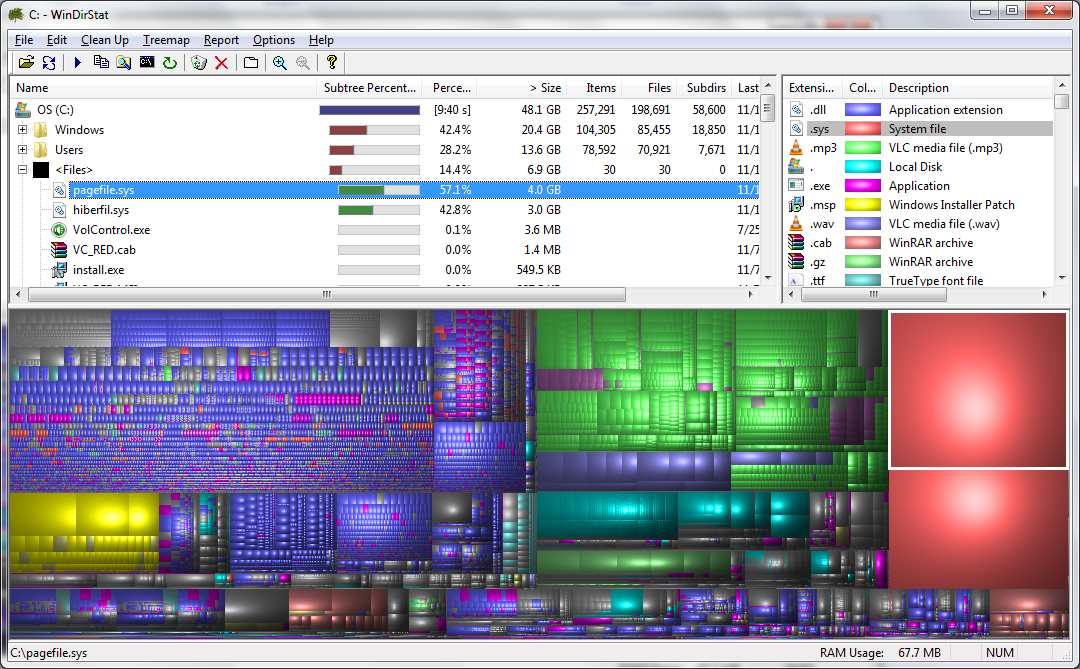
I used to use treesize all the time, but I've since switched to WinDirStat. Very powerful tool with a killer graphical interface.

WinDirStat - Windows Directory Statistics

windirstat.png
 

My Computer My Computer

At a glance

Windows 7 Pro x64
Computer type
PC/Desktop
Computer Manufacturer/Model Number
Dell Optiplex 7010
OS
Windows 7 Pro x64
Thank You CARWIZ ! Never would have figured that out on my own. :D
 

My Computer My Computer

At a glance

Windows 7 Ultimate x64
OS
Windows 7 Ultimate x64
Run WinDirStat as Administrator. The "Unknown" space will likely show up under the \Windows directory, or somewhere you can identify it.

I found 70GB in \Windows\temp\cab_*, which I backed up to an external file and deleted all but the last month's. There is also lots of space wasted by C:\Windows\Logs\CBS\*.log

These files were not deleted by the Disk Cleanup process.
 

My Computer My Computer

At a glance

Windows 7 Pro 64
Computer type
PC/Desktop
OS
Windows 7 Pro 64
You can delete the files on C:\Windows\SoftwareDistribution\Download
They were used to update and now useless.
 

My Computers My Computers

  • At a glance

    Windows 7 HP 64i5 6600K - 800MHz to 4200MHz4+4G GSkill DDR4 3000IG - Intel 530
    Computer type
    PC/Desktop
    Computer Manufacturer/Model Number
    custom build
    OS
    Windows 7 HP 64
    CPU
    i5 6600K - 800MHz to 4200MHz
    Motherboard
    GA-Z170-HD3P
    Memory
    4+4G GSkill DDR4 3000
    Graphics Card(s)
    IG - Intel 530
    Monitor(s) Displays
    Samsung 226BW
    Screen Resolution
    1680x1050
    Hard Drives
    (1) -1 SM951 – 128GB M.2 AHCI PCIe SSD drive for Windows 7 and Lubuntu
    (2) -1 WD SATA 3 - 1T for Data
    (3) -1 WD SATA 3 - 1T for backup
    PSU
    Thermaltake 450W TR2 gold
    Keyboard
    Old and good Chicony mechanical keyboard
    Mouse
    Logitech mX performance - 9 buttons (had to disable some)
    Internet Speed
    500Mb/s
    Browser
    Firefox 64
    Other Info
    TinyWall firewall
  • At a glance

    Windows 7 Proi7-4500U 800MHz to 3.0GHz(4+4)G DDR3 1600IG intel 4400 + NVIDIA GeForce GT 745M
    Computer type
    Laptop
    System Manufacturer/Model Number
    Asus Q550LF
    OS
    Windows 7 Pro
    CPU
    i7-4500U 800MHz to 3.0GHz
    Motherboard
    Asus Q550LF
    Memory
    (4+4)G DDR3 1600
    Graphics Card(s)
    IG intel 4400 + NVIDIA GeForce GT 745M
    Sound Card
    Realtek
    Monitor(s) Displays
    LG Display LP156WF4-SPH1
    Screen Resolution
    1920 x 1080
    Hard Drives
    BX500 120G SSD for Windows and programs +
    1T HDD for data
    Internet Speed
    500 Mb/s
    Browser
    Firefox
    Other Info
    TinyWall firewall
I had a similar situation on a Windows 7 laptop where nearly 500 GB was "missing" on my system partition. The partition was full, but Windows Explorer was unable to detect the missing space, and the "windirstat" program simply showed a 500 GB "unknown" entry.

However, the TreeSize Free (Administrator) program (TreeSize Free - Quickly Scan Directory Sizes and Find Space Hogs) was able to show what the problem was, namely that someone had misconfigured the Cobian Backup program such that the source and destination directories were the same. As a consequence, it recursed until the partition filled up AND made nearly infinitely long directory paths that neither Windows Explorer nor windirstat were able to handle.

Perhaps needless to say, none of the Windows directory removal tools, including cmd rmdir, would work to remove this mess and it was with great difficulty that I finally managed to clean it up.
 

My Computer My Computer

At a glance

Windows 7 ProfessionalIntel I5
Computer Manufacturer/Model Number
Panasonic CF-53
OS
Windows 7 Professional
CPU
Intel I5
Years old and it still works!

For anyone looking for 169GB in Unknown space shown by WinDirStat, CARWIZ and ritcheyvs saved me. Old Dell laptop with 500GB HDD showed 169GB Unknown that cleared when I used ritcheyvs's narrative above, with the addition of making sure to select Clean System Files, or the More Options tab won't show up.

"After DiskCleanup has computed the space it can gain back it displays a small window that lists the file categories you can delete (like Downloaded Program Files) with check boxes so you can select categories to "clean up". BUT, at the top of that window is a tab with More Options. Click on that tab and then check the "Clean up..." box for System Restore and Shadow Copies."

Thanks Guys!
 

My Computer My Computer

At a glance

Windows 10 64 biti7-6700k32GB DDR4Nvidia Quadro K2000
Computer type
PC/Desktop
Computer Manufacturer/Model Number
custom build
OS
Windows 10 64 bit
CPU
i7-6700k
Motherboard
Gigabyte GA-Z170X-G7
Memory
32GB DDR4
Graphics Card(s)
Nvidia Quadro K2000
Hard Drives
Many - WD Red and Black up to 8TB
Antivirus
Norton Security
Browser
Most of 'em
I just tried this and realized that I had tried this to fix the problem before. I still have 169GB of unknon space and a full hard drive. I need help!
 

My Computer My Computer

At a glance

New York
Computer type
Laptop
Computer Manufacturer/Model Number
HP
OS
New York
Here is what it looks like
 

Attachments

  • unknownspace.gif
    unknownspace.gif
    310.4 KB · Views: 2

My Computer My Computer

At a glance

New York
Computer type
Laptop
Computer Manufacturer/Model Number
HP
OS
New York
I just ran WinDirStat again in admin mode and discovered that most of my hard drive is taken up by windows. The temp folder is taking up most of the windows space and it contains a boat load of cab files. anyone know what I can delete safely?
 

My Computer My Computer

At a glance

New York
Computer type
Laptop
Computer Manufacturer/Model Number
HP
OS
New York
Back
Top