Solved Windows Update will not update and I've tried multiple fixes

Hi,
all three of my installs only show about 350 updates total :)
 

My Computer My Computer

Computer type
PC/Desktop
Computer Manufacturer/Model Number
Custom assembled by me :}
OS
Win-7-Pro64bit 7-H-Prem-64bit
CPU
i7-5930K 2nd i9-9940x both water blocked VRM's too
Motherboard
ASUS SABERTOOTH X99 2nd ASUS x299 Apex
Memory
Trident-z 3200C14 2nd Trident-z 3600C16
Graphics Card(s)
EVGA 1080ti ftw3 2nd Titan Xp both water blocked
Sound Card
Built-in Realtek
Monitor(s) Displays
1-AOC G2460PG 24"G-Sync 144Hz/ 2nd 1-ASUS VG248QE 24" 144Hz
Screen Resolution
1920 x 1080 144Hz
Hard Drives
2-Samsung M.2 Evo & Evo Plus
2-Samsung 850 EVO 500GB SSD's/ 3-2.5 W.D. Black 1tb-&3-1tb/3-3.5 WD Black 1tb hdd's
PSU
EVGA SuperNOVA 1000-P2 2nd 1200-P2
Case
2-Corsair Obsidian Series 450D Black ATX Mid Tower
Cooling
Custom water loops
Keyboard
Logitech G710+/ 2nd Logitech G910
Mouse
2-RedDragon M901 Perdition 16400 dpi Gaming mouse = wired
Internet Speed
Comcast Ping 19ms 89.31mbps download speed 6.12mbps upload
Antivirus
Malwarebytes Pro/ Superantispyware Pro
Browser
FireFox & Pale moon
Other Info
2nd ASUS X299 Apex/Intel i9-9940x with Custom water loop/7H-Prem-x64/Corsair 450D case/Ram Trident-z 3600C16 4x8gb / Samsung970Evo plus 500gb SSD/Dual ssd EZ swap evo/PSU EVGA SuperNova 1200w-P2 80+Platinum/GPU Titan Xp /8-ML-140 on push-pull on 2-280GTX rads
What I've noticed some security suites like Eset do reset update settings

Hmm Thrash wonder how many others do that?? and personally now the furor of the 10 upgrading stuff has died away I have given up worrying about downloading updates because I honestly do not know what they do specifically without having to look them up and I have better fish to fry.

Burt we still see people worrying about updates downloading or rather not downloading and I wonder why unless of course it is after a clean install. I would rather hope that the new ISO's we can get access to now are already "updated" so to speak.
 

My Computer My Computer

Computer type
PC/Desktop
Computer Manufacturer/Model Number
Own build (new) Desk1 / Asus ROG Win 7 / Desk2 1st build
OS
Desk1 7 Home Prem / Desk2 10 Pro / Main lap Asus ROG 10 Pro 2 laptop Toshiba 7 Pro Asus P2520 7 & 10
CPU
Desk1 i5 3750K / Laptop i7 GTX 860M / Desk2 i5 2500
Motherboard
Desk1 Asus P877-V / Desk2 Gigabyte H67 UD3H / Laptop ?
Memory
Desk1 8GB (1866) / Desk2 16GB (1333) / Laptop 8Gb DDR3
Graphics Card(s)
Desk 1& 2NVidia GTX 650 & Laptops on board Intel
Sound Card
Desk 1 & 2 -XONAR DG Realtek High Def audio Laptop
Monitor(s) Displays
Desk 1 Benq HD 2450 / Desk2 Philips 24" / Laptop 17.5"
Screen Resolution
1920x1080 D1 & D2 & Laptop 1
Hard Drives
Desk1 Samsung 120GB 830 SSD
Asus ROG 256GB 850 Pro SSD
Desk2 Samsung 840 256 SSD
Toshiba 120GB EVO
PSU
Desk 1 Corsair HX 1050/ Laptop ? / Desk 2 Corsair HX 650
Case
Desk 1 Cooler HAF XM ? Toshiba laptop / Desk2 Coolermaster
Cooling
Fans on all Desk1 -2 Desk2 - all Coolermasters 5 Laptop ?
Keyboard
Desk 1 MS Sidewinder X6 Desk 2 MS Sidewinder X 4
Mouse
Desk 1&2 - Gigabyte MS 900 gamer - laptop - Logitec wireless
Internet Speed
ADSL2+
Other Info
One other Desktop (tester) and spare Toshba laptop both with SSD's
Running Kaspersky 2016 ISS on all machines config'd identically
Logitec audio stereo systems on each machine (x3)
Canon MG5250MFC
Router/modem TP-Link running WPA2SK
I've just finished downloading two fresh WIN 7 SP1 Pro images from the official sources,and they have identical SDA sums as the original SP1 ISOs from a few years back. They aren't updated with any new updates since the image was first created. Only those who slip-stream updates into the ISO image will have the fully patched and updated versions, and since I've never used a slip-streamed version for a new installation, I can't say whether there would be activation issues. I do know that if your license is from an original issue WIN7, a WIN 7 SP1 installation won't activate with that key...I tried it! Even to the point of talking directly to MS, and they refused to activate it, even though I had installed the original version, and updated it with a SP1 download! Once identified as SP1, it has to have the later license key which makes me wonder whether the SDA hash or MD5 Sum is used by the algorithm for authentication. So if you are going to do a fresh install from original WIN 7 media, be sure to activate before applying the SP1 update package.
At any rate, I just did three clean installs, and had all of the associated issues described in this thread! That's why I'm here! THANKS to all contributors to this thread! You have helped to solve issues with updating the three fresh installs, and also to repair a machine that serves as the server for our work shop network! However, the one at work suffered from a WIN10 upgrade abortion! I kinda got tired of having to keep removing that automated update, and I just went to all of the machines that were affected, and deleted the WIN10 OS download folder so that the installation program had no source to extract files from in case it tried to upgrade without my authorization... It tried, and having removed that folder saved the company days of downtime since, WIN 10 was proven to break activation of our database and invoicing program! However, I later learned that it had broken Windows Update! It has been fixed with the procedures learned in this thread, and by deleting a registry key for the update rollback. (Found in discussions in the MS community pages)
THANKS AGAIN EVERYONE!!!
 

My Computer My Computer

Computer type
PC/Desktop
Computer Manufacturer/Model Number
ASUS That I custom built!
OS
WIN 7 Professional x64
CPU
AMD A10-7850 Kaveri Quad Core
Motherboard
ASUS ROG Crossblade Ranger A88X
Memory
16Gb G-Skill Ripjaws DDR3-2400
Hard Drives
Kingston HyperX 120Gb Reactor SSD, Seagate hybrid 2Tb ST2000DX001 MLC/8Gb/64Mb cache
PSU
Thermaltake TR2-600 watt
Case
Antec
Cooling
Cooler Master hyper 212+
Internet Speed
50 Mb
Antivirus
AVG
Browser
Firefox
Other Info
Newest of my custom builds, I still own 3 other Asus custom built (by me) PCs used frequently. I also maintain a business network with 4 desktop PCs of various retail flavors plus 1 of my custom machines, and three laptops with wired and wireless connections. I also maintain another business network with two wireless desktops, all of the above with wireless printers on the networks.
I have just fixed the Windows Update infinite loop using solutions from a few threads here. I highly believe Microsoft are being jerks and intentionally screwing this up to make people upgrade to crappy Win 10. I was going to just download a cracked Win 7 copy since those usually have the latest updates rolled into the install, but this place as allways delivers and I managed to fix the Windows update infinite loop bug.

Quick summary of what helped me:

1: Disable Windows Update. Double click and set Startup Type: Manual. Stop it or restart to take effect if it gives an error.
*It was reported that Background Intelligent Transfer Service should also have Startup Type: Manual or Automatic (Delayed) and stopped. (Default seems to be Manual)
2: Go to Windows Update and select "Never check for updates (not recommended)"
3: Install updates from Search for Windows Updates takes forever? - A possible solution website. Other updates reported to fix the problem: KB3020369 & KB3125574 & KB3172605
*KB3125574 reported to contain all updates to April 2016
4: After all updates installed, switch back Windows Update to "Check for updates but let me choose whether to download and install them"

***For me just installing KB3138612 (as per Search for Windows Updates takes forever? - A possible solution Windows Update Client, latest version highlighted in bold) helped me get all the updates via Windows Update within minutes. I did not install any other update manually other than KB3138612***
 

My Computer My Computer

OS
windows 7

My Computer My Computer

Computer type
PC/Desktop
Computer Manufacturer/Model Number
Custom assembled by me :}
OS
Win-7-Pro64bit 7-H-Prem-64bit
CPU
i7-5930K 2nd i9-9940x both water blocked VRM's too
Motherboard
ASUS SABERTOOTH X99 2nd ASUS x299 Apex
Memory
Trident-z 3200C14 2nd Trident-z 3600C16
Graphics Card(s)
EVGA 1080ti ftw3 2nd Titan Xp both water blocked
Sound Card
Built-in Realtek
Monitor(s) Displays
1-AOC G2460PG 24"G-Sync 144Hz/ 2nd 1-ASUS VG248QE 24" 144Hz
Screen Resolution
1920 x 1080 144Hz
Hard Drives
2-Samsung M.2 Evo & Evo Plus
2-Samsung 850 EVO 500GB SSD's/ 3-2.5 W.D. Black 1tb-&3-1tb/3-3.5 WD Black 1tb hdd's
PSU
EVGA SuperNOVA 1000-P2 2nd 1200-P2
Case
2-Corsair Obsidian Series 450D Black ATX Mid Tower
Cooling
Custom water loops
Keyboard
Logitech G710+/ 2nd Logitech G910
Mouse
2-RedDragon M901 Perdition 16400 dpi Gaming mouse = wired
Internet Speed
Comcast Ping 19ms 89.31mbps download speed 6.12mbps upload
Antivirus
Malwarebytes Pro/ Superantispyware Pro
Browser
FireFox & Pale moon
Other Info
2nd ASUS X299 Apex/Intel i9-9940x with Custom water loop/7H-Prem-x64/Corsair 450D case/Ram Trident-z 3600C16 4x8gb / Samsung970Evo plus 500gb SSD/Dual ssd EZ swap evo/PSU EVGA SuperNova 1200w-P2 80+Platinum/GPU Titan Xp /8-ML-140 on push-pull on 2-280GTX rads
Hi ICIT2LOL - how can I send you a PM? When I click on your username I don't get option to PM you.
 

My Computer My Computer

Computer type
PC/Desktop
Computer Manufacturer/Model Number
custom build
OS
Windows 7 Ultimate x64
CPU
Intel i7 920 (2.67Ghz)
Memory
6 GB
Graphics Card(s)
Nvidia GeForce GT610

My Computer My Computer

Computer type
PC/Desktop
Computer Manufacturer/Model Number
custom build
OS
Windows 7 Ultimate x64
CPU
Intel i7 920 (2.67Ghz)
Memory
6 GB
Graphics Card(s)
Nvidia GeForce GT610
Hi ICIT2LOL & ThrashZone - I just wanted to let you know I have similar problems & started a thread here - if you could have a look that would be appreciated:
Windows 7 Update Error: Service Registration Is Missing or Corrupt

Ok Mick now it is usual for a member to have a few posts in first before the admin will let you PM others _ I am not sure how many posts it has to be but at a rough guess I would think around 30-50 I am not 100% sure But we can take a look at that thread for you - and all credit to you that was a good move because having a similar problem to someone else and posting in their thread can lead to confusion as to who one is answering and what one is needing to advise only because similar problems can have very different causes soemtime on account of a different system setup to different components etc
 

My Computer My Computer

Computer type
PC/Desktop
Computer Manufacturer/Model Number
Own build (new) Desk1 / Asus ROG Win 7 / Desk2 1st build
OS
Desk1 7 Home Prem / Desk2 10 Pro / Main lap Asus ROG 10 Pro 2 laptop Toshiba 7 Pro Asus P2520 7 & 10
CPU
Desk1 i5 3750K / Laptop i7 GTX 860M / Desk2 i5 2500
Motherboard
Desk1 Asus P877-V / Desk2 Gigabyte H67 UD3H / Laptop ?
Memory
Desk1 8GB (1866) / Desk2 16GB (1333) / Laptop 8Gb DDR3
Graphics Card(s)
Desk 1& 2NVidia GTX 650 & Laptops on board Intel
Sound Card
Desk 1 & 2 -XONAR DG Realtek High Def audio Laptop
Monitor(s) Displays
Desk 1 Benq HD 2450 / Desk2 Philips 24" / Laptop 17.5"
Screen Resolution
1920x1080 D1 & D2 & Laptop 1
Hard Drives
Desk1 Samsung 120GB 830 SSD
Asus ROG 256GB 850 Pro SSD
Desk2 Samsung 840 256 SSD
Toshiba 120GB EVO
PSU
Desk 1 Corsair HX 1050/ Laptop ? / Desk 2 Corsair HX 650
Case
Desk 1 Cooler HAF XM ? Toshiba laptop / Desk2 Coolermaster
Cooling
Fans on all Desk1 -2 Desk2 - all Coolermasters 5 Laptop ?
Keyboard
Desk 1 MS Sidewinder X6 Desk 2 MS Sidewinder X 4
Mouse
Desk 1&2 - Gigabyte MS 900 gamer - laptop - Logitec wireless
Internet Speed
ADSL2+
Other Info
One other Desktop (tester) and spare Toshba laptop both with SSD's
Running Kaspersky 2016 ISS on all machines config'd identically
Logitec audio stereo systems on each machine (x3)
Canon MG5250MFC
Router/modem TP-Link running WPA2SK
Thanks ICIT2LOL - I appreciate your time & expertise :)
 

My Computer My Computer

Computer type
PC/Desktop
Computer Manufacturer/Model Number
custom build
OS
Windows 7 Ultimate x64
CPU
Intel i7 920 (2.67Ghz)
Memory
6 GB
Graphics Card(s)
Nvidia GeForce GT610
No problems Mick and I am no expert I just do this for a hobby the others are far better qualified than I am I know just enough to get me by;)
 

My Computer My Computer

Computer type
PC/Desktop
Computer Manufacturer/Model Number
Own build (new) Desk1 / Asus ROG Win 7 / Desk2 1st build
OS
Desk1 7 Home Prem / Desk2 10 Pro / Main lap Asus ROG 10 Pro 2 laptop Toshiba 7 Pro Asus P2520 7 & 10
CPU
Desk1 i5 3750K / Laptop i7 GTX 860M / Desk2 i5 2500
Motherboard
Desk1 Asus P877-V / Desk2 Gigabyte H67 UD3H / Laptop ?
Memory
Desk1 8GB (1866) / Desk2 16GB (1333) / Laptop 8Gb DDR3
Graphics Card(s)
Desk 1& 2NVidia GTX 650 & Laptops on board Intel
Sound Card
Desk 1 & 2 -XONAR DG Realtek High Def audio Laptop
Monitor(s) Displays
Desk 1 Benq HD 2450 / Desk2 Philips 24" / Laptop 17.5"
Screen Resolution
1920x1080 D1 & D2 & Laptop 1
Hard Drives
Desk1 Samsung 120GB 830 SSD
Asus ROG 256GB 850 Pro SSD
Desk2 Samsung 840 256 SSD
Toshiba 120GB EVO
PSU
Desk 1 Corsair HX 1050/ Laptop ? / Desk 2 Corsair HX 650
Case
Desk 1 Cooler HAF XM ? Toshiba laptop / Desk2 Coolermaster
Cooling
Fans on all Desk1 -2 Desk2 - all Coolermasters 5 Laptop ?
Keyboard
Desk 1 MS Sidewinder X6 Desk 2 MS Sidewinder X 4
Mouse
Desk 1&2 - Gigabyte MS 900 gamer - laptop - Logitec wireless
Internet Speed
ADSL2+
Other Info
One other Desktop (tester) and spare Toshba laptop both with SSD's
Running Kaspersky 2016 ISS on all machines config'd identically
Logitec audio stereo systems on each machine (x3)
Canon MG5250MFC
Router/modem TP-Link running WPA2SK
Thrash

Followed your steps above. WOW!!! I am now up to date.

TX
 

My Computer My Computer

Computer type
PC/Desktop
Computer Manufacturer/Model Number
Dell XPS 8700
OS
Windows 7 Home Premium 64bit.
CPU
Intel Core i7 4790 Haswell
Motherboard
Dell Inc. Model 0KWVT8
Memory
DDR3 Size 24576 MBytes
Hard Drives
Samsung SSD 850 EVO 250G SCSI Disk Device (System Disk)
1TB HHD (Storage)
Here is a 100% guaranteed solution to the updating blues for Windows 7
You should first download these 6 files:
1. 64 Bit- https://download.microsoft.com/down...020-EC41D56B074F/Windows6.1-KB3020369-x64.msu
32 Bit- https://download.microsoft.com/down...B0A-35769CBBE6B0/Windows6.1-KB3020369-x86.msu
2. 64 Bit- http://download.windowsupdate.com/d..._2dafb1d203c8964239af3048b5dd4b1264cd93b9.msu
32 Bit- http://download.windowsupdate.com/d..._ba1ff5537312561795cc04db0b02fbb0a74b2cbd.msu
3. 64 Bit- https://download.microsoft.com/down...6F1-B25B137E3C87/Windows6.1-KB3102810-x64.msu
32 Bit- https://download.microsoft.com/down...371-1A7F5AC417E9/Windows6.1-KB3102810-x86.msu
4. 64 Bit- https://download.microsoft.com/down...199-5B335EE092F6/Windows6.1-KB3112343-x64.msu
32 Bit- https://download.microsoft.com/down...199-5B335EE092F6/Windows6.1-KB3112343-x64.msu
5. 64 Bit- https://download.microsoft.com/down...67F-C713F7821374/Windows6.1-KB3172605-x64.msu
32 Bit- https://download.microsoft.com/down...A9C-6B30C3E1735A/Windows6.1-KB3172605-x86.msu
6. 64 Bit- https://download.microsoft.com/down...7A1-BF8608449C85/Windows6.1-KB3161664-x64.msu
32 Bit- https://download.microsoft.com/down...0B6-F243DDC20D51/Windows6.1-KB3161664-x86.msu
Ok Now that you’ve downloaded everything, here is the precise process. Please don’t skip any steps or it may or may not work properly for you. I’ve included the 32 bit links even though most people have problems with the 64 Bit.
1. Click Start, type in CMD, right click the search result “command Prompt” and left click on run as administrator, click yes
2. In the “elevated” command box, type in NET STOP WUAUSERV and press enter, after service is stopped, install the first on you downloaded earlier (KB3020369)
3. Click close after in finishes
4. Click back into the command box and again type NET STOP WUAUSERV and press enter, after service is stopped, install the second one you downloaded (KB3125574)
5. Restart the computer at the end when it asks you to do so.
6. Click Start, type in CMD, right click the search result “command Prompt” and left click on run as administrator, click yes
7. In the “elevated” command box, type in NET STOP WUAUSERV and press enter, after service is stopped, install the third download (KB3102810)
8. Click close after in finishes
9. Click back into the command box and again type NET STOP WUAUSERV and press enter, after service is stopped, install the fourth download (KB3112343)
10. Click close after in finishes
11. Click back into the command box and again type NET STOP WUAUSERV and press enter, after service is stopped, install the fifth download (KB3172605)
12. Restart the computer at the end when it asks you to do so.
13. Click Start, type in CMD, right click the search result “command Prompt” and left click on run as administrator, click yes
14. In the “elevated” command box, type in NET STOP WUAUSERV and press enter, after service is stopped, install the final downloaded file (KB3161664)
15. Your updates will now work! You’re Welcome ;)
 

My Computer My Computer

Computer type
PC/Desktop
Computer Manufacturer/Model Number
custom
OS
Windows 7 home premium 64 bit
Hi,
I don't see how installing multiple update clients in a row is of any help :)
1) KB3020369 & 2) KB3172605 Done.
 

My Computer My Computer

Computer type
PC/Desktop
Computer Manufacturer/Model Number
Custom assembled by me :}
OS
Win-7-Pro64bit 7-H-Prem-64bit
CPU
i7-5930K 2nd i9-9940x both water blocked VRM's too
Motherboard
ASUS SABERTOOTH X99 2nd ASUS x299 Apex
Memory
Trident-z 3200C14 2nd Trident-z 3600C16
Graphics Card(s)
EVGA 1080ti ftw3 2nd Titan Xp both water blocked
Sound Card
Built-in Realtek
Monitor(s) Displays
1-AOC G2460PG 24"G-Sync 144Hz/ 2nd 1-ASUS VG248QE 24" 144Hz
Screen Resolution
1920 x 1080 144Hz
Hard Drives
2-Samsung M.2 Evo & Evo Plus
2-Samsung 850 EVO 500GB SSD's/ 3-2.5 W.D. Black 1tb-&3-1tb/3-3.5 WD Black 1tb hdd's
PSU
EVGA SuperNOVA 1000-P2 2nd 1200-P2
Case
2-Corsair Obsidian Series 450D Black ATX Mid Tower
Cooling
Custom water loops
Keyboard
Logitech G710+/ 2nd Logitech G910
Mouse
2-RedDragon M901 Perdition 16400 dpi Gaming mouse = wired
Internet Speed
Comcast Ping 19ms 89.31mbps download speed 6.12mbps upload
Antivirus
Malwarebytes Pro/ Superantispyware Pro
Browser
FireFox & Pale moon
Other Info
2nd ASUS X299 Apex/Intel i9-9940x with Custom water loop/7H-Prem-x64/Corsair 450D case/Ram Trident-z 3600C16 4x8gb / Samsung970Evo plus 500gb SSD/Dual ssd EZ swap evo/PSU EVGA SuperNova 1200w-P2 80+Platinum/GPU Titan Xp /8-ML-140 on push-pull on 2-280GTX rads
Maybe I should have also mentioned that by installing this way you will only have about 65 updates left instead of 275. it's much quicker to update this way than wait for Windows update to have to install all of them.
 

My Computer My Computer

Computer type
PC/Desktop
Computer Manufacturer/Model Number
custom
OS
Windows 7 home premium 64 bit
Hi,
Well this is not the clean install thread it is to fix an older existing install with updating issues so a lot of the updates you post would either be installed already or not able to be installed
Here is the clean install thread post #2 :)
windows update
 

My Computer My Computer

Computer type
PC/Desktop
Computer Manufacturer/Model Number
Custom assembled by me :}
OS
Win-7-Pro64bit 7-H-Prem-64bit
CPU
i7-5930K 2nd i9-9940x both water blocked VRM's too
Motherboard
ASUS SABERTOOTH X99 2nd ASUS x299 Apex
Memory
Trident-z 3200C14 2nd Trident-z 3600C16
Graphics Card(s)
EVGA 1080ti ftw3 2nd Titan Xp both water blocked
Sound Card
Built-in Realtek
Monitor(s) Displays
1-AOC G2460PG 24"G-Sync 144Hz/ 2nd 1-ASUS VG248QE 24" 144Hz
Screen Resolution
1920 x 1080 144Hz
Hard Drives
2-Samsung M.2 Evo & Evo Plus
2-Samsung 850 EVO 500GB SSD's/ 3-2.5 W.D. Black 1tb-&3-1tb/3-3.5 WD Black 1tb hdd's
PSU
EVGA SuperNOVA 1000-P2 2nd 1200-P2
Case
2-Corsair Obsidian Series 450D Black ATX Mid Tower
Cooling
Custom water loops
Keyboard
Logitech G710+/ 2nd Logitech G910
Mouse
2-RedDragon M901 Perdition 16400 dpi Gaming mouse = wired
Internet Speed
Comcast Ping 19ms 89.31mbps download speed 6.12mbps upload
Antivirus
Malwarebytes Pro/ Superantispyware Pro
Browser
FireFox & Pale moon
Other Info
2nd ASUS X299 Apex/Intel i9-9940x with Custom water loop/7H-Prem-x64/Corsair 450D case/Ram Trident-z 3600C16 4x8gb / Samsung970Evo plus 500gb SSD/Dual ssd EZ swap evo/PSU EVGA SuperNova 1200w-P2 80+Platinum/GPU Titan Xp /8-ML-140 on push-pull on 2-280GTX rads
Great work ThrashZone...thank you so much.
 

My Computer My Computer

Computer type
PC/Desktop
OS
Windows 7 Pro 32bit
Hi and welcome to SevenForums Bambinoo
You're very welcome :)
Cheers.
 

My Computer My Computer

Computer type
PC/Desktop
Computer Manufacturer/Model Number
Custom assembled by me :}
OS
Win-7-Pro64bit 7-H-Prem-64bit
CPU
i7-5930K 2nd i9-9940x both water blocked VRM's too
Motherboard
ASUS SABERTOOTH X99 2nd ASUS x299 Apex
Memory
Trident-z 3200C14 2nd Trident-z 3600C16
Graphics Card(s)
EVGA 1080ti ftw3 2nd Titan Xp both water blocked
Sound Card
Built-in Realtek
Monitor(s) Displays
1-AOC G2460PG 24"G-Sync 144Hz/ 2nd 1-ASUS VG248QE 24" 144Hz
Screen Resolution
1920 x 1080 144Hz
Hard Drives
2-Samsung M.2 Evo & Evo Plus
2-Samsung 850 EVO 500GB SSD's/ 3-2.5 W.D. Black 1tb-&3-1tb/3-3.5 WD Black 1tb hdd's
PSU
EVGA SuperNOVA 1000-P2 2nd 1200-P2
Case
2-Corsair Obsidian Series 450D Black ATX Mid Tower
Cooling
Custom water loops
Keyboard
Logitech G710+/ 2nd Logitech G910
Mouse
2-RedDragon M901 Perdition 16400 dpi Gaming mouse = wired
Internet Speed
Comcast Ping 19ms 89.31mbps download speed 6.12mbps upload
Antivirus
Malwarebytes Pro/ Superantispyware Pro
Browser
FireFox & Pale moon
Other Info
2nd ASUS X299 Apex/Intel i9-9940x with Custom water loop/7H-Prem-x64/Corsair 450D case/Ram Trident-z 3600C16 4x8gb / Samsung970Evo plus 500gb SSD/Dual ssd EZ swap evo/PSU EVGA SuperNova 1200w-P2 80+Platinum/GPU Titan Xp /8-ML-140 on push-pull on 2-280GTX rads
I'm sure I'm experiencing something like this error, endless checking, so I'm tagging on to this thread. I'm helping someone with a machine that is not mine. I discovered that their updates have been failing or cancelling for months. They swear they have not cancelled anything so not sure where this is coming from unless windows itself gives up after time.

The machine was looping. Down loading or attempting to download the same 24 updates. I ran the Microsoft Updates trouble shooter. It reported back it could not fix two issues. 1) Service Registration is missing or corrupt and 2) Windows update error 0x80070057 followed by the date and time in brackets. I reran trouble shooter and it clear the first issue "Service registration is missing or corrupt. I powered down the computer. Once it had booted I went into Windows updates and the 24 had disappeared.

I then clicked on checked for updates. It has been going for hours.

Would the two KB's you mentioned Thrashzone be a recommended fix in this situation or does the forum think there are other courses of action I should take. I don't want to rebuild so I thought I would ask first.

Thank you.
 

My Computer My Computer

Computer type
PC/Desktop
Computer Manufacturer/Model Number
Custom Build
OS
Windows 7 Ulitimate 64bit
CPU
i7-2600k
Motherboard
Asus P8P67 DEluxe Rev 3.1
Memory
16GB
Graphics Card(s)
Sapphire RX460 4GB
Sound Card
Creative Sound Blaster Audigy 2 ZS Platinum Pro
Monitor(s) Displays
Samsunfg BX2431, Acer x223W
Hard Drives
Samsung Solid State for OS,
Western Digital Black 1TB in Raid 1,
Western Digital Black 500GB
PSU
Corsair Gold 850AX
Case
Corsair Obsidian 800D
Cooling
Noctua NH-D14
Keyboard
das Keyboard MX Brown
Mouse
Logitech M510
Internet Speed
100Mb +
Antivirus
Norton Internet Security
Browser
All
Thanks. I did see something about making sure the decimal point was in the decimal field and I saw dashes in the date presented. I will check and fix this.

Can I ask what registry entry ( or a link ) needs to be adjusted. I'm not in front of machine but when I saw all the failed and cancelled I'm sure I saw Windows 10 in list. I would like to have this info in hand when I get a hold of the machine on Friday.

Thanks again.
 

My Computer My Computer

Computer type
PC/Desktop
Computer Manufacturer/Model Number
Custom Build
OS
Windows 7 Ulitimate 64bit
CPU
i7-2600k
Motherboard
Asus P8P67 DEluxe Rev 3.1
Memory
16GB
Graphics Card(s)
Sapphire RX460 4GB
Sound Card
Creative Sound Blaster Audigy 2 ZS Platinum Pro
Monitor(s) Displays
Samsunfg BX2431, Acer x223W
Hard Drives
Samsung Solid State for OS,
Western Digital Black 1TB in Raid 1,
Western Digital Black 500GB
PSU
Corsair Gold 850AX
Case
Corsair Obsidian 800D
Cooling
Noctua NH-D14
Keyboard
das Keyboard MX Brown
Mouse
Logitech M510
Internet Speed
100Mb +
Antivirus
Norton Internet Security
Browser
All
Hi,
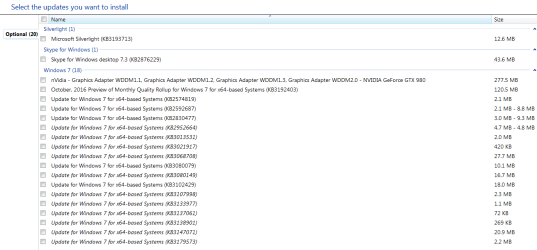
Well 10 related stuff all I can show is what I personally have not installed so if you see them don't install them yet
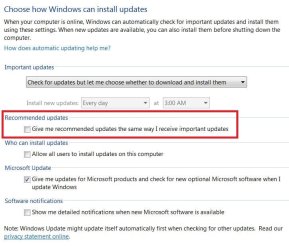
Also be sure the update settings are sorting Important updates properly by excluding Recommended updates from being mixed up with Important updates ;)
update settings.JPG
10-18-2016 skipped optional.PNG
 

My Computer My Computer

Computer type
PC/Desktop
Computer Manufacturer/Model Number
Custom assembled by me :}
OS
Win-7-Pro64bit 7-H-Prem-64bit
CPU
i7-5930K 2nd i9-9940x both water blocked VRM's too
Motherboard
ASUS SABERTOOTH X99 2nd ASUS x299 Apex
Memory
Trident-z 3200C14 2nd Trident-z 3600C16
Graphics Card(s)
EVGA 1080ti ftw3 2nd Titan Xp both water blocked
Sound Card
Built-in Realtek
Monitor(s) Displays
1-AOC G2460PG 24"G-Sync 144Hz/ 2nd 1-ASUS VG248QE 24" 144Hz
Screen Resolution
1920 x 1080 144Hz
Hard Drives
2-Samsung M.2 Evo & Evo Plus
2-Samsung 850 EVO 500GB SSD's/ 3-2.5 W.D. Black 1tb-&3-1tb/3-3.5 WD Black 1tb hdd's
PSU
EVGA SuperNOVA 1000-P2 2nd 1200-P2
Case
2-Corsair Obsidian Series 450D Black ATX Mid Tower
Cooling
Custom water loops
Keyboard
Logitech G710+/ 2nd Logitech G910
Mouse
2-RedDragon M901 Perdition 16400 dpi Gaming mouse = wired
Internet Speed
Comcast Ping 19ms 89.31mbps download speed 6.12mbps upload
Antivirus
Malwarebytes Pro/ Superantispyware Pro
Browser
FireFox & Pale moon
Other Info
2nd ASUS X299 Apex/Intel i9-9940x with Custom water loop/7H-Prem-x64/Corsair 450D case/Ram Trident-z 3600C16 4x8gb / Samsung970Evo plus 500gb SSD/Dual ssd EZ swap evo/PSU EVGA SuperNova 1200w-P2 80+Platinum/GPU Titan Xp /8-ML-140 on push-pull on 2-280GTX rads
Back
Top